drop database if exists `bit_index`;
create database if not exists `bit_index` default character set utf8;
use `bit_index`;

-- 构建一个8000000条记录的数据
-- 构建的海量表数据需要有差异性,所以使用存储过程来创建, 拷贝下面代码就可以了,暂时不用理解

-- 产生随机字符串
delimiter $$
create function rand_string(n INT)
returns varchar(255)
begin
declare chars_str varchar(100) default
'abcdefghijklmnopqrstuvwxyzABCDEFJHIJKLMNOPQRSTUVWXYZ';
declare return_str varchar(255) default '';
declare i int default 0;
while i < n do
set return_str =concat(return_str,substring(chars_str,floor(1+rand()*52),1));
set i = i + 1;
end while;
return return_str;
end $$
delimiter ;


-- 产生随机数字
delimiter $$
create function rand_num( )
returns int(5)
begin
declare i int default 0;
set i = floor(10+rand()*500);
return i;
end $$
delimiter ;

-- 创建存储过程,向雇员表添加海量数据
delimiter $$
create procedure insert_emp(in start int(10),in max_num int(10))
begin
declare i int default 0;
set autocommit = 0;
repeat
set i = i + 1;
insert into EMP values ((start+i)
,rand_string(6),'SALESMAN',0001,curdate(),2000,400,rand_num());
until i = max_num
end repeat;
commit;
end $$
delimiter ;

-- 雇员表
CREATE TABLE `EMP` (
  `empno` int(6) unsigned zerofill NOT NULL COMMENT '雇员编号',
  `ename` varchar(10) DEFAULT NULL COMMENT '雇员姓名',
  `job` varchar(9) DEFAULT NULL COMMENT '雇员职位',
  `mgr` int(4) unsigned zerofill DEFAULT NULL COMMENT '雇员领导编号',
  `hiredate` datetime DEFAULT NULL COMMENT '雇佣时间',
  `sal` decimal(7,2) DEFAULT NULL COMMENT '工资月薪',
  `comm` decimal(7,2) DEFAULT NULL COMMENT '奖金',
  `deptno` int(2) unsigned zerofill DEFAULT NULL COMMENT '部门编号'
);
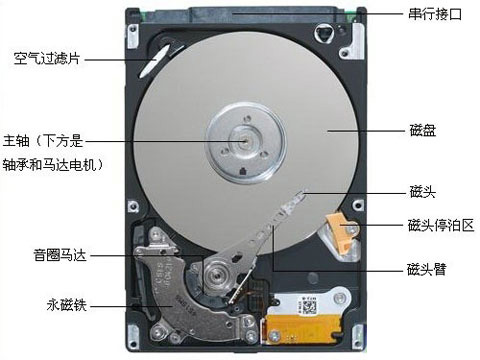
#数据库文件,本质其实就是保存在磁盘的盘片当中,就是一个一个的文件
[root@iZ2vc09opqmjec5hsbsi0aZ ~]# ls /var/lib/mysql -l    #我们目前MySQL中的文件
total 254028
-rw-r----- 1 mysql mysql        56 Mar  9 20:17 auto.cnf
drwxr-x--- 2 mysql mysql      4096 Mar 23 18:26 bit_index
-rw------- 1 mysql mysql      1676 Mar  9 20:17 ca-key.pem
-rw-r--r-- 1 mysql mysql      1112 Mar  9 20:17 ca.pem
-rw-r--r-- 1 mysql mysql      1112 Mar  9 20:17 client-cert.pem
-rw------- 1 mysql mysql      1676 Mar  9 20:17 client-key.pem
-rw-r----- 1 mysql mysql       288 Mar  9 20:29 ib_buffer_pool
-rw-r----- 1 mysql mysql 146800640 Mar 23 18:28 ibdata1
-rw-r----- 1 mysql mysql  50331648 Mar 23 18:28 ib_logfile0
-rw-r----- 1 mysql mysql  50331648 Mar 23 18:28 ib_logfile1
-rw-r----- 1 mysql mysql  12582912 Mar 17 19:44 ibtmp1
drwxr-x--- 2 mysql mysql      4096 Mar 13 14:49 mysql
srwxrwxrwx 1 mysql mysql         0 Mar  9 20:29 mysql.sock
-rw------- 1 mysql mysql         6 Mar  9 20:29 mysql.sock.lock
drwxr-x--- 2 mysql mysql      4096 Mar  9 20:17 performance_schema
-rw------- 1 mysql mysql      1676 Mar  9 20:17 private_key.pem
-rw-r--r-- 1 mysql mysql       452 Mar  9 20:17 public_key.pem
drwxr-x--- 2 mysql mysql      4096 Mar 18 19:10 scott
-rw-r--r-- 1 mysql mysql      1112 Mar  9 20:17 server-cert.pem
-rw------- 1 mysql mysql      1680 Mar  9 20:17 server-key.pem
drwxr-x--- 2 mysql mysql     12288 Mar  9 20:17 sys
drwxr-x--- 2 mysql mysql      4096 Mar 20 21:28 test
# 自己定义的数据库,里面有数据表
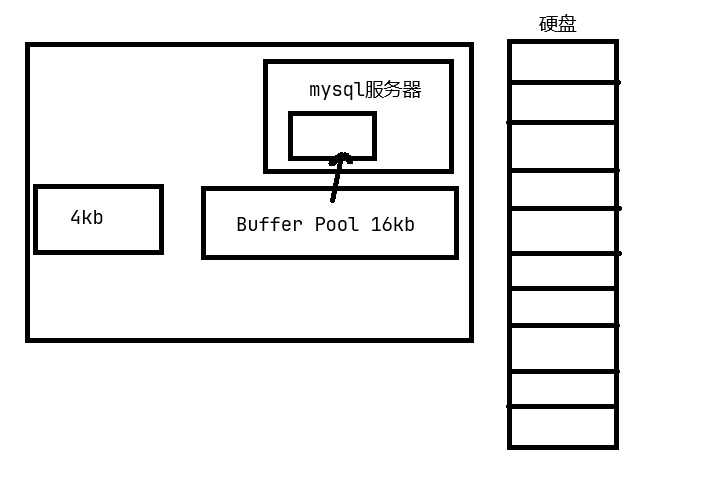
而 MySQL 作为一款应用软件,可以想象成一种特殊的文件系统。它有着更高的IO场景,所以,为了提高基本的IO效率, MySQL 进行IO的基本单位是 16KB
bash复制代码
mysql> show global status like 'innodb_page_size';
+------------------+-------+
| Variable_name    | Value |
+------------------+-------+
| Innodb_page_size | 16384 |        -- 16*1024=16384
+------------------+-------+
1 row in set (0.00 sec)
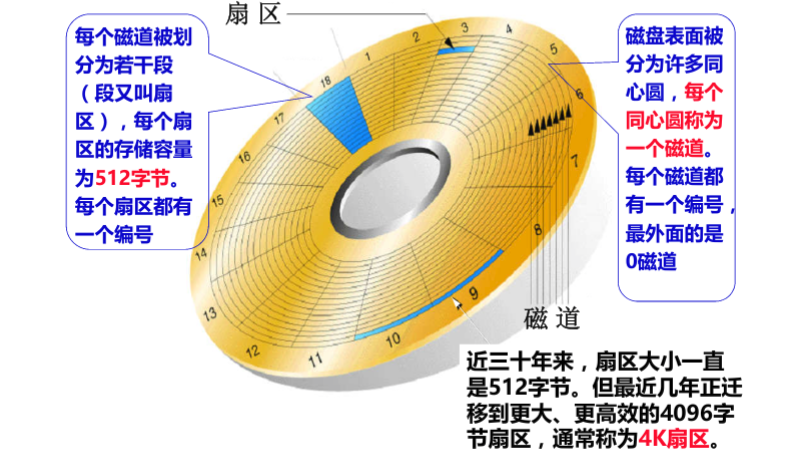
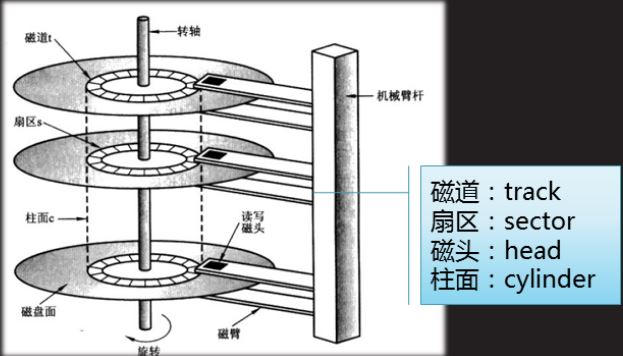
也就是说,磁盘这个硬件设备的基本单位是 512 字节,而 MySQL InnoDB引擎 使用 16kB 进行IO交互。即,MySQL 和磁盘进行数据交互的基本单位是16kB。这个基本数据单元,在 MySQL 这里叫做page(注意和系统的page区分)
4.page认识
MySQL 中的数据文件,是以page为单位保存在磁盘当中的。
MySQL 的 CURD 操作,都需要通过计算,找到对应的插入位置,或者找到对应要修改或者查询的数据。
为了更好的进行上面的操作, MySQL 服务器在内存中运行的时候,在服务器内部,**就申请了被称为 Buffer Pool 的的大内存空间,**来进行各种缓存。其实就是很大的内存空间,来和磁盘数据进行IO交互。
为何更高的效率,一定要尽可能的减少系统和磁盘IO的次数
5.索引的理解
建立测试表
bash复制代码
mysql> create table if not exists user(
    -> id int primary key,    --一定要添加主键哦,只有这样才会默认生成主键索引
    -> age int not null,
    -> name varchar(16) not null
    -> );
Query OK, 0 rows affected (0.01 sec)

mysql> show create table user\G
*************************** 1. row ***************************
       Table: user
Create Table: CREATE TABLE `user` (
  `id` int(11) NOT NULL,
  `age` int(11) NOT NULL,
  `name` varchar(16) NOT NULL,
  PRIMARY KEY (`id`)
) ENGINE=InnoDB DEFAULT CHARSET=utf8 --默认就是InnoDB存储引擎
1 row in set (0.00 sec)
插入多条记录
bash复制代码
mysql> insert into user (id, age, name) values(3, 18, '杨过');
Query OK, 1 row affected (0.00 sec)

mysql> insert into user (id, age, name) values(4, 16, '小龙女');
Query OK, 1 row affected (0.00 sec)

mysql> insert into user (id, age, name) values(2, 26, '黄蓉');
Query OK, 1 row affected (0.00 sec)

mysql> insert into user (id, age, name) values(5, 36, '郭靖');
Query OK, 1 row affected (0.00 sec)

mysql> insert into user (id, age, name) values(1, 56, '欧阳锋');
Query OK, 1 row affected (0.00 sec)
查询插入结果
bash复制代码
mysql> select * from user;
+----+-----+-----------+
| id | age | name      |
+----+-----+-----------+
|  1 |  56 | 欧阳锋    |
|  2 |  26 | 黄蓉      |
|  3 |  18 | 杨过      |
|  4 |  16 | 小龙女    |
|  5 |  36 | 郭靖      |
+----+-----+-----------+
5 rows in set (0.00 sec)
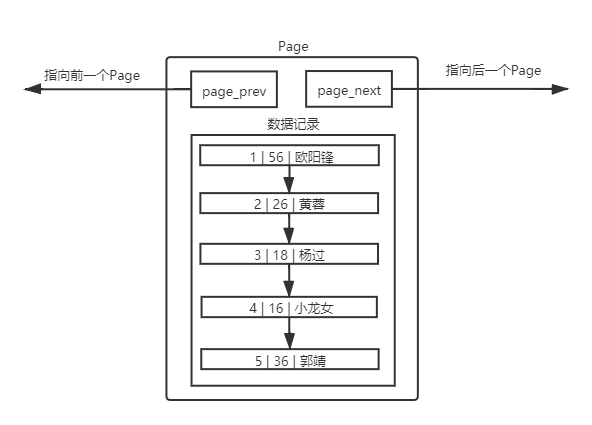
我们发现竟然默认有序,这样排序有什么好处呢
5.1 理解单个page
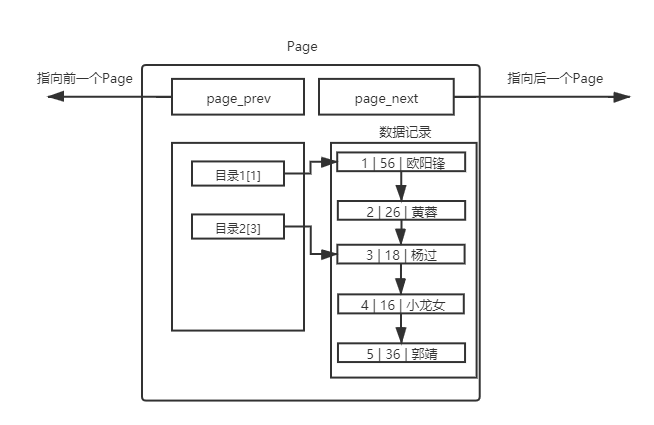
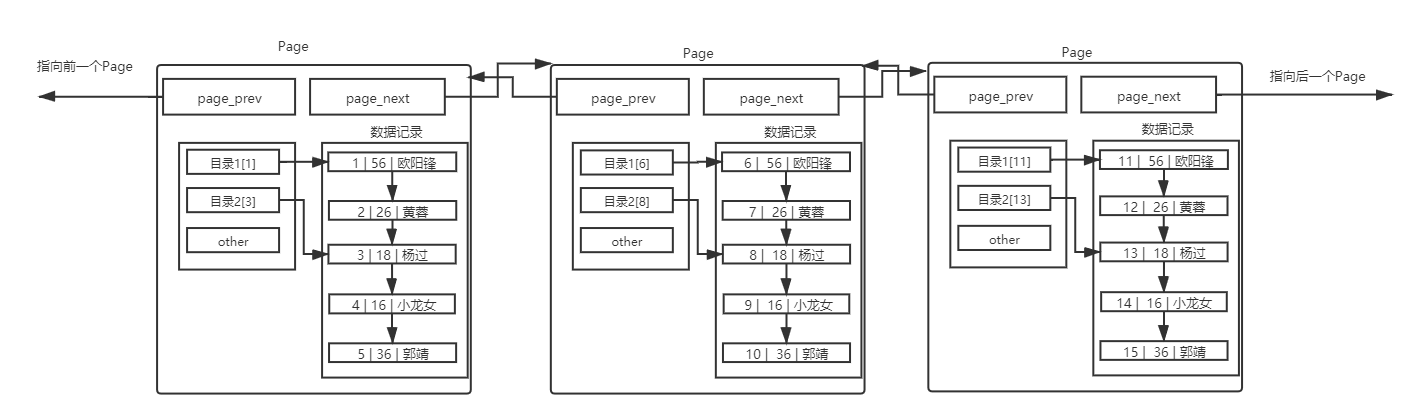
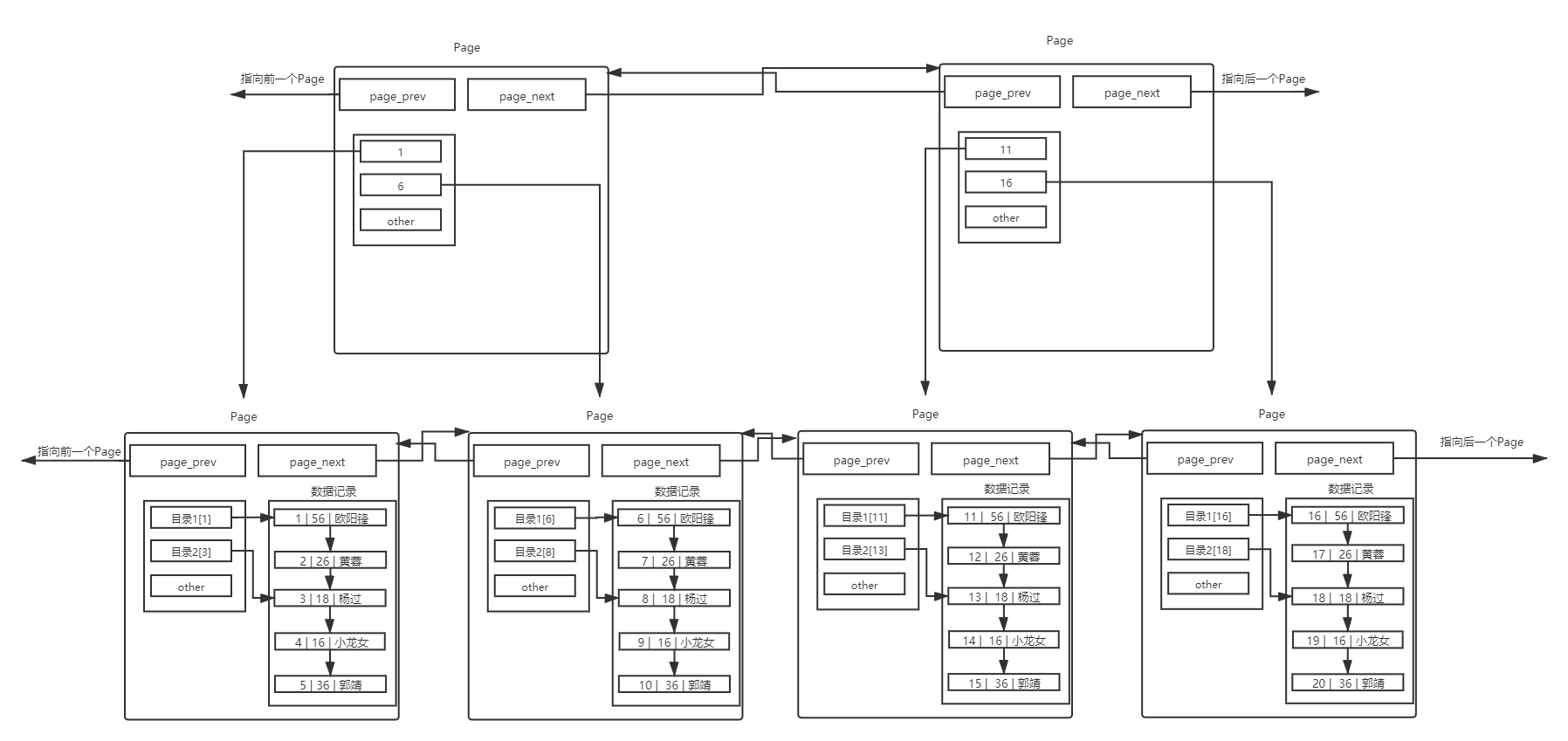
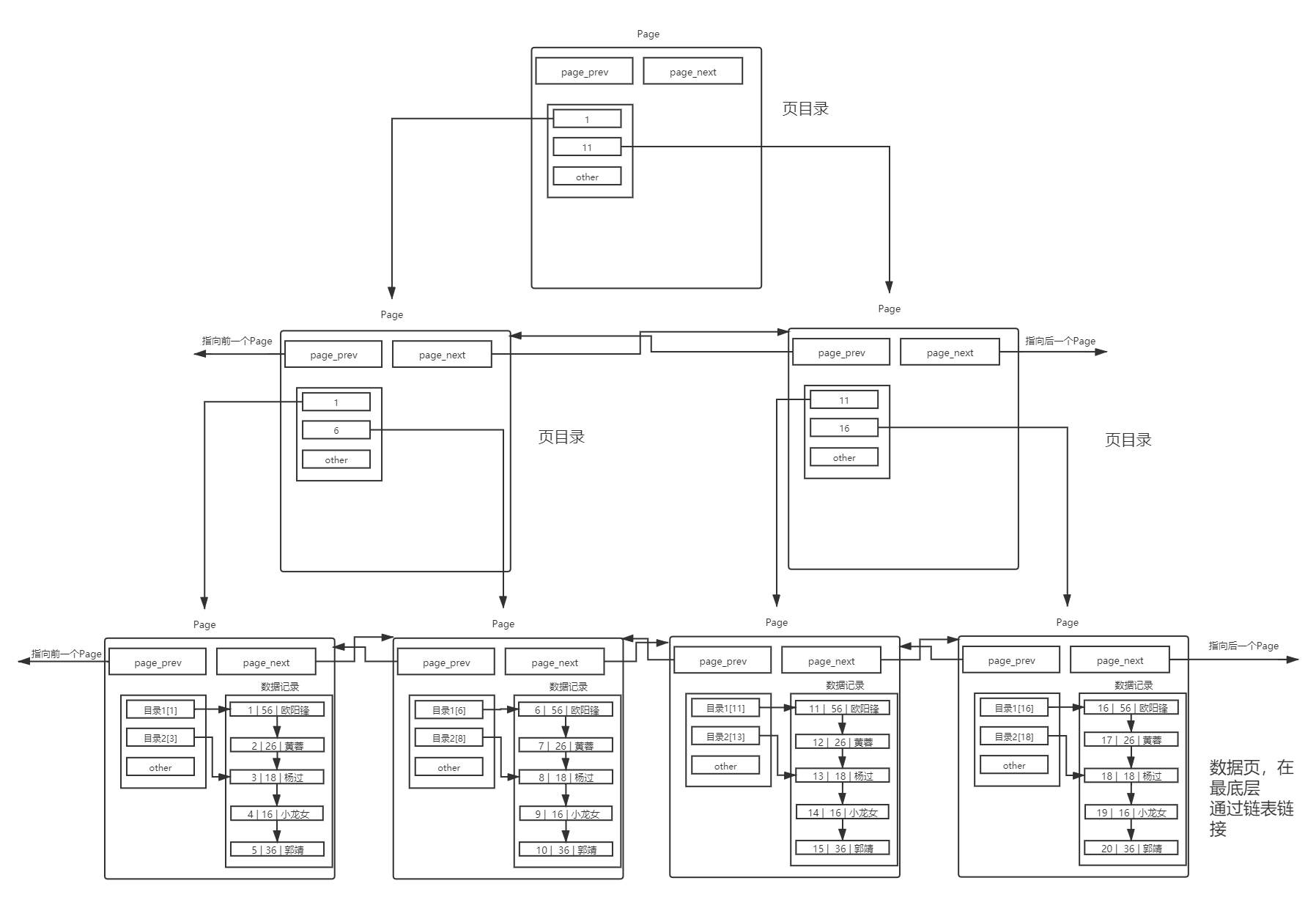
MySQL 中要管理很多数据表文件,而要管理好这些文件,就需要 先描述,在组织 ,我们目前可以简单理解成一个个独立文件是有一个或者多个Page构成的。
mysql> create database myisam_test; --创建数据库
Query OK, 1 row affected (0.00 sec)

mysql> use myisam_test;
Database changed
mysql> create table mtest(
    -> id int primary key,
    -> name varchar(11) not null
    -> )engine=MyISAM; --使用engine=MyISAM
Query OK, 0 rows affected (0.00 sec)


[root@iZ2vc09opqmjec5hsbsi0aZ mysql]# ls myisam_test/ -al --mysql数据目录下
total 28
drwxr-x--- 2 mysql mysql 4096 Mar 23 19:49 .
drwxr-x--x 9 mysql mysql 4096 Mar 23 19:48 ..
-rw-r----- 1 mysql mysql   61 Mar 23 19:48 db.opt
-rw-r----- 1 mysql mysql 8586 Mar 23 19:49 mtest.frm --表结构数据
-rw-r----- 1 mysql mysql    0 Mar 23 19:49 mtest.MYD --该表对应的数据,当前没有数
据,所以是0
-rw-r----- 1 mysql mysql 1024 Mar 23 19:49 mtest.MYI --该表对应的主键索引数据
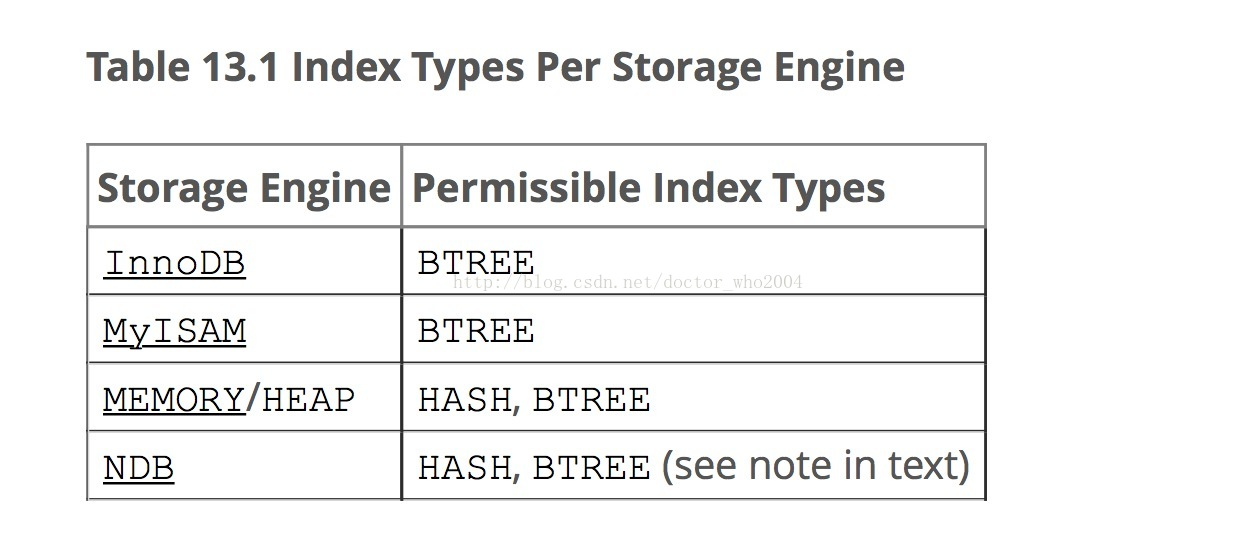
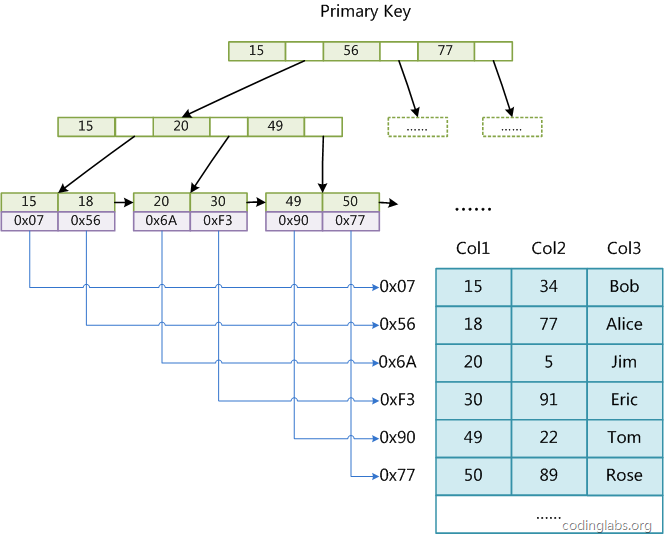
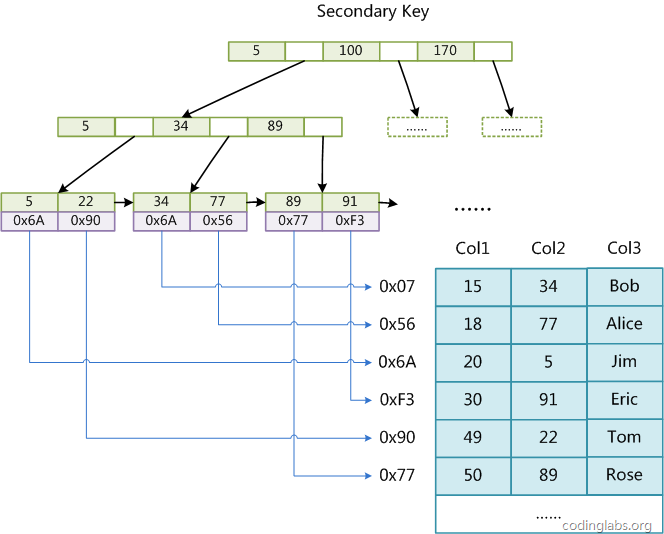
其中, MyISAM 这种用户数据与索引数据分离的索引方案,叫做非聚簇索引
bash复制代码
mysql>  create database innodb_test; --创建数据库
Query OK, 1 row affected (0.00 sec)

mysql> use innodb_test;
Database changed
mysql> create table itest(
    -> id int primary key,
    -> name varchar(11) not null
    -> )engine=InnoDB;    --使用engine=InnoDB
Query OK, 0 rows affected (0.00 sec)

[root@iZ2vc09opqmjec5hsbsi0aZ mysql]# ls innodb_test/ -al
total 120
drwxr-x---  2 mysql mysql  4096 Mar 23 19:55 .
drwxr-x--x 10 mysql mysql  4096 Mar 23 19:55 ..
-rw-r-----  1 mysql mysql    61 Mar 23 19:55 db.opt
-rw-r-----  1 mysql mysql  8586 Mar 23 19:55 itest.frm --表结构数据
-rw-r-----  1 mysql mysql 98304 Mar 23 19:55 itest.ibd --该表对应的主键索引和用户
数据,虽然现在一行数据没有,但是该表并不为0,因为有主键索引数据
mysql> CREATE TABLE articles (
    -> id INT UNSIGNED AUTO_INCREMENT NOT NULL PRIMARY KEY,
    -> title VARCHAR(200),
    -> body TEXT,
    -> FULLTEXT (title,body)
    -> )engine=MyISAM;
Query OK, 0 rows affected (0.00 sec)

mysql> INSERT INTO articles (title,body) VALUES
    -> ('MySQL Tutorial','DBMS stands for DataBase ...'),
    -> ('How To Use MySQL Well','After you went through a ...'),
    -> ('Optimizing MySQL','In this tutorial we will show ...'),
    -> ('1001 MySQL Tricks','1. Never run mysqld as root. 2. ...'),
    -> ('MySQL vs. YourSQL','In the following database comparison ...'),
    -> ('MySQL Security','When configured properly, MySQL ...');
Query OK, 6 rows affected (0.00 sec)
Records: 6  Duplicates: 0  Warnings: 0
查询有没有database数据
如果使用如下查询方式,虽然查询出数据,但是没有使用到全文索引
bash复制代码
mysql> select * from articles where body like '%database%';
+----+-------------------+------------------------------------------+
| id | title             | body                                     |
+----+-------------------+------------------------------------------+
|  1 | MySQL Tutorial    | DBMS stands for DataBase ...             |
|  5 | MySQL vs. YourSQL | In the following database comparison ... |
+----+-------------------+------------------------------------------+
可以用explain工具看一下,是否使用到索引
bash复制代码
mysql> explain select * from articles where body like '%database%'\G
*************************** 1. row ***************************
           id: 1
  select_type: SIMPLE
        table: articles
   partitions: NULL
         type: ALL
possible_keys: NULL
          key: NULL
      key_len: NULL
          ref: NULL
         rows: 6
     filtered: 16.67
        Extra: Using where
1 row in set, 1 warning (0.00 sec)
如何使用全文索引呢?
bash复制代码
mysql> SELECT * FROM articles
    -> WHERE MATCH (title,body) AGAINST ('database');
+----+-------------------+------------------------------------------+
| id | title             | body                                     |
+----+-------------------+------------------------------------------+
|  5 | MySQL vs. YourSQL | In the following database comparison ... |
|  1 | MySQL Tutorial    | DBMS stands for DataBase ...             |
+----+-------------------+------------------------------------------+
2 rows in set (0.00 sec)
通过explain来分析这个sql语句
bash复制代码
mysql> explain SELECT * FROM articles WHERE MATCH (title,body) AGAINST
    -> ('database')\G
*************************** 1. row ***************************
           id: 1
  select_type: SIMPLE
        table: articles
   partitions: NULL
         type: fulltext
possible_keys: title
          key: title <= key用到了title
      key_len: 0
          ref: const
         rows: 1
     filtered: 100.00
        Extra: Using where
1 row in set, 1 warning (0.00 sec)
查询索引
第一种方法: show keys from 表名;
第二种方法: show index from 表名;
第三种方法(信息比较简略): desc 表名;
删除索引
第一种方法-删除主键索引l:
alter table 表名 drop primary key;
第二种方法-其他索引的删除:alter table 表名 drop index 索引名:索引名就是show keysfrom 表名中的 Key_name 字段