作者:姜尔
在三维 GIS 应用中,除了展示地形与影像,往往还需要融入环境信息,例如当前相机位置的实时天气。本文将基于 SuperMap iClient3D for WebGL 产品,结合高德地图 API,实现一个"相机位置天气实时汇报"的功能。用户只需在三维场景中漫游,系统便会自动获取相机所在位置的天气,并动态更新 UI 面板、切换天空盒、开启雨雪雾等特效。
1. 实现效果预览
- 页面右上角悬浮天气面板,显示当前相机位置的地点、温度、湿度、天气图标及更新时间。
- 相机移动时,面板自动更新,并触发相应的天气特效(雨、雪、雾)与天空盒切换。
- 本地实时时钟与天气更新时间并存,直观展示数据新鲜度。
2. 技术选型
|----------------------------------|---------------------|
| 技术栈 | 作用 |
| SuperMap iClient3D for WebGL | 三维地球场景构建与相机控制 |
| 高德地图 Web API | 逆地理编码(坐标转地址)、实时天气查询 |
| 原生 JavaScript + CSS | UI 交互、动态样式与特效控制 |
3. 核心实现步骤
3.1 初始化三维场景
首先,按照 SuperMap iClient3D 标准流程创建 Viewer,加载地形与影像服务,并设置一个初始相机位置。
javascript
viewer = new SuperMap3D.Viewer('Container', {
    terrainProvider: new SuperMap3D.SuperMapTerrainProvider({
        url: "https://www.supermapol.com/realspace/services/3D-dixingyingxiang/rest/realspace/datas/DatasetDEM",
        isSct: true,
        invisibility: true
    })
});
viewer.imageryLayers.addImageryProvider(new SuperMap3D.SuperMapImageryProvider({
    url: "https://www.supermapol.com/realspace/services/3D-dixingyingxiang/rest/realspace/datas/MosaicResult"
}));
viewer.scene.camera.setView({
    destination: new SuperMap3D.Cartesian3(-1206939.1925299785, 5337998.241228442, 3286279.2424502545),
    orientation: { heading: 1.4059, pitch: -0.20917, roll: 0 }
});
3.2 集成高德地图 API
引入高德地图 JavaScript API,并初始化 Geocoder(地理编码)和 Weather(天气查询)插件。
javascript
window._AMapSecurityConfig = { securityJsCode: '你的安全密钥' };
const script = document.createElement('script');
script.src = 'https://webapi.amap.com/maps?v=2.0&key=你的API密钥&plugin=AMap.Geocoder,AMap.Weather&callback=onAMapInit';
document.head.appendChild(script);
window.onAMapInit = () => {
    amapWeather = new AMap.Weather();
    amapGeocoder = new AMap.Geocoder();
    // 获取初始天气
    fetchWeatherByCamera(true);
};
3.3 获取相机位置并调用高德接口
相机移动时,从 scene.camera 中获取当前经纬度(Cartographic 格式),通过高德逆地理编码获取 adcode(行政区划代码),再使用该代码查询实时天气。
javascript
async function fetchWeatherByCamera(force = false) {
    const cart = viewer.scene.camera.positionCartographic;
    const lng = SuperMap3D.Math.toDegrees(cart.longitude);
    const lat = SuperMap3D.Math.toDegrees(cart.latitude);
    // 位置变化小于0.05度则跳过,避免频繁请求
    if (!force && lastFetchLng !== null && Math.hypot(lng - lastFetchLng, lat - lastFetchLat) < 0.05) return;

    amapGeocoder.getAddress([lng, lat], (status, result) => {
        const adcode = result.regeocode.addressComponent.adcode;
        amapWeather.getLive(adcode, (err, data) => {
            // 更新 UI、特效、天空盒...
        });
    });
}
3.4 相机移动监听与防抖
为了实时响应相机位置变化,我们在 scene.postRender 事件中监听相机移动。由于相机每帧都可能移动,通过 防抖 机制避免频繁请求天气接口。
javascript
function onCameraMove() {
    const cart = viewer.scene.camera.positionCartographic;
    const lng = SuperMap3D.Math.toDegrees(cart.longitude);
    const lat = SuperMap3D.Math.toDegrees(cart.latitude);
    if (lastCheckLng !== null && Math.hypot(lng - lastCheckLng, lat - lastCheckLat) > 0.02) {
        if (debounceTimer) clearTimeout(debounceTimer);
        debounceTimer = setTimeout(() => fetchWeatherByCamera(true), 500);
    }
    lastCheckLng = lng;
    lastCheckLat = lat;
}
scene.postRender.addEventListener(onCameraMove);
3.5 动态天气特效与天空盒
根据返回的天气文本(如"小雨""大雪""雾"等),我们将其归类为 rain、snow、fog 或 sunny,并分别开启对应的场景特效:
- 雨:启用 postProcessStages.rain,调节角度与速度。
- 雪:启用 postProcessStages.snow,调节密度与速度。
- 雾:创建 FogEffect 对象并显示。
- 晴/其他:关闭所有特效。
同时,根据天气类别与本地时区的小时数,动态切换天空盒资源(晴天、日落、夜晚、阴天)。
javascript
function updateSkybox(category, localHour) {
    let id = (category === 'rain' || category === 'snow' || category === 'fog') ? '5' :
             (localHour >= 6 && localHour < 18) ? '1' :
             (localHour >= 18 && localHour < 20) ? '2' : '3';
    const sources = SKYBOX_MAP[id];
    scene.skyBox = new SuperMap3D.SkyBox({ sources });
}
3.6 UI 面板实时刷新
右上角天气面板采用绝对定位,数据更新时动态修改 DOM 内容,并显示当前本地时间与天气数据的更新时间,提升用户体验。
javascript
<div id="weatherPanel" class="weather-panel">
    <div class="weather-header">
        <span class="title">🌤️ 相机实时天气</span>
        <span class="location" id="locationBadge">定位中...</span>
    </div>
    <div id="weatherContent">
        <div class="weather-main">
            <span id="weatherIcon">☁️</span>
            <span id="weatherTemp">--°C</span>
            <span id="weatherDesc">--</span>
        </div>
        <div class="weather-details">💧 湿度 <span id="humidity">--</span>%</div>
        <div class="time-row">
            <span>📅 天气更新时间: <span id="updateTime">--</span></span>
            <span>🕒 本地实时: <span id="localRealTime">--:--:--</span></span>
        </div>
    </div>
</div>
4. 关键参数与接口说明
|-----------------------------|-------------------------|
| 类/接口 | 说明 |
| SuperMap3D.Viewer | 三维地球容器,管理场景、相机、图层等 |
| camera.positionCartographic | 获取相机位置的弧度制经纬度及高度 |
| AMap.Geocoder | 高德逆地理编码,将经纬度转为地址信息 |
| AMap.Weather | 高德天气查询,通过 adcode 获取实时天气 |
| scene.postProcessStages | 后处理特效,用于雨雪等粒子效果 |
| SuperMap3D.SkyBox | 天空盒,可自定义六面贴图 |
5. 注意事项与扩展
- API 配额:高德地图 API 有每日调用次数限制,实际项目中建议增加缓存机制,减少重复请求。
- 防抖阈值:可根据实际需求调整防抖的移动阈值与延迟时间。
- 特效兼容性:雨雪特效依赖 WebGL 后处理,部分低端设备可能性能下降,可增加开关选项。
- 天空盒资源:需要提前准备六张不同方向的贴图,并按路径存放。
6 . 完整代码
html
<!DOCTYPE html>
<html lang="zh-CN">
<head>
    <meta charset="utf-8">
    <meta name="viewport" content="width=device-width, initial-scale=1, user-scalable=no">
    <title>实时相机天气 - SuperMap iClient3D</title>
    <link href="../../Build/SuperMap3D/Widgets/widgets.css" rel="stylesheet">
    <link href="./css/pretty.css" rel="stylesheet">
    <script src="./js/jquery.min.js"></script>
    <script src="./js/spectrum.js"></script>
    <script src="./js/config.js"></script>
    <script src="../../Build/SuperMap3D/SuperMap3D.js"></script>
    <style>
        * { margin: 0; padding: 0; box-sizing: border-box; }
        body, html { width: 100%; height: 100%; overflow: hidden; }
        #Container { width: 100%; height: 100%; }

        /* 天气面板 - 右上角 */
        .weather-panel {
            position: absolute;
            top: 20px;
            right: 20px;
            width: 280px;
            background: rgba(0,0,0,0.75);
            backdrop-filter: blur(10px);
            border-radius: 12px;
            border: 1px solid rgba(0,255,255,0.3);
            color: #eef5ff;
            font-size: 13px;
            z-index: 1000;
            pointer-events: none;
            font-family: 'Segoe UI', sans-serif;
        }
        .weather-header {
            background: rgba(0,30,50,0.8);
            padding: 8px 12px;
            border-bottom: 1px solid rgba(0,255,255,0.2);
            font-weight: 600;
            display: flex;
            justify-content: space-between;
        }
        .weather-header .title { color: #0cf; }
        .weather-header .location { font-size: 11px; background: rgba(0,0,0,0.5); padding: 2px 6px; border-radius: 20px; font-weight: normal; }
        .weather-content { padding: 12px; }
        .weather-main {
            display: flex;
            align-items: center;
            justify-content: space-between;
            margin-bottom: 10px;
        }
        .weather-icon { font-size: 42px; filter: drop-shadow(0 0 6px #0cf); }
        .weather-temp { font-size: 32px; font-weight: 300; }
        .weather-text { font-size: 18px; opacity: 0.9; }
        .weather-details {
            background: rgba(0,0,0,0.3);
            padding: 6px 10px;
            border-radius: 20px;
            text-align: center;
            margin-top: 8px;
        }
        .time-row {
            display: flex;
            justify-content: space-between;
            font-size: 10px;
            opacity: 0.7;
            margin-top: 10px;
            border-top: 1px solid rgba(255,255,255,0.1);
            padding-top: 6px;
        }
        .loading-status { text-align: center; padding: 20px; }
        #loadingbar { display: none; }
    </style>
</head>
<body>
<div id="Container"></div>

<!-- 天气面板 -->
<div id="weatherPanel" class="weather-panel">
    <div class="weather-header">
        <span class="title">🌤️ 相机实时天气</span>
        <span class="location" id="locationBadge">定位中...</span>
    </div>
    <div id="weatherContent" class="weather-content">
        <div class="weather-main">
            <span class="weather-icon" id="weatherIcon">☁️</span>
            <span class="weather-temp" id="weatherTemp">--°C</span>
            <span class="weather-text" id="weatherDesc">--</span>
        </div>
        <div class="weather-details">
            💧 湿度 <span id="humidity">--</span>%
        </div>
        <div class="time-row">
            <span>📅 天气更新时间: <span id="updateTime">--</span></span>
            <span>🕒 本地实时: <span id="localRealTime">--:--:--</span></span>
        </div>
    </div>
    <div id="loadingHint" class="loading-status" style="display: none;">⏳ 获取天气中...</div>
</div>

<script>
    // ==================== 全局变量 ====================
    let viewer, scene;                     // SuperMap 核心对象
    let amapWeather, amapGeocoder;        // 高德天气和地理编码
    let lastFetchLng = null, lastFetchLat = null; // 上次获取天气的位置
    let isFetching = false;                // 防止并发请求
    let debounceTimer = null;              // 相机移动防抖定时器
    let fogEffect = null;                  // 雾效实例

    // ==================== 天空盒资源映射 ====================
    const SKYBOX_MAP = {
        '1': { positiveX: './images/SkyBox/bluesky/Right.jpg', negativeX: './images/SkyBox/bluesky/Left.jpg', positiveY: './images/SkyBox/bluesky/Front.jpg', negativeY: './images/SkyBox/bluesky/Back.jpg', positiveZ: './images/SkyBox/bluesky/Up.jpg', negativeZ: './images/SkyBox/bluesky/Down.jpg' },
        '2': { positiveX: './images/SkyBox/sunsetglow/Right.jpg', negativeX: './images/SkyBox/sunsetglow/Left.jpg', positiveY: './images/SkyBox/sunsetglow/Front.jpg', negativeY: './images/SkyBox/sunsetglow/Back.jpg', positiveZ: './images/SkyBox/sunsetglow/Up.jpg', negativeZ: './images/SkyBox/sunsetglow/Down.jpg' },
        '3': { positiveX: './images/SkyBox/Night/Right.png', negativeX: './images/SkyBox/Night/Left.png', positiveY: './images/SkyBox/Night/Front.png', negativeY: './images/SkyBox/Night/Back.png', positiveZ: './images/SkyBox/Night/Up.png', negativeZ: './images/SkyBox/Night/Down.png' },
        '4': { positiveX: './images/SkyBox/partly_cloudy_puresky/Right.jpg', negativeX: './images/SkyBox/partly_cloudy_puresky/Left.jpg', positiveY: './images/SkyBox/partly_cloudy_puresky/Front.jpg', negativeY: './images/SkyBox/partly_cloudy_puresky/Back.jpg', positiveZ: './images/SkyBox/partly_cloudy_puresky/Up.jpg', negativeZ: './images/SkyBox/partly_cloudy_puresky/Down.jpg' },
        '5': { positiveX: './images/SkyBox/cloudy/Right.jpg', negativeX: './images/SkyBox/cloudy/Left.jpg', positiveY: './images/SkyBox/cloudy/Front.jpg', negativeY: './images/SkyBox/cloudy/Back.jpg', positiveZ: './images/SkyBox/cloudy/Up.jpg', negativeZ: './images/SkyBox/cloudy/Down.jpg' }
    };

    // ==================== 辅助函数 ====================
    function getCurrentTimeString() {
        const now = new Date();
        return `${now.getHours().toString().padStart(2,'0')}:${now.getMinutes().toString().padStart(2,'0')}:${now.getSeconds().toString().padStart(2,'0')}`;
    }

    // 根据经度计算本地时区小时(粗略)
    function getLocalHourFromLng(lng) {
        let offset = Math.round(lng / 15);
        let hour = (new Date().getUTCHours() + offset) % 24;
        return hour < 0 ? hour + 24 : hour;
    }

    // 根据天气文本判断天气类别(雨/雪/雾/晴)
    function getWeatherCategory(text) {
        const t = text.toLowerCase();
        if (t.includes('雨')) return 'rain';
        if (t.includes('雪')) return 'snow';
        if (t.includes('雾') || t.includes('霾')) return 'fog';
        return 'sunny';
    }

    // 根据天气文本获取对应图标emoji
    function getWeatherIcon(text) {
        if (!text) return '☁️';
        const t = text.toLowerCase();
        if (t.includes('晴')) return '☀️';
        if (t.includes('多云')) return '⛅';
        if (t.includes('阴')) return '☁️';
        if (t.includes('雨')) return '🌧️';
        if (t.includes('雪')) return '❄️';
        if (t.includes('雾') || t.includes('霾')) return '🌫️';
        return '☁️';
    }

    // ==================== 天气特效与天空盒 ====================
    // 清除所有天气特效(雨、雪、雾)
    function clearWeatherEffects() {
        try {
            if (viewer?.scene?.postProcessStages) {
                if (viewer.scene.postProcessStages.rain) viewer.scene.postProcessStages.rain.enabled = false;
                if (viewer.scene.postProcessStages.snow) viewer.scene.postProcessStages.snow.enabled = false;
            }
            if (fogEffect?.show) fogEffect.show(false);
            if (scene?.layers?.layerQueue) {
                for (let i = 0; i < scene.layers.layerQueue.length; i++) {
                    try { scene.layers.layerQueue[i].removePBRMaterial?.(); } catch(e) {}
                }
            }
        } catch(e) { console.warn(e); }
    }

    // 应用天气效果(雨/雪/雾/晴)
    function applyWeatherEffect(category) {
        clearWeatherEffects();
        if (category === 'rain') {
            try {
                if (viewer.scene.postProcessStages.rain) {
                    viewer.scene.postProcessStages.rain.enabled = true;
                    viewer.scene.postProcessStages.rain.uniforms.angle = 6;
                    viewer.scene.postProcessStages.rain.uniforms.speed = 6;
                }
            } catch(e) { console.warn("雨效失败"); }
        } else if (category === 'snow') {
            try {
                if (viewer.scene.postProcessStages.snow) {
                    viewer.scene.postProcessStages.snow.enabled = true;
                    viewer.scene.postProcessStages.snow.uniforms.density = 10;
                    viewer.scene.postProcessStages.snow.uniforms.angle = 0;
                    viewer.scene.postProcessStages.snow.uniforms.speed = 3;
                }
            } catch(e) { console.warn("雪效失败"); }
        } else if (category === 'fog') {
            try {
                if (!fogEffect && window.SuperMap3D?.FogEffect) {
                    fogEffect = new SuperMap3D.FogEffect(viewer, { visibility: 0.9, color: new SuperMap3D.Color(0.8,0.8,0.8,0.3) });
                }
                if (fogEffect) fogEffect.show(true);
            } catch(e) { console.warn("雾效失败"); }
        }
    }

    // 根据天气类别和本地小时自动选择天空盒
    function updateSkybox(category, localHour) {
        if (!scene) return;
        let id = (category === 'rain' || category === 'snow' || category === 'fog') ? '5' :
                 (localHour >= 6 && localHour < 18) ? '1' :
                 (localHour >= 18 && localHour < 20) ? '2' : '3';
        const sources = SKYBOX_MAP[id];
        if (sources) {
            try {
                scene.skyBox = new SuperMap3D.SkyBox({ sources });
                if (viewer) viewer.scene.requestRender();
            } catch(e) { console.warn("天空盒失败"); }
        }
    }

    // ==================== UI 更新 ====================
    function updateWeatherUI(data) {
        document.getElementById('locationBadge').innerHTML = data.locationShort;
        document.getElementById('weatherIcon').innerHTML = data.icon;
        document.getElementById('weatherTemp').innerHTML = `${data.temp}°C`;
        document.getElementById('weatherDesc').innerHTML = data.text;
        document.getElementById('humidity').innerHTML = data.humidity;
        document.getElementById('updateTime').innerHTML = data.updateTime;
    }

    function setLoading(show) {
        document.getElementById('weatherContent').style.display = show ? 'none' : 'block';
        document.getElementById('loadingHint').style.display = show ? 'block' : 'none';
    }

    // 启动本地实时时钟(每秒刷新)
    function startRealTimeClock() {
        setInterval(() => {
            document.getElementById('localRealTime').innerHTML = getCurrentTimeString();
        }, 1000);
    }

    // ==================== 天气获取核心逻辑 ====================
    // 根据当前相机位置获取天气(高德逆地理+天气API)
    async function fetchWeatherByCamera(force = false) {
        if (isFetching) return;
        if (!viewer?.scene?.camera) return;
        try {
            const cart = viewer.scene.camera.positionCartographic;
            if (!cart) return;
            const lng = SuperMap3D.Math.toDegrees(cart.longitude);
            const lat = SuperMap3D.Math.toDegrees(cart.latitude);

            // 位置变化小于0.05度且非强制更新,跳过
            if (!force && lastFetchLng !== null && Math.hypot(lng - lastFetchLng, lat - lastFetchLat) < 0.05) return;

            if (!amapGeocoder) return;
            isFetching = true;
            setLoading(true);

            amapGeocoder.getAddress([lng, lat], (status, result) => {
                if (status !== 'complete' || !result.regeocode) {
                    isFetching = false; setLoading(false);
                    return;
                }
                const adcode = result.regeocode.addressComponent.adcode;
                if (!adcode) { isFetching = false; setLoading(false); return; }

                amapWeather.getLive(adcode, (err, data) => {
                    isFetching = false;
                    if (err) { setLoading(false); return; }

                    // 天气更新时间(优先使用API时间,格式 "MM-DD HH:MM")
                    const apiTime = data.reporttime ? data.reporttime.slice(5,16) : null;
                    const updateTimeDisplay = apiTime || getCurrentTimeString();

                    const weatherText = data.weather || '晴天';
                    const category = getWeatherCategory(weatherText);
                    const localHour = getLocalHourFromLng(lng);

                    // 应用天气效果和天空盒
                    applyWeatherEffect(category);
                    updateSkybox(category, localHour);

                    // 格式化位置名称
                    const loc = result.regeocode.formattedAddress ||
                                (result.regeocode.addressComponent.city || result.regeocode.addressComponent.province);
                    const shortLoc = loc.length > 18 ? loc.slice(0,16)+'...' : loc;

                    updateWeatherUI({
                        locationShort: `📷 ${shortLoc}`,
                        temp: data.temperature || '--',
                        text: weatherText,
                        humidity: data.humidity || '--',
                        updateTime: updateTimeDisplay,
                        icon: getWeatherIcon(weatherText)
                    });

                    lastFetchLng = lng;
                    lastFetchLat = lat;
                    setLoading(false);
                });
            });
        } catch(e) { console.warn(e); isFetching = false; setLoading(false); }
    }

    // ==================== 相机移动监听(防抖) ====================
    let lastCheckLng = null, lastCheckLat = null;
    function onCameraMove() {
        if (!viewer?.scene?.camera) return;
        const cart = viewer.scene.camera.positionCartographic;
        if (!cart) return;
        const lng = SuperMap3D.Math.toDegrees(cart.longitude);
        const lat = SuperMap3D.Math.toDegrees(cart.latitude);
        if (lastCheckLng !== null && Math.hypot(lng - lastCheckLng, lat - lastCheckLat) > 0.02) {
            if (debounceTimer) clearTimeout(debounceTimer);
            debounceTimer = setTimeout(() => fetchWeatherByCamera(true), 500);
        }
        lastCheckLng = lng;
        lastCheckLat = lat;
    }

    // ==================== 高德地图初始化 ====================
    function initAMap() {
        if (window.AMap) {
            amapWeather = new AMap.Weather();
            amapGeocoder = new AMap.Geocoder();
            fetchWeatherByCamera(true);
            if (scene) scene.postRender.addEventListener(onCameraMove);
            return;
        }
        window._AMapSecurityConfig = { securityJsCode: '你的安全密钥' };
const script = document.createElement('script');
script.src = 'https://webapi.amap.com/maps?v=2.0&key=你的API密钥&plugin=AMap.Geocoder,AMap.Weather&callback=onAMapInit';
document.head.appendChild(script);
        window.onAMapInit = () => {
            amapWeather = new AMap.Weather();
            amapGeocoder = new AMap.Geocoder();
            fetchWeatherByCamera(true);
            if (scene) scene.postRender.addEventListener(onCameraMove);
        };
    }

    // ==================== SuperMap 场景初始化 ====================
    function onload(SuperMap3D) {
        viewer = new SuperMap3D.Viewer('Container', {
            terrainProvider: new SuperMap3D.SuperMapTerrainProvider({ url: "https://www.supermapol.com/realspace/services/3D-dixingyingxiang/rest/realspace/datas/DatasetDEM", isSct: true, invisibility: true }),
            contextOptions: { contextType: getEngineType() }
        });
        viewer.scenePromise.then(s => {
            scene = s;
            viewer.imageryLayers.addImageryProvider(new SuperMap3D.SuperMapImageryProvider({ url: "https://www.supermapol.com/realspace/services/3D-dixingyingxiang/rest/realspace/datas/MosaicResult" }));
            viewer.scene.camera.setView({
                destination: new SuperMap3D.Cartesian3(-1206939.1925299785, 5337998.241228442, 3286279.2424502545),
                orientation: { heading: 1.4059, pitch: -0.20917, roll: 0 }
            });
            $('#loadingbar').remove();
            initAMap();
            startRealTimeClock();
        });
    }

    // 启动应用
    if (typeof SuperMap3D !== 'undefined') onload(SuperMap3D);
    else window.addEventListener('load', () => { if (typeof SuperMap3D !== 'undefined') onload(SuperMap3D); });
</script>
</body>
</html>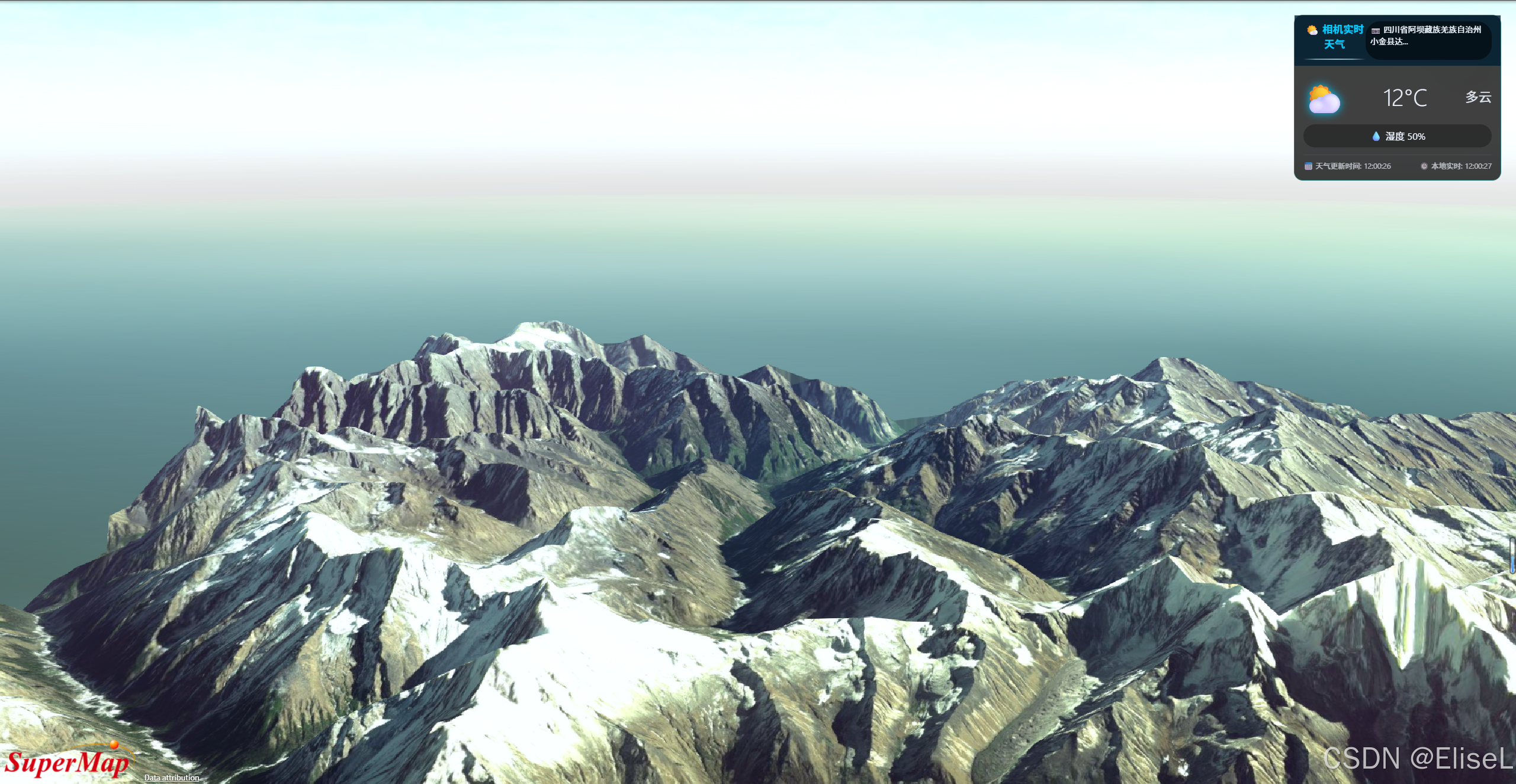
7 . 总结
通过 SuperMap iClient3D for WebGL 提供的三维场景能力,配合高德地图丰富的 LBS 服务,我们仅用少量代码就实现了一个"随相机位置动态更新天气"的实用功能。该方案可广泛应用于智慧城市、气象监测、户外作业仿真等场景,让三维应用更贴近真实环境。
读者可根据本示例,进一步拓展更多环境数据(如空气质量、风力风向),打造更沉浸的 GIS 可视化应用。
本文示例代码基于 SuperMap iClient3D for WebGL 与高德地图 JavaScript API 实现,实际开发中请替换为自己申请的 API Key。