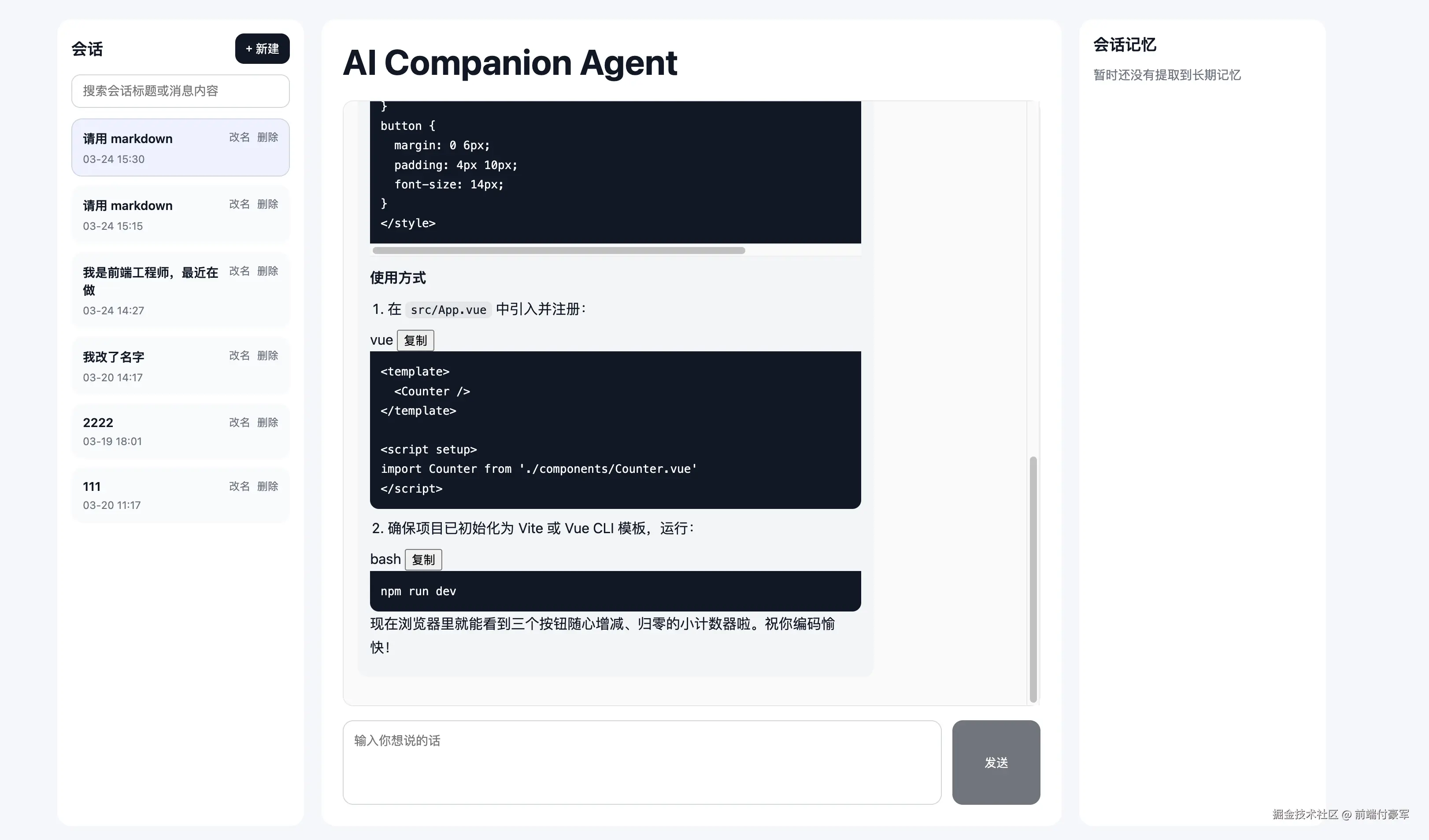
新增功能:
- 代码块复制按钮
- 会话搜索
几乎所有的 AI 工具都支持这个功能,也非常常用,对于我们 CV 战士来说非常方便,哈哈哈
1)web/src/App.vue
import
csharp
import { computed, ref, watch, onMounted, nextTick, h } from 'vue'添加方法
javascript
const copyCode = async code => {
try {
await navigator.clipboard.writeText(code || '')
window.alert('代码已复制')
} catch (e) {
console.error(e)
window.alert('复制失败')
}
}
const renderer = new marked.Renderer()
renderer.code = ({ text, lang }) => {
const language = lang || 'text'
const escapedCode = (text || '')
.replace(/&/g, '&')
.replace(/</g, '<')
.replace(/>/g, '>')
.replace(/"/g, '"')
return `
<div class="code-block-wrap">
<div class="code-block-header">
<span class="code-lang">${language}</span>
<button class="copy-code-btn" data-code="${escapedCode}">复制</button>
</div>
<pre><code class="language-${language}">${escapedCode}</code></pre>
</div>
`
}
const renderMarkdown = content => {
const rawHtml = marked.parse(content || '', { renderer })
return DOMPurify.sanitize(rawHtml)
}新增状态
csharp
const sessionKeyword = ref('')新增计算属性
javascript
const filteredSessions = computed(() => {
  const keyword = sessionKeyword.value.trim().toLowerCase()
  if (!keyword) return sessions.value

  return sessions.value.filter(item => {
    const titleMatch = (item.title || '').toLowerCase().includes(keyword)
    const messageMatch = (item.messages || []).some(msg =>
      (msg.content || '').toLowerCase().includes(keyword)
    )
    return titleMatch || messageMatch
  })
})
新增复制事件代理方法
javascript
const handleChatBoxClick = event => {
const target = event.target
if (target?.classList?.contains('copy-code-btn')) {
const code = target.getAttribute('data-code') || ''
copyCode(
code
.replace(/"/g, '"')
.replace(/>/g, '>')
.replace(/</g, '<')
.replace(/&/g, '&')
)
}
}onMounted
scss
onMounted(() => {
  fetchMemories()
  scrollToBottom()

  if (chatBoxRef.value) {
    chatBoxRef.value.addEventListener('click', handleChatBoxClick)
  }
})
2)改模板
在左侧会话标题下面,加搜索框
新增
ini
<input
  v-model="sessionKeyword"
  class="session-search"
  placeholder="搜索会话标题或消息内容"
/>
会话列表循环改成 filteredSessions
ini
v-for="item in filteredSessions"3)补充样式
css
.session-search {
  width: 100%;
  box-sizing: border-box;
  border: 1px solid #d1d5db;
  border-radius: 10px;
  padding: 10px 12px;
  font-size: 14px;
  outline: none;
  margin-bottom: 12px;
}

.code-block-wrap {
  margin: 8px 0;
}

.code-block-header {
  display: flex;
  align-items: center;
  justify-content: space-between;
  background: #1f2937;
  color: #f9fafb;
  padding: 8px 12px;
  border-top-left-radius: 10px;
  border-top-right-radius: 10px;
  font-size: 12px;
}

.code-lang {
  opacity: 0.9;
}

.copy-code-btn {
  border: none;
  background: #374151;
  color: #fff;
  padding: 4px 10px;
  border-radius: 8px;
  font-size: 12px;
  cursor: pointer;
}

.copy-code-btn:hover {
  background: #4b5563;
}

.markdown-body :deep(.code-block-wrap pre) {
  margin: 0;
  border-top-left-radius: 0;
  border-top-right-radius: 0;
}
4)验证
验证代码复制
请用 markdown 返回一个 Vue3 计数器示例,带代码块然后点代码块右上角 复制。
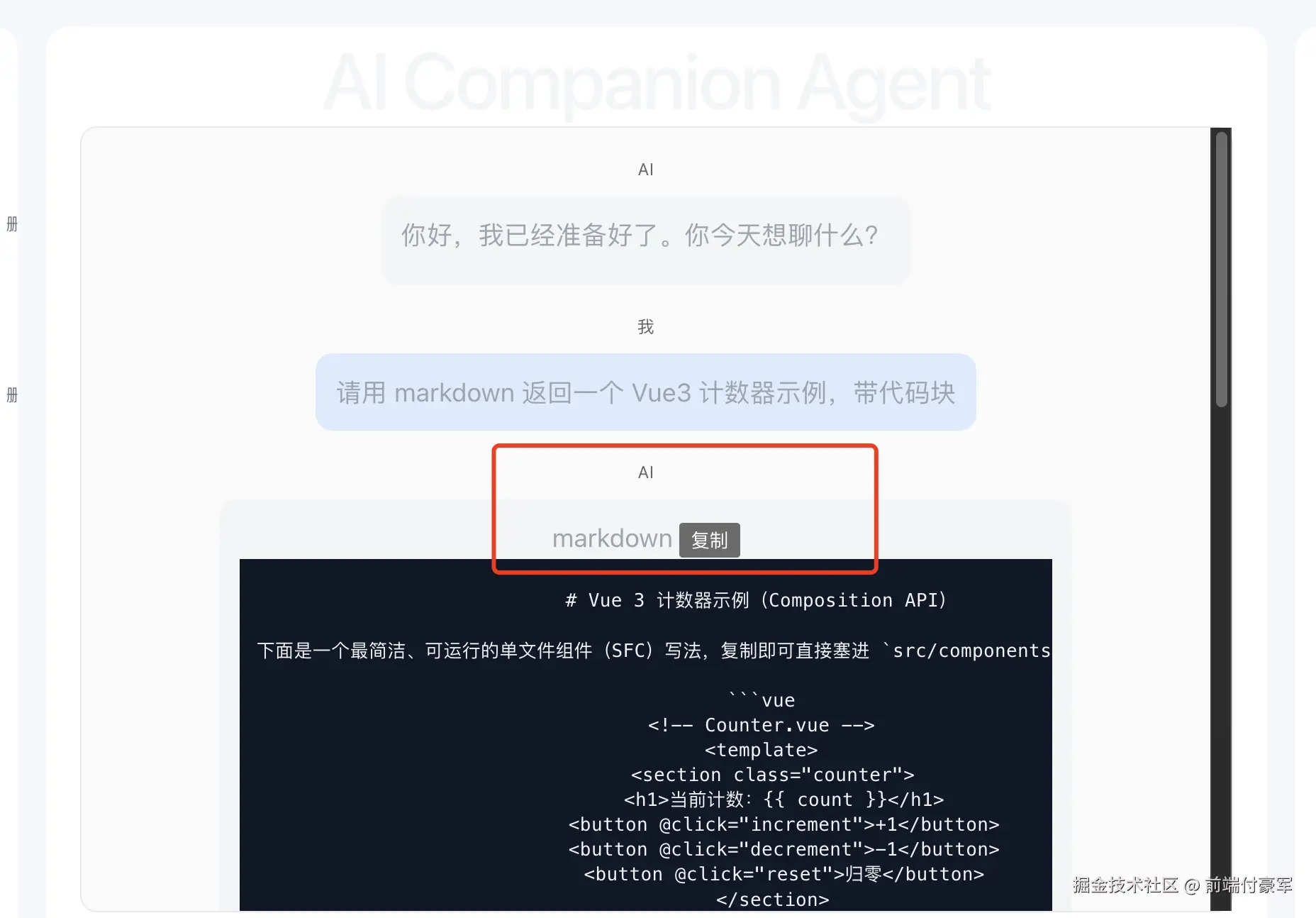
可以复制内容
验证会话搜索
左侧搜索框输入:
- 会话标题里的关键词
- 或某条消息内容里的关键词
实时过滤
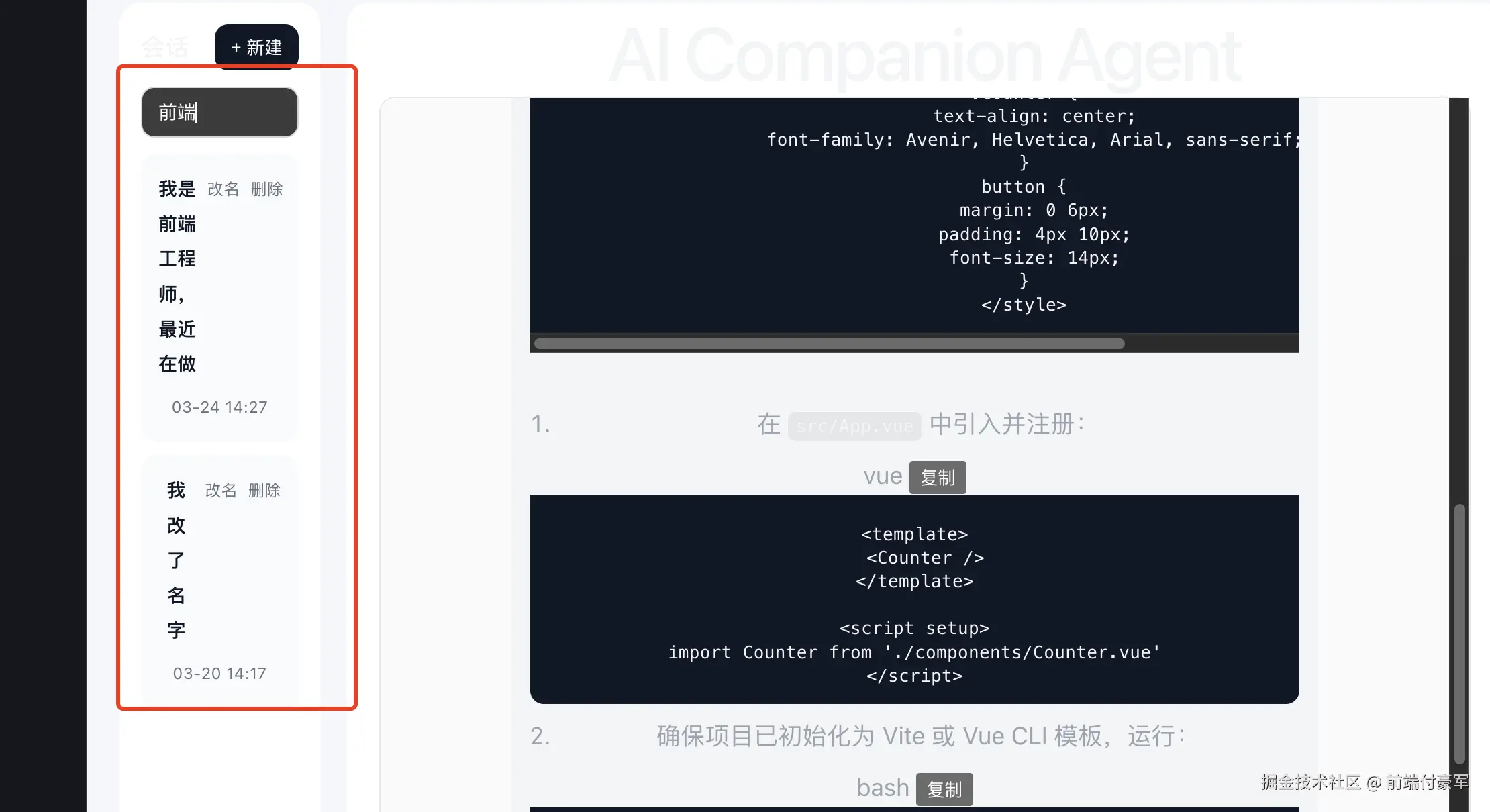
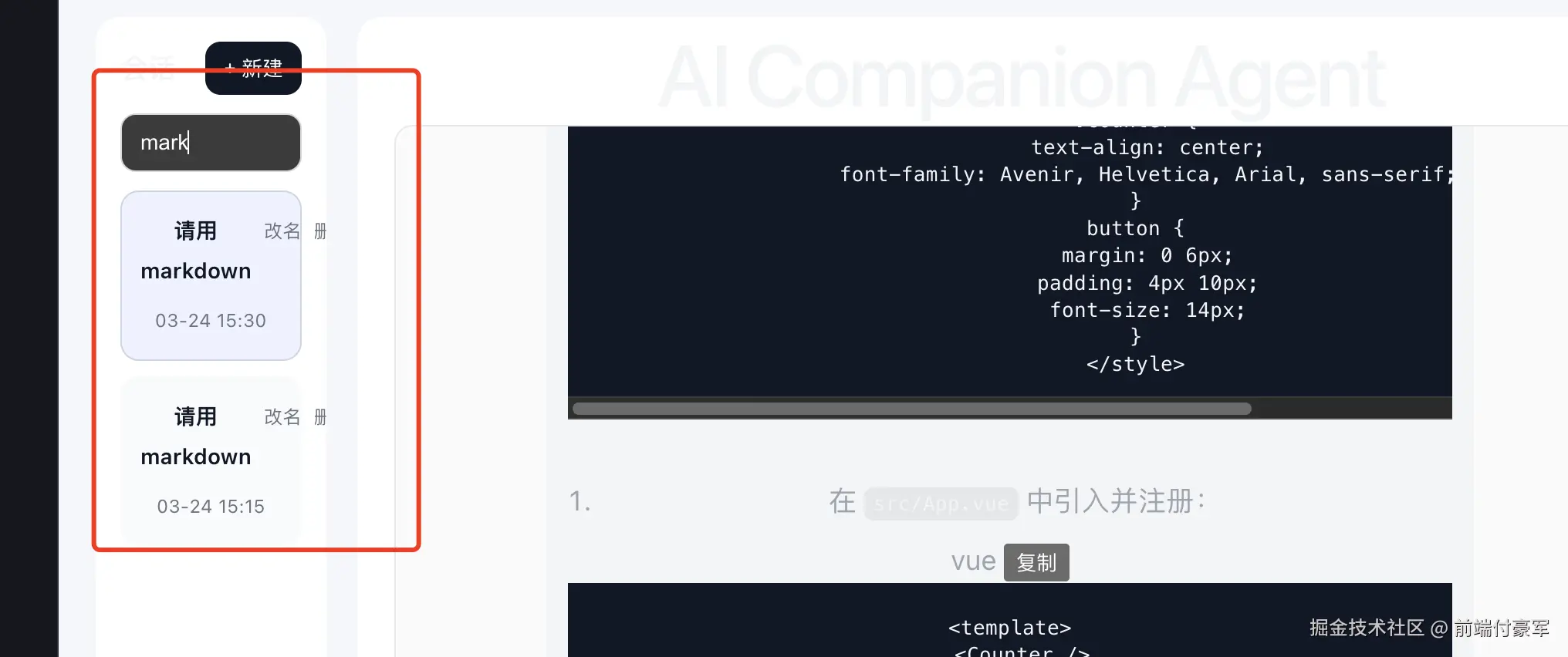
目前样式有点不对劲 改一下
模版加一层
ini
<input
  v-model="sessionKeyword"
  class="session-search"
  placeholder="搜索会话标题或消息内容"
/>

<div class="session-list">
  <div
    v-for="item in filteredSessions"
    :key="item.id"
    :class="['session-item', currentSessionId === item.id ? 'active' : '']"
    @click="handleSwitchSession(item.id)"
  >
    <div class="session-top">
      <template v-if="editingSessionId === item.id">
        <input
          v-model="editingTitle"
          class="session-input"
          @click.stop
          @keydown.enter="handleRenameSession(item.id)"
          @blur="handleRenameSession(item.id)"
        />
      </template>
      <template v-else>
        <div class="session-title">{{ item.title }}</div>
      </template>

      <div class="session-actions">
        <span class="action-btn" @click.stop="handleStartRename(item)">改名</span>
        <span class="action-btn delete" @click.stop="handleDeleteSession(item.id)">删除</span>
      </div>
    </div>
    <div class="session-time">{{ formatTime(item.updatedAt) }}</div>
  </div>
</div>
css 更新
xml
<style scoped>
.page {
  min-height: 100vh;
  background: #f5f7fb;
  padding: 24px;
  box-sizing: border-box;
  display: flex;
}
.container {
  width: 100%;
  max-width: 1440px;
  margin: 0 auto;
  display: flex;
  gap: 20px;
  align-items: stretch;
}
.sidebar {
  width: 280px;
  flex-shrink: 0;
  background: #fff;
  border-radius: 16px;
  padding: 16px;
  box-sizing: border-box;
  height: calc(100vh - 48px);
  overflow: hidden;
  display: flex;
  flex-direction: column;
}
.sidebar-header {
  display: flex;
  align-items: center;
  justify-content: space-between;
  margin-bottom: 12px;
}
.sidebar-header h2 {
  margin: 0;
  font-size: 18px;
}
.new-btn {
  border: none;
  border-radius: 10px;
  background: #111827;
  color: #fff;
  padding: 8px 12px;
  cursor: pointer;
}
.session-list {
  flex: 1;
  min-height: 0;
  overflow-y: auto;
}
.session-item {
  padding: 12px;
  border-radius: 12px;
  background: #f9fafb;
  cursor: pointer;
  margin-bottom: 10px;
  border: 1px solid transparent;
}
.session-item.active {
  border-color: #cbd5e1;
  background: #eef2ff;
}
.session-title {
  font-size: 14px;
  font-weight: 600;
  color: #111827;
  margin-bottom: 6px;
}
.session-time {
  font-size: 12px;
  color: #6b7280;
}
.main {
  flex: 1;
  min-width: 0;
  background: #fff;
  border-radius: 16px;
  padding: 24px;
  box-sizing: border-box;
  height: calc(100vh - 48px);
  display: flex;
  flex-direction: column;
  overflow: hidden;
}
h1 {
  margin: 0 0 20px;
  font-size: 40px;
  line-height: 1.2;
  color: #111827;
  font-weight: 700;
}
.chat-box {
  flex: 1;
  min-height: 0;
  overflow-y: auto;
  border: 1px solid #e5e7eb;
  border-radius: 12px;
  padding: 16px;
  background: #fafafa;
}
.msg {
  margin-bottom: 16px;
}
.msg.system {
  display: none;
}
.role {
  font-size: 12px;
  color: #666;
  margin-bottom: 6px;
}
.content {
  display: inline-block;
  max-width: 75%;
  line-height: 1.7;
  padding: 12px 14px;
  border-radius: 12px;
  word-break: break-word;
}
.user .content {
  background: #dbeafe;
}
.assistant .content {
  background: #f3f4f6;
}
.input-area {
  margin-top: 16px;
  display: flex;
  gap: 12px;
  align-items: stretch;
}
textarea {
  flex: 1;
  height: 96px;
  resize: none;
  border: 1px solid #d1d5db;
  border-radius: 12px;
  padding: 12px;
  font-size: 14px;
  outline: none;
  box-sizing: border-box;
}
button {
  border: none;
  border-radius: 12px;
  background: #111827;
  color: #fff;
  cursor: pointer;
}
.input-area button {
  width: 100px;
}
button:disabled {
  opacity: 0.6;
  cursor: not-allowed;
}

.memory-panel {
  width: 280px;
  flex-shrink: 0;
  background: #fff;
  border-radius: 16px;
  padding: 16px;
  box-sizing: border-box;
  height: calc(100vh - 48px);
  overflow-y: auto;
}
.memory-header {
  font-size: 18px;
  font-weight: 600;
  margin-bottom: 12px;
}
.memory-list {
  display: flex;
  flex-direction: column;
  gap: 10px;
}
.memory-item {
  padding: 12px;
  border-radius: 12px;
  background: #f9fafb;
  line-height: 1.6;
  color: #111827;
  border: 1px solid #e5e7eb;
}
.memory-empty {
  color: #6b7280;
  font-size: 14px;
}
.session-top {
  display: flex;
  align-items: flex-start;
  justify-content: space-between;
  gap: 8px;
}

.session-actions {
  display: flex;
  align-items: center;
  gap: 8px;
  flex-shrink: 0;
}

.action-btn {
  font-size: 12px;
  color: #6b7280;
  cursor: pointer;
}

.action-btn:hover {
  color: #111827;
}

.action-btn.delete:hover {
  color: #dc2626;
}

.session-input {
  width: 100%;
  border: 1px solid #cbd5e1;
  border-radius: 8px;
  padding: 6px 8px;
  font-size: 14px;
  outline: none;
  box-sizing: border-box;
}
.stop-btn {
  width: 100px;
  background: #ef4444;
}

.markdown-body :deep(p) {
  margin: 0 0 8px;
}

.markdown-body :deep(pre) {
  background: #111827;
  color: #f9fafb;
  padding: 12px;
  border-radius: 10px;
  overflow-x: auto;
  margin: 8px 0;
}

.markdown-body :deep(code) {
  background: rgba(0, 0, 0, 0.06);
  padding: 2px 6px;
  border-radius: 6px;
  font-size: 13px;
}

.markdown-body :deep(pre code) {
  background: transparent;
  padding: 0;
}

.markdown-body :deep(ul),
.markdown-body :deep(ol) {
  padding-left: 20px;
  margin: 8px 0;
}

.markdown-body :deep(h1),
.markdown-body :deep(h2),
.markdown-body :deep(h3),
.markdown-body :deep(h4) {
  margin: 10px 0 8px;
  font-size: 16px;
}

.markdown-body :deep(blockquote) {
  margin: 8px 0;
  padding-left: 12px;
  border-left: 4px solid #d1d5db;
  color: #4b5563;
}

.markdown-body :deep(table) {
  border-collapse: collapse;
  width: 100%;
  margin: 8px 0;
}

.markdown-body :deep(th),
.markdown-body :deep(td) {
  border: 1px solid #e5e7eb;
  padding: 8px;
  text-align: left;
}
.session-search {
  width: 100%;
  box-sizing: border-box;
  border: 1px solid #d1d5db;
  border-radius: 10px;
  padding: 10px 12px;
  font-size: 14px;
  outline: none;
  margin-bottom: 12px;
}

.code-block-wrap {
  margin: 8px 0;
}

.code-block-header {
  display: flex;
  align-items: center;
  justify-content: space-between;
  background: #1f2937;
  color: #f9fafb;
  padding: 8px 12px;
  border-top-left-radius: 10px;
  border-top-right-radius: 10px;
  font-size: 12px;
}

.code-lang {
  opacity: 0.9;
}

.copy-code-btn {
  border: none;
  background: #374151;
  color: #fff;
  padding: 4px 10px;
  border-radius: 8px;
  font-size: 12px;
  cursor: pointer;
}

.copy-code-btn:hover {
  background: #4b5563;
}

.markdown-body :deep(.code-block-wrap pre) {
  margin: 0;
  border-top-left-radius: 0;
  border-top-right-radius: 0;
}
</style>
style.css 更新
css
html,
body,
#app {
  margin: 0;
  padding: 0;
  width: 100%;
  min-height: 100%;
}

body {
  min-width: 1200px;
  font-family: Inter, -apple-system, BlinkMacSystemFont, 'Segoe UI', sans-serif;
  color: #111827;
  background: #f5f7fb;
}
nice !
看着舒服多了