引言
在日常工作和生活中,我们经常需要记录时间间隔,比如工作打卡、学习时长、项目耗时等。今天我将为大家介绍一个基于Vue3的打卡计时器实现方案,它具有以下特点:
- ✅ 从打卡开始自动计时
- ✅ 支持暂停/继续功能
- ✅ 可记录多个时间点(不重置计时)
- ✅ 清晰的视觉反馈
- ✅ 响应式设计,适配各种设备
功能概述
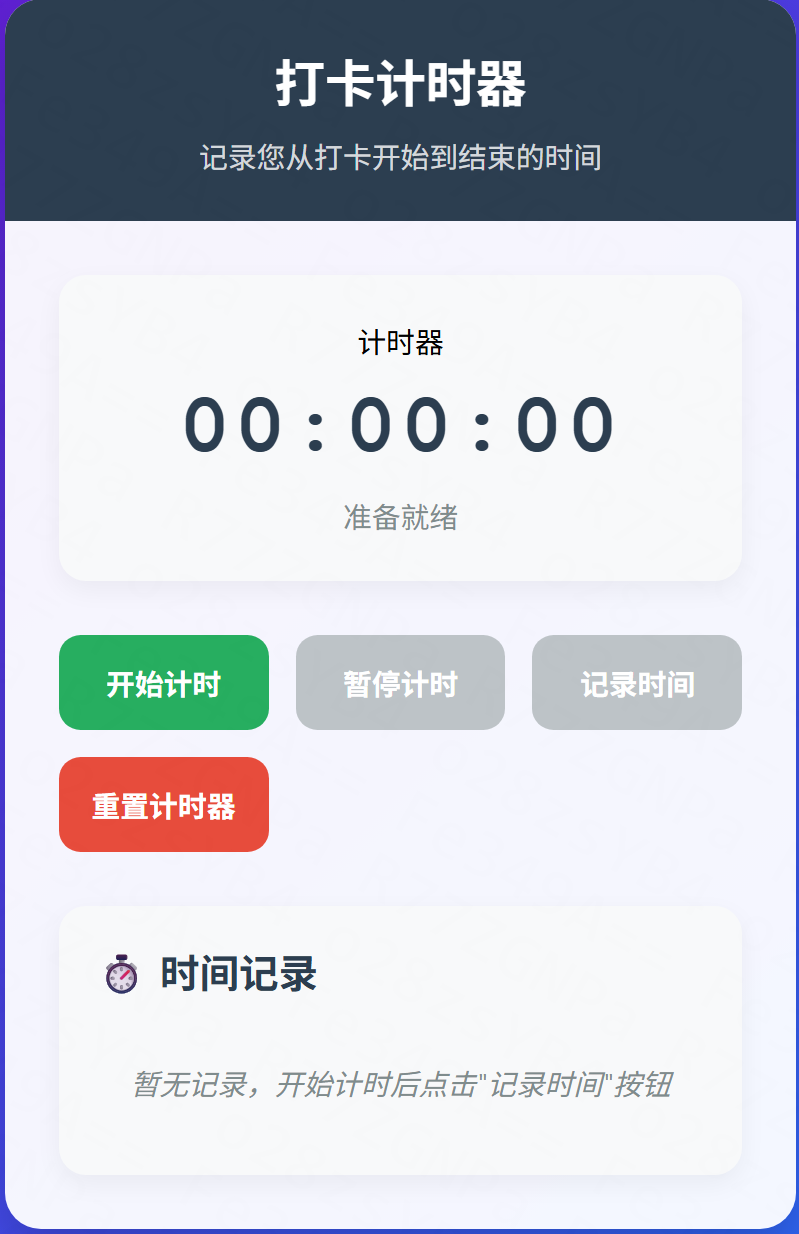
本计时器主要实现以下核心功能:
- 持续计时:从开始打卡起持续计时,显示当前已用时间
- 暂停/继续:可随时暂停计时,再次点击继续
- 记录时间点:在计时过程中记录关键时间点,不重置计时器
- 重置功能:一键重置所有状态和记录
- 时间显示:以时:分:秒格式显示时间
代码实现
1. 完整HTML文件
html
<!DOCTYPE html>
<html lang="zh-CN">
<head>
  <meta charset="UTF-8">
  <meta name="viewport" content="width=device-width, initial-scale=1.0">
  <title>打卡计时器</title>
  <script src="https://unpkg.com/vue@3/dist/vue.global.js"></script>
  <style>
    * {
      box-sizing: border-box;
      margin: 0;
      padding: 0;
      font-family: 'Segoe UI', Tahoma, Geneva, Verdana, sans-serif;
    }
    body {
      background: linear-gradient(135deg, #6a11cb 0%, #2575fc 100%);
      min-height: 100vh;
      display: flex;
      justify-content: center;
      align-items: center;
      padding: 20px;
    }
    .container {
      width: 100%;
      max-width: 600px;
      background: rgba(255, 255, 255, 0.95);
      border-radius: 20px;
      box-shadow: 0 15px 30px rgba(0, 0, 0, 0.2);
      overflow: hidden;
    }
    .header {
      background: #2c3e50;
      color: white;
      padding: 25px;
      text-align: center;
    }
    .header h1 {
      font-size: 28px;
      margin-bottom: 10px;
    }
    .header p {
      opacity: 0.8;
      font-size: 16px;
    }
    .content {
      padding: 30px;
    }
    .timer-display {
      background: #f8f9fa;
      border-radius: 15px;
      padding: 25px;
      text-align: center;
      margin-bottom: 30px;
      box-shadow: 0 5px 15px rgba(0, 0, 0, 0.05);
    }
    .time {
      font-size: 48px;
      font-weight: bold;
      color: #2c3e50;
      margin: 10px 0;
      font-family: 'Courier New', monospace;
      letter-spacing: 2px;
    }
    .status {
      font-size: 16px;
      color: #7f8c8d;
      margin-top: 5px;
    }
    .controls {
      display: grid;
      grid-template-columns: repeat(3, 1fr);
      gap: 15px;
      margin-bottom: 30px;
    }
    .btn {
      padding: 15px;
      border: none;
      border-radius: 12px;
      font-size: 16px;
      font-weight: 600;
      cursor: pointer;
      transition: all 0.3s ease;
      color: white;
    }
    .btn:hover {
      transform: translateY(-3px);
      box-shadow: 0 5px 15px rgba(0, 0, 0, 0.1);
    }
    .btn:active {
      transform: translateY(0);
    }
    .btn-start {
      background: #27ae60;
    }
    .btn-pause {
      background: #e67e22;
    }
    .btn-record {
      background: #3498db;
    }
    .btn-reset {
      background: #e74c3c;
    }
    .btn:disabled {
      background: #bdc3c7;
      cursor: not-allowed;
      transform: none;
    }
    .records {
      background: #f8f9fa;
      border-radius: 15px;
      padding: 20px;
      box-shadow: 0 5px 15px rgba(0, 0, 0, 0.05);
    }
    .records h2 {
      color: #2c3e50;
      margin-bottom: 15px;
      font-size: 22px;
      display: flex;
      align-items: center;
    }
    .records h2 i {
      margin-right: 10px;
    }
    .record-list {
      max-height: 200px;
      overflow-y: auto;
    }
    .record-item {
      display: flex;
      justify-content: space-between;
      padding: 12px 15px;
      border-bottom: 1px solid #eee;
      animation: fadeIn 0.3s ease;
    }
    .record-item:last-child {
      border-bottom: none;
    }
    .record-time {
      font-weight: 600;
      color: #3498db;
    }
    .record-duration {
      color: #7f8c8d;
      font-size: 14px;
    }
    .empty-records {
      text-align: center;
      padding: 20px;
      color: #7f8c8d;
      font-style: italic;
    }
    .footer {
      text-align: center;
      padding: 20px;
      color: #7f8c8d;
      font-size: 14px;
      border-top: 1px solid #eee;
    }
    @keyframes fadeIn {
      from { opacity: 0; transform: translateY(10px); }
      to { opacity: 1; transform: translateY(0); }
    }
    @media (max-width: 500px) {
      .controls {
        grid-template-columns: 1fr;
      }
      .time {
        font-size: 36px;
      }
    }
  </style>
</head>
<body>
  <div id="app">
    <div class="container">
      <div class="header">
        <h1>打卡计时器</h1>
        <p>记录您从打卡开始到结束的时间</p>
      </div>
      <div class="content">
        <div class="timer-display">
          <div>计时器</div>
          <div class="time">{{ formattedTime }}</div>
          <div class="status">{{ timerStatus }}</div>
        </div>

        <div class="controls">
          <button class="btn btn-start" @click="startTimer" :disabled="isRunning">
            开始计时
          </button>
          <button class="btn btn-pause" @click="pauseTimer" :disabled="!isRunning">
            暂停计时
          </button>
          <button class="btn btn-record" @click="recordTime" :disabled="!isRunning && elapsed === 0">
            记录时间
          </button>
          <button class="btn btn-reset" @click="resetTimer" class="grid-column: 1 / -1;">
            重置计时器
          </button>
        </div>

        <div class="records">
          <h2>⏱️ 时间记录</h2>
          <div class="record-list">
            <div v-if="records.length === 0" class="empty-records">
              暂无记录,开始计时后点击"记录时间"按钮
            </div>
            <div v-for="(record, index) in records" :key="index" class="record-item">
              <span class="record-time">{{ record.time }}</span>
              <span class="record-duration">持续: {{ formatDuration(record.elapsed) }}</span>
            </div>
          </div>
        </div>
      </div>
      <div class="footer">
        <p>提示:开始计时后,您可以多次记录时间点,计时器不会重置</p>
      </div>
    </div>
  </div>

  <script>
    const { createApp, ref, computed, onUnmounted } = Vue

    createApp({
      setup() {
        // 响应式状态
        const isRunning = ref(false)
        const elapsed = ref(0) // 已经过去的时间(毫秒)
        const startTime = ref(null)
        const timer = ref(null)
        const records = ref([])

        // 计时器状态文本
        const timerStatus = computed(() => {
          if (isRunning.value) return '计时中...'
          if (elapsed.value > 0) return '已暂停'
          return '准备就绪'
        })

        // 格式化时间显示(时:分:秒)
        const formattedTime = computed(() => {
          return formatDuration(elapsed.value)
        })

        // 格式化持续时间
        function formatDuration(ms) {
          const totalSeconds = Math.floor(ms / 1000)
          const hours = Math.floor(totalSeconds / 3600)
          const minutes = Math.floor((totalSeconds % 3600) / 60)
          const seconds = totalSeconds % 60

          return `${hours.toString().padStart(2, '0')}:${minutes.toString().padStart(2, '0')}:${seconds.toString().padStart(2, '0')}`
        }

        // 开始计时
        function startTimer() {
          if (isRunning.value) return

          isRunning.value = true
          startTime.value = Date.now() - elapsed.value

          timer.value = setInterval(() => {
            elapsed.value = Date.now() - startTime.value
          }, 100) // 每100毫秒更新一次,提高流畅度
        }

        // 暂停计时
        function pauseTimer() {
          if (!isRunning.value) return

          isRunning.value = false
          clearInterval(timer.value)
          timer.value = null
        }

        // 记录当前时间
        function recordTime() {
          if (elapsed.value === 0) return

          const now = new Date()
          const timeString = `${now.getHours().toString().padStart(2, '0')}:${now.getMinutes().toString().padStart(2, '0')}:${now.getSeconds().toString().padStart(2, '0')}`

          records.value.push({
            time: timeString,
            elapsed: elapsed.value
          })
        }

        // 重置计时器
        function resetTimer() {
          pauseTimer()
          elapsed.value = 0
          records.value = []
          startTime.value = null
        }

        // 组件卸载时清理定时器
        onUnmounted(() => {
          if (timer.value) {
            clearInterval(timer.value)
          }
        })

        return {
          isRunning,
          elapsed,
          records,
          timerStatus,
          formattedTime,
          startTimer,
          pauseTimer,
          recordTime,
          resetTimer,
          formatDuration
        }
      }
    }).mount('#app')
  </script>
</body>
</html>
1. 核心状态管理
html
// 响应式状态
const isRunning = ref(false)          // 计时器是否正在运行
const elapsed = ref(0)                // 已经过去的时间(毫秒)
const startTime = ref(null)           // 计时开始时间戳
const timer = ref(null)               // 定时器引用
const records = ref([])               // 记录的时间点列表
2. 核心功能函数
开始计时:
html
function startTimer() {
  if (isRunning.value) return

  isRunning.value = true
  startTime.value = Date.now() - elapsed.value

  timer.value = setInterval(() => {
    elapsed.value = Date.now() - startTime.value
  }, 100) // 每100毫秒更新一次,提高流畅度
}暂停计时:
html
function pauseTimer() {
  if (!isRunning.value) return

  isRunning.value = false
  clearInterval(timer.value)
  timer.value = null
}记录时间点:
html
unction recordTime() {
  if (elapsed.value === 0) return

  const now = new Date()
  const timeString = `${now.getHours().toString().padStart(2, '0')}:${now.getMinutes().toString().padStart(2, '0')}:${now.getSeconds().toString().padStart(2, '0')}`

  records.value.push({
    time: timeString,
    elapsed: elapsed.value
  })
}- 时间格式化函数
html
function formatDuration(ms) {
  const totalSeconds = Math.floor(ms / 1000)
  const hours = Math.floor(totalSeconds / 3600)
  const minutes = Math.floor((totalSeconds % 3600) / 60)
  const seconds = totalSeconds % 60

  return `${hours.toString().padStart(2, '0')}:${minutes.toString().padStart(2, '0')}:${seconds.toString().padStart(2, '0')}`
}
功能演示
使用流程
- 1.开始打卡:点击"开始计时"按钮启动计时器
- 2.持续计时:计时器自动计算并显示从开始到现在的时间
- 3.记录关键时间点:点击"记录时间"按钮保存当前时间(计时器继续运行)
- 4.暂停/继续:可以随时暂停计时,再次点击继续
- 5.重置:点击"重置计时器"清除所有记录和计时状态
界面预览
使用场景
这个计时器适用于多种场景:
- 1.工作打卡:记录上班、下班时间,计算工作时长
- 2.学习计时:记录学习开始和结束时间,统计学习时长
- 3.项目管理:记录任务开始时间,监控项目进度
- 4.运动健身:记录运动开始时间,监控运动时长
- 5.会议记录:记录会议开始和关键节点时间
优化建议
1. 本地存储支持
可以添加localStorage支持,刷新页面后保留计时状态:
html
// 保存到本地存储
function saveToStorage() {
  localStorage.setItem('timerState', JSON.stringify({
    elapsed: elapsed.value,
    records: records.value,
    isRunning: isRunning.value
  }))
}

// 从本地存储加载
function loadFromStorage() {
  const saved = localStorage.getItem('timerState')
  if (saved) {
    const state = JSON.parse(saved)
    elapsed.value = state.elapsed || 0
    records.value = state.records || []
    isRunning.value = false // 默认不自动运行
  }
}- 导出功能
添加导出记录功能:
html
unction exportRecords() {
  const data = records.value.map(r =>
    `时间点: ${r.time}, 持续时间: ${formatDuration(r.elapsed)}`
  ).join('\n')

  const blob = new Blob([data], { type: 'text/plain' })
  const url = URL.createObjectURL(blob)
  const a = document.createElement('a')
  a.href = url
  a.download = '计时记录.txt'
  a.click()
  URL.revokeObjectURL(url)
}- 响应式优化
对于移动端,可以添加触摸事件支持:
html
// 在移动端添加触摸反馈
function addTouchFeedback() {
  const buttons = document.querySelectorAll('.btn')
  buttons.forEach(btn => {
    btn.addEventListener('touchstart', function() {
      this.style.transform = 'scale(0.95)'
    })
    btn.addEventListener('touchend', function() {
      this.style.transform = ''
    })
  })
}
总结
本文介绍了基于Vue3的打卡计时器完整实现,涵盖了:
- ✅ 核心功能实现(计时、暂停、记录、重置)
- ✅ 代码结构和关键函数解析
- ✅ 使用流程和界面预览
- ✅ 适用场景分析
- ✅ 优化建议(本地存储、导出功能、响应式优化)
这个计时器组件可以直接集成到任何Vue3项目中,也可以作为独立页面使用。代码简洁明了,易于理解和扩展。
源码获取:以上完整代码可以直接复制使用,或访问我的GitHub仓库获取最新版本。
希望这个计时器能帮助您更好地管理时间,提高工作效率!如果您有任何问题或建议,欢迎在评论区留言交流。