基础语法、类和对象
java
// Hello World
public class HelloWorld {
    public static void main(String[] args) {
        System.out.println("Hello World"); // 输出 Hello World
    }
}

// 枚举
class FreshJuice {
   enum FreshJuiceSize{ SMALL, MEDIUM , LARGE }
   FreshJuiceSize size;
}
public class FreshJuiceTest {
   public static void main(String[] args){
      FreshJuice juice = new FreshJuice();
      juice.size = FreshJuice.FreshJuiceSize.MEDIUM  ;
   }
}

// 类和对象
public class Puppy {
    private int age;
    private String name;

    // 构造器
    public Puppy(String name) {
        this.name = name;
        System.out.println("小狗的名字是 : " + name);
    }

    public void setAge(int age) {
        this.age = age;
    }

    public int getAge() {
        return age;
    }

    public String getName() {
        return name;
    }

    // 主方法
    public static void main(String[] args) {
        Puppy myPuppy = new Puppy("Tommy");

        myPuppy.setAge(2);

        int age = myPuppy.getAge();
        System.out.println("小狗的年龄为 : " + age);

        System.out.println("变量值 : " + myPuppy.getAge());
    }
}

import java.io.*;

public class Employee {
    private String name;
    private int age;
    private String designation;
    private double salary;

    // Employee 类的构造器
    public Employee(String name) {
        this.name = name;
    }

    // 设置 age 的值
    public void setAge(int age) {
        this.age = age;
    }

    // 获取 age 的值
    public int getAge() {
        return age;
    }

    // 设置 designation 的值
    public void setDesignation(String designation) {
        this.designation = designation;
    }

    // 获取 designation 的值
    public String getDesignation() {
        return designation;
    }

    // 设置 salary 的值
    public void setSalary(double salary) {
        this.salary = salary;
    }

    // 获取 salary 的值
    public double getSalary() {
        return salary;
    }

    // 打印信息
    public void printEmployee() {
        System.out.println(this);
    }

    // 重写 toString 方法
    @Override
    public String toString() {
        return "名字: " + name + "\n" +
               "年龄: " + age + "\n" +
               "职位: " + designation + "\n" +
               "薪水: " + salary;
    }
}

import java.io.*;

public class EmployeeTest {
    public static void main(String[] args) {
        // 使用构造器创建两个对象
        Employee empOne = new Employee("RUNOOB1");
        Employee empTwo = new Employee("RUNOOB2");

        // 调用这两个对象的成员方法
        empOne.setAge(26);
        empOne.setDesignation("高级程序员");
        empOne.setSalary(1000);
        empOne.printEmployee();

        empTwo.setAge(21);
        empTwo.setDesignation("菜鸟程序员");
        empTwo.setSalary(500);
        empTwo.printEmployee();
    }
}
基本数据类型、变量与常量
java
// 基本数据类型
public class Test {
    static boolean bool;
    static byte by;
    static char ch;
    static double d;
    static float f;
    static int i;
    static long l;
    static short sh;
    static String str;

    public static void main(String[] args) {
        System.out.println("Bool :" + bool);    // Bool     :false
        System.out.println("Byte :" + by);    // Byte     :0
        System.out.println("Character:" + ch);    // Character:
        System.out.println("Double :" + d);    // Double   :0.0
        System.out.println("Float :" + f);    // Float    :0.0
        System.out.println("Integer :" + i);    // Integer  :0
        System.out.println("Long :" + l);    // Long     :0
        System.out.println("Short :" + sh);    // Short    :0
        System.out.println("String :" + str);    // String   :null
    }
}

// 常量
final double PI = 3.1415927; // 使用 final 关键字来修饰常量

// byte、int、long、和short都可以用十进制、16进制以及8进制的方式来表示。
// 当使用字面量的时候,前缀 0 表示 8 进制,而前缀 0x 代表 16 进制,
int decimal = 100;
int octal = 0144;
int hexa =  0x64;

// 自动类型转换
低  ------------------------------------>  高
byte,short,char---> int ---> long---> float ---> double

// 强制类型转换
public class ForceTransform {
    public static void main(String[] args){
        int i1 = 123;
        byte b = (byte)i1;//强制类型转换为byte
        System.out.println("int强制类型转换为byte后的值等于"+b);
    }
}

public class RunoobTest {
    // 成员变量
    private int instanceVar;
    // 静态变量
    private static int staticVar;

    public void method(int paramVar) {
        // 局部变量
        int localVar = 10;

        // 使用变量
        instanceVar = localVar;
        staticVar = paramVar;

        System.out.println("成员变量: " + instanceVar);
        System.out.println("静态变量: " + staticVar);
        System.out.println("参数变量: " + paramVar);
        System.out.println("局部变量: " + localVar);
    }

    public static void main(String[] args) {
        RunoobTest v = new RunoobTest();
        v.method(20);
    }
}
修饰符
java
// 默认访问修饰符
class MyClass {  // 默认访问修饰符
    int x = 10;  // 默认访问修饰符
    void display() {  // 默认访问修饰符
        System.out.println("Value of x is: " + x);
    }
}
class MyOtherClass {
    public static void main(String[] args) {
        MyClass obj = new MyClass();
        obj.display();  // 访问 MyClass 中的默认访问修饰符变量和方法
    }
}

// 私有、公有、受保护的访问修饰符
public class Logger {
   private String format;
   protected String format2;
   public String getFormat() {
      return this.format;
   }
   public void setFormat(String format) {
      this.format = format;
   }
}

// static 关键字用来声明独立于对象的静态变量,无论一个类实例化多少对象,它的
// 静态变量只有一份拷贝。静态变量也被称为类变量。局部变量不能被声明为 static 变量。
public class InstanceCounter {
   private static int numInstances = 0;
   protected static int getCount() {
      return numInstances;
   }

   private static void addInstance() {
      numInstances++;
   }

   InstanceCounter() {
      InstanceCounter.addInstance();
   }

   public static void main(String[] arguments) {
      System.out.println("Starting with " +
      InstanceCounter.getCount() + " instances"); // Starting with 0 instances
      for (int i = 0; i < 500; ++i){
         new InstanceCounter();
      }
      System.out.println("Created " +
      InstanceCounter.getCount() + " instances"); // Created 500 instances
   }
}

// final 表示"最后的、最终的"含义,变量一旦赋值后,
// 不能被重新赋值。被 final 修饰的实例变量必须显式指定初始值。
public class Test{
  final int value = 10;
  // 下面是声明常量的实例
  public static final int BOXWIDTH = 6;
  static final String TITLE = "Manager";

  public void changeValue(){
     value = 12; //将输出一个错误
  }
}

// 父类中的 final 方法可以被子类继承,但是不能被子类重写。
public class Test{
    public final void changeName(){
       // 方法体
    }
}

// final 类不能被继承,没有类能够继承 final 类的任何特性。
public final class Test {
   // 类体
}

// abstract修饰符
abstract class Caravan{
   private double price;
   private String model;
   private String year;
   public abstract void goFast(); //抽象方法
   public abstract void changeColor();
}
class SubClass extends Caravan{
     //实现抽象方法
      void goFast(){
          .........
      }
    void changeColor() {
        .........
    }
}

// synchronized 关键字声明的方法同一时间只能被一个线程访问。
// synchronized 修饰符可以应用于四个访问修饰符。
public synchronized void showDetails(){
.......
}

//序列化的对象包含被 transient 修饰的实例变量时,java 虚拟机(JVM)跳过该特定的变量。
// 该修饰符包含在定义变量的语句中,用来预处理类和变量的数据类型。
public transient int limit = 55;   // 不会持久化
public int b; // 持久化

// volatile 修饰的成员变量在每次被线程访问时,都强制从共享内存中重新读取该成员变量的值。
// 而且,当成员变量发生变化时,会强制线程将变化值回写到共享内存。
public class MyRunnable implements Runnable
{
    private volatile boolean active;
    public void run()
    {
        active = true;
        while (active) // 第一行
        {
            // 代码
        }
    }
    public void stop()
    {
        active = false; // 第二行
    }
}
运算符
java
// 算式运算符
public class Test {

  public static void main(String[] args) {
     int a = 10;
     int b = 20;
     int c = 25;
     int d = 25;
     System.out.println("a + b = " + (a + b) );   // a + b = 30
     System.out.println("a - b = " + (a - b) );   // a - b = -10
     System.out.println("a * b = " + (a * b) );   // a * b = 200
     System.out.println("b / a = " + (b / a) );   // b / a = 2
     System.out.println("b % a = " + (b % a) );   // b % a = 0
     System.out.println("c % a = " + (c % a) );   // c % a = 5
     System.out.println("a++   = " +  (a++) );   // a++   = 10
     System.out.println("a--   = " +  (a--) );   // a--   = 11
     System.out.println("d++   = " +  (d++) );   // d++   = 25
     System.out.println("++d   = " +  (++d) );   // ++d   = 27
  }
}

// 关系运算符
public class Test {

  public static void main(String[] args) {
     int a = 10;
     int b = 20;
     System.out.println("a == b = " + (a == b) );   // a == b = false
     System.out.println("a != b = " + (a != b) );   // a != b = true
     System.out.println("a > b = " + (a > b) );   // a > b = false
     System.out.println("a < b = " + (a < b) );   // a < b = true
     System.out.println("b >= a = " + (b >= a) );   // b >= a = true
     System.out.println("b <= a = " + (b <= a) );   // b <= a = false
  }
}

// 位运算符
public class Test {
  public static void main(String[] args) {
     int a = 60; /* 60 = 0011 1100 */
     int b = 13; /* 13 = 0000 1101 */
     int c = 0;
     c = a & b;       /* 12 = 0000 1100 */
     System.out.println("a & b = " + c );

     c = a | b;       /* 61 = 0011 1101 */
     System.out.println("a | b = " + c );

     c = a ^ b;       /* 49 = 0011 0001 */
     System.out.println("a ^ b = " + c );

     c = ~a;          /*-61 = 1100 0011 */
     System.out.println("~a = " + c );

     c = a << 2;     /* 240 = 1111 0000 */
     System.out.println("a << 2 = " + c );

     c = a >> 2;     /* 15 = 1111 */
     System.out.println("a >> 2  = " + c );

     c = a >>> 2;     /* 15 = 0000 1111 */
     System.out.println("a >>> 2 = " + c );
  }
}

// 逻辑运算符
public class Test {
  public static void main(String[] args) {
     boolean a = true;
     boolean b = false;
     System.out.println("a && b = " + (a&&b));  // a && b = false
     System.out.println("a || b = " + (a||b) );  // a || b = true
     System.out.println("!(a && b) = " + !(a && b));  // !(a && b) = true
  }
}

// 短路逻辑运算符
// 当使用与逻辑运算符时,在两个操作数都为true时,结果才为true,但是当
// 得到第一个操作为false时,其结果就必定是false,这时候就不会再判断第二个操作了。
public class LuoJi{
    public static void main(String[] args){
        int a = 5;//定义一个变量;
        boolean b = (a<4)&&(a++<10);
        System.out.println("使用短路逻辑运算符的结果为"+b);  // 使用短路逻辑运算符的结果为false
        System.out.println("a的结果为"+a);  // a的结果为5
    }
}

// 赋值运算符
public class Test {
    public static void main(String[] args) {
        int a = 10;
        int b = 20;
        int c = 0;
        c = a + b;
        System.out.println("c = a + b = " + c );
        c += a ;
        System.out.println("c += a  = " + c );
        c -= a ;
        System.out.println("c -= a = " + c );
        c *= a ;
        System.out.println("c *= a = " + c );
        a = 10;
        c = 15;
        c /= a ;
        System.out.println("c /= a = " + c );
        a = 10;
        c = 15;
        c %= a ;
        System.out.println("c %= a  = " + c );
        c <<= 2 ;
        System.out.println("c <<= 2 = " + c );
        c >>= 2 ;
        System.out.println("c >>= 2 = " + c );
        c >>= 2 ;
        System.out.println("c >>= 2 = " + c );
        c &= a ;
        System.out.println("c &= a  = " + c );
        c ^= a ;
        System.out.println("c ^= a   = " + c );
        c |= a ;
        System.out.println("c |= a   = " + c );
    }
}

// instanceof 运算符
( Object reference variable ) instanceof  (class/interface type)

String name = "James";
boolean result = name instanceof String; // 由于 name 是 String 类型,所以返回真

class Vehicle {}

public class Car extends Vehicle {
   public static void main(String[] args){
      Vehicle a = new Car();
      boolean result =  a instanceof Car; // true
      System.out.println( result);
   }
}
循环结构、条件语句、switch case
java
// 循环结构
public class Test {
   public static void main(String[] args) {
      int x = 10;
      while( x < 20 ) {
         System.out.print("value of x : " + x );
         x++;
         System.out.print("\n");
      }
   }
}

public class Test {
   public static void main(String[] args){
      int x = 10;

      do{  // 语句块在检测布尔表达式之前已经执行了
         System.out.print("value of x : " + x );
         x++;
         System.out.print("\n");
      }while( x < 20 );
   }
}

public class Test {
   public static void main(String[] args) {

      for(int x = 10; x < 20; x = x+1) {
         System.out.print("value of x : " + x );
         System.out.print("\n");
      }
   }
}

public class Test { // 增强for循环。Java5 引入了一种主要用于数组的增强型 for 循环
   public static void main(String[] args){
      int [] numbers = {10, 20, 30, 40, 50};

      for(int x : numbers ){
         System.out.print( x );
         System.out.print(",");
      }
      System.out.print("\n");
      String [] names ={"James", "Larry", "Tom", "Lacy"};
      for( String name : names ) {
         System.out.print( name );
         System.out.print(",");
      }
   }
}

// break、continue关键字略

// 条件语句
public class Test {
   public static void main(String args[]){
      int x = 30;

      if( x == 10 ){
         System.out.print("Value of X is 10");
      }else if( x == 20 ){
         System.out.print("Value of X is 20");
      }else if( x == 30 ){
         System.out.print("Value of X is 30");
      }else{
         System.out.print("这是 else 语句");
      }
   }
}

// switch case
public class Test {
   public static void main(String args[]){
      //char grade = args[0].charAt(0);
      char grade = 'C';

      switch(grade)
      {
         case 'A' :
            System.out.println("优秀");
            break;
         case 'B' :
         case 'C' :
            System.out.println("良好");
            break;
         case 'D' :
            System.out.println("及格");
            break;
         case 'F' :
            System.out.println("你需要再努力努力");
            break;
         default :
            System.out.println("未知等级");
      }
      System.out.println("你的等级是 " + grade);
   }
}
Number & Math 类
java
int a = 5000;
float b = 13.65f;
byte c = 0x4a;

public class Test{

   public static void main(String[] args){
      Integer x = 5;
      x =  x + 10;
      System.out.println(x);
   }
}

Number num = 1234.56; // 实际是Double类型

System.out.println(num.intValue());    // 1234 (截断小数)
System.out.println(num.longValue());   // 1234
System.out.println(num.floatValue());  // 1234.56
System.out.println(num.doubleValue()); // 1234.56

// 大数处理
BigInteger bigInt = new BigInteger("12345678901234567890");
BigDecimal bigDec = new BigDecimal("1234567890.1234567890");

// 大数运算
BigInteger sum = bigInt.add(new BigInteger("1"));
BigDecimal product = bigDec.multiply(new BigDecimal("2"));

// 自动装箱拆箱
// 自动装箱
Integer autoBoxed = 42; // 编译器转换为 Integer.valueOf(42)

// 自动拆箱
int autoUnboxed = autoBoxed; // 编译器转换为 autoBoxed.intValue()

// Java Math类
public class Test {
    public static void main (String []args)
    {
        System.out.println("90 度的正弦值:" + Math.sin(Math.PI/2));
        System.out.println("0度的余弦值:" + Math.cos(0));
        System.out.println("60度的正切值:" + Math.tan(Math.PI/3));
        System.out.println("1的反正切值: " + Math.atan(1));
        System.out.println("π/2的角度值:" + Math.toDegrees(Math.PI/2));
        System.out.println(Math.PI);
    }
}

// 高级数字运算
Math.exp(1);    // e^1 ≈ 2.718
Math.log(Math.E); // ln(e) = 1
Math.log10(100); // log10(100) = 2

// 生成[0.0, 1.0)之间的随机数
double random = Math.random();

// 生成[1, 100]的随机整数
int randomInt = (int)(Math.random() * 100) + 1;

Math.hypot(3, 4); // 计算sqrt(x²+y²) → 5.0
Math.IEEEremainder(10, 3); // IEEE余数 → 1.0

Math.PI;    // π ≈ 3.141592653589793
Math.E;     // 自然对数底数e ≈ 2.718281828459045

public class NumberMathDemo {
    public static void main(String[] args) {
        System.out.println("=== Java Number 和 Math 类方法演示 ===");
        System.out.println();

        // 1. 基本类型转换
        System.out.println("1. 基本类型转换方法:");
        Integer num1 = 100;
        System.out.println("Integer(100).doubleValue(): " + num1.doubleValue() + "     // 100.0");
        System.out.println("Integer(100).floatValue(): " + num1.floatValue() + "      // 100.0");
        System.out.println("Integer(100).longValue(): " + num1.longValue() + "       // 100");
        System.out.println();

        // 2. 比较方法
        System.out.println("2. 比较方法:");
        Integer a = 100;
        Integer b = 200;
        System.out.println("100.compareTo(200): " + a.compareTo(b) + "        // -1 (100 < 200)");
        System.out.println("100.equals(100): " + a.equals(100) + "     // true");
        System.out.println();

        // 3. 静态工厂方法
        System.out.println("3. 静态工厂方法:");
        System.out.println("Integer.valueOf(\"123\"): " + Integer.valueOf("123") + "     // 123");
        System.out.println("Integer.parseInt(\"456\"): " + Integer.parseInt("456") + "     // 456");
        System.out.println("Double.valueOf(\"3.14\"): " + Double.valueOf("3.14") + "   // 3.14");
        System.out.println();

        // 4. 字符串转换
        System.out.println("4. 字符串转换:");
        System.out.println("Integer(500).toString(): " + Integer.valueOf(500).toString() + "     // \"500\"");
        System.out.println("Integer.toString(255, 16): " + Integer.toString(255, 16) + "     // \"ff\" (16进制)");
        System.out.println();

        // 5. 取整方法
        System.out.println("5. 取整方法:");
        System.out.println("Math.ceil(3.7): " + Math.ceil(3.7) + "     // 4.0");
        System.out.println("Math.floor(3.7): " + Math.floor(3.7) + "   // 3.0");
        System.out.println("Math.rint(3.5): " + Math.rint(3.5) + "     // 4.0");
        System.out.println("Math.rint(2.5): " + Math.rint(2.5) + "     // 2.0");
        System.out.println("Math.round(3.7): " + Math.round(3.7) + "     // 4");
        System.out.println("Math.round(-3.5): " + Math.round(-3.5) + "    // -3 (注意: Math.floor(-3.5+0.5) = -3)");
        System.out.println();

        // 6. 基本数学运算
        System.out.println("6. 基本数学运算:");
        System.out.println("Math.abs(-10): " + Math.abs(-10) + "     // 10");
        System.out.println("Math.min(5, 8): " + Math.min(5, 8) + "     // 5");
        System.out.println("Math.max(5, 8): " + Math.max(5, 8) + "     // 8");
        System.out.println("Math.pow(2, 3): " + Math.pow(2, 3) + "     // 8.0");
        System.out.println("Math.sqrt(16): " + Math.sqrt(16) + "     // 4.0");
        System.out.println();

        // 7. 指数和对数
        System.out.println("7. 指数和对数:");
        System.out.println("Math.exp(1): " + Math.exp(1) + "     // e ≈ 2.718281828459045");
        System.out.println("Math.log(Math.E): " + Math.log(Math.E) + "     // 1.0");
        System.out.println("Math.log10(100): " + Math.log10(100) + "     // 2.0");
        System.out.println();

        // 8. 三角函数
        System.out.println("8. 三角函数 (使用弧度制):");
        System.out.println("90度的正弦值: " + Math.sin(Math.PI/2) + "     // 1.0");
        System.out.println("0度的余弦值: " + Math.cos(0) + "     // 1.0");
        System.out.println("60度的正切值: " + Math.tan(Math.PI/3) + "     // 1.7320508075688767 (√3)");
        System.out.println("45度的正切值: " + Math.tan(Math.PI/4) + "     // 0.9999999999999999 (应该是1, 浮点误差)");
        System.out.println();

        // 9. 反三角函数
        System.out.println("9. 反三角函数:");
        System.out.println("Math.asin(0.5): " + Math.asin(0.5) + "     // π/6 ≈ 0.5235987755982989 (30度)");
        System.out.println("Math.acos(0.5): " + Math.acos(0.5) + "     // π/3 ≈ 1.0471975511965979 (60度)");
        System.out.println("1的反正切值: " + Math.atan(1) + "     // π/4 ≈ 0.7853981633974483 (45度)");
        System.out.println("Math.atan2(1, 1): " + Math.atan2(1, 1) + "     // π/4 (点(1,1)的极坐标角度)");
        System.out.println();

        // 10. 角度弧度转换
        System.out.println("10. 角度弧度转换:");
        System.out.println("π/2的角度值: " + Math.toDegrees(Math.PI/2) + "     // 90.0");
        System.out.println("180度转弧度: " + Math.toRadians(180) + "     // π ≈ 3.141592653589793");
        System.out.println("90度转弧度: " + Math.toRadians(90) + "     // π/2 ≈ 1.5707963267948966");
        System.out.println();

        // 11. 随机数
        System.out.println("11. 随机数:");
        System.out.println("Math.random(): " + Math.random() + "     // 0.0到1.0之间的随机数");
        System.out.println("生成1-100随机整数: " + (int)(Math.random() * 100 + 1) + "     // 每次运行结果不同");
        System.out.println();

        // 12. 常用常量
        System.out.println("12. 数学常量:");
        System.out.println("Math.PI: " + Math.PI + "     // π ≈ 3.141592653589793");
        System.out.println("Math.E: " + Math.E + "     // 自然对数底数 ≈ 2.718281828459045");
        System.out.println();

        // 13. 实用示例
        System.out.println("13. 实用示例:");
        // 计算圆的面积
        double radius = 5.0;
        double area = Math.PI * Math.pow(radius, 2);
        System.out.println("半径为5的圆面积: " + area + "     // π*5² ≈ 78.53981633974483");

        // 两点间距离
        double x1 = 0, y1 = 0;
        double x2 = 3, y2 = 4;
        double distance = Math.sqrt(Math.pow(x2 - x1, 2) + Math.pow(y2 - y1, 2));
        System.out.println("点(0,0)到点(3,4)的距离: " + distance + "     // 5.0 (勾股定理)");

        // 格式化输出
        System.out.printf("面积格式化输出: %.2f     // 78.54\n", area);
    }
}
Character、String
java
// Character类
char ch = 'a';

// Unicode 字符表示形式
char uniChar = '\u039A';

// 字符数组
char[] charArray ={ 'a', 'b', 'c', 'd', 'e' };

Character ch = new Character('a');

// 原始字符 'a' 装箱到 Character 对象 ch 中
Character ch = 'a';

// 原始字符 'x' 用 test 方法装箱
// 返回拆箱的值到 'c'
char c = test('x');

public class CharacterSimpleDemo {
    public static void main(String[] args) {
        // 1. isLetter() - 是否是一个字母
        System.out.println("Character.isLetter('A'): " + Character.isLetter('A'));     // true
        System.out.println("Character.isLetter('5'): " + Character.isLetter('5'));     // false

        // 2. isDigit() - 是否是一个数字字符
        System.out.println("Character.isDigit('7'): " + Character.isDigit('7'));       // true
        System.out.println("Character.isDigit('a'): " + Character.isDigit('a'));       // false

        // 3. isWhitespace() - 是否是一个空白字符
        System.out.println("Character.isWhitespace(' '): " + Character.isWhitespace(' '));  // true
        System.out.println("Character.isWhitespace('a'): " + Character.isWhitespace('a'));  // false

        // 4. isUpperCase() - 是否是大写字母
        System.out.println("Character.isUpperCase('A'): " + Character.isUpperCase('A'));  // true
        System.out.println("Character.isUpperCase('a'): " + Character.isUpperCase('a'));  // false

        // 5. isLowerCase() - 是否是小写字母
        System.out.println("Character.isLowerCase('a'): " + Character.isLowerCase('a'));  // true
        System.out.println("Character.isLowerCase('A'): " + Character.isLowerCase('A'));  // false

        // 6. toUpperCase() - 指定字母的大写形式
        System.out.println("Character.toUpperCase('a'): " + Character.toUpperCase('a'));  // A
        System.out.println("Character.toUpperCase('A'): " + Character.toUpperCase('A'));  // A

        // 7. toLowerCase() - 指定字母的小写形式
        System.out.println("Character.toLowerCase('Z'): " + Character.toLowerCase('Z'));  // z
        System.out.println("Character.toLowerCase('z'): " + Character.toLowerCase('z'));  // z

        // 8. toString() - 返回字符的字符串形式
        System.out.println("Character.toString('X'): " + Character.toString('X'));  // "X"
        System.out.println("Character.toString('9'): " + Character.toString('9'));  // "9"
    }
}

// String类
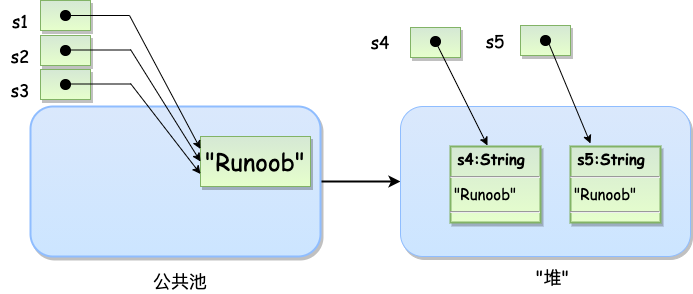
String s1 = "Runoob";              // String 直接创建
String s2 = "Runoob";              // String 直接创建
String s3 = s1;                    // 相同引用
String s4 = new String("Runoob");   // String 对象创建
String s5 = new String("Runoob");   // String 对象创建

public class StringDemo{
   public static void main(String args[]){
      char[] helloArray = { 'r', 'u', 'n', 'o', 'o', 'b'};
      String helloString = new String(helloArray);
      System.out.println( helloString );

       int len = helloString.length();
       System.out.println( len );
   }
}

// 连接字符串
string1.concat(string2);
"我的名字是 ".concat("Runoob");

// 创建格式化字符串
System.out.printf("浮点型变量的值为 " +
                  "%f, 整型变量的值为 " +
                  " %d, 字符串变量的值为 " +
                  "is %s", floatVar, intVar, stringVar);
String fs;
fs = String.format("浮点型变量的值为 " +
                   "%f, 整型变量的值为 " +
                   " %d, 字符串变量的值为 " +
                   " %s", floatVar, intVar, stringVar);

public class StringMethodsDemo {
    public static void main(String[] args) {
        // 1. 创建字符串
        String str1 = "Hello";
        String str2 = "World";
        String str3 = "  Java Programming  ";

        // 2. 基本方法
        System.out.println("1. charAt(1): " + str1.charAt(1));                     // e
        System.out.println("2. length(): " + str1.length());                       // 5
        System.out.println("3. isEmpty(): " + "".isEmpty());                       // true
        System.out.println("4. toString(): " + str1.toString());                   // Hello

        // 3. 比较方法
        System.out.println("5. equals(\"Hello\"): " + str1.equals("Hello"));        // true
        System.out.println("6. equalsIgnoreCase(\"hello\"): " + str1.equalsIgnoreCase("hello"));  // true
        System.out.println("7. compareTo(\"Hello\"): " + str1.compareTo("Hello"));  // 0
        System.out.println("8. compareTo(\"Hella\"): " + str1.compareTo("Hella"));  // 4
        System.out.println("9. compareToIgnoreCase(\"hello\"): " + str1.compareToIgnoreCase("hello"));  // 0

        // 4. 查找方法
        System.out.println("10. indexOf('l'): " + str1.indexOf('l'));              // 2
        System.out.println("11. indexOf('l', 3): " + str1.indexOf('l', 3));        // 3
        System.out.println("12. indexOf(\"lo\"): " + str1.indexOf("lo"));           // 3
        System.out.println("13. lastIndexOf('l'): " + str1.lastIndexOf('l'));      // 3
        System.out.println("14. contains(\"ell\"): " + str1.contains("ell"));       // true

        // 5. 连接和修改
        System.out.println("15. concat(\" World\"): " + str1.concat(" World"));    // Hello World
        System.out.println("16. toLowerCase(): " + str1.toLowerCase());            // hello
        System.out.println("17. toUpperCase(): " + str1.toUpperCase());            // HELLO
        System.out.println("18. trim(): " + str3.trim());                          // Java Programming

        // 6. 替换
        System.out.println("19. replace('l', 'x'): " + str1.replace('l', 'x'));    // Hexxo
        System.out.println("20. replaceAll(\"l\", \"x\"): " + str1.replaceAll("l", "x"));  // Hexxo
        System.out.println("21. replaceFirst(\"l\", \"x\"): " + str1.replaceFirst("l", "x"));  // Hexlo

        // 7. 子串
        System.out.println("22. substring(1): " + str1.substring(1));              // ello
        System.out.println("23. substring(1, 4): " + str1.substring(1, 4));         // ell
        System.out.println("24. subSequence(1, 4): " + str1.subSequence(1, 4));    // ell

        // 8. 拆分为数组
        String str4 = "a,b,c,d";
        String[] arr = str4.split(",");
        System.out.println("25. split(\",\"): " + String.join("|", arr));          // a|b|c|d

        String[] arr2 = str4.split(",", 2);
        System.out.println("26. split(\",\", 2): " + String.join("|", arr2));      // a|b,c,d

        // 9. 匹配和验证
        System.out.println("27. startsWith(\"He\"): " + str1.startsWith("He"));    // true
        System.out.println("28. startsWith(\"lo\", 3): " + str1.startsWith("lo", 3));  // true
        System.out.println("29. endsWith(\"lo\"): " + str1.endsWith("lo"));        // true
        System.out.println("30. matches(\"H.*o\"): " + str1.matches("H.*o"));      // true

        // 10. 转换为数组
        char[] chars = str1.toCharArray();
        System.out.println("31. toCharArray(): " + new String(chars));             // Hello

        byte[] bytes = str1.getBytes();
        System.out.println("32. getBytes(): " + new String(bytes));                // Hello

        char[] dest = new char[3];
        str1.getChars(0, 3, dest, 0);
        System.out.println("33. getChars(0,3): " + new String(dest));             // Hel

        // 11. 静态方法
        System.out.println("34. String.valueOf(123): " + String.valueOf(123));    // 123
        System.out.println("35. String.valueOf(3.14): " + String.valueOf(3.14));  // 3.14
        System.out.println("36. String.valueOf(true): " + String.valueOf(true));  // true

        char[] data = {'J', 'a', 'v', 'a'};
        System.out.println("37. copyValueOf(data): " + String.copyValueOf(data)); // Java
        System.out.println("38. copyValueOf(data,1,2): " + String.copyValueOf(data, 1, 2));  // av

        // 12. 其他
        System.out.println("39. hashCode(): " + str1.hashCode());                   // 整数哈希值
        System.out.println("40. intern(): " + (str1.intern() == "Hello".intern())); // true

        // 13. regionMatches
        String s1 = "Hello World";
        String s2 = "world";
        System.out.println("41. regionMatches(6, \"World\",0,5): " + s1.regionMatches(6, "World", 0, 5));  // true
        System.out.println("42. regionMatches(true,6,\"world\",0,5): " + s1.regionMatches(true, 6, "world", 0, 5));  // true

        // 14. contentEquals
        StringBuilder sb = new StringBuilder("Hello");
        System.out.println("43. contentEquals(sb): " + str1.contentEquals(sb));    // true
    }
}
StringBuilder、StringBuffer 类
在使用 StringBuffer 类时,每次都会对 StringBuffer 对象本身进行操作,而不是生成新的对象,所以如果需要对字符串进行修改推荐使用 StringBuffer。
StringBuilder 类在 Java 5 中被提出,它和 StringBuffer 之间的最大不同在于 StringBuilder 的方法不是线程安全的(不能同步访问)。
由于 StringBuilder 相较于 StringBuffer 有速度优势,所以多数情况下建议使用 StringBuilder 类。
java
// 非线程安全
public class RunoobTest{
    public static void main(String[] args){
        StringBuilder sb = new StringBuilder(10);
        sb.append("Runoob..");
        System.out.println(sb);  // Runoob..
        sb.append("!");
        System.out.println(sb);  // Runoob..!
        sb.insert(8, "Java");
        System.out.println(sb);  // Runoob..Java!
        sb.delete(5,8);
        System.out.println(sb);  // RunooJava!
    }
}

// 线程安全
public class Test{
  public static void main(String[] args){
    StringBuffer sBuffer = new StringBuffer("菜鸟教程官网:");
    sBuffer.append("www");
    sBuffer.append(".runoob");
    sBuffer.append(".com");
    System.out.println(sBuffer);
  }
}
public class StringBufferDemo {
    public static void main(String[] args) {
        // 创建StringBuffer对象
        StringBuffer sb = new StringBuffer("Hello");

        // 1. 追加操作
        sb.append(" World");
        System.out.println("1. append: " + sb);  // Hello World

        // 2. 反转
        sb.reverse();
        System.out.println("2. reverse: " + sb);  // dlroW olleH
        sb.reverse();  // 恢复原状

        // 3. 删除
        sb.delete(5, 11);
        System.out.println("3. delete: " + sb);  // Hello

        // 4. 插入
        sb.insert(5, " Java");
        System.out.println("4. insert: " + sb);  // Hello Java

        sb.insert(5, 123);
        System.out.println("5. insert int: " + sb);  // Hello123 Java

        // 6. 替换
        sb.replace(5, 8, "456");
        System.out.println("6. replace: " + sb);  // Hello456 Java

        // 7. 容量相关
        System.out.println("7. length: " + sb.length());  // 13
        System.out.println("8. capacity: " + sb.capacity());  // 21

        // 8. 确保容量
        sb.ensureCapacity(50);
        System.out.println("9. ensureCapacity后: " + sb.capacity());

        // 9. 获取字符
        System.out.println("10. charAt(0): " + sb.charAt(0));  // H

        // 10. 设置字符
        sb.setCharAt(0, 'h');
        System.out.println("11. setCharAt: " + sb);  // hello456 Java

        // 11. 复制到字符数组
        char[] dest = new char[5];
        sb.getChars(0, 5, dest, 0);
        System.out.println("12. getChars: " + new String(dest));  // hello

        // 12. 查找
        System.out.println("13. indexOf(\"Java\"): " + sb.indexOf("Java"));  // 9
        System.out.println("14. lastIndexOf(\"l\"): " + sb.lastIndexOf("l"));  // 3

        // 13. 设置长度
        sb.setLength(5);
        System.out.println("15. setLength(5): " + sb);  // hello

        // 14. 子串
        sb.append(" World!");
        System.out.println("16. substring(6): " + sb.substring(6));  // World!
        System.out.println("17. substring(6, 9): " + sb.substring(6, 9));  // Wor

        // 15. 子序列
        CharSequence seq = sb.subSequence(0, 5);
        System.out.println("18. subSequence(0,5): " + seq);  // hello

        // 16. 转字符串
        System.out.println("19. toString: " + sb.toString());  // hello World!
    }
}
数组、日期时间、正则表达式
新项目优先使用 java.time 包 (Java 8+)
避免使用老旧的 Date 和 Calendar 类
明确区分使用时区:
不需要时区:LocalDate/LocalTime/LocalDateTime
需要时区:ZonedDateTime
格式化时考虑线程安全:使用 DateTimeFormatter 而非 SimpleDateFormat
数据库交互:
JDBC 4.2+ 直接支持 java.time 类型
旧版本可转换为 java.sql.Date/Timestamp
java
// 数组太熟悉了,略

// 日期时间
import java.time.LocalDate;
import java.time.format.DateTimeFormatter;

public class RunoobTest {
    public static void main(String[] args) {
        // 获取当前日期
        LocalDate today = LocalDate.now();
        System.out.println("当前日期: " + today);  // 当前日期: 2025-05-01

        // 创建特定日期
        LocalDate nationalDay = LocalDate.of(2025, 10, 1);
        System.out.println("国庆节: " + nationalDay);  // 国庆节: 2025-10-01

        // 日期加减
        LocalDate tomorrow = today.plusDays(1);
        LocalDate nextMonth = today.plusMonths(1);
        LocalDate lastYear = today.minusYears(1);

        System.out.println("明天: " + tomorrow);  // 明天: 2025-05-02
        System.out.println("下个月: " + nextMonth);  // 下个月: 2025-06-01
        System.out.println("去年今天: " + lastYear);  // 去年今天: 2024-05-01
    }
}

// LocalDate日期
LocalDate today = LocalDate.now();
LocalDate date = LocalDate.of(2023, Month.JUNE, 15);
int year = date.getYear();  // 2023
Month month = date.getMonth();  // JUNE
int day = date.getDayOfMonth();  // 15
LocalDate nextWeek = today.plusWeeks(1);
boolean isLeap = date.isLeapYear();  // 是否闰年

// LocalTime 时间
LocalTime now = LocalTime.now();
LocalTime time = LocalTime.of(14, 30, 45);  // 14:30:45
int hour = time.getHour();  // 14
int minute = time.getMinute();  // 30
LocalTime nextHour = time.plusHours(1);

// ZonedDateTime 带时区日期时间
ZonedDateTime zdt = ZonedDateTime.now(ZoneId.of("Asia/Shanghai"));
ZonedDateTime nyTime = zdt.withZoneSameInstant(ZoneId.of("America/New_York"));
ZoneId zone = zdt.getZone();  // 获取时区

// Instant 时间戳
Instant now = Instant.now();  // 获取当前时间戳
Instant later = now.plusSeconds(60);  // 60秒后
long epochMilli = now.toEpochMilli();  // 获取毫秒时间戳

// 获取当前日期时间
import java.util.Date;

public class DateDemo {
   public static void main(String[] args) {
       // 初始化 Date 对象
       Date date = new Date();

       // 使用 toString() 函数显示日期时间
       System.out.println(date.toString()); // Mon May 04 09:51:52 CDT 2013
   }
}

// 日期比较
import java.util.Date;

public class DateComparison {
    public static void main(String[] args) {
        Date date1 = new Date(121, 5, 15); // 2021年6月15日
        Date date2 = new Date(121, 5, 20); // 2021年6月20日

        // 比较毫秒数
        if (date1.getTime() < date2.getTime()) {
            System.out.println("date1 在 date2 之前");
        } else if (date1.getTime() > date2.getTime()) {
            System.out.println("date1 在 date2 之后");
        } else {
            System.out.println("两个日期相同");
        }

        // 使用 before() 方法
        System.out.println("date1 在 date2 之前吗? " + date1.before(date2));

        // 使用 after() 方法
        System.out.println("date1 在 date2 之后吗? " + date1.after(date2));

        // 使用 equals() 方法
        System.out.println("两个日期相同吗? " + date1.equals(date2));

        int result = date1.compareTo(date2);

        if (result < 0) {
            System.out.println("date1 在 date2 之前");
        } else if (result > 0) {
            System.out.println("date1 在 date2 之后");
        } else {
            System.out.println("两个日期相同");
        }
    }
}

// 使用 SimpleDateFormat 格式化日期
import  java.util.*;
import java.text.*;

public class DateDemo {
   public static void main(String[] args) {

      Date dNow = new Date( );
      SimpleDateFormat ft = new SimpleDateFormat ("yyyy-MM-dd hh:mm:ss");

      System.out.println("当前时间为: " + ft.format(dNow));  // 当前时间为: 2018-09-06 10:16:34
   }
}

import java.util.Date;
public class DateFormatExample {
   public static void main(String[] args) {
      Date date = new Date();
      System.out.printf("%tY-%tm-%td %tH:%tM:%tS %tZ", date, date, date, date, date, date, date);
   }
}

import java.util.*;

public class DateDemo {
   public static void main(String[] args) {
       Date date=new Date();
        //b的使用,月份简称
        String str=String.format(Locale.US,"英文月份简称:%tb",date);
        System.out.println(str);
        System.out.printf("本地月份简称:%tb%n",date);
        //B的使用,月份全称
        str=String.format(Locale.US,"英文月份全称:%tB",date);
        System.out.println(str);
        System.out.printf("本地月份全称:%tB%n",date);
        //a的使用,星期简称
        str=String.format(Locale.US,"英文星期的简称:%ta",date);
        System.out.println(str);
        //A的使用,星期全称
        System.out.printf("本地星期的简称:%tA%n",date);
        //C的使用,年前两位
        System.out.printf("年的前两位数字(不足两位前面补0):%tC%n",date);
        //y的使用,年后两位
        System.out.printf("年的后两位数字(不足两位前面补0):%ty%n",date);
        //j的使用,一年的天数
        System.out.printf("一年中的天数(即年的第几天):%tj%n",date);
        //m的使用,月份
        System.out.printf("两位数字的月份(不足两位前面补0):%tm%n",date);
        //d的使用,日(二位,不够补零)
        System.out.printf("两位数字的日(不足两位前面补0):%td%n",date);
        //e的使用,日(一位不补零)
        System.out.printf("月份的日(前面不补0):%te",date);
   }
}

import java.util.*;
import java.text.*;

public class DateDemo {

   public static void main(String[] args) {
      SimpleDateFormat ft = new SimpleDateFormat ("yyyy-MM-dd");

      String input = args.length == 0 ? "1818-11-11" : args[0];

      System.out.print(input + " Parses as ");

      Date t;

      try {
          t = ft.parse(input);
          System.out.println(t);
      } catch (ParseException e) {
          System.out.println("Unparseable using " + ft);
      }
   }

    // $ java DateDemo
    // 1818-11-11 Parses as Wed Nov 11 00:00:00 GMT 1818
    // $ java DateDemo 2007-12-01
    // 2007-12-01 Parses as Sat Dec 01 00:00:00 GMT 2007
}

import java.util.*;

public class GregorianCalendarDemo {

   public static void main(String[] args) {
      String months[] = {
      "Jan", "Feb", "Mar", "Apr",
      "May", "Jun", "Jul", "Aug",
      "Sep", "Oct", "Nov", "Dec"};

      int year;
      // 初始化 Gregorian 日历
      // 使用当前时间和日期
      // 默认为本地时间和时区
      GregorianCalendar gcalendar = new GregorianCalendar();
      // 显示当前时间和日期的信息
      System.out.print("Date: ");
      System.out.print(months[gcalendar.get(Calendar.MONTH)]);
      System.out.print(" " + gcalendar.get(Calendar.DATE) + " ");
      System.out.println(year = gcalendar.get(Calendar.YEAR));
      System.out.print("Time: ");
      System.out.print(gcalendar.get(Calendar.HOUR) + ":");
      System.out.print(gcalendar.get(Calendar.MINUTE) + ":");
      System.out.println(gcalendar.get(Calendar.SECOND));

      // 测试当前年份是否为闰年
      if(gcalendar.isLeapYear(year)) {
         System.out.println("当前年份是闰年");
      }
      else {
         System.out.println("当前年份不是闰年");
      }
   }
    // Date: Apr 22 2009
    // Time: 11:25:27
    // 当前年份不是闰年
}
正则表达式(不熟悉)、方法(略)、构造方法(略)
java
import java.util.regex.*;

class RegexExample1{
   public static void main(String[] args){
      String content = "I am noob " +
        "from runoob.com.";

      String pattern = ".*runoob.*";

      boolean isMatch = Pattern.matches(pattern, content);
      System.out.println("字符串中是否包含了 'runoob' 子字符串? " + isMatch);  // 字符串中是否包含了 'runoob' 子字符串? true
   }
}
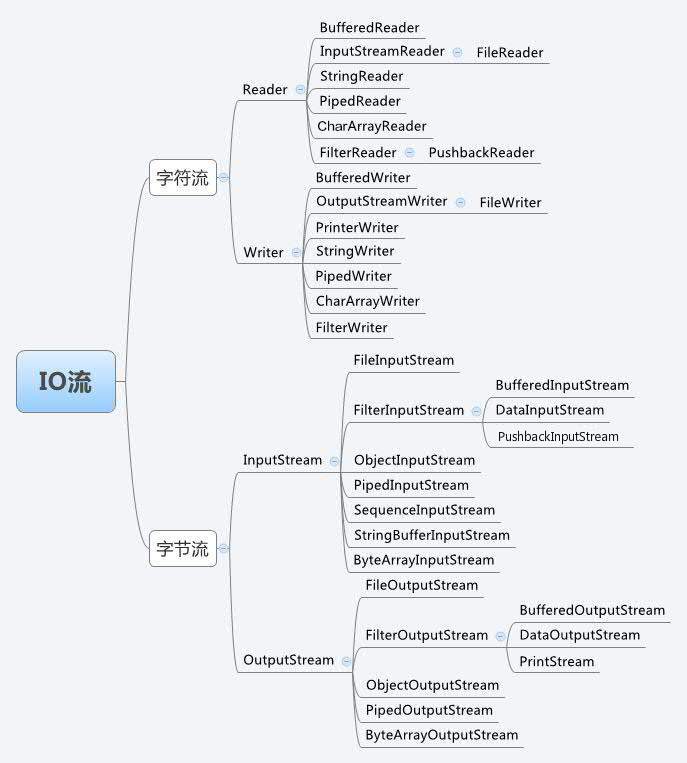
流(Stream)、文件(File)和 IO
java
// BufferedReader 对象创建后,我们便可以使用 read() 方法从控制台读取一个字符,
// 或者用 readLine() 方法读取一个字符串。

// 从控制台读取多字符输入
// 使用 BufferedReader 在控制台读取字符
import java.io.*;

public class BRRead {
    public static void main(String[] args) throws IOException {
        char c;
        // 使用 System.in 创建 BufferedReader
        BufferedReader br = new BufferedReader(new InputStreamReader(System.in));
        System.out.println("输入字符, 按下 'q' 键退出。");
        // 读取字符
        do {
            c = (char) br.read();
            System.out.println(c);
        } while (c != 'q');
    }
    // 输入字符, 按下 'q' 键退出。
    // runoob
    // r
    // u
    // n
    // o
    // o
    // b
    //
    //
    // q
    // q
}

// 从控制台读取字符串
String readLine( ) throws IOException

//使用 BufferedReader 在控制台读取字符
import java.io.*;

public class BRReadLines {
    public static void main(String[] args) throws IOException {
        // 使用 System.in 创建 BufferedReader
        BufferedReader br = new BufferedReader(new InputStreamReader(System.in));
        String str;
        System.out.println("Enter lines of text.");
        System.out.println("Enter 'end' to quit.");
        do {
            str = br.readLine();
            System.out.println(str);
        } while (!str.equals("end"));
    }
    // Enter lines of text.
    // Enter 'end' to quit.
    // This is line one
    // This is line one
    // This is line two
    // This is line two
    // end
    // end
}

// 控制台输出
import java.io.*;

// 下面的例子用 write() 把字符 "A" 和紧跟着的换行符输出到屏幕
//演示 System.out.write().
public class WriteDemo {
    public static void main(String[] args) {
        int b;
        b = 'A';
        System.out.write(b);
        System.out.write('\n');
    }
}

// FileInputStream
// 该流用于从文件读取数据,它的对象可以用关键字 new 来创建。
// 有多种构造方法可用来创建对象。
// 可以使用字符串类型的文件名来创建一个输入流对象来读取文件
InputStream f = new FileInputStream("C:/java/hello");

// 也可以使用一个文件对象来创建一个输入流对象来读取文件。
// 我们首先得使用 File() 方法来创建一个文件对象
File f = new File("C:/java/hello");
InputStream in = new FileInputStream(f);

// FileOutputStream
// 该类用来创建一个文件并向文件中写数据。
// 如果该流在打开文件进行输出前,目标文件不存在,那么该流会创建该文件。
// 有两个构造方法可以用来创建 FileOutputStream 对象。
// 使用字符串类型的文件名来创建一个输出流对象
OutputStream f = new FileOutputStream("C:/java/hello")

// 也可以使用一个文件对象来创建一个输出流来写文件。
// 我们首先得使用File()方法来创建一个文件对象
File f = new File("C:/java/hello");
OutputStream fOut = new FileOutputStream(f);

import java.io.*;

public class fileStreamTest {
    public static void main(String[] args) {
        try {
            byte bWrite[] = { 11, 21, 3, 40, 5 };
            OutputStream os = new FileOutputStream("test.txt");
            for (int x = 0; x < bWrite.length; x++) {
                os.write(bWrite[x]); // writes the bytes
            }
            os.close();

            InputStream is = new FileInputStream("test.txt");
            int size = is.available();

            for (int i = 0; i < size; i++) {
                System.out.print((char) is.read() + "  ");
            }
            is.close();
        } catch (IOException e) {
            System.out.print("Exception");
        }
    }
}

// 上面的程序首先创建文件test.txt,并把给定的数字以二进制形式写进该文件,同时输出到控制台上。
// 以上代码由于是二进制写入,可能存在乱码,你可以使用以下代码实例来解决乱码问题
//文件名 :fileStreamTest2.java
import java.io.*;

public class fileStreamTest2 {
    public static void main(String[] args) throws IOException {

        File f = new File("a.txt");
        FileOutputStream fop = new FileOutputStream(f);
        // 构建FileOutputStream对象,文件不存在会自动新建

        OutputStreamWriter writer = new OutputStreamWriter(fop, "UTF-8");
        // 构建OutputStreamWriter对象,参数可以指定编码,默认为操作系统默认编码,windows上是gbk

        writer.append("中文输入");
        // 写入到缓冲区

        writer.append("\r\n");
        // 换行

        writer.append("English");
        // 刷新缓存冲,写入到文件,如果下面已经没有写入的内容了,直接close也会写入

        writer.close();
        // 关闭写入流,同时会把缓冲区内容写入文件,所以上面的注释掉

        fop.close();
        // 关闭输出流,释放系统资源

        FileInputStream fip = new FileInputStream(f);
        // 构建FileInputStream对象

        InputStreamReader reader = new InputStreamReader(fip, "UTF-8");
        // 构建InputStreamReader对象,编码与写入相同

        StringBuffer sb = new StringBuffer();
        while (reader.ready()) {
            sb.append((char) reader.read());
            // 转成char加到StringBuffer对象中
        }
        System.out.println(sb.toString());
        reader.close();
        // 关闭读取流

        fip.close();
        // 关闭输入流,释放系统资源

    }
}

// 创建目录
// mkdir( )方法创建一个文件夹,成功则返回true,失败则返回false。
// 失败表明File对象指定的路径已经存在,或者由于整个路径还不存在,该文件夹不能被创建。
// mkdirs()方法创建一个文件夹和它的所有父文件夹。
import java.io.File;

public class CreateDir {
    public static void main(String[] args) {
        String dirname = "/tmp/user/java/bin";
        File d = new File(dirname);
        // 现在创建目录
        d.mkdirs();
    }
}
// 注意: Java 在 UNIX 和 Windows 自动按约定分辨文件路径分隔符。
// 如果你在 Windows 版本的 Java 中使用分隔符 (/) ,路径依然能够被正确解析。

// 读取目录
import java.io.File;

public class DirList {
    public static void main(String args[]) {
        String dirname = "/tmp";
        File f1 = new File(dirname);
        if (f1.isDirectory()) {
            System.out.println("目录 " + dirname);
            String s[] = f1.list();
            for (int i = 0; i < s.length; i++) {
                File f = new File(dirname + "/" + s[i]);
                if (f.isDirectory()) {
                    System.out.println(s[i] + " 是一个目录");
                } else {
                    System.out.println(s[i] + " 是一个文件");
                }
            }
        } else {
            System.out.println(dirname + " 不是一个目录");
        }
    }
    // 目录 /tmp
    // bin 是一个目录
    // lib 是一个目录
    // demo 是一个目录
    // test.txt 是一个文件
    // README 是一个文件
    // index.html 是一个文件
    // include 是一个目录
}

// 删除目录或文件
// 删除文件可以使用 java.io.File.delete() 方法。
// 以下代码会删除目录 /tmp/java/,需要注意的是当删除某一目录时,
// 必须保证该目录下没有其他文件才能正确删除,否则将删除失败。
import java.io.File;

public class DeleteFileDemo {
    public static void main(String[] args) {
        // 这里修改为自己的测试目录
        File folder = new File("/tmp/java/");
        deleteFolder(folder);
    }

    // 删除文件及目录
    public static void deleteFolder(File folder) {
        File[] files = folder.listFiles();
        if (files != null) {
            for (File f : files) {
                if (f.isDirectory()) {
                    deleteFolder(f);
                } else {
                    f.delete();
                }
            }
        }
        folder.delete();
    }
}
Scanner 类
java
// next 方法
import java.util.Scanner;

public class ScannerDemo {
    public static void main(String[] args) {
        Scanner scan = new Scanner(System.in);
        // 从键盘接收数据

        // next方式接收字符串
        System.out.println("next方式接收:");
        // 判断是否还有输入
        if (scan.hasNext()) {
            String str1 = scan.next();
            System.out.println("输入的数据为:" + str1);
        }
        scan.close();
    }
    // $ javac ScannerDemo.java
    // $ java ScannerDemo
    // next方式接收:
    // runoob com
    // 输入的数据为:runoob
}

// nextLine 方法
import java.util.Scanner;

public class ScannerDemo {
    public static void main(String[] args) {
        Scanner scan = new Scanner(System.in);
        // 从键盘接收数据

        // nextLine方式接收字符串
        System.out.println("nextLine方式接收:");
        // 判断是否还有输入
        if (scan.hasNextLine()) {
            String str2 = scan.nextLine();
            System.out.println("输入的数据为:" + str2);
        }
        scan.close();
    }
    // $ javac ScannerDemo.java
    // $ java ScannerDemo
    // nextLine方式接收:
    // runoob com
    // 输入的数据为:runoob com
}

// 如果要输入 int 或 float 类型的数据,在 Scanner 类中也有支持,
// 但是在输入之前最好先使用 hasNextXxx() 方法进行验证,再使用 nextXxx() 来读取
import java.util.Scanner;

public class ScannerDemo {
    public static void main(String[] args) {
        Scanner scan = new Scanner(System.in);
        // 从键盘接收数据
        int i = 0;
        float f = 0.0f;
        System.out.print("输入整数:");
        if (scan.hasNextInt()) {
            // 判断输入的是否是整数
            i = scan.nextInt();
            // 接收整数
            System.out.println("整数数据:" + i);
        } else {
            // 输入错误的信息
            System.out.println("输入的不是整数!");
        }
        System.out.print("输入小数:");
        if (scan.hasNextFloat()) {
            // 判断输入的是否是小数
            f = scan.nextFloat();
            // 接收小数
            System.out.println("小数数据:" + f);
        } else {
            // 输入错误的信息
            System.out.println("输入的不是小数!");
        }
        scan.close();
    }
}

// 以下实例我们可以输入多个数字,并求其总和与平均数,
// 每输入一个数字用回车确认,通过输入非数字来结束输入并输出执行结果
import java.util.Scanner;

class RunoobTest {
    public static void main(String[] args) {
        System.out.println("请输入数字:");
        Scanner scan = new Scanner(System.in);

        double sum = 0;
        int m = 0;

        while (scan.hasNextDouble()) {
            double x = scan.nextDouble();
            m = m + 1;
            sum = sum + x;
        }

        System.out.println(m + "个数的和为" + sum);
        System.out.println(m + "个数的平均值是" + (sum / m));
        scan.close();
    }
}
next() 与 nextLine() 区别
next():
- 1、一定要读取到有效字符后才可以结束输入。
- 2、对输入有效字符之前遇到的空白,next() 方法会自动将其去掉。
- 3、只有输入有效字符后才将其后面输入的空白作为分隔符或者结束符。
- next() 不能得到带有空格的字符串。
nextLine():
- 1、以Enter为结束符,也就是说 nextLine()方法返回的是输入回车之前的所有字符。
- 2、可以获得空白。
异常处理
在 Java 中,异常处理是一种重要的编程概念,用于处理程序执行过程中可能出现的错误或异常情况。
异常是程序中的一些错误,但并不是所有的错误都是异常,并且错误有时候是可以避免的。
比如说,你的代码少了一个分号,那么运行出来结果是提示是错误 java.lang.Error,如果你用 System.out.println(11/0),那么你是因为你用 0 做了除数,会抛出 java.lang.ArithmeticException 的异常。
异常发生的原因有很多,通常包含以下几大类:
- 用户输入了非法数据。
- 要打开的文件不存在。
- 网络通信时连接中断,或者JVM内存溢出。
这些异常有的是因为用户错误引起,有的是程序错误引起的,还有其它一些是因为物理错误引起的。
要理解 Java 异常处理是如何工作的,你需要掌握以下三种类型的异常:
- **检查性异常:**最具代表的检查性异常是用户错误或问题引起的异常,这些异常在编译时强制要求程序员处理。例如要打开一个不存在文件时,一个异常就发生了,这些异常在编译时不能被简单地忽略。这类异常通常使用 try-catch 块来捕获并处理异常,或者在方法声明中使用 throws 子句声明方法可能抛出的异常。
java
try {
    // 可能会抛出异常的代码
} catch (IOException e) {
    // 处理异常的代码
}
或者:
java
public void readFile() throws IOException {
    // 可能会抛出IOException的代码
}- 运行时异常: 这些异常在编译时不强制要求处理,通常是由程序中的错误引起的,例如 NullPointerException、ArrayIndexOutOfBoundsException 等,这类异常可以选择处理,但并非强制要求。
java
try {
    // 可能会抛出异常的代码
} catch (NullPointerException e) {
    // 处理异常的代码
}- 错误: 错误不是异常,而是脱离程序员控制的问题,错误在代码中通常被忽略。例如,当栈溢出时,一个错误就发生了,它们在编译也检查不到的。
Java 提供了以下关键字和类来支持异常处理:
- try:用于包裹可能会抛出异常的代码块。
- catch:用于捕获异常并处理异常的代码块。
- finally:用于包含无论是否发生异常都需要执行的代码块。
- throw:用于手动抛出异常。
- throws:用于在方法声明中指定方法可能抛出的异常。
- Exception 类:是所有异常类的父类,它提供了一些方法来获取异常信息,如 getMessage()、printStackTrace() 等。
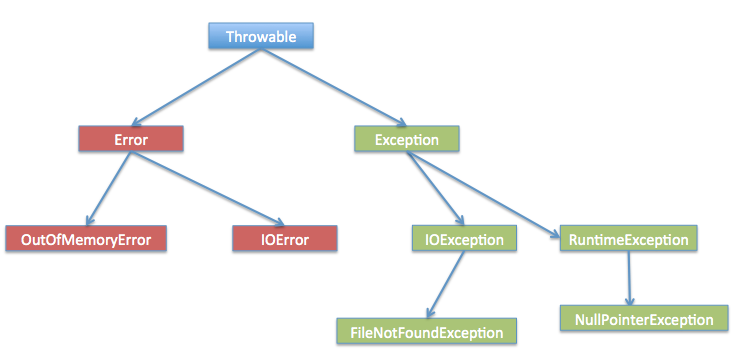
Exception 类的层次
所有的异常类是从 java.lang.Exception 类继承的子类。
Exception 类是 Throwable 类的子类。除了Exception类外,Throwable还有一个子类Error 。
Java 程序通常不捕获错误。错误一般发生在严重故障时,它们在Java程序处理的范畴之外。
Error 用来指示运行时环境发生的错误。
例如,JVM 内存溢出。一般地,程序不会从错误中恢复。
异常类有两个主要的子类:IOException 类和 RuntimeException 类。
java
// 捕获异常
// 文件名 : ExcepTest.java
import java.io.*;
public class ExcepTest{

   public static void main(String args[]){
      try{
         int a[] = new int[2];
         System.out.println("Access element three :" + a[3]);
      }catch(ArrayIndexOutOfBoundsException e){
         System.out.println("Exception thrown  :" + e);
      }
      System.out.println("Out of the block");
       // Exception thrown  :java.lang.ArrayIndexOutOfBoundsException: 3
       // Out of the block
   }
}

// 多重 try-catch
try {
    file = new FileInputStream(fileName);
    x = (byte) file.read();
} catch(FileNotFoundException f) { // Not valid!
    f.printStackTrace();
    return -1;
} catch(IOException i) {
    i.printStackTrace();
    return -1;
}


// 多异常合并
// 需要注意:
//     异常类型1、异常类型2 等 不能有继承关系,否则会导致编译错误。
//     异常变量名 是这三种异常的共同引用变量,因此在 catch 块内你不能调用它们特有的方法。
//     编译器会推断出这个异常变量的类型为这几个异常的最近公共父类(比如 Exception 或 IOException)。

// 如下这种互不继承的异常,同时可能抛出 SQLException 和 IOException:
try {
    // 同时可能抛出 SQL 和 IO 异常
    doSomething();
} catch (SQLException | IOException e) {
    System.out.println("发生了 SQL 或 IO 异常!");
    e.printStackTrace();
}

// 错误写法!
// FileNotFoundException 是 IOException 的子类,
// 所以这个写法实际上是不合法的,会报编译错误。
catch (FileNotFoundException | IOException e) {
    // 会导致编译错误,因为 FileNotFoundException 是 IOException 的子类
}

// throw/throws 关键字
public void checkNumber(int num) {
  if (num < 0) {
    throw new IllegalArgumentException("Number must be positive");
  }
}

public void readFile(String filePath) throws IOException {
  BufferedReader reader = new BufferedReader(new FileReader(filePath));
  String line = reader.readLine();
  while (line != null) {
    System.out.println(line);
    line = reader.readLine();
  }
  reader.close();
}

import java.io.*;
public class className
{
   public void withdraw(double amount) throws RemoteException,
                              InsufficientFundsException
   {
       // Method implementation
   }
   //Remainder of class definition
}

// Finally 关键字
public class ExcepTest{
  public static void main(String args[]){
    int a[] = new int[2];
    try{
       System.out.println("Access element three :" + a[3]);
    }catch(ArrayIndexOutOfBoundsException e){
       System.out.println("Exception thrown  :" + e);
    }
    finally{
       a[0] = 6;
       System.out.println("First element value: " +a[0]);
       System.out.println("The finally statement is executed");
    }
  }
    // Exception thrown  :java.lang.ArrayIndexOutOfBoundsException: 3
    // First element value: 6
    // The finally statement is executed
}

// try-with-resources
import java.io.*;

public class RunoobTest {

    public static void main(String[] args) {
    String line;
        try(BufferedReader br = new BufferedReader(new FileReader("test.txt"))) {
            while ((line = br.readLine()) != null) {
                System.out.println("Line =>"+line);
            }
        } catch (IOException e) {
            System.out.println("IOException in try block =>" + e.getMessage());
        }
    }
    // IOException in try block =>test.txt (No such file or directory)
}

import java.io.*;

class RunoobTest {
    public static void main(String[] args) {
        BufferedReader br = null;
        String line;

        try {
            System.out.println("Entering try block");
            br = new BufferedReader(new FileReader("test.txt"));
            while ((line = br.readLine()) != null) {
            System.out.println("Line =>"+line);
            }
        } catch (IOException e) {
            System.out.println("IOException in try block =>" + e.getMessage());
        } finally {
            System.out.println("Entering finally block");
            try {
                if (br != null) {
                    br.close();
                }
            } catch (IOException e) {
                System.out.println("IOException in finally block =>"+e.getMessage());
            }
        }
    }
}

// try-with-resources 处理多个资源
import java.io.*;
import java.util.*;
class RunoobTest {
    public static void main(String[] args) throws IOException{
        try (Scanner scanner = new Scanner(new File("testRead.txt"));
            PrintWriter writer = new PrintWriter(new File("testWrite.txt"))) {
            while (scanner.hasNext()) {
                writer.print(scanner.nextLine());
            }
        }
    }
}

// 声明自定义异常
class MyException extends Exception{
}

// 文件名InsufficientFundsException.java
import java.io.*;

//自定义异常类,继承Exception类
public class InsufficientFundsException extends Exception
{
  //此处的amount用来储存当出现异常(取出钱多于余额时)所缺乏的钱
  private double amount;
  public InsufficientFundsException(double amount)
  {
    this.amount = amount;
  }
  public double getAmount()
  {
    return amount;
  }
}

// 文件名称 CheckingAccount.java
import java.io.*;

//此类模拟银行账户
public class CheckingAccount
{
  //balance为余额,number为卡号
   private double balance;
   private int number;
   public CheckingAccount(int number)
   {
      this.number = number;
   }
  //方法:存钱
   public void deposit(double amount)
   {
      balance += amount;
   }
  //方法:取钱
   public void withdraw(double amount) throws
                              InsufficientFundsException
   {
      if(amount <= balance)
      {
         balance -= amount;
      }
      else
      {
         double needs = amount - balance;
         throw new InsufficientFundsException(needs);
      }
   }
  //方法:返回余额
   public double getBalance()
   {
      return balance;
   }
  //方法:返回卡号
   public int getNumber()
   {
      return number;
   }
}

// 文件名称 CheckingAccount.java
import java.io.*;

//此类模拟银行账户
public class CheckingAccount
{
  //balance为余额,number为卡号
   private double balance;
   private int number;
   public CheckingAccount(int number)
   {
      this.number = number;
   }
  //方法:存钱
   public void deposit(double amount)
   {
      balance += amount;
   }
  //方法:取钱
   public void withdraw(double amount) throws
                              InsufficientFundsException
   {
      if(amount <= balance)
      {
         balance -= amount;
      }
      else
      {
         double needs = amount - balance;
         throw new InsufficientFundsException(needs);
      }
   }
  //方法:返回余额
   public double getBalance()
   {
      return balance;
   }
  //方法:返回卡号
   public int getNumber()
   {
      return number;
   }
}

//文件名称 BankDemo.java
public class BankDemo
{
   public static void main(String [] args)
   {
      CheckingAccount c = new CheckingAccount(101);
      System.out.println("Depositing $500...");
      c.deposit(500.00);
      try
      {
         System.out.println("\nWithdrawing $100...");
         c.withdraw(100.00);
         System.out.println("\nWithdrawing $600...");
         c.withdraw(600.00);
      }catch(InsufficientFundsException e)
      {
         System.out.println("Sorry, but you are short $"
                                  + e.getAmount());
         e.printStackTrace();
      }
    }
    // Depositing $500...

    // Withdrawing $100...

    // Withdrawing $600...
    // Sorry, but you are short $200.0
    // InsufficientFundsException
    //         at CheckingAccount.withdraw(CheckingAccount.java:25)
    //         at BankDemo.main(BankDemo.java:13)

}