1、在mysql 5.7.44 创建库和表
create database pk_flink;
create table student(id int(11) not null auto_increment,name varchar(25),age int(10),primary key(id));
#准备数据
insert into studnet(name,age) values("zyb",38),("gxj",36);
insert into student(name,age) values("zyb",38),("gxj",36);
2、pom.xml 添加依赖
<dependency>
    <groupId>com.mysql</groupId>
    <artifactId>mysql-connector-j</artifactId>
    <version>8.0.33</version>
</dependency>
3、MySQLUtils 工具开发
package com.zyb.flink.basic.utils;

import java.sql.Connection;
import java.sql.DriverManager;

public class MySQLUtils {
    /**
     * 获取Connection
     * @return
     * @throws Exception
     */
    public static Connection getConnection() throws Exception{
        Class.forName("com.mysql.cj.jdbc.Driver");
        return DriverManager.getConnection("jdbc:mysql://192.168.254.80:3306/pk_flink","root","123456");
    }

    /**
     * 关闭Connection
     * @param closeable
     */
    public static void close(AutoCloseable closeable) {
        if (null!= closeable){
            try {
                closeable.close();
            }catch (Exception e){
                e.printStackTrace();
            }finally {
                closeable=null;
            }

        }
    }

}
4、创建Student bean对象
package com.zyb.flink.basic.bean;

public class Student {
    private int id;
    private String name;
    private int age;

    public Student(int id, String name, int age) {
        this.id = id;
        this.name = name;
        this.age = age;
    }

    public Student() {
    }

    @Override
    public String toString() {
        return "Student{" +
                "id=" + id +
                ", name='" + name + '\'' +
                ", age=" + age +
                '}';
    }

    public int getId() {
        return id;
    }

    public void setId(int id) {
        this.id = id;
    }

    public String getName() {
        return name;
    }

    public void setName(String name) {
        this.name = name;
    }

    public int getAge() {
        return age;
    }

    public void setAge(int age) {
        this.age = age;
    }
}
5、MySQL Source 开发代码
package com.zyb.flink.basic.source;

import com.zyb.flink.basic.bean.Student;
import com.zyb.flink.basic.utils.MySQLUtils;
import org.apache.flink.configuration.Configuration;
import org.apache.flink.streaming.api.functions.source.RichSourceFunction;

import java.sql.Connection;
import java.sql.PreparedStatement;
import java.sql.ResultSet;

public class MysqlSource extends RichSourceFunction<Student> {
    Connection connection;
    PreparedStatement pstmt;

    /**
     * 获取 数据库连接connection
     * @param parameters
     * @throws Exception
     */
    @Override
    public void open(Configuration parameters) throws Exception {
        connection = MySQLUtils.getConnection();
        pstmt=connection.prepareStatement("select * from student;");
    }

    /**
     * 关闭connection
     * @throws Exception
     */
    @Override
    public void close() throws Exception {
        MySQLUtils.close(pstmt);
        MySQLUtils.close(connection);
    }

    /**
     * 业务逻辑
     * @param ctx
     * @throws Exception
     */
    @Override
    public void run(SourceContext<Student> ctx) throws Exception {
        ResultSet rs = pstmt.executeQuery();
        while (rs.next()){
            int id = rs.getInt("id");
            String name = rs.getString("name");
            int age = rs.getInt("age");
            Student student = new Student(id,name,age);
            ctx.collect(student);
        }
    }

    @Override
    public void cancel() {

    }


}
6、测试结果
package com.zyb.flink.basic;
import com.zyb.flink.basic.bean.Student;
import com.zyb.flink.basic.source.MysqlSource;
import org.apache.flink.streaming.api.datastream.DataStreamSource;
import org.apache.flink.streaming.api.environment.StreamExecutionEnvironment;


public class TestMySQLSource {
    public static void main(String[] args) throws Exception {

        //获取flink 上下文环境
        StreamExecutionEnvironment env = StreamExecutionEnvironment.getExecutionEnvironment();

        //获取自定义数据源
        DataStreamSource<Student> source = env.addSource(new MysqlSource());
        source.print();


        //执行
        env.execute();
    }


}
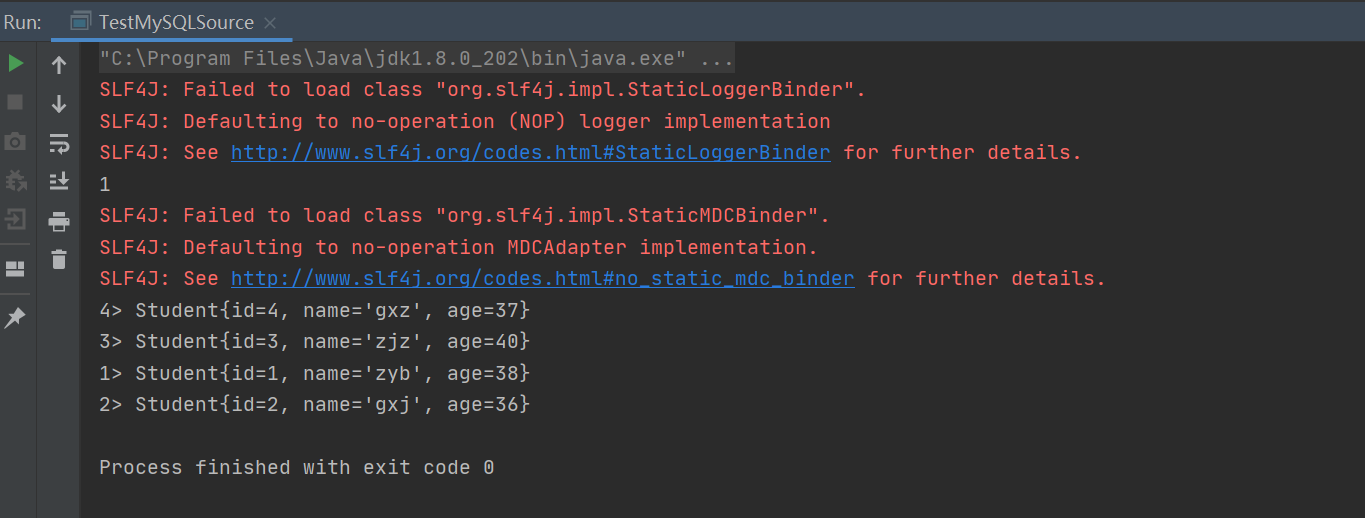
结果: