使用ultralytics库将YOLO26模型文件yolo26m.pt转换为onnx格式的模型文件,然后调用Microsoft.ML.OnnxRuntime获取模型信息,如下图所示:
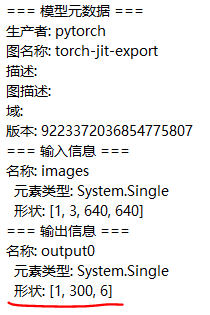
yolo26m.onnx模型的输入形状与yolo5相同,但输出形状变成了1,300,6,第一维还是代表一次处理的图片数量,第二维为预测框的总数量,也即每张图片的预测结果数量,第三维为每个预测框的特征向量长度,由于YOLO26采用端到端无NMS推理,直接输出最终检测结果,因此第三维的长度急剧减少,主要包括x1, y1, x2, y2, confidence, class_id等6个值,前4个值为预测框的左上角和右下角坐标,confidence为置信度分数,class_id为COCO类别的索引值。
基于之前调用Microsoft.ML.OnnxRuntime+OpenCvSharp+YOLO5的源码,调整模型预测结果的后处理函数及坐标变换函数逻辑如下:
csharp
public (int x, int y, int w, int h) ScaleCoordinatesOfYolo26(
    float xl, float yl, float xr, float yr,
    int originalWidth, int originalHeight,
    int inputSize = 640)
{
    // 计算缩放比例
    float scale = Math.Min((float)inputSize / originalWidth, (float)inputSize / originalHeight);

    // 计算填充尺寸
    int padX = (int)((inputSize - originalWidth * scale) / 2);
    int padY = (int)((inputSize - originalHeight * scale) / 2);

    // 映射回原始图像坐标
    int scaledX = (int)((xl - padX) / scale);
    int scaledY = (int)((yl - padY) / scale);
    int scaledW = (int)((xr-xl) / scale);
    int scaledH = (int)((yr-yl) / scale);

    return (scaledX, scaledY, scaledW, scaledH);
}

public List<DetectionResult> ProcessDetectionsOfYolo26(
   DenseTensor<float> output,
   int originalWidth,
   int originalHeight,
   float confidenceThreshold = 0.8f)
{
    var detections = new List<DetectionResult>();

    // 解析输出张量 (1, 300, 6) - 假设80个类别
    int numDetections = output.Dimensions[1];

    for (int i = 0; i < numDetections; i++)
    {
        // 提取对象置信度
        float objectConfidence = output[0,i,4];

        // 获取最高概率类别
        int classId = Convert.ToInt32(output[0, i, 5]);

        if (objectConfidence > confidenceThreshold)
        {
            // 提取边界框坐标
            float pXl = output[0, i, 0];
            float pYl = output[0, i, 1];
            float pXr = output[0, i, 2];
            float pYr = output[0, i, 3];

            // 映射回原始图像坐标
            var (x, y, w, h) = ScaleCoordinatesOfYolo26(
                pXl, pYl, pXr, pYr,
                originalWidth, originalHeight);

            // 创建边界框
            Rect boundingBox = new Rect(x, y, w, h);

            detections.Add(new DetectionResult
            {
                ClassId = classId,
                Label = CocoLabels[classId],
                Confidence = objectConfidence,
                BoundingBox = boundingBox,
                OriginalCoordinates = (x, y, w, h)
            });
        }
    }

    return detections;
}
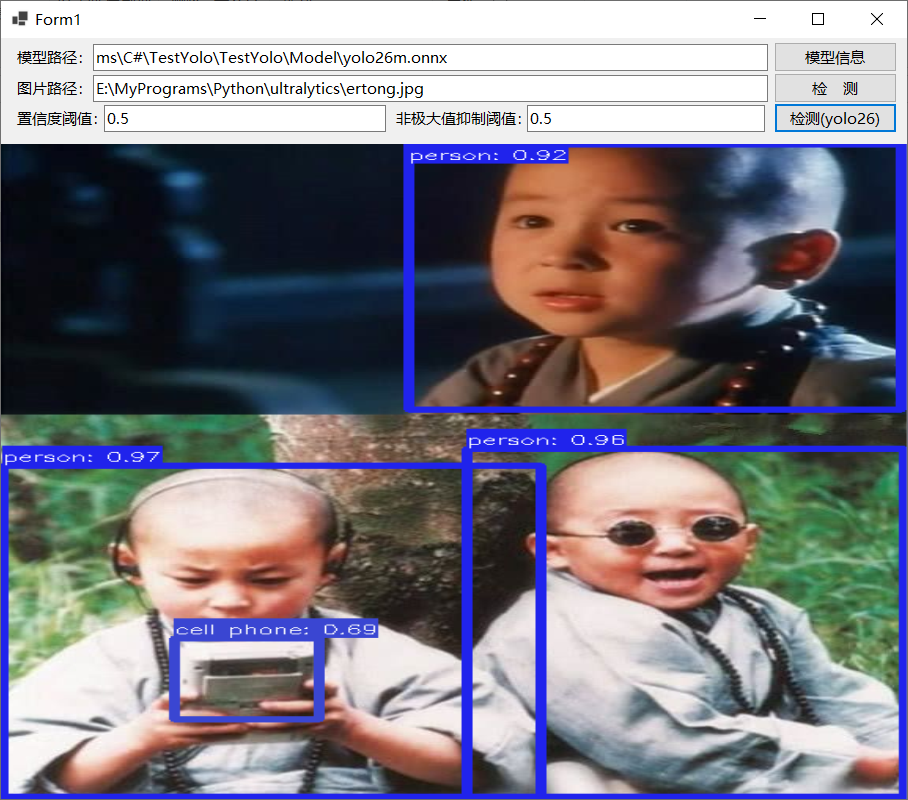
最后是程序运行效果,如下图所示:
参考文献: