嵌入式Linux Lua使用ZeroBrane远程调试
概述
本文记录了在嵌入式 Linux 平台上移植 ZeroBrane 远程调试功能的过程。通过集成 MobDebug 和 LuaSocket 库,实现了对 Lua 脚本的远程调试支持,包括断点调试、单步执行、变量监视和调用堆栈等功能。
背景
目标平台是一个基于 Linux 的仪器控制系统,使用嵌入式 Lua 作为脚本引擎。硬件访问通过 UIO (Userspace I/O) 和 mmap() 实现寄存器访问。为了方便开发和调试,需要支持 ZeroBrane Studio 远程调试功能。
技术架构
ZeroBrane 调试原理
ZeroBrane 使用 MobDebug 协议进行远程调试:
┌─────────────────┐         TCP/IP          ┌─────────────────┐
│  ZeroBrane      │◄──────────────────────►│  fan-instruments│
│  Studio         │      port: 8172         │  (Lua 脚本)     │
│  (调试器)       │                         │  (被调试端)     │
└─────────────────┘                         └─────────────────┘
协议流程:
- 被调试端连接到 ZeroBrane 服务器
- 服务器发送命令 (RUN, STEP, SETB 等)
- 被调试端执行并返回状态 (202 Paused 等)
依赖库
| 库 | 版本 | 说明 |
|---|---|---|
| Lua | 5.4 | 已有 |
| LuaSocket | 3.1.0 | 新增,提供 TCP 通信 |
| MobDebug | 0.805 | 新增,调试协议实现 |
移植步骤
1. 添加 LuaSocket 库
从官方仓库获取源码:
bash
git clone --depth 1 https://github.com/lunarmodules/luasocket.git目录结构:
lib/luasocket/
├── *.c, *.h          # C 源码
├── lua/              # Lua 封装层
│   ├── socket.lua
│   ├── mime.lua
│   └── ltn12.lua
└── luasocket.cmake   # 构建脚本
构建脚本 lib/luasocket/luasocket.cmake:
cmake
add_library(luasocket STATIC
    lib/luasocket/auxiliar.c
    lib/luasocket/buffer.c
    lib/luasocket/compat.c
    lib/luasocket/except.c
    lib/luasocket/inet.c
    lib/luasocket/io.c
    lib/luasocket/luasocket.c
    lib/luasocket/mime.c
    lib/luasocket/options.c
    lib/luasocket/select.c
    lib/luasocket/tcp.c
    lib/luasocket/timeout.c
    lib/luasocket/udp.c
)

if(UNIX AND NOT APPLE)
    target_sources(luasocket PRIVATE lib/luasocket/usocket.c)
elseif(WIN32)
    target_sources(luasocket PRIVATE lib/luasocket/wsocket.c)
endif()
2. 添加 MobDebug 库
下载 MobDebug:
bash
curl -o lib/mobdebug/mobdebug.lua \
    https://raw.githubusercontent.com/pkulchenko/MobDebug/master/src/mobdebug.lua
由于嵌入式环境可能没有文件系统访问,需要将 Lua 脚本编译为 C 字节数组嵌入可执行文件。
创建转换脚本 lib/mobdebug/lua_embed.py:
python
#!/usr/bin/env python3
import sys

def lua_to_c(lua_file, output_c, var_name):
    with open(lua_file, 'rb') as f:
        data = f.read()

    hex_values = ', '.join(f'0x{b:02x}' for b in data)
    c_code = f'const char {var_name}[] = {{ {hex_values}, 0 }};\n'

    with open(output_c, 'w') as f:
        f.write(c_code)

if __name__ == '__main__':
    lua_to_c(sys.argv[1], sys.argv[2], sys.argv[3])
构建脚本 lib/mobdebug/mobdebug.cmake:
cmake
function(lua_to_c LUA_FILE OUTPUT_C VAR_NAME)
    add_custom_command(
        OUTPUT ${OUTPUT_C}
        COMMAND ${Python3_EXECUTABLE} ${LUA_EMBED_SCRIPT}
            ${LUA_FILE} ${OUTPUT_C} ${VAR_NAME}
        DEPENDS ${LUA_FILE} ${LUA_EMBED_SCRIPT}
    )
endfunction()

lua_to_c(${PROJECT_SOURCE_DIR}/lib/mobdebug/mobdebug.lua
         ${CMAKE_BINARY_DIR}/mobdebug_data.c mobdebug_lua)
lua_to_c(${PROJECT_SOURCE_DIR}/lib/luasocket/lua/socket.lua
         ${CMAKE_BINARY_DIR}/socket_data.c socket_lua)
# ... 其他 Lua 文件

add_library(mobdebug_embed STATIC
    ${CMAKE_BINARY_DIR}/mobdebug_data.c
    ${CMAKE_BINARY_DIR}/socket_data.c
    # ...
)
3. 创建调试模块
lib/lua_debug.h:
c
#ifndef LUA_DEBUG_H
#define LUA_DEBUG_H

#include <lua.hpp>

extern "C" {
int luaopen_socket_core(lua_State *L);
int luaopen_mime_core(lua_State *L);
}

int lua_debug_init(lua_State *L);
int lua_debug_start(lua_State *L, const char *host, int port);
void lua_debug_stop(lua_State *L);

#endif
lib/lua_debug.cpp 关键实现:
cpp
// 注册 C 模块
static int register_c_module(lua_State *L, const char *name, lua_CFunction openfn)
{
    luaL_requiref(L, name, openfn, 1);
    lua_setfield(L, -2, name);
    return 0;
}

// 初始化调试模块
int lua_debug_init(lua_State *L)
{
    // 注册 socket.core 和 mime.core (C 模块)
    register_c_module(L, "socket.core", luaopen_socket_core);
    register_c_module(L, "mime.core", luaopen_mime_core);

    // 加载 Lua 封装层 (嵌入的字节码)
    load_embedded_lua(L, "socket", socket_lua);
    load_embedded_lua(L, "mobdebug", mobdebug_lua);

    return 0;
}

// 启动调试会话
int lua_debug_start(lua_State *L, const char *host, int port)
{
    lua_getglobal(L, "mobdebug");
    lua_getfield(L, -1, "start");
    lua_pushstring(L, host);
    lua_pushinteger(L, port);
    lua_pcall(L, 2, 1, 0);
    // ...
}
4. 修改主程序
添加命令行参数支持:
cpp
// main.cpp
int main(int argc, char *argv[])
{
    // 解析参数
    int debug_mode = 0;
    std::string debug_host = "localhost";
    int debug_port = 8172;

    for (int i = 1; i < argc; i++) {
        if (strcmp(argv[i], "--debug") == 0) {
            debug_mode = 1;
        } else if (strcmp(argv[i], "--debug-host") == 0 && i + 1 < argc) {
            debug_host = argv[++i];
        } else if (strcmp(argv[i], "--debug-port") == 0 && i + 1 < argc) {
            debug_port = atoi(argv[++i]);
        }
    }

    // 初始化调试模块
    if (debug_mode) {
        lua_debug_init(L);
    }

    // 运行脚本
    if (script_arg > 0) {
        if (debug_mode) {
            lua_debug_start(L, debug_host.c_str(), debug_port);
        }
        run_script(L, argv[script_arg]);
        if (debug_mode) {
            lua_debug_stop(L);
        }
    }
}
5. 启用 Lua 标准库
MobDebug 依赖 io 和 os 模块,需要修改 lib/lua/linit.c:
c
static const luaL_Reg loadedlibs[] = {
  {LUA_GNAME, luaopen_base},
  {LUA_LOADLIBNAME, luaopen_package},
  {LUA_COLIBNAME, luaopen_coroutine},
  {LUA_TABLIBNAME, luaopen_table},
  {LUA_IOLIBNAME, luaopen_io},      // 启用
  {LUA_OSLIBNAME, luaopen_os},      // 启用
  {LUA_STRLIBNAME, luaopen_string},
  {LUA_MATHLIBNAME, luaopen_math},
  {LUA_UTF8LIBNAME, luaopen_utf8},
  {LUA_DBLIBNAME, luaopen_debug},
  {NULL, NULL}
};
遇到的问题
问题 1: module 'io' not found
原因 : linit.c 中 io 和 os 库被注释禁用。
解决 : 启用 LUA_IOLIBNAME 和 LUA_OSLIBNAME。
问题 2: module 'socket.core' not found
原因 : LuaSocket 的 Lua 封装层 (socket.lua) 需要 C 核心模块 (socket.core),但只加载了 Lua 层。
解决 : 使用 luaL_requiref() 注册 C 模块到 package.loaded:
cpp
luaL_requiref(L, "socket.core", luaopen_socket_core, 1);
lua_setfield(L, -2, "socket.core");
问题 3: module 'mime.core' not found
原因 : 同上,mime.lua 依赖 mime.core。
解决 : 同样注册 mime.core。
问题 4: require "mobdebug" 失败
原因 : mobdebug 只注册为全局变量,未注册到 package.loaded。
解决 : 同时注册到 package.loaded 和全局表:
cpp
lua_setfield(L, -2, "mobdebug");  // package.loaded.mobdebug
lua_getfield(L, -1, "mobdebug");
lua_setglobal(L, "mobdebug");      // _G.mobdebug
测试验证
测试脚本
test_debug.lua:
lua
print("=== ZeroBrane Debug Test ===")

-- 检查模块
local modules = {"socket", "socket.core", "mime", "mime.core", "mobdebug"}
for _, mod in ipairs(modules) do
    local ok, m = pcall(require, mod)
    print(ok and "[OK]" or "[FAIL]", mod)
end

-- 测试连接
local socket = require("socket")
local tcp = socket.tcp()
tcp:settimeout(2)
local ok, err = tcp:connect("localhost", 8172)
if ok then
    print("[OK] Connected to debugger!")
    tcp:close()
end

-- 测试循环 (设置断点)
for i = 1, 5 do
    local x = i * 2
    print("iteration " .. i .. ": x=" .. x)
end
Mock 调试服务器
test_debug_server.py:
python
#!/usr/bin/env python3
import socket

def debug_server(port=8172):
    server = socket.socket(socket.AF_INET, socket.SOCK_STREAM)
    server.setsockopt(socket.SOL_SOCKET, socket.SO_REUSEADDR, 1)
    server.bind(('0.0.0.0', port))
    server.listen(1)

    print(f"Waiting for connection on port {port}...")
    conn, addr = server.accept()
    print(f"*** CONNECTION SUCCESSFUL! ***")

    # 发送 RUN 命令让脚本继续执行
    conn.send(b"RUN\n")

    conn.close()
    server.close()

if __name__ == '__main__':
    debug_server()
测试结果
bash
# 终端 1
$ python3 test_debug_server.py
Waiting for connection on port 8172...
*** CONNECTION SUCCESSFUL! ***

# 终端 2
$ ./build/fan-instruments --debug test_debug.lua
socket.core registered
mime.core registered
MobDebug module initialized
Debugger connected to localhost:8172
=== ZeroBrane Debug Test ===
[OK] socket
[OK] socket.core
[OK] mime
[OK] mime.core
[OK] mobdebug
[OK] Connected to debugger!
iteration 1: x=2
iteration 2: x=4
...
使用方法
命令行参数
| 参数 | 说明 | 默认值 |
|---|---|---|
--debug |
启用调试模式 | - |
--debug-host HOST |
调试服务器地址 | localhost |
--debug-port PORT |
调试服务器端口 | 8172 |
ZeroBrane Studio 配置
-
启动 ZeroBrane Studio
-
打开 Lua 脚本文件
-
设置断点 (点击行号左侧)
-
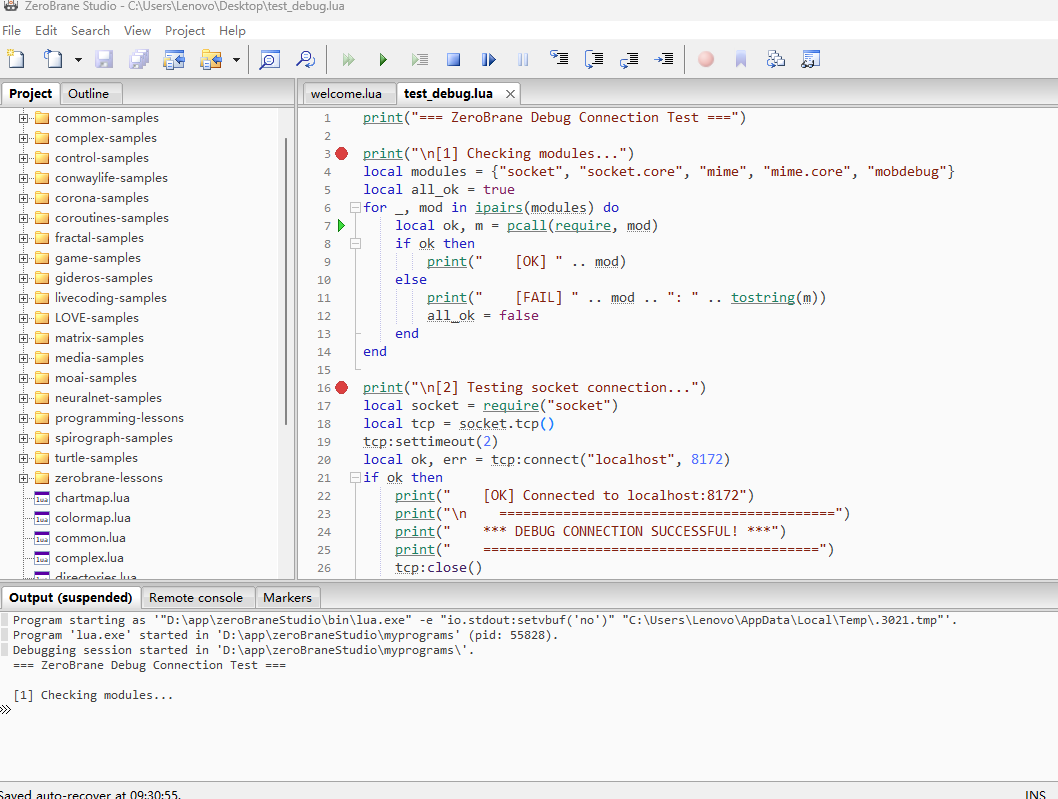
菜单: Project → Start Debugger Server
-
在目标设备上运行:
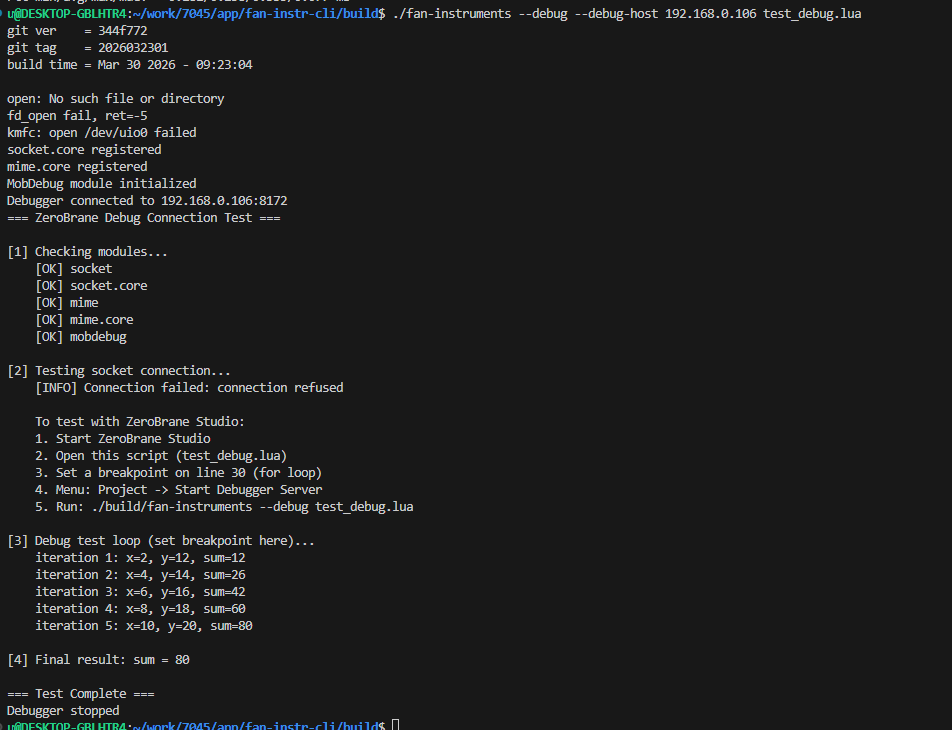
bash./fan-instruments --debug --debug-host <PC_IP> script.lua
调试功能
- 断点调试: 在 ZeroBrane 中设置断点,程序会暂停
- 单步执行: Step Into (F11), Step Over (F10), Step Out (Shift+F11)
- 变量监视: 在 Watch 窗口添加表达式
- 调用堆栈: 查看 Stack 窗口
文件清单
lib/
├── lua_debug.h              # 调试模块头文件
├── lua_debug.cpp            # 调试模块实现
├── lua/
│   └── linit.c              # 修改: 启用 io/os 库
├── luasocket/               # 新增: LuaSocket 库
│   ├── *.c, *.h
│   ├── lua/*.lua
│   └── luasocket.cmake
└── mobdebug/                # 新增: MobDebug 库
    ├── mobdebug.lua
    ├── mobdebug.cmake
    └── lua_embed.py

main.cpp                     # 修改: 添加调试参数
CMakeLists.txt               # 修改: 添加依赖

test_debug.lua               # 测试脚本
test_debug_server.py         # Mock 调试服务器
上板测试
总结
本次移植主要工作:
- 集成 LuaSocket: 提供底层 TCP 通信能力
- 集成 MobDebug: 实现调试协议
- 嵌入 Lua 脚本: 将 Lua 文件编译为 C 数组,避免文件系统依赖
- 注册 C 模块 : 正确注册
socket.core和mime.core - 启用标准库 : 开启
io和os模块
移植后的系统支持 ZeroBrane Studio 远程调试,方便嵌入式 Lua 脚本的开发和调试。