一.引言
在 iOS 开发中,"复杂页面"几乎是所有人都会遇到的问题。
比如一个典型的专家详情页,通常包含:
- 用户信息
- 数据统计(胜率、收益)
- 图表
- 推荐内容
- 历史列表
这个页面中倒是包含了列表,所以大家会考虑到UITableView,有些时候可能并不包含复用列表这时候大家就很难想到UITableView。
很多人的写法是这样的:
- UIScrollView + 多个子 View
- 各种 if/else 控制显示隐藏
- 需求一改,牵一发动全身
写到后期,往往会变成一个"谁都不敢动"的页面。
二. 问题的本质:采用了不合理的方式描述页面
出现这种现象的原因主要是因为,大多数人对页面的理解是这样的:页面 = 一堆 View 的组合。
但实际上,这类页面更接近:页面 = 多个"区块(Section)"的组合。
一旦我们换成这个角度来理解页面,那么实现的方式将会完全不同。
三. 核心思路:把页面构建成Section 列表
我在项目中采用了一种非常简单但有效的方式,首先我的项目中会有两个类在通用组件内,我们以其中一个 PHBaseSectionItem****为例:
Swift
import UIKit

open class PHBaseSectionItem: NSObject {

    /// cell类
    public var tabCellClass: UITableViewCell.Type?
    /// cell类
    public var collectionCellClass: UICollectionViewCell.Type?
    /// cell标识
    public  var cellIdentifier: String = ""
    /// 组头标识
    public var headerIdentifier: String = ""
    /// 组标题
    public var title: String = ""
    /// 子列表数据
    public var subItems: [Any] = []
    /// 子列表size
    public var itemSize: CGSize = CGSize.zero
    /// 组头高度
    public var headerHeight: CGFloat = 0
    /// 组尾高度
    public var footerHeight: CGFloat = 0


}
我的这个类可以用在UITableView列表中,也同样可以使用在UICollectionView列表中,我们就以UITableView为例:
- **tabCellClass:**UITableViewCell.Type UITableViewCell,的类型。
- **cellIdentifier:**字符串,该组UITableViewCell的标识。
- **headerIdentifier:**字符串,该组组头的标识。
- **title:**字符串,该组的标题。
- **subItems:**Any类型数组,如果页面是多类型的列表会用到这个。
- **headerHeight:**CGFloat,该组组头高度。
- **footerHeight:**CGFloat,该组组尾高度。
然后在页面内创建一个页面结构的数据列表:
Swift
/// 页面结构
private var dataList: [PHBaseSectionItem] = []
这些东西出来之后,页面将不再由View决定,而是由一组 PHBaseSectionItem决定。
页面结构示意图:

我们把示例简化一点就不加图表了哈,你可以把整个页面理解为:
- 用户信息
- 统计数据
- 最新方案列表
- 历史方案列表
四. 关键设计:引用 Builder 统一构建页面结构
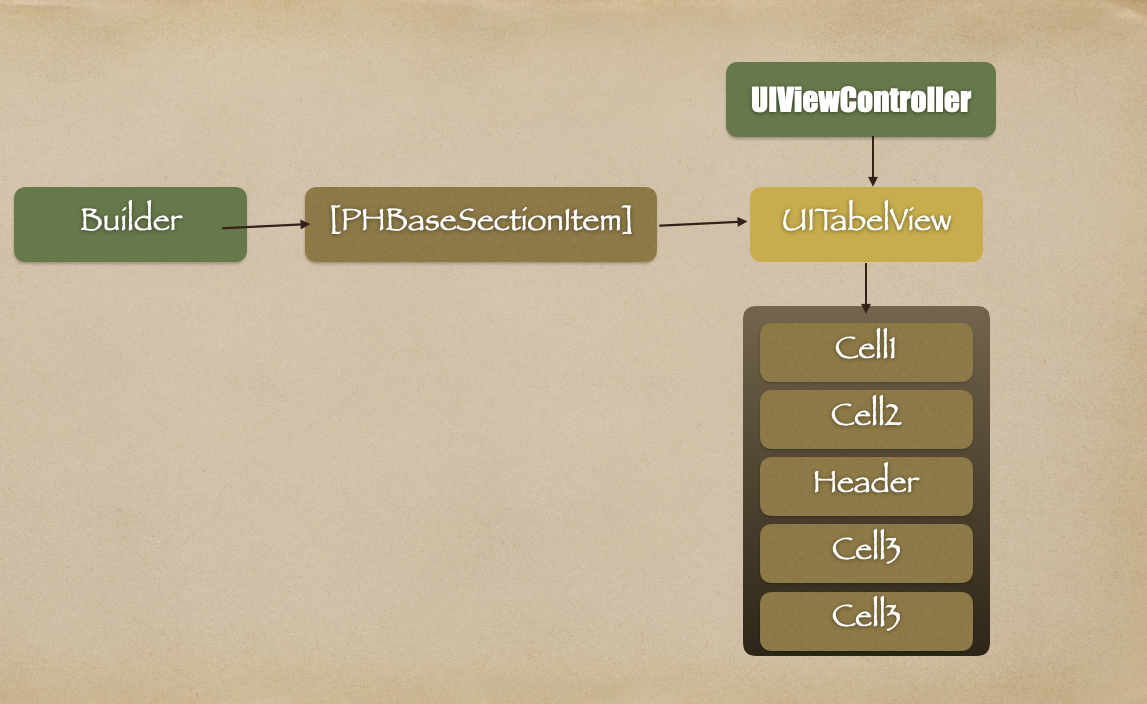
然后我们引入一个 Builder它主要用来,根据我们需要显示或者隐藏的内容来构建列表数据 dataList:
Swift
class PHContributorDetailBuilder: NSObject {

    /// 构建专家详情列表数据
    static func buildDataList()->[PHSectionItem] {
        var list:[PHSectionItem] = []
       // 信息
        let infoSectionItem = PHSectionItem()
        infoSectionItem.cellIdentifier = "PHContributorInfoCell"
        infoSectionItem.tableViewCellClass = PHContributorInfoCell.self
        list.append(infoSectionItem)
        // 近期战绩
        let lastRecordSectionItem = PHSectionItem()
        lastRecordSectionItem.cellIdentifier = "PHContributorRecordCell"
        lastRecordSectionItem.tableViewCellClass = PHContributorRecordCell.self
        list.append(lastRecordSectionItem)
        // 在售方案
        let saleSectionItem = PHSectionItem()
        saleSectionItem.cellIdentifier = "PHSchemeDetailOtherCell"
        saleSectionItem.tableViewCellClass = PHSchemeDetailOtherCell.self
        saleSectionItem.headerIdentifier = "PHContributorSectionHeaderView"
        saleSectionItem.headerHeight = 44
        saleSectionItem.title = "Latest Insights"
        list.append(saleSectionItem)

        // 历史方案
        let historySectionItem = PHSectionItem()
        historySectionItem.cellIdentifier = "PHSchemeDetailOtherCell"
        historySectionItem.tableViewCellClass = PHSchemeDetailOtherCell.self
        historySectionItem.headerIdentifier = "PHContributorSectionHeaderView"
        historySectionItem.headerHeight = 44
        historySectionItem.title = "Past Insights"
        list.append(historySectionItem)


        return list
    }

}
Builder 负责:
- 定义页面有哪些区块
- 每个区块用什么 Cell
- Header 长什么样,Header高度等等。
五. tableView 的角色:不是核心,而是"渲染器"
在这套架构下,UITableView 的职责被极度简化:
Swift
private let tableView = UITableView(frame: .zero, style: .plain)它只做三件事:
- 注册 Cell(根据 dataList)
- 渲染 Cell(根据 dataList)
- 刷新 UI(reloadData)
UITableView 不再是"列表控件",而是一个"页面渲染引擎"。
六. 如何处理"特殊区块"
在我们的这个页面中,有两个列表属于不同于其它类型的,但是又不多,这种情况我们就直接在视图控制器内,通过sectionItem的标识或者标题,来单独处理这两组数据了。
例如我的判断是:
Swift
if sectionItem.title == "最新方案" {
    return schemeList.count
}

if sectionItem.title == "历史方案" {
    return historySchemeList.count
}
而如果确实有很多不同的列表,大家也看见了当前PHBaseSectionItem是Open修饰的,也就是我们具备最大的权限,完全可以继承自PHBaseSectionItem创建一个比较个性的数据结构,每个结构中都有可以变化的数据,其实在PHBaseSectionItem也提供了自列表的入口,大家也可以直接使用,只是因为是Any类型,需要进行的判断会多一些。
整体策略还是:
统一骨架 + 局部特判
七. 这套方案带来的工程价值
1. 页面不会越改越乱:
结构由 Builder 控制,而不是 VC。避免 if/else 爆炸
2. 新增模块成本极低:
新增一个区块,只需要:增加一个 SectionItem,不需要改动页面整体结构。
3. 天然支持"动态页面":
比如:
- AB Test
- 不同用户展示不同模块
只需要改 Builder。
4. ViewController 复杂度被锁死:
VC 只负责:
- 渲染
- 绑定数据
- 响应事件
不会膨胀成 1000+ 行的"上帝类"
八. 结语
我们并没有在"优化 UITableView 的写法", 而是在重新定义"页面应该如何被描述"。
过去我们用 View 拼页面,现在我们用 Section 描述页面。
当页面结构被抽象成数据之后:
-
- UITableView 只是一个渲染工具
-
- ViewController 不再承载结构复杂度
-
- 页面也不会随着需求迭代而失控
UITableView 没变, 但我们看待它的方式变了。
而这,才是这套方案真正的价值。