本次功能
支持调:
temperaturetop_pmax_tokens
效果:
- 每个会话可独立配置参数
- 调参后立即影响后续对话
- 更像正式 AI Playground / Agent 调试台
1)改 web/src/utils/session.js
createSession
yaml
  return {
    id: crypto.randomUUID(),
    title,
    mode,
    customPrompt: persona.systemPrompt,
    temperature: 0.7,
    topP: 1,
    maxTokens: 1200,
    pinned: false,
    createdAt: Date.now(),
    updatedAt: Date.now(),
    messages: [
改 loadSessions 里的 normalize
yaml
      return {
        mode,
        customPrompt:
          item.customPrompt ||
          item.messages?.find(m => m.role === 'system')?.content ||
          persona.systemPrompt,
        temperature: 0.7,
        topP: 1,
        maxTokens: 1200,
        pinned: false,
        ...item,
      }
2)改 server/app.py
ChatRequest 新增字段
python
class ChatRequest(BaseModel):
    messages: List[Message]
    session_id: Optional[str] = None
    temperature: Optional[float] = 0.7
    top_p: Optional[float] = 1
    max_tokens: Optional[int] = 1200
/api/chat 里替换模型调用参数
ini
        completion = client.chat.completions.create(
            model=MODEL_NAME,
            messages=final_messages,
            temperature=req.temperature or 0.7,
            top_p=req.top_p or 1,
            max_tokens=req.max_tokens or 1200,
        )
/api/chat/stream 里替换模型调用参数
ini
            stream = client.chat.completions.create(
                model=MODEL_NAME,
                messages=final_messages,
                temperature=req.temperature or 0.7,
                top_p=req.top_p or 1,
                max_tokens=req.max_tokens or 1200,
                stream=True,
            )
3)改 web/src/App.vue
新增计算属性
ruby
const currentParams = computed(() => {
  return {
    temperature: currentSession.value?.temperature ?? 0.7,
    topP: currentSession.value?.topP ?? 1,
    maxTokens: currentSession.value?.maxTokens ?? 1200,
  }
})
新增状态
csharp
const temperatureDraft = ref(0.7)
const topPDraft = ref(1)
const maxTokensDraft = ref(1200)
新增监听
ini
watch(
  currentParams,
  newVal => {
    temperatureDraft.value = newVal.temperature
    topPDraft.value = newVal.topP
    maxTokensDraft.value = newVal.maxTokens
  },
  { immediate: true, deep: true }
)
新增方法
javascript
const handleSaveParams = () => {
  if (!currentSession.value) return

  const nextTemperature = Math.min(2, Math.max(0, Number(temperatureDraft.value) || 0.7))
  const nextTopP = Math.min(1, Math.max(0, Number(topPDraft.value) || 1))
  const nextMaxTokens = Math.min(4000, Math.max(100, Number(maxTokensDraft.value) || 1200))

  sessions.value = sortSessions(
    sessions.value.map(item =>
      item.id === currentSessionId.value
        ? {
            ...item,
            temperature: nextTemperature,
            topP: nextTopP,
            maxTokens: nextMaxTokens,
            updatedAt: Date.now(),
          }
        : item
    )
  )
}
改 sendMessageStream
yaml
    body: JSON.stringify({
      messages,
      session_id: currentSession.value.id,
      temperature: currentSession.value.temperature,
      top_p: currentSession.value.topP,
      max_tokens: currentSession.value.maxTokens,
    }),
4)改模板
ini
<div class="params-panel">
  <div class="params-panel-header">
    <div class="params-panel-title">聊天参数</div>
    <button class="prompt-btn" @click="handleSaveParams">保存参数</button>
  </div>

  <div class="params-grid">
    <div class="param-item">
      <label class="param-label">temperature</label>
      <input v-model="temperatureDraft" class="param-input" type="number" min="0" max="2" step="0.1" />
      <div class="param-tip">越高越发散,越低越稳定</div>
    </div>

    <div class="param-item">
      <label class="param-label">top_p</label>
      <input v-model="topPDraft" class="param-input" type="number" min="0" max="1" step="0.1" />
      <div class="param-tip">控制采样范围</div>
    </div>

    <div class="param-item">
      <label class="param-label">max_tokens</label>
      <input v-model="maxTokensDraft" class="param-input" type="number" min="100" max="4000" step="100" />
      <div class="param-tip">限制单次最大输出长度</div>
    </div>
  </div>
</div>
5)补充样式
css
.params-panel {
  margin-bottom: 16px;
  padding: 16px;
  border: 1px solid #e5e7eb;
  border-radius: 12px;
  background: #fafafa;
}

.params-panel-header {
  display: flex;
  align-items: center;
  justify-content: space-between;
  gap: 12px;
  margin-bottom: 12px;
}

.params-panel-title {
  font-size: 16px;
  font-weight: 600;
  color: #111827;
}

.params-grid {
  display: grid;
  grid-template-columns: repeat(3, minmax(0, 1fr));
  gap: 12px;
}

.param-item {
  padding: 12px;
  border-radius: 10px;
  background: #fff;
  border: 1px solid #e5e7eb;
}

.param-label {
  display: block;
  margin-bottom: 8px;
  font-size: 13px;
  font-weight: 600;
  color: #111827;
}

.param-input {
  width: 100%;
  box-sizing: border-box;
  border: 1px solid #d1d5db;
  border-radius: 8px;
  padding: 8px 10px;
  font-size: 14px;
  outline: none;
  background: #fff;
}

.param-tip {
  margin-top: 8px;
  font-size: 12px;
  color: #6b7280;
}
6)验证
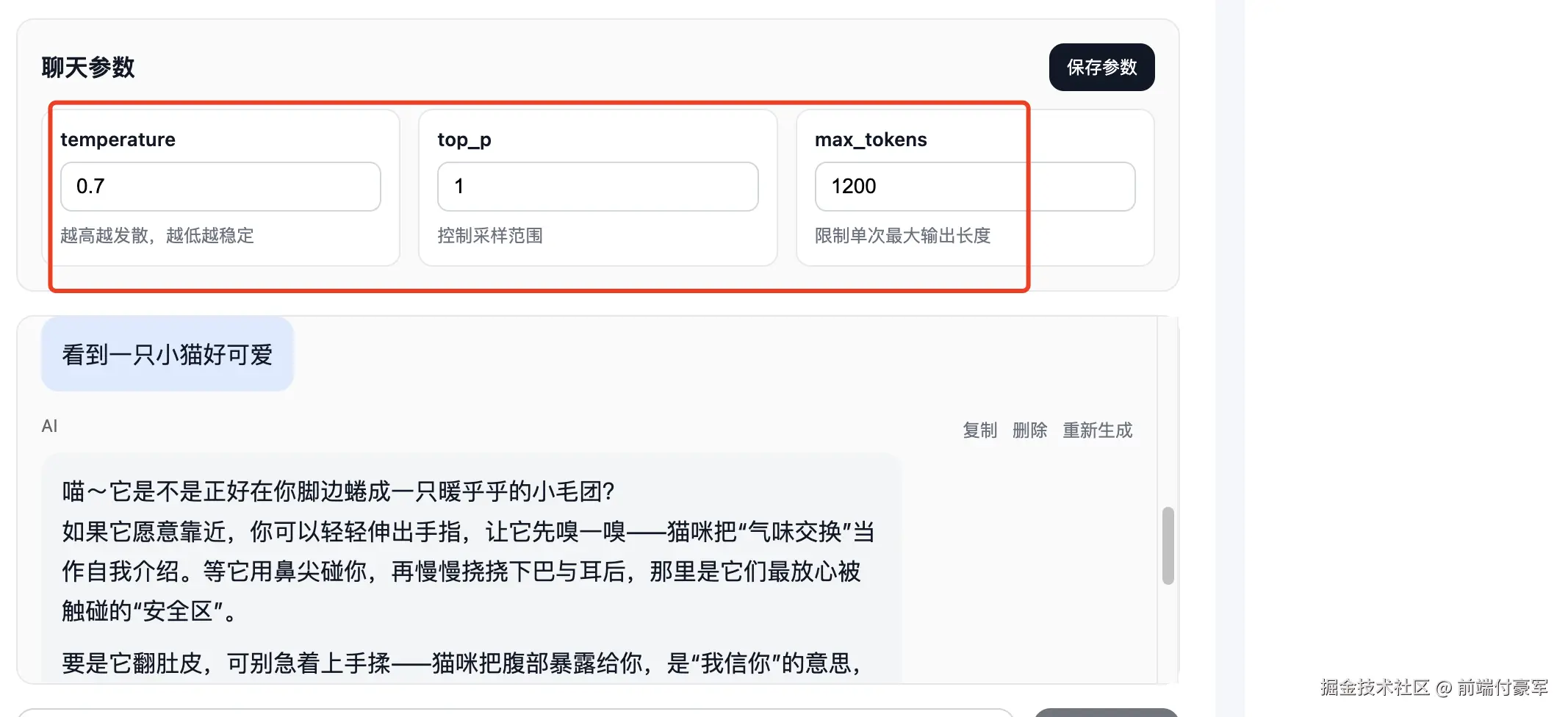
测试 temperature
设成:
0.2问同一个开放问题两次,回答会更稳定。
再设成:
0.7回答会更发散。
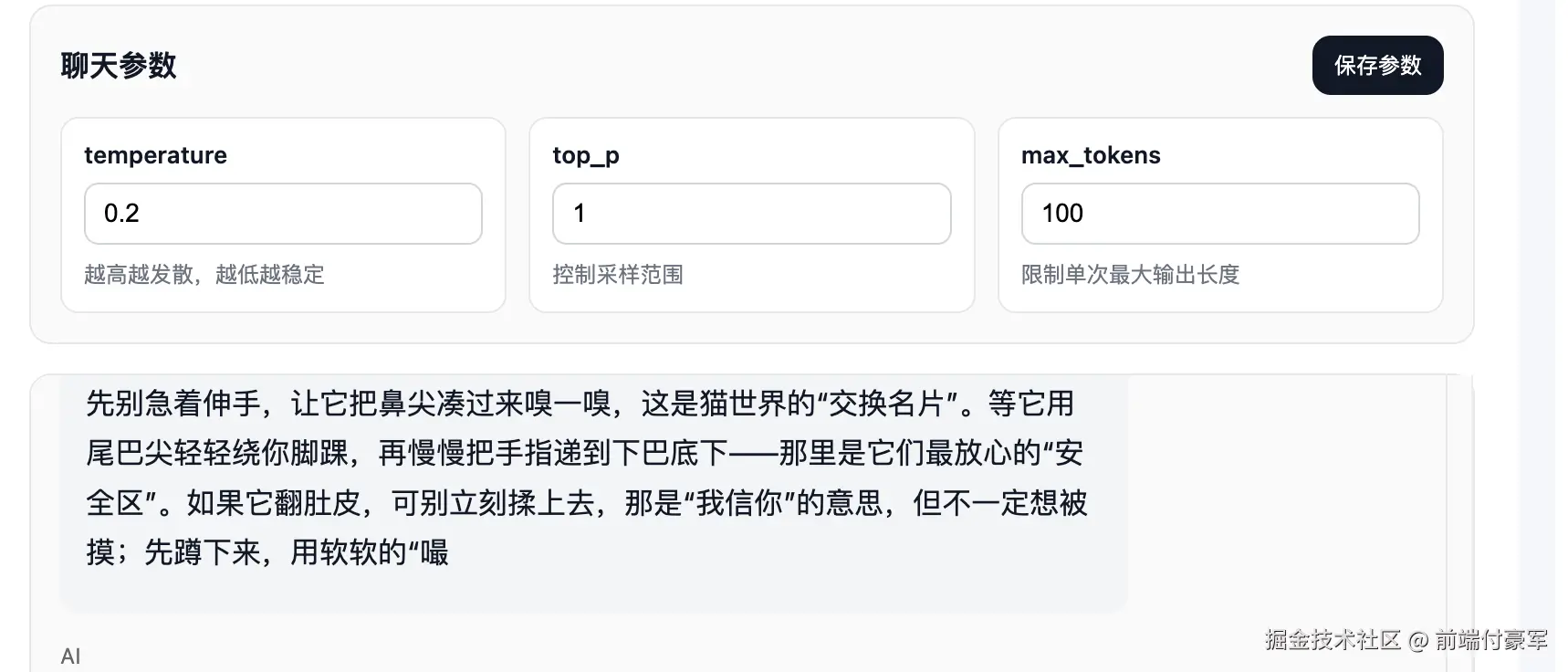
测试 max_tokens
设成:
100让 AI 输出长文,回复会明显变短。
nice !