一、将 Ultralytics YOLO26 模型导出为 ONNX 格式
是通过ultralytics-yolo的源码将yolo26n.pt的模型转换成onnx格式,将pt格式的模型转换成onnx,ONNX Runtime 支持各种平台,例如 Windows、macOS 和 Linux,可以使用 ONNX Runtime 运行,java貌似支持。ONNX Runtime 可以提供高达 3 倍的 CPU 加速。
python
from ultralytics import YOLO


def export_onnx():#将 Ultralytics YOLO26 模型导出为 ONNX 格式

    # Load the YOLO26 model

    model = YOLO("yolo26n.pt")


    # Export the model to ONNX format

    model.export(format="onnx")  # creates 'yolo26n.onnx'


    # Load the exported ONNX model

    onnx_model = YOLO("yolo26n.onnx")


    # Run inference

    # results = onnx_model(source='ultralytics/assets/bus.jpg', save=True)


if __name__ == '__main__':

    export_onnx()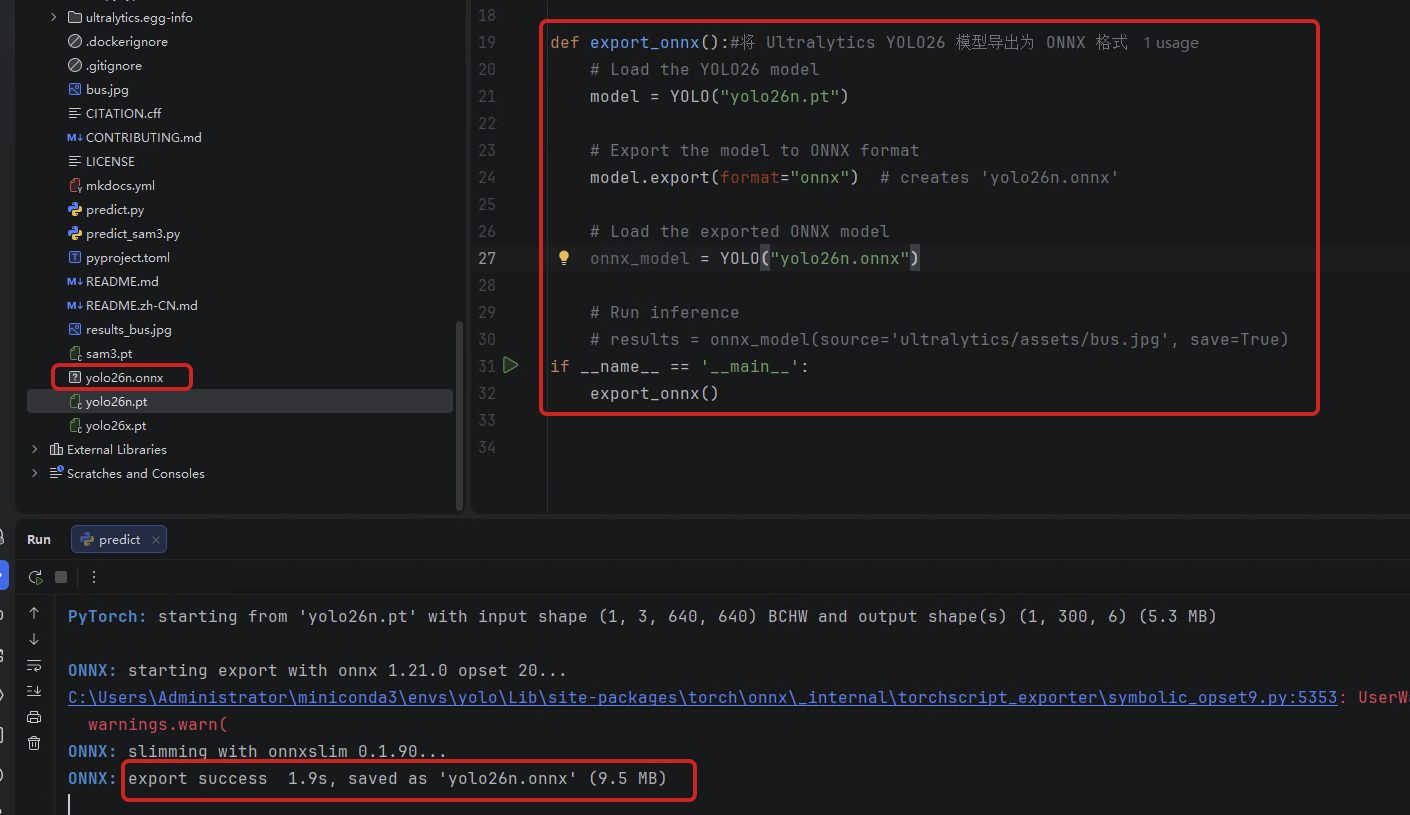
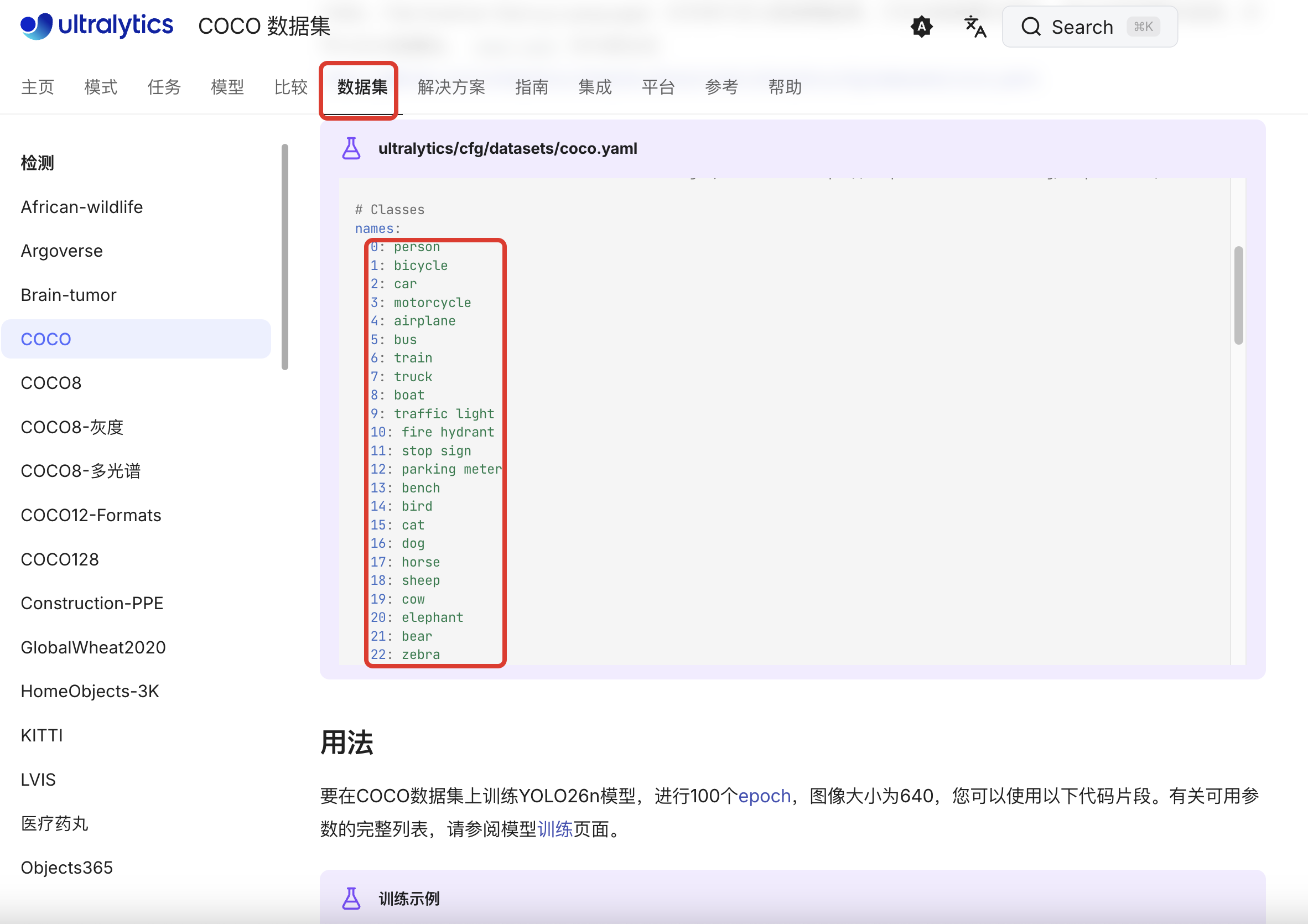
二、准备yolo26x.pt模型的分类数据集
官网上关于 yolo26n.pt的数据集有80个,整理成coco.name
三、准备一张yolo官网的测试图片
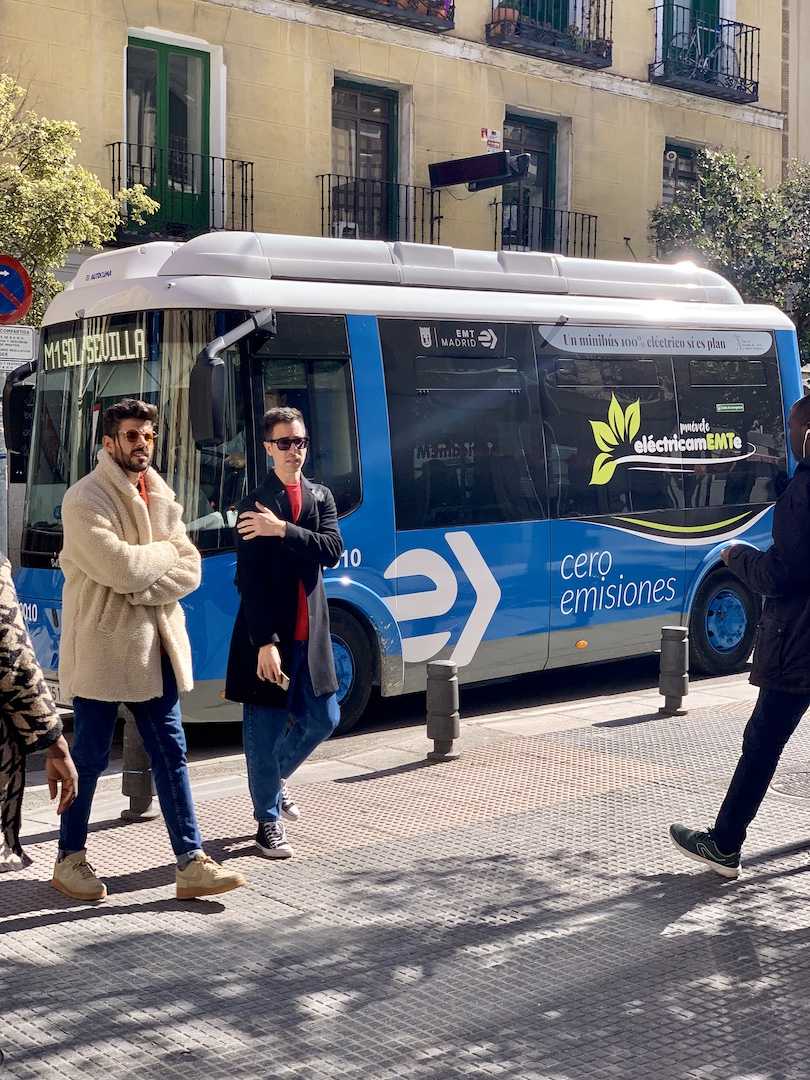
四、java环境下引入依赖
XML
<!-- ONNX Runtime Java API -->
        <dependency>
            <groupId>com.microsoft.onnxruntime</groupId>
            <artifactId>onnxruntime</artifactId>
            <version>1.17.3</version>
        </dependency>

        <!-- OpenCV Java 绑定,用于图像处理和绘制 -->
        <dependency>
            <groupId>org.openpnp</groupId>
            <artifactId>opencv</artifactId>
            <version>4.5.5-1</version>
        </dependency>
五、直接上代码
java
import ai.onnxruntime.*;
import nu.pattern.OpenCV;
import org.opencv.core.*;
import org.opencv.imgproc.Imgproc;
import org.opencv.imgcodecs.Imgcodecs;

import java.io.IOException;
import java.nio.FloatBuffer;
import java.util.*;

public class YOLOv26Inference {
    static {
        OpenCV.loadShared();
        System.out.println("OpenCV loaded successfully");
    }

    private OrtSession session;
    private OrtEnvironment env;
    private long[] inputShape = new long[]{1, 3, 640, 640};
    private float confThreshold = 0.45f;
    private List<String> classes;

    public YOLOv26Inference(String modelPath, String classesPath) throws OrtException, IOException {
        env = OrtEnvironment.getEnvironment();
        OrtSession.SessionOptions opts = new OrtSession.SessionOptions();
        opts.setOptimizationLevel(OrtSession.SessionOptions.OptLevel.ALL_OPT);
        this.session = env.createSession(modelPath, opts);

        classes = loadClasses(classesPath);
        System.out.println("Loaded " + classes.size() + " classes");
    }

    public void detectAndDraw(String imagePath, String outputPath) throws Exception {
        // 1. 读取图片
        Mat img = Imgcodecs.imread(imagePath);
        if (img.empty()) {
            throw new Exception("图片加载失败: " + imagePath);
        }

        // 获取原始图像尺寸
        int originalWidth = img.width();
        int originalHeight = img.height();
        System.out.println("原始图像尺寸: " + originalWidth + " x " + originalHeight);

        // 2. 预处理(保持宽高比,使用 Letterbox)
        float[] scale = new float[1];
        int[] pad = new int[2];
        float[][][] inputTensor = preprocessWithLetterbox(img, scale, pad);

        // 3. 创建输入张量
        OnnxTensor tensor = OnnxTensor.createTensor(env, FloatBuffer.wrap(flatten(inputTensor)), inputShape);

        // 4. 推理
        Map<String, OnnxTensor> inputs = Collections.singletonMap("images", tensor);
        OrtSession.Result results = session.run(inputs);

        // 5. 解析输出
        String outputName = results.iterator().next().getKey();
        OnnxTensor outputTensor = (OnnxTensor) results.get(outputName).get();

        long[] shape = outputTensor.getInfo().getShape();
        System.out.println("Output shape: " + Arrays.toString(shape));

        // 获取输出数据 [1, 300, 6]
        float[][][] output = (float[][][]) outputTensor.getValue();
        List<Detection> detections = parseDetectionsWithScale(output[0], originalWidth, originalHeight, scale[0], pad[0], pad[1]);

        System.out.println("检测到 " + detections.size() + " 个物体");

        // 6. 绘制检测框
        for (Detection det : detections) {
            // 绘制矩形框
            Imgproc.rectangle(img,
                    new Point(det.x1, det.y1),
                    new Point(det.x2, det.y2),
                    new Scalar(0, 255, 0), 2);

            // 绘制标签背景
            String label = String.format("%s: %.2f", classes.get(det.classId), det.confidence);
            int[] baseLine = new int[1];
            Size labelSize = Imgproc.getTextSize(label, Imgproc.FONT_HERSHEY_SIMPLEX, 0.5, 1, baseLine);

            // 确保标签不会超出图像顶部
            double labelY = det.y1 - 5;
            if (labelY - labelSize.height < 0) {
                labelY = det.y1 + labelSize.height + 5;
                Imgproc.rectangle(img,
                        new Point(det.x1, det.y1),
                        new Point(det.x1 + labelSize.width, det.y1 + labelSize.height + 5),
                        new Scalar(0, 255, 0), -1);
                Imgproc.putText(img, label,
                        new Point(det.x1, det.y1 + labelSize.height),
                        Imgproc.FONT_HERSHEY_SIMPLEX, 0.5,
                        new Scalar(0, 0, 0), 1);
            } else {
                Imgproc.rectangle(img,
                        new Point(det.x1, det.y1 - labelSize.height - 5),
                        new Point(det.x1 + labelSize.width, det.y1),
                        new Scalar(0, 255, 0), -1);
                Imgproc.putText(img, label,
                        new Point(det.x1, det.y1 - 5),
                        Imgproc.FONT_HERSHEY_SIMPLEX, 0.5,
                        new Scalar(0, 0, 0), 1);
            }
        }

        // 7. 保存结果
        Imgcodecs.imwrite(outputPath, img);
        System.out.println("检测完成,结果保存至:" + outputPath);

        results.close();
        tensor.close();
    }

    /**
     * Letterbox 预处理:保持宽高比,填充到 640x640
     */
    private float[][][] preprocessWithLetterbox(Mat img, float[] scale, int[] pad) {
        int originalWidth = img.width();
        int originalHeight = img.height();

        // 计算缩放比例(保持宽高比)
        float scaleW = 640.0f / originalWidth;
        float scaleH = 640.0f / originalHeight;
        float scaleFactor = Math.min(scaleW, scaleH);
        scale[0] = scaleFactor;

        int newWidth = Math.round(originalWidth * scaleFactor);
        int newHeight = Math.round(originalHeight * scaleFactor);

        // 计算填充
        int padW = (640 - newWidth) / 2;
        int padH = (640 - newHeight) / 2;
        pad[0] = padW;
        pad[1] = padH;

        System.out.println("缩放比例: " + scaleFactor);
        System.out.println("填充: padW=" + padW + ", padH=" + padH);

        // 缩放图像
        Mat resized = new Mat();
        Imgproc.resize(img, resized, new Size(newWidth, newHeight));

        // 创建 640x640 画布并填充灰色 (114,114,114) - YOLO 默认填充色
        Mat canvas = new Mat(640, 640, resized.type(), new Scalar(114, 114, 114));

        // 将缩放后的图像放到画布中央
        resized.copyTo(canvas.submat(padH, padH + newHeight, padW, padW + newWidth));

        // BGR 转 RGB
        Mat rgbImg = new Mat();
        Imgproc.cvtColor(canvas, rgbImg, Imgproc.COLOR_BGR2RGB);

        // 归一化并转换为 NCHW 格式
        float[][][] tensor = new float[3][640][640];
        for (int i = 0; i < 640; i++) {
            for (int j = 0; j < 640; j++) {
                double[] pixel = rgbImg.get(i, j);
                tensor[0][i][j] = (float) (pixel[0] / 255.0);
                tensor[1][i][j] = (float) (pixel[1] / 255.0);
                tensor[2][i][j] = (float) (pixel[2] / 255.0);
            }
        }

        return tensor;
    }

    /**
     * 解析检测结果,并缩放坐标回原始图像尺寸
     */
    private List<Detection> parseDetectionsWithScale(float[][] output, int originalWidth, int originalHeight,
                                                     float scale, int padW, int padH) {
        List<Detection> detections = new ArrayList<>();

        for (int i = 0; i < output.length; i++) {
            float[] pred = output[i];
            float confidence = pred[4];

            // 过滤低置信度
            if (confidence < confThreshold) continue;

            int classId = (int) pred[5];

            // 模型输出的坐标是在 640x640(包含填充)上的
            float modelX1 = pred[0];
            float modelY1 = pred[1];
            float modelX2 = pred[2];
            float modelY2 = pred[3];

            // 移除填充,得到在有效图像区域的坐标
            float x1_noPad = modelX1 - padW;
            float y1_noPad = modelY1 - padH;
            float x2_noPad = modelX2 - padW;
            float y2_noPad = modelY2 - padH;

            // 缩放回原始图像尺寸
            float x1 = x1_noPad / scale;
            float y1 = y1_noPad / scale;
            float x2 = x2_noPad / scale;
            float y2 = y2_noPad / scale;

            // 确保坐标在图像范围内
            x1 = Math.max(0, Math.min(originalWidth, x1));
            y1 = Math.max(0, Math.min(originalHeight, y1));
            x2 = Math.max(0, Math.min(originalWidth, x2));
            y2 = Math.max(0, Math.min(originalHeight, y2));

            detections.add(new Detection(x1, y1, x2, y2, confidence, classId));
        }

        return detections;
    }

    private float[] flatten(float[][][] tensor) {
        float[] flat = new float[3 * 640 * 640];
        int idx = 0;
        for (int c = 0; c < 3; c++) {
            for (int h = 0; h < 640; h++) {
                for (int w = 0; w < 640; w++) {
                    flat[idx++] = tensor[c][h][w];
                }
            }
        }
        return flat;
    }

    private List<String> loadClasses(String path) throws IOException {
        return java.nio.file.Files.readAllLines(java.nio.file.Paths.get(path));
    }

    static class Detection {
        float x1, y1, x2, y2, confidence;
        int classId;

        Detection(float x1, float y1, float x2, float y2, float conf, int id) {
            this.x1 = x1;
            this.y1 = y1;
            this.x2 = x2;
            this.y2 = y2;
            this.confidence = conf;
            this.classId = id;
        }
    }

    public static void main(String[] args) throws Exception {
        YOLOv26Inference detector = new YOLOv26Inference(
                "/Users/longjun/GeoServerProjects/greatmapserver-ai/gmserver-ai-mcp-client/src/test/java/models/yolo26n.onnx",
                "/Users/longjun/GeoServerProjects/greatmapserver-ai/gmserver-ai-mcp-client/src/test/java/models/coco.names"
        );
        detector.detectAndDraw(
                "/Users/longjun/GeoServerProjects/greatmapserver-ai/gmserver-ai-mcp-client/src/test/java/models/bus.jpg",
                "/Users/longjun/GeoServerProjects/greatmapserver-ai/gmserver-ai-mcp-client/src/test/java/models/output.jpg"
        );
    }
}
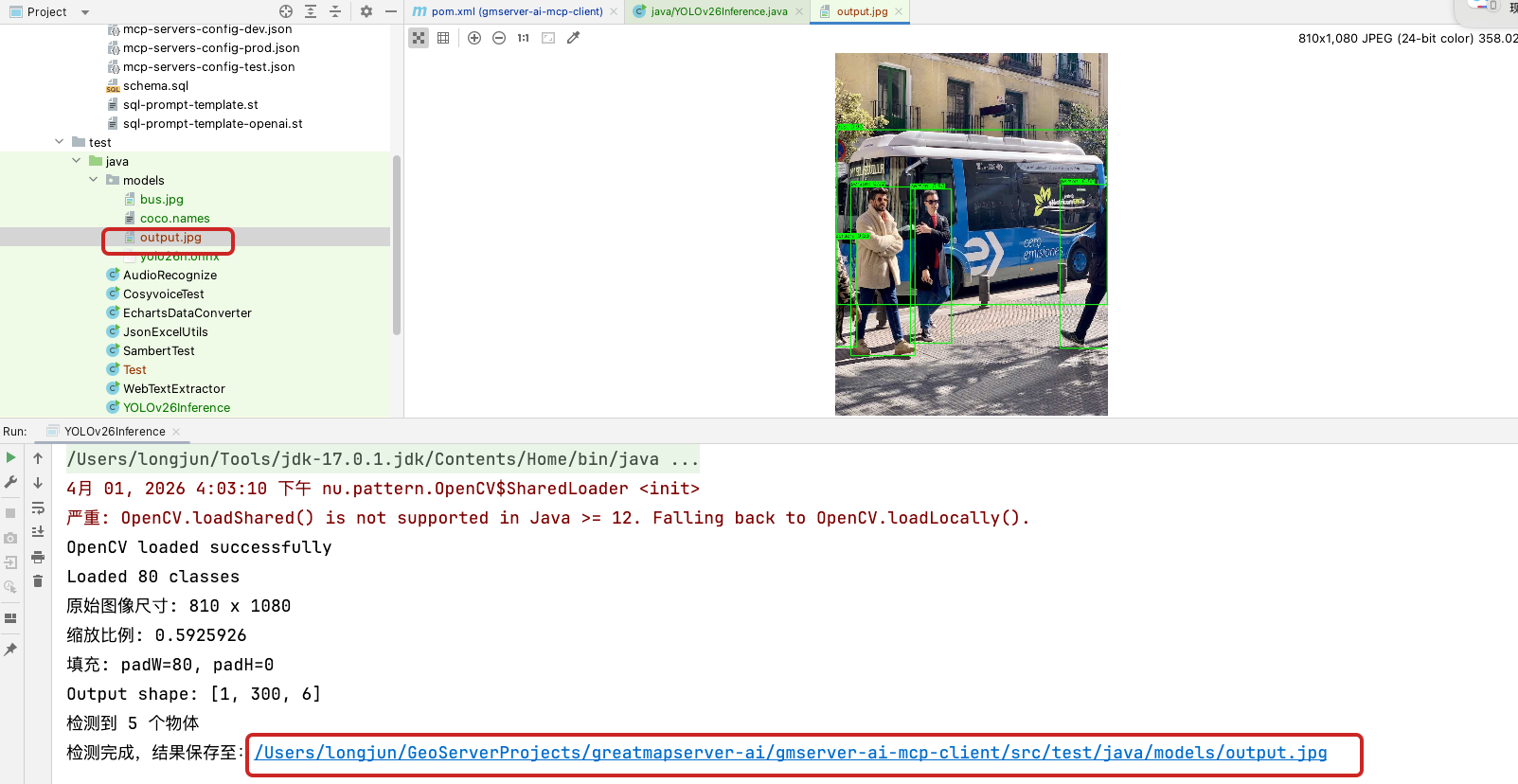
六、看运行结果output.jpg