1、安装
下载二进制文件
https://github.com/juanfont/headscale/releases/download/v0.28.0/headscale_0.28.0_linux_amd64
下载上传至服务器安装
bash
sudo mv /tmp/headscale_0.28.0_linux_amd64 /usr/local/bin/headscale
sudo chmod +x /usr/local/bin/headscale
headscale version
2、配置
写配置文件
bash
sudo nano /etc/headscale/config.yaml


server_url: 你的公网ip:8889
listen_addr: 0.0.0.0:8889
grpc_listen_addr: 0.0.0.0:41641

database:
  type: sqlite3
  sqlite:
    path: /var/lib/headscale/db.sqlite

prefixes:
  v4: 100.64.0.0/10
  v6: fd7a:115c:a1e0::/48

noise:
  private_key_path: /var/lib/headscale/private.key

tls:
  letsencrypt:
    enabled: false

dns:
  override_local_dns: false
  magic_dns: true
  base_domain: headscale.net

log:
  level: info

derp:
  server:
    enabled: true
    region_id: 999
    region_code: "headscale"
    region_name: "Headscale Embedded DERP"
    stun_listen_addr: "0.0.0.0:3478"
    private_key_path: /var/lib/headscale/derp_server.key
  urls: []
  auto_update_enabled: false
配置文件测试
bash
sudo headscale configtest
或者
sudo headscale configtest -c /etc/headscale/config.yaml
检查防火墙状态放行相应端口
bash
sudo ufw allow 8080/tcp
sudo ufw allow 3478/udp
sudo ufw allow 41641/udp
sudo ufw reload- 写 systemd 服务文件
创建 /etc/systemd/system/headscale.service:
bash
sudo nano /etc/systemd/system/headscale.service内容(如果 which headscale 显示的路径不是 /usr/local/bin/headscale,这里要改):
bash
[Unit]
Description=Headscale coordination server
After=network.target

[Service]
User=headscale
Group=nogroup
ExecStart=/usr/local/bin/headscale serve -c /etc/headscale/config.yaml
WorkingDirectory=/var/lib/headscale
Restart=on-failure
RestartSec=5s

# 限制权限(可选,安全一点)
NoNewPrivileges=true

[Install]
WantedBy=multi-user.target
重新加载并启动服务
bash
sudo systemctl daemon-reload
sudo systemctl enable --now headscale
sudo systemctl status headscale
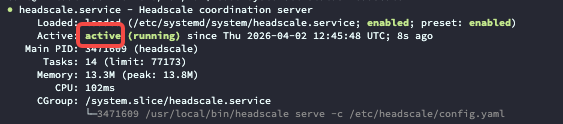
启动成功
3、失败踩坑
1、文件权限不对会导致失败
2、配置格式不对,配置参数不同版本可能有区别
3、报错可以通过下面命令检查
bash
sudo journalctl -u headscale --no-pager -n 504、使用
下载tailscale客户端
https://tailscale.com/download/windows
安装后在客户端输入命令
tailscale up --login-server=http://ip:8889成功后会返回

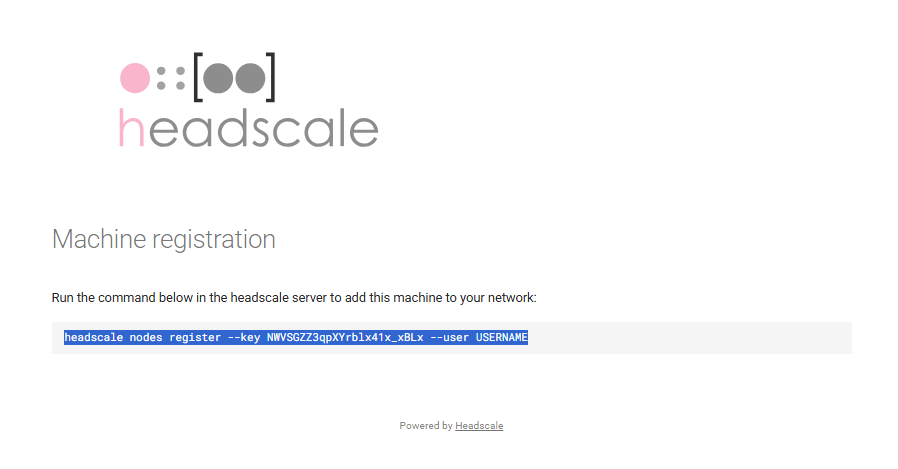
在浏览器打开返回的地址
复制命令到客户端执行
服务端执行
1、先创建用户
sudo headscale users create ccc2、给用户授权
sudo headscale nodes register --key NWVSGZZ3qpXYrblx41x_xBLx --user ccc在客户端查看链接状态
tailscale status