文章目录
-
- [🎯 什么是Tool Calling?](#🎯 什么是Tool Calling?)
- [🛠️ 方案一:本地Tool Calling(推荐入门)](#🛠️ 方案一:本地Tool Calling(推荐入门))
-
- [1. 项目依赖](#1. 项目依赖)
- [2. 配置文件](#2. 配置文件)
- [3. 定义工具类(核心)](#3. 定义工具类(核心))
- [4. Controller层调用:](#4. Controller层调用:)
- [5. 测试验证](#5. 测试验证)
- [🌐 方案二:MCP协议工具调用(企业级)](#🌐 方案二:MCP协议工具调用(企业级))
- [📊 两种方案对比](#📊 两种方案对比)
- [⚠️ 最佳实践](#⚠️ 最佳实践)
🎯 什么是Tool Calling?
Tool Calling(工具调用)是AI Agent的核心能力,允许大语言模型(LLM)在需要时调用外部工具/函数来获取实时数据或执行操作。
核心流程图
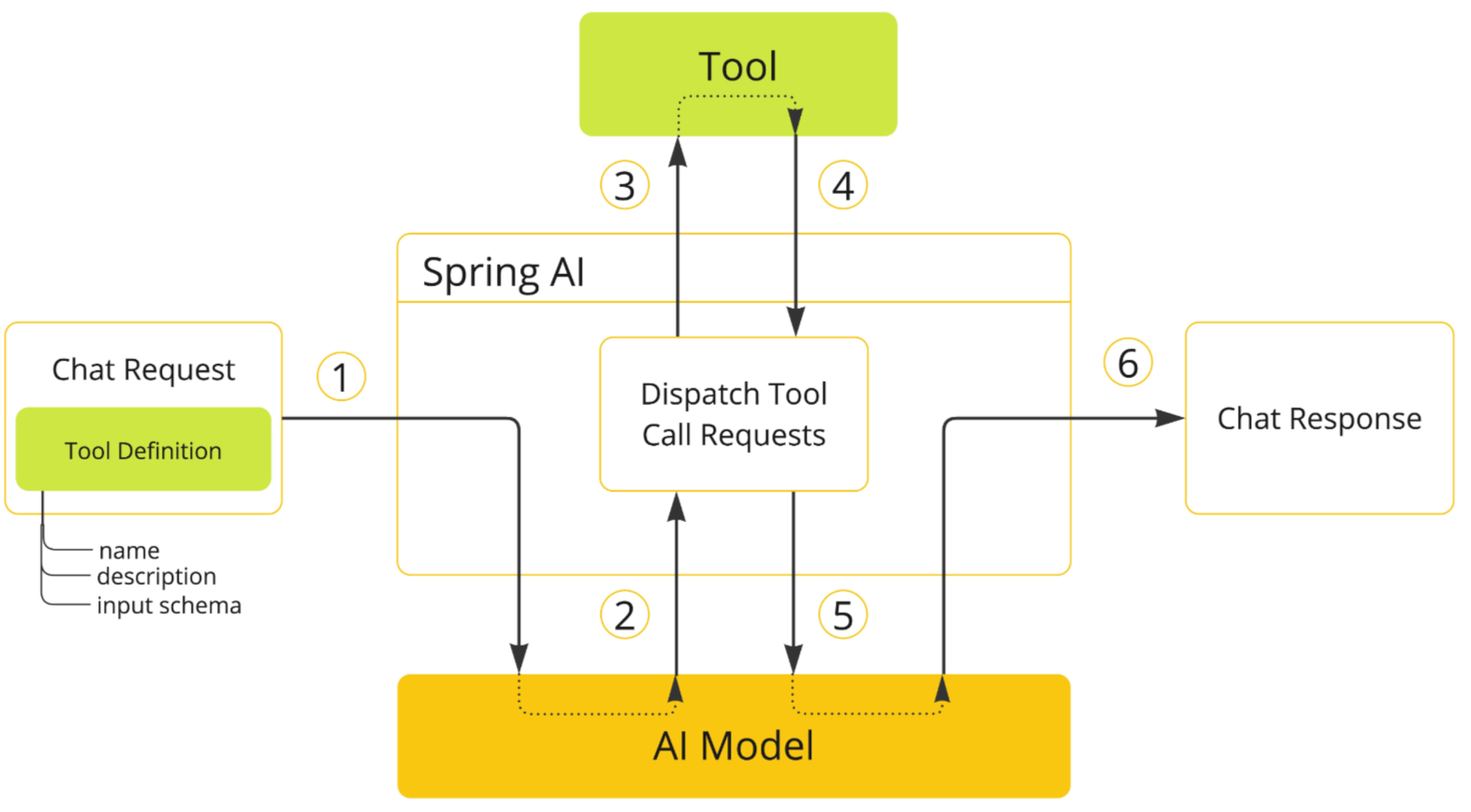
流程说明 :
- 定义工具:将Java方法注册为工具(包含名称、描述、参数模式)
- AI决策:模型分析用户意图,决定是否需要调用工具
- 执行工具:Spring AI自动分发并执行对应的工具方法
- 结果返回:将工具执行结果传回模型生成最终回复
🛠️ 方案一:本地Tool Calling(推荐入门)
1. 项目依赖
xml
<dependencies>
    <!-- Spring Boot Starter -->
    <dependency>
        <groupId>org.springframework.boot</groupId>
        <artifactId>spring-boot-starter-web</artifactId>
    </dependency>

    <!-- Spring AI OpenAI Starter -->
    <dependency>
        <groupId>org.springframework.ai</groupId>
        <artifactId>spring-ai-starter-model-openai</artifactId>
    </dependency>
</dependencies>

<dependencyManagement>
    <dependencies>
        <dependency>
            <groupId>org.springframework.ai</groupId>
            <artifactId>spring-ai-bom</artifactId>
            <version>1.0.0-M5</version>
            <type>pom</type>
            <scope>import</scope>
        </dependency>
    </dependencies>
</dependencyManagement>
2. 配置文件
yaml
# application.yml
spring:
  ai:
    openai:
      api-key: your-api-key
      base-url: https://api.siliconflow.cn
      chat:
        options:
          model: moonshotai/Kimi-K2-Thinking
          temperature: 0.7
3. 定义工具类(核心)
使用@Tool注解声明式定义工具 :
获取当前日期时间的工具类:
java
package com.example.ai.tool;

import org.springframework.ai.tool.annotation.Tool;
import org.springframework.stereotype.Component;

import java.time.LocalDate;
import java.time.LocalDateTime;
import java.time.format.DateTimeFormatter;

@Component
public class TimeTools {

    @Tool(description = "获取用户所在时区的当前日期和时间,用于回答时间相关问题")
    public String getCurrentTime() {
        return LocalDateTime.now()
                .atZone(java.time.ZoneId.systemDefault())
                .toString();
    }
}
数学运算的工具类:
java
package com.example.ai.tool;

import lombok.extern.slf4j.Slf4j;
import org.springframework.ai.tool.annotation.Tool;
import org.springframework.ai.tool.annotation.ToolParam;
import org.springframework.stereotype.Component;

import javax.script.ScriptEngine;
import javax.script.ScriptEngineManager;
import java.util.regex.Pattern;

/**
 * 数学计算工具,支持加减乘除及括号运算
 * 注意:Java 17+ 已移除 Nashorn JS 引擎,使用自定义表达式解析器替代
 */
@Component
@Slf4j
public class CalcTools {

    // 安全正则:只允许数字 + 运算符
    private static final Pattern SAFE_EXPR = Pattern.compile("[0-9+\\-*/().\\s]+");

    @Tool(description = "计算数学表达式,支持加减乘除及括号,例如 10+20*3 或 (10+20)*3")
    public String calculate(
            @ToolParam(description = "数学表达式,例如 10+20*3 或 (10+20)*3") String expr) {
        try {

            if (!SAFE_EXPR.matcher(expr).matches()) {
                return "非法表达式,仅支持数字 + - * / ( )";
            }

            ScriptEngineManager manager = new ScriptEngineManager();
            ScriptEngine engine = manager.getEngineByName("graal.js");
            if (engine == null) {
                log.error("错误:找不到 graal.js 引擎,请确认依赖已正确添加");
                return "";
            }

            Object result = engine.eval(expr);
            // 使用 Number 接口安全转换(避免直接强转 double)
            double numericResult = ((Number) result).doubleValue();
            return "计算结果:" + numericResult;
        } catch (Exception e) {
            log.error("计算失败", e);
            return "计算失败:" + e.getMessage();
        }
    }

}
因为是jdk17版本,所以引入graal.js引擎,maven配置文件加上
xml
 <dependency>
   <groupId>org.graalvm.js</groupId>
    <artifactId>js</artifactId>
    <version>24.1.2</version>
</dependency>
<dependency>
    <groupId>org.graalvm.js</groupId>
    <artifactId>js-scriptengine</artifactId>
    <version>24.1.2</version>
</dependency>
查询天气的工具类:
java
package com.example.ai.tool;

import com.fasterxml.jackson.databind.ObjectMapper;
import lombok.extern.slf4j.Slf4j;
import org.springframework.ai.tool.annotation.Tool;
import org.springframework.ai.tool.annotation.ToolParam;
import org.springframework.stereotype.Component;
import org.springframework.web.reactive.function.client.WebClient;

import java.util.Map;

/**
 * 天气查询工具,通过聚合数据天气 API 获取实时天气信息
 */
@Component
@Slf4j
public class WeatherTools {

    private final WebClient webClient;

    private final ObjectMapper objectMapper = new ObjectMapper();


    public WeatherTools(WebClient.Builder webClientBuilder) {
        this.webClient = webClientBuilder.build();
    }


    /**
     * 免费天气接口,无需 API Key,国内直接访问,支持全国城市
     */
    @Tool(description = "查询中国城市的实时天气,返回温度、天气状况、风向风速")
    public String getWeather(
            @ToolParam(description = "中文城市名称,例如:北京、上海、长沙、深圳") String city) {

        try {
            String apiKey = "4efc59bb794a071dcabf21fc0583dffd";

            String url = String.format("http://apis.juhe.cn/simpleWeather/query?key=%s&city=%s", apiKey, city);

            return webClient.get()
                    .uri(url)
                    .retrieve()
                    .bodyToMono(String.class)
                    .block();

        } catch (Exception e) {
            log.error("查询天气服务异常:", e);
            return "天气查询服务异常,请稍后再试";
        }
    }

}
4. Controller层调用:
java
package com.example.ai.controller;

import com.example.ai.tool.CalcTools;
import com.example.ai.tool.TimeTools;
import com.example.ai.tool.WeatherTools;
import org.springframework.ai.chat.client.ChatClient;
import org.springframework.web.bind.annotation.GetMapping;
import org.springframework.web.bind.annotation.RequestParam;
import org.springframework.web.bind.annotation.RestController;

@RestController
public class ToolCallingController {

    private final ChatClient chatClient;
    private final TimeTools timeTools;
    private final CalcTools calcTools;
    private final WeatherTools weatherTools;

    public ToolCallingController(ChatClient.Builder builder,
                                 TimeTools timeTools,
                                 CalcTools calcTools,
                                 WeatherTools weatherTools) {
        this.chatClient = builder.build();
        this.timeTools = timeTools;
        this.calcTools = calcTools;
        this.weatherTools = weatherTools;
    }

    /**
     * Tool Calling 接口:支持时间查询、数学计算、天气查询
     *
     * @param msg 用户问题
     * @return AI 回答
     */
    @GetMapping("/ai")
    public String callTool(@RequestParam String msg) {
        // 注册所有工具,AI 根据问题自动选择合适的工具调用
        return chatClient.prompt(msg)
                .tools(timeTools, calcTools, weatherTools)
                .call()
                .content();
    }
}
5. 测试验证
bash
# 测试1:查询时间(会触发getCurrentDateTime工具)
curl "http://localhost:8080/api?msg=现在几点了?明天是几号?"

# 测试2:简单数学运算
curl "http://localhost:8080/ai?msg=10+20*3 等于多少"

# 测试2:查询实时天气
curl "http://localhost:8080/ai?msg=北京天气"执行逻辑解析:
| 步骤 | 动作 | 说明 |
|---|---|---|
| 1 | 用户提问 | "现在几点了?" |
| 2 | LLM分析 | 识别需要当前时间信息 |
| 3 | 工具调用 | 自动调用getCurrentDateTime() |
| 4 | 结果返回 | 工具返回时间字符串 |
| 5 | 生成回复 | LLM基于工具结果生成自然语言回答 |
🌐 方案二:MCP协议工具调用(企业级)
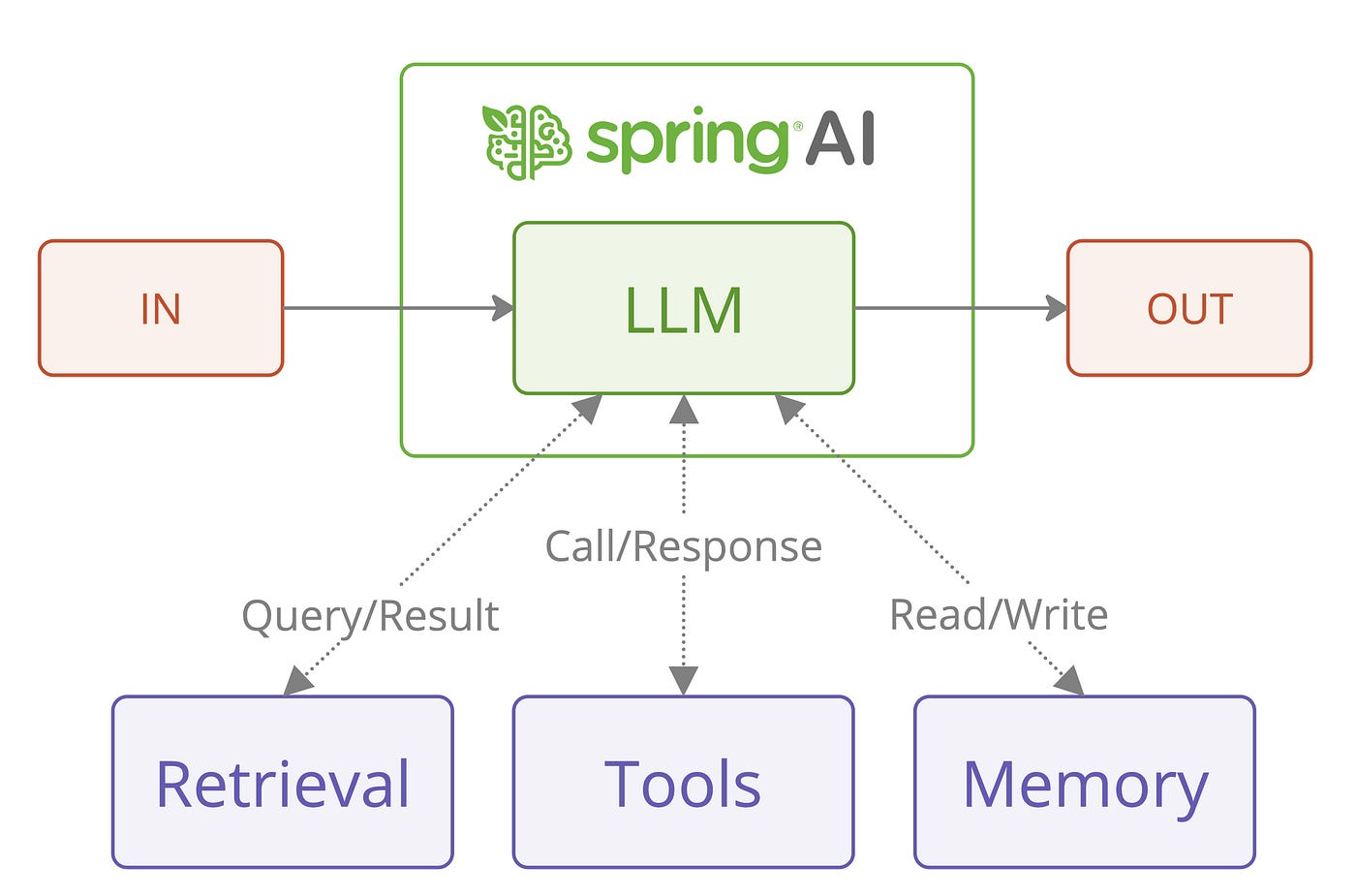
MCP(Model Context Protocol)是Anthropic推出的开放协议,标准化AI工具集成 。
MCP架构图
📊 两种方案对比
| 特性 | 本地Tool Calling | MCP协议 |
|---|---|---|
| 复杂度 | ⭐ 简单 | ⭐⭐⭐ 较复杂 |
| 适用场景 | 单体应用、快速原型 | 微服务、企业级集成 |
| 工具复用 | 仅限当前应用 | 跨应用、跨语言共享 |
| 生态兼容 | Spring AI专属 | 支持Claude、Cursor、Cline等 |
| 部署方式 | 嵌入式 | 独立Server/Client模式 |
| 推荐阶段 | 开发测试 | 生产环境 |
⚠️ 最佳实践
- 工具描述要清晰 :
@Tool的description直接影响LLM的决策准确性 - 参数类型明确:使用具体类型而非String,让Spring AI自动生成Schema
- 错误处理:工具方法内做好异常捕获,返回友好的错误信息
- 权限控制:敏感操作(如转账、删除)需增加人工确认环节
- 日志记录 :开启
logging.level.org.springframework.ai=DEBUG查看工具调用详情
通过以上方案,您可以快速构建具备Tool Calling能力的Spring Boot AI应用。建议从本地Tool Calling 开始入门,熟悉后再迁移到MCP架构以获得更好的扩展性。