这是我用ai辅助做出的一个小项目,emmmm,主包知道自己菜,还在学,后面会持续学习
Github仓库地址:https://github.com/iwait3/-HarmonyOS-.git
老规矩,先放运行截图,然后放开发指南
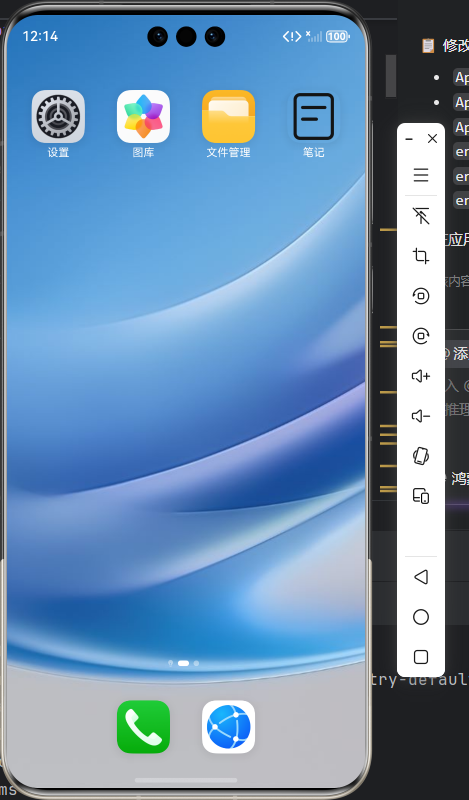
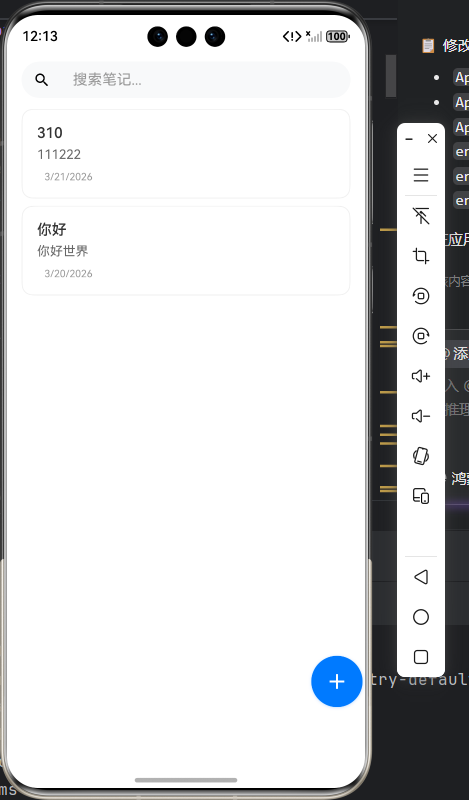
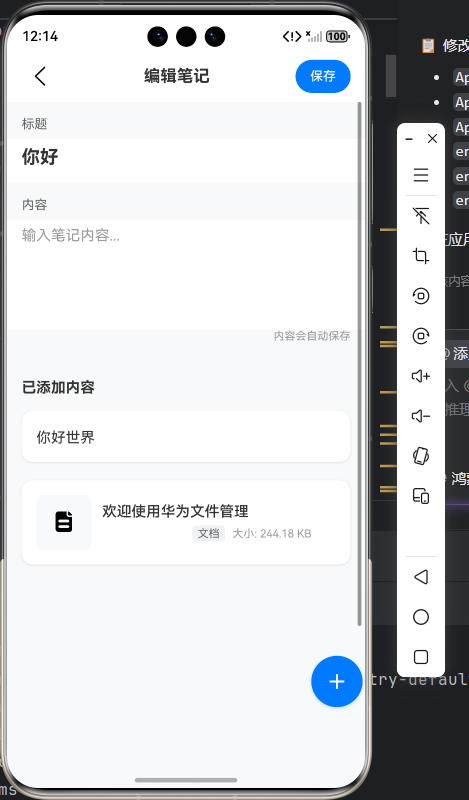
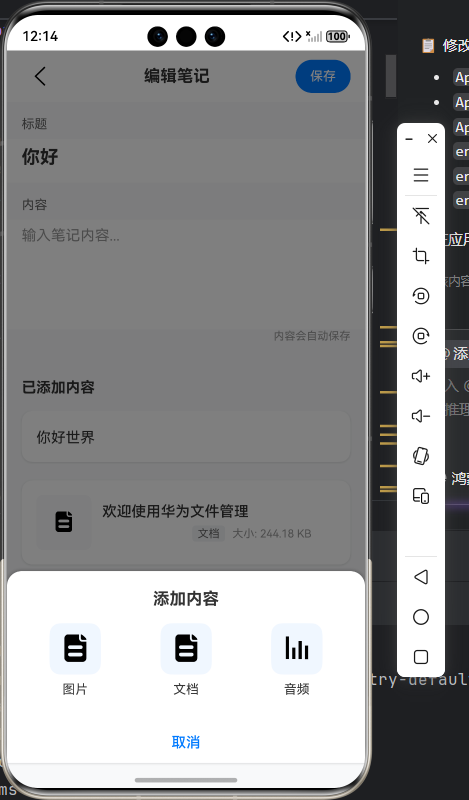
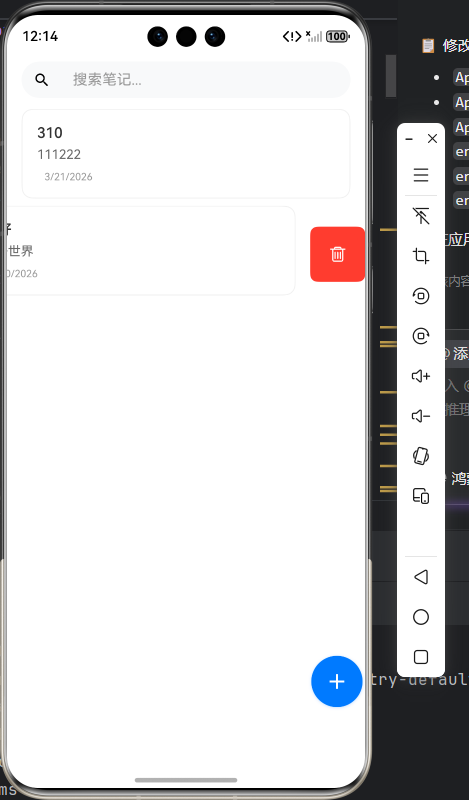
以上是使用模拟机运行出来的截图,之前测试放了些样例进去,接下来就是开发指南了
这是一个基于HarmonyOS的现代笔记管理应用,采用ArkTS语言开发,具有以下核心特性:

- 现代化UI设计,符合HarmonyOS设计语言
- 支持文本、图片、文档、音频等多种内容类型
- 强大的搜索功能(标题、标签、内容多维度搜索)
- 批量操作支持
- 撤销删除功能
- 本地数据持久化存储
目录结构如下:
note/
├── AppScope/                    # 应用级配置
│   ├── app.json5               # 应用配置文件
│   └── resources/              # 应用资源
├── entry/                      # 主模块
│   ├── src/main/
│   │   ├── ets/
│   │   │   ├── entryability/   # 入口能力
│   │   │   ├── model/          # 数据模型
│   │   │   ├── pages/          # 页面组件
│   │   │   └── Service/        # 服务层
│   │   ├── resources/          # 模块资源
│   │   └── module.json5        # 模块配置
├── build-profile.json5         # 构建配置
└── oh-package.json5           # 依赖管理
技术架构:
┌─────────────────────────────────────────────────────────────┐
│                        UI层 (Pages)                         │
├─────────────────────────────────────────────────────────────┤
│ Index.ets - 笔记列表页面  │  EditNote.ets - 编辑页面        │
└─────────────────────────────────────────────────────────────┘
┌─────────────────────────────────────────────────────────────┐
│                     服务层 (Services)                        │
├─────────────────────────────────────────────────────────────┤
│ NoteService - 数据管理  │ FilePickerService - 文件选择      │
│ ConfirmationService - 确认服务 │ UndoManager - 撤销管理      │
└─────────────────────────────────────────────────────────────┘
┌─────────────────────────────────────────────────────────────┐
│                     数据层 (Model)                          │
├─────────────────────────────────────────────────────────────┤
│                NoteData - 笔记数据模型                      │
└─────────────────────────────────────────────────────────────┘
┌─────────────────────────────────────────────────────────────┐
│                     HarmonyOS SDK                           │
├─────────────────────────────────────────────────────────────┤
│   Preferences  │ Router  │ FilePicker  │ PromptAction       │
└─────────────────────────────────────────────────────────────┘
1、配置应用信息 AppScope/app.json5
{
  "app": {
    "bundleName": "com.cn.myapplication",
    "vendor": "example",
    "versionCode": 1000000,
    "versionName": "1.0.0",
    "icon": "$media:book",
    "label": "$string:app_name"
  }
}
2、 配置模块信息 entry/src/main/module.json5
{
  "module": {
    "name": "entry",
    "type": "entry",
    "pages": "$profile:main_pages",
    "abilities": [
      {
        "name": "EntryAbility",
        "srcEntry": "./ets/entryability/EntryAbility.ets",
        "icon": "$media:book",
        "label": "$string:EntryAbility_label",
        "skills": [
          {
            "entities": ["entity.system.home"],
            "actions": ["ohos.want.action.home"]
          }
        ]
      }
    ],
    "requestPermissions": [
      {
        "name": "ohos.permission.READ_IMAGEVIDEO",
        "reason": "$string:read_imagevideo_reason"
      }
    ]
  }
}
3、数据模型设计
创建数据模型文件 entry/src/main/ets/model/NoteData.ts:export enum NoteContentType {
TEXT = 'text',
IMAGE = 'image',
DOCUMENT = 'document',
AUDIO = 'audio'
}
export interface NoteContentItem {
type: NoteContentType;
content: string;
metadata?: Record<string, string | number>;
timestamp: string;
}
export interface NoteData {
id: string;
title: string;
contentItems: NoteContentItem[];
createTime: string;
updateTime?: string;
tags?: string[];
isPinned?: boolean;
}4、服务层实现
1. **核心数据服务** - NoteService.ts
   - 使用Preferences进行数据持久化
   - 实现CRUD操作和缓存机制
- 支持批量操作和搜索功能/**
* 笔记服务 - 基于HarmonyOS最佳实践的笔记数据管理
* 负责笔记数据的增删改查操作,使用Preferences进行持久化存储
*/
import dataPreferences from '@ohos.data.preferences';
import { NoteData } from '../model/NoteData';
import common from '@ohos.app.ability.common';
class NoteService {
// 数据存储相关属性
private preferences: dataPreferences.Preferences | null = null; // Preferences实例
private readonly PREFERENCE_NAME = 'note_app_preferences'; // 存储文件名
private readonly NOTES_KEY = 'notes'; // 笔记数据键名
private context: common.UIAbilityContext | null = null; // 应用上下文
private isInitialized: boolean = false; // 初始化状态
// 缓存机制配置
private notesCache: NoteData[] | null = null; // 笔记数据缓存
private lastCacheUpdate: number = 0; // 最后缓存更新时间
private readonly CACHE_TIMEOUT = 5000; // 5秒缓存有效期
/**
* 设置应用上下文
* @param context - UIAbility上下文对象
*/
setContext(context: common.UIAbilityContext): void {
this.context = context;
}
/**
* 初始化服务
* 创建Preferences实例用于数据持久化
*/
async init(): Promise<void> {
if (this.isInitialized) {
return;
}
if (!this.preferences && this.context) {
try {
this.preferences = await dataPreferences.getPreferences(this.context, this.PREFERENCE_NAME);
this.isInitialized = true;
} catch (error) {
console.error('Failed to initialize preferences: ' + JSON.stringify(error));
throw new Error('Preferences initialization failed');
}
}
}
/**
* 检查缓存是否有效
* @returns 缓存是否在有效期内
*/
private isCacheValid(): boolean {
return this.notesCache !== null &&
Date.now() - this.lastCacheUpdate < this.CACHE_TIMEOUT;
}
/**
* 获取所有笔记(带缓存优化)
* @returns 笔记数据数组
*/
async getAllNotes(): Promise<NoteData[]> {
await this.init();
if (!this.preferences) {
console.error('Preferences not initialized');
return [];
}
// 使用缓存机制减少IO操作
if (this.isCacheValid()) {
return this.notesCache!;
}
try {
const notesJson = await this.preferences.get(this.NOTES_KEY, '[]');
const notes = JSON.parse(notesJson as string) as NoteData[];
// 更新缓存
this.notesCache = notes;
this.lastCacheUpdate = Date.now();
return notes;
} catch (error) {
console.error('Failed to get notes: ' + JSON.stringify(error));
return [];
}
}
/**
* 保存笔记
* @param note - 笔记数据对象
* @returns 保存是否成功
*/
async saveNote(note: NoteData): Promise<boolean> {
await this.init();
if (!this.preferences) {
console.error('Preferences not initialized');
return false;
}
try {
const notes = await this.getAllNotes();
const existingIndex = notes.findIndex(n => n.id === note.id);
// 更新笔记数据,添加更新时间
const updatedNote = {
...note,
updateTime: new Date().toISOString()
};
// 判断是新增还是更新
if (existingIndex >= 0) {
notes[existingIndex] = updatedNote;
} else {
updatedNote.createTime = new Date().toISOString();
notes.push(updatedNote);
}
// 按更新时间降序排序,最新笔记显示在最前面
notes.sort((a, b) => {
const timeA = new Date(a.updateTime || a.createTime).getTime();
const timeB = new Date(b.updateTime || b.createTime).getTime();
return timeB - timeA;
});
// 保存到Preferences
await this.preferences.put(this.NOTES_KEY, JSON.stringify(notes));
await this.preferences.flush();
// 清除缓存,确保下次读取最新数据
this.notesCache = null;
return true;
} catch (error) {
console.error('Failed to save note: ' + JSON.stringify(error));
return false;
}
}
/**
* 删除笔记
* @param id - 笔记ID
* @returns 删除是否成功
*/
async deleteNote(id: string): Promise<boolean> {
await this.init();
if (!this.preferences) {
console.error('Preferences not initialized');
return false;
}
try {
const notes = await this.getAllNotes();
const filteredNotes = notes.filter(note => note.id !== id);
// 检查是否找到要删除的笔记
if (filteredNotes.length === notes.length) {
return false;
}
await this.preferences.put(this.NOTES_KEY, JSON.stringify(filteredNotes));
await this.preferences.flush();
this.notesCache = null;
return true;
} catch (error) {
console.error('Failed to delete note: ' + JSON.stringify(error));
return false;
}
}
/**
* 批量删除笔记
* @param ids - 笔记ID数组
* @returns 删除结果(成功和失败的ID列表)
*/
async deleteNotes(ids: string[]): Promise<{ success: string[], failed: string[] }> {
await this.init();
if (!this.preferences) {
console.error('Preferences not initialized');
return { success: [], failed: ids };
}
try {
const notes = await this.getAllNotes();
const filteredNotes = notes.filter(note => !ids.includes(note.id));
// 获取实际删除的笔记ID
const deletedIds = notes
.filter(note => ids.includes(note.id))
.map(note => note.id);
await this.preferences.put(this.NOTES_KEY, JSON.stringify(filteredNotes));
await this.preferences.flush();
this.notesCache = null;
return {
success: deletedIds,
failed: ids.filter(id => !deletedIds.includes(id))
};
} catch (error) {
console.error('Failed to delete notes: ' + JSON.stringify(error));
return { success: [], failed: ids };
}
}
/**
* 批量保存笔记
* @param notes - 笔记数据数组
* @returns 保存是否成功
*/
async batchSaveNotes(notes: NoteData[]): Promise<boolean> {
await this.init();
if (!this.preferences) {
console.error('Preferences not initialized');
return false;
}
try {
const existingNotes = await this.getAllNotes();
const updatedNotes = [...existingNotes];
// 批量更新笔记数据
for (const note of notes) {
const existingIndex = updatedNotes.findIndex(n => n.id === note.id);
if (existingIndex >= 0) {
updatedNotes[existingIndex] = {
...note,
updateTime: new Date().toISOString()
};
} else {
updatedNotes.push({
...note,
createTime: new Date().toISOString(),
updateTime: new Date().toISOString()
});
}
}
// 排序
updatedNotes.sort((a, b) => {
const timeA = new Date(a.updateTime || a.createTime).getTime();
const timeB = new Date(b.updateTime || b.createTime).getTime();
return timeB - timeA;
});
await this.preferences.put(this.NOTES_KEY, JSON.stringify(updatedNotes));
await this.preferences.flush();
this.notesCache = null;
return true;
} catch (error) {
console.error('Failed to batch save notes: ' + JSON.stringify(error));
return false;
}
}
/**
* 根据ID获取笔记
* @param id - 笔记ID
* @returns 笔记数据或undefined
*/
async getNoteById(id: string): Promise<NoteData | undefined> {
await this.init();
try {
const notes = await this.getAllNotes();
return notes.find(note => note.id === id);
} catch (error) {
console.error('Failed to get note by id: ' + JSON.stringify(error));
return undefined;
}
}
/**
* 搜索笔记
* @param query - 搜索关键词
* @returns 匹配的笔记数组
*/
async searchNotes(query: string): Promise<NoteData[]> {
if (!query.trim()) {
return await this.getAllNotes();
}
try {
const notes = await this.getAllNotes();
const searchTerm = query.toLowerCase();
// 多维度搜索:标题、标签、文本内容
return notes.filter(note => {
// 搜索标题
if (note.title && note.title.toLowerCase().includes(searchTerm)) {
return true;
}
// 搜索标签
if (note.tags && note.tags.some(tag => tag.toLowerCase().includes(searchTerm))) {
return true;
}
// 搜索内容
if (note.contentItems) {
return note.contentItems.some(item => {
if (item.type === 'text') {
return item.content.toLowerCase().includes(searchTerm);
}
return false;
});
}
return false;
});
} catch (error) {
console.error('Failed to search notes: ' + JSON.stringify(error));
return [];
}
}
/**
* 获取笔记数量统计
* @returns 统计信息对象
*/
async getStatistics(): Promise<{
total: number;
pinned: number;
withImages: number;
withDocuments: number;
withAudio: number;
}> {
try {
const notes = await this.getAllNotes();
return {
total: notes.length,
pinned: notes.filter(note => note.isPinned).length,
withImages: notes.filter(note =>
note.contentItems?.some(item => item.type === 'image')
).length,
withDocuments: notes.filter(note =>
note.contentItems?.some(item => item.type === 'document')
).length,
withAudio: notes.filter(note =>
note.contentItems?.some(item => item.type === 'audio')
).length
};
} catch (error) {
console.error('Failed to get statistics: ' + JSON.stringify(error));
return { total: 0, pinned: 0, withImages: 0, withDocuments: 0, withAudio: 0 };
}
}
/**
* 清除缓存
*/
clearCache(): void {
this.notesCache = null;
this.lastCacheUpdate = 0;
}
}
// 导出单例实例
export default new NoteService();2. **文件选择服务** - FilePickerService.ts
- 处理图片、文档、音频文件选择
- 文件信息提取和验证import picker from '@ohos.file.picker';
import fs from '@ohos.file.fs';
import { BusinessError } from '@ohos.base';
export interface FileInfo {
uri: string;
name: string;
size: number;
type: string;
timestamp: string;
}
class FilePickerService {
async pickImage(): Promise<FileInfo | null> {
try {
const photoPicker = new picker.PhotoViewPicker();
const photoSelectOptions = new picker.PhotoSelectOptions();
photoSelectOptions.MIMEType = picker.PhotoViewMIMETypes.IMAGE_TYPE;
photoSelectOptions.maxSelectNumber = 1;
const result = await photoPicker.select(photoSelectOptions);
if (result && result.photoUris && result.photoUris.length > 0) {
const uri = result.photoUris[0];
const fileInfo = await this.getFileInfo(uri);
return fileInfo;
}
return null;
} catch (error) {
console.error('Failed to pick image: ' + JSON.stringify(error));
return null;
}
}
async pickDocument(): Promise<FileInfo | null> {
try {
const documentPicker = new picker.DocumentViewPicker();
const documentSelectOptions = new picker.DocumentSelectOptions();
const result = await documentPicker.select(documentSelectOptions);
if (result && result.length > 0) {
const uri = result[0];
const fileInfo = await this.getFileInfo(uri);
return fileInfo;
}
return null;
} catch (error) {
console.error('Failed to pick document: ' + JSON.stringify(error));
return null;
}
}
async pickAudio(): Promise<FileInfo | null> {
try {
const audioPicker = new picker.AudioViewPicker();
const audioSelectOptions = new picker.AudioSelectOptions();
const result = await audioPicker.select(audioSelectOptions);
if (result && result.length > 0) {
const uri = result[0];
const fileInfo = await this.getFileInfo(uri);
return fileInfo;
}
return null;
} catch (error) {
console.error('Failed to pick audio: ' + JSON.stringify(error));
return null;
}
}
private async getFileInfo(uri: string): Promise<FileInfo> {
try {
const file = fs.openSync(uri, fs.OpenMode.READ_ONLY);
const stat = fs.statSync(file.fd);
fs.closeSync(file);
return {
uri: uri,
name: this.getFileNameFromUri(uri),
size: stat.size,
type: this.getFileTypeFromUri(uri),
timestamp: new Date().toISOString()
};
} catch (error) {
console.error('Failed to get file info: ' + JSON.stringify(error));
return {
uri: uri,
name: '未知文件',
size: 0,
type: 'unknown',
timestamp: new Date().toISOString()
};
}
}
private getFileNameFromUri(uri: string): string {
try {
const segments = uri.split('/');
let fileName = segments[segments.length - 1] || '未命名文件';
// 解码URI编码的文件名
try {
fileName = decodeURIComponent(fileName);
} catch (e) {
console.log('文件名无需解码: ' + fileName);
}
// 美化显示:移除特殊字符,保留中文和基本字符
fileName = fileName.replace(/[^\u4e00-\u9fa5a-zA-Z0-9\-_.\s]/g, '').trim();
return fileName || '未命名文件';
} catch (error) {
console.error('文件名处理失败: ' + JSON.stringify(error));
return '未命名文件';
}
}
private getFileTypeFromUri(uri: string): string {
const extension = uri.split('.').pop()?.toLowerCase() || '';
const imageExtensions = ['jpg', 'jpeg', 'png', 'gif', 'bmp', 'webp'];
const documentExtensions = ['pdf', 'doc', 'docx', 'txt', 'rtf', 'md'];
const audioExtensions = ['mp3', 'wav', 'aac', 'flac', 'ogg'];
if (imageExtensions.includes(extension)) return 'image';
if (documentExtensions.includes(extension)) return 'document';
if (audioExtensions.includes(extension)) return 'audio';
return 'unknown';
}
}
export default new FilePickerService();3. **用户交互服务** - ConfirmationService.ts
- 统一管理确认对话框
- 提示信息和Toast管理import promptAction from '@ohos.promptAction';
/**
* 操作风险级别
*/
export enum OperationRiskLevel {
LOW = 'low', // 低风险操作
MEDIUM = 'medium', // 中风险操作
HIGH = 'high', // 高风险操作
CRITICAL = 'critical' // 关键风险操作
}
/**
* 确认弹窗服务 - 基于HarmonyOS最佳实践的统一确认操作管理
*/
class ConfirmationService {
// 弹窗配置常量
private readonly CONFIG = {
DANGER_COLOR: '#FF3B30',
PRIMARY_COLOR: '#007AFF',
SECONDARY_COLOR: '#666666',
SUCCESS_COLOR: '#34C759',
WARNING_COLOR: '#FF9500'
};
/**
* 根据风险级别获取确认配置
*/
private getConfirmationConfig(
level: OperationRiskLevel,
operationType: string,
itemName: string = '项目',
count: number = 1
): {
title: string;
message: string;
confirmText: string;
cancelText: string;
confirmColor: string;
showWarningIcon: boolean;
requireAdditionalConfirmation?: boolean;
} {
const baseConfigs = {
[OperationRiskLevel.LOW]: {
title: '确认操作',
message: `确定要执行此操作吗?`,
confirmText: '确定',
cancelText: '取消',
confirmColor: this.CONFIG.PRIMARY_COLOR,
showWarningIcon: false
},
[OperationRiskLevel.MEDIUM]: {
title: '操作确认',
message: `确定要${operationType}这个${itemName}吗?`,
confirmText: operationType,
cancelText: '取消',
confirmColor: this.CONFIG.WARNING_COLOR,
showWarningIcon: true
},
[OperationRiskLevel.HIGH]: {
title: '高风险操作确认',
message: `确定要${operationType}这个${itemName}吗?此操作将无法撤销。`,
confirmText: operationType,
cancelText: '取消',
confirmColor: this.CONFIG.DANGER_COLOR,
showWarningIcon: true,
requireAdditionalConfirmation: true
},
[OperationRiskLevel.CRITICAL]: {
title: '关键操作确认',
message: `确定要${operationType} ${count} 个${itemName}吗?此操作将永久删除数据且无法恢复。`,
confirmText: `确认${operationType}`,
cancelText: '取消',
confirmColor: this.CONFIG.DANGER_COLOR,
showWarningIcon: true,
requireAdditionalConfirmation: true
}
};
return baseConfigs[level];
}
/**
* 显示分级确认弹窗
*/
async showGradedConfirmation(
level: OperationRiskLevel,
operationType: string,
itemName: string = '项目',
count: number = 1
): Promise<boolean> {
const config = this.getConfirmationConfig(level, operationType, itemName, count);
// 高风险操作需要二次确认
if (config.requireAdditionalConfirmation) {
const firstConfirmed = await this.showBasicConfirmation(config);
if (!firstConfirmed) {
return false;
}
// 二次确认
const secondConfig = {
...config,
title: '请再次确认',
message: `请再次确认是否要${operationType} ${count > 1 ? count + '个' : '这个'}${itemName}?`,
confirmText: '确认执行'
};
return await this.showBasicConfirmation(secondConfig);
}
return await this.showBasicConfirmation(config);
}
/**
* 显示基础确认弹窗
*/
private async showBasicConfirmation(config: {
title: string;
message: string;
confirmText: string;
cancelText: string;
confirmColor: string;
showWarningIcon: boolean;
requireAdditionalConfirmation?: boolean;
}): Promise<boolean> {
return new Promise((resolve) => {
promptAction.showDialog({
title: config.title,
message: config.message,
buttons: [
{
text: config.cancelText,
color: this.CONFIG.SECONDARY_COLOR
},
{
text: config.confirmText,
color: config.confirmColor
}
]
}).then((result) => {
resolve(result.index === 1);
}).catch(() => {
resolve(false);
});
});
}
/**
* 显示删除确认弹窗 - 增强版
*/
async showDeleteConfirmation(
message: string = '确定要删除吗?删除后将无法恢复。',
title: string = '删除确认',
itemName: string = '项目'
): Promise<boolean> {
return new Promise((resolve) => {
promptAction.showDialog({
title: title,
message: message,
buttons: [
{
text: '取消',
color: this.CONFIG.SECONDARY_COLOR
},
{
text: `删除${itemName}`,
color: this.CONFIG.DANGER_COLOR
}
]
}).then((result) => {
resolve(result.index === 1);
}).catch(() => {
resolve(false);
});
});
}
/**
* 显示批量删除确认弹窗 - 增强版
*/
async showBatchDeleteConfirmation(count: number, itemName: string = '笔记'): Promise<boolean> {
const level = count > 5 ? OperationRiskLevel.CRITICAL : OperationRiskLevel.HIGH;
return this.showGradedConfirmation(level, '删除', itemName, count);
}
/**
* 显示内容删除确认弹窗 - 增强版
*/
async showContentDeleteConfirmation(contentType: string = '内容项'): Promise<boolean> {
return this.showGradedConfirmation(OperationRiskLevel.MEDIUM, '删除', contentType, 1);
}
/**
* 显示笔记删除确认(智能分级)
*/
async showNoteDeleteConfirmation(noteTitle: string, isPinned: boolean = false): Promise<boolean> {
const level = isPinned ? OperationRiskLevel.HIGH : OperationRiskLevel.MEDIUM;
// 智能消息生成
let message = `确定要删除"${noteTitle}"吗?`;
if (isPinned) {
message += ' 这是一个置顶笔记,删除后将无法恢复。';
} else {
message += ' 删除后将无法恢复。';
}
return new Promise((resolve) => {
promptAction.showDialog({
title: isPinned ? '删除置顶笔记' : '删除笔记',
message: message,
buttons: [
{
text: '取消',
color: this.CONFIG.SECONDARY_COLOR
},
{
text: '确认删除',
color: this.CONFIG.DANGER_COLOR
}
]
}).then((result) => {
resolve(result.index === 1);
}).catch(() => {
resolve(false);
});
});
}
/**
* 显示保存确认弹窗
*/
async showSaveConfirmation(): Promise<boolean> {
return this.showGradedConfirmation(OperationRiskLevel.LOW, '保存', '修改', 1);
}
/**
* 显示取消编辑确认
*/
async showCancelEditConfirmation(hasChanges: boolean): Promise<boolean> {
if (!hasChanges) {
return true;
}
return new Promise((resolve) => {
promptAction.showDialog({
title: '放弃修改',
message: '当前有未保存的修改,确定要放弃吗?',
buttons: [
{
text: '继续编辑',
color: this.CONFIG.SECONDARY_COLOR
},
{
text: '放弃修改',
color: this.CONFIG.DANGER_COLOR
}
]
}).then((result) => {
resolve(result.index === 1);
}).catch(() => {
resolve(false);
});
});
}
/**
* 显示通用确认弹窗 - 增强版
*/
async showConfirmation(
message: string,
title: string = '确认操作',
confirmText: string = '确定',
cancelText: string = '取消',
confirmType: 'primary' | 'danger' | 'success' = 'primary'
): Promise<boolean> {
return new Promise((resolve) => {
const confirmColor = this.getConfirmColor(confirmType);
promptAction.showDialog({
title: title,
message: message,
buttons: [
{
text: cancelText,
color: this.CONFIG.SECONDARY_COLOR
},
{
text: confirmText,
color: confirmColor
}
]
}).then((result) => {
resolve(result.index === 1);
}).catch(() => {
resolve(false);
});
});
}
/**
* 显示操作确认弹窗(带警告图标)
*/
async showWarningConfirmation(
message: string,
title: string = '操作确认'
): Promise<boolean> {
return this.showConfirmation(
message,
title,
'继续',
'取消',
'danger'
);
}
/**
* 显示成功确认弹窗
*/
async showSuccessConfirmation(
message: string,
title: string = '操作成功'
): Promise<boolean> {
return this.showConfirmation(
message,
title,
'确定',
'',
'success'
);
}
/**
* 显示撤销提示 - 增强版
*/
showUndoToast(message: string = '操作已撤销', duration: number = 2000): void {
promptAction.showToast({
message: message,
duration: duration
});
}
/**
* 显示操作成功提示 - 增强版
*/
showSuccessToast(message: string, duration: number = 2000): void {
promptAction.showToast({
message: message,
duration: duration
});
}
/**
* 显示错误提示 - 增强版
*/
showErrorToast(message: string, duration: number = 3000): void {
promptAction.showToast({
message: message,
duration: duration
});
}
/**
* 显示信息提示
*/
showInfoToast(message: string, duration: number = 2000): void {
promptAction.showToast({
message: message,
duration: duration
});
}
/**
* 显示警告提示
*/
showWarningToast(message: string, duration: number = 3000): void {
promptAction.showToast({
message: message,
duration: duration
});
}
/**
* 获取确认按钮颜色
*/
private getConfirmColor(type: string): string {
switch (type) {
case 'danger':
return this.CONFIG.DANGER_COLOR;
case 'success':
return this.CONFIG.SUCCESS_COLOR;
case 'primary':
default:
return this.CONFIG.PRIMARY_COLOR;
}
}
/**
* 显示加载提示
*/
showLoading(message: string = '加载中...'): void {
// HarmonyOS 暂不支持自定义加载提示,使用Toast替代
promptAction.showToast({
message: message,
duration: 1500
});
}
/**
* 批量操作结果提示
*/
showBatchResultToast(successCount: number, totalCount: number, operation: string = '操作'): void {
if (successCount === totalCount) {
this.showSuccessToast(`${operation}成功,共处理 ${totalCount} 个项目`);
} else if (successCount === 0) {
this.showErrorToast(`${operation}失败,请重试`);
} else {
this.showWarningToast(`${operation}完成,成功 ${successCount}/${totalCount} 个项目`);
}
}
}
export default new ConfirmationService();5、UI组件开发
1. **主页面组件** - Index.ets
   - 笔记列表展示
   - 搜索和过滤功能
   - 批量操作支持
- 撤销删除功能/**
* 笔记列表页面 - 应用的主界面
* 显示所有笔记列表,支持搜索、批量操作、撤销删除等功能
*/
import router from '@ohos.router';
import promptAction from '@ohos.promptAction';
import { NoteData } from '../model/NoteData';
import NoteService from '../Service/NoteService';
import UndoManager from '../Service/UndoManager';
import ConfirmationService from '../Service/ConfirmationService';
@Entry
@Component
struct Index {
// 状态管理:使用@State装饰器实现响应式数据绑定
@State notes: NoteData[] = []; // 所有笔记数据
@State searchText: string = ''; // 搜索关键词
@State filteredNotes: NoteData[] = []; // 过滤后的笔记列表
@State selectedNotes: string[] = []; // 批量选择中的笔记ID
@State isBatchMode: boolean = false; // 是否处于批量模式
@State showUndoToast: boolean = false; // 是否显示撤销提示
/**
* 页面即将显示时调用
* 初始化数据和加载笔记
*/
async aboutToAppear() {
await this.loadNotes();
}
/**
* 页面显示时调用
* 确保数据最新状态
*/
onPageShow() {
this.loadNotes();
}
/**
* 加载笔记数据
* 从服务层获取所有笔记并更新UI
*/
async loadNotes() {
this.notes = await NoteService.getAllNotes();
this.filteredNotes = this.notes;
}
/**
* 搜索功能实现
* 根据关键词过滤笔记列表
*/
onSearch() {
if (this.searchText) {
// 多维度搜索:标题、标签、文本内容
this.filteredNotes = this.notes.filter(note => {
// 搜索标题
if (note.title && note.title.includes(this.searchText)) {
return true;
}
// 搜索标签
if (note.tags && note.tags.some(tag => tag.includes(this.searchText))) {
return true;
}
// 搜索文本内容
if (note.contentItems) {
return note.contentItems.some(item => {
if (item.type === 'text') {
return item.content.includes(this.searchText);
}
return false;
});
}
return false;
});
} else {
this.filteredNotes = this.notes;
}
}
/**
* 添加新笔记
* 跳转到编辑页面创建新笔记
*/
onAddNote() {
router.push({
url: 'pages/EditNote'
});
}
/**
* 笔记点击事件处理
* 根据当前模式执行不同操作
* @param note - 被点击的笔记对象
*/
onNoteClick(note: NoteData) {
if (this.isBatchMode) {
// 批量模式:切换选择状态
this.toggleNoteSelection(note.id);
} else {
// 正常模式:跳转到编辑页面
router.push({
url: 'pages/EditNote',
params: {
noteId: note.id
}
});
}
}
/**
* 切换笔记选择状态
* @param noteId - 笔记ID
*/
toggleNoteSelection(noteId: string) {
const index = this.selectedNotes.indexOf(noteId);
if (index > -1) {
this.selectedNotes.splice(index, 1);
} else {
this.selectedNotes.push(noteId);
}
}
/**
* 删除单个笔记
* @param noteId - 笔记ID
*/
async deleteNote(noteId: string) {
const noteToDelete = this.notes.find(note => note.id === noteId);
if (!noteToDelete) {
return;
}
// 显示确认对话框
const confirmed = await ConfirmationService.showNoteDeleteConfirmation(
noteToDelete.title || '未命名笔记',
noteToDelete.isPinned
);
if (confirmed) {
// 添加到撤销管理器
UndoManager.addDeletedNotes([noteToDelete]);
const success = await NoteService.deleteNote(noteId);
if (success) {
await this.loadNotes();
this.showUndoToast = true;
ConfirmationService.showSuccessToast('笔记删除成功');
// 5秒后自动隐藏撤销提示
setTimeout(() => {
this.showUndoToast = false;
UndoManager.clear();
}, 5000);
} else {
ConfirmationService.showErrorToast('删除失败,请重试');
}
}
}
/**
* 撤销删除操作
* 从撤销管理器恢复已删除的笔记
*/
async undoDelete() {
if (UndoManager.hasUndo()) {
const notesToRestore = await UndoManager.undo();
const success = await NoteService.batchSaveNotes(notesToRestore);
await this.loadNotes();
this.showUndoToast = false;
if (success) {
ConfirmationService.showUndoToast('删除操作已撤销');
} else {
ConfirmationService.showErrorToast('撤销操作失败');
}
}
}
/**
* 批量删除选中的笔记
*/
async deleteSelectedNotes() {
if (this.selectedNotes.length === 0) {
ConfirmationService.showErrorToast('请先选择要删除的笔记');
return;
}
const confirmed = await ConfirmationService.showBatchDeleteConfirmation(this.selectedNotes.length, '笔记');
if (confirmed) {
const notesToDelete = this.notes.filter(note => this.selectedNotes.includes(note.id));
UndoManager.addDeletedNotes(notesToDelete);
const deleteResult = await NoteService.deleteNotes(this.selectedNotes);
if (deleteResult.failed.length > 0) {
ConfirmationService.showBatchResultToast(
deleteResult.success.length,
this.selectedNotes.length,
'删除'
);
} else {
ConfirmationService.showSuccessToast(`成功删除 ${deleteResult.success.length} 个笔记`);
}
await this.loadNotes();
this.selectedNotes = [];
this.isBatchMode = false;
this.showUndoToast = true;
setTimeout(() => {
this.showUndoToast = false;
UndoManager.clear();
}, 5000);
}
}
/**
* 切换批量操作模式
*/
toggleBatchMode() {
this.isBatchMode = !this.isBatchMode;
if (!this.isBatchMode) {
this.selectedNotes = [];
}
}
/**
* 获取笔记预览内容
* @param note - 笔记对象
* @returns 预览文本
*/
private getNotePreview(note: NoteData): string {
if (!note.contentItems || note.contentItems.length === 0) {
return '暂无内容';
}
const firstItem = note.contentItems[0];
if (firstItem.type === 'text') {
return firstItem.content.length > 50
? firstItem.content.substring(0, 50) + '...'
: firstItem.content;
} else {
// 文件类型预览
const typeMap: Record<string, string> = {
'image': '[图片]',
'document': '[文档]',
'audio': '[音频]'
};
return typeMap[firstItem.type] || '[文件]';
}
}
/**
* 格式化日期显示
* @param dateString - 日期字符串
* @returns 格式化后的日期文本
*/
private formatDate(dateString: string): string {
try {
const date = new Date(dateString);
const now = new Date();
const diffMs = now.getTime() - date.getTime();
const diffDays = Math.floor(diffMs / (1000 * 60 * 60 * 24));
// 相对时间显示
if (diffDays === 0) {
return '今天';
} else if (diffDays === 1) {
return '昨天';
} else if (diffDays < 7) {
return `${diffDays}天前`;
} else {
return date.toLocaleDateString();
}
} catch (error) {
return dateString;
}
}
/**
* 构建侧滑删除按钮
* @param note - 笔记对象
* @returns 侧滑按钮组件
*/
@Builder
getSwipeActionButtons(note: NoteData) {
Column() {
Button() {
Image($r('app.media.delete'))
.width(18)
.height(18)
.fillColor('#ffffff')
}
.width(45)
.height(45)
.backgroundColor('#FF3B30')
.borderRadius(8)
.onClick(() => this.deleteNote(note.id))
}
.width(60)
.height(60)
.justifyContent(FlexAlign.Center)
.alignItems(HorizontalAlign.Center)
.backgroundColor('#FF3B30')
.borderRadius(8)
}
/**
* 页面UI构建
*/
build() {
Stack({ alignContent: Alignment.TopStart }) {
// 主内容区域
Column({
space: 0
}) {
// 顶部操作栏 - 现代简约设计
Column({
space: 8
}) {
// 搜索区域
Row({
space: 12
}) {
// 搜索框 - 简洁设计
Row({
space: 8
}) {
Image($r('app.media.search'))
.width(20)
.height(20)
.fillColor('#666666')
.margin({ left: 12 })
TextInput({
placeholder: '搜索笔记...',
text: this.searchText
})
.onChange((value: string) => {
this.searchText = value;
this.onSearch();
})
.width('100%')
.height(40)
.fontSize(16)
.fontColor('#333333')
.placeholderColor('#999999')
.backgroundColor('transparent')
}
.backgroundColor('#f8f9fa')
.borderRadius(20)
.flexGrow(1)
.height(40)
.margin({ left: 16, right: 16 })
// 批量操作按钮
Button() {
Image(this.isBatchMode ? $r('app.media.add') : $r('app.media.more1'))
.width(20)
.height(20)
.fillColor(this.isBatchMode ? '#007AFF' : '#666666')
}
.width(40)
.height(40)
.backgroundColor(this.isBatchMode ? '#e6f3ff' : 'transparent')
.borderRadius(20)
.margin({ right: 16 })
.onClick(() => this.toggleBatchMode())
}
.width('100%')
// 批量操作工具栏
if (this.isBatchMode) {
Row({
space: 16
}) {
Text(`已选择 ${this.selectedNotes.length} 个笔记`)
.fontSize(14)
.fontColor('#666666')
.flexGrow(1)
.margin({ left: 16 })
Button('删除选中')
.width(80)
.height(32)
.fontSize(12)
.backgroundColor('#FF3B30')
.fontColor('#ffffff')
.borderRadius(16)
.margin({ right: 16 })
.onClick(() => this.deleteSelectedNotes())
}
.width('100%')
.padding({ top: 8, bottom: 8 })
.backgroundColor('#f8f9fa')
.borderRadius(8)
.margin({ left: 16, right: 16 })
}
}
.width('100%')
.padding({ top: 12, bottom: 12 })
.backgroundColor('#ffffff')
// 笔记列表
List() {
ForEach(this.filteredNotes, (note: NoteData) => {
ListItem() {
Row({
space: 12
}) {
if (this.isBatchMode) {
Image(this.selectedNotes.includes(note.id) ? $r('app.media.add') : $r('app.media.search'))
.width(20)
.height(20)
.fillColor(this.selectedNotes.includes(note.id) ? '#007AFF' : '#CCCCCC')
}
Column({
space: 6
}) {
Row() {
Text(note.title || '未命名笔记')
.fontSize(16)
.fontWeight(FontWeight.Medium)
.fontColor('#333333')
.flexGrow(1)
if (note.isPinned) {
Image($r('app.media.more1'))
.width(16)
.height(16)
.margin({ left: 8 })
.fillColor('#FF9500')
}
}
.width('100%')
Text(this.getNotePreview(note))
.fontSize(14)
.fontColor('#666666')
.width('100%')
.maxLines(2)
Row() {
if (note.tags && note.tags.length > 0) {
Text(note.tags.slice(0, 2).join(', '))
.fontSize(11)
.fontColor('#666666')
.backgroundColor('#f0f0f0')
.padding({ left: 6, right: 6, top: 2, bottom: 2 })
.borderRadius(4)
}
Text(this.formatDate(note.updateTime || note.createTime))
.fontSize(11)
.fontColor('#999999')
.margin({ left: 8 })
}
.width('100%')
.margin({ top: 4 })
}
.flexGrow(1)
}
.padding(16)
.backgroundColor(this.selectedNotes.includes(note.id) ? '#f0f8ff' : '#ffffff')
.borderRadius(12)
.margin({ left: 16, right: 16, bottom: 8 })
.border({
width: 1,
color: '#f0f0f0'
})
.onClick(() => this.onNoteClick(note))
}
.swipeAction({
end: this.getSwipeActionButtons(note)
})
}, (note: NoteData) => note.id)
}
.width('100%')
.flexGrow(1)
.backgroundColor('#ffffff')
// 撤销操作提示
if (this.showUndoToast) {
Row({
space: 16
}) {
Text(`已删除 ${UndoManager.getUndoNotes().length} 个笔记`)
.fontSize(14)
.fontColor('#ffffff')
.flexGrow(1)
.margin({ left: 16 })
Button('撤销')
.width(50)
.height(30)
.fontSize(12)
.backgroundColor('#ffffff')
.fontColor('#007AFF')
.borderRadius(4)
.margin({ right: 16 })
.onClick(() => this.undoDelete())
}
.width('100%')
.height(50)
.backgroundColor('#333333')
.borderRadius(8)
.position({
x: '0%',
y: '90%'
})
}
// 添加笔记按钮 - 浮动操作按钮
Button() {
Image($r('app.media.add'))
.width(24)
.height(24)
.fillColor('#ffffff')
}
.width(56)
.height(56)
.position({
x: '85%',
y: '85%'
})
.backgroundColor('#007AFF')
.borderRadius(28)
.shadow({
radius: 8,
color: '#40007AFF',
offsetX: 0,
offsetY: 2
})
.onClick(() => this.onAddNote())
}
.width('100%')
.height('100%')
.backgroundColor('#ffffff')
}
.width('100%')
.height('100%')
.backgroundColor('#ffffff')
}
}2. **编辑页面组件** - EditNote.ets
- 笔记创建和编辑
- 多类型内容管理
- 文件附件支持
- 自动保存机制/**
* 笔记编辑页面 - 创建和编辑笔记的核心界面
* 支持文本输入、文件附件添加、内容管理等功能
*/
import router from '@ohos.router';
import promptAction from '@ohos.promptAction';
import ConfirmationService from '../Service/ConfirmationService';
import { NoteData, NoteContentType, NoteContentItem } from '../model/NoteData';
import NoteService from '../Service/NoteService';
import FilePickerService, { FileInfo } from '../Service/FilePickerService';
@Entry
@Component
struct EditNote {
// 状态管理
@State title: string = ''; // 笔记标题
@State contentItems: NoteContentItem[] = []; // 内容项数组
@State isDirty: boolean = false; // 是否有未保存的修改
@State currentTextContent: string = ''; // 当前编辑的文本内容
@State isEditing: boolean = false; // 是否正在编辑(显示操作面板)
private noteId: string = ''; // 当前编辑的笔记ID(为空表示新建)
/**
* 页面即将显示时调用
* 初始化数据和加载现有笔记(如果是编辑模式)
*/
async aboutToAppear() {
const params = router.getParams() as Record<string, string>;
if (params && params.noteId) {
this.noteId = params.noteId;
await this.loadNote();
}
}
// 原始数据备份,用于比较是否发生修改
private originalTitle: string = '';
private originalContentItems: NoteContentItem[] = [];
/**
* 检查笔记是否被修改
* @returns 是否有真实修改
*/
private checkIfModified(): boolean {
// 检查标题是否修改
if (this.title !== this.originalTitle) {
return true;
}
// 检查内容项数量是否变化
if (this.contentItems.length !== this.originalContentItems.length) {
return true;
}
// 检查每个内容项是否变化
for (let i = 0; i < this.contentItems.length; i++) {
const currentItem = this.contentItems[i];
const originalItem = this.originalContentItems[i];
if (!originalItem ||
currentItem.type !== originalItem.type ||
currentItem.content !== originalItem.content) {
return true;
}
}
return false;
}
/**
* 加载现有笔记数据
*/
async loadNote() {
const note = await NoteService.getNoteById(this.noteId);
if (note) {
this.title = note.title;
this.contentItems = note.contentItems || [];
// 保存原始数据用于比较
this.originalTitle = note.title;
this.originalContentItems = [...(note.contentItems || [])];
}
}
/**
* 返回按钮处理
* 检查是否有未保存的修改并提示用户
* @returns 是否阻止默认返回行为
*/
onBackPress(): boolean {
const hasRealChanges = this.checkIfModified();
// 如果是查看现有笔记且没有真实修改,直接返回
if (this.noteId && !hasRealChanges) {
router.back();
return false;
}
// 如果是新建笔记且有内容,或者现有笔记有真实修改,才显示确认弹窗
if (hasRealChanges) {
ConfirmationService.showCancelEditConfirmation(hasRealChanges).then((confirmed: boolean) => {
if (confirmed) {
router.back();
}
});
return true; // 阻止默认返回行为
} else {
router.back();
}
return false;
}
/**
* 保存笔记
* 将当前编辑的笔记数据保存到持久化存储
*/
async saveNote() {
// 如果有未保存的文本内容,先保存
if (this.currentTextContent.trim()) {
this.addTextContent(this.currentTextContent);
this.currentTextContent = '';
}
const note: NoteData = {
id: this.noteId || Date.now().toString(),
title: this.title,
contentItems: this.contentItems,
createTime: new Date().toISOString()
};
const success = await NoteService.saveNote(note);
if (success) {
ConfirmationService.showSuccessToast('笔记已保存');
this.isDirty = false;
// 更新原始数据
this.originalTitle = this.title;
this.originalContentItems = [...this.contentItems];
} else {
ConfirmationService.showErrorToast('保存失败,请重试');
}
}
/**
* 添加文本内容
* @param text - 文本内容
*/
addTextContent(text: string) {
if (text.trim()) {
this.contentItems.push({
type: NoteContentType.TEXT,
content: text.trim(),
timestamp: new Date().toISOString()
});
this.isDirty = true;
}
}
/**
* 添加图片
* 调用文件选择器选择图片文件
*/
async addImage() {
const fileInfo = await FilePickerService.pickImage();
if (fileInfo) {
this.contentItems.push({
type: NoteContentType.IMAGE,
content: fileInfo.uri,
metadata: {
name: fileInfo.name,
size: fileInfo.size
},
timestamp: new Date().toISOString()
});
this.isDirty = true;
ConfirmationService.showSuccessToast(`图片已添加: ${fileInfo.name}`);
}
}
/**
* 添加文档
* 调用文件选择器选择文档文件
*/
async addDocument() {
const fileInfo = await FilePickerService.pickDocument();
if (fileInfo) {
this.contentItems.push({
type: NoteContentType.DOCUMENT,
content: fileInfo.uri,
metadata: {
name: fileInfo.name,
size: fileInfo.size,
type: fileInfo.type
},
timestamp: new Date().toISOString()
});
this.isDirty = true;
ConfirmationService.showSuccessToast(`文档已添加: ${fileInfo.name}`);
}
}
/**
* 添加音频
* 调用文件选择器选择音频文件
*/
async addAudio() {
const fileInfo = await FilePickerService.pickAudio();
if (fileInfo) {
this.contentItems.push({
type: NoteContentType.AUDIO,
content: fileInfo.uri,
metadata: {
name: fileInfo.name,
size: fileInfo.size
},
timestamp: new Date().toISOString()
});
this.isDirty = true;
ConfirmationService.showSuccessToast(`音频已添加: ${fileInfo.name}`);
}
}
/**
* 删除内容项
* @param index - 内容项索引
*/
async deleteContentItem(index: number) {
if (index >= 0 && index < this.contentItems.length) {
const item = this.contentItems[index];
let contentType = '内容项';
// 根据内容类型显示不同的确认信息
switch (item.type) {
case NoteContentType.TEXT:
contentType = '文本内容';
break;
case NoteContentType.IMAGE:
contentType = '图片';
break;
case NoteContentType.DOCUMENT:
contentType = '文档';
break;
case NoteContentType.AUDIO:
contentType = '音频';
break;
}
const confirmed = await ConfirmationService.showContentDeleteConfirmation(contentType);
if (confirmed) {
this.contentItems.splice(index, 1);
this.isDirty = true;
ConfirmationService.showSuccessToast(`${contentType}已删除`);
}
}
}
/**
* 内容项构建器
* @param item - 内容项数据
* @param index - 内容项索引
* @returns 内容项UI组件
*/
@Builder
ContentItemBuilder(item: NoteContentItem, index: number) {
Column() {
if (item.type === NoteContentType.TEXT) {
// 文本内容卡片
Column() {
Text(item.content)
.fontSize(16)
.fontColor('#333333')
.lineHeight(24)
.width('100%')
.padding(16)
}
.width('100%')
.backgroundColor('#ffffff')
.borderRadius(12)
.shadow({
radius: 8,
color: '#1a000000',
offsetX: 0,
offsetY: 2
})
.margin({ bottom: 12 })
} else {
// 文件内容卡片
Row({
space: 12
}) {
// 文件图标区域
Column({
space: 4
}) {
if (item.type === NoteContentType.IMAGE) {
Image(item.content)
.width(60)
.height(60)
.objectFit(ImageFit.Cover)
.borderRadius(8)
} else {
Column() {
Image(this.getFileTypeIcon(item.type))
.width(24)
.height(24)
.fillColor('#666666')
}
.width(60)
.height(60)
.backgroundColor('#f8f9fa')
.borderRadius(8)
.justifyContent(FlexAlign.Center)
}
}
// 文件信息区域
Column({
space: 6
}) {
Text(this.getDisplayName(item))
.fontSize(16)
.fontWeight(FontWeight.Medium)
.fontColor('#333333')
.width('100%')
.maxLines(1)
.textOverflow({ overflow: TextOverflow.Ellipsis })
Row({
space: 8
}) {
Text(this.getFileTypeDescription(item.type))
.fontSize(12)
.fontColor('#666666')
.backgroundColor('#f0f2f5')
.padding({ left: 6, right: 6, top: 2, bottom: 2 })
.borderRadius(4)
Text(`大小: ${this.formatFileSize(Number(item.metadata?.size) || 0)}`)
.fontSize(12)
.fontColor('#999999')
}
}
.flexGrow(1)
.justifyContent(FlexAlign.Center)
}
.width('100%')
.padding(16)
.backgroundColor('#ffffff')
.borderRadius(12)
.shadow({
radius: 8,
color: '#1a000000',
offsetX: 0,
offsetY: 2
})
.margin({ bottom: 12 })
.onClick(() => this.viewFile(item))
}
}
}
/**
* 获取文件类型图标
* @param type - 文件类型
* @returns 图标资源
*/
private getFileTypeIcon(type: NoteContentType): Resource {
switch (type) {
case NoteContentType.IMAGE:
return $r('app.media.document');
case NoteContentType.DOCUMENT:
return $r('app.media.document');
case NoteContentType.AUDIO:
return $r('app.media.audio');
default:
return $r('app.media.document');
}
}
/**
* 获取显示名称
* @param item - 内容项
* @returns 显示名称
*/
private getDisplayName(item: NoteContentItem): string {
const nameValue = item.metadata?.name;
let name = '未命名文件';
if (typeof nameValue === 'string') {
name = nameValue;
} else if (typeof nameValue === 'number') {
name = nameValue.toString();
}
// 移除文件扩展名
name = name.replace(/\.[^/.]+$/, '');
// 如果名称过长,截断显示
if (name.length > 20) {
name = name.substring(0, 20) + '...';
}
return name;
}
/**
* 获取文件类型描述
* @param type - 文件类型
* @returns 类型描述
*/
private getFileTypeDescription(type: NoteContentType): string {
switch (type) {
case NoteContentType.IMAGE:
return '图片';
case NoteContentType.DOCUMENT:
return '文档';
case NoteContentType.AUDIO:
return '音频';
default:
return '文件';
}
}
/**
* 查看文件
* @param item - 内容项
*/
private viewFile(item: NoteContentItem) {
if (item.type === NoteContentType.IMAGE || item.type === NoteContentType.DOCUMENT) {
router.push({
url: 'components/FileViewer',
params: {
fileUri: item.content,
fileName: item.metadata?.name || '未命名文件'
}
});
}
}
/**
* 构建侧滑删除按钮
* @param index - 内容项索引
* @returns 侧滑按钮组件
*/
@Builder
getSwipeActionButtons(index: number) {
Column() {
Button() {
Image($r('app.media.delete'))
.width(18)
.height(18)
.fillColor('#ffffff')
}
.width(45)
.height(45)
.backgroundColor('#FF3B30')
.borderRadius(8)
.onClick(() => this.deleteContentItem(index))
}
.width(60)
.height(60)
.justifyContent(FlexAlign.Center)
.alignItems(HorizontalAlign.Center)
.backgroundColor('#FF3B30')
.borderRadius(8)
}
/**
* 格式化文件大小
* @param bytes - 字节数
* @returns 格式化后的文件大小
*/
private formatFileSize(bytes: number): string {
if (bytes === 0) return '0 B';
const k = 1024;
const sizes = ['B', 'KB', 'MB', 'GB'];
const i = Math.floor(Math.log(bytes) / Math.log(k));
return parseFloat((bytes / Math.pow(k, i)).toFixed(2)) + ' ' + sizes[i];
}
/**
* 浮动操作按钮构建器
* @returns 浮动按钮组件
*/
@Builder
FloatingActionButton() {
Column() {
Button() {
Column() {
Image($r('app.media.add'))
.width(24)
.height(24)
.fillColor('#ffffff')
}
.width('100%')
.height('100%')
.justifyContent(FlexAlign.Center)
}
.width(56)
.height(56)
.backgroundColor('#007AFF')
.borderRadius(28)
.shadow({
radius: 8,
color: '#40007AFF',
offsetX: 0,
offsetY: 4
})
.onClick(() => {
this.isEditing = !this.isEditing;
})
}
.position({
x: '85%',
y: '85%'
})
}
/**
* 操作面板构建器
* @returns 底部操作面板组件
*/
@Builder
ActionSheet() {
Column() {
// 标题
Text('添加内容')
.fontSize(18)
.fontWeight(FontWeight.Bold)
.fontColor('#333333')
.width('100%')
.textAlign(TextAlign.Center)
.padding({ top: 20, bottom: 16 })
// 操作按钮网格
Row({
space: 20
}) {
// 添加图片
Column({
space: 8
}) {
Button() {
Image($r('app.media.document'))
.width(32)
.height(32)
.fillColor('#007AFF')
}
.width(56)
.height(56)
.backgroundColor('#F0F7FF')
.borderRadius(12)
.onClick(() => {
this.addImage();
this.isEditing = false;
})
Text('图片')
.fontSize(14)
.fontColor('#333333')
}
.alignItems(HorizontalAlign.Center)
.layoutWeight(1)
// 添加文档
Column({
space: 8
}) {
Button() {
Image($r('app.media.document'))
.width(32)
.height(32)
.fillColor('#007AFF')
}
.width(56)
.height(56)
.backgroundColor('#F0F7FF')
.borderRadius(12)
.onClick(() => {
this.addDocument();
this.isEditing = false;
})
Text('文档')
.fontSize(14)
.fontColor('#333333')
}
.alignItems(HorizontalAlign.Center)
.layoutWeight(1)
// 添加音频
Column({
space: 8
}) {
Button() {
Image($r('app.media.audio'))
.width(32)
.height(32)
.fillColor('#007AFF')
}
.width(56)
.height(56)
.backgroundColor('#F0F7FF')
.borderRadius(12)
.onClick(() => {
this.addAudio();
this.isEditing = false;
})
Text('音频')
.fontSize(14)
.fontColor('#333333')
}
.alignItems(HorizontalAlign.Center)
.layoutWeight(1)
}
.width('100%')
.padding({ left: 24, right: 24, bottom: 20 })
// 取消按钮
Button('取消')
.width('100%')
.height(44)
.fontSize(16)
.fontColor('#007AFF')
.fontWeight(FontWeight.Medium)
.backgroundColor('transparent')
.borderRadius(0)
.margin({ top: 8 })
.onClick(() => {
this.isEditing = false;
})
}
.width('100%')
.backgroundColor('#ffffff')
.borderRadius({ topLeft: 16, topRight: 16 })
.shadow({
radius: 16,
color: '#40000000',
offsetX: 0,
offsetY: -2
})
}
/**
* 页面UI构建
*/
build() {
Stack() {
// 主内容区域
Column({
space: 0
}) {
// 顶部导航栏 - 现代化设计
Row({
space: 16
}) {
// 返回按钮
Button() {
Image($r('app.media.back'))
.width(24)
.height(24)
.fillColor('#333333')
}
.width(40)
.height(40)
.backgroundColor('transparent')
.borderRadius(20)
.onClick(() => this.onBackPress())
// 页面标题
Text(this.noteId ? '编辑笔记' : '新建笔记')
.fontSize(18)
.fontWeight(FontWeight.Bold)
.fontColor('#333333')
.flexGrow(1)
.textAlign(TextAlign.Center)
// 保存按钮
Button('保存')
.width(60)
.height(36)
.fontSize(14)
.fontColor('#ffffff')
.backgroundColor('#007AFF')
.borderRadius(18)
.onClick(async () => {
await this.saveNote();
router.back();
})
}
.height(56)
.width('100%')
.padding({ left: 16, right: 16 })
.backgroundColor('#ffffff')
.shadow({
radius: 4,
color: '#0a000000',
offsetX: 0,
offsetY: 1
})
// 编辑区域
Scroll() {
Column({
space: 0
}) {
// 标题输入区域
Column() {
Text('标题')
.fontSize(14)
.fontColor('#666666')
.width('100%')
.padding({left: 16, top: 16, bottom: 8 })
TextInput({
placeholder: '输入笔记标题...',
text: this.title
})
.onChange((value: string) => {
this.title = value;
this.isDirty = true;
})
.fontSize(20)
.fontWeight(FontWeight.Bold)
.fontColor('#333333')
.placeholderColor('#999999')
.width('100%')
.padding({ left: 16, right: 16, bottom: 16 })
.backgroundColor('#ffffff')
.borderRadius(0)
}
// 文本内容区域
Column() {
Text('内容')
.fontSize(14)
.fontColor('#666666')
.width('100%')
.padding({ left: 16, top: 16, bottom: 8 })
TextArea({
placeholder: '输入笔记内容...',
text: this.currentTextContent
})
.onChange((value: string) => {
this.currentTextContent = value;
this.isDirty = true;
})
.fontSize(16)
.fontColor('#333333')
.placeholderColor('#999999')
.width('100%')
.height(120)
.padding({ left: 16, right: 16, bottom: 8 })
.backgroundColor('#ffffff')
.borderRadius(0)
// 自动保存提示
Text('内容会自动保存')
.fontSize(12)
.fontColor('#999999')
.width('100%')
.textAlign(TextAlign.End)
.padding({ right: 16, bottom: 16 })
}
// 已添加内容区域
if (this.contentItems.length > 0) {
Column() {
Text('已添加内容')
.fontSize(16)
.fontWeight(FontWeight.Bold)
.fontColor('#333333')
.width('100%')
.padding({ left: 16, top: 24, bottom: 16 })
List() {
ForEach(this.contentItems, (item: NoteContentItem, index: number) => {
ListItem() {
this.ContentItemBuilder(item, index)
}
.margin({ left: 16, right: 16, bottom: 8 })
.swipeAction({
end: this.getSwipeActionButtons(index)
})
}, (item: NoteContentItem, index: number) => index.toString())
}
.width('100%')
.height(this.contentItems.length * 120)
.layoutWeight(1)
}
.width('100%')
}
}
.width('100%')
}
.flexGrow(1)
.backgroundColor('#f8f9fa')
.padding({ bottom:350 }) // 为浮动按钮留出空间
}
.width('100%')
.height('100%')
// 浮动操作按钮
this.FloatingActionButton()
// 底部操作面板
if (this.isEditing) {
Column() {
Blank()
.flexGrow(1)
.onClick(() => {
this.isEditing = false;
})
this.ActionSheet()
}
.width('100%')
.height('100%')
.backgroundColor('#80000000')
}
}
.width('100%')
.height('100%')
.backgroundColor('#f8f9fa')
}
}6、入口能力配置
entry/src/main/ets/entryability/EntryAbility.ets
/**
 * 入口能力类 - HarmonyOS应用的主入口点
 * 负责应用生命周期管理和初始化工作
 */

import { AbilityConstant, ConfigurationConstant, UIAbility, Want } from '@kit.AbilityKit';
import { hilog } from '@kit.PerformanceAnalysisKit';
import { window } from '@kit.ArkUI';
import NoteService from '../Service/NoteService';

// 日志域标识
const DOMAIN = 0x0000;

export default class EntryAbility extends UIAbility {
  /**
   * 能力创建时调用
   * @param want - 启动参数
   * @param launchParam - 启动配置
   */
  onCreate(want: Want, launchParam: AbilityConstant.LaunchParam): void {
    try {
      // 设置应用颜色模式为系统默认
      this.context.getApplicationContext().setColorMode(ConfigurationConstant.ColorMode.COLOR_MODE_NOT_SET);
    } catch (err) {
      hilog.error(DOMAIN, 'testTag', 'Failed to set colorMode. Cause: %{public}s', JSON.stringify(err));
    }
    hilog.info(DOMAIN, 'testTag', '%{public}s', 'Ability onCreate');
  }

  /**
   * 能力销毁时调用
   * 清理资源和释放内存
   */
  onDestroy(): void {
    hilog.info(DOMAIN, 'testTag', '%{public}s', 'Ability onDestroy');
  }

  /**
   * 窗口阶段创建时调用
   * 主要初始化工作和UI加载
   * @param windowStage - 窗口阶段对象
   */
  onWindowStageCreate(windowStage: window.WindowStage): void {
    hilog.info(DOMAIN, 'testTag', '%{public}s', 'Ability onWindowStageCreate');

    // 初始化笔记服务的上下文,为数据持久化做准备
    NoteService.setContext(this.context);

    // 加载主页面内容
    windowStage.loadContent('pages/Index', (err) => {
      if (err.code) {
        hilog.error(DOMAIN, 'testTag', 'Failed to load the content. Cause: %{public}s', JSON.stringify(err));
        return;
      }
      hilog.info(DOMAIN, 'testTag', 'Succeeded in loading the content.');
    });
  }

  /**
   * 窗口阶段销毁时调用
   * 清理UI相关资源
   */
  onWindowStageDestroy(): void {
    hilog.info(DOMAIN, 'testTag', '%{public}s', 'Ability onWindowStageDestroy');
  }

  /**
   * 应用进入前台时调用
   * 恢复应用状态和数据同步
   */
  onForeground(): void {
    hilog.info(DOMAIN, 'testTag', '%{public}s', 'Ability onForeground');
  }

  /**
   * 应用进入后台时调用
   * 保存状态和释放非必要资源
   */
  onBackground(): void {
    hilog.info(DOMAIN, 'testTag', '%{public}s', 'Ability onBackground');
  }
}
以上就是开发指南的内容,如有问题欢迎指正