摘要
文字是游戏 UI 和信息展示的基础元素。本章将深入介绍 Pygame 的文字渲染功能。我们将学习如何加载字体文件,掌握文字的渲染和对齐方法,探索文字特效如阴影、描边和渐变的实现,以及如何实现文字换行和自动缩放。通过本章的学习,读者将能够在游戏中呈现美观、专业的文字效果。
8.1 字体系统概述
Pygame 的字体功能由 pygame.font 模块提供,支持 TrueType 字体文件的加载和渲染。
8.1.1 支持的字体格式
Pygame 主要支持以下字体格式:
| 格式 | 扩展名 | 说明 |
|---|---|---|
| TrueType | .ttf | 最常用,跨平台 |
| OpenType | .otf | 现代字体格式 |
| 系统字体文件 | .ttf / .ttc / .otf | 从操作系统字体文件路径直接加载 |
8.1.2 初始化字体系统
python
import pygame

pygame.init()

# 或者单独初始化
pygame.font.init()

# 检查是否初始化成功
if pygame.font.get_init():
    print("字体系统已初始化")
8.2 基本文字渲染
8.2.1 从字体文件加载字体
由于某些环境下 pygame.font.SysFont 可能存在兼容性问题,推荐直接使用字体文件路径加载字体。
python
import pygame
import sys
import os

pygame.init()
screen = pygame.display.set_mode((800, 600))
clock = pygame.time.Clock()

def get_font(size):
    font_paths = [
        r"C:\Windows\Fonts\simhei.ttf",
        r"C:\Windows\Fonts\msyh.ttc",
        r"C:\Windows\Fonts\msyh.ttf",
        r"C:\Windows\Fonts\simsun.ttc",
    ]

    for path in font_paths:
        if os.path.exists(path):
            try:
                return pygame.font.Font(path, size)
            except:
                pass

    return pygame.font.Font(None, size)

font = get_font(36)

running = True
while running:
    for event in pygame.event.get():
        if event.type == pygame.QUIT:
            running = False

    screen.fill((50, 50, 50))

    text_surface = font.render("你好,Pygame!", True, (255, 255, 255))
    screen.blit(text_surface, (300, 250))

    pygame.display.flip()
    clock.tick(60)

pygame.quit()
sys.exit()
8.2.2 使用字体文件
python
import pygame
import sys
import os

pygame.init()
screen = pygame.display.set_mode((800, 600))
clock = pygame.time.Clock()

def get_font(size):
    font_paths = [
        r"C:\Windows\Fonts\simhei.ttf",
        r"C:\Windows\Fonts\msyh.ttc",
        r"C:\Windows\Fonts\simsun.ttc",
    ]

    for path in font_paths:
        if os.path.exists(path):
            try:
                return pygame.font.Font(path, size)
            except:
                pass

    return pygame.font.Font(None, size)

custom_font = get_font(36)

running = True
while running:
    for event in pygame.event.get():
        if event.type == pygame.QUIT:
            running = False

    screen.fill((50, 50, 50))

    text_surface = custom_font.render("自定义字体", True, (255, 255, 255))
    screen.blit(text_surface, (300, 250))

    pygame.display.flip()
    clock.tick(60)

pygame.quit()
sys.exit()
8.2.3 渲染模式
python
# 抗锯齿渲染,推荐
text_surface = font.render("文字", True, (255, 255, 255))

# 非抗锯齿渲染,适合像素风格
text_surface = font.render("文字", False, (255, 255, 255))

# 带背景色的渲染
text_surface = font.render("文字", True, (255, 255, 255), (0, 0, 0))
8.3 文字对齐与布局
python
import pygame
import sys
import os

pygame.init()
screen = pygame.display.set_mode((800, 600))
clock = pygame.time.Clock()

def get_font(size):
    font_paths = [
        r"C:\Windows\Fonts\simhei.ttf",
        r"C:\Windows\Fonts\msyh.ttc",
        r"C:\Windows\Fonts\simsun.ttc",
    ]

    for path in font_paths:
        if os.path.exists(path):
            try:
                return pygame.font.Font(path, size)
            except:
                pass

    return pygame.font.Font(None, size)

font = get_font(24)

def draw_text_aligned(surface, text, font, color, rect, align="left"):
    text_surface = font.render(text, True, color)
    text_rect = text_surface.get_rect()

    if align == "left":
        text_rect.left = rect.left
        text_rect.centery = rect.centery
    elif align == "center":
        text_rect.center = rect.center
    elif align == "right":
        text_rect.right = rect.right
        text_rect.centery = rect.centery
    elif align == "top":
        text_rect.centerx = rect.centerx
        text_rect.top = rect.top
    elif align == "bottom":
        text_rect.centerx = rect.centerx
        text_rect.bottom = rect.bottom

    surface.blit(text_surface, text_rect)
    return text_rect

running = True
while running:
    for event in pygame.event.get():
        if event.type == pygame.QUIT:
            running = False

    screen.fill((50, 50, 50))

    rect = pygame.Rect(100, 100, 600, 400)
    pygame.draw.rect(screen, (100, 100, 100), rect, 2)

    draw_text_aligned(screen, "左对齐", font, (255, 255, 255), rect, "left")
    draw_text_aligned(screen, "居中", font, (255, 255, 255), rect, "center")
    draw_text_aligned(screen, "右对齐", font, (255, 255, 255), rect, "right")
    draw_text_aligned(screen, "顶部", font, (255, 255, 255), rect, "top")
    draw_text_aligned(screen, "底部", font, (255, 255, 255), rect, "bottom")

    pygame.display.flip()
    clock.tick(60)

pygame.quit()
sys.exit()
8.4 文字特效
8.4.1 阴影效果
python
import pygame
import sys
import os

pygame.init()
screen = pygame.display.set_mode((800, 600))
clock = pygame.time.Clock()

def get_font(size):
    font_paths = [
        r"C:\Windows\Fonts\simhei.ttf",
        r"C:\Windows\Fonts\msyh.ttc",
        r"C:\Windows\Fonts\simsun.ttc",
    ]

    for path in font_paths:
        if os.path.exists(path):
            try:
                return pygame.font.Font(path, size)
            except:
                pass

    return pygame.font.Font(None, size)

def render_text_with_shadow(surface, text, font, text_color, shadow_color, pos, shadow_offset=(2, 2)):
    shadow_surface = font.render(text, True, shadow_color)
    shadow_pos = (pos[0] + shadow_offset[0], pos[1] + shadow_offset[1])
    surface.blit(shadow_surface, shadow_pos)

    text_surface = font.render(text, True, text_color)
    surface.blit(text_surface, pos)

font = get_font(48)

running = True
while running:
    for event in pygame.event.get():
        if event.type == pygame.QUIT:
            running = False

    screen.fill((50, 50, 50))

    render_text_with_shadow(
        screen,
        "阴影文字效果",
        font,
        (255, 255, 255),
        (0, 0, 0),
        (250, 250)
    )

    pygame.display.flip()
    clock.tick(60)

pygame.quit()
sys.exit()
8.4.2 描边效果
python
import pygame
import sys
import os

pygame.init()
screen = pygame.display.set_mode((800, 600))
clock = pygame.time.Clock()

def get_font(size):
    font_paths = [
        r"C:\Windows\Fonts\simhei.ttf",
        r"C:\Windows\Fonts\msyh.ttc",
        r"C:\Windows\Fonts\simsun.ttc",
    ]

    for path in font_paths:
        if os.path.exists(path):
            try:
                return pygame.font.Font(path, size)
            except:
                pass

    return pygame.font.Font(None, size)

def render_text_with_outline(surface, text, font, text_color, outline_color, pos, outline_width=2):
    outline_surface = font.render(text, True, outline_color)

    for dx in range(-outline_width, outline_width + 1):
        for dy in range(-outline_width, outline_width + 1):
            if dx != 0 or dy != 0:
                surface.blit(outline_surface, (pos[0] + dx, pos[1] + dy))

    text_surface = font.render(text, True, text_color)
    surface.blit(text_surface, pos)

font = get_font(48)

running = True
while running:
    for event in pygame.event.get():
        if event.type == pygame.QUIT:
            running = False

    screen.fill((50, 50, 50))

    render_text_with_outline(
        screen,
        "描边文字效果",
        font,
        (255, 255, 0),
        (255, 0, 0),
        (250, 250),
        3
    )

    pygame.display.flip()
    clock.tick(60)

pygame.quit()
sys.exit()
8.4.3 渐变文字
python
import pygame
import sys
import os

pygame.init()
screen = pygame.display.set_mode((800, 600))
clock = pygame.time.Clock()

def get_font(size):
    font_paths = [
        r"C:\Windows\Fonts\simhei.ttf",
        r"C:\Windows\Fonts\msyh.ttc",
        r"C:\Windows\Fonts\simsun.ttc",
    ]

    for path in font_paths:
        if os.path.exists(path):
            try:
                return pygame.font.Font(path, size)
            except:
                pass

    return pygame.font.Font(None, size)

def create_gradient_text(text, font, color1, color2):
    text_surface = font.render(text, True, (255, 255, 255))
    width, height = text_surface.get_size()

    gradient = pygame.Surface((width, height), pygame.SRCALPHA)

    for y in range(height):
        ratio = y / height
        r = int(color1[0] + (color2[0] - color1[0]) * ratio)
        g = int(color1[1] + (color2[1] - color1[1]) * ratio)
        b = int(color1[2] + (color2[2] - color1[2]) * ratio)
        pygame.draw.line(gradient, (r, g, b), (0, y), (width, y))

    result = pygame.Surface((width, height), pygame.SRCALPHA)
    result.blit(gradient, (0, 0))
    result.blit(text_surface, (0, 0), special_flags=pygame.BLEND_RGBA_MULT)

    return result

font = get_font(48)

running = True
while running:
    for event in pygame.event.get():
        if event.type == pygame.QUIT:
            running = False

    screen.fill((50, 50, 50))

    gradient_text = create_gradient_text("渐变文字", font, (255, 0, 0), (0, 0, 255))
    screen.blit(gradient_text, (250, 250))

    pygame.display.flip()
    clock.tick(60)

pygame.quit()
sys.exit()
8.5 文字换行与自动缩放
python
import pygame
import sys
import os

pygame.init()
screen = pygame.display.set_mode((800, 600))
clock = pygame.time.Clock()

def get_font(size):
    font_paths = [
        r"C:\Windows\Fonts\simhei.ttf",
        r"C:\Windows\Fonts\msyh.ttc",
        r"C:\Windows\Fonts\simsun.ttc",
    ]

    for path in font_paths:
        if os.path.exists(path):
            try:
                return pygame.font.Font(path, size)
            except:
                pass

    return pygame.font.Font(None, size)

def render_wrapped_text(surface, text, font, color, rect, line_spacing=5):
    words = text.split(' ')
    lines = []
    current_line = []

    for word in words:
        test_line = ' '.join(current_line + [word])
        test_surface = font.render(test_line, True, color)

        if test_surface.get_width() <= rect.width:
            current_line.append(word)
        else:
            if current_line:
                lines.append(' '.join(current_line))
            current_line = [word]

    if current_line:
        lines.append(' '.join(current_line))

    y = rect.y
    for line in lines:
        line_surface = font.render(line, True, color)
        surface.blit(line_surface, (rect.x, y))
        y += font.get_height() + line_spacing

        if y + font.get_height() > rect.bottom:
            break

def render_fitted_text(surface, text, font_path, color, rect, max_font_size=72):
    for size in range(max_font_size, 8, -1):
        test_font = pygame.font.Font(font_path, size)
        text_surface = test_font.render(text, True, color)

        if text_surface.get_width() <= rect.width and text_surface.get_height() <= rect.height:
            surface.blit(text_surface, rect.topleft)
            return test_font

    return pygame.font.Font(font_path, 12)

font_path = r"C:\Windows\Fonts\simhei.ttf"
if not os.path.exists(font_path):
    font_path = r"C:\Windows\Fonts\msyh.ttc"

font = pygame.font.Font(font_path, 24) if os.path.exists(font_path) else pygame.font.Font(None, 24)

long_text = "这是一段很长的文字,需要自动换行显示。Pygame 的文字渲染功能虽然基础,但通过适当的封装可以 实现丰富的效果。"

running = True
while running:
    for event in pygame.event.get():
        if event.type == pygame.QUIT:
            running = False

    screen.fill((50, 50, 50))

    text_rect = pygame.Rect(100, 100, 600, 200)
    pygame.draw.rect(screen, (100, 100, 100), text_rect, 2)
    render_wrapped_text(screen, long_text, font, (255, 255, 255), text_rect)

    fit_rect = pygame.Rect(250, 400, 300, 100)
    pygame.draw.rect(screen, (100, 100, 100), fit_rect, 2)
    render_fitted_text(screen, "自适应", font_path if os.path.exists(font_path) else None, (255, 255, 0), fit_rect)

    pygame.display.flip()
    clock.tick(60)

pygame.quit()
sys.exit()
8.6 文字工具类示例
下面给出一个更稳妥的文字渲染工具类示例,统一使用字体文件加载。
python
import pygame
import os

class TextRenderer:
    def __init__(self, font_path, font_size):
        self.font_path = font_path
        self.font_size = font_size
        self.font = pygame.font.Font(font_path, font_size)
        self.cache = {}

    def render_text(self, text, color):
        key = (text, color)
        if key not in self.cache:
            self.cache[key] = self.font.render(text, True, color)
        return self.cache[key]

    def draw(self, surface, text, color, pos):
        text_surface = self.render_text(text, color)
        surface.blit(text_surface, pos)
        return text_surface.get_rect(topleft=pos)

    def draw_shadow(self, surface, text, text_color, shadow_color, pos, offset=(2, 2)):
        shadow = self.font.render(text, True, shadow_color)
        surface.blit(shadow, (pos[0] + offset[0], pos[1] + offset[1]))
        text_surface = self.render_text(text, text_color)
        surface.blit(text_surface, pos)

    def draw_outline(self, surface, text, text_color, outline_color, pos, width=2):
        outline_surface = self.font.render(text, True, outline_color)
        for dx in range(-width, width + 1):
            for dy in range(-width, width + 1):
                if dx != 0 or dy != 0:
                    surface.blit(outline_surface, (pos[0] + dx, pos[1] + dy))
        text_surface = self.render_text(text, text_color)
        surface.blit(text_surface, pos)
8.7 综合示例:文字系统演示
python
import pygame
import sys
import os

class TextRenderer:
    def __init__(self, font_path, font_size):
        self.font = pygame.font.Font(font_path, font_size)
        self.cache = {}

    def render(self, surface, text, color, pos, shadow=False, outline=False):
        key = (text, color, shadow, outline)
        if key in self.cache:
            text_surface = self.cache[key]
        else:
            base_surface = self.font.render(text, True, color)
            width, height = base_surface.get_size()
            pad = 4 if outline else (2 if shadow else 0)

            result = pygame.Surface((width + pad * 2, height + pad * 2), pygame.SRCALPHA)

            if shadow:
                shadow_surface = self.font.render(text, True, (0, 0, 0))
                result.blit(shadow_surface, (pad + 2, pad + 2))

            if outline:
                outline_surface = self.font.render(text, True, (0, 0, 0))
                for dx in range(-2, 3):
                    for dy in range(-2, 3):
                        if dx != 0 or dy != 0:
                            result.blit(outline_surface, (pad + dx, pad + dy))

            result.blit(base_surface, (pad, pad))
            text_surface = result
            self.cache[key] = text_surface

        surface.blit(text_surface, pos)
        return text_surface.get_rect(topleft=pos)

def get_font_path():
    candidates = [
        r"C:\Windows\Fonts\simhei.ttf",
        r"C:\Windows\Fonts\msyh.ttc",
        r"C:\Windows\Fonts\simsun.ttc",
    ]
    for p in candidates:
        if os.path.exists(p):
            return p
    return None

pygame.init()
screen = pygame.display.set_mode((800, 600))
clock = pygame.time.Clock()

font_path = get_font_path()
if font_path is None:
    font_path = pygame.font.match_font("arial") if False else None

if font_path is None:
    font_path = r"C:\Windows\Fonts\arial.ttf"

renderer = TextRenderer(font_path, 36)

running = True
while running:
    for event in pygame.event.get():
        if event.type == pygame.QUIT:
            running = False

    screen.fill((50, 50, 50))

    renderer.render(screen, "普通文字", (255, 255, 255), (50, 50))
    renderer.render(screen, "阴影文字", (255, 255, 255), (50, 120), shadow=True)
    renderer.render(screen, "描边文字", (255, 255, 0), (50, 190), outline=True)
    renderer.render(screen, "阴影 + 描边", (0, 255, 255), (50, 260), shadow=True, outline=True)

    pygame.display.flip()
    clock.tick(60)

pygame.quit()
sys.exit()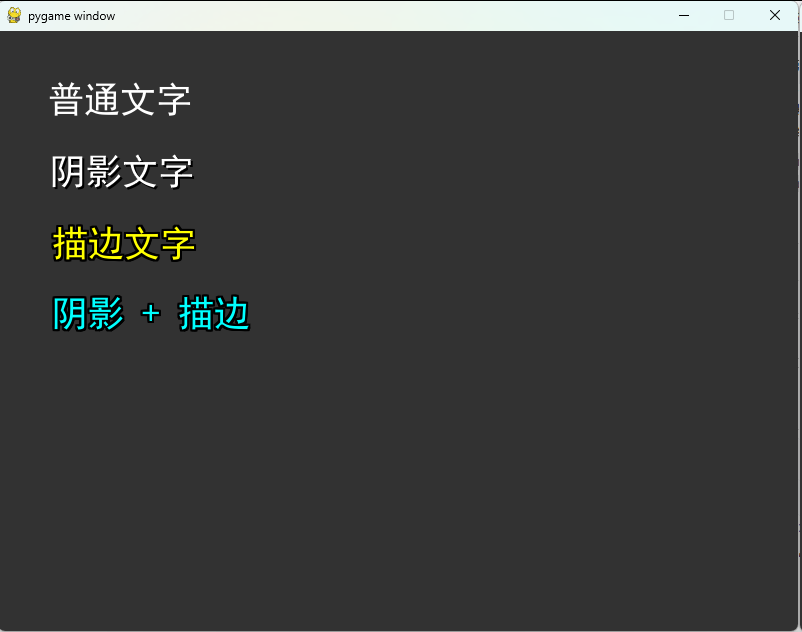
8.8 本章总结
本章详细介绍了 Pygame 的文字渲染系统。我们学习了字体加载方法、基本文字渲染、对齐布局技巧,以及阴影、描边、渐变等文字特效的实现。通过文字换行和自动缩放功能,可以适应不同的显示需求。文字渲染工具类的示例展示了如何组织和优化文字渲染代码。良好的文字呈现是游戏 UI 品质的重要体现。
本章知识点回顾
| 知识点 | 主要内容 |
|---|---|
| 字体加载 | Font 类、字体文件路径加载 |
| 文字渲染 | render 方法、抗锯齿 |
| 对齐布局 | 矩形对齐、居中显示 |
| 文字特效 | 阴影、描边、渐变 |
| 高级功能 | 自动换行、字体缩放 |
课后练习
- 实现一个富文本渲染系统,支持同一段文字中不同颜色和大小。
- 创建一个打字机效果组件,逐字显示文字。
- 实现文字发光效果。
- 使用文字粒子效果实现动态标题。
- 实现一个对话系统 UI,支持头像、名字和对话内容。
下章预告
在下一章中,我们将学习动画系统的实现,包括帧动画、补间动画和骨骼动画的基础知识。