欢迎加入开源鸿蒙跨平台社区:
https://openharmonycrossplatform.csdn.net
摘要与引言:语言模因的生化固化过程
在人类语言认知的早期发育阶段,序列信息的获取与维持,本质上是海马体(Hippocampus)与相关皮层网络中,神经突触的链式生长与长时程增强(Long-Term Potentiation, LTP)过程。传统的幼儿园成语接龙游戏,仅仅停留于表层的字符匹配。但在本文中,我们将"成语接龙"的本质抽象为:神经模因(Meme)在突触拓扑网络中的序列锚定(Engram Anchoring)。
基于开源鸿蒙系统与 Flutter 的跨平台底层渲染机制,我们不仅在构建一个游戏,而是在架构一个微观的认知神经发生器。在这个系统中:
- 每成功接驳一个成语,即意味着在 CA3 区成功固化了一个"记忆印迹(Engram)节点"。
- 系统内置完整的生化内分泌阻尼(Metabolic Damping)跟踪机制:脑源性神经营养因子(BDNF)、LTP 强度以及压力激素皮质醇(Cortisol)将实时反馈交互状态,并直接驱动 UI 层面的粒子脉冲与网络抖动。
核心架构:认知模因测绘台设计理念
整个测绘台分为两个核心脑区投影面板:
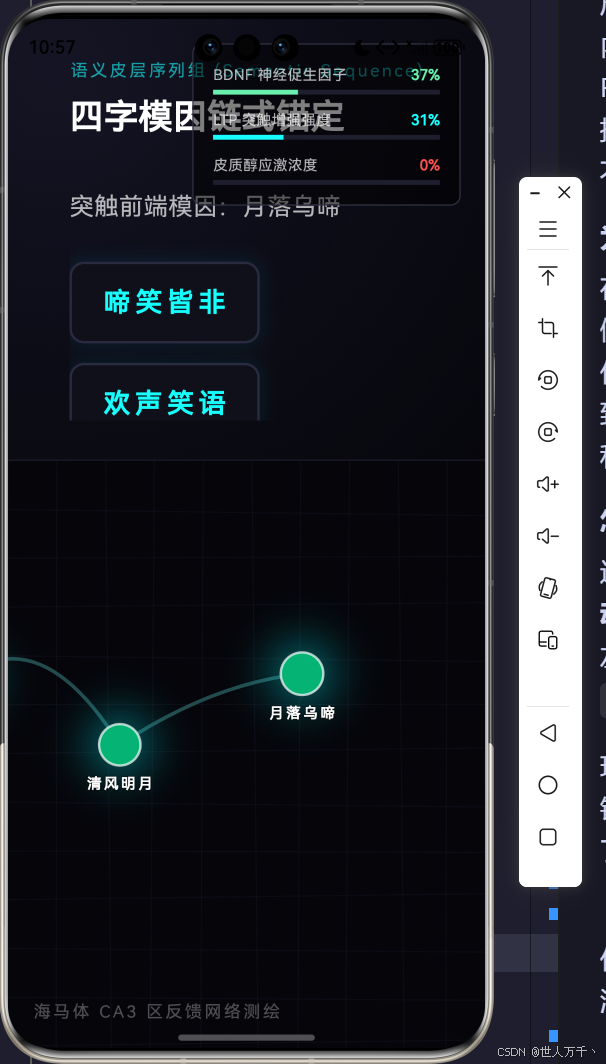
- 左侧(语义皮层提取站):对应大脑的额叶下部(Broca's Area),这里负责展示当前的突触前端模因,并提供一系列神经纤维候选分支供受试者选择接驳。
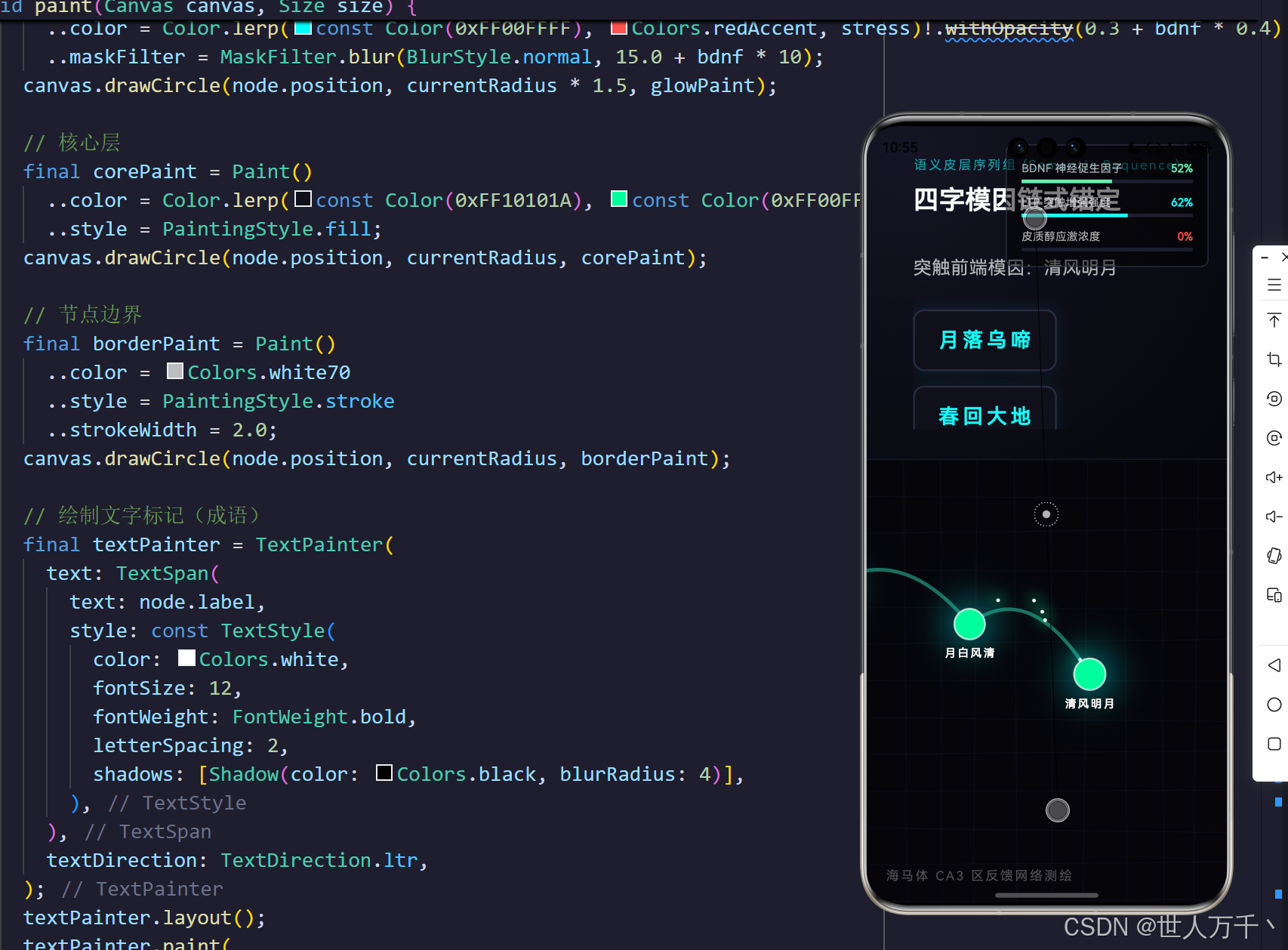
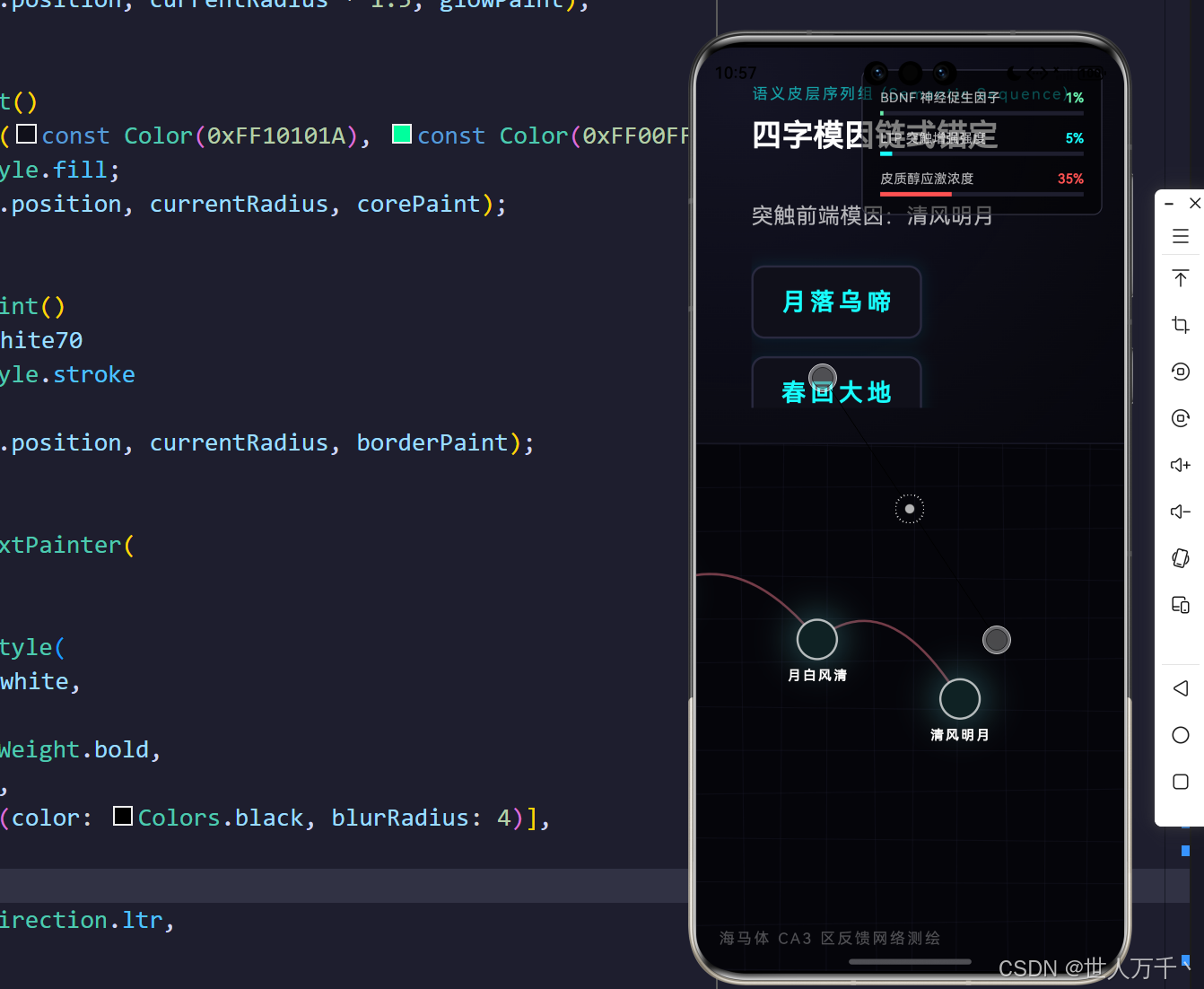
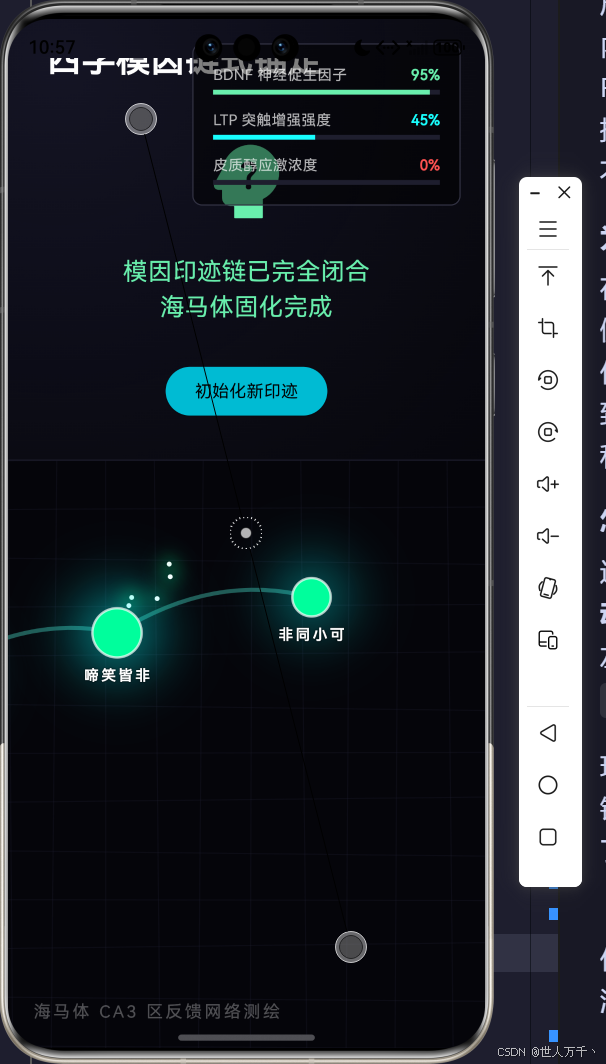
- 右侧(海马体 CA3 区网络切片):这是整个引擎的核心物理层,一个带有波形呼吸效应、二次贝塞尔曲率连接的拓扑网络。正确的选择将引发突触链条向右方延伸,并伴有代表电化学信号转移的粒子脉冲;错误的选择将引发皮质醇浓度上升与危险的红色应激反应。
这种设计将抽象的逻辑转译为具象的生物学动态结构,极大地增强了开发领域的赛博深度,同时也深度考核了底层 CustomPainter 与状态机高频渲染的性能边界。
系统拓扑 UML 类图分析
为了梳理整个生化状态与物理节点的调度逻辑,我们将结构用 UML 类图进行领域驱动拆分。
manages >
spawns >
loads >
1
1
1
n
n
n
KindergartenIdiomEngramDashboard
-double _bdnfLevel
-double _ltpStrength
-double _stressCortisol
-List<EngramNode> _engramChain
-List<PulseParticle> _activePulses
+_updateMetabolism()
+_handleAnswer()
+_spawnPulse()
EngramNode
+Offset position
+String label
+double birthTime
+double radius
PulseParticle
+Offset start
+Offset end
+Offset controlPoint
+double progress
+double speed
+Color color
+get currentPosition() : Offset
IdiomStage
+String current
+List<String> options
+String correctAnswer
在上述类关系中,KindergartenIdiomEngramDashboard 作为主状态机,统筹调度着化学指标与物理图元的渲染;EngramNode 是静力学结构,而 PulseParticle 是动力学传递单元。
核心算法剖析:从生化衰减到贝塞尔脉冲
为了在这个复杂的生物系统中建立自洽的闭环,我们需要对其内部的核心运转逻辑进行逐块解析。
代码剖析一:神经递质的代谢阻尼追踪
在真实的神经系统中,激素的分泌与衰减是一个动态回归的过程(内稳态 Homeostasis)。系统在每一帧(Frame)都需要计算 BDNF 与皮质醇向基线衰退的差值。这种机制通过 Ticker 完成高频更新。
dart
  void _updateMetabolism() {
    // 阻尼衰减算法:生理指标会随时间向基线回归
    // BDNF 基础值为 0.1,受刺激上升后缓慢衰减
    _bdnfLevel += (0.1 - _bdnfLevel) * 0.005;

    // LTP 基础值为 0.05
    _ltpStrength += (0.05 - _ltpStrength) * 0.002;

    // 皮质醇应激指标基础值为 0.0,快速代谢
    _stressCortisol += (0.0 - _stressCortisol) * 0.01;
  }
这里的衰减速率因子(如 0.005 0.005 0.005, 0.01 0.01 0.01)构成了神经方程中的耗散项。当使用者不断答错时,皮质醇指标会不断攀升对抗衰减项;如果置之不理,它又会随着 Ticker 的流逝恢复平静。这实现了超越传统 UI 开发的"仿生学"时间维度感。
代码剖析二:电化学脉冲的二次贝塞尔轨迹推导
在突触建立或激活时,动作电位(Action Potential)会在突触间隙传递。为了在视觉上呈现这种非线性的跃迁,我们使用了二次贝塞尔曲线。我们定义粒子 progress 从 0.0 0.0 0.0 演化到 1.0 1.0 1.0,其实时坐标由下列公式决定。
轨迹坐标推导公式:
B ( t ) = ( 1 − t ) 2 P 0 + 2 t ( 1 − t ) P 1 + t 2 P 2 , t ∈ 0 , 1 \mathbf{B}(t) = (1-t)^2\mathbf{P}_0 + 2t(1-t)\mathbf{P}_1 + t^2\mathbf{P}_2, \quad t \in 0,1 B(t)=(1−t)2P0+2t(1−t)P1+t2P2,t∈0,1
其中, P 0 \mathbf{P}_0 P0 为起点突触坐标, P 2 \mathbf{P}_2 P2 为终点坐标, P 1 \mathbf{P}_1 P1 为控制点。代码实现如下:
dart
  Offset get currentPosition {
    // 二次贝塞尔曲线公式:B(t) = (1-t)^2 * P0 + 2t(1-t) * P1 + t^2 * P2
    final double t = progress;
    final double mt = 1.0 - t;
    return Offset(
      mt * mt * start.dx + 2 * mt * t * controlPoint.dx + t * t * end.dx,
      mt * mt * start.dy + 2 * mt * t * controlPoint.dy + t * t * end.dy,
    );
  }
通过为每一个脉冲随机生成一个 controlPoint,我们能够在屏幕上看到极其复杂且具生命力的、呈现放射状跳跃的神经闪电网,而非死板的直线移动。
代码剖析三:动态记忆节点的拓扑演进与自动视口跟随
随着成语接龙的深入,节点在海马体切片中不断向右侧扩张,如果溢出屏幕边缘,体验将被破坏。在此,我们放弃了传统的 ListView 机制,而是直接在 Canvas 的外部容器施加矩阵仿射变换。
dart
          // 如果节点超出屏幕,利用平移Canvas实现滚动跟随
          AnimatedContainer(
            duration: const Duration(milliseconds: 800),
            curve: Curves.easeOutCubic,
            transform: Matrix4.translationValues(
              _engramChain.isNotEmpty && _engramChain.last.position.dx > constraints.maxWidth - 150
                  ? constraints.maxWidth - 150 - _engramChain.last.position.dx
                  : 0.0,
              0, 0,
            ),
            child: CustomPaint(
              size: Size.infinite,
              painter: EngramTopologyPainter(
                nodes: _engramChain,
                pulses: _activePulses,
                time: _time,
                bdnf: _bdnfLevel,
                ltp: _ltpStrength,
                stress: _stressCortisol,
              ),
            ),
          ),
这里我们比较了最后一个突触节点 _engramChain.last.position.dx 与容器边界 constraints.maxWidth。如果节点侵入安全视口范围(离边缘 150px 距离),则利用 AnimatedContainer 和 Matrix4.translationValues 平滑地将整个画布向左回退推移。这保证了不管生成多长的拓扑网,渲染焦点始终锚定在最前端的活跃突触。
代码剖析四:环境应激状态下的画布扰动与泛光控制
当受试者选择错误的模因接驳时,系统判定位出现"语义排斥",导致皮质醇激增(stressCortisol > 0.3)。此时,底层 CustomPainter 将引入高频三角函数对画笔进行扰动计算。
dart
    for (int i = 0; i < nodes.length - 1; i++) {
      final start = nodes[i].position;
      final end = nodes[i + 1].position;

      final dx = end.dx - start.dx;
      // 添加应激抖动
      final jitterX = stress > 0.2 ? (sin(time * 20 + i) * stress * 5) : 0;
      final jitterY = stress > 0.2 ? (cos(time * 20 + i) * stress * 5) : 0;

      final path = Path()
        ..moveTo(start.dx, start.dy)
        ..quadraticBezierTo(
          start.dx + dx / 2 + jitterX,
          start.dy - 50 + jitterY,
          end.dx, end.dy
        );
      canvas.drawPath(path, connectionPaint);
    }
通过混入 sin(time * 20) 和 stress 的乘积,在平时风平浪静的曲线中加入了剧烈的噪点毛刺。同时,在外圈的光晕绘制中,利用 MaskFilter.blur 与 BDNF 和皮质醇插值的调配,完美呈现了一种危险且令人不安的血红色神经纤维颤抖状态。
状态反馈流转网络
我们将上述错综复杂的判断、激素更新与粒子触发流程,利用 Flowchart 进行梳理,清晰展示生命体征在判断树下的流转。
是 (匹配)
否 (排斥)
用户在左侧选择成语候选项
选择是否与语义锚点匹配?
BDNF上升 / 皮质醇下降
生成新 Engram 节点位置
发射高能青色动作电位脉冲
更新为下一个待测序列
皮质醇飙升 / BDNF衰减
施加系统警报与拓扑红化抖动
发射红色排斥脉冲并维持原进度
每一帧 Ticker 内环境阻尼计算
回归平稳状态并渲染 Canvas
结语:在比特世界中重塑生物学认知
这篇跨学科工程不仅是一次代码的堆叠,更是利用开源鸿蒙生态与 Flutter 底层图形引擎对人类大脑功能(尤其是记忆链化机制)的崇高致敬。通过将复杂的生命体征方程具象化为动态矩阵扰动、贝塞尔运动与环境泛光,我们将一款幼儿园成语接龙,彻底升维成了一台充满学术厚度与视觉张力的记忆印迹演化舱。
这种开发模式打破了客户端逻辑"点击-等待-响应"的枯燥模式,注入了"呼吸-刺激-代谢-衰减"的生物学灵魂,也是我们探索鸿蒙跨端全场景体验(特别是在折叠大屏与 PC 宽屏上展开那片宏大的神经拓扑)的极佳范例。
完整代码
bash
import 'dart:math';
import 'dart:ui' as ui;
import 'package:flutter/material.dart';
import 'package:flutter/scheduler.dart';

void main() {
  runApp(const MaterialApp(
    debugShowCheckedModeBanner: false,
    home: KindergartenIdiomEngramDashboard(),
  ));
}

/// 核心数据模型:成语关卡(代表一个记忆序列的节点)
class IdiomStage {
  final String current;
  final List<String> options;
  final String correctAnswer;

  IdiomStage({
    required this.current,
    required this.options,
    required this.correctAnswer,
  });
}

/// 记忆印迹(Engram)拓扑节点
class EngramNode {
  final Offset position;
  final String label;
  final double birthTime;
  double radius;

  EngramNode({
    required this.position,
    required this.label,
    required this.birthTime,
    this.radius = 0.0,
  });
}

/// 神经脉冲粒子(模拟电化学信号穿梭)
class PulseParticle {
  final Offset start;
  final Offset end;
  final Offset controlPoint;
  double progress = 0.0; // 0.0 to 1.0
  final double speed;
  final Color color;

  PulseParticle({
    required this.start,
    required this.end,
    required this.controlPoint,
    required this.speed,
    required this.color,
  });

  Offset get currentPosition {
    // 二次贝塞尔曲线公式:B(t) = (1-t)^2 * P0 + 2t(1-t) * P1 + t^2 * P2
    final double t = progress;
    final double mt = 1.0 - t;
    return Offset(
      mt * mt * start.dx + 2 * mt * t * controlPoint.dx + t * t * end.dx,
      mt * mt * start.dy + 2 * mt * t * controlPoint.dy + t * t * end.dy,
    );
  }
}

class KindergartenIdiomEngramDashboard extends StatefulWidget {
  const KindergartenIdiomEngramDashboard({super.key});

  @override
  State<KindergartenIdiomEngramDashboard> createState() => _KindergartenIdiomEngramDashboardState();
}

class _KindergartenIdiomEngramDashboardState extends State<KindergartenIdiomEngramDashboard> with SingleTickerProviderStateMixin {
  late Ticker _ticker;
  double _time = 0.0;

  // 生命科学指标 (0.0 ~ 1.0)
  double _bdnfLevel = 0.2; // 脑源性神经营养因子
  double _ltpStrength = 0.1; // 长时程增强效应
  double _stressCortisol = 0.1; // 皮质醇(压力)

  // 成语题库与进度
  final List<IdiomStage> _idiomDatabase = [
    IdiomStage(current: "欢天喜地", options: ["地久天长", "五颜六色", "一心一意"], correctAnswer: "地久天长"),
    IdiomStage(current: "地久天长", options: ["长年累月", "百花齐放", "春暖花开"], correctAnswer: "长年累月"),
    IdiomStage(current: "长年累月", options: ["月白风清", "鸟语花香", "千军万马"], correctAnswer: "月白风清"),
    IdiomStage(current: "月白风清", options: ["清风明月", "山清水秀", "万物复苏"], correctAnswer: "清风明月"),
    IdiomStage(current: "清风明月", options: ["月落乌啼", "春回大地", "莺歌燕舞"], correctAnswer: "月落乌啼"),
    IdiomStage(current: "月落乌啼", options: ["啼笑皆非", "欢声笑语", "鸟语花香"], correctAnswer: "啼笑皆非"),
    IdiomStage(current: "啼笑皆非", options: ["非同小可", "可怜巴巴", "无可奈何"], correctAnswer: "非同小可"),
  ];

  int _currentStageIndex = 0;

  // 神经突触拓扑网络
  final List<EngramNode> _engramChain = [];
  final List<PulseParticle> _activePulses = [];
  final Random _random = Random();

  @override
  void initState() {
    super.initState();
    // 初始化首个记忆印迹节点
    _engramChain.add(EngramNode(
      position: const Offset(50, 200),
      label: _idiomDatabase[0].current,
      birthTime: 0.0,
      radius: 15.0,
    ));

    _ticker = createTicker((elapsed) {
      setState(() {
        _time = elapsed.inMicroseconds / 1000000.0;
        _updateMetabolism();
        _updatePulses();
      });
    });
    _ticker.start();
  }

  void _updateMetabolism() {
    // 阻尼衰减算法:生理指标会随时间向基线回归
    _bdnfLevel += (0.1 - _bdnfLevel) * 0.005;
    _ltpStrength += (0.05 - _ltpStrength) * 0.002;
    _stressCortisol += (0.0 - _stressCortisol) * 0.01;
  }

  void _updatePulses() {
    for (int i = _activePulses.length - 1; i >= 0; i--) {
      _activePulses[i].progress += _activePulses[i].speed;
      if (_activePulses[i].progress >= 1.0) {
        _activePulses.removeAt(i);
      }
    }

    // 随机发放自发性神经脉冲(基于LTP强度)
    if (_engramChain.length > 1 && _random.nextDouble() < (_ltpStrength * 0.1)) {
      int targetIdx = _random.nextInt(_engramChain.length - 1) + 1;
      _spawnPulse(targetIdx - 1, targetIdx, const Color(0xFF00FFFF));
    }
  }

  void _spawnPulse(int fromIdx, int toIdx, Color color) {
    if (fromIdx < 0 || toIdx >= _engramChain.length) return;
    final start = _engramChain[fromIdx].position;
    final end = _engramChain[toIdx].position;
    final midX = (start.dx + end.dx) / 2;
    final midY = (start.dy + end.dy) / 2;
    final control = Offset(midX + (_random.nextDouble() - 0.5) * 100, midY - 100);

    _activePulses.add(PulseParticle(
      start: start,
      end: end,
      controlPoint: control,
      speed: 0.02 + _random.nextDouble() * 0.02,
      color: color,
    ));
  }

  void _handleAnswer(String answer) {
    if (_currentStageIndex >= _idiomDatabase.length) return;

    if (answer == _idiomDatabase[_currentStageIndex].correctAnswer) {
      // 答题正确:记忆印迹链延伸
      _bdnfLevel = min(1.0, _bdnfLevel + 0.4);
      _ltpStrength = min(1.0, _ltpStrength + 0.3);
      _stressCortisol = max(0.0, _stressCortisol - 0.2);

      final lastNode = _engramChain.last;
      // 随机生成下一个节点的位置(向右推进,上下波动)
      final newX = lastNode.position.dx + 120 + _random.nextDouble() * 40;
      final newY = max(50.0, min(350.0, lastNode.position.dy + (_random.nextDouble() - 0.5) * 150));

      _engramChain.add(EngramNode(
        position: Offset(newX, newY),
        label: answer,
        birthTime: _time,
        radius: 18.0,
      ));

      // 发射强烈的突触脉冲
      for(int i = 0; i < 5; i++) {
        Future.delayed(Duration(milliseconds: i * 100), () {
          if(mounted) _spawnPulse(_engramChain.length - 2, _engramChain.length - 1, const Color(0xFF00FF9D));
        });
      }

      if (_currentStageIndex < _idiomDatabase.length - 1) {
        _currentStageIndex++;
      } else {
        // 游戏通关重置逻辑
        _stressCortisol = 0.0;
        _bdnfLevel = 1.0;
      }
    } else {
      // 答题错误:产生认知负荷与皮质醇飙升
      _stressCortisol = min(1.0, _stressCortisol + 0.5);
      _bdnfLevel = max(0.0, _bdnfLevel - 0.1);

      // 发送干扰红色脉冲
      if (_engramChain.length > 1) {
         _spawnPulse(_engramChain.length - 2, _engramChain.length - 1, const Color(0xFFFF2A2A));
      }
    }
  }

  @override
  void dispose() {
    _ticker.dispose();
    super.dispose();
  }

  @override
  Widget build(BuildContext context) {
    return Scaffold(
      backgroundColor: const Color(0xFF05050A),
      body: Stack(
        children: [
          // 添加用户提供的精美背景图作为底层
          Positioned.fill(
            child: Opacity(
              opacity: 0.1,
              child: Image.asset(
                'assets/images/explore_ohos.png',
                fit: BoxFit.cover,
                errorBuilder: (context, error, stackTrace) => Container(color: Colors.transparent),
              ),
            ),
          ),

          LayoutBuilder(
            builder: (context, constraints) {
              final bool isPortrait = constraints.maxHeight > constraints.maxWidth;

              if (isPortrait) {
                // 竖屏瀑布流坍缩布局
                return Column(
                  children: [
                    Expanded(flex: 3, child: _buildInteractionPanel()),
                    const Divider(color: Color(0xFF1E1E2E), height: 1),
                    Expanded(flex: 4, child: _buildEngramVisualizer(constraints)),
                  ],
                );
              } else {
                // 横屏分栏布局
                return Row(
                  children: [
                    Expanded(flex: 2, child: _buildInteractionPanel()),
                    const VerticalDivider(color: Color(0xFF1E1E2E), width: 1),
                    Expanded(flex: 3, child: _buildEngramVisualizer(constraints)),
                  ],
                );
              }
            },
          ),

          // 生物指标 HUD 悬浮窗
          Positioned(
            top: 20,
            right: 20,
            child: _buildBioHud(),
          )
        ],
      ),
    );
  }

  Widget _buildInteractionPanel() {
    final currentStage = _idiomDatabase[min(_currentStageIndex, _idiomDatabase.length - 1)];
    final bool isCompleted = _currentStageIndex >= _idiomDatabase.length - 1 && _engramChain.last.label == currentStage.correctAnswer;

    return Container(
      padding: const EdgeInsets.all(32.0),
      decoration: BoxDecoration(
        gradient: RadialGradient(
          center: const Alignment(-0.8, -0.8),
          radius: 1.5,
          colors: [
            const Color(0xFF151525),
            const Color(0xFF05050A).withOpacity(0.8),
          ],
        ),
      ),
      child: Center(
        child: SingleChildScrollView(
          child: Column(
            crossAxisAlignment: CrossAxisAlignment.start,
            mainAxisAlignment: MainAxisAlignment.center,
            children: [
              Text(
                "语义皮层序列组 (Semantic Sequence)",
                style: TextStyle(
                  color: Colors.cyanAccent.withOpacity(0.6),
                  fontSize: 14,
                  letterSpacing: 2.0,
                ),
              ),
              const SizedBox(height: 8),
              const Text(
                "四字模因链式锚定",
                style: TextStyle(
                  color: Colors.white,
                  fontSize: 28,
                  fontWeight: FontWeight.bold,
                ),
              ),
              const SizedBox(height: 40),

              if (isCompleted)
                Center(
                  child: Column(
                    children: [
                      const Icon(Icons.psychology_alt, color: Colors.greenAccent, size: 80),
                      const SizedBox(height: 20),
                      const Text("模因印迹链已完全闭合\n海马体固化完成", textAlign: TextAlign.center, style: TextStyle(color: Colors.greenAccent, fontSize: 20)),
                      const SizedBox(height: 30),
                      ElevatedButton(
                        style: ElevatedButton.styleFrom(backgroundColor: Colors.cyan, foregroundColor: Colors.black),
                        onPressed: () {
                          setState(() {
                            _currentStageIndex = 0;
                            _engramChain.clear();
                            _engramChain.add(EngramNode(position: const Offset(50, 200), label: _idiomDatabase[0].current, birthTime: _time, radius: 15.0));
                            _activePulses.clear();
                          });
                        },
                        child: const Text("初始化新印迹"),
                      )
                    ],
                  ),
                )
              else ...[
                Text(
                  "突触前端模因:${currentStage.current}",
                  style: const TextStyle(color: Colors.white70, fontSize: 20),
                ),
                const SizedBox(height: 30),
                Wrap(
                  spacing: 16.0,
                  runSpacing: 16.0,
                  children: currentStage.options.map((opt) {
                    return _buildOptionButton(opt);
                  }).toList(),
                ),
              ]
            ],
          ),
        ),
      ),
    );
  }

  Widget _buildOptionButton(String text) {
    return InkWell(
      onTap: () => _handleAnswer(text),
      borderRadius: BorderRadius.circular(12),
      child: Container(
        padding: const EdgeInsets.symmetric(horizontal: 24, vertical: 16),
        decoration: BoxDecoration(
          color: const Color(0xFF10101A),
          border: Border.all(color: const Color(0xFF2A2A40), width: 2),
          borderRadius: BorderRadius.circular(12),
          boxShadow: [
            BoxShadow(
              color: Colors.cyan.withOpacity(0.1),
              blurRadius: 10,
              spreadRadius: 2,
            )
          ],
        ),
        child: Text(
          text,
          style: const TextStyle(
            color: Colors.cyanAccent,
            fontSize: 22,
            fontWeight: FontWeight.w600,
            letterSpacing: 4.0,
          ),
        ),
      ),
    );
  }

  Widget _buildEngramVisualizer(BoxConstraints constraints) {
    return ClipRect(
      child: Stack(
        children: [
          // 背景网格暗示海马体切片
          CustomPaint(
            size: Size.infinite,
            painter: HippocampusGridPainter(_time),
          ),

          // 如果节点超出屏幕,利用 ListView 或者 GestureDetector 做平移,这里为简便演示,通过平移Canvas实现滚动跟随
          AnimatedContainer(
            duration: const Duration(milliseconds: 800),
            curve: Curves.easeOutCubic,
            transform: Matrix4.translationValues(
              _engramChain.isNotEmpty && _engramChain.last.position.dx > constraints.maxWidth - 150
                  ? constraints.maxWidth - 150 - _engramChain.last.position.dx
                  : 0.0,
              0, 0,
            ),
            child: CustomPaint(
              size: Size.infinite,
              painter: EngramTopologyPainter(
                nodes: _engramChain,
                pulses: _activePulses,
                time: _time,
                bdnf: _bdnfLevel,
                ltp: _ltpStrength,
                stress: _stressCortisol,
              ),
            ),
          ),

          Positioned(
            left: 20,
            bottom: 20,
            child: Text(
              "海马体 CA3 区反馈网络测绘",
              style: TextStyle(color: Colors.white.withOpacity(0.3), letterSpacing: 2),
            ),
          )
        ],
      ),
    );
  }

  Widget _buildBioHud() {
    return Container(
      padding: const EdgeInsets.all(16),
      decoration: BoxDecoration(
        color: Colors.black.withOpacity(0.5),
        border: Border.all(color: const Color(0xFF333344)),
        borderRadius: BorderRadius.circular(8),
      ),
      width: 220,
      child: Column(
        crossAxisAlignment: CrossAxisAlignment.start,
        children: [
          _buildIndicator("BDNF 神经促生因子", _bdnfLevel, Colors.greenAccent),
          const SizedBox(height: 12),
          _buildIndicator("LTP 突触增强强度", _ltpStrength, Colors.cyanAccent),
          const SizedBox(height: 12),
          _buildIndicator("皮质醇应激浓度", _stressCortisol, Colors.redAccent),
        ],
      ),
    );
  }

  Widget _buildIndicator(String label, double value, Color color) {
    return Column(
      crossAxisAlignment: CrossAxisAlignment.start,
      children: [
        Row(
          mainAxisAlignment: MainAxisAlignment.spaceBetween,
          children: [
            Text(label, style: const TextStyle(color: Colors.white70, fontSize: 12)),
            Text("${(value * 100).toInt()}%", style: TextStyle(color: color, fontSize: 12, fontWeight: FontWeight.bold)),
          ],
        ),
        const SizedBox(height: 4),
        LinearProgressIndicator(
          value: value,
          backgroundColor: const Color(0xFF1E1E2E),
          color: color,
          minHeight: 4,
        ),
      ],
    );
  }
}

class HippocampusGridPainter extends CustomPainter {
  final double time;
  HippocampusGridPainter(this.time);

  @override
  void paint(Canvas canvas, Size size) {
    final paint = Paint()
      ..color = const Color(0xFF1E1E2E).withOpacity(0.3)
      ..strokeWidth = 1.0;

    // 绘制轻微波动的生命体征网格
    for (double i = 0; i < size.width; i += 40) {
      final offset = sin(time * 2 + i * 0.05) * 5;
      canvas.drawLine(Offset(i, 0), Offset(i + offset, size.height), paint);
    }
    for (double i = 0; i < size.height; i += 40) {
      final offset = cos(time * 2 + i * 0.05) * 5;
      canvas.drawLine(Offset(0, i), Offset(size.width, i + offset), paint);
    }
  }

  @override
  bool shouldRepaint(covariant CustomPainter oldDelegate) => true;
}

class EngramTopologyPainter extends CustomPainter {
  final List<EngramNode> nodes;
  final List<PulseParticle> pulses;
  final double time;
  final double bdnf;
  final double ltp;
  final double stress;

  EngramTopologyPainter({
    required this.nodes,
    required this.pulses,
    required this.time,
    required this.bdnf,
    required this.ltp,
    required this.stress,
  });

  @override
  void paint(Canvas canvas, Size size) {
    // 1. 绘制突触连接线(树突与轴突)
    final connectionPaint = Paint()
      ..style = PaintingStyle.stroke
      ..strokeWidth = 2.0 + ltp * 3.0 // LTP强度增加连线厚度
      ..color = Color.lerp(const Color(0xFF2A2A40), const Color(0xFF00FF9D), ltp * 0.5)!;

    if (stress > 0.3) {
      connectionPaint.color = Color.lerp(connectionPaint.color, Colors.redAccent, stress)!;
      // 应激状态下线条抖动
    }

    for (int i = 0; i < nodes.length - 1; i++) {
      final start = nodes[i].position;
      final end = nodes[i + 1].position;

      final dx = end.dx - start.dx;
      final dy = end.dy - start.dy;

      // 添加应激抖动
      final jitterX = stress > 0.2 ? (sin(time * 20 + i) * stress * 5) : 0;
      final jitterY = stress > 0.2 ? (cos(time * 20 + i) * stress * 5) : 0;

      final path = Path()
        ..moveTo(start.dx, start.dy)
        ..quadraticBezierTo(
          start.dx + dx / 2 + jitterX,
          start.dy - 50 + jitterY,
          end.dx, end.dy
        );

      canvas.drawPath(path, connectionPaint);
    }

    // 2. 绘制神经放电粒子
    for (var pulse in pulses) {
      final pos = pulse.currentPosition;
      final particlePaint = Paint()
        ..color = pulse.color
        ..maskFilter = const MaskFilter.blur(BlurStyle.normal, 8.0);
      canvas.drawCircle(pos, 4.0, particlePaint);

      final corePaint = Paint()..color = Colors.white;
      canvas.drawCircle(pos, 2.0, corePaint);
    }

    // 3. 绘制记忆印迹节点核心
    for (var node in nodes) {
      // 节点的呼吸效应
      final breathe = sin(time * 3 + node.birthTime) * 3 * bdnf;
      final currentRadius = node.radius + breathe;

      // 外发光层
      final glowPaint = Paint()
        ..color = Color.lerp(const Color(0xFF00FFFF), Colors.redAccent, stress)!.withOpacity(0.3 + bdnf * 0.4)
        ..maskFilter = MaskFilter.blur(BlurStyle.normal, 15.0 + bdnf * 10);
      canvas.drawCircle(node.position, currentRadius * 1.5, glowPaint);

      // 核心层
      final corePaint = Paint()
        ..color = Color.lerp(const Color(0xFF10101A), const Color(0xFF00FF9D), min(1.0, bdnf + ltp))!
        ..style = PaintingStyle.fill;
      canvas.drawCircle(node.position, currentRadius, corePaint);

      // 节点边界
      final borderPaint = Paint()
        ..color = Colors.white70
        ..style = PaintingStyle.stroke
        ..strokeWidth = 2.0;
      canvas.drawCircle(node.position, currentRadius, borderPaint);

      // 绘制文字标记(成语)
      final textPainter = TextPainter(
        text: TextSpan(
          text: node.label,
          style: const TextStyle(
            color: Colors.white,
            fontSize: 12,
            fontWeight: FontWeight.bold,
            letterSpacing: 2,
            shadows: [Shadow(color: Colors.black, blurRadius: 4)],
          ),
        ),
        textDirection: TextDirection.ltr,
      );
      textPainter.layout();
      textPainter.paint(
        canvas,
        Offset(node.position.dx - textPainter.width / 2, node.position.dy + currentRadius + 8)
      );
    }
  }

  @override
  bool shouldRepaint(covariant EngramTopologyPainter oldDelegate) => true;
}