创建一个conda环境
bash
conda create -n llm python=3.10软件库安装,缺少的软件包,会报错提示安装即可
bash
pip install langchain transformers代码:
python
from langchain_huggingface import ChatHuggingFace, HuggingFacePipeline
from langchain_core.messages import HumanMessage, SystemMessage
from langchain_core.chat_history import InMemoryChatMessageHistory
from langchain_core.runnables.history import RunnableWithMessageHistory
import torch

# 1. 初始化本地 LLM (保持你之前的配置)
llm = HuggingFacePipeline.from_model_id(
    model_id="/data2/wanghq/models/Qwen/Qwen3-8B",
    task="text-generation",
    pipeline_kwargs={
        "max_new_tokens": 1024,
        "temperature": 0.5,
        "do_sample": True,
        "device_map": "auto",
        "trust_remote_code": True,
        "dtype": torch.bfloat16,
    },
)

model = ChatHuggingFace(llm=llm)

# 2. 建立内存中的存储字典,用于存放不同 session 的历史记录
store = {}

def get_session_history(session_id: str):
    if session_id not in store:
        store[session_id] = InMemoryChatMessageHistory()
    return store[session_id]

# 3. 封装成带记忆能力的 Chain
# 这里的 config 会根据 session_id 自动提取或存储对话历史
with_message_history = RunnableWithMessageHistory(
    model,
    get_session_history,
)

# 4. 实现循环对话
print("\n--- 已进入连续对话模式(输入 'exit' 退出) ---")
session_config = {"configurable": {"session_id": "robot_research_01"}}

# 可选:先存入一个系统提示词
get_session_history("robot_research_01").add_message(
    SystemMessage(content="你是一个机器人专家。直接回复,不要输出 <think> 标签。")
)

while True:
    user_input = input("\nUser: ")
    if user_input.lower() in ["exit", "quit", "退出"]:
        break

    print("\nQwen: ", end="", flush=True)

    # 5. 调用并流式输出
    # 注意:with_message_history 会自动处理历史记录的注入和更新
    for chunk in with_message_history.stream(
        [HumanMessage(content=user_input)],
        config=session_config
    ):
        print(chunk.content, end="", flush=True)
    print("\n")
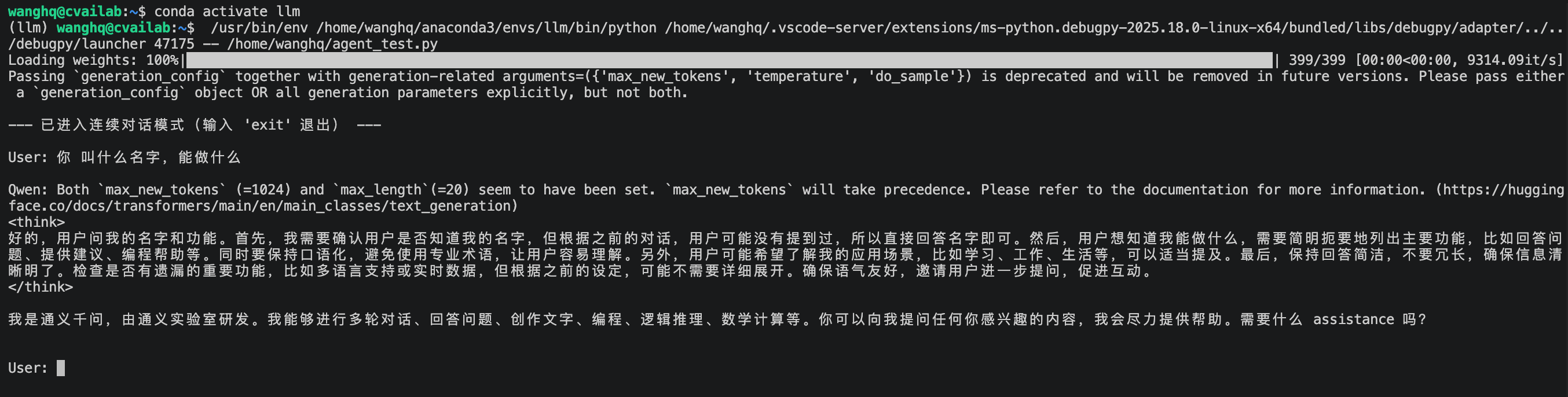
执行结果