闲来无事,看到加速器的网速上传下载变动,试着自己做个小工具
先是命令指示符版的:
@echo off
chcp 65001 >nul
REM 切换为UTF-8编码
:loop

for /f "skip=2 tokens=2 delims=," %%a in ('typeperf "\Network Interface(802.11n USB Wireless LAN Card)\Bytes Received/sec" -sc 1') do (
set "recv=%%~a"
goto :gotRecv
)
:gotRecv
REM 获取下载速率(skip=2:跳过前两行,tokens=2:提取第二个字段,delims=,:指定逗号为字段分隔符)

for /f "skip=2 tokens=2 delims=," %%b in ('typeperf "\Network Interface(802.11n USB Wireless LAN Card)\Bytes Sent/sec" -sc 1') do (
set "sent=%%~b"
goto :gotSent
)
:gotSent
REM 获取上传速率

for /f "delims=." %%i in ("%recv%") do set recv_int=%%i
set /a recvKB=recv_int/1024
for /f "delims=." %%i in ("%sent%") do set sent_int=%%i
set /a sentKB=sent_int/1024
REM 转换为KB/s格式

echo recv↓:%recvKB% KB/s sent↑:%sentKB% KB/s

timeout /t 1 /nobreak >nul
REM 等待1秒
goto loop
效果:
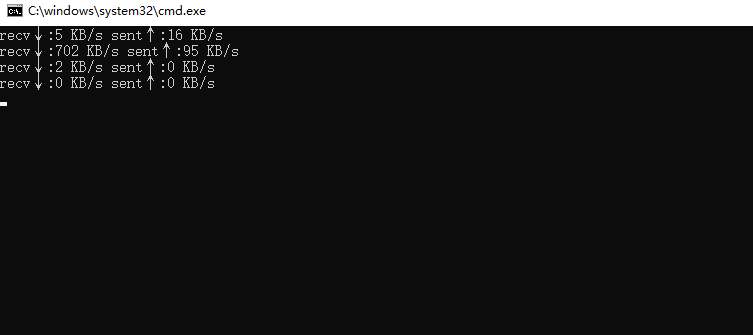
(在自己电脑上操作时把'802.11n USB Wireless LAN Card'换成'*',如果电脑上有多个网卡,建议换成正在使用流量的那个网卡,这里我有有限和无线网卡,一开始搞的时候全用'*'导致流量一直为0,也算一个教训..)
这个黑框框版本有点不友好,并且只能获得整数位KB/s,我又弄了个python版的
python
from tkinter import *
import tkinter as tk
import psutil
import time

def main():

    sentLast=psutil.net_io_counters().bytes_sent#获取上传流量
    recvLast=psutil.net_io_counters().bytes_recv#获取下载流量
    lastTime=time.time()

    def updateNetwork():
        nonlocal sentLast,recvLast,lastTime
        sentNow=psutil.net_io_counters().bytes_sent
        recvNow=psutil.net_io_counters().bytes_recv
        nowTime=time.time()
        ##获取新数据
        deltaTime=nowTime-lastTime#获取时间差
        if deltaTime>0:
            up=(sentNow-sentLast)/1024/deltaTime
            down=(recvNow-recvLast)/1024/deltaTime
            upDetail.config(text='{0:.2f}KB/s'.format(up))
            downDetail.config(text='{0:.2f}KB/s'.format(down))
            ##更新当次网速
            sentLast=sentNow
            recvLast=recvNow
            lastTime=nowTime
            ##更新上一次记录
        root.after(1000,updateNetwork)


    root = tk.Tk()
    root.title("网速监测")
    root.geometry('300x200')

    upLabel = Label(root,text='↑')
    upDetail = Label(root,text='0.00KB/s')

    downLabel = Label(root,text='↓')
    downDetail = Label(root,text='0.00KB/s')

    upLabel.place(x=20,y=20)
    upDetail.place(x=100,y=20)
    downLabel.place(x=20,y=100)
    downDetail.place(x=100,y=100)

    updateNetwork()#开始刷新

    root.mainloop()

if __name__ == "__main__":
    main()
这下舒服了
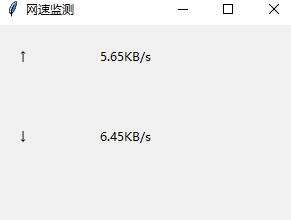
tip:我机子上两个程序都能正常运行,如有bug,请各位大佬多多指教!