欢迎加入开源鸿蒙跨平台社区:
https://openharmonycrossplatform.csdn.net
一、项目概述
运行效果图
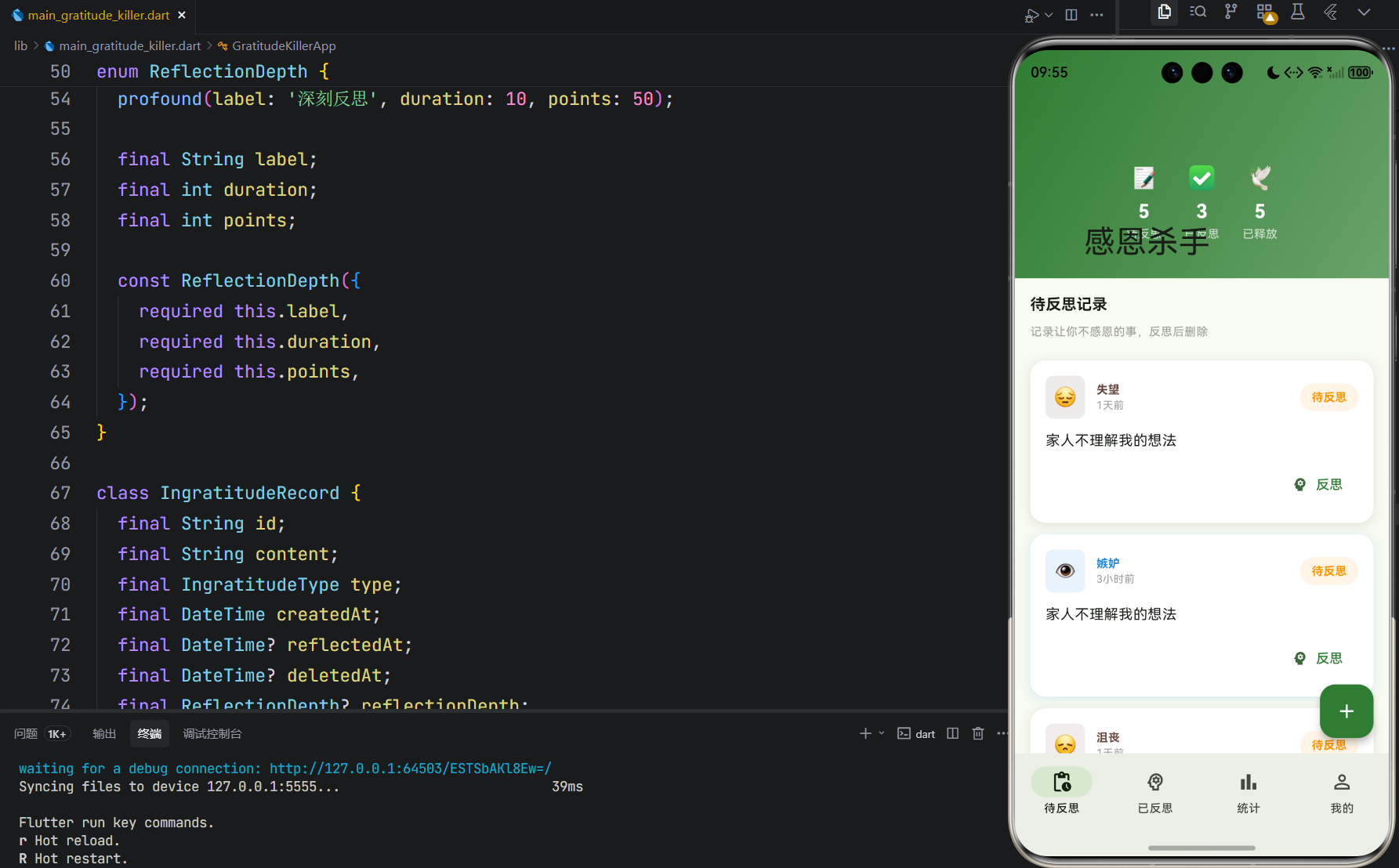
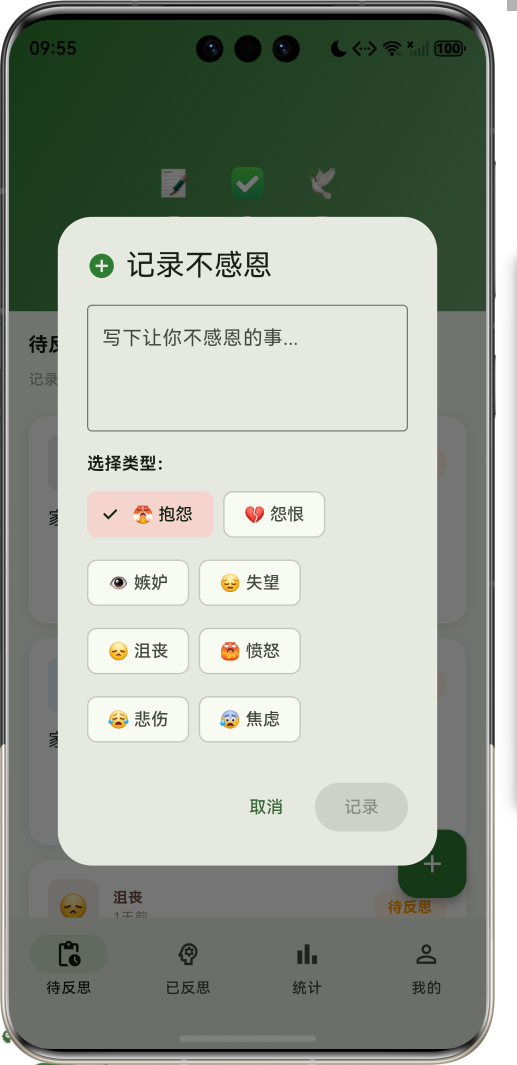
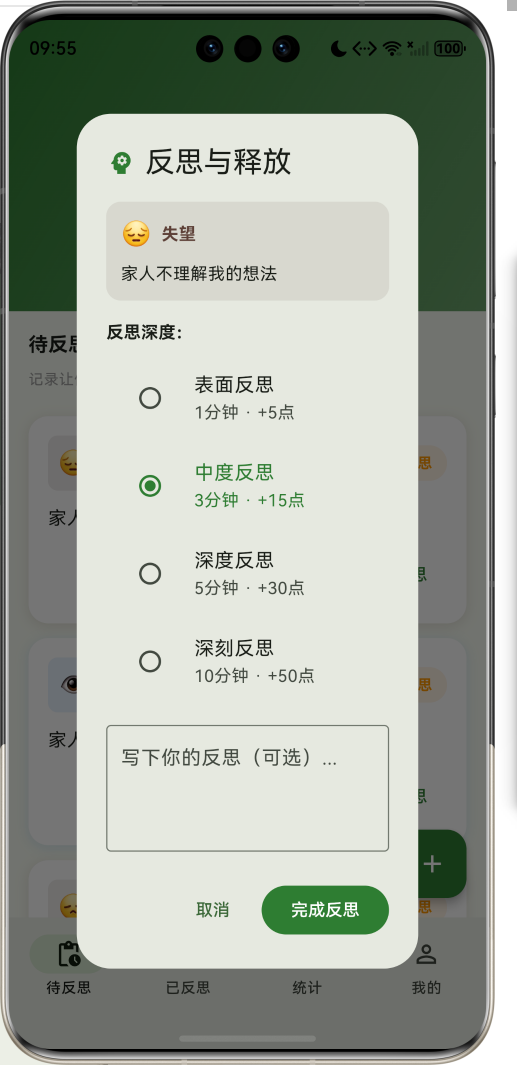

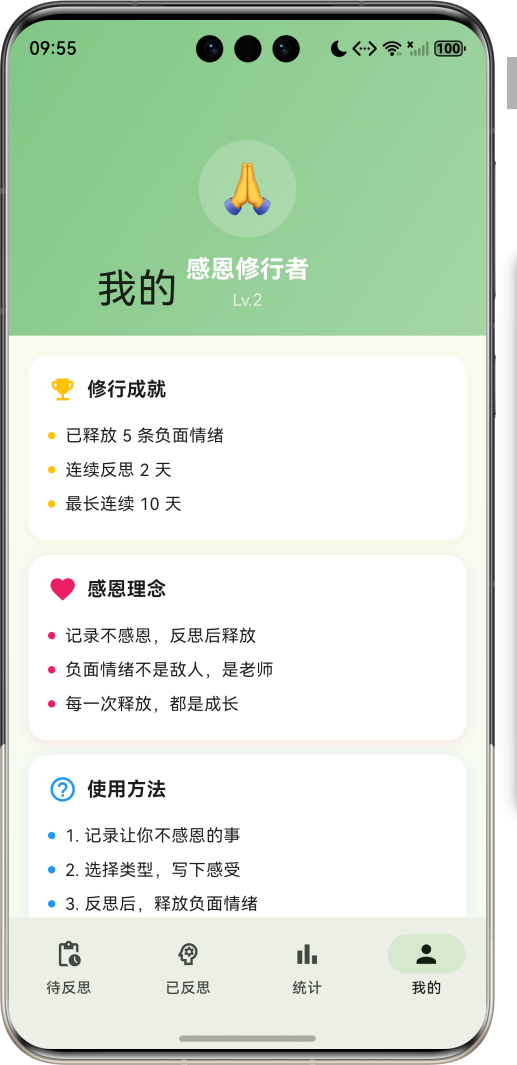
1.1 应用简介
感恩杀手是一款独特的心理疗愈应用。它颠覆了传统感恩日记的思路,让用户记录那些"不感恩"的事情------抱怨、怨恨、嫉妒、失望等负面情绪。通过深度反思后,将这些负面记录删除,实现心理上的净化与释放。
应用以清新的绿色为主色调,象征心灵的净化与成长。涵盖记录管理、反思系统、统计分析、个人成长四大模块。用户可以通过记录负面情绪、深度反思、释放删除的流程,逐步培养感恩之心,净化心灵。
1.2 核心功能
| 功能模块 | 功能描述 | 实现方式 |
|---|---|---|
| 记录管理 | 记录不感恩的事情 | 表单输入 |
| 反思系统 | 多深度反思机制 | 选择+文本 |
| 释放删除 | 删除负面情绪 | 动画效果 |
| 统计分析 | 数据可视化 | CustomPainter |
| 成长系统 | 积分与等级 | 计算逻辑 |
| 连续打卡 | 激励持续反思 | 状态追踪 |
1.3 不感恩类型定义
| 序号 | 类型名称 | Emoji | 颜色 | 描述 |
|---|---|---|---|---|
| 1 | 抱怨 | 😤 | #E53935 | 对现状不满,持续抱怨 |
| 2 | 怨恨 | 💔 | #8E24AA | 对他人或事物的怨恨 |
| 3 | 嫉妒 | 👁️ | #1E88E5 | 对他人的成功感到嫉妒 |
| 4 | 失望 | 😔 | #5D4037 | 期望落空,感到失望 |
| 5 | 沮丧 | 😞 | #6D4C41 | 情绪低落,感到沮丧 |
| 6 | 愤怒 | 😡 | #D32F2F | 强烈的不满和愤怒 |
| 7 | 悲伤 | 😢 | #1976D2 | 内心的悲伤和难过 |
| 8 | 焦虑 | 😰 | #7B1FA2 | 对未来的担忧和焦虑 |
1.4 反思深度定义
| 序号 | 深度名称 | 时长 | 积分 | 描述 |
|---|---|---|---|---|
| 1 | 表面反思 | 1分钟 | 5点 | 快速浏览,简单思考 |
| 2 | 中度反思 | 3分钟 | 15点 | 深入思考,寻找原因 |
| 3 | 深度反思 | 5分钟 | 30点 | 全面分析,寻找解决方案 |
| 4 | 深刻反思 | 10分钟 | 50点 | 彻底剖析,实现成长 |
1.5 技术栈
| 技术领域 | 技术选型 | 版本要求 |
|---|---|---|
| 开发框架 | Flutter | >= 3.0.0 |
| 编程语言 | Dart | >= 2.17.0 |
| 设计规范 | Material Design 3 | - |
| 动画控制 | AnimationController | - |
| 图表绘制 | CustomPainter | - |
| 状态管理 | setState | - |
| 目标平台 | 鸿蒙OS / Web | API 21+ |
1.6 项目结构
lib/
└── main_gratitude_killer.dart
    ├── GratitudeKillerApp           # 应用入口
    ├── IngratitudeType              # 不感恩类型枚举
    ├── ReflectionDepth              # 反思深度枚举
    ├── IngratitudeRecord            # 不感恩记录模型
    ├── UserStats                    # 用户统计模型
    ├── GratitudeKillerHomePage      # 主页面(底部导航)
    ├── _buildPendingPage            # 待反思页面
    ├── _buildReflectedPage          # 已反思页面
    ├── _buildStatsPage              # 统计分析页面
    ├── _buildProfilePage            # 个人中心页面
    └── TypeChartPainter             # 类型分布图绘制器
二、系统架构
2.1 整体架构图
Data Layer
Business Layer
Presentation Layer
主页面
GratitudeKillerHomePage
待反思页
已反思页
统计分析页
个人中心页
记录列表
添加记录
反思弹窗
已反思列表
释放操作
统计展示
类型分布
成就展示
理念说明
记录管理器
RecordManager
反思系统
ReflectionSystem
积分计算器
PointsCalculator
IngratitudeRecord
不感恩记录
IngratitudeType
不感恩类型
ReflectionDepth
反思深度
UserStats
用户统计
2.2 类图设计
has
has
manages
tracks
renders
counts
GratitudeKillerApp
+Widget build()
<<enumeration>>
IngratitudeType
+String label
+String emoji
+Color color
+complaint()
+resentment()
+jealousy()
+disappointment()
+frustration()
+anger()
+sadness()
+anxiety()
<<enumeration>>
ReflectionDepth
+String label
+int duration
+int points
+surface()
+moderate()
+deep()
+profound()
IngratitudeRecord
+String id
+String content
+IngratitudeType type
+DateTime createdAt
+DateTime? reflectedAt
+DateTime? deletedAt
+ReflectionDepth? reflectionDepth
+String? reflection
+int? reflectionPoints
+bool isReflected
+bool isDeleted
+Duration get age
UserStats
+int totalRecords
+int reflectedRecords
+int deletedRecords
+int totalReflectionPoints
+int currentStreak
+int longestStreak
+Map<IngratitudeType,int> typeCounts
GratitudeKillerHomePage
-int _selectedIndex
-List<IngratitudeRecord> _pendingRecords
-List<IngratitudeRecord> _reflectedRecords
-List<IngratitudeRecord> _deletedRecords
-UserStats _userStats
+Widget build()
-_addRecord()
-_completeReflection()
-_deleteRecord()
TypeChartPainter
+Map<IngratitudeType,int> typeCounts
+void paint()
+bool shouldRepaint()
2.3 页面导航流程
待反思
已反思
统计
我的
应用启动
待反思页
底部导航
记录列表
已反思列表
数据分析
个人中心
点击添加按钮
添加记录弹窗
填写内容
选择类型
保存记录
点击记录卡片
反思弹窗
选择反思深度
填写反思内容
完成反思
点击释放按钮
确认删除
释放动画
获得积分
查看统计数据
查看类型分布
查看成就
查看理念
2.4 记录生命周期
释放动画 已反思列表 反思弹窗 待反思列表 用户 释放动画 已反思列表 反思弹窗 待反思列表 用户 添加记录 显示新记录 点击反思 显示反思选项 选择深度并提交 移动记录 显示已反思记录 点击释放 播放动画 显示释放效果 删除记录
三、核心模块设计
3.1 数据模型设计
3.1.1 不感恩类型枚举 (IngratitudeType)
dart
enum IngratitudeType {
  complaint(label: '抱怨', emoji: '😤', color: Color(0xFFE53935)),
  resentment(label: '怨恨', emoji: '💔', color: Color(0xFF8E24AA)),
  jealousy(label: '嫉妒', emoji: '👁️', color: Color(0xFF1E88E5)),
  disappointment(label: '失望', emoji: '😔', color: Color(0xFF5D4037)),
  frustration(label: '沮丧', emoji: '😞', color: Color(0xFF6D4C41)),
  anger(label: '愤怒', emoji: '😡', color: Color(0xFFD32F2F)),
  sadness(label: '悲伤', emoji: '😢', color: Color(0xFF1976D2)),
  anxiety(label: '焦虑', emoji: '😰', color: Color(0xFF7B1FA2));

  final String label;
  final String emoji;
  final Color color;
}
3.1.2 反思深度枚举 (ReflectionDepth)
dart
enum ReflectionDepth {
  surface(label: '表面反思', duration: 1, points: 5),
  moderate(label: '中度反思', duration: 3, points: 15),
  deep(label: '深度反思', duration: 5, points: 30),
  profound(label: '深刻反思', duration: 10, points: 50);

  final String label;
  final int duration;  // 反思时长(分钟)
  final int points;    // 获得积分
}
3.1.3 不感恩记录模型 (IngratitudeRecord)
dart
class IngratitudeRecord {
  final String id;
  final String content;
  final IngratitudeType type;
  final DateTime createdAt;
  final DateTime? reflectedAt;
  final DateTime? deletedAt;
  final ReflectionDepth? reflectionDepth;
  final String? reflection;
  final int? reflectionPoints;
  final bool isReflected;
  final bool isDeleted;

  Duration get age => DateTime.now().difference(createdAt);
}
3.1.4 用户统计模型 (UserStats)
dart
class UserStats {
  int totalRecords;           // 总记录数
  int reflectedRecords;       // 已反思数
  int deletedRecords;         // 已释放数
  int totalReflectionPoints;  // 总积分
  int currentStreak;          // 当前连续天数
  int longestStreak;          // 最长连续天数
  Map<IngratitudeType, int> typeCounts;  // 类型统计
}
3.1.5 不感恩类型分布
25% 18% 15% 12% 10% 8% 7% 5% 不感恩类型分布示例 抱怨 怨恨 嫉妒 失望 沮丧 愤怒 悲伤 焦虑
3.2 页面结构设计
3.2.1 主页面布局
GratitudeKillerHomePage
IndexedStack
待反思页
已反思页
统计分析页
个人中心页
NavigationBar
待反思 Tab
已反思 Tab
统计 Tab
我的 Tab
FloatingActionButton
3.2.2 待反思页结构
待反思页
SliverAppBar
快速统计
记录列表
标题
渐变背景
待反思数
已反思数
已释放数
记录卡片
类型图标
记录内容
时间显示
反思按钮
3.2.3 反思弹窗结构
反思弹窗
记录信息
反思深度选择
反思内容输入
操作按钮
类型图标
类型标签
记录内容
表面反思
中度反思
深度反思
深刻反思
取消按钮
完成按钮
3.2.4 统计分析页结构
统计分析页
总积分展示
统计卡片
类型分布图
积分数值
积分说明
总记录
已反思
已释放
连续天数
环形图
图例说明
3.3 记录流转流程
反思
释放
删除
添加记录
待反思列表
用户操作
反思弹窗
选择深度
填写反思
完成反思
已反思列表
用户操作
确认删除
播放动画
删除记录
获得积分
直接删除
3.4 积分计算逻辑
表面
中度
深度
深刻
完成反思
获取反思深度
深度判断
+5点
+15点
+30点
+50点
累计积分
计算等级
Level = 积分/100 + 1
四、UI设计规范
4.1 配色方案
应用以清新的绿色为主色调,象征心灵的净化与成长:
| 颜色类型 | 色值 | 用途 |
|---|---|---|
| 主色 | #2E7D32 (Green) | 导航、主题元素 |
| 辅助色 | #43A047 | 已反思页面 |
| 第三色 | #66BB6A | 统计页面 |
| 强调色 | #81C784 | 个人中心 |
| 背景色 | #ECEFF1 | 页面背景 |
| 卡片背景 | #FFFFFF | 记录卡片 |
4.2 类型配色
| 不感恩类型 | 色值 | 视觉效果 |
|---|---|---|
| 抱怨 | #E53935 | 鲜红警示 |
| 怨恨 | #8E24AA | 深紫神秘 |
| 嫉妒 | #1E88E5 | 蓝色冷静 |
| 失望 | #5D4037 | 棕色沉稳 |
| 沮丧 | #6D4C41 | 深棕低沉 |
| 愤怒 | #D32F2F | 红色激烈 |
| 悲伤 | #1976D2 | 蓝色忧郁 |
| 焦虑 | #7B1FA2 | 紫色紧张 |
4.3 字体规范
| 元素 | 字号 | 字重 | 颜色 |
|---|---|---|---|
| 页面标题 | 24px | Bold | 主色 |
| 记录内容 | 15px | Regular | #000000 |
| 类型标签 | 12px | Bold | 类型色 |
| 积分显示 | 20px | Bold | 绿色 |
| 时间显示 | 11px | Regular | #9E9E9E |
4.4 组件规范
4.4.1 待反思卡片
┌──────────────────────────────────────────────────────┐
│  ┌────┐  抱怨                              ┌──────┐  │
│  │ 😤 │  2小时前                           │待反思│  │
│  └────┘                                    └──────┘  │
│                                                      │
│  今天同事说话语气不好,让我很不舒服                    │
│                                                      │
│                              [ 🧘 反思 ]              │
└──────────────────────────────────────────────────────┘
4.4.2 反思弹窗
┌─────────────────────────────────────────────────────┐
│  🧠 反思与释放                                       │
├─────────────────────────────────────────────────────┤
│  ┌─────────────────────────────────────────────┐   │
│  │ 😤 抱怨                                      │   │
│  │ 今天同事说话语气不好,让我很不舒服            │   │
│  └─────────────────────────────────────────────┘   │
│                                                     │
│  反思深度:                                         │
│  ○ 表面反思   1分钟 · +5点                         │
│  ● 中度反思   3分钟 · +15点                        │
│  ○ 深度反思   5分钟 · +30点                        │
│  ○ 深刻反思   10分钟 · +50点                       │
│                                                     │
│  ┌─────────────────────────────────────────────┐   │
│  │ 写下你的反思(可选)...                       │   │
│  └─────────────────────────────────────────────┘   │
│                                                     │
│         [取消]        [完成反思]                    │
└─────────────────────────────────────────────────────┘
4.4.3 已反思卡片
┌──────────────────────────────────────────────────────┐
│  😤 今天同事说话语气不好,让我很不舒服                 │
│                                                      │
│  ┌────────────────────────────────────────────────┐ │
│  │ 💭 通过反思,我意识到这件事其实没那么重要...    │ │
│  └────────────────────────────────────────────────┘ │
│                                                      │
│  [中度反思] +15点                    [🗑️ 释放]      │
└──────────────────────────────────────────────────────┘
4.4.4 释放动画
┌─────────────────────────────────────────────────────┐
│                                                     │
│                    🕊️                               │
│                   (飞翔)                            │
│                                                     │
│            负面情绪已释放                           │
│            感恩之心更加纯净                         │
│                                                     │
└─────────────────────────────────────────────────────┘
五、核心功能实现
5.1 添加记录实现
dart
void _addRecord(String content, IngratitudeType type) {
  final record = IngratitudeRecord(
    id: 'record_${DateTime.now().millisecondsSinceEpoch}',
    content: content,
    type: type,
    createdAt: DateTime.now(),
  );

  setState(() {
    _pendingRecords.insert(0, record);
    _userStats.totalRecords++;
    _userStats.typeCounts[type] = (_userStats.typeCounts[type] ?? 0) + 1;
  });
}
5.2 完成反思实现
dart
void _completeReflection(IngratitudeRecord record, ReflectionDepth depth, String reflection) {
  setState(() {
    _pendingRecords.removeWhere((r) => r.id == record.id);
    _reflectedRecords.insert(
      0,
      record.copyWith(
        isReflected: true,
        reflectedAt: DateTime.now(),
        reflectionDepth: depth,
        reflection: reflection.isEmpty ? null : reflection,
        reflectionPoints: depth.points,
      ),
    );
    _userStats.reflectedRecords++;
  });
}
5.3 释放记录实现
dart
void _confirmDelete(IngratitudeRecord record) {
  setState(() {
    _reflectedRecords.removeWhere((r) => r.id == record.id);
    _deletedRecords.insert(
      0,
      record.copyWith(
        isDeleted: true,
        deletedAt: DateTime.now(),
      ),
    );
    _userStats.deletedRecords++;
    _userStats.totalReflectionPoints += record.reflectionPoints ?? 0;
    _userStats.currentStreak++;
    if (_userStats.currentStreak > _userStats.longestStreak) {
      _userStats.longestStreak = _userStats.currentStreak;
    }
  });

  _showDeleteAnimation();
}
5.4 释放动画实现
dart
void _showDeleteAnimation() {
  showDialog(
    context: context,
    barrierDismissible: false,
    builder: (context) => AlertDialog(
      content: Column(
        mainAxisSize: MainAxisSize.min,
        children: [
          TweenAnimationBuilder<double>(
            tween: Tween(begin: 0, end: 1),
            duration: const Duration(milliseconds: 800),
            builder: (context, value, child) {
              return Transform.scale(
                scale: 1 + value * 0.2,
                child: Opacity(
                  opacity: 1 - value,
                  child: const Text('🕊️', style: TextStyle(fontSize: 80)),
                ),
              );
            },
          ),
          const Text('负面情绪已释放'),
        ],
      ),
    ),
  );

  Future.delayed(const Duration(seconds: 2), () {
    Navigator.pop(context);
  });
}
5.5 类型分布图绘制
dart
class TypeChartPainter extends CustomPainter {
  final Map<IngratitudeType, int> typeCounts;

  @override
  void paint(Canvas canvas, Size size) {
    final total = typeCounts.values.fold<int>(0, (sum, v) => sum + v);
    if (total == 0) return;

    final center = Offset(size.width / 2, size.height / 2);
    final radius = size.height / 2 - 20;
    var startAngle = -pi / 2;

    typeCounts.forEach((type, count) {
      if (count == 0) return;

      final sweepAngle = (count / total) * 2 * pi;
      final paint = Paint()
        ..color = type.color
        ..style = PaintingStyle.fill;

      canvas.drawArc(
        Rect.fromCircle(center: center, radius: radius),
        startAngle,
        sweepAngle,
        true,
        paint,
      );

      startAngle += sweepAngle;
    });

    final innerPaint = Paint()
      ..color = Colors.white
      ..style = PaintingStyle.fill;
    canvas.drawCircle(center, radius * 0.5, innerPaint);
  }
}
六、交互设计
6.1 记录添加流程
数据层 添加弹窗 待反思页 用户 数据层 添加弹窗 待反思页 用户 点击添加按钮 显示添加界面 显示输入框和类型选择 填写内容 选择类型 点击记录 创建记录 更新列表 显示成功提示
6.2 反思释放流程
是
否
查看待反思列表
点击记录卡片
显示反思弹窗
选择反思深度
填写反思内容
完成反思
移入已反思列表
点击释放按钮
确认删除
确认?
播放释放动画
删除记录
获得积分
更新统计
返回列表
6.3 积分等级系统
0点
100点
200点
300点
400点
500点
Lv1
Lv2
Lv3
Lv4
Lv5
Lv6
感恩新手
感恩修行者
感恩大师
七、扩展功能规划
7.1 后续版本规划
2024-01-07 2024-01-14 2024-01-21 2024-01-28 2024-02-04 2024-02-11 2024-02-18 2024-02-25 2024-03-03 2024-03-10 2024-03-17 记录管理 反思系统 统计分析 反思提醒 成就系统 数据导出 社区分享 冥想引导 云端同步 V1.0 基础版本 V1.1 增强版本 V1.2 进阶版本 感恩杀手应用开发计划
7.2 功能扩展建议
7.2.1 反思提醒
提醒功能:
- 定时提醒反思
- 超时未反思提醒
- 连续反思激励
- 个性化提醒设置
7.2.2 成就系统
成就功能:
- 释放里程碑成就
- 连续反思成就
- 类型收集成就
- 等级提升奖励
7.2.3 冥想引导
冥想功能:
- 反思前冥想引导
- 呼吸练习
- 正念冥想
- 放松音乐
八、注意事项
8.1 开发注意事项
-
数据持久化:记录数据需要本地存储,支持数据导出
-
反思深度:不同深度对应不同积分,激励深度反思
-
释放动画:释放时播放动画,增强仪式感
-
连续打卡:记录连续反思天数,激励持续使用
-
类型统计:统计各类型记录数量,帮助用户了解自己
8.2 常见问题
| 问题 | 原因 | 解决方案 |
|---|---|---|
| 记录无法添加 | 内容为空 | 添加输入验证 |
| 反思后未移入列表 | 状态未更新 | 检查状态同步 |
| 积分计算错误 | 深度选择错误 | 确认深度积分 |
| 动画不播放 | 控制器未初始化 | 检查动画控制器 |
| 统计数据不准 | 数据未及时更新 | 每次操作后刷新 |
8.3 设计理念
🙏 感恩杀手理念 🙏
感恩不仅仅是记录美好的事物,
更是学会面对和释放负面情绪。
记录不感恩的事情,
不是为了沉溺其中,
而是为了看清它、理解它、释放它。
每一次反思,都是一次成长。
每一次释放,都是一次净化。
负面情绪不是敌人,是老师。
学会与它相处,才能真正感恩。
记录、反思、释放------净化心灵的旅程
九、运行说明
9.1 环境要求
| 环境 | 版本要求 |
|---|---|
| Flutter SDK | >= 3.0.0 |
| Dart SDK | >= 2.17.0 |
| 鸿蒙OS | API 21+ |
9.2 运行命令
bash
# 查看可用设备
flutter devices

# 运行到Web服务器
flutter run -d web-server -t lib/main_gratitude_killer.dart --web-port 8131

# 运行到鸿蒙设备
flutter run -d 127.0.0.1:5555 lib/main_gratitude_killer.dart

# 运行到Windows
flutter run -d windows -t lib/main_gratitude_killer.dart

# 代码分析
flutter analyze lib/main_gratitude_killer.dart
十、总结
感恩杀手应用通过记录管理、反思系统、释放删除、统计分析四大模块,为用户提供了一个独特的心理疗愈平台。应用颠覆了传统感恩日记的思路,让用户记录负面情绪,通过反思后释放,实现心灵净化。
核心功能涵盖多类型记录、多深度反思、仪式感释放、积分成长四大模块。记录系统支持8种不感恩类型,帮助用户精准分类;反思系统提供4种深度选择,激励深度思考;释放系统配合动画效果,增强仪式感;积分系统记录成长轨迹,激励持续使用。
应用采用 Material Design 3 设计规范,以清新的绿色为主色调,象征心灵的净化与成长。通过本应用,希望能够帮助用户学会面对和释放负面情绪,培养真正的感恩之心。
感恩杀手------记录、反思、释放,净化心灵