在这个地址下载linux-5.15.119.tar.xz :https://cdn.kernel.org/pub/linux/kernel/v5.x/
在这个地址下载patch-5.15.119-rt65.patch.xz:https://cdn.kernel.org/pub/linux/kernel/projects/rt/5.15/older/
然后放入ubuntu的文件夹中,进行解压:
root@raojs-virtual-machine:/opt# tar -xf linux-5.15.119.tar.xz
root@raojs-virtual-machine:/opt# ls
linux-5.15.119  linux-5.15.119.tar.xz  patch-5.15.119-rt65.patch.xz
root@raojs-virtual-machine:/opt# cd linux-5.15.119/
root@raojs-virtual-machine:/opt/linux-5.15.119# ls
arch   certs    CREDITS  Documentation  fs       init      ipc     Kconfig  lib       MAINTAINERS  mm   README   scripts   sound  usr
block  COPYING  crypto   drivers        include  io_uring  Kbuild  kernel   LICENSES  Makefile     net  samples  security  tools  virt
root@raojs-virtual-machine:/opt/linux-5.15.119# cd ..
root@raojs-virtual-machine:/opt# xz -d patch-5.15.119-rt65.patch.xz
然后,打补丁:
cd linux-5.15.119
patch -p1 < ../patch-5.15.119-rt65.patch
回答问题:
# 1. Timer tick handling - 选择 Full dynticks
choice[1-3?]: 3

# 2. Force context tracking - 选择 N(推荐)
Force context tracking (CONTEXT_TRACKING_FORCE) [N/y] (NEW): n

抢占模型选择(最关键)

# 当出现 Preemption Model 选项时
Preemption Model
  1. No Forced Preemption (Server) (PREEMPT_NONE)
  2. Voluntary Kernel Preemption (Desktop) (PREEMPT_VOLUNTARY)
  3. Preemptible Kernel (Low-Latency Desktop) (PREEMPT)
> 4. Fully Preemptible Kernel (Real-Time) (PREEMPT_RT)
choice[1-4?]: 4

# CPU 隔离(如果需要专用核心运行实时任务)
CPU isolation (RCU_NOCB_CPU) [N/y] (NEW): y

# 追踪器选项(调试用,通常选 N)
Tracers (FTRACE) [Y/n] (NEW): n

# 高性能计时器
High Resolution Timer Support (HIGH_RES_TIMERS) [Y/n] (NEW): y

# 中断合并延迟
Interrupt merging (IRQ_MERGE) [N/y] (NEW): n

# RCU 回调卸载(推荐)
Offload RCU callback processing from boot-selected CPUs (RCU_NOCB_CPU) [N/y] (NEW): y

# CPU 频率调控(对实时性有影响)
CPU Frequency scaling (CPU_FREQ) [Y/n] (NEW): y
  # 选择性能模式
  Default CPUFreq governor (performance)


Milliseconds to delay boosting after RCU grace-period start (RCU_BOOST_DELAY) [500] (NEW)
默认值:回车
后面可多次回车

选择2即可:
Legacy applications
1.Full emulation (LEGACY_VSYSCALL_EMULATE) (NEW)
>2.Emulate execution only (LEGACY VSYSCALL XONLY)
3. None (LEGACY VSYSCALL NONE)
choice[1-3?]:

可选2或者3:
Which hash algorithm should modules be signed with?
1.Sign modules with SHA-1 (MODULE SIG SHA1)
2 Sign modules With SHA-224 (MODULE SIG SHA224) (NEW)
3 Sign modules with SHA-256 (MODULE SIG SHA256
4 Sign modules With SHA-384 (MODULE SIG SHA384)
5 Sign modules with SHA-512 (MODULE SIG SHA512)
复制当前配置(关键):cp /boot/config-$(uname -r) .config
然后:make oldconfig
打开实时选项(核心步骤):make menuconfig
进入:
General Setup  --->
    Preemption Model  --->
选择:
( ) No Forced Preemption
( ) Voluntary Kernel Preemption
( ) Preemptible Kernel
(*) Fully Preemptible Kernel (Real-Time)
编译内核(耗时)
make -j$(nproc)
make modules_install
sudo make install
遇到问题1:无法更新软件包
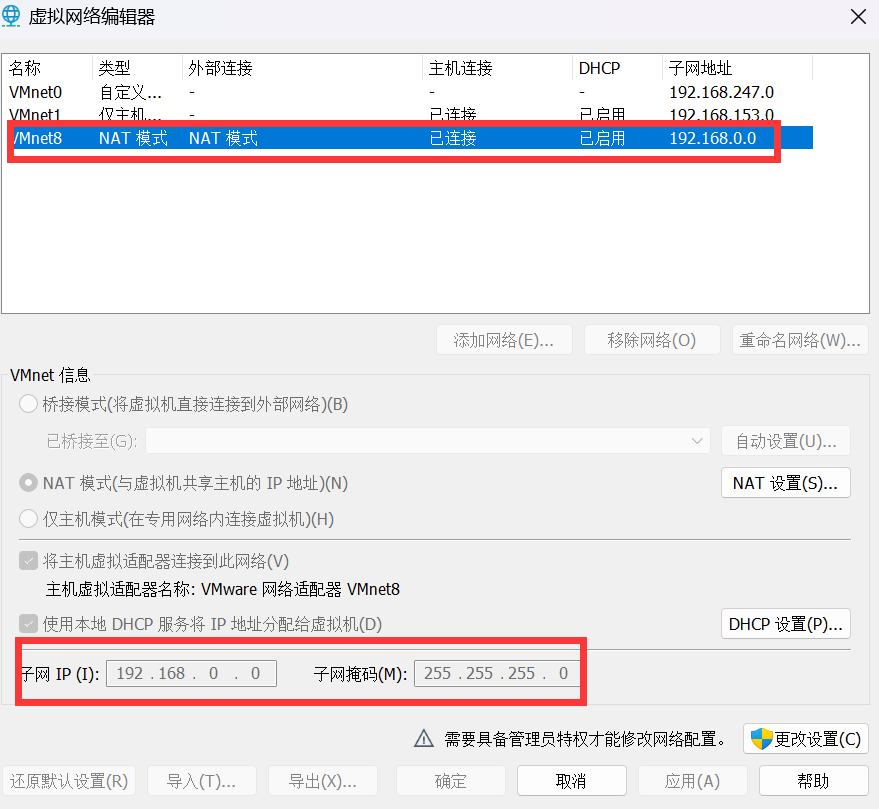
root@raojs-virtual-machine:/opt/linux-5.15.119# sudo apt update 忽略:1 http://cn.archive.ubuntu.com/ubuntu jammy InRelease 忽略:2 http://security.ubuntu.com/ubuntu jammy-security InRelease 忽略:1 http://cn.archive.ubuntu.com/ubuntu jammy InRelease 忽略:2 http://security.ubuntu.com/ubuntu jammy-security InRelease 忽略:1 http://cn.archive.ubuntu.com/ubuntu jammy InRelease 忽略:2 http://security.ubuntu.com/ubuntu jammy-security InRelease 错误:1 http://cn.archive.ubuntu.com/ubuntu jammy InRelease 暂时不能解析域名"cn.archive.ubuntu.com" 错误:2 http://security.ubuntu.com/ubuntu jammy-security InRelease 暂时不能解析域名"security.ubuntu.com" 正在读取软件包列表... 完成 正在分析软件包的依赖关系树... 完成 正在读取状态信息... 完成 所有软件包均为最新。 W: 无法下载 http://cn.archive.ubuntu.com/ubuntu/dists/jammy/InRelease 暂时不能解析域名"cn.archive.ubuntu.com" W: 无法下载 http://security.ubuntu.com/ubuntu/dists/jammy-security/InRelease 暂时不能解析域名"security.ubuntu.com" W: 部分索引文件下载失败。如果忽略它们,那将转而使用旧的索引文件。 root@raojs-virtual-machine:/opt/linux-5.15.119# ping 8.8.8.8 PING 8.8.8.8 (8.8.8.8) 56(84) bytes of data. From 192.168.0.100 icmp_seq=54 Destination Host Unreachable From 192.168.0.100 icmp_seq=55 Destination Host Unreachable解决方法:配置 VMware NAT 端口映射。编辑 → 虚拟网络编辑器→ VMnet8(NAT)→NAT Settings → Port Forwarding
这项需要配置正确,然后才可以正常使用MobaXterm这类软件连接ubuntu.