第一题:键盘-css
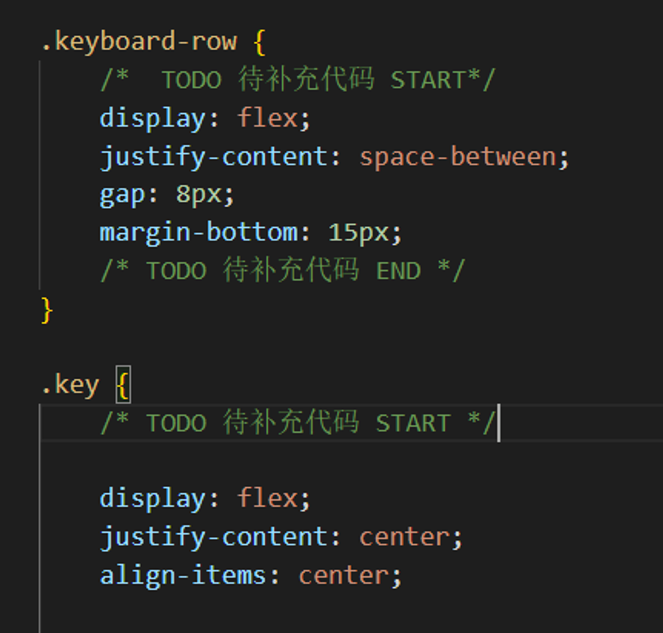
键盘小按钮间隔8px---对应容器加gap
位置
justify-content:space-between两端对齐,项目间等距;around两侧等距;evenly间距完全相等
flex-start左对齐/上对齐,end,center
align-item:baseline(第一行文字基线对齐),stretch项目拉伸占满高度,center
align-content:只有项目换行后才生效
第三题:电子签名
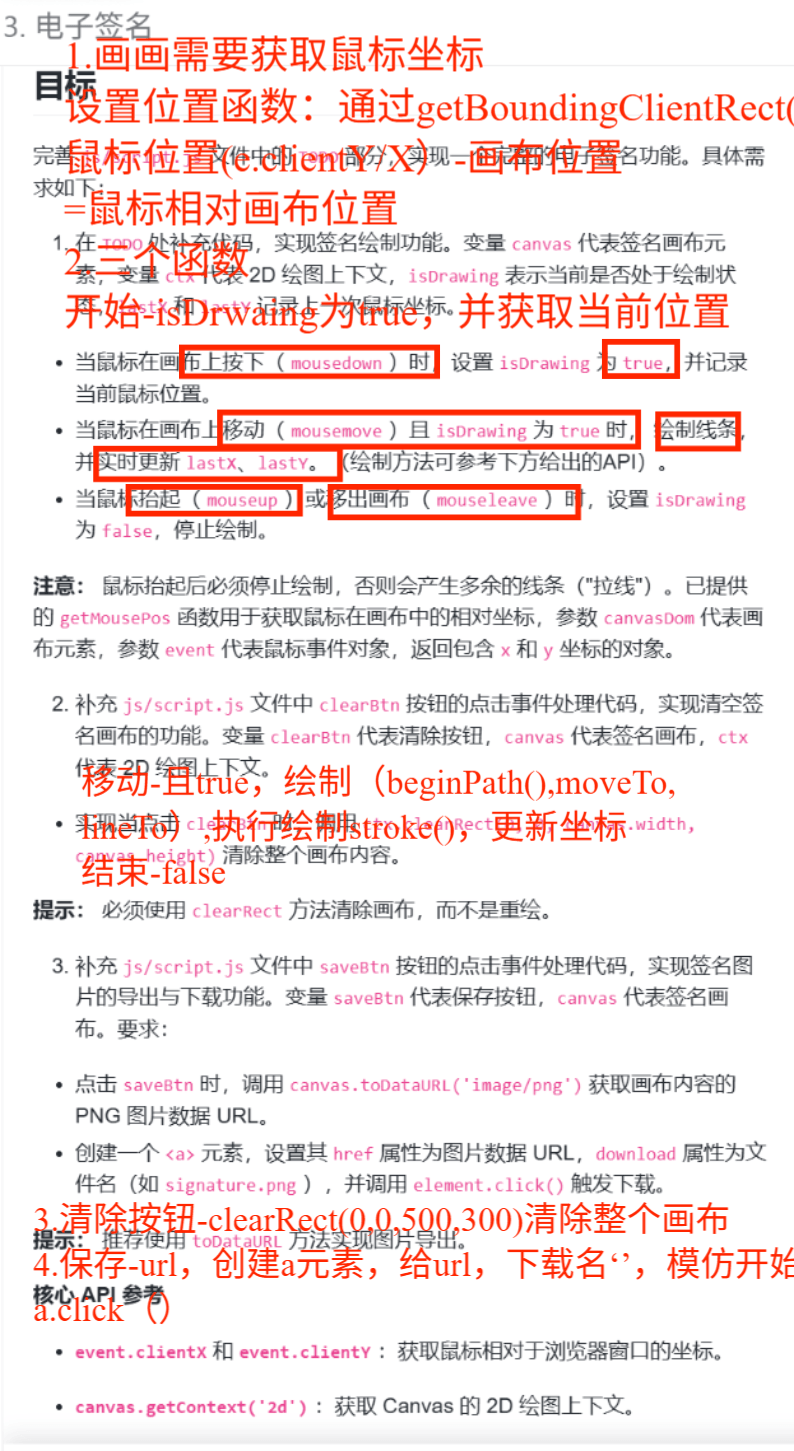
考点:
元素位置的获取,XX.getBoundingClientRect()--包括元素位置和大小
鼠标相对画布位置--鼠标相对浏览器视口的坐标clientX/Y-画布在视口中的位置
设置获取鼠标相对画布的函数,每次触发事件都需要用
绘制: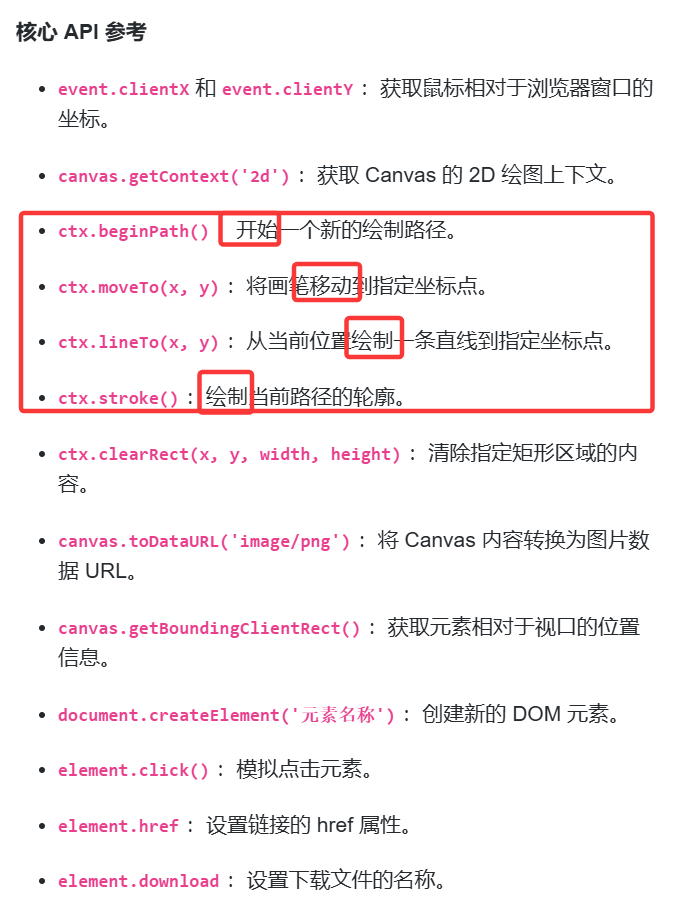
第四题:外卖餐具-vue,js
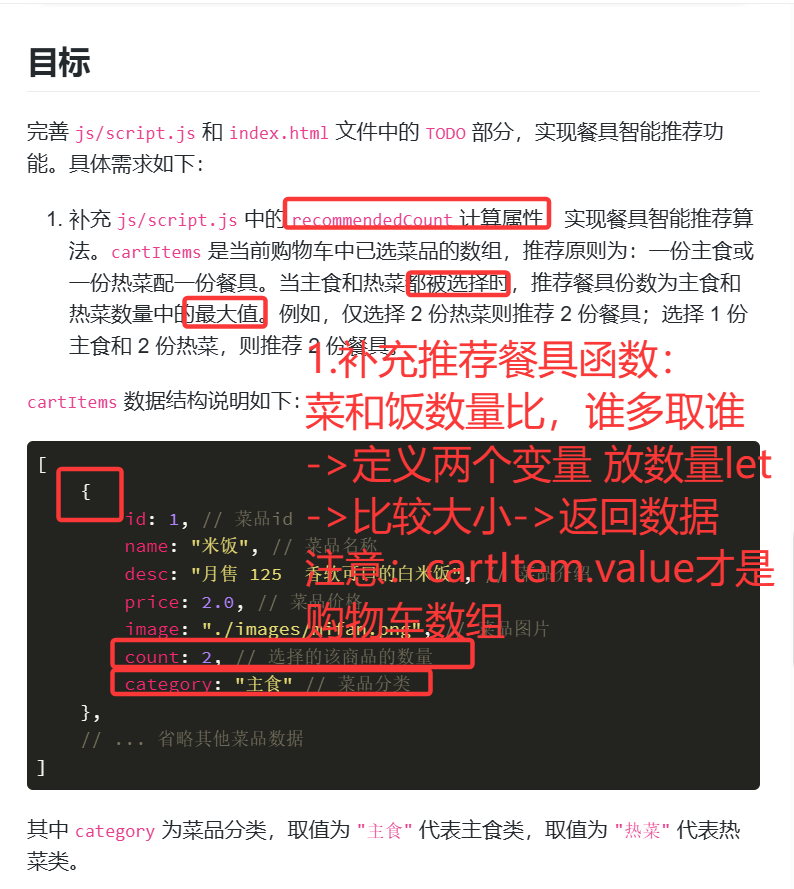
考点:
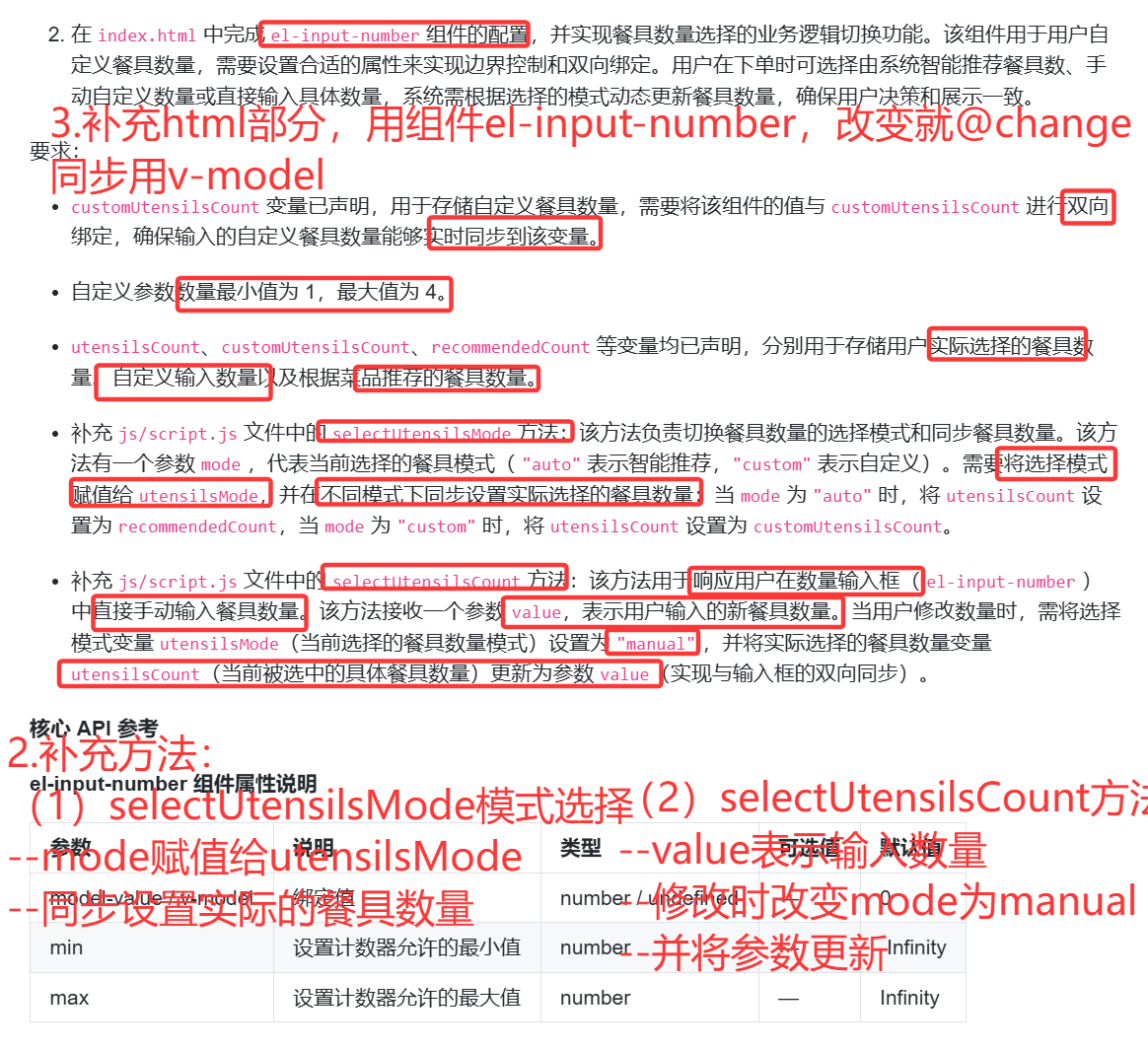
出现const XX=ref..说明XX.value才是真正的数据---setup 内部读写 ref 必须用 .value
双向绑定 v-model='某个变量或有返回值的函数'
一改变就触发@change="运行的函数名"
空数据兜底||0
使用组件《XX》《/XX》
javascript
const { createApp, ref, computed } = Vue;

const app = createApp({
    setup() {
        // 菜品数据
        const menuItems = ref([
            {
                id: 1,
                name: "米饭",
                desc: "月售 125  香软可口的白米饭",
                price: 2.0,
                image: "./images/mifan.png",
                category: "主食"
            },
            {
                id: 2,
                name: "蛋炒饭",
                desc: "月售 89  经典蛋炒饭",
                price: 12.0,
                image: "./images/danchaofan.png",
                category: "主食"
            },
            {
                id: 3,
                name: "鱼香肉丝",
                desc: "月售 156  招牌菜品",
                price: 28.0,
                image: "./images/yuxiangrousi.png",
                category: "热菜"
            },
            {
                id: 4,
                name: "宫保鸡丁",
                desc: "月售 134  麻辣鲜香",
                price: 32.0,
                image: "./images/gongbaojiding.png",
                category: "热菜"
            },
            {
                id: 5,
                name: "红烧肉",
                desc: "月售 98  肥而不腻",
                price: 38.0,
                image: "./images/hongshaorou.png",
                category: "热菜"
            },
            {
                id: 6,
                name: "麻婆豆腐",
                desc: "月售 112  经典川菜",
                price: 18.0,
                image: "./images/mapodoufu.png",
                category: "热菜"
            }
        ]);

        // 购物车数据
        const cartItems = ref([]);

        // 当前选中分类
        const activeCategory = ref("热销榜");

        // 购物车相关
        const cartVisible = ref(false);
        const utensilsDialogVisible = ref(false);
        const orderSuccessDialogVisible = ref(false);
        const needUtensils = ref(true);
        const utensilsMode = ref("auto"); // auto, manual, custom
        const utensilsCount = ref(1);
        const customUtensilsCount = ref(4);
        const finalUtensilsCount = ref(0);

        // 切换分类
        const switchCategory = (category) => {
            activeCategory.value = category;
        };

        // 过滤菜品(热销榜显示所有)
        const filteredMenuItems = computed(() => {
            if (activeCategory.value === "热销榜") {
                return menuItems.value;
            }
            return menuItems.value.filter((item) => item.category === activeCategory.value);
        });

        // 计算总数量
        const totalCount = computed(() => {
            return cartItems.value.reduce((sum, item) => sum + item.count, 0);
        });

        // 计算总价格
        const totalPrice = computed(() => {
            return cartItems.value.reduce((sum, item) => sum + item.price * item.count, 0);
        });
        // 智能推荐餐具数量
        const recommendedCount = computed(() => {
            // TODO :目标 1 待补充代码 Start
            let mainTotal=0
            let dishTotal=0
            //等同于i=0遍历的效果
            //记住cartItems是Vue的ref响应式变量
            //cartItems.value[i]才是当前项
            for(let item of cartItems.value){
                if(item.category==='主食'){
                    mainTotal+=item.count
                }
                else{
                    dishTotal+=item.count
                }
            }
            return Math.max(mainTotal,dishTotal)||0
            // TODO :目标 1 待补充代码 End
        });

        // 获取商品在购物车中的数量
        const getItemCount = (item) => {
            const cartItem = cartItems.value.find((cartItem) => cartItem.id === item.id);
            return cartItem ? cartItem.count : 0;
        };

        // 增加商品
        const increaseItem = (item) => {
            const existingItem = cartItems.value.find((cartItem) => cartItem.id === item.id);
            if (existingItem) {
                existingItem.count++;
            } else {
                cartItems.value.push({
                    ...item,
                    count: 1
                });
            }
        };

        // 减少商品
        const decreaseItem = (item) => {
            const existingItem = cartItems.value.find((cartItem) => cartItem.id === item.id);
            if (existingItem) {
                if (existingItem.count > 1) {
                    existingItem.count--;
                } else {
                    // 如果数量为1,从购物车中移除
                    const index = cartItems.value.findIndex((cartItem) => cartItem.id === item.id);
                    cartItems.value.splice(index, 1);
                }
            }
        };

        // 清空购物车
        const clearCart = () => {
            cartItems.value = [];
            cartVisible.value = false;
        };

        // 切换购物车显示
        const toggleCart = () => {
            if (totalCount.value > 0) {
                cartVisible.value = !cartVisible.value;
            }
        };

        // 显示餐具对话框
        const showUtensilsDialog = () => {
            if (totalCount.value > 0) {
                // 显示餐具选择对话框
                utensilsDialogVisible.value = true;
            }
        };

        // 选择是否需要餐具
        const selectNeedUtensils = (need) => {
            needUtensils.value = need;
            if (!need) {
                utensilsMode.value = "auto";
                utensilsCount.value = 0;
            } else {
                utensilsMode.value = "auto";
                console.log(recommendedCount.value, '---');
                utensilsCount.value = recommendedCount.value;
            }
        };

        // 选择餐具模式
        const selectUtensilsMode = (mode) => {
            // TODO :目标 2 待补充代码 Start
            //用户选择的模式是 mode--赋值
            utensilsMode.value=mode
            //如果是auto(智能推荐)--把之前推荐数量赋值
            if(mode==='auto'){
                utensilsCount.value=recommendedCount.value
            }
            else if(mode='custom'){
                utensilsCount.value=customUtensilsCount.value
            }

            // TODO :目标 2 待补充代码 End
        };

        // 选择具体餐具数量
        const selectUtensilsCount = (count) => {
            // TODO :目标 2 待补充代码 Start
            utensilsMode.value='manual'
            utensilsCount.value=count
            // TODO :目标 2 待补充代码 End
        };

        // 确认餐具选择
        const confirmUtensils = () => {
            finalUtensilsCount.value = needUtensils.value ? utensilsCount.value : 0;
            utensilsDialogVisible.value = false;

            // 显示下单成功对话框
            setTimeout(() => {
                orderSuccessDialogVisible.value = true;
            }, 300);
        };

        // 关闭订单成功对话框
        const closeOrderSuccess = () => {
            orderSuccessDialogVisible.value = false;
            // 清空购物车
            cartItems.value = [];
            // 重置餐具选择
            needUtensils.value = true;
            utensilsMode.value = "auto";
        };

        return {
            menuItems,
            activeCategory,
            switchCategory,
            filteredMenuItems,
            cartVisible,
            totalCount,
            totalPrice,
            cartItems,
            recommendedCount,
            getItemCount,
            increaseItem,
            decreaseItem,
            clearCart,
            toggleCart,
            showUtensilsDialog,
            utensilsDialogVisible,
            orderSuccessDialogVisible,
            needUtensils,
            selectNeedUtensils,
            utensilsMode,
            selectUtensilsMode,
            utensilsCount,
            selectUtensilsCount,
            customUtensilsCount,
            finalUtensilsCount,
            confirmUtensils,
            closeOrderSuccess
        };
    }
});

app.use(ElementPlus);
const vm = app.mount('#app');

// 暴露Vue实例供检测脚本使用
window.__VUE_APP__ = vm;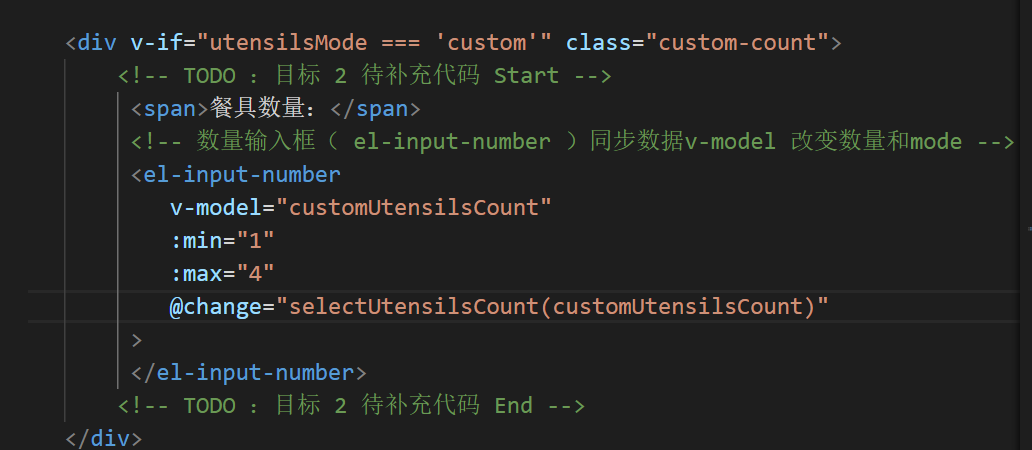
易错易漏:
1.cartItems.value才是真正的内容--出现const XX=ref..,就得.value
2.没有考虑空购物车 ||0 不然就infinity 最好使用Math.max(mainTotal, dishTotal) || 0这个写法
3.selectUtensilsMode没有考虑到共有三种情况
4.模板不用 .value,但 setup 里必须加!
5.utensilsCount 和 customUtensilsCount 的关系前者是最终真实数量,后者只是输入框临时值,必须同步。
改进方法:
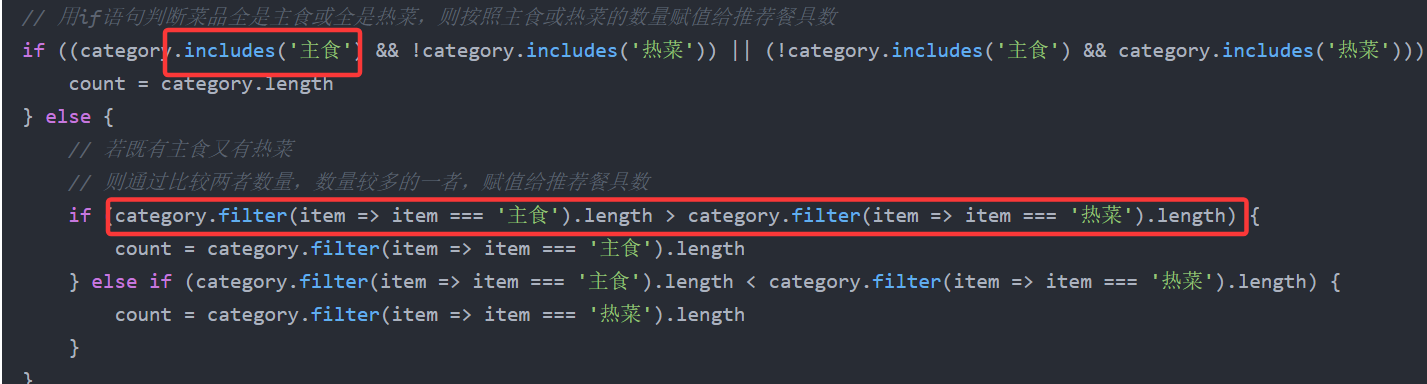
使用**数组的filter来筛选数据,**就不用多次遍历
第五题:学习热度
考点:
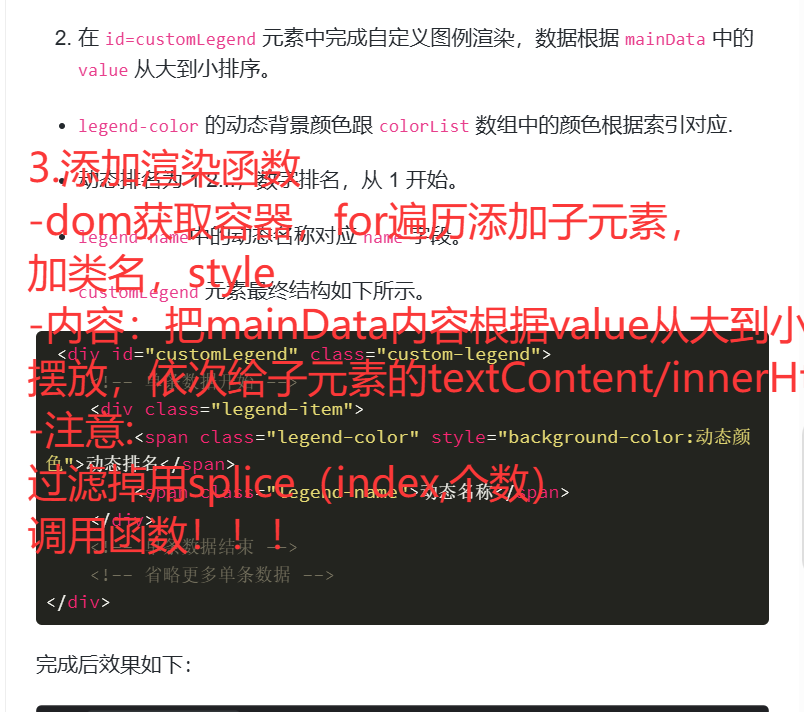
XX.splice(index,个数)--删掉数组里从第index+1个开始往后删几个
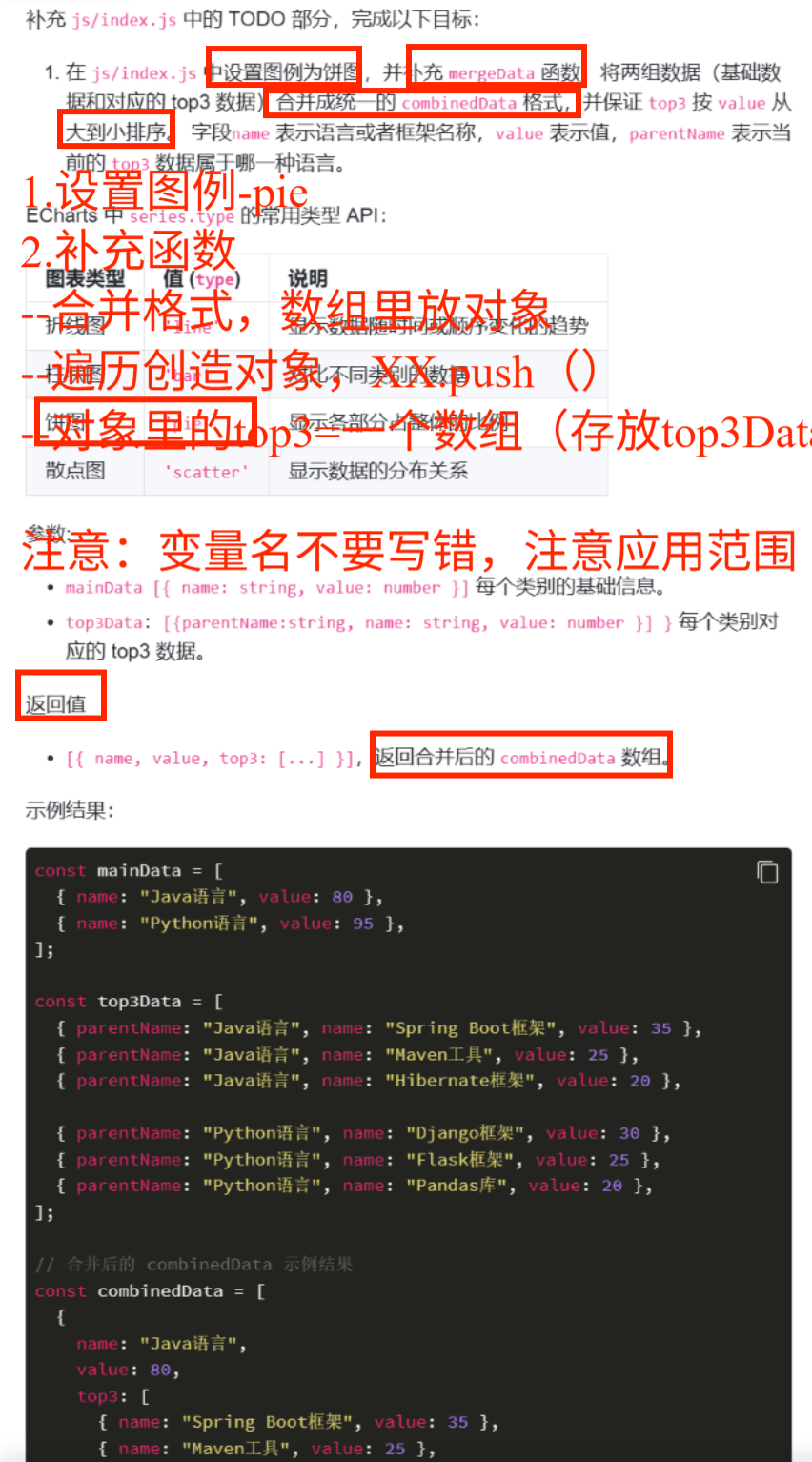
创造对象数组
sort排序
sort((a, b) => b.value - a.value) sort:排序 b.value - a.value:从大到小排
appendChild()只能一个一个加,但是append可以一起加
拼html:
legendItem.innerHTML = `
<span class="legend-color" style="background:${colorListindex}"></span>
<span class="legend-name">${item.name}</span>
`;
javascript
let colorList = ["#ff4d4f","#ffc53d","#69c0ff","#95de64","#d3adf7"]
function createTop3Chart({
  chartId = "chart",
  title = "学习热度-TOP3",
  combinedData = [],

}) {
  const chartDom = document.getElementById(chartId);
  const chartInstance = echarts.init(chartDom);

  const option = {
    tooltip: {
      trigger: 'item',
      backgroundColor: "#fff",
      formatter: function(params){
        const itemData = combinedData.find(item => item.name === params.name) || {};
        const top3 = itemData.top3 || [];
        let tooltipContent = `<div class="tool-tip-contaner"><h1>${title}</h1>`;
        tooltipContent += `<table class="tooltip-table"><tr><th>排序</th><th>名称</th><th>值</th></tr>`;
        top3.forEach((item,index)=>{
          tooltipContent += `<tr>
            <td><span class="tooltip-color" style="background:${colorList[index]}"></span>${index+1}</td>
            <td>${item.name}</td>
            <td>${item.value}</td>
          </tr>`;
        });
        tooltipContent += "</table></div>";
        return tooltipContent;
      }
    },
    series:[
      {
        type:'pie', // TODO: 待补充代码  目标 1
        radius:["30%","45%"],
        center:["50%","50%"],
        data: combinedData.sort((a,b)=>b.value-a.value).map((item,index)=>({ ...item, itemStyle:{color:colorList[index ]} })),
        label:{
          show:true,
          fontSize: 14,
          formatter:"{b}: {c} ({d}%)"
        }
      }
    ]
  };
  chartInstance.setOption(option);


}

const mainData = [
  { name: "Java语言", value: 80 },
  { name: "Python语言", value: 95 },
  { name: "JavaScript语言", value: 90 },
  { name: "C++语言", value: 70 },
  { name: "Go语言", value: 65 }
];
const top3Data = [
  { parentName: "Java语言", name: "Spring Boot框架", value: 35 },
  { parentName: "Java语言", name: "Maven工具", value: 25 },
  { parentName: "Java语言", name: "Hibernate框架", value: 20 },

  { parentName: "Python语言", name: "Django框架", value: 10 },
  { parentName: "Python语言", name: "Flask框架", value: 25 },
  { parentName: "Python语言", name: "Pandas库", value: 20 },

  { parentName: "JavaScript语言", name: "React框架", value: 40 },
  { parentName: "JavaScript语言", name: "Vue框架", value: 30 },
  { parentName: "JavaScript语言", name: "Node.js环境", value: 15 },

  { parentName: "C++语言", name: "STL库", value: 30 },
  { parentName: "C++语言", name: "Qt框架", value: 20 },
  { parentName: "C++语言", name: "Boost库", value: 15 },

  { parentName: "Go语言", name: "Gin框架", value: 25 },
  { parentName: "Go语言", name: "Beego框架", value: 20 },
  { parentName: "Go语言", name: "Gorm库", value: 15 }
];

var combinedData = mergeData(mainData, top3Data);


/**
  * @param {Array} mainData 主数据数组,包含语言名称和对应值
  * @param {Array} top3Data Top3 数据数组,包含每个语言的前三名及其值
  * @returns {Array} 返回合并后的数据数组,每个元素包含语言名称、值和对应的 Top3 数组
 */
function mergeData(mainData, top3Data) {
  // TODO: 待补充代码  目标 1
  let combinedData=[]
  //combined的内容分为两个对象
  //根据mainData的长度,添加n个对象
  for(let i=0;i<mainData.length;i++){
    const Object={
      name:'',
      value:'',
      top3:[]
    }
    combinedData.push(Object)
  }
  //每个对象的属性name,value,top3数据从mainData里获取
  for(i=0;i<mainData.length;i++){
    combinedData[i].name=mainData[i].name
    combinedData[i].value=mainData[i].value
  }
  //而top3又是一个数组包裹对象,对象里是name,value
  for(i=0;i<mainData.length;i++){
    const top3Content=[]
    const Name=mainData[i].name
    for(j=0;j<top3Data.length;j++){
      if(top3Data[j].parentName===Name){
        const top3Item={name:top3Data[j].name,value:top3Data[j].value}
        top3Content.push(top3Item)
      }
    }
    //不理解怎么把数组放到top3:的后面
    combinedData[i].top3=top3Content
  }
  return combinedData
}


 // 渲染自定义图例
// TODO: 待补充代码  目标 2
function renderCustomLegend(){
  const legendContainer=document.getElementById('customLegend')

  //洗牌,把mainData里面从大到小放,然后再给ItemColor和ItemName
  const Query=[]
  for(let i=0;i<mainData.length;i++){
    let Max=mainData[i].value
    // 应该让n初始化为i
    let n=i
    for(let j=i+1;j<mainData.length;j++){
      if(mainData[j].value>Max){
        n=j
        Max=mainData[j].value
      }
    }
    const MaxObject={name:mainData[n].name,value:mainData[n].value}
    Query.push(MaxObject)
    //移除了当时最大的
    //错误写法: mainData[n].remove
    //正确写法:mainData[n].splice(index,1)
  }


  //添加div到legendContainer
  for(let i=0;i<Query.length;i++){
    const legendItem=document.createElement('div')
    //className 或者classList.add都可以
    legendItem.className='legend-item'

    const ItemColor=document.createElement('span')
    ItemColor.classList.add('legend-color')
    ItemColor.style.backgroundColor=colorList[i]
    //序号=i+1
    ItemColor.innerHTML=i+1

    const ItemName=document.createElement('span')
    ItemName.classList.add('legend-name')
    //textContent或者innerHtml都可以
    ItemName.textContent=Query[i].name
    //分别加上去!!
    legendItem.appendChild(ItemColor)
    legendItem.appendChild(ItemName)

    legendContainer.appendChild(legendItem)
  }
}
//记得调用渲染函数!!!
renderCustomLegend()

// 调用图表函数
createTop3Chart({
  combinedData
});
易错易漏:
获取元素id大小写错误
n应该设置为i
颜色color=XX就行,不需要""
忘记调用函数
动态数字应该是i+1
改进方法:
直接 在mainData里的内容添加top:top3的内容---item0.top3=top3
先筛选filter 出类型一样的,再对数组内容的形式做改变--map 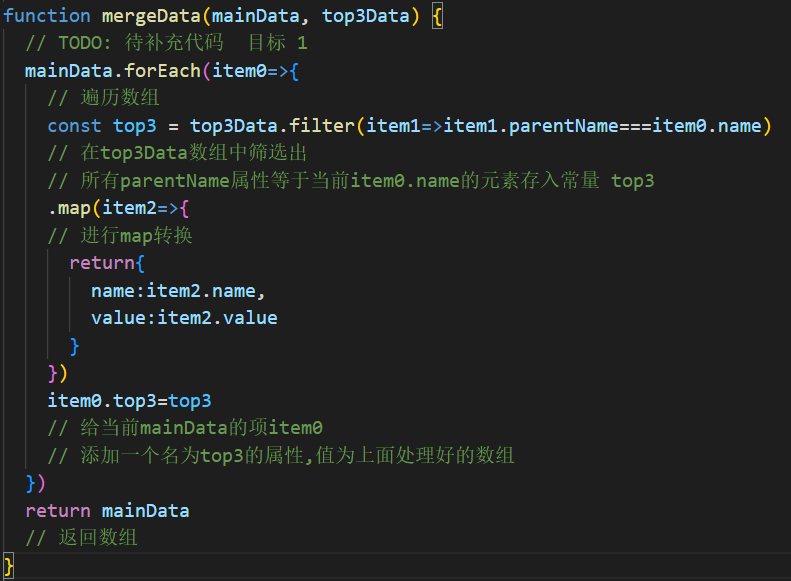
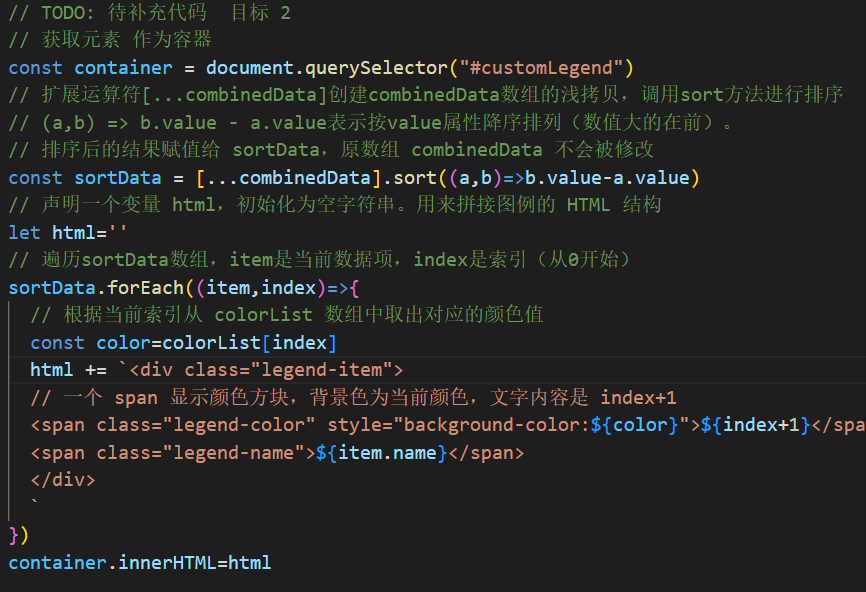
目标二需要根据value排序,复制combinedData,通过sort((a,b)=>{b.value-a.value>0}) 属性来排序,再设置空字符串html,将固定内容添加在html,通过${元素}来填充动态数据,而html又是container的内容
第八题:路由记录
考点:
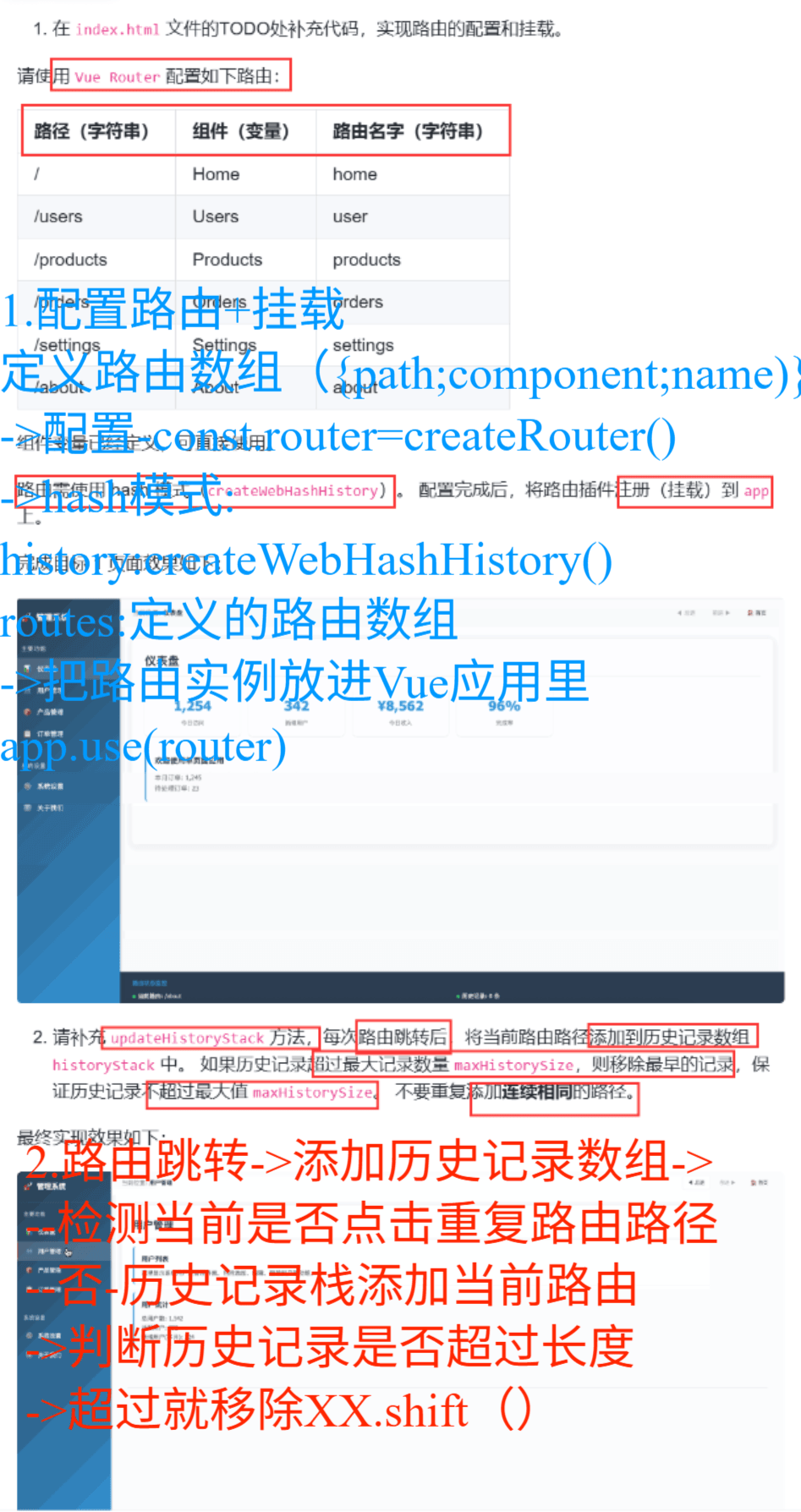
vue Router配置路由:
一般流程:
1.引入VueRouter所需方法:const {createRouter,createWebHashHistory}=VueRouter
2.定义路由规则 const routes= {path:"路径",component:组件,name:"路由名字"},
3.创建路由实例 const router=createRouter({ history:模式;routes:routes})
4.把路由挂载到Vue应用:app.use(router)
历史记录栈:XX.historyStack(这是个数组)
添加数组内容:XX.push()
从头开始删一个:数组.shift()
html
<!DOCTYPE html>
<html lang="zh-CN">

<head>
    <meta charset="UTF-8">
    <meta name="viewport" content="width=device-width, initial-scale=1.0">
    <title>路由记录</title>
    <script src="./lib/vue.global.js"></script>
    <script src="./lib/vue-router.global.js"></script>
   <link rel="stylesheet" href="./css/styles.css">
</head>

<body>
    <div id="app">
        <div class="app-container">
            <!-- 左侧菜单 -->
            <div class="sidebar">
                <div class="logo">
                    <div class="logo-icon">🚀</div>
                    <div class="logo-text">管理系统</div>
                </div>

                <div class="menu-section">
                    <div class="menu-title">主要功能</div>
                    <ul class="menu-items">
                        <li v-for="item in mainMenu" :key="item.path" class="menu-item"
                            :class="{ active: $route.path === item.path }" @click="navigateTo(item.path)">
                            <div class="menu-icon">{{ item.icon }}</div>
                            <div>{{ item.name }}</div>
                        </li>
                    </ul>
                </div>

                <div class="menu-section">
                    <div class="menu-title">系统设置</div>
                    <ul class="menu-items">
                        <li v-for="item in settingsMenu" :key="item.path" class="menu-item"
                            :class="{ active: $route.path === item.path }" @click="navigateTo(item.path)">
                            <div class="menu-icon">{{ item.icon }}</div>
                            <div>{{ item.name }}</div>
                        </li>
                    </ul>
                </div>
            </div>

            <!-- 右侧内容区域 -->
            <div class="main-content">
                <div class="top-bar">
                    <div class="breadcrumb">
                        当前位置: <span class="current">{{ currentPageTitle }}</span>
                    </div>
                    <div class="nav-controls">
                        <button class="nav-btn" @click="goBack" :disabled="!canGoBack">
                            <span>◀</span> 后退
                        </button>
                        <button class="nav-btn" @click="goForward" :disabled="!canGoForward">
                            前进 <span>▶</span>
                        </button>
                        <button class="nav-btn" @click="goHome">
                            <span>🏠</span> 首页
                        </button>
                    </div>
                </div>

                <div class="content-area">
                    <router-view></router-view>
                </div>

                <div class="debug-panel">
                    <div class="debug-title">路由状态监控</div>
                    <div class="debug-info">
                        <div class="debug-item">
                            <span class="status-indicator status-ok"></span>
                            <strong>当前路由:</strong> {{ $route.path }}
                        </div>
                        <div class="debug-item">
                            <span class="status-indicator status-ok"></span>
                            <strong>历史记录:</strong> {{ historyCount }} 条
                        </div>
                    </div>
                    <div class="history-stack">
                        <div v-for="(item, index) in historyStack" :key="index" class="history-item"
                            :class="{ current: index === historyStack.length - 1 }">
                            {{ item }}
                        </div>
                    </div>
                </div>
            </div>
        </div>
    </div>

      <script src="./components/Home.js"></script>
      <script src="./components/Users.js"></script>
      <script src="./components/Products.js"></script>
      <script src="./components/Orders.js"></script>
      <script src="./components/Settings.js"></script>
      <script src="./components/About.js"></script>
    <script>
        const { createApp, ref, computed, onMounted, watch } = Vue;
        const { createRouter, createWebHashHistory } = VueRouter;

        // TODO 目标1 待补充代码1 Start

        //1.定义路由数组
        const routes=[
            {path:'/',component:Home,name:'home'},
            {path:'/users',component:Users,name:'user'},
            {path:'/products',component:Products,name:'products'},
            {path:'/orders',component:Orders,name:'orders'},
            {path:'/settings',component:Settings,name:'setting'},
            {path:'/about',component:About,name:'about'},
        ]

        // TODO 目标1 待补充代码1  End

        // 创建Vue应用
        const app = createApp({
            data() {
                return {
                    mainMenu: [
                        { name: '仪表盘', path: '/', icon: '📊' },
                        { name: '用户管理', path: '/users', icon: '👥' },
                        { name: '产品管理', path: '/products', icon: '📦' },
                        { name: '订单管理', path: '/orders', icon: '📋' }
                    ],
                    settingsMenu: [
                        { name: '系统设置', path: '/settings', icon: '⚙️' },
                        { name: '关于我们', path: '/about', icon: 'ℹ️' }
                    ],
                    historyStack: [],
                    maxHistorySize: 10,
                    canGoBack: false,
                    canGoForward: false
                };
            },
            computed: {
                currentPageTitle() {
                    const routeName = this.$route.name;
                    const allMenuItems = [...this.mainMenu, ...this.settingsMenu];
                    const currentItem = allMenuItems.find(item => item.path === this.$route.path);
                    return currentItem ? currentItem.name : '未知页面';
                },
                historyCount() {
                    return this.historyStack.length;
                }
            },
            methods: {
                navigateTo(path) {
                    this.$router.push(path);
                    this.updateHistoryStack();

                },
                   updateHistoryStack() {
                    // TODO 目标2 待补充代码 Start
                    //获取当前的路由路径
                    const currentPath=this.$route.path;
                    //如果用户重复点了同一菜单----历史记录栈有内容,且历史记录最后一条就是当前要跳转的路径
                    if(this.historyStack.length>0&&this.historyStack[this.historyStack.length-1]===currentPath){
                        //那就不处理
                    }else{
                        //否则历史记录栈增加当前路径
                        this.historyStack.push(currentPath)
                        //历史记录不超过最大值
                        if(this.historyStack.length>this.maxHistorySize){
                            //超过了就移除最旧的记录
                            this.historyStack.shift()
                        }
                    }

                    // TODO 目标2 待补充代码 End
                    // 更新前进后退按钮状态
                    this.updateNavButtons();
                },

                goBack() {
                    window.history.back();
                },
                goForward() {
                    window.history.forward();
                },
                goHome() {
                    this.navigateTo('/');
                },


                updateNavButtons() {
                    // 简化实现,实际应用中可能需要更复杂的逻辑
                    this.canGoBack = this.historyStack.length > 1;
                    this.canGoForward = false; // 在实际应用中需要跟踪forward状态
                }
            },
            mounted() {
                this.updateHistoryStack();
            }
        });

        // TODO 目标1 待补充代码2 Start

        //2.创建路由实例,指定hash模式并传入路由规则
        const router=createRouter({
            //设置路由用 # 模式显示
            //路由模式(路径显示方式):哈希模式
            history:createWebHashHistory(),
            //路由规则表:前面定义的路由数组----写的路由规则,交给路由实例使用
            routes:routes
        })
        //把路由实例放进Vue应用里
        app.use(router)

        // TODO 目标1 待补充代码2 End


        // 挂载应用
     let vm = app.mount('#app');
    </script>
</body>

</html>
第十题:优居选
考点:
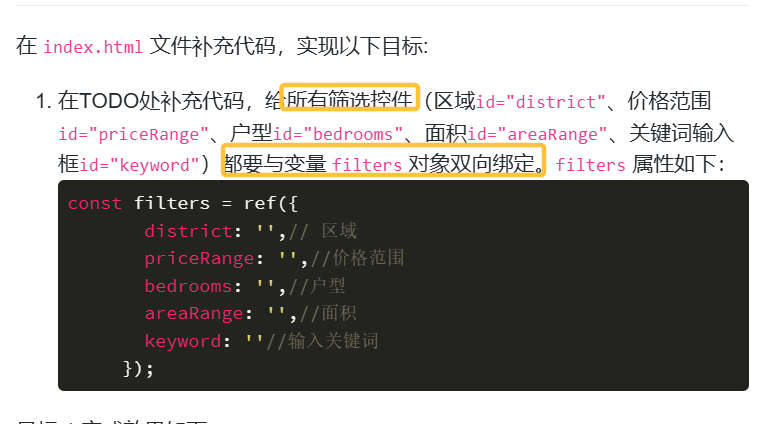
v-model双向绑定
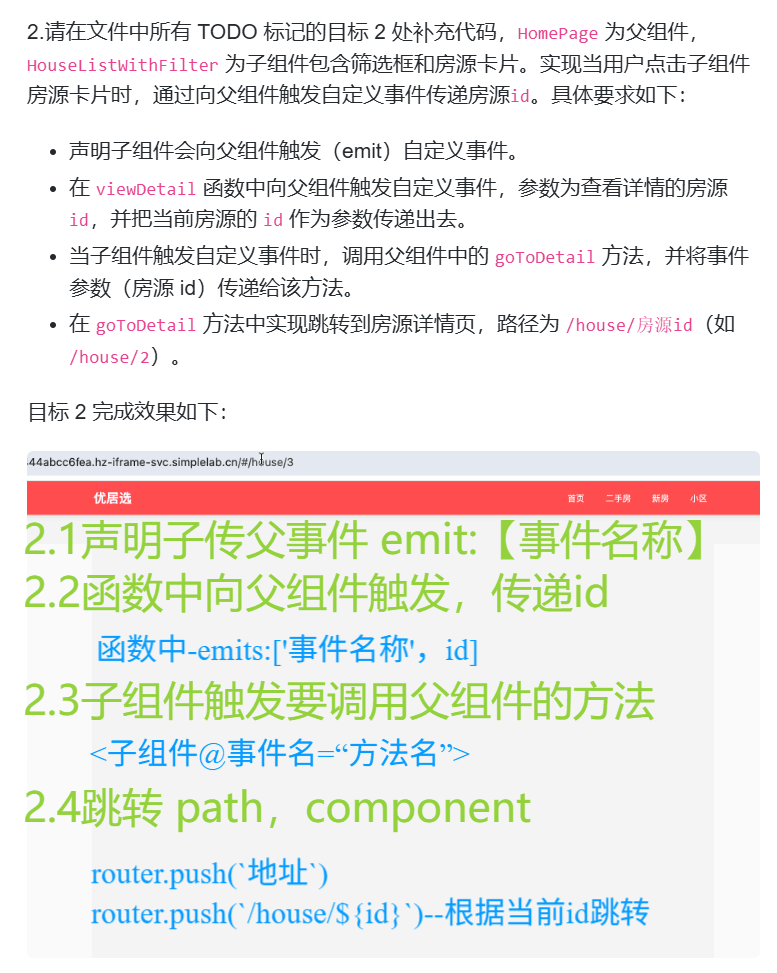
子传父 emit:{}
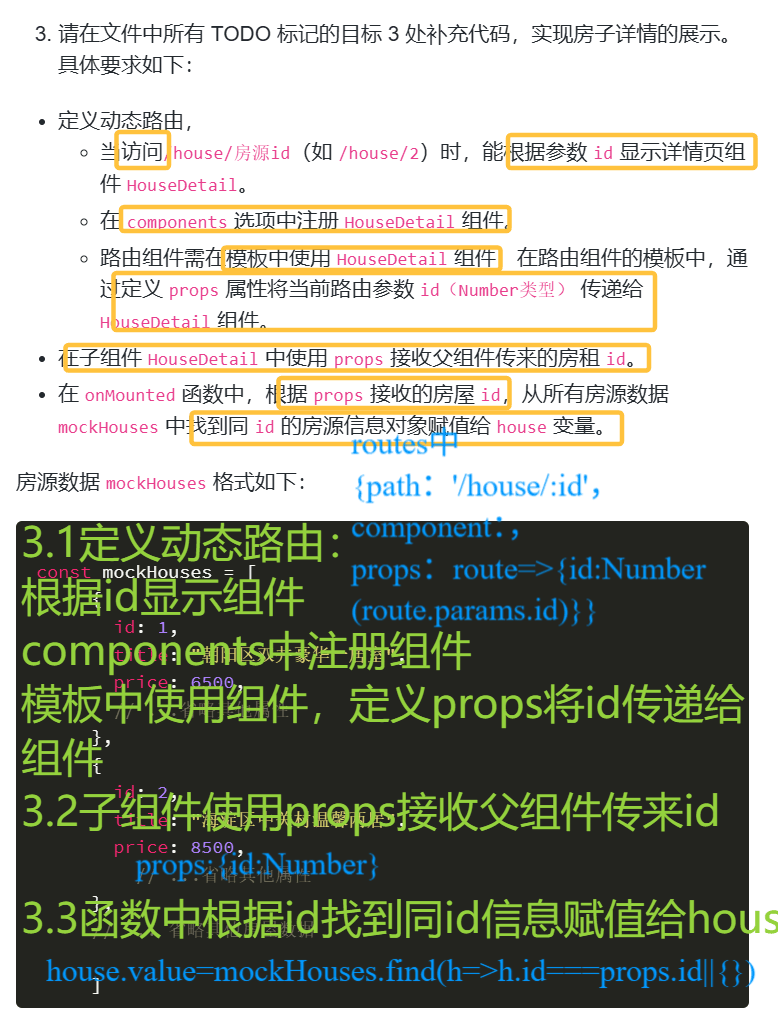
父传子 props
子使用父的方法,@事件="方法"
router.push('地址')---不刷新页面,只是切换组件

html
<!DOCTYPE html>
<html lang="zh-CN">
<head>
  <meta charset="UTF-8">
  <meta name="viewport" content="width=device-width, initial-scale=1.0">
  <title>优居选</title>
  <script src="./lib/vue.global.js"></script>
  <script src="./lib/vue-router.global.js"></script>
  <link rel="stylesheet" href="./css/styles.css">
</head>
<body>
  <div id="app"></div>

  <script type="module">
    const { createApp, ref, computed, onMounted } = Vue;
    const { createRouter, createWebHashHistory } = VueRouter;

    // 模拟租房数据
    const mockHouses = [
      {
        id: 1,
        title: "朝阳区双井豪华一居室",
        price: 6500,
        area: 65,
        bedrooms: 1,
        livingrooms: 1,
        bathrooms: 1,
        floor: "12/24",
        orientation: "南",
        district: "朝阳区",
        location: "双井",
        tags: ["近地铁", "精装修", "拎包入住"],
        image: "./images/house1.jpg",
        description: "位于朝阳区双井核心地段,交通便利,周边配套设施齐全。房屋精装修,南北通透,采光良好,家电齐全,拎包即可入住。"
      },
      {
        id: 2,
        title: "海淀区中关村温馨两居",
        price: 8500,
        area: 85,
        bedrooms: 2,
        livingrooms: 1,
        bathrooms: 1,
        floor: "8/18",
        orientation: "南北",
        district: "海淀区",
        location: "中关村",
        tags: ["学区房", "近地铁", "精装修"],
        image: "./images/house2.jpg",
        description: "位于海淀区中关村,优质学区房,周边有多所重点中小学。房屋温馨舒适,南北通透,采光充足,适合家庭居住。"
      },
      {
        id: 3,
        title: "东城区王府井精装开间",
        price: 5500,
        area: 45,
        bedrooms: 1,
        livingrooms: 1,
        bathrooms: 1,
        floor: "5/12",
        orientation: "东",
        district: "东城区",
        location: "王府井",
        tags: ["近商圈", "精装修", "独立卫浴"],
        image: "./images/house3.jpg",
        description: "位于东城区王府井商圈,生活便利,购物餐饮一应俱全。房屋精装修,独立卫浴,适合单身或情侣居住。"
      },
      {
        id: 4,
        title: "西城区金融街豪华三居",
        price: 12000,
        area: 120,
        bedrooms: 3,
        livingrooms: 2,
        bathrooms: 2,
        floor: "15/28",
        orientation: "南北",
        district: "西城区",
        location: "金融街",
        tags: ["豪华装修", "视野开阔", "近商圈"],
        image: "./images/house4.jpg",
        description: "位于西城区金融街核心区域,豪华装修,视野开阔,南北通透。周边配套设施完善,交通便利,适合高端人士居住。"
      },
      {
        id: 5,
        title: "丰台区方庄舒适两居",
        price: 5800,
        area: 75,
        bedrooms: 2,
        livingrooms: 1,
        bathrooms: 1,
        floor: "6/15",
        orientation: "南",
        district: "丰台区",
        location: "方庄",
        tags: ["性价比高", "精装修", "近地铁"],
        image: "./images/house5.jpg",
        description: "位于丰台区方庄,性价比高,精装修,近地铁。房屋采光良好,布局合理,适合年轻家庭居住。"
      },
      {
        id: 6,
        title: "通州区运河商务区一居室",
        price: 4200,
        area: 55,
        bedrooms: 1,
        livingrooms: 1,
        bathrooms: 1,
        floor: "10/20",
        orientation: "南",
        district: "通州区",
        location: "运河商务区",
        tags: ["新小区", "精装修", "近地铁"],
        image: "./images/house6.jpg",
        description: "位于通州区运河商务区,新小区,精装修,近地铁。房屋干净整洁,配套设施完善,适合上班族居住。"
      }
    ];

    // 合并后的筛选和列表组件
    const HouseListWithFilter = {
      template: `
        <div>
          <!-- 筛选部分 -->
          <div class="filter-section">
            <div class="filter-row">
              <div class="filter-group">
                <label>区域</label>
                <!-- TODO: 待补充代码1 目标1   -->
                <select id="district" v-model="filters.district">
                  <option value="">全部</option>
                  <option v-for="district in districts" :key="district" :value="district">{{ district }}</option>
                </select>
              </div>
              <div class="filter-group">
                <label>价格范围</label>
                <!-- TODO: 待补充代码2 目标1   -->
                <select id="priceRange"  v-model="filters.priceRange">
                  <option value="">全部</option>
                  <option value="0-4000">4000元以下</option>
                  <option value="4000-6000">4000-6000元</option>
                  <option value="6000-8000">6000-8000元</option>
                  <option value="8000-10000">8000-10000元</option>
                  <option value="10000-0">10000元以上</option>
                </select>
              </div>
              <div class="filter-group">
                <label>户型</label>
                <!-- TODO: 待补充代码3 目标1   -->
                <select id="bedrooms"  v-mobel="filters.bedrooms">
                  <option value="">全部</option>
                  <option value="1">一室</option>
                  <option value="2">两室</option>
                  <option value="3">三室</option>
                  <option value="4">四室及以上</option>
                </select>

              </div>
              <div class="filter-group">
                <label>面积</label>
                <!-- TODO: 待补充代码4 目标1   -->
                <select id="areaRange"  v-mobel="filters.areaRange">
                  <option value="">全部</option>
                  <option value="0-50">50㎡以下</option>
                  <option value="50-70">50-70㎡</option>
                  <option value="70-90">70-90㎡</option>
                  <option value="90-120">90-120㎡</option>
                  <option value="120-0">120㎡以上</option>
                </select>
              </div>
            </div>
            <div class="filter-row">
              <div class="filter-group">
                <label>关键词</label>
                <!-- TODO: 待补充代码5 目标1   -->
                <input id="keyword" type="text" placeholder="输入小区或位置关键词"  v-mobel="filters.keywordc">
              </div>
            </div>
          </div>

          <!-- 排序和列表部分 -->
          <div class="sort-section">
            <div class="sort-options">
              <button
                v-for="option in sortOptions"
                :key="option.value"
                :class="{ active: sortBy === option.value }"
                @click="updateSort(option.value)"
              >
                {{ option.label }}
              </button>
            </div>
            <div>共找到 {{ filteredHouses.length }} 套房源</div>
          </div>

          <div v-if="filteredHouses.length > 0" class="house-list">
            <div
              v-for="house in filteredHouses"
              :key="house.id"
              class="house-card"
              @click="viewDetail(house.id)"
            >
              <img :src="house.image" :alt="house.title" class="house-img">
              <div class="house-info">
                <h3 class="house-title">{{ house.title }}</h3>
                <div class="house-details">
                  <span>{{ house.area }}㎡</span>
                  <span>{{ house.bedrooms }}室{{ house.livingrooms }}厅</span>
                  <span>{{ house.floor }}层</span>
                  <span>{{ house.orientation }}向</span>
                </div>
                <div class="house-price">{{ house.price }}元/月</div>
                <div class="house-tags">
                  <span v-for="tag in house.tags" :key="tag" class="tag">{{ tag }}</span>
                </div>
              </div>
            </div>
          </div>
          <div v-else class="no-results">
            没有找到符合条件的房源,请尝试调整筛选条件
          </div>
        </div>
      `,
      // TODO 待补充代码1  目标2 Start
      //声明子组件会向父组件触发(emit)自定义事件
      emits:['view-detail'],
      // TODO 待补充代码1  目标2 End
      setup(props, { emit }) {
        const districts = [...new Set(mockHouses.map(house => house.district))];

        const sortOptions = [
          { label: '默认排序', value: 'default' },
          { label: '价格从低到高', value: 'price-asc' },
          { label: '价格从高到低', value: 'price-desc' },
          { label: '面积从大到小', value: 'area-desc' }
        ];

        const filters = ref({
          district: '',
          priceRange: '',
          bedrooms: '',
          areaRange: '',
          keyword: ''
        });

        const sortBy = ref('default');

        const filteredHouses = computed(() => {
          let result = [...mockHouses];

          // 区域筛选
          if (filters.value.district) {
            result = result.filter(house => house.district === filters.value.district);
          }

          // 价格范围筛选
          if (filters.value.priceRange) {
            const [min, max] = filters.value.priceRange.split('-').map(Number);
            result = result.filter(house => {
              if (min === 0) return house.price <= max;
              if (max === 0) return house.price >= min;
              return house.price >= min && house.price <= max;
            });
          }

          // 户型筛选
          if (filters.value.bedrooms) {
            const bedrooms = parseInt(filters.value.bedrooms);
            result = result.filter(house => house.bedrooms === bedrooms);
          }

          // 面积范围筛选
          if (filters.value.areaRange) {
            const [min, max] = filters.value.areaRange.split('-').map(Number);
            result = result.filter(house => {
              if (min === 0) return house.area <= max;
              if (max === 0) return house.area >= min;
              return house.area >= min && house.area <= max;
            });
          }

          // 关键词筛选
          if (filters.value.keyword) {
            const keyword = filters.value.keyword.toLowerCase();
            result = result.filter(house =>
              house.title.toLowerCase().includes(keyword) ||
              house.location.toLowerCase().includes(keyword)
            );
          }

          // 排序
          if (sortBy.value === 'price-asc') {
            result.sort((a, b) => a.price - b.price);
          } else if (sortBy.value === 'price-desc') {
            result.sort((a, b) => b.price - a.price);
          } else if (sortBy.value === 'area-desc') {
            result.sort((a, b) => b.area - a.area);
          }

          return result;
        });

        const viewDetail = (id) => {
          // TODO 待补充代码2 目标2
          // viewDetail 函数中向父组件触发自定义事件
          //view-detail动作就传递id
          emits:['view-detail',id]
        };

        const updateSort = (sortValue) => {
          sortBy.value = sortValue;
        };

        return {
          districts,
          sortOptions,
          filters,
          sortBy,
          filteredHouses,
          viewDetail,
          updateSort
        };
      }
    };

    // 房屋详情组件
    const HouseDetail = {
      template: `
        <div class="detail-page">
          <div class="detail-header">
            <img :src="house.image" :alt="house.title" class="detail-img">
          </div>
          <div class="detail-content">
            <h1 class="detail-title">{{ house.title }}</h1>
            <div class="detail-price">{{ house.price }}元/月</div>
            <div class="detail-info">
              <div class="info-item">
                <span class="info-label">面积</span>
                <span class="info-value">{{ house.area }}㎡</span>
              </div>
              <div class="info-item">
                <span class="info-label">户型</span>
                <span class="info-value">{{ house.bedrooms }}室{{ house.livingrooms }}厅{{ house.bathrooms }}卫</span>
              </div>
              <div class="info-item">
                <span class="info-label">楼层</span>
                <span class="info-value">{{ house.floor }}</span>
              </div>
              <div class="info-item">
                <span class="info-label">朝向</span>
                <span class="info-value">{{ house.orientation }}</span>
              </div>
              <div class="info-item">
                <span class="info-label">区域</span>
                <span class="info-value">{{ house.district }}</span>
              </div>
              <div class="info-item">
                <span class="info-label">位置</span>
                <span class="info-value">{{ house.location }}</span>
              </div>
            </div>
            <div class="house-tags">
              <span v-for="tag in house.tags" :key="tag" class="tag">{{ tag }}</span>
            </div>
            <div class="detail-description">
              <h3>房源描述</h3>
              <p>{{ house.description }}</p>
            </div>
            <router-link to="/" class="back-button">返回列表</router-link>
          </div>
        </div>
      `,
      // TODO 待补充代码2 目标3 Start
        props:{id: Number},
       // TODO 待补充代码2 目标3 End
      setup(props) {
        const house = ref({});

        onMounted(() => {
          // TODO: 待补充代码3 目标3
          house.value=mockHouses.find(h=>h.id===props.id||{})
        });

        return {
          house
        };
      }
    };

    // 首页组件
    const HomePage = {
      template: `
        <div>
          <!-- TODO: 待补充代码3 目标2 -->
           <HouseListWithFilter @view-detail="goToDetail"/>
        </div>
      `,
      components: {
        HouseListWithFilter
      },
      setup() {
        const router = VueRouter.useRouter();

        const goToDetail = (id) => {
          // TODO 待补充代码4 目标2
          //补充函数
          router.push(`/house/${id}`)
        };

        return {
          goToDetail
        };
      }
    };

    // 路由配置
    const routes = [
      { path: '/', component: HomePage },
      // TODO 待补充代码1  目标3
      {
        path:'/house/:id',
        component:HouseDetail,
        props:route=>({id:Number(route.params.id)})
      }
    ];

    // 创建路由
    const router = createRouter({
      history: createWebHashHistory(),
      routes
    });

    // 创建Vue应用
    const app = createApp({
      template: `
        <div>
          <header>
            <div class="container">
              <div class="header-content">
                <div class="logo">优居选</div>
                <nav>
                  <ul>
                    <li id="toIndex"><router-link to="/">首页</router-link></li>
                    <li><a href="#">二手房</a></li>
                    <li><a href="#">新房</a></li>
                    <li><a href="#">小区</a></li>
                  </ul>
                </nav>
              </div>
            </div>
          </header>
          <main class="container">
            <router-view></router-view>
          </main>
        </div>
      `
    });

    // 使用路由
    app.use(router);

    // 挂载应用
  let vm =   app.mount('#app');
  </script>
</body>
</html>