一、为什么需要专业架构?
很多Electron教程的刚开始都是这样:
javascript
npm init -y
npm install electron
# 然后直接写代码,用 electron . 运行
这种方式对于"Hello World"没问题,但当你开始做真正的项目时,会遇到一堆问题:
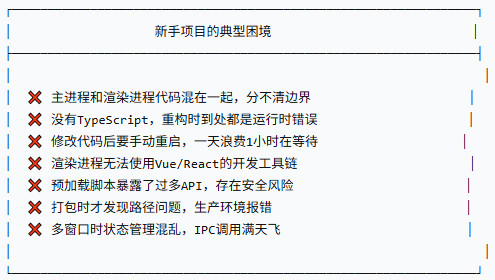
我们来搭建一个企业级Electron项目架构,解决上述所有问题。
二、整体架构设计
2.1 三层架构图
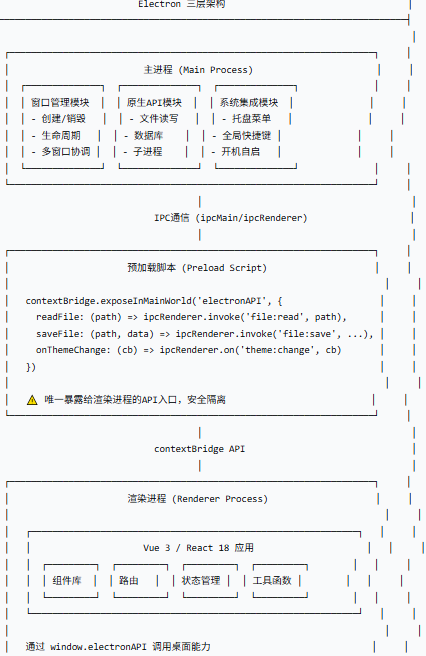
2.2 项目目录结构
javascript
my-electron-app/
├── packages/                          # Monorepo 子包
│   ├── main/                          # 主进程
│   │   ├── src/
│   │   │   ├── index.ts               # 入口文件
│   │   │   ├── window/                # 窗口管理
│   │   │   │   ├── MainWindow.ts
│   │   │   │   └── WindowManager.ts
│   │   │   ├── ipc/                   # IPC 处理器
│   │   │   │   ├── fileHandlers.ts
│   │   │   │   └── systemHandlers.ts
│   │   │   ├── native/                # 原生能力
│   │   │   │   ├── tray.ts
│   │   │   │   └── shortcut.ts
│   │   │   └── utils/                 # 工具函数
│   │   │       └── logger.ts
│   │   ├── package.json
│   │   └── tsconfig.json
│   │
│   ├── preload/                       # 预加载脚本
│   │   ├── src/
│   │   │   ├── index.ts               # 入口
│   │   │   └── api/                   # 暴露的API
│   │   │       ├── file.ts
│   │   │       ├── system.ts
│   │   │       └── types.ts
│   │   ├── package.json
│   │   └── tsconfig.json
│   │
│   └── renderer/                      # 渲染进程(Vue3/React)
│       ├── src/
│       │   ├── main.ts                # 入口
│       │   ├── App.vue                # 根组件
│       │   ├── components/            # UI组件
│       │   ├── views/                 # 页面
│       │   ├── router/                # 路由
│       │   ├── store/                 # 状态管理
│       │   └── styles/                # 全局样式
│       ├── index.html
│       ├── package.json
│       └── tsconfig.json
│
├── electron-builder.json              # 打包配置
├── package.json                       # 根配置(workspace)
├── pnpm-workspace.yaml                # pnpm workspace配置
├── tsconfig.base.json                 # 共享TS配置
└── .eslintrc.json                     # 代码规范
三、环境搭建(分步详解)
3.1 初始化 Monorepo
我们使用 pnpm workspace 来管理多包结构(比npm和yarn更快,磁盘占用更少)。
javascript
# 创建项目目录
mkdir my-electron-app && cd my-electron-app

# 初始化根package.json
pnpm init

# 创建子包目录
mkdir -p packages/main packages/preload packages/renderer
根目录 package.json:
javascript
{
  "name": "my-electron-app",
  "version": "1.0.0",
  "private": true,
  "description": "Enterprise Electron Application",
  "scripts": {
    "dev": "pnpm run -F main dev",
    "build": "pnpm run -F main build",
    "build:all": "pnpm run -F main build && pnpm run -F preload build && pnpm run -F renderer build",
    "lint": "eslint . --ext .ts,.tsx,.vue",
    "type-check": "pnpm run -F main type-check && pnpm run -F preload type-check && pnpm run -F renderer type-check"
  },
  "devDependencies": {
    "typescript": "^5.3.0",
    "eslint": "^8.55.0",
    "@typescript-eslint/eslint-plugin": "^6.13.0",
    "@typescript-eslint/parser": "^6.13.0"
  },
  "engines": {
    "node": ">=18.0.0",
    "pnpm": ">=8.0.0"
  }
}pnpm-workspace.yaml:
javascript
packages:
  - 'packages/*'
3.2 主进程配置(TypeScript + Electron)
packages/main/package.json:
javascript
{
  "name": "main",
  "version": "1.0.0",
  "main": "dist/index.js",
  "scripts": {
    "dev": "electron-vite dev --watch",
    "build": "electron-vite build",
    "type-check": "tsc --noEmit",
    "start": "electron dist/index.js"
  },
  "dependencies": {
    "electron": "^28.0.0",
    "electron-updater": "^6.1.0"
  },
  "devDependencies": {
    "electron-vite": "^2.0.0",
    "vite": "^5.0.0",
    "@types/node": "^20.10.0"
  }
}packages/main/tsconfig.json:
javascript
{
  "extends": "../../tsconfig.base.json",
  "compilerOptions": {
    "target": "ES2020",
    "module": "CommonJS",
    "outDir": "./dist",
    "rootDir": "./src",
    "noEmit": false
  },
  "include": ["src/**/*"],
  "exclude": ["node_modules", "dist"]
}packages/main/src/index.ts(主进程入口):
javascript
import { app, BrowserWindow, ipcMain } from 'electron'
import path from 'path'
import { initTray } from './native/tray'
import { initShortcuts } from './native/shortcut'
import { setupFileHandlers } from './ipc/fileHandlers'
import { setupSystemHandlers } from './ipc/systemHandlers'

// 开发环境判断
const isDev = process.env.NODE_ENV === 'development' || !app.isPackaged

// 全局窗口引用
let mainWindow: BrowserWindow | null = null

/**
 * 创建主窗口
 */
function createMainWindow(): BrowserWindow {
  const win = new BrowserWindow({
    width: 1200,
    height: 800,
    minWidth: 800,
    minHeight: 600,
    show: false,  // 先隐藏,ready-to-show再显示
    frame: true,
    titleBarStyle: process.platform === 'darwin' ? 'hiddenInset' : 'default',
    webPreferences: {
      // 预加载脚本路径(生产/开发环境不同)
      preload: path.join(__dirname, '../preload/dist/index.js'),
      contextIsolation: true,   // 必须开启:上下文隔离
      nodeIntegration: false,   // 必须关闭:禁止渲染进程直接访问Node
      sandbox: false,           // 可选的沙箱模式
    },
  })

  // 加载页面
  if (isDev) {
    // 开发环境:加载Vite开发服务器
    win.loadURL('http://localhost:5173')
    win.webContents.openDevTools()
  } else {
    // 生产环境:加载打包后的文件
    win.loadFile(path.join(__dirname, '../renderer/dist/index.html'))
  }

  // 窗口准备就绪后显示
  win.once('ready-to-show', () => {
    win.show()

    // 如果是macOS,将窗口置于前台
    if (process.platform === 'darwin') {
      app.dock.show()
    }
  })

  // 窗口关闭时清理引用
  win.on('closed', () => {
    mainWindow = null
  })

  return win
}

/**
 * 应用启动
 */
app.whenReady().then(() => {
  // 1. 创建主窗口
  mainWindow = createMainWindow()

  // 2. 注册IPC处理器
  setupFileHandlers()
  setupSystemHandlers()

  // 3. 初始化系统托盘
  initTray(mainWindow)

  // 4. 注册全局快捷键
  initShortcuts(mainWindow)

  // 5. macOS:点击dock图标时重新创建窗口
  app.on('activate', () => {
    if (BrowserWindow.getAllWindows().length === 0) {
      mainWindow = createMainWindow()
    }
  })
})

/**
 * 所有窗口关闭时的行为
 */
app.on('window-all-closed', () => {
  // 除了macOS,其他平台退出应用
  if (process.platform !== 'darwin') {
    app.quit()
  }
})

/**
 * 开发环境:安装Vue Devtools
 */
if (isDev) {
  import('electron-devtools-installer').then(({ default: installExtension, VUEJS_DEVTOOLS }) => {
    installExtension(VUEJS_DEVTOOLS)
      .then((name) => console.log(`Added Extension: ${name}`))
      .catch((err) => console.log('An error occurred: ', err))
  })
}
3.3 预加载脚本(安全桥接层)
packages/preload/package.json:
javascript
{
  "name": "preload",
  "version": "1.0.0",
  "main": "dist/index.js",
  "scripts": {
    "build": "vite build",
    "dev": "vite build --watch",
    "type-check": "tsc --noEmit"
  },
  "devDependencies": {
    "vite": "^5.0.0",
    "@types/node": "^20.10.0"
  }
}packages/preload/vite.config.ts:
javascript
import { defineConfig } from 'vite'
import path from 'path'

export default defineConfig({
  build: {
    lib: {
      entry: path.resolve(__dirname, 'src/index.ts'),
      formats: ['cjs'],
      fileName: () => 'index.js',
    },
    rollupOptions: {
      external: ['electron'],
      output: {
        inlineDynamicImports: true,
      },
    },
    outDir: 'dist',
    emptyOutDir: true,
    sourcemap: process.env.NODE_ENV === 'development',
  },
})packages/preload/src/index.ts:
javascript
import { contextBridge, ipcRenderer } from 'electron'

// ============== 定义API类型 ==============
export interface ElectronAPI {
  // 文件操作
  file: {
    readTextFile: (path: string) => Promise<string>
    writeTextFile: (path: string, content: string) => Promise<void>
    readBinaryFile: (path: string) => Promise<ArrayBuffer>
    selectFile: (options?: FileSelectOptions) => Promise<string | null>
    selectDirectory: () => Promise<string | null>
  }

  // 系统信息
  system: {
    getPlatform: () => 'win32' | 'darwin' | 'linux'
    getVersion: () => string
    getScreenSize: () => { width: number; height: number }
    openExternal: (url: string) => Promise<void>
    showNotification: (title: string, body: string) => void
  }

  // 窗口操作
  window: {
    minimize: () => void
    maximize: () => void
    close: () => void
    isMaximized: () => Promise<boolean>
  }

  // 事件监听
  onThemeChange: (callback: (theme: 'light' | 'dark') => void) => () => void
}

interface FileSelectOptions {
  filters?: { name: string; extensions: string[] }[]
  defaultPath?: string
}

// ============== 实现API ==============
const electronAPI: ElectronAPI = {
  // 文件操作
  file: {
    readTextFile: (path: string) => ipcRenderer.invoke('file:read-text', path),

    writeTextFile: (path: string, content: string) =>
      ipcRenderer.invoke('file:write-text', path, content),

    readBinaryFile: (path: string) => ipcRenderer.invoke('file:read-binary', path),

    selectFile: (options?: FileSelectOptions) =>
      ipcRenderer.invoke('dialog:select-file', options),

    selectDirectory: () => ipcRenderer.invoke('dialog:select-directory'),
  },

  // 系统信息
  system: {
    getPlatform: () => process.platform as 'win32' | 'darwin' | 'linux',

    getVersion: () => process.versions.electron,

    getScreenSize: () => {
      const { screen } = require('electron')
      const { width, height } = screen.getPrimaryDisplay().workAreaSize
      return { width, height }
    },

    openExternal: (url: string) => ipcRenderer.invoke('system:open-external', url),

    showNotification: (title: string, body: string) => {
      new Notification(title, { body })
    },
  },

  // 窗口操作
  window: {
    minimize: () => ipcRenderer.send('window:minimize'),
    maximize: () => ipcRenderer.send('window:maximize'),
    close: () => ipcRenderer.send('window:close'),
    isMaximized: () => ipcRenderer.invoke('window:is-maximized'),
  },

  // 事件监听
  onThemeChange: (callback) => {
    const handler = (_event: any, theme: 'light' | 'dark') => callback(theme)
    ipcRenderer.on('system:theme-changed', handler)
    // 返回取消监听的函数
    return () => ipcRenderer.removeListener('system:theme-changed', handler)
  },
}

// 安全地暴露API给渲染进程
contextBridge.exposeInMainWorld('electronAPI', electronAPI)

// 类型声明(让TypeScript识别window.electronAPI)
declare global {
  interface Window {
    electronAPI: ElectronAPI
  }
}
3.4 渲染进程(Vue 3 + Vite)
packages/renderer/package.json:
javascript
{
  "name": "renderer",
  "version": "1.0.0",
  "private": true,
  "type": "module",
  "scripts": {
    "dev": "vite",
    "build": "vue-tsc && vite build",
    "preview": "vite preview",
    "type-check": "vue-tsc --noEmit"
  },
  "dependencies": {
    "vue": "^3.4.0",
    "vue-router": "^4.2.0",
    "pinia": "^2.1.0"
  },
  "devDependencies": {
    "@vitejs/plugin-vue": "^4.5.0",
    "vite": "^5.0.0",
    "vue-tsc": "^1.8.0",
    "typescript": "^5.3.0"
  }
}packages/renderer/vite.config.ts:
javascript
import { defineConfig } from 'vite'
import vue from '@vitejs/plugin-vue'
import path from 'path'

export default defineConfig({
  plugins: [vue()],
  base: './',  // 使用相对路径,适配Electron
  resolve: {
    alias: {
      '@': path.resolve(__dirname, './src'),
    },
  },
  server: {
    port: 5173,
    strictPort: true,  // 端口被占用时直接退出
  },
  build: {
    outDir: 'dist',
    emptyOutDir: true,
    sourcemap: true,
    rollupOptions: {
      input: path.resolve(__dirname, 'index.html'),
    },
  },
})packages/renderer/index.html:
html
<!DOCTYPE html>
<html lang="zh-CN">
  <head>
    <meta charset="UTF-8" />
    <link rel="icon" type="image/svg+xml" href="/vite.svg" />
    <meta name="viewport" content="width=device-width, initial-scale=1.0" />
    <title>Electron + Vue 3 桌面应用</title>
  </head>
  <body>
    <div id="app"></div>
    <script type="module" src="/src/main.ts"></script>
  </body>
</html>packages/renderer/src/main.ts:
javascript
import { createApp } from 'vue'
import { createPinia } from 'pinia'
import router from './router'
import App from './App.vue'
import './styles/global.css'

// 创建应用
const app = createApp(App)

// 使用插件
app.use(createPinia())
app.use(router)

// 挂载
app.mount('#app')

// 开发环境下输出Electron API是否可用
if (import.meta.env.DEV) {
  console.log('Electron API available:', !!window.electronAPI)
}packages/renderer/src/App.vue:
html
<template>
  <div class="app-container">
    <!-- 自定义标题栏(无边框窗口时使用) -->
    <div class="title-bar" v-if="isFullScreen">
      <div class="title-bar-drag-area"></div>
      <div class="window-controls">
        <button @click="minimizeWindow" class="control-btn">─</button>
        <button @click="maximizeWindow" class="control-btn">□</button>
        <button @click="closeWindow" class="control-btn close">✕</button>
      </div>
    </div>

    <!-- 主要内容区 -->
    <main class="main-content">
      <aside class="sidebar">
        <nav>
          <router-link to="/">首页</router-link>
          <router-link to="/files">文件管理</router-link>
          <router-link to="/settings">设置</router-link>
        </nav>
      </aside>

      <div class="content">
        <router-view />
      </div>
    </main>
  </div>
</template>

<script setup lang="ts">
import { ref, onMounted } from 'vue'

const isFullScreen = ref(false)

// 窗口控制方法
const minimizeWindow = () => {
  window.electronAPI?.window.minimize()
}

const maximizeWindow = async () => {
  window.electronAPI?.window.maximize()
  const maximized = await window.electronAPI?.window.isMaximized()
  isFullScreen.value = maximized || false
}

const closeWindow = () => {
  window.electronAPI?.window.close()
}

// 监听系统主题变化
onMounted(() => {
  if (window.electronAPI?.onThemeChange) {
    window.electronAPI.onThemeChange((theme) => {
      document.documentElement.setAttribute('data-theme', theme)
    })
  }

  // 获取平台信息
  const platform = window.electronAPI?.system.getPlatform()
  console.log('Running on:', platform)
})
</script>

<style scoped>
.app-container {
  display: flex;
  flex-direction: column;
  height: 100vh;
  background: var(--bg-primary);
  color: var(--text-primary);
}

.title-bar {
  height: 32px;
  display: flex;
  justify-content: space-between;
  background: var(--bg-secondary);
  -webkit-app-region: drag;
}

.title-bar-drag-area {
  flex: 1;
  -webkit-app-region: drag;
}

.window-controls {
  display: flex;
  -webkit-app-region: no-drag;
}

.control-btn {
  width: 46px;
  height: 32px;
  border: none;
  background: transparent;
  color: var(--text-primary);
  cursor: pointer;
  font-size: 14px;
}

.control-btn:hover {
  background: var(--hover-bg);
}

.control-btn.close:hover {
  background: #e81123;
  color: white;
}

.main-content {
  display: flex;
  flex: 1;
  overflow: hidden;
}

.sidebar {
  width: 200px;
  background: var(--bg-secondary);
  padding: 16px;
  border-right: 1px solid var(--border-color);
}

.sidebar nav {
  display: flex;
  flex-direction: column;
  gap: 8px;
}

.sidebar a {
  color: var(--text-primary);
  text-decoration: none;
  padding: 8px 12px;
  border-radius: 6px;
}

.sidebar a:hover {
  background: var(--hover-bg);
}

.sidebar a.router-link-active {
  background: var(--primary-color);
  color: white;
}

.content {
  flex: 1;
  padding: 20px;
  overflow-y: auto;
}
</style>
3.5 IPC 处理器实现(主进程)
packages/main/src/ipc/fileHandlers.ts:
javascript
import { ipcMain, dialog } from 'electron'
import fs from 'fs/promises'
import path from 'path'

export function setupFileHandlers() {
  // 读取文本文件
  ipcMain.handle('file:read-text', async (_event, filePath: string) => {
    try {
      const content = await fs.readFile(filePath, 'utf-8')
      return content
    } catch (error) {
      console.error('Read file error:', error)
      throw new Error(`无法读取文件: ${error.message}`)
    }
  })

  // 写入文本文件
  ipcMain.handle('file:write-text', async (_event, filePath: string, content: string) => {
    try {
      await fs.writeFile(filePath, content, 'utf-8')
    } catch (error) {
      console.error('Write file error:', error)
      throw new Error(`无法写入文件: ${error.message}`)
    }
  })

  // 读取二进制文件
  ipcMain.handle('file:read-binary', async (_event, filePath: string) => {
    try {
      const buffer = await fs.readFile(filePath)
      return buffer.buffer.slice(buffer.byteOffset, buffer.byteOffset + buffer.byteLength)
    } catch (error) {
      console.error('Read binary error:', error)
      throw new Error(`无法读取文件: ${error.message}`)
    }
  })

  // 选择文件对话框
  ipcMain.handle('dialog:select-file', async (_event, options) => {
    const result = await dialog.showOpenDialog({
      properties: ['openFile'],
      filters: options?.filters,
      defaultPath: options?.defaultPath,
    })

    if (result.canceled) return null
    return result.filePaths[0]
  })

  // 选择目录对话框
  ipcMain.handle('dialog:select-directory', async () => {
    const result = await dialog.showOpenDialog({
      properties: ['openDirectory'],
    })

    if (result.canceled) return null
    return result.filePaths[0]
  })
}packages/main/src/ipc/systemHandlers.ts:
javascript
import { ipcMain, shell, nativeTheme } from 'electron'

export function setupSystemHandlers() {
  // 打开外部链接
  ipcMain.handle('system:open-external', async (_event, url: string) => {
    await shell.openExternal(url)
  })

  // 监听系统主题变化(主动推送)
  nativeTheme.on('updated', () => {
    const theme = nativeTheme.shouldUseDarkColors ? 'dark' : 'light'
    // 广播给所有渲染进程
    BrowserWindow.getAllWindows().forEach(win => {
      win.webContents.send('system:theme-changed', theme)
    })
  })
}packages/main/src/ipc/windowHandlers.ts:
javascript
import { ipcMain, BrowserWindow } from 'electron'

export function setupWindowHandlers() {
  // 最小化窗口
  ipcMain.on('window:minimize', (event) => {
    const win = BrowserWindow.fromWebContents(event.sender)
    win?.minimize()
  })

  // 最大化/还原窗口
  ipcMain.on('window:maximize', (event) => {
    const win = BrowserWindow.fromWebContents(event.sender)
    if (win?.isMaximized()) {
      win.unmaximize()
    } else {
      win?.maximize()
    }
  })

  // 关闭窗口
  ipcMain.on('window:close', (event) => {
    const win = BrowserWindow.fromWebContents(event.sender)
    win?.close()
  })

  // 查询是否最大化
  ipcMain.handle('window:is-maximized', (event) => {
    const win = BrowserWindow.fromWebContents(event.sender)
    return win?.isMaximized() || false
  })
}
四、开发工作流配置
4.1 开发模式启动流程
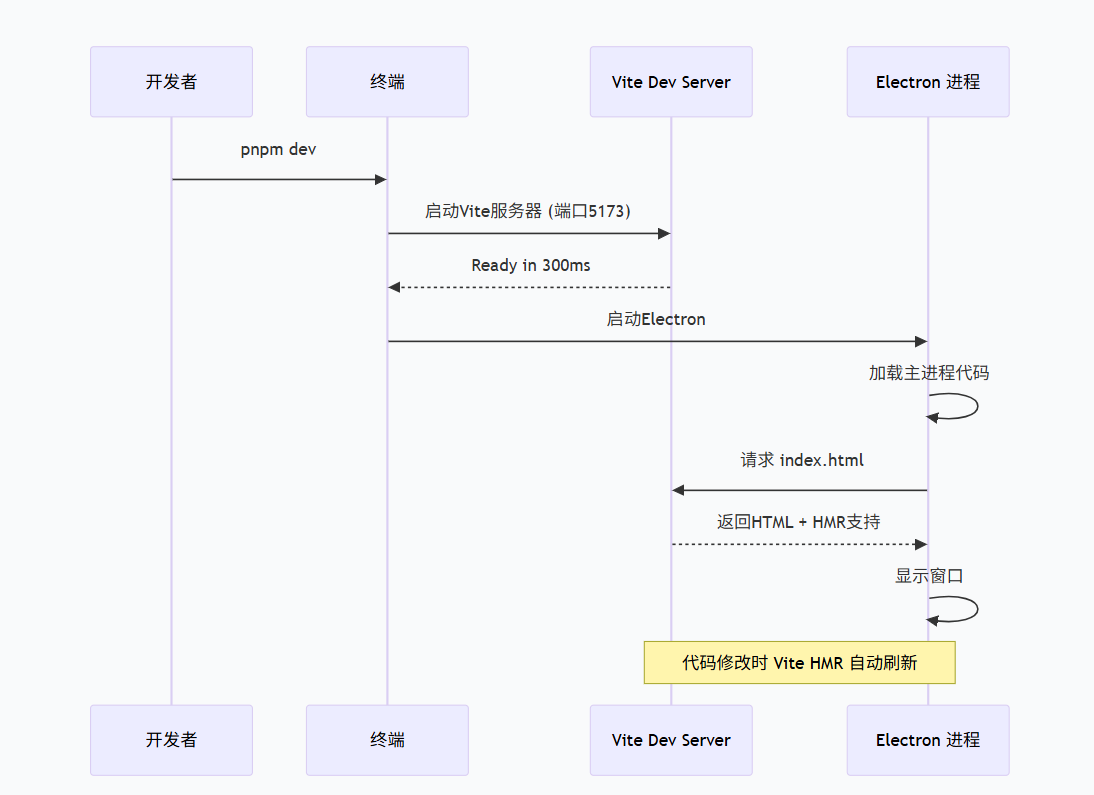
4.2 调试配置(VSCode)
.vscode/launch.json:
javascript
{
  "version": "0.2.0",
  "configurations": [
    {
      "name": "Debug Main Process",
      "type": "node",
      "request": "launch",
      "cwd": "${workspaceFolder}",
      "runtimeExecutable": "${workspaceFolder}/node_modules/.bin/electron",
      "args": ["${workspaceFolder}/packages/main/dist/index.js"],
      "outFiles": ["${workspaceFolder}/packages/main/dist/**/*.js"],
      "sourceMaps": true,
      "console": "integratedTerminal"
    },
    {
      "name": "Debug Renderer Process",
      "type": "chrome",
      "request": "attach",
      "port": 9222,
      "webRoot": "${workspaceFolder}/packages/renderer/src",
      "sourceMapPathOverrides": {
        "webpack:///./src/*": "${webRoot}/*"
      }
    }
  ],
  "compounds": [
    {
      "name": "Debug Full App",
      "configurations": ["Debug Main Process", "Debug Renderer Process"]
    }
  ]
}
4.3 环境变量管理
packages/main/src/utils/env.ts:
javascript
// 环境变量类型
export interface EnvConfig {
  NODE_ENV: 'development' | 'production' | 'test'
  APP_NAME: string
  APP_VERSION: string
  API_BASE_URL?: string
  LOG_LEVEL: 'debug' | 'info' | 'warn' | 'error'
}

// 加载环境变量
export function loadEnv(): EnvConfig {
  const isDev = process.env.NODE_ENV === 'development' || !process.env.NODE_ENV

  return {
    NODE_ENV: isDev ? 'development' : 'production',
    APP_NAME: process.env.APP_NAME || 'MyElectronApp',
    APP_VERSION: process.env.npm_package_version || '1.0.0',
    API_BASE_URL: process.env.API_BASE_URL,
    LOG_LEVEL: (process.env.LOG_LEVEL as EnvConfig['LOG_LEVEL']) || (isDev ? 'debug' : 'info'),
  }
}.env.development:
javascript
NODE_ENV=development
APP_NAME=MyElectronAppDev
API_BASE_URL=http://localhost:3000
LOG_LEVEL=debug.env.production:
javascript
NODE_ENV=production
APP_NAME=MyElectronApp
LOG_LEVEL=info
五、TypeScript 配置详解
5.1 共享基础配置
tsconfig.base.json:
javascript
{
  "compilerOptions": {
    "target": "ES2020",
    "module": "ESNext",
    "lib": ["ES2020", "DOM", "DOM.Iterable"],
    "strict": true,
    "esModuleInterop": true,
    "skipLibCheck": true,
    "forceConsistentCasingInFileNames": true,
    "resolveJsonModule": true,
    "moduleResolution": "node",
    "allowSyntheticDefaultImports": true,
    "noUnusedLocals": true,
    "noUnusedParameters": true,
    "noImplicitReturns": true,
    "noFallthroughCasesInSwitch": true,
    "declaration": true,
    "declarationMap": true,
    "sourceMap": true
  }
}
5.2 全局类型声明
packages/renderer/src/types/global.d.ts:
javascript
// 扩展 Window 接口
declare global {
  interface Window {
    electronAPI: import('preload').ElectronAPI
  }

  // 环境变量类型
  interface ImportMetaEnv {
    VITE_API_URL?: string
    VITE_APP_TITLE?: string
  }

  interface ImportMeta {
    readonly env: ImportMetaEnv
  }
}

// 声明 Vue 文件模块
declare module '*.vue' {
  import type { DefineComponent } from 'vue'
  const component: DefineComponent<{}, {}, any>
  export default component
}

// 声明静态资源模块
declare module '*.css'
declare module '*.scss'
declare module '*.png'
declare module '*.jpg'
declare module '*.svg'
六、代码规范与Git Hooks
6.1 ESLint配置
.eslintrc.json:
javascript
{
  "root": true,
  "env": {
    "node": true,
    "es2021": true
  },
  "extends": [
    "eslint:recommended",
    "plugin:@typescript-eslint/recommended",
    "plugin:vue/vue3-recommended"
  ],
  "parser": "vue-eslint-parser",
  "parserOptions": {
    "parser": "@typescript-eslint/parser",
    "ecmaVersion": 2021,
    "sourceType": "module"
  },
  "rules": {
    "@typescript-eslint/no-explicit-any": "warn",
    "@typescript-eslint/explicit-function-return-type": "off",
    "@typescript-eslint/no-unused-vars": ["error", { "argsIgnorePattern": "^_" }],
    "vue/multi-word-component-names": "off",
    "vue/no-v-html": "warn"
  },
  "overrides": [
    {
      "files": ["packages/main/**/*.ts"],
      "env": {
        "node": true
      }
    },
    {
      "files": ["packages/preload/**/*.ts"],
      "env": {
        "node": true
      }
    },
    {
      "files": ["packages/renderer/**/*.ts", "packages/renderer/**/*.vue"],
      "env": {
        "browser": true
      }
    }
  ]
}
6.2 Husky + lint-staged
.husky/pre-commit:
javascript
#!/bin/sh
. "$(dirname "$0")/_/husky.sh"

npx lint-stagedpackage.json(添加lint-staged配置):
javascript
{
  "lint-staged": {
    "*.{ts,tsx,vue}": [
      "eslint --fix",
      "prettier --write"
    ],
    "*.{json,md}": [
      "prettier --write"
    ]
  }
}
七、打包配置(electron-builder)
electron-builder.json:
javascript
{
  "appId": "com.yourcompany.yourapp",
  "productName": "MyElectronApp",
  "directories": {
    "output": "release"
  },
  "files": [
    "packages/main/dist/**/*",
    "packages/preload/dist/**/*",
    "packages/renderer/dist/**/*"
  ],
  "win": {
    "target": ["nsis", "portable"],
    "icon": "build/icon.ico"
  },
  "mac": {
    "target": ["dmg", "zip"],
    "icon": "build/icon.icns",
    "category": "public.app-category.productivity"
  },
  "linux": {
    "target": ["AppImage", "deb"],
    "icon": "build/icon.png",
    "category": "Utility"
  },
  "nsis": {
    "oneClick": false,
    "allowToChangeInstallationDirectory": true,
    "createDesktopShortcut": true,
    "createStartMenuShortcut": true
  },
  "publish": {
    "provider": "github",
    "releaseType": "release"
  }
}
八、完整命令速查表
| 命令 | 作用 | 使用场景 |
|---|---|---|
pnpm dev |
启动开发环境 | 日常开发 |
pnpm build:all |
构建所有包 | 准备打包前 |
pnpm type-check |
类型检查 | 提交代码前 |
pnpm lint |
代码规范检查 | CI/CD流程 |
pnpm run -F main dev |
单独开发主进程 | 调试主进程 |
pnpm run -F renderer dev |
单独开发渲染进程 | 调试UI |
npm run dist:win |
打包Windows安装包 | 发布Windows版 |
npm run dist:mac |
打包macOS安装包 | 发布Mac版 |
九、常见问题与解决方案
问题1:预加载脚本路径在生产环境找不到
解决方案:
javascript
// 使用动态路径解析
const getPreloadPath = () => {
  if (process.env.NODE_ENV === 'development') {
    return path.join(__dirname, '../../preload/dist/index.js')
  }
  // 生产环境:打包后的路径
  return path.join(process.resourcesPath, 'preload/dist/index.js')
}
问题2:渲染进程无法访问window.electronAPI
检查清单:
-
确保
contextIsolation: true -
确保预加载脚本正确编译并存在
-
检查控制台是否有报错
-
确认
contextBridge.exposeInMainWorld调用成功
问题3:Vite HMR 不生效
解决方案:
javascript
// 在 main/index.ts 中添加
if (isDev) {
  // 监听Vite重载事件
  win.webContents.on('did-fail-load', () => {
    win.loadURL('http://localhost:5173')
  })
}