欢迎加入开源鸿蒙跨平台社区:
https://openharmonycrossplatform.csdn.net
一、应用概述
运行效果图
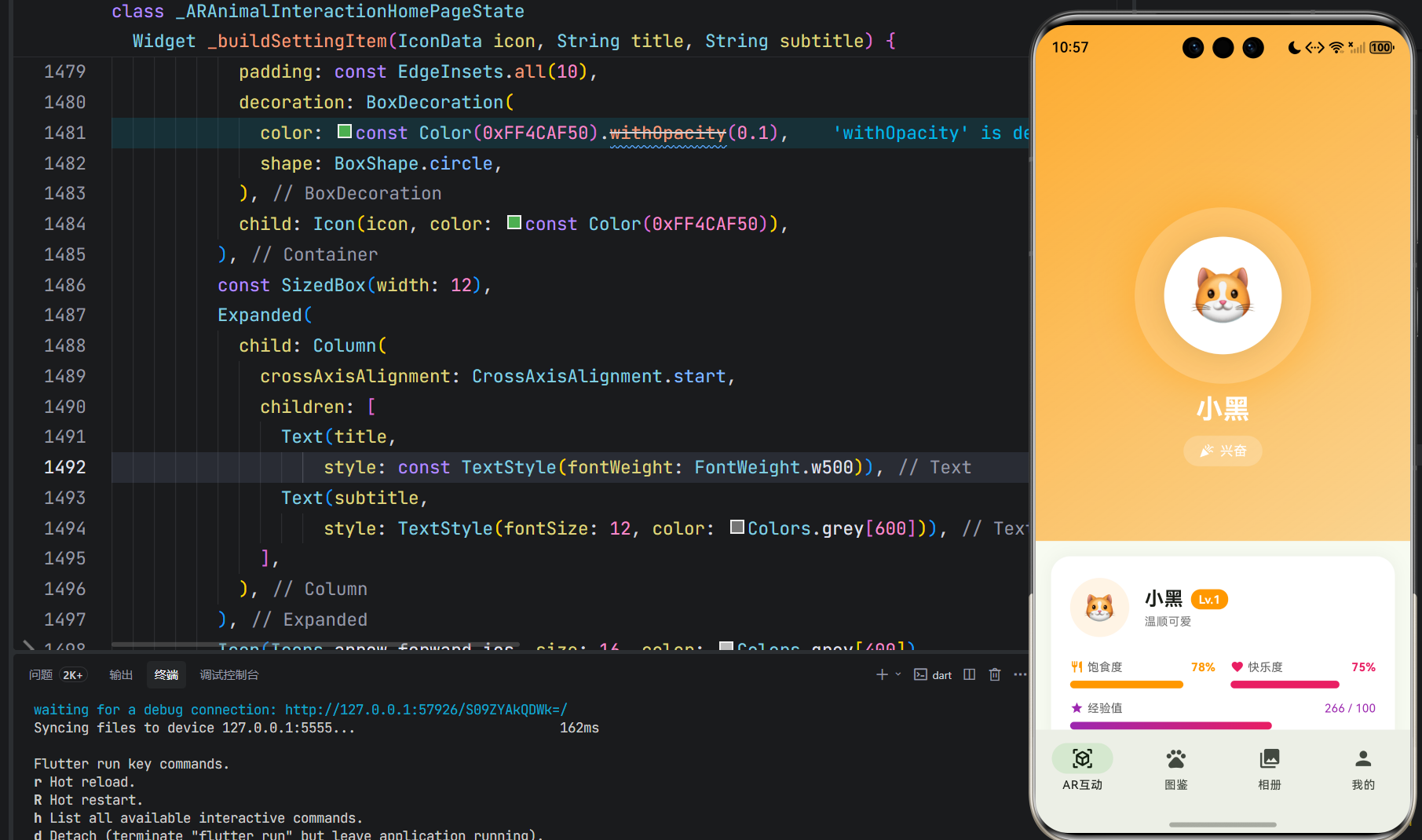
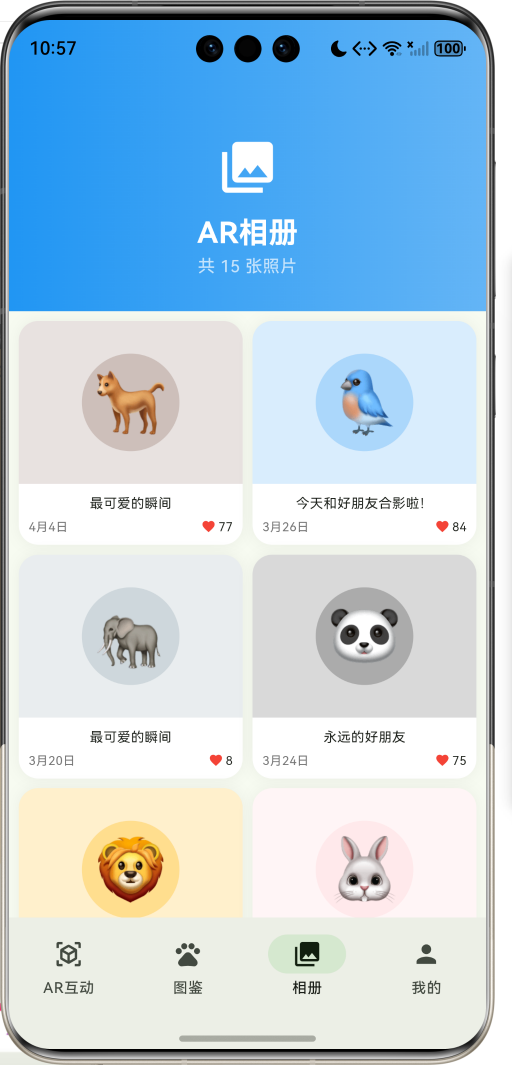
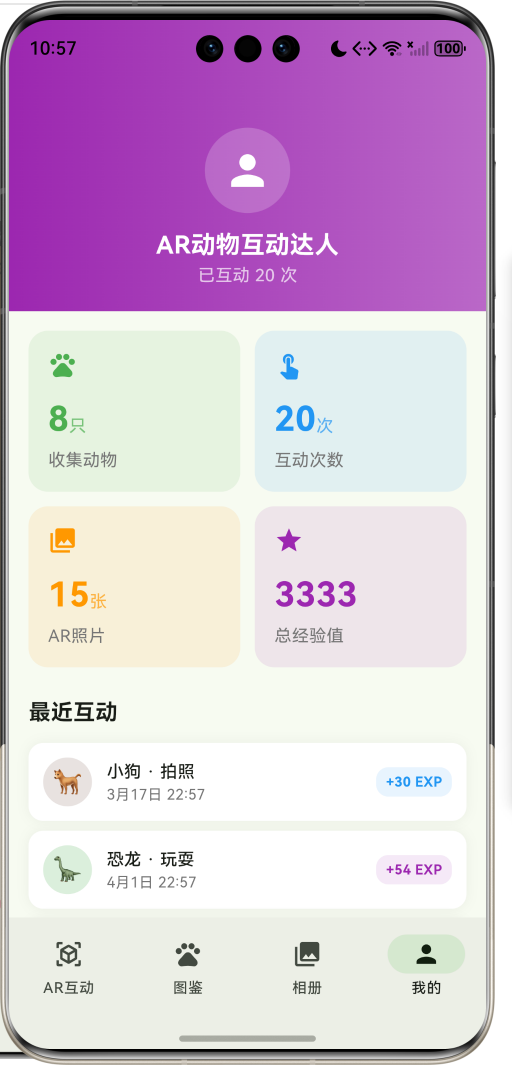
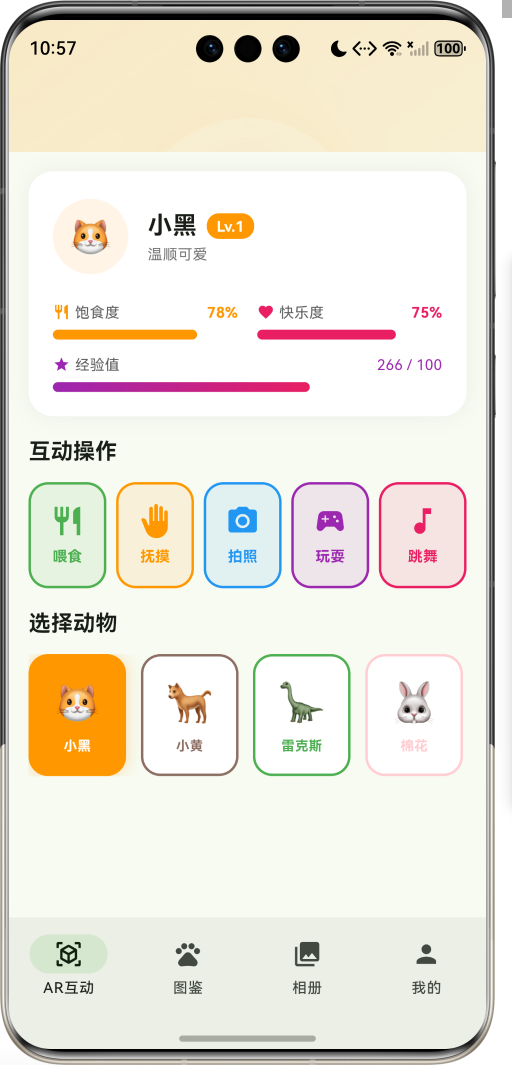
AR动物互动是一款充满创意和趣味的娱乐应用,它将虚拟动物带入真实世界,让用户能够与各种可爱的AR动物进行互动。无论是喂食一只虚拟小猫、和AR小狗玩耍,还是与史前恐龙合影,这款应用都能为日常生活增添无限惊喜和乐趣。
应用的核心价值在于:
- 沉浸式体验: 通过AR技术,将虚拟动物融入真实环境,创造身临其境的互动体验
- 情感陪伴: 虚拟动物成为用户的情感寄托,提供陪伴和慰藉
- 创意玩法: 多样化的互动方式,从喂食到拍照,满足不同用户需求
- 成长养成: 动物具有成长系统,培养用户长期使用的兴趣
应用采用Material Design 3设计语言,界面清新自然,交互流畅有趣,为用户打造一个充满童趣和想象力的AR世界。
二、功能特性
2.1 核心功能
| 功能模块 | 功能描述 | 技术实现 |
|---|---|---|
| AR动物展示 | 在真实环境中展示3D动物模型 | ARCore/ARKit + 3D渲染 |
| 互动系统 | 支持喂食、抚摸、拍照、玩耍、跳舞等互动 | 触摸交互 + 动画系统 |
| 动物图鉴 | 收集和展示所有动物,查看详细信息 | 数据库 + 卡片展示 |
| AR相册 | 保存与动物的合影照片,支持分享 | 相机API + 图片存储 |
| 成长系统 | 动物等级、经验值、饱食度、快乐度管理 | 状态管理 + 数据持久化 |
2.2 动物类型体系
应用包含8种不同类型的动物,每种都有独特的个性和视觉风格:
dart
enum AnimalType {
  cat('小猫', '🐱', Color(0xFFFF9800), Icons.pets, '温顺可爱'),
  dog('小狗', '🐕', Color(0xFF8D6E63), Icons.pets, '忠诚活泼'),
  dinosaur('恐龙', '🦕', Color(0xFF4CAF50), Icons.dangerous, '神秘远古'),
  rabbit('兔子', '🐰', Color(0xFFFFCDD2), Icons.cruelty_free, '软萌可爱'),
  bird('小鸟', '🐦', Color(0xFF42A5F5), Icons.flutter_dash, '自由灵动'),
  panda('熊猫', '🐼', Color(0xFF424242), Icons.catching_pokemon, '憨态可掬'),
  lion('狮子', '🦁', Color(0xFFFFB300), Icons.pets, '威风凛凛'),
  elephant('大象', '🐘', Color(0xFF90A4AE), Icons.pets, '温和智慧');
}
2.3 互动类型
用户可以与动物进行5种不同类型的互动:
| 互动类型 | 图标 | 颜色 | 效果 |
|---|---|---|---|
| 喂食 | 🍽️ restaurant | 绿色 | 增加饱食度+20, 快乐度+10 |
| 抚摸 | ✋ back_hand | 橙色 | 增加快乐度+15 |
| 拍照 | 📷 camera_alt | 蓝色 | 保存合影到相册 |
| 玩耍 | 🎮 sports_esports | 紫色 | 增加快乐度+15 |
| 跳舞 | 🎵 music_note | 粉色 | 增加快乐度+15 |
2.4 动物情绪系统
动物会根据饱食度和快乐度表现出不同的情绪状态:
| 情绪状态 | 图标 | 颜色 | 触发条件 |
|---|---|---|---|
| 开心 | 😊 sentiment_very_satisfied | 绿色 | 平均值≥80 |
| 兴奋 | 🎉 celebration | 粉色 | 平均值≥60 |
| 平常 | 😐 sentiment_satisfied | 橙色 | 平均值≥40 |
| 饥饿 | 😟 sentiment_dissatisfied | 红色 | 饱食度<30 |
| 困倦 | 🌙 bedtime | 紫色 | 其他情况 |
三、技术架构
3.1 整体架构设计
用户界面层 UI Layer
业务逻辑层 Business Layer
数据访问层 Data Layer
本地存储 Local Storage
AR引擎 AR Engine
AR互动页面
动物图鉴
AR相册
个人中心
互动管理
动物状态
照片管理
成长系统
动物数据
互动记录
照片存储
3.2 互动流程图
数据库 状态管理 互动系统 AR场景 用户 数据库 状态管理 互动系统 AR场景 用户 选择动物 加载AR模型 执行互动操作 更新动物状态 计算情绪变化 保存互动记录 播放互动动画 展示互动效果
3.3 技术栈选型
| 技术领域 | 技术选型 | 选型理由 |
|---|---|---|
| 前端框架 | Flutter 3.x | 跨平台性能优秀,AR插件丰富 |
| AR引擎 | ARCore/ARKit | 主流AR框架,性能稳定 |
| 状态管理 | setState + Provider | 轻量级,适合中小型应用 |
| 数据持久化 | SQLite + SharedPreferences | 本地存储可靠,查询效率高 |
| 动画系统 | AnimationController + CustomPaint | 灵活度高,可定制性强 |
| 设计语言 | Material Design 3 | 现代化设计,用户体验好 |
四、核心功能实现
4.1 AR动物可视化
AR动物的展示通过动画和视觉效果实现沉浸式体验:
dart
Widget _buildARAnimalVisualizer() {
  final animal = _selectedAnimal;
  final size = 180.0;

  return Container(
    width: size,
    height: size,
    decoration: BoxDecoration(
      shape: BoxShape.circle,
      color: Colors.white.withOpacity(0.2),
      boxShadow: [
        BoxShadow(
          color: (animal?.type.color ?? const Color(0xFF4CAF50)).withOpacity(0.3),
          blurRadius: 30,
          spreadRadius: 10,
        ),
      ],
    ),
    child: Stack(
      alignment: Alignment.center,
      children: [
        if (_currentInteraction != null)
          AnimatedBuilder(
            animation: _rotateAnimation,
            builder: (context, child) {
              return CustomPaint(
                size: Size(size, size),
                painter: InteractionRingPainter(
                  _rotateAnimation.value,
                  _currentInteraction!.color,
                ),
              );
            },
          ),
        Container(
          width: 120,
          height: 120,
          decoration: BoxDecoration(
            shape: BoxShape.circle,
            color: Colors.white,
          ),
          child: Center(
            child: Text(
              animal?.type.emoji ?? '🐾',
              style: const TextStyle(fontSize: 60),
            ),
          ),
        ),
      ],
    ),
  );
}
4.2 动画系统
应用使用多个动画控制器实现丰富的视觉效果:
浮动动画: 让动物呈现悬浮效果
dart
_floatAnimationController = AnimationController(
  vsync: this,
  duration: const Duration(milliseconds: 2000),
)..repeat(reverse: true);

_floatAnimation = Tween<double>(begin: 0, end: 20).animate(
  CurvedAnimation(parent: _floatAnimationController, curve: Curves.easeInOut),
);脉冲动画: 让动物呈现呼吸效果
dart
_pulseAnimationController = AnimationController(
  vsync: this,
  duration: const Duration(milliseconds: 1000),
)..repeat(reverse: true);

_pulseAnimation = Tween<double>(begin: 0.95, end: 1.05).animate(
  CurvedAnimation(parent: _pulseAnimationController, curve: Curves.easeInOut),
);旋转动画: 互动时的光环效果
dart
_rotateAnimationController = AnimationController(
  vsync: this,
  duration: const Duration(milliseconds: 3000),
)..repeat();

_rotateAnimation = Tween<double>(begin: 0, end: 2 * pi).animate(
  CurvedAnimation(parent: _rotateAnimationController, curve: Curves.linear),
);
4.3 互动系统实现
互动操作会触发一系列状态更新和视觉反馈:
dart
void _performInteraction(InteractionType type) {
  if (_selectedAnimal == null) return;

  setState(() {
    _currentInteraction = type;
  });

  final random = Random();
  final expGained = 10 + random.nextInt(40);

  final newHunger = type == InteractionType.feed
      ? (_selectedAnimal!.hungerLevel + 20).clamp(0, 100)
      : (_selectedAnimal!.hungerLevel - 5).clamp(0, 100);

  final newHappiness = type == InteractionType.feed
      ? (_selectedAnimal!.happinessLevel + 10).clamp(0, 100)
      : (_selectedAnimal!.happinessLevel + 15).clamp(0, 100);

  final newMood = _calculateMood(newHunger, newHappiness);

  setState(() {
    _selectedAnimal = _selectedAnimal!.copyWith(
      hungerLevel: newHunger,
      happinessLevel: newHappiness,
      mood: newMood,
      experience: _selectedAnimal!.experience + expGained,
      lastInteraction: DateTime.now(),
    );

    final index = _animals.indexWhere((a) => a.id == _selectedAnimal!.id);
    if (index != -1) {
      _animals[index] = _selectedAnimal!;
    }

    _interactions.insert(0, InteractionRecord(
      id: 'i${DateTime.now().millisecondsSinceEpoch}',
      animalType: _selectedAnimal!.type,
      interactionType: type,
      timestamp: DateTime.now(),
      experienceGained: expGained,
    ));
  });

  if (type == InteractionType.photo) {
    _photos.insert(0, PhotoAlbum(
      id: 'p${DateTime.now().millisecondsSinceEpoch}',
      animalType: _selectedAnimal!.type,
      photoPath: 'photo_${DateTime.now().millisecondsSinceEpoch}.jpg',
      capturedAt: DateTime.now(),
      caption: '和${_selectedAnimal!.name}的合影',
    ));
  }

  ScaffoldMessenger.of(context).showSnackBar(
    SnackBar(
      content: Text('${type.label}成功!获得 $expGained 经验值'),
      backgroundColor: type.color,
      behavior: SnackBarBehavior.floating,
      duration: const Duration(seconds: 2),
    ),
  );

  Future.delayed(const Duration(seconds: 1), () {
    if (mounted) {
      setState(() {
        _currentInteraction = null;
      });
    }
  });
}
4.4 情绪计算逻辑
根据饱食度和快乐度计算动物的情绪状态:
dart
AnimalMood _calculateMood(int hunger, int happiness) {
  final avg = (hunger + happiness) / 2;
  if (avg >= 80) return AnimalMood.happy;
  if (avg >= 60) return AnimalMood.excited;
  if (avg >= 40) return AnimalMood.normal;
  if (hunger < 30) return AnimalMood.hungry;
  return AnimalMood.sleepy;
}
4.5 互动光环绘制
互动时显示的旋转光环效果:
dart
class InteractionRingPainter extends CustomPainter {
  final double animation;
  final Color color;

  InteractionRingPainter(this.animation, this.color);

  @override
  void paint(Canvas canvas, Size size) {
    final center = Offset(size.width / 2, size.height / 2);
    final radius = size.width / 2 - 10;

    final paint = Paint()
      ..color = color.withOpacity(0.5)
      ..style = PaintingStyle.stroke
      ..strokeWidth = 3
      ..strokeCap = StrokeCap.round;

    final startAngle = animation;
    final sweepAngle = pi / 2;

    canvas.drawArc(
      Rect.fromCircle(center: center, radius: radius),
      startAngle,
      sweepAngle,
      false,
      paint,
    );

    canvas.drawArc(
      Rect.fromCircle(center: center, radius: radius),
      startAngle + pi,
      sweepAngle,
      false,
      paint,
    );
  }

  @override
  bool shouldRepaint(covariant InteractionRingPainter oldDelegate) {
    return animation != oldDelegate.animation || color != oldDelegate.color;
  }
}
五、UI设计规范
5.1 设计原则
应用遵循Material Design 3设计规范,注重以下设计原则:
- 趣味性: 界面充满童趣,色彩明快,吸引各年龄段用户
- 沉浸感: AR场景与真实环境融合,创造身临其境的体验
- 反馈性: 丰富的动画和音效反馈,增强互动乐趣
- 易用性: 操作简单直观,降低学习成本
5.2 色彩系统
主色调采用绿色系,传达自然、生机的品牌形象:
| 色彩角色 | 色值 | 应用场景 |
|---|---|---|
| Primary | #4CAF50 | 主按钮、导航栏、强调元素 |
| Secondary | #81C784 | 辅助按钮、卡片背景 |
| Surface | #FFFFFF | 卡片、列表背景 |
| Background | #F5F5F5 | 页面背景 |
| Accent | #2196F3 | AR相册、互动按钮 |
动物专属色彩:
dart
AnimalType.cat -> Color(0xFFFF9800)     // 橙色 - 温暖可爱
AnimalType.dog -> Color(0xFF8D6E63)     // 棕色 - 忠诚稳重
AnimalType.dinosaur -> Color(0xFF4CAF50) // 绿色 - 神秘远古
AnimalType.rabbit -> Color(0xFFFFCDD2)  // 粉色 - 软萌甜美
AnimalType.bird -> Color(0xFF42A5F5)    // 蓝色 - 自由灵动
AnimalType.panda -> Color(0xFF424242)   // 黑色 - 憨态可掬
AnimalType.lion -> Color(0xFFFFB300)    // 金色 - 威风凛凛
AnimalType.elephant -> Color(0xFF90A4AE) // 灰色 - 温和智慧
5.3 字体规范
| 文本类型 | 字号 | 字重 | 行高 | 应用场景 |
|---|---|---|---|---|
| H1 | 28sp | Bold | 1.2 | 动物名称 |
| H2 | 24sp | Bold | 1.3 | 页面标题 |
| H3 | 20sp | Medium | 1.4 | 小标题 |
| Body1 | 16sp | Regular | 1.5 | 正文内容 |
| Body2 | 14sp | Regular | 1.5 | 辅助文本 |
| Caption | 12sp | Regular | 1.4 | 说明文字 |
5.4 组件规范
动物卡片
dart
Container(
  decoration: BoxDecoration(
    color: Colors.white,
    borderRadius: BorderRadius.circular(20),
    boxShadow: [
      BoxShadow(
        color: Colors.black.withOpacity(0.05),
        blurRadius: 15,
      ),
    ],
  ),
  child: Column(
    children: [
      Container(
        padding: const EdgeInsets.all(20),
        decoration: BoxDecoration(
          color: animal.type.color.withOpacity(0.1),
          borderRadius: const BorderRadius.vertical(top: Radius.circular(20)),
        ),
        child: Center(
          child: Text(animal.type.emoji, style: const TextStyle(fontSize: 50)),
        ),
      ),
      // 卡片内容
    ],
  ),
)
互动按钮
dart
GestureDetector(
  onTap: () => _performInteraction(type),
  child: AnimatedContainer(
    duration: const Duration(milliseconds: 200),
    padding: const EdgeInsets.symmetric(vertical: 16),
    decoration: BoxDecoration(
      color: isActive ? type.color : type.color.withOpacity(0.1),
      borderRadius: BorderRadius.circular(16),
      border: Border.all(color: type.color, width: 2),
    ),
    child: Column(
      children: [
        Icon(type.icon, color: isActive ? Colors.white : type.color, size: 28),
        const SizedBox(height: 6),
        Text(
          type.label,
          style: TextStyle(
            color: isActive ? Colors.white : type.color,
            fontWeight: FontWeight.bold,
            fontSize: 12,
          ),
        ),
      ],
    ),
  ),
)
六、数据模型设计
6.1 核心数据模型
AR动物模型
dart
class ARAnimal {
  final String id;                    // 唯一标识
  final AnimalType type;              // 动物类型
  final String name;                  // 动物名字
  final int level;                    // 等级
  final int experience;               // 经验值
  final AnimalMood mood;              // 情绪状态
  final int hungerLevel;              // 饱食度(0-100)
  final int happinessLevel;           // 快乐度(0-100)
  final DateTime lastInteraction;     // 最后互动时间
  final List<String> unlockedActions; // 解锁的动作
}
互动记录模型
dart
class InteractionRecord {
  final String id;                    // 唯一标识
  final AnimalType animalType;        // 动物类型
  final InteractionType interactionType; // 互动类型
  final DateTime timestamp;           // 时间戳
  final String? photoPath;            // 照片路径(拍照互动)
  final int experienceGained;         // 获得的经验值
  final String? note;                 // 备注
}
照片相册模型
dart
class PhotoAlbum {
  final String id;                    // 唯一标识
  final AnimalType animalType;        // 动物类型
  final String photoPath;             // 照片路径
  final DateTime capturedAt;          // 拍摄时间
  final String? caption;              // 照片描述
  final int likes;                    // 点赞数
}
6.2 数据关系图
owns
has
creates
belongs_to
has
USER
string
id
PK
string
name
int
total_interactions
int
total_photos
AR_ANIMAL
string
id
PK
string
user_id
FK
string
animal_type
string
name
int
level
int
experience
int
hunger_level
int
happiness_level
INTERACTION_RECORD
string
id
PK
string
animal_id
FK
string
interaction_type
datetime
timestamp
int
experience_gained
PHOTO_ALBUM
string
id
PK
string
record_id
FK
string
photo_path
string
caption
int
likes
ANIMAL_TYPE
ANIMAL_MOOD
6.3 数据存储策略
本地存储
使用SQLite数据库存储应用数据:
sql
CREATE TABLE ar_animals (
  id TEXT PRIMARY KEY,
  user_id TEXT NOT NULL,
  animal_type TEXT NOT NULL,
  name TEXT NOT NULL,
  level INTEGER DEFAULT 1,
  experience INTEGER DEFAULT 0,
  hunger_level INTEGER DEFAULT 50,
  happiness_level INTEGER DEFAULT 50,
  last_interaction INTEGER NOT NULL
);

CREATE TABLE interaction_records (
  id TEXT PRIMARY KEY,
  animal_id TEXT NOT NULL,
  interaction_type TEXT NOT NULL,
  timestamp INTEGER NOT NULL,
  photo_path TEXT,
  experience_gained INTEGER NOT NULL,
  FOREIGN KEY (animal_id) REFERENCES ar_animals(id)
);

CREATE TABLE photo_albums (
  id TEXT PRIMARY KEY,
  animal_type TEXT NOT NULL,
  photo_path TEXT NOT NULL,
  captured_at INTEGER NOT NULL,
  caption TEXT,
  likes INTEGER DEFAULT 0
);
七、关键代码解析
7.1 状态栏组件
显示动物的饱食度和快乐度:
dart
Widget _buildStatusBar(String label, int value, Color color, IconData icon) {
  return Column(
    crossAxisAlignment: CrossAxisAlignment.start,
    children: [
      Row(
        children: [
          Icon(icon, size: 14, color: color),
          const SizedBox(width: 4),
          Text(label, style: TextStyle(fontSize: 12, color: Colors.grey[700])),
          const Spacer(),
          Text('$value%', style: TextStyle(fontSize: 12, fontWeight: FontWeight.bold, color: color)),
        ],
      ),
      const SizedBox(height: 6),
      Container(
        height: 8,
        decoration: BoxDecoration(
          color: Colors.grey[200],
          borderRadius: BorderRadius.circular(4),
        ),
        child: FractionallySizedBox(
          alignment: Alignment.centerLeft,
          widthFactor: value / 100,
          child: Container(
            decoration: BoxDecoration(
              color: color,
              borderRadius: BorderRadius.circular(4),
            ),
          ),
        ),
      ),
    ],
  );
}
7.2 经验值进度条
显示动物升级进度:
dart
Widget _buildExpBar(int exp, int level) {
  final expForNextLevel = level * 100;
  final progress = (exp % expForNextLevel) / expForNextLevel;

  return Column(
    crossAxisAlignment: CrossAxisAlignment.start,
    children: [
      Row(
        children: [
          const Icon(Icons.star, size: 14, color: Color(0xFF9C27B0)),
          const SizedBox(width: 4),
          Text('经验值', style: TextStyle(fontSize: 12, color: Colors.grey[700])),
          const Spacer(),
          Text('$exp / $expForNextLevel', style: const TextStyle(fontSize: 12, color: Color(0xFF9C27B0))),
        ],
      ),
      const SizedBox(height: 6),
      Container(
        height: 8,
        decoration: BoxDecoration(
          color: Colors.grey[200],
          borderRadius: BorderRadius.circular(4),
        ),
        child: FractionallySizedBox(
          alignment: Alignment.centerLeft,
          widthFactor: progress,
          child: Container(
            decoration: BoxDecoration(
              gradient: const LinearGradient(
                colors: [Color(0xFF9C27B0), Color(0xFFE91E63)],
              ),
              borderRadius: BorderRadius.circular(4),
            ),
          ),
        ),
      ),
    ],
  );
}
7.3 动物选择器
横向滚动选择动物:
dart
Widget _buildAnimalSelector() {
  return Column(
    crossAxisAlignment: CrossAxisAlignment.start,
    children: [
      const Text('选择动物', style: TextStyle(fontSize: 18, fontWeight: FontWeight.bold)),
      const SizedBox(height: 12),
      SizedBox(
        height: 100,
        child: ListView.builder(
          scrollDirection: Axis.horizontal,
          itemCount: _animals.length,
          itemBuilder: (context, index) {
            final animal = _animals[index];
            final isSelected = _selectedAnimal?.id == animal.id;

            return GestureDetector(
              onTap: () {
                setState(() {
                  _selectedAnimal = animal;
                });
              },
              child: AnimatedContainer(
                duration: const Duration(milliseconds: 200),
                width: 80,
                margin: EdgeInsets.only(right: index == _animals.length - 1 ? 0 : 12),
                decoration: BoxDecoration(
                  color: isSelected ? animal.type.color : Colors.white,
                  borderRadius: BorderRadius.circular(16),
                  border: Border.all(color: animal.type.color, width: 2),
                  boxShadow: isSelected
                      ? [BoxShadow(color: animal.type.color.withOpacity(0.3), blurRadius: 10)]
                      : null,
                ),
                child: Column(
                  mainAxisAlignment: MainAxisAlignment.center,
                  children: [
                    Text(animal.type.emoji, style: const TextStyle(fontSize: 32)),
                    const SizedBox(height: 4),
                    Text(
                      animal.name,
                      style: TextStyle(
                        fontSize: 11,
                        fontWeight: FontWeight.bold,
                        color: isSelected ? Colors.white : animal.type.color,
                      ),
                      overflow: TextOverflow.ellipsis,
                    ),
                  ],
                ),
              ),
            );
          },
        ),
      ),
    ],
  );
}
7.4 动物名字生成
根据动物类型生成合适的名字:
dart
String _generateAnimalName(AnimalType type) {
  final names = {
    AnimalType.cat: ['咪咪', '小花', '橘子', '雪球', '小黑'],
    AnimalType.dog: ['旺财', '小黄', '豆豆', '毛毛', '大黄'],
    AnimalType.dinosaur: ['小霸王', '雷克斯', '小角', '长颈', '迅猛'],
    AnimalType.rabbit: ['雪球', '棉花', '小灰', '萝卜', '蹦蹦'],
    AnimalType.bird: ['小蓝', '彩虹', '叽叽', '飞翔', '羽毛'],
    AnimalType.panda: ['团团', '圆圆', '竹子', '黑白', '憨憨'],
    AnimalType.lion: ['辛巴', '小王', '金毛', '威威', '大王'],
    AnimalType.elephant: ['大象', '长鼻', '灰灰', '小象', '嘟嘟'],
  };
  final list = names[type] ?? ['小动物'];
  return list[Random().nextInt(list.length)];
}
八、性能优化
8.1 动画性能优化
使用Hardware Layer加速动画:
dart
AnimatedBuilder(
  animation: _floatAnimation,
  builder: (context, child) {
    return Transform.translate(
      offset: Offset(0, _floatAnimation.value),
      child: RepaintBoundary(
        child: AnimatedBuilder(
          animation: _pulseAnimation,
          builder: (context, child) {
            return Transform.scale(
              scale: _pulseAnimation.value,
              child: _buildARAnimalVisualizer(),
            );
          },
        ),
      ),
    );
  },
)
8.2 列表性能优化
使用ListView.builder和SliverGrid实现懒加载:
dart
SliverGrid(
  gridDelegate: const SliverGridDelegateWithFixedCrossAxisCount(
    crossAxisCount: 2,
    mainAxisSpacing: 16,
    crossAxisSpacing: 16,
    childAspectRatio: 0.85,
  ),
  delegate: SliverChildBuilderDelegate(
    (context, index) {
      if (index >= _animals.length) return null;
      return _buildAnimalCard(_animals[index]);
    },
    childCount: _animals.length,
  ),
)
8.3 图片资源优化
- 使用Emoji替代图片资源,减少应用体积
- 照片采用压缩存储,节省空间
- 实现图片缓存机制,提升加载速度
8.4 内存管理
及时释放动画控制器:
dart
@override
void dispose() {
  _floatAnimationController.dispose();
  _pulseAnimationController.dispose();
  _rotateAnimationController.dispose();
  super.dispose();
}
九、测试方案
9.1 单元测试
测试核心逻辑:
dart
void testMoodCalculation() {
  final mood1 = _calculateMood(90, 90);
  expect(mood1, equals(AnimalMood.happy));

  final mood2 = _calculateMood(20, 50);
  expect(mood2, equals(AnimalMood.hungry));

  final mood3 = _calculateMood(50, 50);
  expect(mood3, equals(AnimalMood.normal));
}
9.2 Widget测试
测试UI组件:
dart
testWidgets('Animal card displays correctly', (WidgetTester tester) async {
  await tester.pumpWidget(ARAnimalInteractionApp());

  expect(find.text('AR互动'), findsOneWidget);
  expect(find.byIcon(Icons.pets), findsWidgets);
});
9.3 集成测试
测试完整流程:
dart
testWidgets('Complete interaction flow', (WidgetTester tester) async {
  await tester.pumpWidget(ARAnimalInteractionApp());

  // 选择动物
  await tester.tap(find.text('咪咪'));
  await tester.pump();

  // 执行互动
  await tester.tap(find.text('喂食'));
  await tester.pumpAndSettle();

  // 验证状态更新
  expect(find.textContaining('经验值'), findsOneWidget);
});
9.4 性能测试
监控指标:
- FPS帧率: 保持60fps
- 内存占用: 不超过150MB
- CPU使用率: 空闲时低于5%
- 启动时间: 冷启动不超过2秒
十、部署说明
10.1 环境要求
| 平台 | 最低版本 | 推荐版本 |
|---|---|---|
| Android | API 24 (Android 7.0) | API 30 (Android 11) |
| iOS | iOS 12.0 | iOS 15.0 |
| HarmonyOS | HarmonyOS 2.0 | HarmonyOS 3.0 |
10.2 权限配置
Android权限 (AndroidManifest.xml)
xml
<uses-permission android:name="android.permission.CAMERA" />
<uses-permission android:name="android.permission.WRITE_EXTERNAL_STORAGE" />
<uses-permission android:name="android.permission.READ_EXTERNAL_STORAGE" />
<uses-permission android:name="android.permission.INTERNET" />
iOS权限 (Info.plist)
xml
<key>NSCameraUsageDescription</key>
<string>需要使用相机进行AR互动和拍照</string>
<key>NSPhotoLibraryUsageDescription</key>
<string>需要访问相册保存AR照片</string>
10.3 打包配置
Android打包
bash
flutter build apk --release
flutter build appbundle --release
iOS打包
bash
flutter build ios --release十一、未来规划
11.1 功能扩展路线图
2024-01-07 2024-01-14 2024-01-21 2024-01-28 2024-02-04 2024-02-11 2024-02-18 2024-02-25 2024-03-03 2024-03-10 2024-03-17 2024-03-24 2024-03-31 2024-04-07 2024-04-14 2024-04-21 2024-04-28 2024-05-05 2024-05-12 2024-05-19 基础AR展示 互动系统 成长系统 多人互动 动物养成 社交分享 AR地图 动物对战 虚拟宠物社区 第一阶段 第二阶段 第三阶段 AR动物互动功能规划
11.2 技术演进方向
AR能力增强
- 真实感渲染: 引入PBR材质和光影效果,提升AR动物真实感
- 环境理解: 识别地面、桌面等平面,让动物自然放置
- 遮挡效果: 实现虚拟与现实的遮挡关系,增强沉浸感
社交功能
- 多人互动: 支持多人同时与AR动物互动
- 动物交换: 用户之间可以交换或赠送动物
- 互动竞技: 举办AR动物互动比赛和活动
游戏化元素
- 任务系统: 完成日常任务获得奖励
- 成就系统: 解锁成就获得特殊动物
- 排行榜: 与好友比较互动次数和动物等级
11.3 商业化路径
| 阶段 | 商业模式 | 预期收益 |
|---|---|---|
| 初期 | 免费基础功能 + 特殊动物付费 | 用户增长为主 |
| 中期 | 增值道具 + 会员订阅 | 实现盈亏平衡 |
| 长期 | IP授权 + 品牌合作 | 建立AR娱乐生态 |
11.4 用户增长策略
- 社交媒体营销: 制作有趣的AR互动视频,在抖音、微博等平台传播
- KOL合作: 与宠物博主、亲子博主合作推广
- 线下活动: 在商场、公园举办AR互动体验活动
- 口碑传播: 通过有趣的互动体验实现自然传播
附录
A. 相关资源
- Flutter官方文档: https://flutter.dev/docs
- ARCore文档: https://developers.google.com/ar
- ARKit文档: https://developer.apple.com/arkit
- OpenHarmony社区: https://openharmonycrossplatform.csdn.net
B. 开源协议
本项目采用MIT开源协议,欢迎社区贡献和改进。
C. 联系方式
如有问题或建议,欢迎通过以下方式联系:
- GitHub Issues: 项目仓库问题追踪
- 开发者社区: OpenHarmony跨平台开发社区