欢迎加入开源鸿蒙跨平台社区:
https://openharmonycrossplatform.csdn.net
一、项目概述
运行效果图
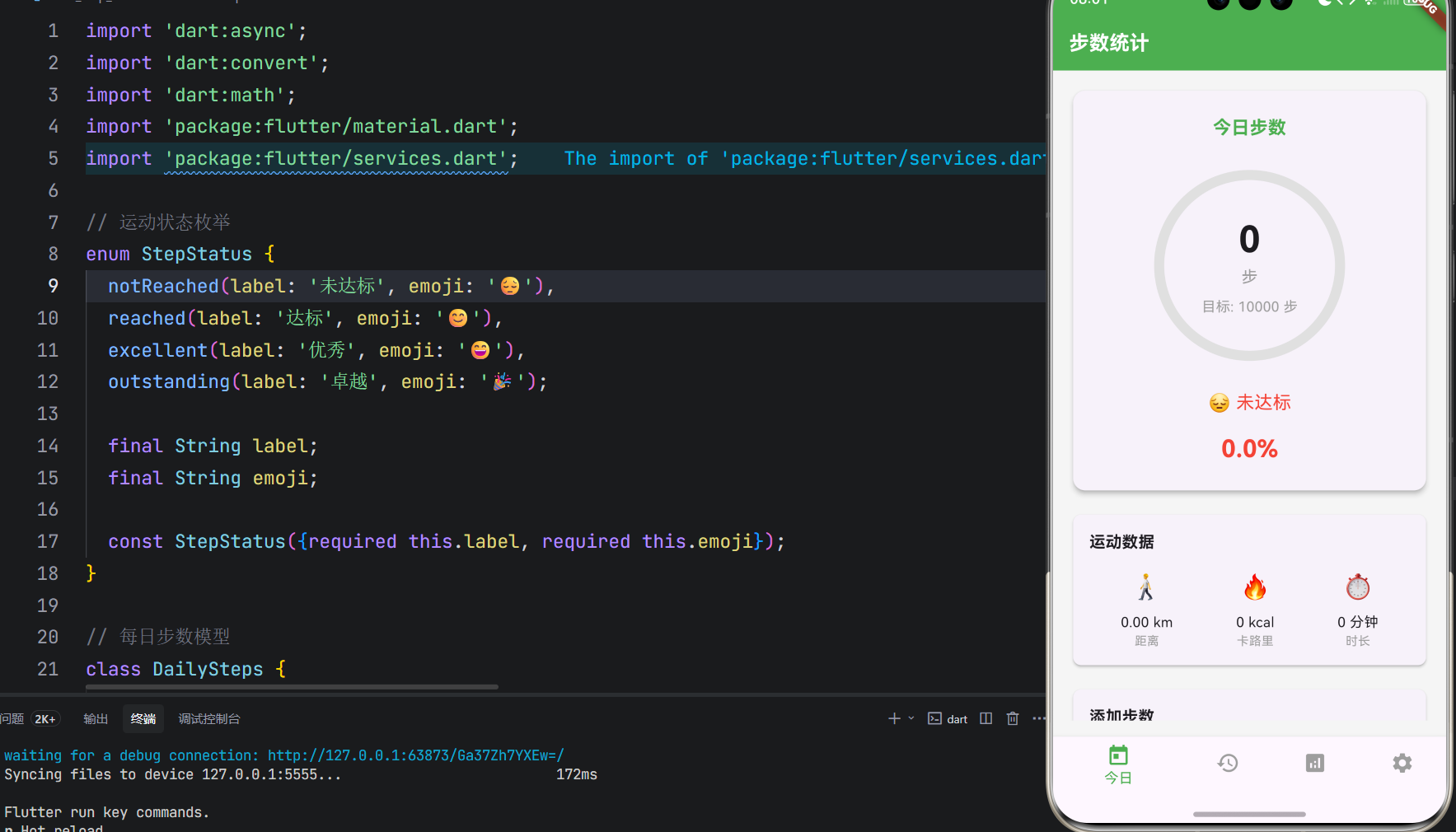


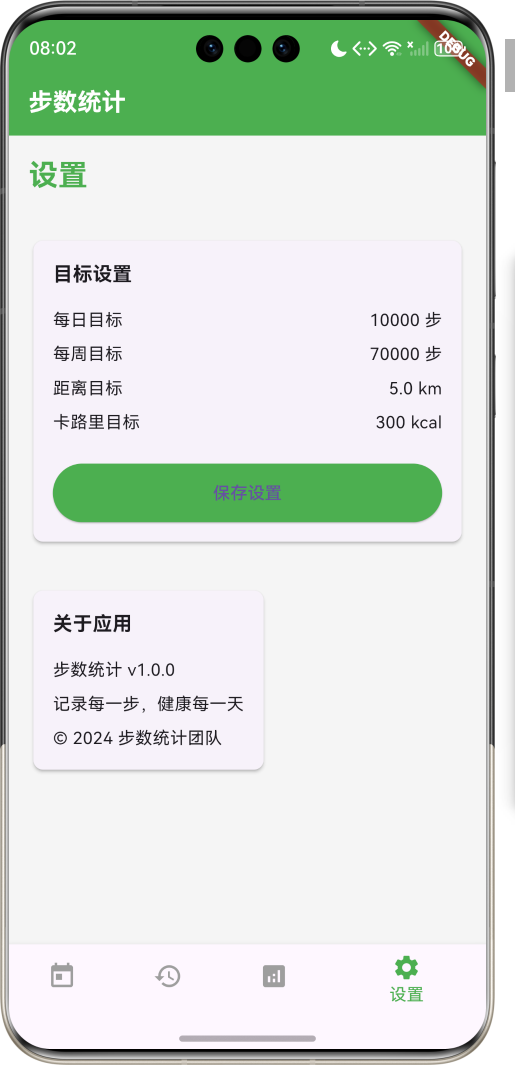
1.1 应用简介
步数统计是一款健康运动类应用,记录每天的步数,支持目标设置,周报表分析,鼓励用户多运动。应用内置步数记录、目标管理、数据分析、运动提醒四大模块,帮助用户养成良好的运动习惯。
应用以清新的绿色为主色调,象征健康与活力。涵盖今日步数、历史记录、数据分析、个人设置四大模块。用户可以查看今日步数、设置运动目标、查看周报表、接收运动提醒,全面管理自己的运动数据。
1.2 核心功能
| 功能模块 | 功能描述 | 实现方式 |
|---|---|---|
| 步数记录 | 记录每日步数 | 本地存储 |
| 目标设置 | 设置每日运动目标 | 参数配置 |
| 周报表 | 分析一周运动数据 | 图表展示 |
| 运动提醒 | 提醒用户运动 | 定时通知 |
| 历史记录 | 查看历史运动数据 | 列表展示 |
1.3 运动状态定义
| 序号 | 状态名称 | Emoji | 描述 |
|---|---|---|---|
| 1 | 未达标 | 😔 | 未完成每日目标 |
| 2 | 达标 | 😊 | 完成每日目标 |
| 3 | 优秀 | 😄 | 超额完成目标 |
| 4 | 卓越 | 🎉 | 远超目标,表现突出 |
1.4 时间周期定义
| 序号 | 周期名称 | 描述 |
|---|---|---|
| 1 | 今日 | 当天的运动数据 |
| 2 | 本周 | 本周的运动数据汇总 |
| 3 | 本月 | 本月的运动数据汇总 |
| 4 | 全部 | 所有历史运动数据 |
1.5 技术栈
| 技术领域 | 技术选型 | 版本要求 |
|---|---|---|
| 开发框架 | Flutter | >= 3.0.0 |
| 编程语言 | Dart | >= 2.17.0 |
| 设计规范 | Material Design 3 | - |
| 图表绘制 | CustomPainter | - |
| 本地存储 | shared_preferences | - |
| 目标平台 | 鸿蒙OS / Web | API 21+ |
1.6 项目结构
lib/
└── main_step_counter.dart
    ├── StepCounterApp         # 应用入口
    ├── DailySteps            # 每日步数模型
    ├── StepGoal              # 步数目标模型
    ├── WeekReport            # 周报表模型
    ├── StepController        # 步数控制器
    ├── StepCounterHomePage   # 主页面
    ├── _buildTodayPage       # 今日页面
    ├── _buildHistoryPage     # 历史页面
    ├── _buildAnalysisPage    # 分析页面
    └── _buildSettingsPage    # 设置页面
二、系统架构
2.1 整体架构图
Data Layer
Business Layer
Presentation Layer
主页面
StepCounterHomePage
今日页面
历史页面
分析页面
设置页面
步数显示
目标进度
快速操作
历史列表
日期筛选
周报表
趋势图
目标设置
提醒设置
步数控制器
StepController
数据管理
DataManager
通知服务
NotificationService
DailySteps
每日步数
StepGoal
步数目标
WeekReport
周报表
LocalStorage
本地存储
2.2 类图设计
uses
creates
manages
generates
has
StepCounterApp
+Widget build()
DailySteps
+String id
+DateTime date
+int steps
+int goal
+double distance
+int calories
+int duration
+StepStatus status
<<enumeration>>
StepStatus
+String label
+String emoji
+notReached()
+reached()
+excellent()
+outstanding()
StepGoal
+int dailyGoal
+int weeklyGoal
+double distanceGoal
+int caloriesGoal
WeekReport
+DateTime startDate
+DateTime endDate
+List<DailySteps> dailySteps
+int totalSteps
+double averageSteps
+int bestDay
+int worstDay
StepController
+List<DailySteps> dailyStepsList
+StepGoal currentGoal
+Future loadSteps()
+Future addSteps(int steps)
+Future setGoal(StepGoal goal)
+WeekReport generateWeekReport()
StepCounterHomePage
+Widget build()
+void _buildTodayPage()
+void _buildHistoryPage()
+void _buildAnalysisPage()
+void _buildSettingsPage()
2.3 页面导航流程
今日
历史
分析
设置
应用启动
今日页面
底部导航
查看今日步数
查看历史记录
查看周报表
管理设置
添加步数
查看进度
选择日期
查看详情
查看趋势
导出报告
设置目标
设置提醒
2.4 步数记录流程
数据管理 步数控制器 今日页面 用户 数据管理 步数控制器 今日页面 用户 添加步数 记录步数 保存数据 确认保存 更新显示 显示更新 查看进度 获取进度 返回进度 显示进度
三、核心模块设计
3.1 数据模型设计
3.1.1 每日步数模型 (DailySteps)
dart
class DailySteps {
  final String id;
  final DateTime date;
  final int steps;
  final int goal;
  final double distance;
  final int calories;
  final int duration;
  final StepStatus status;

  DailySteps({
    required this.id,
    required this.date,
    required this.steps,
    required this.goal,
    required this.distance,
    required this.calories,
    required this.duration,
    required this.status,
  });
}
3.1.2 运动状态枚举 (StepStatus)
dart
enum StepStatus {
  notReached(label: '未达标', emoji: '😔'),
  reached(label: '达标', emoji: '😊'),
  excellent(label: '优秀', emoji: '😄'),
  outstanding(label: '卓越', emoji: '🎉');

  final String label;
  final String emoji;

  const StepStatus({required this.label, required this.emoji});
}
3.1.3 步数目标模型 (StepGoal)
dart
class StepGoal {
  final int dailyGoal;
  final int weeklyGoal;
  final double distanceGoal;
  final int caloriesGoal;

  StepGoal({
    required this.dailyGoal,
    required this.weeklyGoal,
    required this.distanceGoal,
    required this.caloriesGoal,
  });
}
3.1.4 周报表模型 (WeekReport)
dart
class WeekReport {
  final DateTime startDate;
  final DateTime endDate;
  final List<DailySteps> dailySteps;
  final int totalSteps;
  final double averageSteps;
  final int bestDay;
  final int worstDay;

  WeekReport({
    required this.startDate,
    required this.endDate,
    required this.dailySteps,
    required this.totalSteps,
    required this.averageSteps,
    required this.bestDay,
    required this.worstDay,
  });
}
3.2 页面结构设计
3.2.1 主页面布局
StepCounterHomePage
IndexedStack
今日页面
历史页面
分析页面
设置页面
NavigationBar
今日 Tab
历史 Tab
分析 Tab
设置 Tab
3.2.2 今日页面结构
今日页面
步数卡片
目标进度
运动数据
快速操作
今日步数
目标步数
状态显示
进度环
百分比
距离
卡路里
时长
添加步数
开始运动
3.2.3 历史页面结构
历史页面
日期筛选
历史列表
今日
本周
本月
全部
日期卡片
步数
状态
详情
3.2.4 分析页面结构
分析页面
周报表
趋势图
统计数据
总步数
平均步数
最佳日
最差日
柱状图
折线图
总距离
总卡路里
达标天数
3.3 步数计算逻辑
< 100%
100%-150%
150%-200%
> 200%
获取步数
计算距离
计算卡路里
计算时长
判断状态
步数/目标
未达标
达标
优秀
卓越
保存数据
3.4 周报表生成逻辑
获取本周数据
计算总步数
计算平均步数
找出最佳日
找出最差日
生成报表
显示总步数
显示平均步数
显示最佳日
显示最差日
显示趋势图
四、UI设计规范
4.1 配色方案
应用以清新的绿色为主色调,象征健康与活力:
| 颜色类型 | 色值 | 用途 |
|---|---|---|
| 主色 | #4CAF50 (Green) | 导航、主题元素 |
| 辅助色 | #81C784 | 按钮、强调 |
| 第三色 | #A5D6A7 | 背景、卡片 |
| 背景色 | #F5F5F5 | 页面背景 |
| 卡片背景 | #FFFFFF | 信息卡片 |
4.2 状态色彩映射
| 状态 | 色值 | 视觉效果 |
|---|---|---|
| 未达标 | #F44336 | 红色 |
| 达标 | #FFC107 | 黄色 |
| 优秀 | #4CAF50 | 绿色 |
| 卓越 | #2196F3 | 蓝色 |
4.3 字体规范
| 元素 | 字号 | 字重 | 颜色 |
|---|---|---|---|
| 页面标题 | 24px | Bold | 主色 |
| 步数数字 | 48px | Bold | #333333 |
| 目标数字 | 20px | Medium | #666666 |
| 日期标签 | 14px | Regular | #999999 |
| 状态文本 | 16px | Medium | 对应状态色 |
4.4 组件规范
4.4.1 步数卡片
┌─────────────────────────────────────┐
│  今日步数                            │
│                                     │
│         8,432 步                    │
│         目标: 10,000 步              │
│                                     │
│  😊 达标                            │
│                                     │
│  ━━━━━━━━━━━━━━━━━━━━━━━  84.3%    │
└─────────────────────────────────────┘
4.4.2 运动数据卡片
┌─────────────────────────────────────┐
│  运动数据                            │
│                                     │
│  🚶 距离      🔥 卡路里    ⏱️ 时长   │
│  5.6 km      320 kcal    45 分钟   │
└─────────────────────────────────────┘
4.4.3 历史记录卡片
┌─────────────────────────────────────┐
│  2024-01-15  😊                     │
│  ─────────────────────────────────  │
│  8,432 步  /  10,000 步             │
│  ━━━━━━━━━━━━━━━━━━━━━━━  84.3%    │
└─────────────────────────────────────┘
4.4.4 周报表卡片
┌─────────────────────────────────────┐
│  本周报表                            │
│  ─────────────────────────────────  │
│  总步数: 52,432 步                  │
│  平均步数: 7,490 步                 │
│  最佳日: 周三 (12,345 步)           │
│  最差日: 周日 (3,210 步)            │
│  达标天数: 5/7 天                   │
└─────────────────────────────────────┘
4.4.5 设置页面
┌─────────────────────────────────────┐
│  目标设置                            │
│  ─────────────────────────────────  │
│  每日目标: 10,000 步                │
│  每周目标: 70,000 步                │
│  距离目标: 5 km                     │
│  卡路里目标: 300 kcal               │
│                                     │
│  [保存设置]                         │
└─────────────────────────────────────┘
五、核心功能实现
5.1 步数控制器实现
dart
class StepController {
  final DataManager _dataManager;
  final List<DailySteps> dailyStepsList = [];
  StepGoal currentGoal = StepGoal(
    dailyGoal: 10000,
    weeklyGoal: 70000,
    distanceGoal: 5.0,
    caloriesGoal: 300,
  );

  StepController(this._dataManager);

  Future<void> initialize() async {
    await loadSteps();
    await loadGoal();
  }

  Future<void> loadSteps() async {
    dailyStepsList.clear();
    final steps = await _dataManager.loadDailySteps();
    dailyStepsList.addAll(steps);
  }

  Future<void> addSteps(int steps) async {
    final today = DateTime.now();
    final todaySteps = dailyStepsList.firstWhere(
      (s) => s.date.year == today.year && s.date.month == today.month && s.date.day == today.day,
      orElse: () => DailySteps(
        id: UniqueKey().toString(),
        date: today,
        steps: 0,
        goal: currentGoal.dailyGoal,
        distance: 0,
        calories: 0,
        duration: 0,
        status: StepStatus.notReached,
      ),
    );

    final newSteps = todaySteps.steps + steps;
    final distance = newSteps * 0.0007; // 假设每步0.7米
    final calories = (newSteps * 0.04).toInt(); // 假设每步消耗0.04卡路里
    final duration = (newSteps * 0.5).toInt(); // 假设每步0.5秒

    final status = _calculateStatus(newSteps, currentGoal.dailyGoal);

    final updatedSteps = DailySteps(
      id: todaySteps.id,
      date: today,
      steps: newSteps,
      goal: currentGoal.dailyGoal,
      distance: distance,
      calories: calories,
      duration: duration,
      status: status,
    );

    final index = dailyStepsList.indexWhere((s) => s.id == todaySteps.id);
    if (index != -1) {
      dailyStepsList[index] = updatedSteps;
    } else {
      dailyStepsList.insert(0, updatedSteps);
    }

    await _dataManager.saveDailySteps(dailyStepsList);
  }

  StepStatus _calculateStatus(int steps, int goal) {
    final percentage = steps / goal;
    if (percentage < 1.0) return StepStatus.notReached;
    if (percentage < 1.5) return StepStatus.reached;
    if (percentage < 2.0) return StepStatus.excellent;
    return StepStatus.outstanding;
  }

  Future<void> setGoal(StepGoal goal) async {
    currentGoal = goal;
    await _dataManager.saveStepGoal(goal);
  }

  WeekReport generateWeekReport() {
    final now = DateTime.now();
    final startOfWeek = now.subtract(Duration(days: now.weekday - 1));
    final endOfWeek = startOfWeek.add(Duration(days: 6));

    final weekSteps = dailyStepsList.where((s) {
      return s.date.isAfter(startOfWeek.subtract(Duration(days: 1))) &&
             s.date.isBefore(endOfWeek.add(Duration(days: 1)));
    }).toList();

    final totalSteps = weekSteps.fold<int>(0, (sum, s) => sum + s.steps);
    final averageSteps = weekSteps.isEmpty ? 0 : totalSteps / weekSteps.length;
    final bestDay = weekSteps.isEmpty ? 0 : weekSteps.map((s) => s.steps).reduce((a, b) => a > b ? a : b);
    final worstDay = weekSteps.isEmpty ? 0 : weekSteps.map((s) => s.steps).reduce((a, b) => a < b ? a : b);

    return WeekReport(
      startDate: startOfWeek,
      endDate: endOfWeek,
      dailySteps: weekSteps,
      totalSteps: totalSteps,
      averageSteps: averageSteps,
      bestDay: bestDay,
      worstDay: worstDay,
    );
  }

  Future<void> loadGoal() async {
    final goal = await _dataManager.loadStepGoal();
    if (goal != null) {
      currentGoal = goal;
    }
  }
}
5.2 数据管理实现
dart
class DataManager {
  static const String _dailyStepsKey = 'daily_steps';
  static const String _stepGoalKey = 'step_goal';

  // 模拟本地存储
  static Map<String, String> _storage = {};

  Future<List<DailySteps>> loadDailySteps() async {
    final jsonString = _storage[_dailyStepsKey];
    if (jsonString == null) return [];

    final jsonList = json.decode(jsonString) as List;
    return jsonList.map((json) => DailySteps.fromJson(json)).toList();
  }

  Future<void> saveDailySteps(List<DailySteps> steps) async {
    final jsonList = steps.map((step) => step.toJson()).toList();
    _storage[_dailyStepsKey] = json.encode(jsonList);
  }

  Future<StepGoal?> loadStepGoal() async {
    final jsonString = _storage[_stepGoalKey];
    if (jsonString == null) return null;

    final json = json.decode(jsonString);
    return StepGoal.fromJson(json);
  }

  Future<void> saveStepGoal(StepGoal goal) async {
    _storage[_stepGoalKey] = json.encode(goal.toJson());
  }
}
5.3 进度环绘制实现
dart
class ProgressPainter extends CustomPainter {
  final double progress;
  final Color color;

  ProgressPainter({required this.progress, required this.color});

  @override
  void paint(Canvas canvas, Size size) {
    final center = Offset(size.width / 2, size.height / 2);
    final radius = size.width / 2 - 10;

    // 绘制背景圆环
    final bgPaint = Paint()
      ..color = Colors.grey[300]!
      ..style = PaintingStyle.stroke
      ..strokeWidth = 10;
    canvas.drawCircle(center, radius, bgPaint);

    // 绘制进度圆环
    final progressPaint = Paint()
      ..color = color
      ..style = PaintingStyle.stroke
      ..strokeWidth = 10
      ..strokeCap = StrokeCap.round;

    final sweepAngle = 2 * pi * progress;
    canvas.drawArc(
      Rect.fromCircle(center: center, radius: radius),
      -pi / 2,
      sweepAngle,
      false,
      progressPaint,
    );
  }

  @override
  bool shouldRepaint(ProgressPainter oldDelegate) {
    return oldDelegate.progress != progress;
  }
}
5.4 周报表图表实现
dart
class WeekChartPainter extends CustomPainter {
  final List<DailySteps> dailySteps;
  final int maxSteps;

  WeekChartPainter({required this.dailySteps, required this.maxSteps});

  @override
  void paint(Canvas canvas, Size size) {
    final barWidth = size.width / 7;
    final barSpacing = 8.0;

    for (int i = 0; i < 7; i++) {
      final daySteps = dailySteps.length > i ? dailySteps[i].steps : 0;
      final barHeight = (daySteps / maxSteps) * size.height;

      final paint = Paint()
        ..color = _getBarColor(daySteps, dailySteps.length > i ? dailySteps[i].goal : 10000)
        ..style = PaintingStyle.fill;

      final rect = Rect.fromLTWH(
        i * barWidth + barSpacing,
        size.height - barHeight,
        barWidth - barSpacing * 2,
        barHeight,
      );

      canvas.drawRRect(
        RRect.fromRectAndRadius(rect, Radius.circular(4)),
        paint,
      );
    }
  }

  Color _getBarColor(int steps, int goal) {
    final percentage = steps / goal;
    if (percentage < 1.0) return Colors.red;
    if (percentage < 1.5) return Colors.yellow;
    if (percentage < 2.0) return Colors.green;
    return Colors.blue;
  }

  @override
  bool shouldRepaint(WeekChartPainter oldDelegate) {
    return oldDelegate.dailySteps != dailySteps;
  }
}
六、交互设计
6.1 今日页面交互流程
步数控制器 今日页面 用户 步数控制器 今日页面 用户 打开应用 加载今日步数 返回步数数据 显示步数 点击添加步数 添加步数 更新步数 显示更新 查看进度 显示进度环
6.2 历史页面交互流程
筛选
点击卡片
删除
进入历史页面
显示历史列表
用户操作
选择时间范围
更新列表
查看详情
显示详细数据
确认删除
更新列表
6.3 分析页面交互流程
切换视图
切换视图
点击数据
点击数据点
返回
周报表
趋势图
查看详情
七、扩展功能规划
7.1 后续版本规划
2024-01-07 2024-01-14 2024-01-21 2024-01-28 2024-02-04 2024-02-11 2024-02-18 2024-02-25 2024-03-03 2024-03-10 2024-03-17 2024-03-24 2024-03-31 基础UI框架 步数记录功能 目标设置功能 周报表分析 运动提醒 数据导出 GPS轨迹记录 社交分享 云端同步 V1.0 基础版本 V1.1 增强版本 V1.2 进阶版本 步数统计应用开发计划
7.2 功能扩展建议
7.2.1 GPS轨迹记录
轨迹功能:
- 实时GPS定位
- 轨迹绘制
- 路线规划
- 运动地图
7.2.2 社交分享
分享功能:
- 分享运动成就
- 排行榜系统
- 好友挑战
- 运动打卡
7.2.3 云端同步
同步功能:
- 数据云备份
- 多设备同步
- 数据恢复
- 隐私保护
八、注意事项
8.1 开发注意事项
-
数据存储:步数数据需要可靠存储
-
性能优化:图表绘制需要优化性能
-
电量消耗:后台运行需注意电量
-
隐私保护:运动数据需安全存储
-
兼容性:确保在不同设备上的显示效果一致
8.2 常见问题
| 问题 | 原因 | 解决方案 |
|---|---|---|
| 步数不准确 | 计算逻辑错误 | 检查计算公式 |
| 数据丢失 | 存储失败 | 增加错误处理 |
| 图表显示异常 | 数据格式错误 | 检查数据格式 |
| 应用崩溃 | 空指针异常 | 增加空值检查 |
| 进度不更新 | 状态未刷新 | 调用setState |
8.3 使用技巧
🚶 步数统计使用技巧 🚶
每日目标
- 设置合理的每日目标
- 逐步提高目标步数
- 保持连续达标
- 记录运动感受
数据分析
- 定期查看周报表
- 分析运动趋势
- 找出最佳运动时间
- 调整运动计划
运动提醒
- 设置固定提醒时间
- 选择合适的提醒方式
- 养成运动习惯
- 坚持每日打卡
健康管理
- 结合其他健康数据
- 注意运动强度
- 保持充足休息
- 均衡饮食搭配
九、运行说明
9.1 环境要求
| 环境 | 版本要求 |
|---|---|
| Flutter SDK | >= 3.0.0 |
| Dart SDK | >= 2.17.0 |
| 鸿蒙OS | API 21+ |
| Web浏览器 | Chrome 90+ |
9.2 运行命令
bash
# 查看可用设备
flutter devices

# 运行到Web服务器
flutter run -d web-server -t lib/main_step_counter.dart --web-port 8153

# 运行到鸿蒙设备
flutter run -d 127.0.0.1:5555 lib/main_step_counter.dart

# 代码分析
flutter analyze lib/main_step_counter.dart
十、总结
步数统计应用通过记录每天的步数,支持目标设置,周报表分析,鼓励用户多运动。应用内置步数记录、目标管理、数据分析、运动提醒四大模块,帮助用户养成良好的运动习惯。
核心功能包括步数记录、目标设置、周报表、运动提醒等。应用采用清新的绿色为主色调,象征健康与活力,界面简洁美观,交互流畅自然。
通过本应用,希望能够帮助用户更好地管理自己的运动数据,养成良好的运动习惯,保持健康的身体状态。
步数统计------记录每一步,健康每一天