一、后台搭建
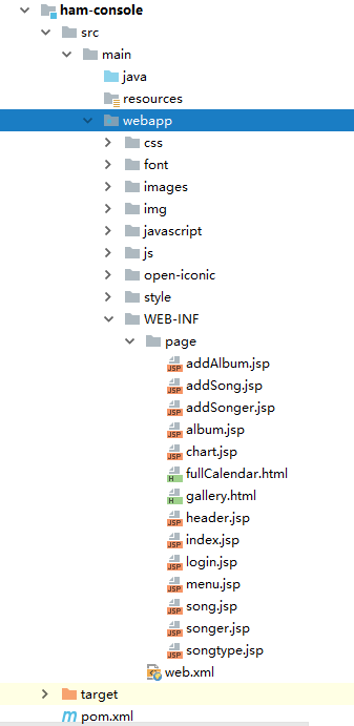
1.导入页面原型
在WEB-INF下创建page文件夹,所有jsp页面写到page下
2.搭建springmvc架构
2.1创建springmvc配置文件
XML
<?xml version="1.0" encoding="UTF-8"?>
<beans xmlns="http://www.springframework.org/schema/beans"
       xmlns:mvc="http://www.springframework.org/schema/mvc"
       xmlns:context="http://www.springframework.org/schema/context"
       xmlns:xsi="http://www.w3.org/2001/XMLSchema-instance"
       xsi:schemaLocation="
        http://www.springframework.org/schema/beans
        http://www.springframework.org/schema/beans/spring-beans.xsd
        http://www.springframework.org/schema/mvc
        http://www.springframework.org/schema/mvc/spring-mvc.xsd
        http://www.springframework.org/schema/context
        http://www.springframework.org/schema/context/spring-context.xsd">


<!--注解的驱动-->
    <mvc:annotation-driven>
        <!--消息转换器,转换返回对象为json形式-->
        <mvc:message-converters>
            <bean class="com.alibaba.fastjson.support.spring.FastJsonHttpMessageConverter">
                <property name="supportedMediaTypes" value="text/html;charset=UTF-8"/>
                <property name="features">
                    <array>
                        <value>WriteMapNullValue</value>
                        <value>WriteNullStringAsEmpty</value>
                    </array>

                </property>
                <property name="dateFormat" value="yyyy-MM-dd"></property>
            </bean>
        </mvc:message-converters>
    </mvc:annotation-driven>
    <context:component-scan base-package="com.qcby.controller"/>

    <bean id="viewResource" class="org.springframework.web.servlet.view.InternalResourceViewResolver">
        <property name="prefix" value="/WEB-INF/page/"></property>
        <property name="suffix" value=".jsp"></property>
    </bean>

    <mvc:default-servlet-handler/>
    <mvc:view-controller path="/" view-name="index"/>

</beans>
2.2配置web.xml
XML
<?xml version="1.0" encoding="UTF-8"?>
<web-app
        version="2.5"
        xmlns="http://java.sun.com/xml/ns/javaee"
        xmlns:xml="http://www.w3.org/XML/1998/namespace"
        xmlns:xsi="http://www.w3.org/2001/XMLSchema-instance"
        xsi:schemaLocation="http://java.sun.com/xml/ns/javaee
        http://java.sun.com/xml/ns/javaee/web-app_2_5.xsd">

  <display-name>Archetype Created Web Application</display-name>

  <filter>
    <filter-name>encodingFilter</filter-name>
    <filter-class>org.springframework.web.filter.CharacterEncodingFilter</filter-class>
    <init-param>
      <param-name>encoding</param-name>
      <param-value>UTF-8</param-value>
    </init-param>
  </filter>
  <filter-mapping>
    <filter-name>encodingFilter</filter-name>
    <url-pattern>/*</url-pattern>
  </filter-mapping>
  <servlet>
    <servlet-name>dispatcherServlet</servlet-name>
    <servlet-class>org.springframework.web.servlet.DispatcherServlet</servlet-class>
    <!--配置加载springmvc配置文件加载-->
    <init-param>
      <param-name>contextConfigLocation</param-name>
      <param-value>classpath:SpringMVC.xml</param-value>
    </init-param>
    <!--启动加载-->
    <load-on-startup>1</load-on-startup>
  </servlet>
  <servlet-mapping>
    <servlet-name>dispatcherServlet</servlet-name>
    <url-pattern>/</url-pattern>
  </servlet-mapping>

  <!--配置监听器 监听spring配置文件的加载-->
  <listener>
    <listener-class>org.springframework.web.context.ContextLoaderListener</listener-class>
  </listener>
  <context-param>
    <param-name>contextConfigLocation</param-name>
    <!--因为console依赖core所以路径为classpath-->
    <param-value>classpath:spring-core.xml</param-value>
  </context-param>
</web-app>
二、分页查询
以Mytype为例
1.创建查询对象
1.1新建query包
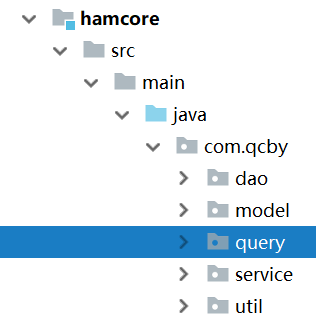
1.2创建MtypeQuery对象
java
package com.qcby.query;

import com.qcby.model.Mtype;

public class MtypeQuery extends Mtype {
    private Integer pageNo;
    private Integer pageSize = 5;
    private Integer startNum;

    public Integer getPageNo() {
        return pageNo;
    }

    public void setPageNo(Integer pageNo) {
        this.pageNo = pageNo;
    }

    public Integer getPageSize() {
        return pageSize;
    }

    public void setPageSize(Integer pageSize) {
        this.pageSize = pageSize;
    }

    public Integer getStartNum() {
        return startNum;
    }

    public void setStartNum(Integer startNum) {
        this.startNum = startNum;
    }
}
2.创建查询SQL
2.1在MtypeMapper.xml中创建查询数据的SQL
XML
<!--查询数据的SQL-->
  <select id="selectPageList" parameterType="com.qcby.query.MtypeQuery" resultType="com.qcby.model.Mtype">
    select
    <include refid="Base_Column_List" />
    from mtype
    <where>
      <if test="tname != null and tname != ''">
        and tname like concat('%',#{tname},'%')
      </if>
    </where>
    limit #{startNum}, #{pageSize}
  </select>
2.2在MtypeMapper.xml中创建查询总记录数的SQL
XML
  <!--查询总记录数的SQL-->
<select id="selectCount" parameterType="com.qcby.query.MtypeQuery" resultType="java.lang.Integer">
    select
    count(*)
    from mtype
    <where>
      <if test="tname != null and tname != ''">
        and tname like concat('%',#{tname},'%')
      </if>
    </where>
  </select>
3.提供分页的Page对象
java
package com.qcby.util;

import java.util.List;

public class Page<T> {
//    页码(已知的,前端传的)
    private  Integer pageNo;

//    每页展示数量(已知的,前端传的)
    private  Integer pageSize;

//    数据库总数据list集合(数据库查的)
    private List<T> list;

//    总数量(数据库查的)
    private Integer totalCount;

//    总页数(总数量/每页展示数量,计算出来的)
    private Integer totalPage;

//    开始行号((页码-1)*每页展示数量,计算出来的)
    private Integer startNum;

    public Page() {
    }

    public Page(Integer pageNo, Integer pageSize, List<T> list, Integer totalCount, Integer totalPage, Integer startNum) {
        this.pageNo = pageNo;
        this.pageSize = pageSize;
        this.list = list;
        this.totalCount = totalCount;
        this.totalPage = totalPage;
        this.startNum = startNum;
    }

    public Integer getPageNo() {
        return pageNo;
    }

    public void setPageNo(Integer pageNo) {
        this.pageNo = pageNo;
    }

    public Integer getPageSize() {
        return pageSize;
    }

    public void setPageSize(Integer pageSize) {
        this.pageSize = pageSize;
    }

    public List<T> getList() {
        return list;
    }

    public void setList(List<T> list) {
        this.list = list;
    }

    public Integer getTotalCount() {
        return totalCount;
    }

    public void setTotalCount(Integer totalCount) {
        this.totalCount = totalCount;
    }

    public Integer getTotalPage() {
        return totalPage;
    }

    public void setTotalPage(Integer totalPage) {
        this.totalPage = totalPage;
    }

    public Integer getStartNum() {
        return startNum;
    }

    public void setStartNum(Integer startNum) {
        this.startNum = startNum;
    }

    @Override
    public String toString() {
        return "Page{" +
                "pageNum=" + pageNo +
                ", pageSize=" + pageSize +
                ", list=" + list +
                ", totalCount=" + totalCount +
                ", totalPage=" + totalPage +
                ", startNum=" + startNum +
                '}';
    }
}
4.完善业务层
4.1BaseService中提供相应的分页查询接口
java
package com.qcby.service;

import com.qcby.util.Page;

public interface BaseService<Q,T> {
    int deleteByPrimaryKey(Integer tid);

    int insert(T record);

    int insertSelective(T record);

    T selectByPrimaryKey(Integer tid);

    int updateByPrimaryKeySelective(T record);

    int updateByPrimaryKey(T record);

    Page<T> selectPageList(Q q);
}
4.2BaseServiceImpl中提供相应的分页查询接口实现
java
package com.qcby.service.impl;

import com.qcby.dao.BaseDao;
import com.qcby.service.BaseService;
import com.qcby.util.Page;
import org.springframework.stereotype.Service;

import java.lang.reflect.Method;
import java.util.List;

@Service
public class BaseServiceImpl<Q,T> implements BaseService<Q,T> {

    protected BaseDao<Q,T> baseDao;

    @Override
    public int deleteByPrimaryKey(Integer tid) {
        return baseDao.deleteByPrimaryKey(tid);
    }

    @Override
    public int insert(T record) {
        return baseDao.insert(record);
    }

    @Override
    public int insertSelective(T record) {
        return baseDao.insertSelective(record);
    }

    @Override
    public T selectByPrimaryKey(Integer tid) {
        return baseDao.selectByPrimaryKey(tid);
    }

    @Override
    public int updateByPrimaryKeySelective(T record) {
        return baseDao.updateByPrimaryKeySelective(record);
    }

    @Override
    public int updateByPrimaryKey(T record) {
        return baseDao.updateByPrimaryKey(record);
    }

    /**
     * 公共模块的分页查询逻辑
     * @param q
     * @return
     */
    @Override
    public Page<T> selectPageList(Q q) {
        //获得查询对象的类对象
        Class<? extends Object> qclass = q.getClass();
        Page<T> page = new Page<T>();
        try {
            //获得getPageNo对象
            Method method = qclass.getMethod("getPageNo", null);
            //反射调用getPageNo方法
            Integer pageNo = (Integer) method.invoke(q, null);
            Method method2 = qclass.getMethod("getPageSize", null);
            Integer pageSize= (Integer) method2.invoke(q, null);
            //创建page对象
            page.setPageNo(pageNo);
            page.setPageSize(pageSize);

            //计算开始行号
            int startNum = (pageNo - 1)*pageSize;
            Method setStartNumMethod = qclass.getMethod("setStartNum", new Class[]{Integer.class});
            setStartNumMethod.invoke(q, startNum);
            //设置page对象的startNum
            page.setStartNum(startNum);

            //查询指定查询条件下的总记录数
            int count = baseDao.selectCount(q);
            //查询结果集
            List<T> list = baseDao.selectPageList(q);
            //把总记录数设置给page对象
            page.setTotalCount(count);
            page.setList(list);

            //计算总页数
            int totalPage = (count % pageSize == 0) ? (count / pageSize) : (count / pageSize + 1);
            page.setTotalPage(totalPage);
        } catch (Exception e) {
            e.printStackTrace();
        }
        return page;
    }
}
5.在MtypeController里面调用Service
java
package com.qcby.controller;

import com.qcby.model.Mtype;
import com.qcby.query.MtypeQuery;
import com.qcby.service.MtypeService;
import com.qcby.util.Page;
import org.springframework.beans.factory.annotation.Autowired;
import org.springframework.stereotype.Controller;
import org.springframework.ui.Model;
import org.springframework.web.bind.annotation.PostMapping;
import org.springframework.web.bind.annotation.RequestMapping;
import org.springframework.web.bind.annotation.ResponseBody;

@Controller
@RequestMapping("/mtype")
public class MtypeController {

    @Autowired
    private MtypeService mtypeService;

    @RequestMapping("/list")
    public String SelectAll(MtypeQuery mytypeQuery, Model model){
//        判断前端有没有传递页码,以及一页展示多少数据
        if(mytypeQuery.getPageNo() == null){
            mytypeQuery.setPageNo(1);
        }
        mytypeQuery.setPageSize(5);
//        调用业务层实现分页条件查询
        Page<Mtype> page = mtypeService.selectPageList(mytypeQuery);
//        将page对象返回给前端页面
        model.addAttribute("page",page);
        model.addAttribute("mq",mytypeQuery);
        return "mtype";
    }

}
6.页面数据展示
表格数据展示
html
<table class="table table-striped table-images" style="color: white;font-size: 14px">
    <thead>
    <tr>
        <th class="hidden-xs-portrait">序号</th>

        <th class="hidden-xs">专辑</th>
        <th class="hidden-xs">流派</th>
        <th></th>
    </tr>
    </thead>
    <tbody>
        <c:forEach items="${page.list}" var="mtype" varStatus="status">
            <tr>
                <td class="hidden-xs-portrait">${status.count}</td>
                <td class="hidden-xs-portrait">${mtype.tname}</td>
                <td class="hidden-xs"> ${mtype.tdesc} </td>
                <td><button modify  class="btn btn-sm btn-primary" tid="${mtype.tid}"  type="button"> 修改 </button>
                    <button data-toggle="button" tid="${mtype.tid}" class="btn btn-sm btn-warning"> 删除 </button></td>
            </tr>
        </c:forEach>
    </tbody>
</table>
分页条数据展示
html
<div class="clearfix text-right">
    <ul class="pagination no-margin">
        <input type="hidden" name="pageNo" id="pageNo" value="${page.pageNo}" />
        <input type="hidden" name="totalPage" id="totalPage" value="${page.totalPage}" />
        <li id="pre" ><a href="#">Prev</a></li>
        <c:forEach   begin="1" end="${page.totalPage}" var="pageNo"  >
            <li  <c:if test="${page.pageNo == pageNo}">class="active"</c:if>>
                <a href="javascript:void(0);">${pageNo}</a>
            </li>
        </c:forEach>
        <li id="next"><a href="#">Next</a></li>
    </ul>
</div>
7.搜索查询
搜索条件注意通过form要包含搜索条件和翻页的pageNo
html
$("#search").click(function () {
    $("#pageNo").val(1);
    $("#mtFrom").submit();
});
通过js来提交搜索的表单,切记提交前要把pageNo置成1
8.分页条的disabled设置,包括翻页

html
var pageNo = parseInt($("#pageNo").val());
var totalPage = parseInt($("#totalPage").val());
if(pageNo == 1 && pageNo == totalPage){
    $("#pre").addClass("disabled")
    $("#next").addClass("disabled")
}
if(pageNo == 1 && pageNo < totalPage){
    $("#pre").addClass("disabled")
    $("#next").removeClass("disabled")
}

if(pageNo > 1 && pageNo == totalPage){
    $("#pre").removeClass("disabled")
    $("#next").addClass("disabled")
}

if(pageNo > 1 && pageNo < totalPage){
    $("#pre").removeClass("disabled")
    $("#next").removeClass("disabled")
}

$("#pre a").click(function () {
    //var pageNo = parseInt($("#pageNo").val());
    $("#pageNo").val(--pageNo);
    $("#mtFrom").submit();
})

$("#next a").click(function () {
    //var pageNo = parseInt($("#pageNo").val());
    $("#pageNo").val(++pageNo);
    $("#mtFrom").submit();
})