欢迎加入开源鸿蒙跨平台社区:
https://openharmonycrossplatform.csdn.net
一、项目概述
运行效果图
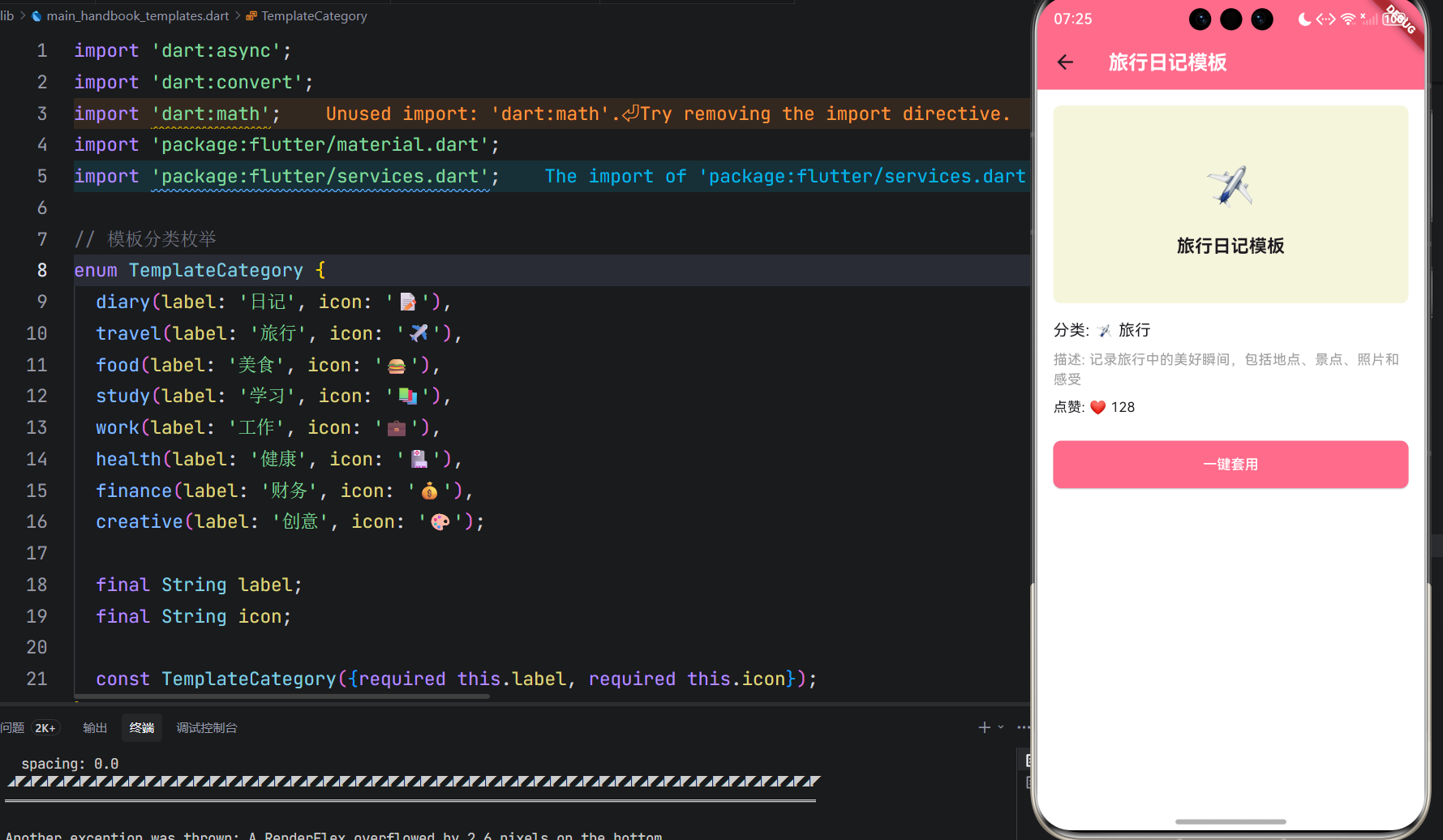
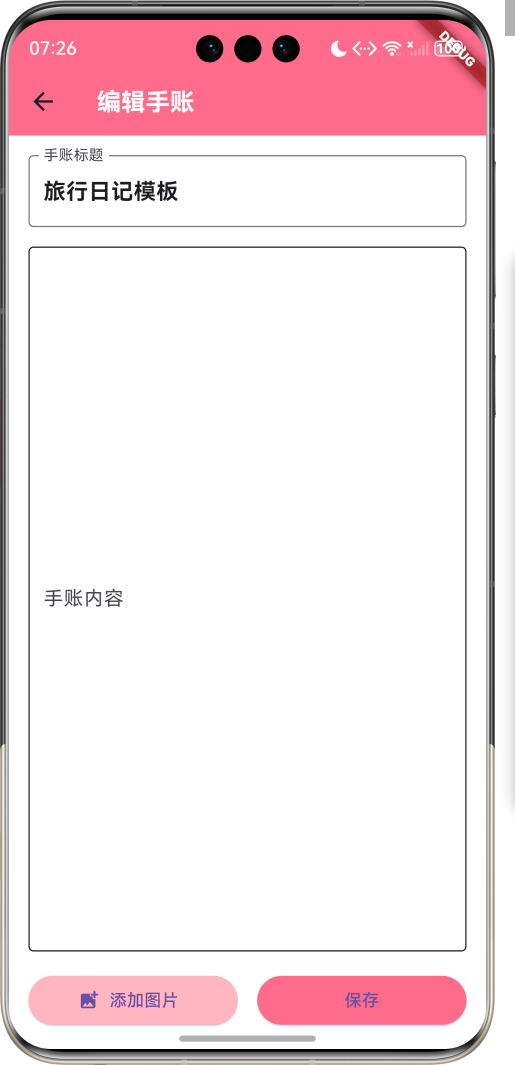
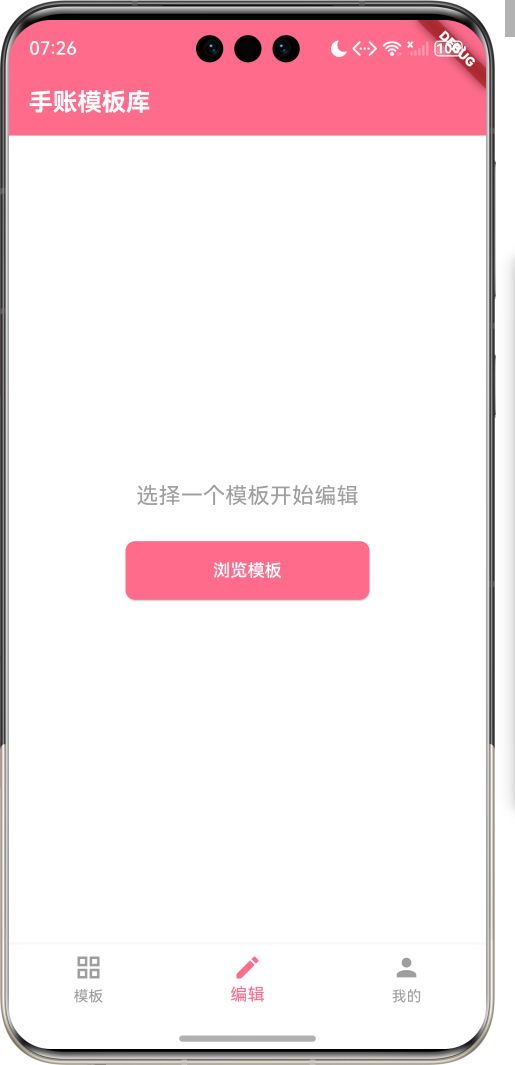
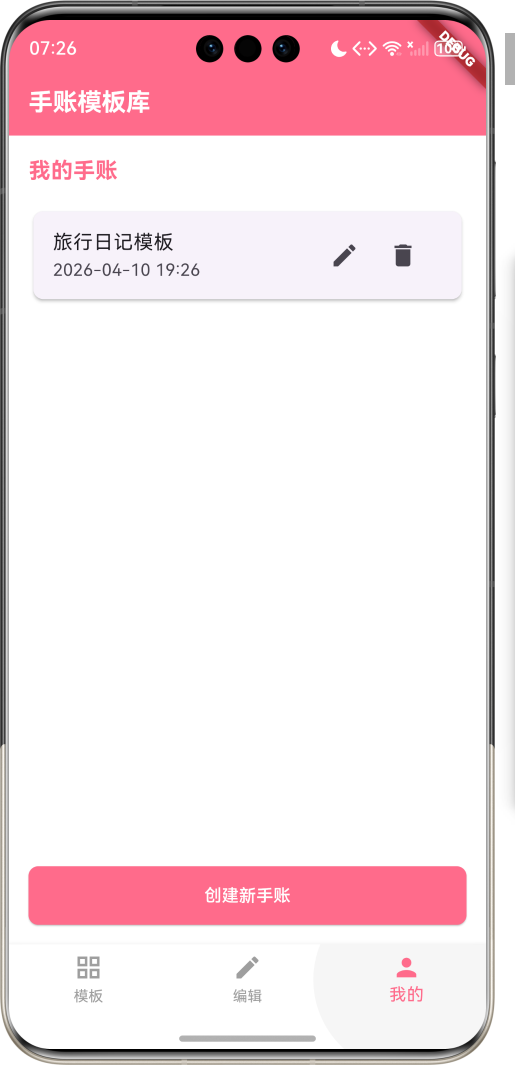
1.1 应用简介
手账模板库是一款提供各种手账模板的应用,用户可以选择日记、旅行、美食、学习等不同类型的模板,一键套用,让手账制作更加美观和便捷。
应用以温暖的粉色和米色为主色调,营造出温馨、创意的氛围。涵盖模板浏览、模板详情、模板编辑、个人中心四大模块。用户可以浏览各种类型的手账模板,查看模板详情,一键套用模板,还可以根据自己的喜好编辑模板内容。
1.2 核心功能
| 功能模块 | 功能描述 | 实现方式 |
|---|---|---|
| 模板浏览 | 浏览各种手账模板 | 网格布局 |
| 模板分类 | 按类型分类模板 | 标签筛选 |
| 模板详情 | 查看模板详情 | 详情页面 |
| 模板套用 | 一键套用模板 | 复制模板 |
| 模板编辑 | 编辑模板内容 | 编辑器 |
| 个人中心 | 管理个人手账 | 本地存储 |
1.3 模板类型定义
| 序号 | 模板类型 | 描述 | 示例内容 |
|---|---|---|---|
| 1 | 日记 | 日常记录 | 日期、天气、心情、内容 |
| 2 | 旅行 | 旅行记录 | 地点、景点、照片、感受 |
| 3 | 美食 | 美食记录 | 菜品、餐厅、评分、照片 |
| 4 | 学习 | 学习笔记 | 知识点、笔记、计划、总结 |
| 5 | 工作 | 工作记录 | 任务、进度、会议、总结 |
| 6 | 健康 | 健康管理 | 运动、饮食、睡眠、情绪 |
| 7 | 财务 | 财务管理 | 收入、支出、预算、分析 |
| 8 | 创意 | 创意设计 | 手绘、拼贴、创意写作 |
1.4 技术栈
| 技术领域 | 技术选型 | 版本要求 |
|---|---|---|
| 开发框架 | Flutter | >= 3.0.0 |
| 编程语言 | Dart | >= 2.17.0 |
| 设计规范 | Material Design 3 | - |
| 本地存储 | shared_preferences | - |
| 图片处理 | image_picker | - |
| 目标平台 | 鸿蒙OS / Web | API 21+ |
1.5 项目结构
lib/
└── main_handbook_templates.dart
    ├── HandbookApp         # 应用入口
    ├── Template           # 模板模型
    ├── TemplateCategory   # 模板分类枚举
    ├── TemplateService    # 模板服务
    ├── TemplateController # 模板控制器
    ├── UserHandbook       # 用户手账
    ├── HandbookHomePage   # 主页面
    ├── _buildTemplateListPage # 模板列表页
    ├── _buildTemplateDetailPage # 模板详情页
    ├── _buildEditorPage   # 编辑器页面
    └── _buildProfilePage  # 个人中心页面
二、系统架构
2.1 整体架构图
Data Layer
Business Layer
Presentation Layer
主页面
HandbookHomePage
模板列表页
模板详情页
编辑器页面
个人中心页面
模板分类
模板网格
搜索功能
模板预览
模板信息
套用按钮
内容编辑
图片添加
保存功能
我的手账
设置管理
模板控制器
TemplateController
模板服务
TemplateService
数据管理
DataManager
Template
模板模型
TemplateCategory
分类枚举
UserHandbook
用户手账
LocalStorage
本地存储
2.2 类图设计
uses
uses
creates
returns
uses
HandbookApp
+Widget build()
Template
+String id
+String name
+String description
+TemplateCategory category
+String thumbnail
+Map<String, dynamic> content
+int likes
<<enumeration>>
TemplateCategory
+String label
+String icon
+diary()
+travel()
+food()
+study()
+work()
+health()
+finance()
+creative()
TemplateService
+List<Template> getAllTemplates()
+List<Template> getTemplatesByCategory(TemplateCategory category)
+Template getTemplateById(String id)
+void likeTemplate(String id)
TemplateController
+List<Template> templates
+List<UserHandbook> userHandbooks
+Future loadTemplates()
+Future applyTemplate(String templateId)
+Future saveHandbook(UserHandbook handbook)
+Future deleteHandbook(String id)
UserHandbook
+String id
+String name
+String templateId
+Map<String, dynamic> content
+DateTime createdAt
+DateTime updatedAt
HandbookHomePage
+Widget build()
+void _buildTemplateListPage()
+void _buildTemplateDetailPage()
+void _buildEditorPage()
+void _buildProfilePage()
2.3 页面导航流程
模板
编辑
我的
应用启动
模板列表页
底部导航
浏览模板
编辑手账
个人中心
选择分类
查看模板
模板详情
套用模板
编辑内容
添加图片
保存手账
我的手账
查看手账
设置管理
2.4 模板套用流程
编辑器页面 模板控制器 模板详情页 模板列表页 用户 编辑器页面 模板控制器 模板详情页 模板列表页 用户 浏览模板 点击模板 显示模板详情 点击套用按钮 应用模板 打开编辑器 显示模板内容 编辑内容 保存手账 保存手账 保存成功
三、核心模块设计
3.1 数据模型设计
3.1.1 模板模型 (Template)
dart
class Template {
  final String id;
  final String name;
  final String description;
  final TemplateCategory category;
  final String thumbnail;
  final Map<String, dynamic> content;
  int likes;

  Template({
    required this.id,
    required this.name,
    required this.description,
    required this.category,
    required this.thumbnail,
    required this.content,
    this.likes = 0,
  });
}
3.1.2 模板分类枚举 (TemplateCategory)
dart
enum TemplateCategory {
  diary(label: '日记', icon: '📝'),
  travel(label: '旅行', icon: '✈️'),
  food(label: '美食', icon: '🍔'),
  study(label: '学习', icon: '📚'),
  work(label: '工作', icon: '💼'),
  health(label: '健康', icon: '🏥'),
  finance(label: '财务', icon: '💰'),
  creative(label: '创意', icon: '🎨');

  final String label;
  final String icon;

  const TemplateCategory({required this.label, required this.icon});
}
3.1.3 用户手账模型 (UserHandbook)
dart
class UserHandbook {
  final String id;
  final String name;
  final String templateId;
  final Map<String, dynamic> content;
  final DateTime createdAt;
  final DateTime updatedAt;

  UserHandbook({
    required this.id,
    required this.name,
    required this.templateId,
    required this.content,
    required this.createdAt,
    required this.updatedAt,
  });
}
3.2 页面结构设计
3.2.1 主页面布局
HandbookHomePage
IndexedStack
模板列表页
编辑器页面
个人中心页面
NavigationBar
模板 Tab
编辑 Tab
我的 Tab
3.2.2 模板列表页结构
模板列表页
分类标签
搜索框
模板网格
全部
日记
旅行
美食
学习
其他
模板卡片
缩略图
模板名称
分类标签
点赞数
3.2.3 模板详情页结构
模板详情页
模板预览
模板信息
套用按钮
缩略图
内容预览
模板名称
分类
描述
点赞数
一键套用
3.2.4 编辑器页面结构
编辑器页面
标题编辑
内容编辑
图片添加
保存按钮
手账标题
文本编辑
格式工具
添加图片
图片预览
保存手账
3.3 模板套用逻辑
用户选择模板
查看模板详情
点击套用按钮
复制模板内容
打开编辑器
编辑内容
添加图片
保存手账
更新个人中心
3.4 手账管理逻辑
查看
编辑
删除
用户进入个人中心
查看我的手账
选择操作
打开手账详情
进入编辑器
确认删除
查看手账内容
编辑手账
删除手账
保存修改
四、UI设计规范
4.1 配色方案
应用以温暖的粉色和米色为主色调,营造出温馨、创意的氛围:
| 颜色类型 | 色值 | 用途 |
|---|---|---|
| 主色 | #FF6B8B (Pink) | 导航、主题元素 |
| 辅助色 | #FFB6C1 | 按钮、强调 |
| 第三色 | #F5F5DC | 背景、卡片 |
| 背景色 | #FFFFFF | 页面背景 |
| 卡片背景 | #F8F8F8 | 信息卡片 |
4.2 分类色彩映射
| 分类 | 色值 | 视觉效果 |
|---|---|---|
| 日记 | #FF6B8B | 粉色 |
| 旅行 | #4ECDC4 | 青色 |
| 美食 | #FF8C42 | 橙色 |
| 学习 | #6A0572 | 紫色 |
| 工作 | #1A535C | 深绿色 |
| 健康 | #2EC4B6 | 薄荷绿 |
| 财务 | #FFD166 | 黄色 |
| 创意 | #EF476F | 玫红色 |
4.3 字体规范
| 元素 | 字号 | 字重 | 颜色 |
|---|---|---|---|
| 页面标题 | 24px | Bold | 主色 |
| 模板名称 | 18px | Medium | #333333 |
| 分类标签 | 14px | Regular | 对应分类色 |
| 模板描述 | 14px | Regular | #666666 |
| 按钮文本 | 16px | Medium | #FFFFFF |
4.4 组件规范
4.4.1 模板卡片
┌─────────────────────────────────────┐
│  ┌─────────────────────────────┐   │
│  │                             │   │
│  │          模板缩略图          │   │
│  │                             │   │
│  └─────────────────────────────┘   │
│  旅行日记模板                       │
│  📝 日记                          │
│  ❤️ 128                         │
└─────────────────────────────────────┘
4.4.2 分类标签
┌─────────────────────┐
│  全部  日记  旅行  美食  学习  更多  │
└─────────────────────┘
4.4.3 编辑器界面
┌─────────────────────────────────────┐
│  编辑手账                            │
│                                     │
│  ┌─────────────────────────────┐   │
│  │  手账标题                    │   │
│  └─────────────────────────────┘   │
│                                     │
│  ┌─────────────────────────────┐   │
│  │  在这里编辑手账内容...        │   │
│  │                             │   │
│  │                             │   │
│  └─────────────────────────────┘   │
│                                     │
│  [添加图片] [保存]                  │
└─────────────────────────────────────┘
4.4.4 个人中心
┌─────────────────────────────────────┐
│  我的手账                            │
│  ─────────────────────────────────  │
│  📝 旅行日记                        │
│  2024-01-01                         │
│                                     │
│  📝 美食记录                        │
│  2024-01-02                         │
│                                     │
│  [创建新手账]                       │
└─────────────────────────────────────┘
五、核心功能实现
5.1 模板服务实现
dart
class TemplateService {
  final List<Template> _templates = [
    Template(
      id: '1',
      name: '旅行日记模板',
      description: '记录旅行中的美好瞬间,包括地点、景点、照片和感受',
      category: TemplateCategory.travel,
      thumbnail: 'travel_template.png',
      content: {
        'title': '旅行日记',
        'date': DateTime.now().toString(),
        'location': '填写地点',
        'attractions': '填写景点',
        'photos': [],
        'feelings': '填写感受',
      },
      likes: 128,
    ),
    Template(
      id: '2',
      name: '美食记录模板',
      description: '记录美食体验,包括菜品、餐厅、评分和照片',
      category: TemplateCategory.food,
      thumbnail: 'food_template.png',
      content: {
        'title': '美食记录',
        'date': DateTime.now().toString(),
        'restaurant': '填写餐厅',
        'dish': '填写菜品',
        'rating': '填写评分',
        'photos': [],
        'comments': '填写评论',
      },
      likes: 96,
    ),
    // 更多模板...
  ];

  List<Template> getAllTemplates() {
    return _templates;
  }

  List<Template> getTemplatesByCategory(TemplateCategory category) {
    if (category == null) return _templates;
    return _templates.where((template) => template.category == category).toList();
  }

  Template getTemplateById(String id) {
    return _templates.firstWhere((template) => template.id == id);
  }

  void likeTemplate(String id) {
    final template = _templates.firstWhere((t) => t.id == id);
    template.likes++;
  }
}
5.2 模板控制器实现
dart
class TemplateController {
  final TemplateService _templateService;
  final DataManager _dataManager;
  final List<Template> templates = [];
  final List<UserHandbook> userHandbooks = [];

  TemplateController(this._templateService, this._dataManager);

  Future<void> initialize() async {
    await loadTemplates();
    await loadUserHandbooks();
  }

  Future<void> loadTemplates() async {
    templates.clear();
    templates.addAll(_templateService.getAllTemplates());
  }

  Future<void> loadUserHandbooks() async {
    userHandbooks.clear();
    final handbooks = await _dataManager.loadUserHandbooks();
    userHandbooks.addAll(handbooks);
  }

  Future<void> applyTemplate(String templateId) async {
    final template = _templateService.getTemplateById(templateId);
    final handbook = UserHandbook(
      id: UniqueKey().toString(),
      name: template.name,
      templateId: template.id,
      content: Map.from(template.content),
      createdAt: DateTime.now(),
      updatedAt: DateTime.now(),
    );
    userHandbooks.add(handbook);
    await _dataManager.saveUserHandbooks(userHandbooks);
  }

  Future<void> saveHandbook(UserHandbook handbook) async {
    final index = userHandbooks.indexWhere((h) => h.id == handbook.id);
    if (index != -1) {
      userHandbooks[index] = UserHandbook(
        id: handbook.id,
        name: handbook.name,
        templateId: handbook.templateId,
        content: handbook.content,
        createdAt: handbook.createdAt,
        updatedAt: DateTime.now(),
      );
    } else {
      userHandbooks.add(UserHandbook(
        id: handbook.id,
        name: handbook.name,
        templateId: handbook.templateId,
        content: handbook.content,
        createdAt: DateTime.now(),
        updatedAt: DateTime.now(),
      ));
    }
    await _dataManager.saveUserHandbooks(userHandbooks);
  }

  Future<void> deleteHandbook(String id) async {
    userHandbooks.removeWhere((h) => h.id == id);
    await _dataManager.saveUserHandbooks(userHandbooks);
  }

  void likeTemplate(String templateId) {
    _templateService.likeTemplate(templateId);
  }

  List<Template> getTemplatesByCategory(TemplateCategory? category) {
    if (category == null) return templates;
    return templates.where((template) => template.category == category).toList();
  }
}
5.3 数据管理实现
dart
class DataManager {
  static const String _userHandbooksKey = 'user_handbooks';

  // 模拟本地存储
  static Map<String, String> _storage = {};

  Future<List<UserHandbook>> loadUserHandbooks() async {
    final jsonString = _storage[_userHandbooksKey];
    if (jsonString == null) return [];

    final jsonList = json.decode(jsonString) as List;
    return jsonList.map((json) => UserHandbook.fromJson(json)).toList();
  }

  Future<void> saveUserHandbooks(List<UserHandbook> handbooks) async {
    final jsonList = handbooks.map((handbook) => handbook.toJson()).toList();
    _storage[_userHandbooksKey] = json.encode(jsonList);
  }
}
5.4 编辑器实现
dart
class EditorPage extends StatefulWidget {
  final UserHandbook? handbook;
  final Template? template;

  const EditorPage({Key? key, this.handbook, this.template}) : super(key: key);

  @override
  _EditorPageState createState() => _EditorPageState();
}

class _EditorPageState extends State<EditorPage> {
  late TextEditingController _titleController;
  late TextEditingController _contentController;
  late Map<String, dynamic> _content;
  late UserHandbook _handbook;

  @override
  void initState() {
    super.initState();
    if (widget.handbook != null) {
      _handbook = widget.handbook!;
      _titleController = TextEditingController(text: _handbook.name);
      _content = Map.from(_handbook.content);
    } else if (widget.template != null) {
      _handbook = UserHandbook(
        id: UniqueKey().toString(),
        name: widget.template!.name,
        templateId: widget.template!.id,
        content: Map.from(widget.template!.content),
        createdAt: DateTime.now(),
        updatedAt: DateTime.now(),
      );
      _titleController = TextEditingController(text: _handbook.name);
      _content = Map.from(_handbook.content);
    } else {
      _handbook = UserHandbook(
        id: UniqueKey().toString(),
        name: '新手账',
        templateId: '',
        content: {'title': '新手账', 'content': ''},
        createdAt: DateTime.now(),
        updatedAt: DateTime.now(),
      );
      _titleController = TextEditingController(text: _handbook.name);
      _content = Map.from(_handbook.content);
    }
    _contentController = TextEditingController(text: _content['content'] ?? '');
  }

  @override
  Widget build(BuildContext context) {
    return Scaffold(
      appBar: AppBar(
        title: Text('编辑手账'),
      ),
      body: Padding(
        padding: EdgeInsets.all(16),
        child: Column(
          children: [
            TextField(
              controller: _titleController,
              decoration: InputDecoration(
                labelText: '手账标题',
                border: OutlineInputBorder(),
              ),
              style: TextStyle(fontSize: 18, fontWeight: FontWeight.bold),
            ),
            SizedBox(height: 16),
            Expanded(
              child: TextField(
                controller: _contentController,
                decoration: InputDecoration(
                  labelText: '手账内容',
                  border: OutlineInputBorder(),
                ),
                maxLines: null,
                expands: true,
                textAlignVertical: TextAlignVertical.top,
              ),
            ),
            SizedBox(height: 16),
            Row(
              children: [
                Expanded(
                  child: ElevatedButton.icon(
                    onPressed: _addImage,
                    icon: Icon(Icons.add_photo_alternate),
                    label: Text('添加图片'),
                    style: ElevatedButton.styleFrom(
                      backgroundColor: Color(0xFFFFB6C1),
                    ),
                  ),
                ),
                SizedBox(width: 16),
                Expanded(
                  child: ElevatedButton(
                    onPressed: _saveHandbook,
                    child: Text('保存'),
                    style: ElevatedButton.styleFrom(
                      backgroundColor: Color(0xFFFF6B8B),
                    ),
                  ),
                ),
              ],
            ),
          ],
        ),
      ),
    );
  }

  void _addImage() {
    // 模拟添加图片
    setState(() {
      if (!_content.containsKey('photos')) {
        _content['photos'] = [];
      }
      (_content['photos'] as List).add('image_url');
    });
  }

  void _saveHandbook() {
    setState(() {
      _handbook = UserHandbook(
        id: _handbook.id,
        name: _titleController.text,
        templateId: _handbook.templateId,
        content: {
          ..._content,
          'title': _titleController.text,
          'content': _contentController.text,
        },
        createdAt: _handbook.createdAt,
        updatedAt: DateTime.now(),
      );
    });
    // 保存手账
    Navigator.of(context).pop(_handbook);
  }
}
六、交互设计
6.1 模板浏览交互流程
编辑器页面 模板控制器 模板详情页 模板列表页 用户 编辑器页面 模板控制器 模板详情页 模板列表页 用户 打开应用 加载模板 返回模板列表 显示模板网格 选择分类 筛选模板 返回筛选结果 显示筛选后的模板 点击模板 打开详情 显示模板详情 点击套用 应用模板 返回新手账 打开编辑器 显示模板内容
6.2 编辑器交互流程
是
否
用户进入编辑器
编辑标题
编辑内容
添加图片
保存手账
保存成功?
返回个人中心
显示错误信息
查看我的手账
6.3 个人中心交互流程
个人中心
我的手账
设置
查看手账
编辑手账
删除手账
创建新手账
编辑器
确认删除
模板列表
七、扩展功能规划
7.1 后续版本规划
2024-01-07 2024-01-14 2024-01-21 2024-01-28 2024-02-04 2024-02-11 2024-02-18 2024-02-25 2024-03-03 2024-03-10 2024-03-17 2024-03-24 2024-03-31 基础UI框架 模板浏览功能 模板套用功能 编辑器功能 个人中心管理 图片添加功能 模板分享 云同步功能 社区互动 V1.0 基础版本 V1.1 增强版本 V1.2 进阶版本 手账模板库应用开发计划
7.2 功能扩展建议
7.2.1 模板分享
分享功能:
- 支持分享手账模板
- 支持分享个人手账
- 生成图片分享
- 分享到社交平台
7.2.2 云同步功能
云同步功能:
- 支持账号登录
- 云端备份手账
- 多设备同步
- 数据恢复功能
7.2.3 社区互动
社区功能:
- 手账展示社区
- 模板下载
- 用户互动
- 排行榜系统
八、注意事项
8.1 开发注意事项
-
性能优化:模板加载和渲染需要优化,避免卡顿
-
存储空间:图片存储需要合理管理,避免占用过多空间
-
用户体验:编辑器需要流畅,支持实时预览
-
数据安全:用户手账数据需要安全存储
-
兼容性:确保在不同设备上的显示效果一致
8.2 常见问题
| 问题 | 原因 | 解决方案 |
|---|---|---|
| 模板加载缓慢 | 模板数据过大 | 优化数据加载 |
| 图片上传失败 | 网络连接问题 | 检查网络连接 |
| 保存失败 | 存储空间不足 | 提示用户清理空间 |
| 编辑器卡顿 | 内容过多 | 优化编辑器性能 |
| 模板显示异常 | 设备兼容性 | 适配不同设备 |
8.3 使用技巧
📝 手账模板库使用技巧 📝
模板浏览
- 点击分类标签筛选模板
- 滑动浏览模板网格
- 点击模板查看详情
- 点赞喜欢的模板
模板套用
- 点击模板详情页的套用按钮
- 在编辑器中修改内容
- 添加图片丰富手账
- 保存手账到个人中心
手账编辑
- 点击个人中心的手账进入编辑
- 使用编辑器修改内容
- 支持添加多张图片
- 实时保存编辑进度
个人中心
- 查看所有保存的手账
- 按时间排序手账
- 删除不需要的手账
- 快速创建新手账
九、运行说明
9.1 环境要求
| 环境 | 版本要求 |
|---|---|
| Flutter SDK | >= 3.0.0 |
| Dart SDK | >= 2.17.0 |
| 鸿蒙OS | API 21+ |
| Web浏览器 | Chrome 90+ |
| 存储空间 | 100MB+ |
9.2 运行命令
bash
# 查看可用设备
flutter devices

# 运行到Web服务器
flutter run -d web-server -t lib/main_handbook_templates.dart --web-port 8148

# 运行到鸿蒙设备
flutter run -d 127.0.0.1:5555 lib/main_handbook_templates.dart

# 代码分析
flutter analyze lib/main_handbook_templates.dart
十、总结
手账模板库应用通过提供各种精美的手账模板,让用户可以轻松创建美观、有创意的手账。用户可以选择日记、旅行、美食、学习等不同类型的模板,一键套用,然后根据自己的喜好编辑内容,添加图片,保存到个人中心。
核心功能包括模板浏览、模板分类、模板详情、模板套用、模板编辑、个人中心等。应用采用温暖的粉色和米色为主色调,营造出温馨、创意的氛围,让用户在使用过程中感受到愉悦和灵感。
通过本应用,希望能够激发用户的创造力,帮助用户记录生活中的美好瞬间,让手账制作变得更加简单和有趣。
手账模板库------让手账制作更简单