欢迎加入开源鸿蒙跨平台社区:
https://openharmonycrossplatform.csdn.net
一、项目概述
运行效果图
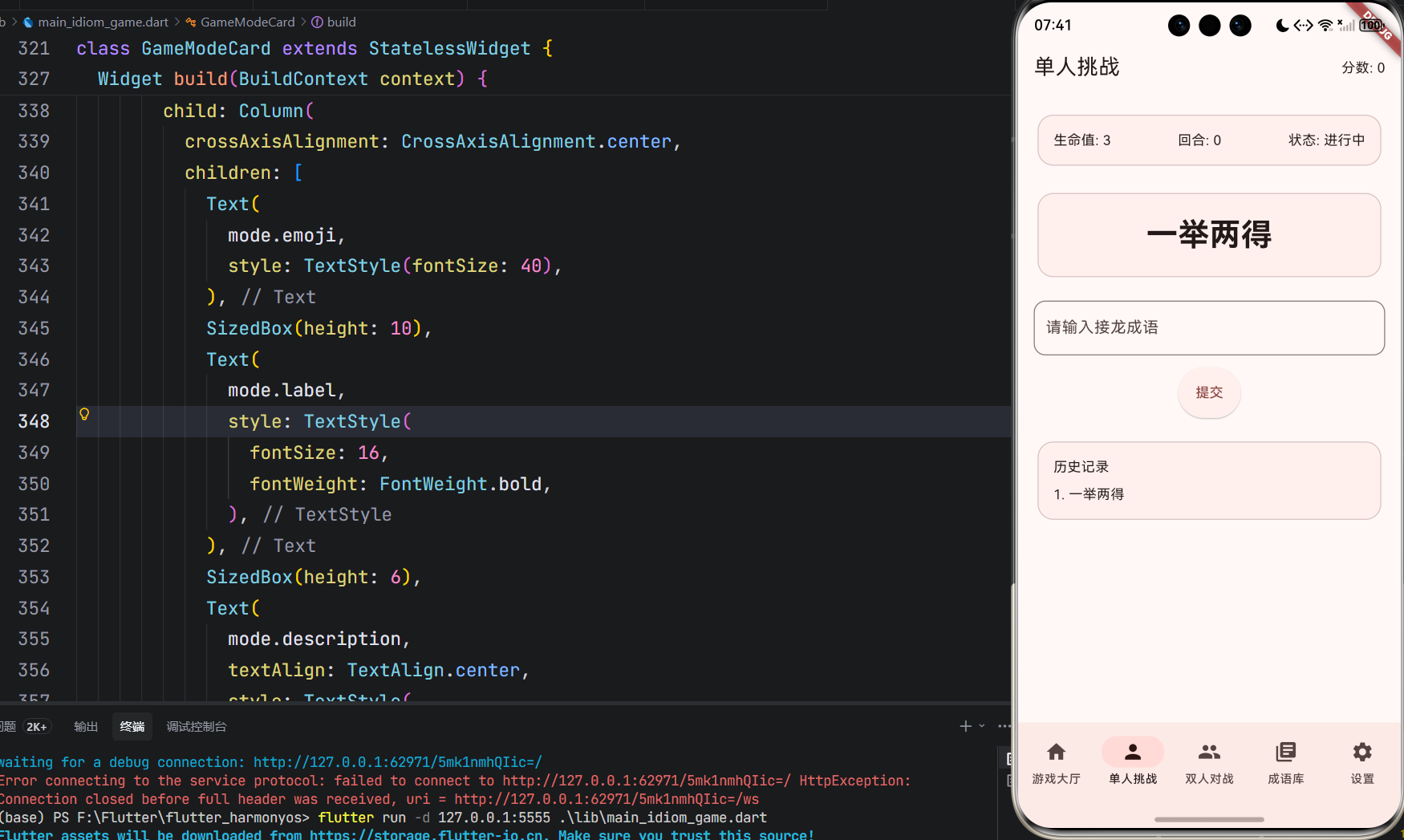
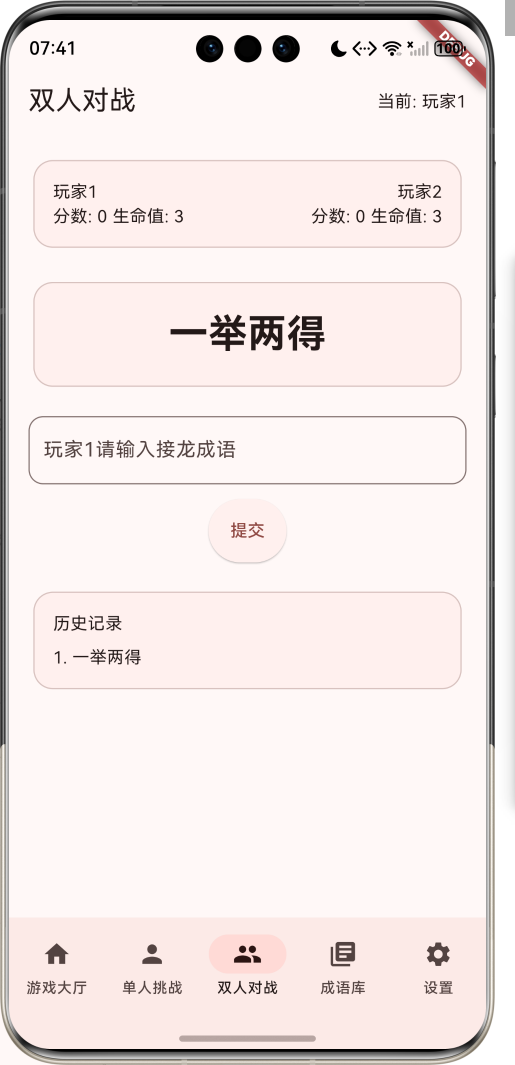
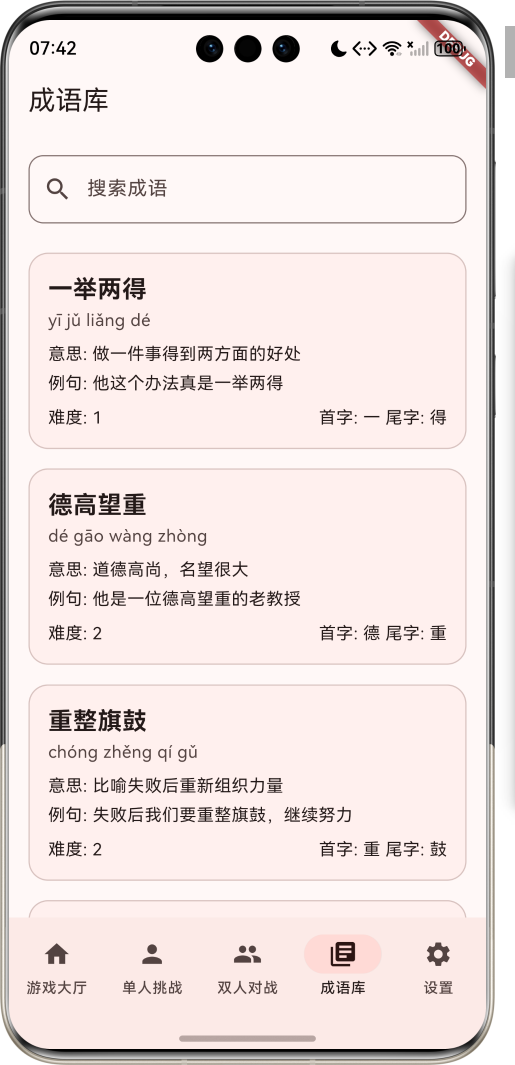
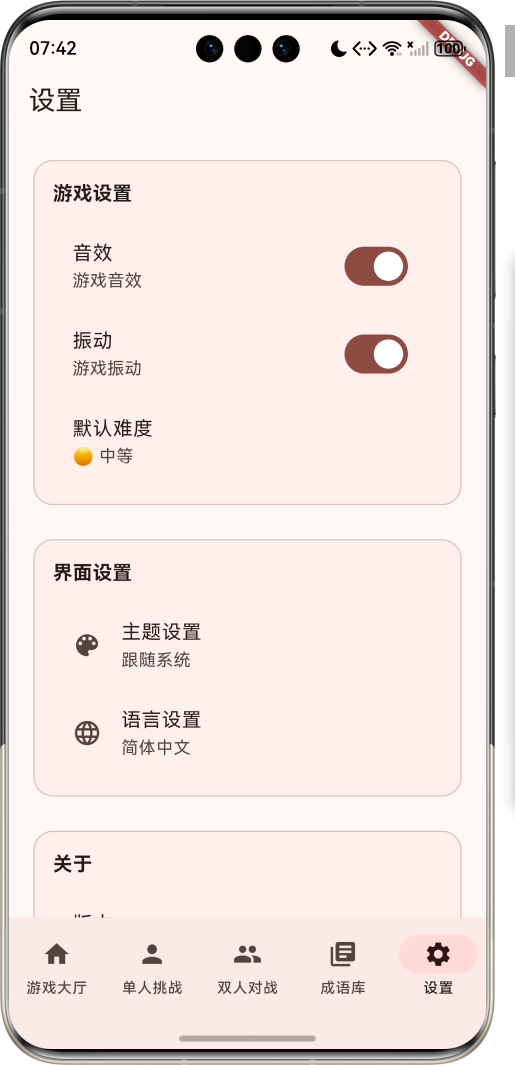
1.1 应用简介
成语接龙游戏是一款寓教于乐的休闲益智应用,通过趣味成语接龙游戏,帮助用户学习和记忆成语,提升语言能力。应用支持单人挑战和双人对战两种模式,以喜庆的红色为主色调,营造欢快的游戏氛围。涵盖游戏大厅、单人挑战、双人对战、成语库四大模块,让用户在娱乐中学习,在学习中娱乐。
1.2 核心功能
| 功能模块 | 功能描述 | 实现方式 |
|---|---|---|
| 单人挑战 | 与AI对战 | 成语库匹配 |
| 双人对战 | 本地双人对战 | 实时匹配 |
| 成语库 | 成语查询 | 本地数据库 |
| 游戏记录 | 保存游戏历史 | 本地存储 |
| 难度设置 | 调整游戏难度 | 配置选项 |
| 排行榜 | 记录最高分 | 本地存储 |
1.3 游戏模式定义
| 序号 | 模式名称 | Emoji | 描述 |
|---|---|---|---|
| 1 | 单人挑战 | 👤 | 与AI对战 |
| 2 | 双人对战 | 👥 | 本地双人对战 |
| 3 | 练习模式 | 📚 | 自由练习 |
| 4 | 限时模式 | ⏱️ | 限时挑战 |
1.4 难度等级定义
| 序号 | 难度等级 | Emoji | 描述 |
|---|---|---|---|
| 1 | 简单 | 🟢 | 常用成语 |
| 2 | 中等 | 🟡 | 包含较常见成语 |
| 3 | 困难 | 🔴 | 包含生僻成语 |
| 4 | 大师 | 🎯 | 包含罕见成语 |
1.5 游戏状态定义
| 序号 | 状态名称 | Emoji | 描述 |
|---|---|---|---|
| 1 | 准备中 | 📋 | 游戏未开始 |
| 2 | 进行中 | 🔄 | 游戏进行中 |
| 3 | 胜利 | 🎉 | 游戏胜利 |
| 4 | 失败 | 😞 | 游戏失败 |
| 5 | 平局 | 🤝 | 游戏平局 |
1.6 技术栈
| 技术领域 | 技术选型 | 版本要求 |
|---|---|---|
| 开发框架 | Flutter | >= 3.0.0 |
| 编程语言 | Dart | >= 2.17.0 |
| 设计规范 | Material Design 3 | - |
| 本地存储 | SharedPreferences | - |
| 动画 | Flutter Animation | - |
| 音效 | audioplayers | - |
| 目标平台 | 鸿蒙OS / Web | API 21+ |
1.7 项目结构
lib/
└── main_idiom_game.dart
    ├── IdiomGameApp               # 应用入口
    ├── GameMode                   # 游戏模式枚举
    ├── DifficultyLevel            # 难度等级枚举
    ├── GameStatus                 # 游戏状态枚举
    ├── Idiom                      # 成语模型
    ├── GameRecord                 # 游戏记录模型
    ├── IdiomGameHomePage          # 主页面(底部导航)
    ├── _buildHomePage              # 游戏大厅页面
    ├── _buildSinglePlayerPage      # 单人挑战页面
    ├── _buildMultiPlayerPage       # 双人对战页面
    ├── _buildIdiomLibraryPage      # 成语库页面
    ├── _buildSettingsPage          # 设置页面
    ├── IdiomCard                  # 成语卡片组件
    ├── GameBoard                  # 游戏棋盘组件
    └── IdiomDatabase              # 成语数据库
二、系统架构
2.1 整体架构图
Data Layer
Business Layer
Presentation Layer
主页面
IdiomGameHomePage
游戏大厅
单人挑战
双人对战
成语库
设置
模式选择
难度选择
开始游戏
AI对战
游戏记录
本地对战
分数统计
成语查询
成语学习
游戏管理器
GameManager
成语管理器
IdiomManager
AI对手
AIOpponent
Idiom
成语
GameRecord
游戏记录
IdiomDatabase
成语数据库
2.2 类图设计
has
has
has
has
IdiomGameApp
+Widget build()
<<enumeration>>
GameMode
+String label
+String emoji
+String description
+singlePlayer()
+multiPlayer()
+practice()
+timed()
<<enumeration>>
DifficultyLevel
+String label
+String emoji
+int value
+easy()
+medium()
+hard()
+master()
<<enumeration>>
GameStatus
+String label
+String emoji
+String color
+preparing()
+playing()
+victory()
+defeat()
+draw()
Idiom
+String id
+String word
+String pinyin
+String meaning
+String example
+int difficulty
+String firstChar
+String lastChar
GameRecord
+String id
+GameMode mode
+DifficultyLevel difficulty
+int score
+int rounds
+GameStatus status
+DateTime createdAt
IdiomGameHomePage
+Widget build()
2.3 页面导航流程
单人挑战
双人对战
练习模式
限时模式
应用启动
游戏大厅
选择模式
选择难度
准备对战
自由练习
设置时间
开始游戏
开始对战
进入练习
开始计时
游戏进行
练习模式
限时挑战
游戏结束
练习结束
显示结果
保存记录
2.4 游戏流程
成语管理器 游戏管理器 游戏页面 用户 成语管理器 游戏管理器 游戏页面 用户 alt 成语有效 成语无效 loop 游戏进行中 选择游戏模式 选择难度 开始游戏 初始化游戏 获取初始成语 返回成语 显示初始成语 输入成语 验证成语 检查成语有效性 返回验证结果 显示正确 增加分数 获取下一个成语 返回成语 显示新成语 显示错误 减少生命值 输入成语 验证成语 游戏结束 显示结果 保存记录
三、核心模块设计
3.1 数据模型设计
3.1.1 游戏模式枚举 (GameMode)
dart
enum GameMode {
  singlePlayer(label: '单人挑战', emoji: '👤', description: '与AI对战'),
  multiPlayer(label: '双人对战', emoji: '👥', description: '本地双人对战'),
  practice(label: '练习模式', emoji: '📚', description: '自由练习'),
  timed(label: '限时模式', emoji: '⏱️', description: '限时挑战');

  final String label;
  final String emoji;
  final String description;
}
3.1.2 难度等级枚举 (DifficultyLevel)
dart
enum DifficultyLevel {
  easy(label: '简单', emoji: '🟢', value: 1),
  medium(label: '中等', emoji: '🟡', value: 2),
  hard(label: '困难', emoji: '🔴', value: 3),
  master(label: '大师', emoji: '🎯', value: 4);

  final String label;
  final String emoji;
  final int value;
}
3.1.3 成语模型 (Idiom)
dart
class Idiom {
  final String id;              // 成语ID
  final String word;            // 成语
  final String pinyin;          // 拼音
  final String meaning;         // 意思
  final String example;         // 例句
  final int difficulty;         // 难度
  final String firstChar;       // 首字
  final String lastChar;        // 尾字
}
3.1.4 游戏记录模型 (GameRecord)
dart
class GameRecord {
  final String id;                  // 记录ID
  final GameMode mode;              // 游戏模式
  final DifficultyLevel difficulty; // 难度等级
  final int score;                  // 分数
  final int rounds;                 // 回合数
  final GameStatus status;          // 游戏状态
  final DateTime createdAt;         // 创建时间
}
3.1.5 成语数据示例
| 成语 | 拼音 | 意思 | 难度 | 首字 | 尾字 |
|---|---|---|---|---|---|
| 一举两得 | yī jǔ liǎng dé | 做一件事得到两方面的好处 | 1 | 一 | 得 |
| 德高望重 | dé gāo wàng zhòng | 道德高尚,名望很大 | 2 | 德 | 重 |
| 重整旗鼓 | chóng zhěng qí gǔ | 比喻失败后重新组织力量 | 2 | 重 | 鼓 |
| 鼓舞人心 | gǔ wǔ rén xīn | 振奋人们的信心 | 2 | 鼓 | 心 |
| 心花怒放 | xīn huā nù fàng | 心里高兴得像花儿盛开一样 | 2 | 心 | 放 |
| 放任自流 | fàng rèn zì liú | 听凭自然发展,不加约束 | 3 | 放 | 流 |
| 流言蜚语 | liú yán fēi yǔ | 没有根据的话 | 3 | 流 | 语 |
| 语重心长 | yǔ zhòng xīn cháng | 言辞诚恳,情意深长 | 2 | 语 | 长 |
| 长治久安 | cháng zhì jiǔ ān | 形容国家长期安定 | 3 | 长 | 安 |
| 安居乐业 | ān jū lè yè | 生活安定,工作愉快 | 2 | 安 | 业 |
3.2 页面结构设计
3.2.1 主页面布局
IdiomGameHomePage
IndexedStack
游戏大厅
单人挑战
双人对战
成语库
设置
NavigationBar
游戏大厅 Tab
单人挑战 Tab
双人对战 Tab
成语库 Tab
设置 Tab
3.2.2 游戏大厅页面结构
游戏大厅
SliverAppBar
模式选择
难度选择
开始游戏按钮
游戏记录
标题
游戏介绍
单人挑战
双人对战
练习模式
限时模式
简单
中等
困难
大师
3.2.3 单人挑战页面结构
单人挑战
SliverAppBar
游戏棋盘
输入框
提交按钮
游戏状态
标题
分数
当前成语
历史记录
生命值
回合数
游戏时间
3.2.4 双人对战页面结构
双人对战
SliverAppBar
游戏棋盘
输入框
提交按钮
玩家信息
标题
当前玩家
当前成语
历史记录
玩家1分数
玩家2分数
回合数
3.3 游戏逻辑设计
有效
符合
是
否
无效
是
否
开始游戏
初始化游戏
生成初始成语
显示初始成语
玩家输入
验证成语
检查接龙规则
增加分数
AI生成响应
AI成功
更新游戏状态
玩家胜利
减少生命值
生命值>0
游戏结束
显示结果
保存记录
返回大厅
3.4 成语匹配逻辑
是
否
是
否
获取当前成语
提取尾字
搜索匹配成语
找到匹配
按难度筛选
随机选择成语
返回成语
检查是否有同音字
找到同音字
搜索同音字成语
游戏结束
四、UI设计规范
4.1 配色方案
应用以喜庆的红色为主色调,营造欢快的游戏氛围:
| 颜色类型 | 色值 | 用途 |
|---|---|---|
| 主色 | #E53935 (Red) | 导航、主题元素 |
| 辅助色 | #EF5350 | 游戏大厅 |
| 第三色 | #FF5252 | 单人挑战 |
| 强调色 | #FFCDD2 | 双人对战 |
| 背景色 | #FAFAFA | 页面背景 |
| 卡片背景 | #FFFFFF | 游戏卡片 |
| 成功色 | #4CAF50 | 正确答案 |
| 错误色 | #F44336 | 错误答案 |
4.2 游戏状态颜色定义
| 状态 | 色值 | 视觉效果 |
|---|---|---|
| 准备中 | #9E9E9E | 灰色,未开始 |
| 进行中 | #2196F3 | 蓝色,进行中 |
| 胜利 | #4CAF50 | 绿色,成功 |
| 失败 | #F44336 | 红色,失败 |
| 平局 | #FF9800 | 橙色,平局 |
4.3 字体规范
| 元素 | 字号 | 字重 | 颜色 |
|---|---|---|---|
| 页面标题 | 24px | Bold | 主色 |
| 成语文本 | 32px | Bold | #000000 |
| 拼音 | 16px | Regular | #666666 |
| 意思 | 14px | Regular | #999999 |
| 按钮文本 | 16px | Medium | #FFFFFF |
4.4 组件规范
4.4.1 游戏模式卡片
┌─────────────────────────────────────┐
│  👤  单人挑战                      │
│                                     │
│  与AI对战                           │
│  测试你的成语水平                     │
│                                     │
│  [开始游戏]                         │
└─────────────────────────────────────┘
4.4.2 成语卡片
┌─────────────────────────────────────┐
│  一举两得                          │
│  yī jǔ liǎng dé                    │
│                                     │
│  做一件事得到两方面的好处              │
│                                     │
│  例句:他这个办法真是一举两得          │
└─────────────────────────────────────┘
4.4.3 游戏棋盘
┌─────────────────────────────────────┐
│  当前成语:一举两得                  │
│                                     │
│  ┌─────────────────────────────┐   │
│  │  请输入接龙成语:            │   │
│  │                            │   │
│  └─────────────────────────────┘   │
│                                     │
│  [提交]                             │
│                                     │
│  分数:100  生命值:3  回合:5       │
└─────────────────────────────────────┘
4.4.4 难度选择器
┌─────────────────────────────────────┐
│  选择难度                            │
│                                     │
│  🟢  简单                           │
│  🟡  中等                           │
│  🔴  困难                           │
│  🎯  大师                           │
└─────────────────────────────────────┘
五、核心功能实现
5.1 游戏大厅页面实现
dart
class HomePage extends StatelessWidget {
  const HomePage({super.key});

  @override
  Widget build(BuildContext context) {
    return CustomScrollView(
      slivers: [
        SliverAppBar(
          title: Text('成语接龙游戏'),
          expandedHeight: 150,
          flexibleSpace: FlexibleSpaceBar(
            background: Container(
              decoration: BoxDecoration(
                gradient: LinearGradient(
                  begin: Alignment.topLeft,
                  end: Alignment.bottomRight,
                  colors: [
                    Color(0xFFE53935),
                    Color(0xFFEF5350),
                  ],
                ),
              ),
              child: Center(
                child: Column(
                  mainAxisAlignment: MainAxisAlignment.center,
                  children: [
                    Text(
                      '成语接龙',
                      style: TextStyle(
                        color: Colors.white,
                        fontSize: 32,
                        fontWeight: FontWeight.bold,
                      ),
                    ),
                    Text(
                      '寓教于乐,学习成语',
                      style: TextStyle(
                        color: Colors.white,
                        fontSize: 16,
                      ),
                    ),
                  ],
                ),
              ),
            ),
          ),
        ),
        SliverToBoxAdapter(
          child: Padding(
            padding: const EdgeInsets.all(16),
            child: Column(
              crossAxisAlignment: CrossAxisAlignment.start,
              children: [
                Text(
                  '选择游戏模式',
                  style: TextStyle(
                    fontSize: 18,
                    fontWeight: FontWeight.bold,
                  ),
                ),
                SizedBox(height: 16),
                _buildGameModes(),
                SizedBox(height: 24),
                Text(
                  '游戏记录',
                  style: TextStyle(
                    fontSize: 18,
                    fontWeight: FontWeight.bold,
                  ),
                ),
                SizedBox(height: 16),
                _buildGameRecords(),
              ],
            ),
          ),
        ),
      ],
    );
  }

  Widget _buildGameModes() {
    return GridView.count(
      crossAxisCount: 2,
      shrinkWrap: true,
      physics: NeverScrollableScrollPhysics(),
      gap: 16,
      children: GameMode.values.map((mode) {
        return GameModeCard(mode: mode);
      }).toList(),
    );
  }

  Widget _buildGameRecords() {
    return ListView.builder(
      shrinkWrap: true,
      physics: NeverScrollableScrollPhysics(),
      itemCount: 3,
      itemBuilder: (context, index) {
        return GameRecordCard(
          record: GameRecord(
            id: '1',
            mode: GameMode.singlePlayer,
            difficulty: DifficultyLevel.medium,
            score: 150,
            rounds: 10,
            status: GameStatus.victory,
            createdAt: DateTime.now(),
          ),
        );
      },
    );
  }
}
5.2 单人挑战页面实现
dart
class SinglePlayerPage extends StatefulWidget {
  const SinglePlayerPage({super.key});

  @override
  State<SinglePlayerPage> createState() => _SinglePlayerPageState();
}

class _SinglePlayerPageState extends State<SinglePlayerPage> {
  String _currentIdiom = '一举两得';
  String _inputIdiom = '';
  int _score = 0;
  int _lives = 3;
  int _rounds = 0;
  List<String> _history = [];
  bool _isAIThinking = false;

  @override
  void initState() {
    super.initState();
    _history.add(_currentIdiom);
  }

  @override
  Widget build(BuildContext context) {
    return CustomScrollView(
      slivers: [
        SliverAppBar(
          title: Text('单人挑战'),
          actions: [
            Padding(
              padding: const EdgeInsets.all(16),
              child: Text('分数: $_score'),
            ),
          ],
        ),
        SliverToBoxAdapter(
          child: Padding(
            padding: const EdgeInsets.all(16),
            child: Column(
              crossAxisAlignment: CrossAxisAlignment.start,
              children: [
                _buildGameStatus(),
                SizedBox(height: 20),
                _buildCurrentIdiom(),
                SizedBox(height: 20),
                _buildInputArea(),
                SizedBox(height: 20),
                _buildHistory(),
              ],
            ),
          ),
        ),
      ],
    );
  }

  Widget _buildGameStatus() {
    return Card(
      child: Padding(
        padding: const EdgeInsets.all(16),
        child: Row(
          mainAxisAlignment: MainAxisAlignment.spaceBetween,
          children: [
            Text('生命值: $_lives'),
            Text('回合: $_rounds'),
            Text('状态: 进行中'),
          ],
        ),
      ),
    );
  }

  Widget _buildCurrentIdiom() {
    return Card(
      child: Padding(
        padding: const EdgeInsets.all(20),
        child: Center(
          child: Text(
            _currentIdiom,
            style: TextStyle(
              fontSize: 32,
              fontWeight: FontWeight.bold,
            ),
          ),
        ),
      ),
    );
  }

  Widget _buildInputArea() {
    return Column(
      children: [
        TextField(
          onChanged: (value) {
            _inputIdiom = value;
          },
          decoration: InputDecoration(
            labelText: '请输入接龙成语',
            border: OutlineInputBorder(),
          ),
        ),
        SizedBox(height: 12),
        ElevatedButton(
          onPressed: _submitIdiom,
          child: Text('提交'),
        ),
      ],
    );
  }

  Widget _buildHistory() {
    return Card(
      child: Padding(
        padding: const EdgeInsets.all(16),
        child: Column(
          crossAxisAlignment: CrossAxisAlignment.start,
          children: [
            Text('历史记录'),
            SizedBox(height: 8),
            Column(
              children: _history.asMap().entries.map((entry) {
                return Row(
                  children: [
                    Text('${entry.key + 1}. ${entry.value}'),
                  ],
                );
              }).toList(),
            ),
          ],
        ),
      ),
    );
  }

  void _submitIdiom() {
    if (_inputIdiom.isEmpty) return;

    // 验证成语
    if (_isValidIdiom(_inputIdiom)) {
      _score += 10;
      _rounds++;
      _history.add(_inputIdiom);
      _currentIdiom = _inputIdiom;
      _inputIdiom = '';

      // AI响应
      _isAIThinking = true;
      Future.delayed(Duration(seconds: 1), () {
        setState(() {
          _currentIdiom = _getAIResponse();
          _history.add(_currentIdiom);
          _isAIThinking = false;
        });
      });
    } else {
      _lives--;
      if (_lives <= 0) {
        _showGameOver();
      }
    }
    setState(() {});
  }

  bool _isValidIdiom(String idiom) {
    // 简单验证逻辑
    return idiom.length == 4 && idiom.startsWith(_currentIdiom[_currentIdiom.length - 1]);
  }

  String _getAIResponse() {
    // AI生成响应
    final responses = ['德高望重', '重整旗鼓', '鼓舞人心', '心花怒放', '放任自流'];
    return responses[Random().nextInt(responses.length)];
  }

  void _showGameOver() {
    showDialog(
      context: context,
      builder: (context) {
        return AlertDialog(
          title: Text('游戏结束'),
          content: Text('你的分数: $_score\n回合数: $_rounds'),
          actions: [
            TextButton(
              onPressed: () {
                Navigator.pop(context);
                // 重置游戏
                _resetGame();
              },
              child: Text('重新开始'),
            ),
          ],
        );
      },
    );
  }

  void _resetGame() {
    _currentIdiom = '一举两得';
    _inputIdiom = '';
    _score = 0;
    _lives = 3;
    _rounds = 0;
    _history = [_currentIdiom];
    setState(() {});
  }
}
5.3 成语管理器实现
dart
class IdiomManager {
  final List<Idiom> _idioms = [
    Idiom(
      id: '1',
      word: '一举两得',
      pinyin: 'yī jǔ liǎng dé',
      meaning: '做一件事得到两方面的好处',
      example: '他这个办法真是一举两得',
      difficulty: 1,
      firstChar: '一',
      lastChar: '得',
    ),
    Idiom(
      id: '2',
      word: '德高望重',
      pinyin: 'dé gāo wàng zhòng',
      meaning: '道德高尚,名望很大',
      example: '他是一位德高望重的老教授',
      difficulty: 2,
      firstChar: '德',
      lastChar: '重',
    ),
    // 更多成语...
  ];

  List<Idiom> findIdiomsByLastChar(String lastChar, {int? maxDifficulty}) {
    return _idioms.where((idiom) {
      bool matchesChar = idiom.firstChar == lastChar;
      bool matchesDifficulty = maxDifficulty == null || idiom.difficulty <= maxDifficulty;
      return matchesChar && matchesDifficulty;
    }).toList();
  }

  Idiom? getRandomIdiom({int? maxDifficulty}) {
    List<Idiom> filtered = maxDifficulty == null
        ? _idioms
        : _idioms.where((idiom) => idiom.difficulty <= maxDifficulty).toList();

    if (filtered.isEmpty) return null;
    return filtered[Random().nextInt(filtered.length)];
  }

  bool isValidIdiom(String word) {
    return _idioms.any((idiom) => idiom.word == word);
  }

  Idiom? findIdiom(String word) {
    return _idioms.firstWhereOrNull((idiom) => idiom.word == word);
  }
}
5.4 游戏管理器实现
dart
class GameManager {
  final IdiomManager _idiomManager = IdiomManager();
  final AIOpponent _aiOpponent = AIOpponent();

  GameRecord startGame(GameMode mode, DifficultyLevel difficulty) {
    return GameRecord(
      id: DateTime.now().toString(),
      mode: mode,
      difficulty: difficulty,
      score: 0,
      rounds: 0,
      status: GameStatus.playing,
      createdAt: DateTime.now(),
    );
  }

  bool validateIdiom(String currentIdiom, String inputIdiom) {
    if (!_idiomManager.isValidIdiom(inputIdiom)) {
      return false;
    }

    String lastChar = currentIdiom[currentIdiom.length - 1];
    return inputIdiom.startsWith(lastChar);
  }

  String? getAIResponse(String currentIdiom, DifficultyLevel difficulty) {
    String lastChar = currentIdiom[currentIdiom.length - 1];
    List<Idiom> candidates = _idiomManager.findIdiomsByLastChar(
      lastChar,
      maxDifficulty: difficulty.value,
    );

    if (candidates.isEmpty) return null;
    return candidates[Random().nextInt(candidates.length)].word;
  }

  void saveGameRecord(GameRecord record) {
    // 保存游戏记录
  }

  List<GameRecord> getGameRecords() {
    // 获取游戏记录
    return [];
  }
}
六、交互设计
6.1 游戏流程
成语管理器 游戏管理器 游戏页面 用户 成语管理器 游戏管理器 游戏页面 用户 alt 成语有效 成语无效 loop 游戏进行中 选择单人挑战 选择难度 开始游戏 初始化游戏 获取初始成语 返回成语 显示初始成语 输入成语 验证成语 检查成语有效性 返回验证结果 显示正确 增加分数 获取下一个成语 返回成语 显示新成语 显示错误 减少生命值 输入成语 验证成语 游戏结束 显示结果 保存记录
6.2 双人对战流程
有效
无效
是
否
有效
无效
是
否
开始双人对战
初始化游戏
生成初始成语
玩家1回合
输入成语
验证成语
增加分数
玩家2回合
减少生命值
生命值>0
玩家2胜利
输入成语
验证成语
增加分数
减少生命值
生命值>0
玩家1胜利
显示结果
保存记录
返回大厅
6.3 成语查询流程
进入成语库
输入成语
搜索成语
显示结果
查看详情
七、扩展功能规划
7.1 后续版本规划
2024-01-07 2024-01-14 2024-01-21 2024-01-28 2024-02-04 2024-02-11 2024-02-18 2024-02-25 2024-03-03 2024-03-10 2024-03-17 2024-03-24 2024-03-31 2024-04-07 基础UI框架 单人挑战功能 双人对战功能 成语库功能 练习模式 限时模式 网络对战 排行榜系统 成就系统 V1.0 基础版本 V1.1 增强版本 V1.2 进阶版本 成语接龙游戏开发计划
7.2 功能扩展建议
7.2.1 网络对战功能
网络对战功能:
- 实时多人对战
- 排行榜系统
- 好友系统
- 聊天功能
7.2.2 成语学习功能
学习功能:
- 成语解释
- 成语故事
- 成语分类
- 学习进度跟踪
7.2.3 成就系统
成就系统:
- 连续接龙奖励
- 难度挑战成就
- 学习成就
- 排行榜成就
八、注意事项
8.1 开发注意事项
-
成语库:需要构建丰富的成语库,包含不同难度的成语
-
AI逻辑:AI对手需要智能选择成语,避免重复
-
用户体验:游戏界面需要简洁直观,操作流畅
-
性能优化:成语查询和验证需要高效算法
-
错误处理:需要处理用户输入错误和游戏异常
8.2 常见问题
| 问题 | 原因 | 解决方案 |
|---|---|---|
| 成语匹配失败 | 成语库不足 | 扩展成语库 |
| AI无法响应 | 没有匹配成语 | 实现同音字匹配 |
| 游戏卡顿 | 成语查询缓慢 | 优化查询算法 |
| 输入错误 | 用户输入错误 | 增加输入验证 |
| 分数计算错误 | 逻辑错误 | 检查计分逻辑 |
8.3 使用技巧
🎯 成语接龙游戏技巧 🎯
游戏策略
- 选择熟悉的成语开始
- 记住常用成语的首尾字
- 注意成语的难度等级
- 合理使用生命值
学习建议
- 游戏中学习新成语
- 查看成语解释和例句
- 定期复习游戏中遇到的成语
- 与朋友一起玩,互相学习
获胜技巧
- 选择合适的难度
- 保持冷静,不要急躁
- 利用AI的弱点
- 积累成语知识
常见成语
- 一举两得 → 德高望重 → 重整旗鼓 → 鼓舞人心
- 心花怒放 → 放任自流 → 流言蜚语 → 语重心长
- 长治久安 → 安居乐业 → 业精于勤 → 勤能补拙
九、运行说明
9.1 环境要求
| 环境 | 版本要求 |
|---|---|
| Flutter SDK | >= 3.0.0 |
| Dart SDK | >= 2.17.0 |
| 鸿蒙OS | API 21+ |
| Web浏览器 | Chrome 90+ |
| 存储权限 | 读写权限 |
9.2 运行命令
bash
# 查看可用设备
flutter devices

# 运行到Web服务器
flutter run -d web-server -t lib/main_idiom_game.dart --web-port 8152

# 运行到鸿蒙设备
flutter run -d 127.0.0.1:5555 lib/main_idiom_game.dart

# 代码分析
flutter analyze lib/main_idiom_game.dart
十、总结
成语接龙游戏应用通过寓教于乐的方式,帮助用户学习和记忆成语,提升语言能力。应用支持单人挑战和双人对战两种模式,以喜庆的红色为主色调,营造欢快的游戏氛围。
核心功能涵盖游戏大厅、单人挑战、双人对战、成语库四大模块。游戏大厅提供模式选择和游戏记录;单人挑战与AI对战;双人对战支持本地双人游戏;成语库提供成语查询和学习。
应用采用 Material Design 3 设计规范,以喜庆的红色为主色调,象征传统文化的魅力。通过本应用,希望能够激发用户学习成语的兴趣,在娱乐中学习,在学习中娱乐,传承和弘扬中华优秀传统文化。
成语接龙游戏------寓教于乐,学习成语