系列文章目录
文章目录
前言
银河麒麟V4下编译Qt5.12.12,首先Qt 官方站点下载源码,
Qt5.12.12
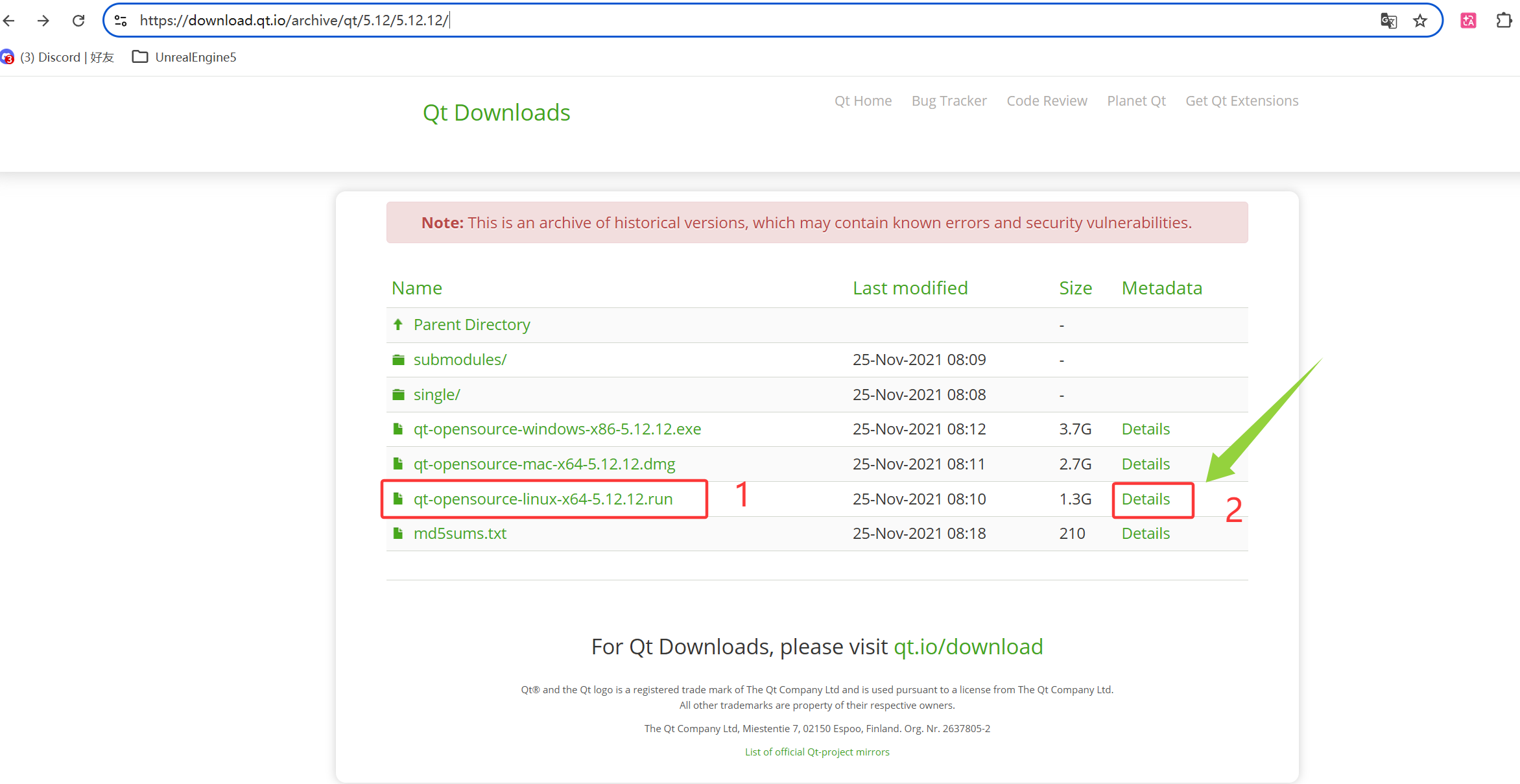
鼠标直接点击1,弹出乱码,不管有没有科学上网都是乱码,所以这里必须点击2:Details
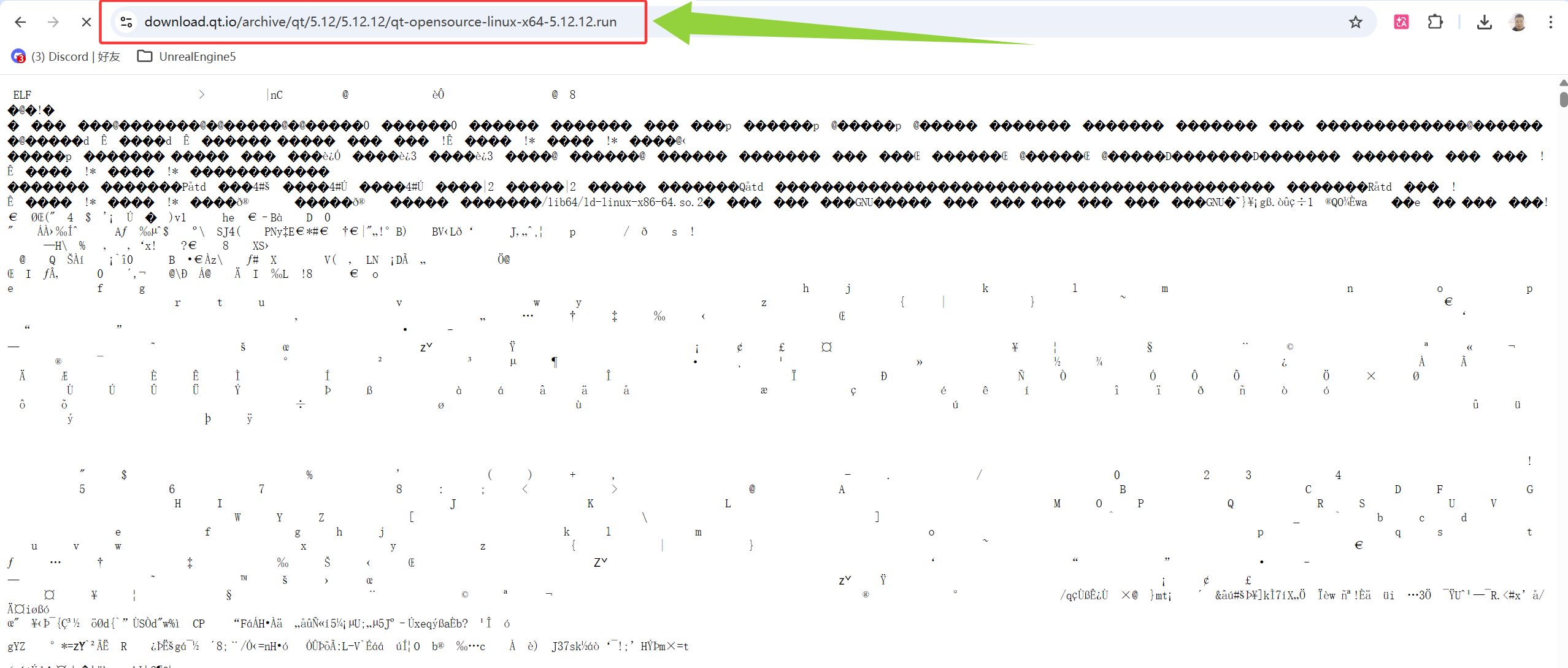
点击Details弹出界面
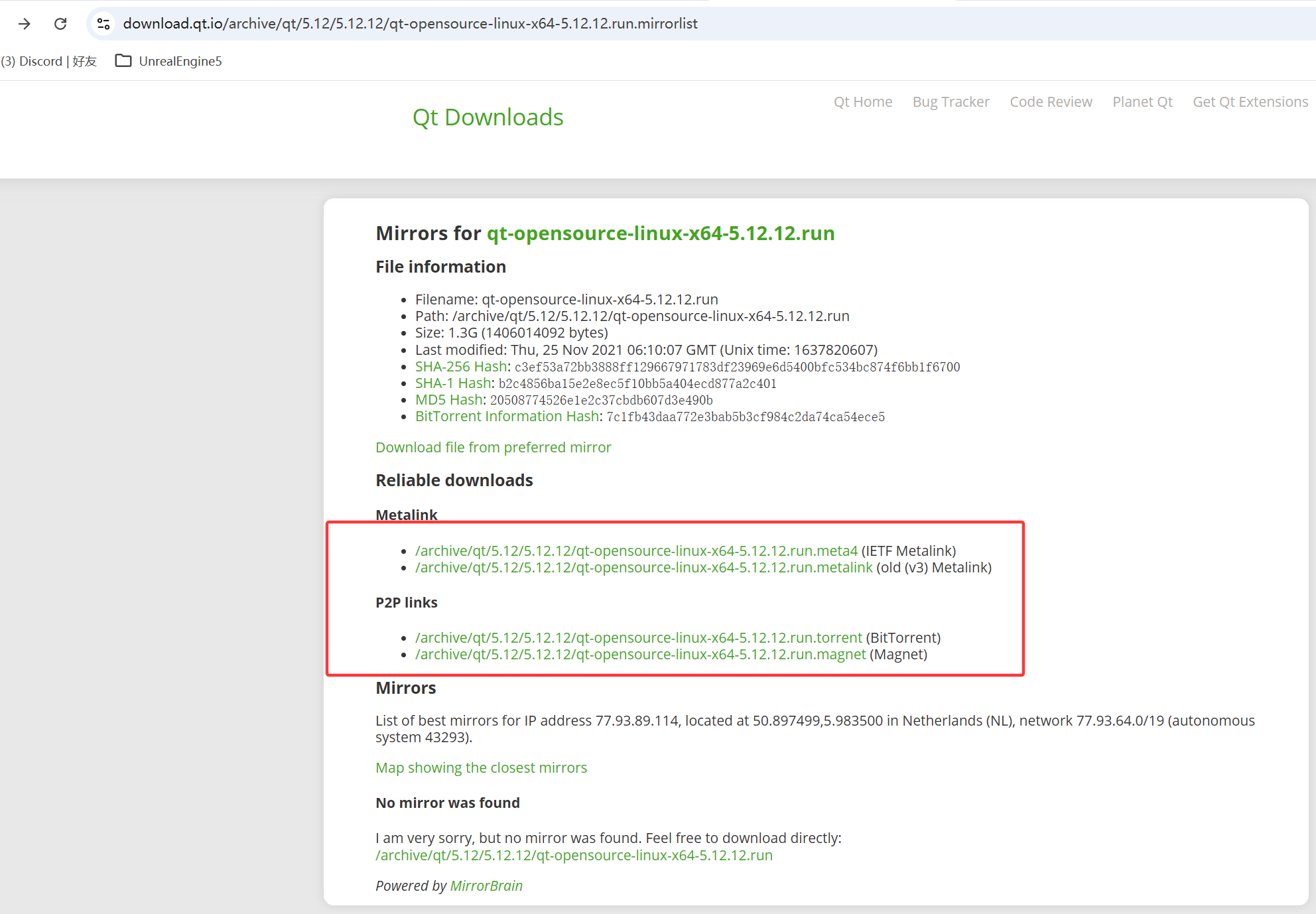
注意:这里敲黑板!!!这里下载的 qt-opensource-linux-x64-5.12.12.run 是 x86_64 架构的二进制安装器,而我的机器是 ARM64(银河麒麟 V4 ARM64)。所以这个安装器根本不能在你的平台上运行。我不信邪,在我机器上试了,确实无法运行。
解决办法是用国内镜像(推荐清华或中科大),或者在本地下载后上传到服务器。之后再按编译步骤安装 Qt 5.12.11。
bash
# 清华大学开源镜像站
wget https://mirrors.tuna.tsinghua.edu.cn/qt/archive/qt/5.12/5.12.11/single/qt-everywhere-src-5.12.11.tar.xz

# 中科大镜像站
wget https://mirrors.ustc.edu.cn/qtproject/archive/qt/5.12/5.12.11/single/qt-everywhere-src-5.12.11.tar.xz
注意这里的镜像在银河麒麟V4上依然无法运行,我用的windows系统下迅雷下载,然后拷贝到银河麒麟V4上是可以的,或者使用Xmanager Power Suite 7工具从windows下传输到银河麒麟V4上
mrk@mrk-DT3000-F4:/data/work/tools/Qt5.12.12/qt-everywhere-src-5.12.12$ wget https://mirrors.tuna.tsinghua.edu.cn/qt/archive/qt/5.12/5.12.11/single/qt-everywhere-src-5.12.11.tar.xz
--2026-04-08 10:45:14-- https://mirrors.tuna.tsinghua.edu.cn/qt/archive/qt/5.12/5.12.11/single/qt-everywhere-src-5.12.11.tar.xz
正在解析主机 mirrors.tuna.tsinghua.edu.cn (mirrors.tuna.tsinghua.edu.cn)... 101.6.15.130, 2402:f000:1:400::2
正在连接 mirrors.tuna.tsinghua.edu.cn (mirrors.tuna.tsinghua.edu.cn)|101.6.15.130|:443... 失败:拒绝连接。
正在连接 mirrors.tuna.tsinghua.edu.cn (mirrors.tuna.tsinghua.edu.cn)|2402:f000:1:400::2|:443... 失败:网络不可达。
mrk@mrk-DT3000-F4:/data/work/tools/Qt5.12.12/qt-everywhere-src-5.12.12$
一、编译Qt5.12.12源码
- 解压源码
bash
cd /data/work/tools/Qt5.12.12
tar -xvf qt-everywhere-src-5.12.12.tar.xz
cd qt-everywhere-src-5.12.12- 安装依赖
确保系统有完整的编译工具和 Qt 所需的开发库:
bash
sudo apt-get update
sudo apt-get install build-essential g++ make perl python
sudo apt-get install libxcb1-dev libx11-dev libxext-dev libxrender-dev
sudo apt-get install libxkbcommon-dev libxkbcommon-x11-dev
sudo apt-get install mesa-common-dev libgl1-mesa-dev
sudo apt-get install libfontconfig1-dev libfreetype6-dev libssl-dev- 进入源码目录
bash
cd /data/work/tools/Qt5.12.12/qt-everywhere-src-5.12.12- 运行 configure,指定安装路径
bash
./configure -prefix /data/work/tools/Qt5.12.12/build \
    -opensource -confirm-license \
    -release -optimized-qmake \
-nomake examples -nomake tests- 编译与安装
bash
make -j$(nproc)
make install
二、编写代码
main.cpp
cpp
#include <QApplication>
#include <QMainWindow>
#include <QVBoxLayout>
#include <QWidget>
#include <QMessageBox>

#include <osgViewer/Viewer>
#include <osgDB/ReadFile>
#include <osgEarth/EarthManipulator>
#include <osgEarth/Registry>

// 使用 osgQOpenGLWidget
#include <osgQOpenGL/osgQOpenGLWidget>

#include <QSurfaceFormat>
#include <QOpenGLContext>
#include <QDebug>


QWidget* createOsgEarthWidget(const std::string& earthFile) {
    osgEarth::initialize();

    osgQOpenGLWidget* widget = new osgQOpenGLWidget;

    // 在 OpenGL 初始化完成后再加载 Earth 文件
   QObject::connect(widget, &osgQOpenGLWidget::initialized, [widget, earthFile]() {
    osg::ref_ptr<osg::Node> earthNode = osgDB::readNodeFile(earthFile);
    if (!earthNode.valid()) {
        QMessageBox::critical(widget, "错误", "无法加载 Earth 文件: " + QString::fromStdString(earthFile));
        return;
    }

    osgViewer::Viewer* viewer = widget->getOsgViewer();
    viewer->setThreadingModel(osgViewer::Viewer::SingleThreaded);
    viewer->setSceneData(earthNode.get());
    viewer->setCameraManipulator(new osgEarth::Util::EarthManipulator);

    // 调试输出 OpenGL 环境信息
    const GLubyte* vendor   = glGetString(GL_VENDOR);
    const GLubyte* renderer = glGetString(GL_RENDERER);
    const GLubyte* version  = glGetString(GL_VERSION);

    QString info = QString("OpenGL Vendor: %1\nOpenGL Renderer: %2\nOpenGL Version: %3")
                       .arg(vendor ? reinterpret_cast<const char*>(vendor) : "Unknown")
                       .arg(renderer ? reinterpret_cast<const char*>(renderer) : "Unknown")
                       .arg(version ? reinterpret_cast<const char*>(version) : "Unknown");

    QMessageBox::information(widget, "OpenGL 信息", info);
});


    return widget;
}


int main(int argc, char *argv[]) {
    // 默认尝试桌面 OpenGL 4.0
    QSurfaceFormat format;
    format.setVersion(2, 0);
    format.setProfile(QSurfaceFormat::CompatibilityProfile);
    format.setDepthBufferSize(24);
    format.setStencilBufferSize(8);
    format.setSamples(4);
    QSurfaceFormat::setDefaultFormat(format);

    QApplication::setAttribute(Qt::AA_UseDesktopOpenGL);
    QApplication app(argc, argv);

    // 检测当前环境是否能创建 OpenGL 上下文
    QOpenGLContext ctx;
    ctx.setFormat(format);
    if (!ctx.create()) {
        qWarning() << "GLX 不可用,切换到 OpenGLES/EGL 模式";
        QApplication::setAttribute(Qt::AA_UseOpenGLES);
    }

    QMainWindow window;
    QWidget *central = new QWidget(&window);
    QVBoxLayout *layout = new QVBoxLayout(central);

    QWidget* osgWidget = createOsgEarthWidget(
        "/data/work/tools/osgEarth3.2/osgearth-osgearth-3.2/tests/earth_with_elevation.earth"
    );
    if (osgWidget) {
        layout->addWidget(osgWidget);
    }

    window.setCentralWidget(central);
    window.resize(800, 600);
    window.show();

    return app.exec();
}
mainwindow.h
cpp
#ifndef MAINWINDOW_H
#define MAINWINDOW_H

#include <QMainWindow>

namespace Ui {
class MainWindow;
}

class MainWindow : public QMainWindow
{
    Q_OBJECT

public:
    explicit MainWindow(QWidget *parent = 0);
    ~MainWindow();

private:
    Ui::MainWindow *ui;
};

#endif // MAINWINDOW_H
mainwindow.cpp
cpp
#include "mainwindow.h"
#include "ui_mainwindow.h"

MainWindow::MainWindow(QWidget *parent) :
    QMainWindow(parent),
    ui(new Ui::MainWindow)
{
    ui->setupUi(this);
}

MainWindow::~MainWindow()
{
    delete ui;
}
bash
QT       += core gui widgets
QT       += opengl   # 启用 Qt 的 OpenGL 模块

CONFIG   += c++14
TARGET = OsgEarthRender
TEMPLATE = app

# 只保留 main.cpp(删除 osgwidget.cpp/osgwidget.h)
SOURCES += main.cpp

# 安装路径
OSG_DIR = /usr/local/osg-3.6.5
OSGEARTH_DIR = /usr/local/osgearth-3.2
GDAL_DIR = /usr/local/gdal-3.4.1

# 头文件路径
INCLUDEPATH += $$OSG_DIR/include \
               $$OSGEARTH_DIR/include \
               $$OSGEARTH_DIR/include/osgEarthDrivers \
               $$GDAL_DIR/include

INCLUDEPATH += /usr/local/osgQt/include

# 库路径和需要的库
LIBS += -L$$OSG_DIR/lib \
        -L$$OSGEARTH_DIR/lib64 \
        -L$$GDAL_DIR/lib \
        -losg -losgDB -losgUtil -losgViewer -losgGA \
        -losgText -losgTerrain -losgSim -losgFX \
        -losgEarth -lgdal

LIBS += -L/usr/local/osgQt/lib64 -losgQOpenGL

# 屏蔽常见警告
QMAKE_CXXFLAGS += -Wno-deprecated-copy \
                  -Wno-unused-parameter \
                  -Wno-reorder
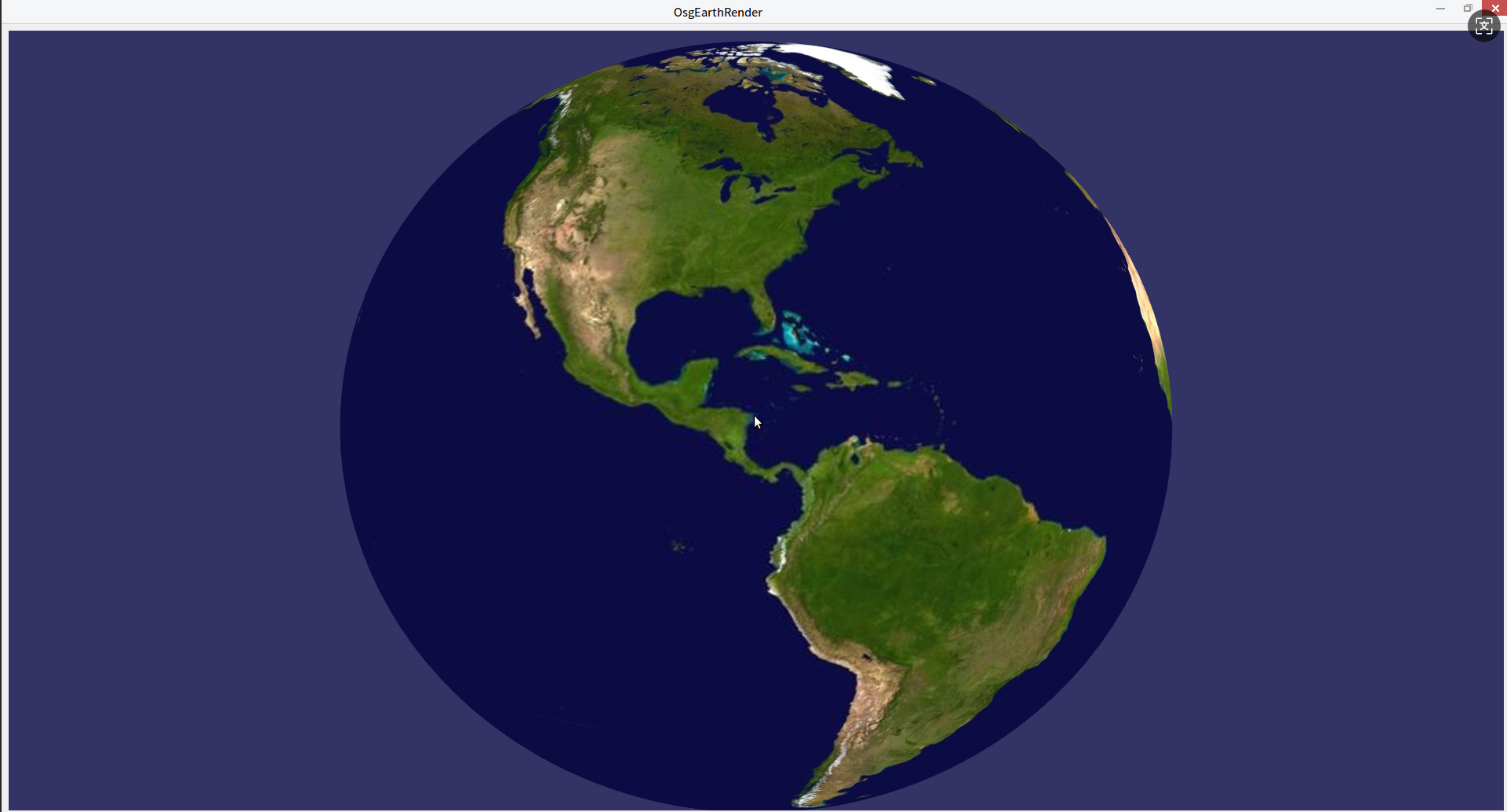
三、运行结果