文章目录
- 前言
- 一、如何互动
-
- [1.服务端 & 客户端](#1.服务端 & 客户端)
- [2.短连接 & 长连接](#2.短连接 & 长连接)
- 3.MQTT是什么?
- 二、开发抽签页面
- 三、部署项目
- 四、写入NFC标签内容
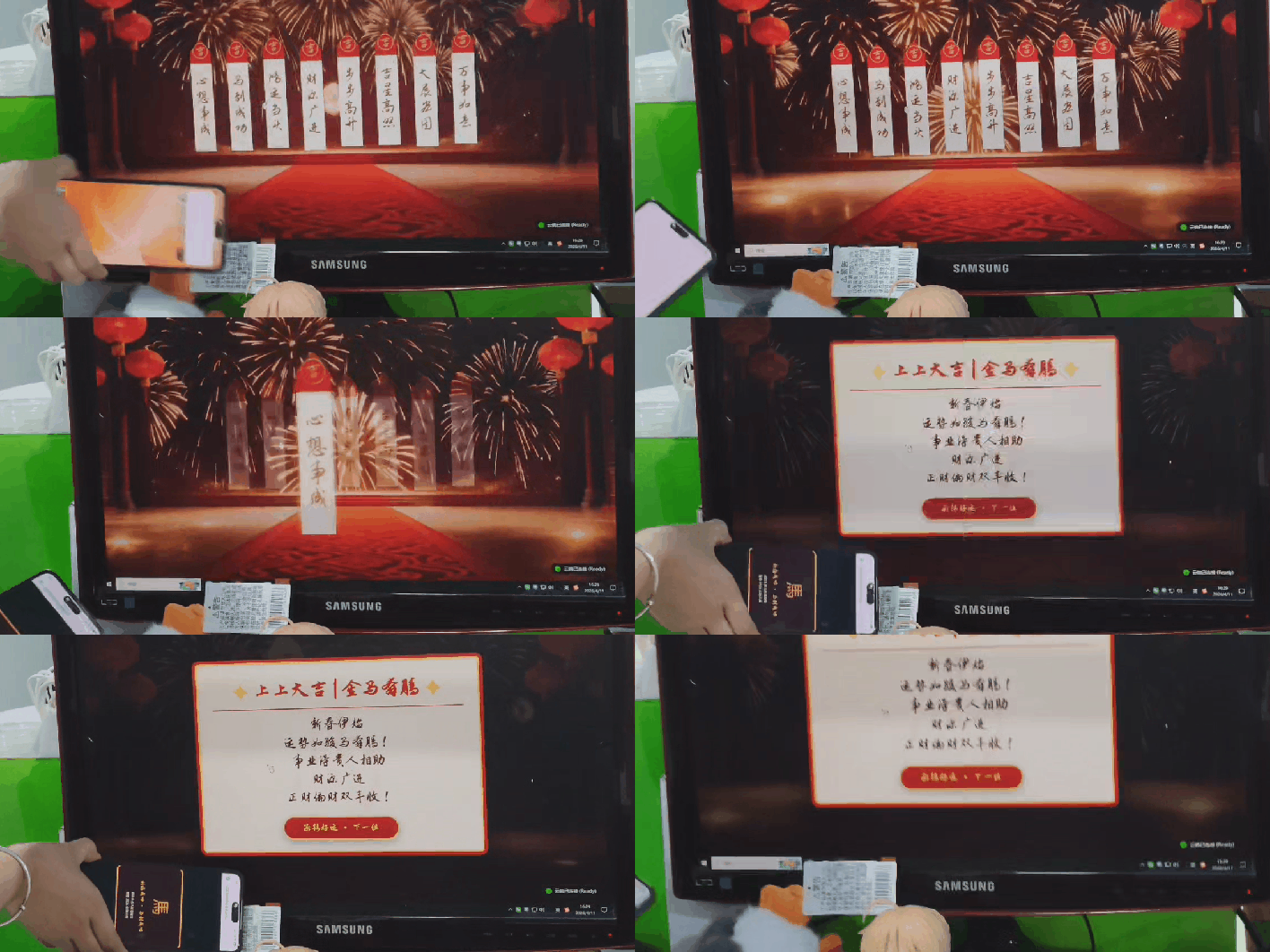
- 五、项目互动效果
前言
提示:年会抽签功能需要手机设备和电脑设备进行互动,因此最好将项目部署到云服务器或者云虚拟机上。如果是本地部署请确保手机和电脑在同一个网段!!!并且手机端NFC功能使用需要HTTPS,需要申请证书
近期我们公司行政找到我,希望我们这边开发个NFC标签互动小游戏在年会上使用,具体需求是参会人员用手机触碰NFC标签,互动之后,大屏幕那边就会显示该人员抽到的签内容。我也是第一次接触NFC标签开发,因此做个笔记分享
一、如何互动
我们思考下这个项目最重要的问题------如何互动,我们需要回忆下几个概念:服务端,客户端,短连接和长连接。
1.服务端 & 客户端
对于这个抽签小游戏项目,无需存储数据或者用户登录信息等。因此我觉得不需要做服务端。直接写客户端就可以了。手机和电脑设备都会自带浏览器。将项目开发为web应用是最合适的。
2.短连接 & 长连接
web应用是浏览器打开的应用。大多数是基于短连接HTTP协议。也就是我们刷新一次网页进行一次HTTP请求。请求结束之后,则无法再收到其他更新的信息。我们需要页面中加入长连接,进行消息推送。也就是下面用到MQTT协议。
3.MQTT是什么?
MQTT(消息队列遥测传输,Message Queuing Telemetry Transport)是一种基于发布/订阅范式的轻量级消息传输协议,详细请自行查看MQTT百度百科。我们写的是浏览器页面,需要用到JavaScript的MQTT库------MQTT.js
二、开发抽签页面
1.实现思路
我们主要是根据浏览器的URL是否存在参数来区分设备类型。电脑端的浏览器URL没有参数,当没有获取到ID参数则监听公共MQTT服务器订阅消息,收到消息之后显示标签内容;手机端的浏览器打开带有参数的URL,当获取到ID参数则给公共MQTT服务器发送订阅消息。
2.具体实现
新建项目文件夹nfc,在里面新建index.html
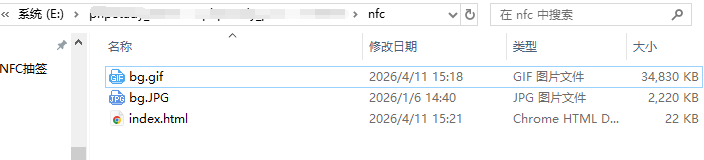
用到的背景动画如下

index.html代码如下:
html
<!DOCTYPE html>
<html lang="zh-CN">
<head>
    <meta charset="UTF-8">
    <meta name="viewport" content="width=device-width, initial-scale=1.0">
    <title>2026马到成功 | 赛博求签</title>

    <script src="https://unpkg.com/mqtt@4.3.7/dist/mqtt.min.js"></script>

    <link rel="preconnect" href="https://fonts.googleapis.com">
    <link rel="preconnect" href="https://fonts.gstatic.com" crossorigin>
    <link href="https://fonts.googleapis.com/css2?family=Zhi+Mang+Xing&family=Noto+Serif+SC:wght@700&display=swap" rel="stylesheet">

    <style>
        :root {
            --stick-red: #d6000f;
            --stick-beige: #f8f4e6;
            --stick-gold: #cfa972;
            --festive-red: #c00000;
            --festive-gold: #ffd34e;

            --art-font: "Zhi Mang Xing", "Ma Shan Zheng", cursive;
            --body-font: "Noto Serif SC", "Songti SC", serif;

            --pattern-clouds-subtle: url("data:image/svg+xml,%3Csvg width='60' height='60' viewBox='0 0 60 60' xmlns='http://www.w3.org/2000/svg'%3E%3Cpath d='M30 30c0-5.523 4.477-10 10-10s10 4.477 10 10-4.477 10-10 10-4.477-10-10-10zm0 0c0 5.523-4.477 10-10 10s-10-4.477-10-10 4.477-10 10-10 4.477-10 10 10z' fill='%23cfa972' fill-opacity='0.1' fill-rule='evenodd'/%3E%3C/svg%3E");
        }

        body {
            margin: 0; padding: 0;
            background-color: #000;
            color: var(--festive-gold);
            font-family: var(--body-font);
            height: 100vh; width: 100vw;
            overflow: hidden;
            display: flex; justify-content: center; align-items: center;
        }

        #cinema-stage {
            position: relative;
            width: 100vw; height: 56.25vw;
            max-height: 100vh; max-width: 177.78vh;
            overflow: hidden;
            display: flex; justify-content: center; align-items: center;
            background: radial-gradient(circle, #5e0000 0%, #2b0000 100%);
        }

        #bg-video {
            position: absolute;
            top: 0; left: 0; width: 100%; height: 100%;
            object-fit: cover;
            z-index: 0;
            opacity: 0.85;
        }

        #mobile-trigger-ui {
            display: none;
            text-align: center; z-index: 9999;
            background: rgba(60, 0, 0, 0.95);
            padding: 40px; border-radius: 20px;
            border: 3px solid var(--festive-red);
            box-shadow: 0 0 0 5px var(--festive-gold), 0 0 40px rgba(255, 215, 0, 0.4);
            width: 80%; max-width: 400px;
            position: fixed; top: 50%; left: 50%; transform: translate(-50%, -50%);
        }
        .success-icon {
            font-size: 80px; margin-bottom: 20px;
            font-family: var(--art-font);
            color: var(--festive-gold); text-shadow: 0 0 20px var(--festive-red);
            animation: pulse-pray 2s infinite ease-in-out;
        }
        @keyframes pulse-pray { 0% { transform: scale(1); opacity: 1; } 50% { transform: scale(1.1); opacity: 0.8; } 100% { transform: scale(1); opacity: 1; } }
        .mobile-text {
            font-size: 32px;
            font-family: var(--art-font);
            color: var(--festive-gold);
            margin-bottom: 15px;
        }
        .mobile-tip { font-size: 16px; color: #fff; opacity: 0.9; line-height: 1.6; font-weight: normal;}

        #pc-container { width: 100%; height: 100%; position: absolute; top:0; left:0; z-index: 2; }

        #start-mask {
            position: absolute; top: 0; left: 0; width: 100%; height: 100%;
            background: rgba(0,0,0,0.8); z-index: 5000;
            display: flex; justify-content: center; align-items: center;
            flex-direction: column; cursor: pointer;
            border: 20px solid var(--festive-red); box-sizing: border-box;
        }

        #start-mask h1 {
            font-size: 5rem; margin-bottom: 30px;
            font-family: var(--art-font);
            letter-spacing: 5px;
            background: linear-gradient(45deg, #bf953f, #fcf6ba, #b38728, #fbf5b7, #aa771c);
            background-size: 200% auto;
            -webkit-background-clip: text;
            background-clip: text;
            color: transparent;
            animation: goldShine 3s linear infinite;
            filter: drop-shadow(0 0 5px rgba(255, 215, 0, 0.3));
        }
        @keyframes goldShine { to { background-position: 200% center; } }

        #start-mask p {
            font-size: 2rem; color: #fff; animation: pulse 1s infinite;
            border: 2px solid #fff; padding: 10px 40px; border-radius: 50px;
            font-family: var(--art-font);
        }
        @keyframes pulse { 0% { opacity: 0.5; } 50% { opacity: 1; } 100% { opacity: 0.5; } }

        .status-box {
            position: absolute; bottom: 20px; right: 20px;
            z-index: 3000; background: rgba(0,0,0,0.6);
            padding: 8px 15px; border-radius: 20px;
            display: flex; align-items: center; gap: 10px;
            border: 1px solid rgba(255,255,255,0.3);
        }
        .status-dot { width: 12px; height: 12px; background-color: #f00; border-radius: 50%; transition: all 0.3s; border: 2px solid rgba(255,255,255,0.5);}
        .status-text { color: #fff; font-size: 14px; font-family: sans-serif;}

        #stick-container {
            position: absolute; top: 50%; left: 50%; transform: translate(-50%, -50%);
            width: 90%; display: flex; justify-content: center; align-items: center;
            flex-wrap: wrap; gap: 20px; z-index: 10;
        }

        .stick {
            position: relative;
            width: 70px; height: 360px;
            margin: 10px 15px;
            clip-path: polygon(50% 0%, 100% 12%, 100% 100%, 0% 100%, 0% 12%);
            border-radius: 0; border: none;
            background:
                var(--pattern-clouds-subtle) center 100px / 60px repeat,
                linear-gradient(to bottom, var(--stick-red) 0%, var(--stick-red) 22%, var(--stick-beige) 22%, var(--stick-beige) 100%);

            display: flex;
            align-items: center;
            justify-content: flex-start;
            padding-top: 110px;
            box-sizing: border-box;

            writing-mode: vertical-rl;

            font-family: var(--art-font);
            font-size: 3.2rem;
            font-weight: normal;

            color: #8a5a1f;
            text-shadow: 0 1px 0 rgba(255,255,255,0.4);

            letter-spacing: 0px;
            cursor: default;
            animation: breathe var(--duration, 3s) ease-in-out infinite alternate;
            filter: drop-shadow(12px 12px 6px rgba(0,0,0,0.9));
            transition: all 1s cubic-bezier(0.25, 1, 0.5, 1);
        }

        @keyframes breathe {
            0% { transform: translateY(0); }
            100% { transform: translateY(-15px); }
        }

        .stick::before {
            content: '吉';
            position: absolute;
            top: 3.5%; left: 50%;
            transform: translateX(-50%);
            width: 45px; height: 45px;
            border: 3px solid var(--stick-gold);
            border-radius: 50%;
            display: flex; justify-content: center; align-items: center;
            font-size: 2.6rem;
            color: var(--stick-gold);
            font-family: var(--art-font);
            background-image: none; margin: 0; opacity: 1; z-index: 2;
        }

        .stick::after { display: none; }

        .stick.fade-out { opacity: 0; transform: scale(0.5); }

        .stick.chosen {
            position: fixed; z-index: 999;
            top: 50% !important; left: 50% !important;
            transform: translate(-50%, -50%) scale(1.6) rotate(0deg) !important;
            filter: drop-shadow(0 0 20px rgba(255, 211, 78, 1));
            animation: none;
        }

        #result-overlay {
            position: absolute; top: 0; left: 0; width: 100%; height: 100%;
            z-index: 1000; display: flex; justify-content: center; align-items: center;
            opacity: 0; pointer-events: none; perspective: 1500px;
            transition: opacity 0.5s; background: rgba(0,0,0,0.6);
        }
        #result-overlay.active { opacity: 1; pointer-events: auto; }

        .fortune-card {
            width: 800px;
            min-height: 450px;
            padding: 40px 50px;
            background-color: #fdf7e3;
            border: 10px solid var(--festive-red); outline: 5px solid var(--festive-gold); outline-offset: -15px;
            border-radius: 20px; text-align: center;
            box-shadow: 0 50px 120px rgba(0,0,0,1);
            opacity: 0; transform: rotateY(90deg);
            transition: all 0.8s cubic-bezier(0.175, 0.885, 0.32, 1.275);
            position: relative; overflow: hidden;
            display: flex; flex-direction: column; justify-content: center; align-items: center;
        }
        .fortune-card::before {
            content: '馬'; position: absolute; top: 50%; left: 50%; transform: translate(-50%, -50%);
            font-size: 400px; color: var(--festive-red); opacity: 0.05;
            font-family: var(--art-font);
            pointer-events: none; z-index: 0;
        }
        .fortune-card.show { opacity: 1; transform: rotateY(0deg); }

        #fortune-title {
            font-size: 4.2rem;
            margin: 0 0 20px 0;
            color: var(--festive-red);
            border-bottom: 3px solid var(--festive-red); padding-bottom: 15px;
            position: relative; z-index: 1;
            font-family: var(--art-font);
            text-shadow: 1px 1px 0 var(--festive-gold);
            width: 100%;
        }
        #fortune-title::before { content: '✦'; color: var(--festive-gold); margin-right: 15px; }
        #fortune-title::after { content: '✦'; color: var(--festive-gold); margin-left: 15px; }

        #fortune-text {
            font-family: "STXinwei", "华文新魏", var(--art-font);
            font-size: 3.0rem;
            line-height: 1.2;
            color: #5c1b1b;
            font-weight: normal;
            position: relative; z-index: 1;
            white-space: pre-wrap;
            text-align: center;
        }

        .reset-btn {
            margin-top: 30px;
            padding: 15px 60px; font-size: 2.0rem; position: relative; z-index: 1;
            background: linear-gradient(to bottom, var(--festive-red), #a00000);
            color: var(--festive-gold);
            border: 3px solid var(--festive-gold); border-radius: 60px; cursor: pointer;
            font-family: var(--art-font);
            box-shadow: 0 10px 25px rgba(0,0,0,0.4), inset 0 2px 5px rgba(255,255,255,0.2);
            text-shadow: 1px 1px 2px rgba(0,0,0,0.5); transition: all 0.3s;
        }
        .reset-btn:hover { transform: scale(1.05) translateY(-5px); box-shadow: 0 15px 35px rgba(0,0,0,0.5), inset 0 2px 5px rgba(255,255,255,0.3); }
    </style>
</head>
<body>
    <div id="cinema-stage">
        <!-- 换成自己背景图片路径 -->
        <img src="bg.gif" alt="" style="width: 100%;">

        <div id="pc-container">
            <div id="start-mask" onclick="activateSystem()">
                <h1>2026 马到成功 | 赛博求签</h1>
                <p>✦ 点击开启新春鸿运 ✦</p>
            </div>

            <div class="status-box">
                <div class="status-dot" id="status-dot"></div>
                <div class="status-text" id="status-text">连接中...</div>
            </div>

            <div id="stick-container">
                <div class="stick" style="--duration:3s">心想事成</div>
                <div class="stick" style="--duration:4s">马到成功</div>
                <div class="stick" style="--duration:3.5s">鸿运当头</div>
                <div class="stick" style="--duration:4.5s">财源广进</div>
                <div class="stick" style="--duration:3.2s">步步高升</div>
                <div class="stick" style="--duration:3.8s">吉星高照</div>
                <div class="stick" style="--duration:4.2s">大展宏图</div>
                <div class="stick" style="--duration:3.6s">万事如意</div>
            </div>

            <div id="result-overlay">
                <div class="fortune-card" id="fortune-card">
                    <h2 id="fortune-title">标题</h2>
                    <div id="fortune-text">内容</div>
                    <button class="reset-btn" id="reset-btn">承接好运 · 下一位</button>
                </div>
            </div>
        </div>
    </div>

    <div id="mobile-trigger-ui">
        <div class="success-icon">馬</div>
        <div class="mobile-text">祈福成功 · 马到成功</div>
        <div class="mobile-tip">请抬头看大屏幕解签<br>愿您 2026 宏图大展</div>
    </div>

    <script>
        const MQTT_TOPIC = 'nianhui_final_2025_fixed_channel';
        const MQTT_BROKER = 'wss://broker.emqx.io:8084/mqtt';

        const FORTUNE_DATABASE = {
            '01': { title: "上上大吉 | 金马奔腾", content: "新春伊始\n运势如骏马奔腾!\n事业得贵人相助\n财源广进\n正财偏财双丰收!" },
            '02': { title: "大吉 | 马到成功", content: "所谋之事\n定能马到成功!\n只要付诸行动\n必能势如破竹\n顺利达成心中目标!" },
            '03': { title: "上吉 | 龙马精神", content: "身体健康\n精力充沛!\n任何挑战如履平地\n你是团队中\n最耀眼的明星!" },
            '04': { title: "吉 | 鸿运当头", content: "喜鹊枝头叫\n今年运气好到让人羡慕!\n多结善缘\n好机会将主动找上门" },
            '05': { title: "中吉 | 步步高升", content: "运势稳步上扬\n厚积薄发\n耐心积累\n年终回首\n必将站在全新的高度!" },
            '06': { title: "上上签 | 伯乐相马", content: "今年最大的好运\n是遇伯乐!\n才华将被充分发掘\n迎来职业生涯高光时刻!" },
            '07': { title: "大吉 | 财运亨通", content: "金马送福\n财星高照!\n投资理财眼光独到\n实现财务小目标\n就在今年!" },
            '08': { title: "吉 | 顺风顺水", content: "烦恼随风而去\n万事顺遂!\n工作生活中的小阻碍\n迎刃而解\n享受美好时光" },
            '09': { title: "上吉 | 喜从天降", content: "生活中藏着巨大彩蛋!\n可能是奖金\n晋升或好消息\n喜事即将临门!" },
            '10': { title: "吉 | 福星高照", content: "职场防御力满分!\n无论环境波动\n你都能稳坐钓鱼台\n是团队的定海神针" },
            '11': { title: "中平 | 蓄势待发", content: "养精蓄锐的最佳期\n像良驹调整呼吸\n一旦发力\n必将一鸣惊人!" },
            '12': { title: "大吉 | 势不可挡", content: "行动力爆棚!\n任何困难都无法阻挡你\n想到就做\n年度MVP非你莫属!" },
            '13': { title: "吉 | 珠联璧合", content: "喜得绝佳拍档!\n强强联手\n发挥巨大能量\n共创辉煌佳绩!" },
            '14': { title: "中吉 | 渐入佳境", content: "状态渐入佳境\n以更智慧的方式处理问题\n享受游刃有余的成就感" },
            '15': { title: "上吉 | 心想事成", content: "美好愿景变为现实!\n梦想路径清晰可见\n相信直觉\n大胆追梦吧!" },
            '16': { title: "吉 | 贵人扶持", content: "真诚善良积攒极佳人缘\n困难时总有贵人相助\n善待他人\n福报自来!" },
            '17': { title: "中平 | 平安是福", content: "运势平稳\n平安健康是最大福气!\n在追求事业时\n别忘照顾好身体与家人" },
            '18': { title: "大吉 | 飞黄腾达", content: "质变之年!\n能力格局巨大飞跃\n抓住机遇\n开启人生辉煌新篇章!" },
            '19': { title: "吉 | 吉庆有余", content: "掌握生活平衡之道\n从容不迫的态度\n带来持久健康\n和源源不断的快乐!" },
            '20': { title: "否极泰来 | 触底反弹", content: "转折点已到!\n否极泰来\n巨大的上升空间就在前方\n好运即将爆发!" },
            'default': { title: "纳福纳祥", content: "祥瑞之气环绕\n请静心祈福\n重新扫描\n迎接属于你的好运" }
        };

        const urlParams = new URLSearchParams(window.location.search);
        const triggerId = urlParams.get('id');

        // 触发模态框
        function activateSystem() {
            document.getElementById('start-mask').style.display = 'none';
            const video = document.getElementById('bg-video');
            if (video) video.play().catch(e => console.log('Autoplay blocked:', e));
        }

        if (triggerId) {
            initMobileMode(triggerId);
        } else {
            initPCMode();
        }

        // 初始化移动端模式(移动端触发抽签)
        function initMobileMode(id) {
            document.getElementById('cinema-stage').style.display = 'none';
            document.getElementById('mobile-trigger-ui').style.display = 'block';

            const client = mqtt.connect(MQTT_BROKER);
            client.on('connect', () => {
                client.publish(MQTT_TOPIC, JSON.stringify({ id: id }), { qos: 1 });
            });
        }

        // 初始化PC端模式(PC端显示酬勤内容)
        function initPCMode() {
            const client = mqtt.connect(MQTT_BROKER);
            const statusDot = document.getElementById('status-dot');
            const statusText = document.getElementById('status-text');

            client.on('connect', () => {
                statusDot.style.backgroundColor = '#0f0';
                statusDot.style.boxShadow = '0 0 10px #0f0';
                statusText.innerText = '云端已连接 (Ready)';
                client.subscribe(MQTT_TOPIC);
            });

            // 增加断线重连提示
            client.on('reconnect', () => {
                statusDot.style.backgroundColor = '#fa0';
                statusText.innerText = '正在重连...';
            });

            client.on('error', (err) => {
                console.error("MQTT Error:", err);
                statusDot.style.backgroundColor = '#f00';
                statusText.innerText = '连接失败,请检查网络';
            });

            client.on('message', (topic, message) => {
                try {
                    const data = JSON.parse(message.toString());
                    animateChoiceAndShowResult(data.id);
                } catch (e) { console.error(e); }
            });
        }

        let isAnimating = false;
        // 动画选择并显示结果
        function animateChoiceAndShowResult(fortuneId) {
            if (isAnimating) return;
            isAnimating = true;

            const sticks = document.querySelectorAll('.stick');
            const stickIndex = (parseInt(fortuneId) - 1) % sticks.length;
            const chosenStick = sticks[stickIndex];

            const rect = chosenStick.getBoundingClientRect();

            sticks.forEach((stick, index) => {
                if (index !== stickIndex) {
                    stick.classList.add('fade-out');
                }
            });

            chosenStick.style.position = 'fixed';
            chosenStick.style.left = rect.left + 'px';
            chosenStick.style.top = rect.top + 'px';
            chosenStick.style.margin = '0';
            chosenStick.style.zIndex = '999';

            void chosenStick.offsetWidth;

            chosenStick.classList.add('chosen');

            setTimeout(() => {
                chosenStick.style.left = '';
                chosenStick.style.top = '';
            }, 50);

            setTimeout(() => {
                showResultCard(fortuneId);
            }, 1200);
        }

        // 显示结果卡片
        function showResultCard(id) {
            const data = FORTUNE_DATABASE[id] || FORTUNE_DATABASE['default'];
            document.getElementById('fortune-title').innerText = data.title;
            document.getElementById('fortune-text').innerText = data.content;

            const overlay = document.getElementById('result-overlay');
            overlay.classList.add('active');
            const card = document.getElementById('fortune-card');
            setTimeout(() => { card.classList.add('show'); }, 100);
        }

        // 重置按钮逻辑 点击后重置所有状态
        document.getElementById('reset-btn').addEventListener('click', () => {
            const overlay = document.getElementById('result-overlay');
            const card = document.getElementById('fortune-card');
            overlay.classList.remove('active');
            card.classList.remove('show');

            const sticks = document.querySelectorAll('.stick');
            sticks.forEach(stick => {
                stick.classList.remove('fade-out');
                stick.classList.remove('chosen');
                stick.style.position = '';
                stick.style.left = '';
                stick.style.top = '';
                stick.style.margin = '';
                stick.style.zIndex = '';
            });

            isAnimating = false;
        });
    </script>
</body>
</html>
三、部署项目
将项目部署到云服务器上。因为手机端NFC功能需要再HTTPS协议上进行,部署的时候需要申请相应的证书即可。接下来继续往下操作
四、写入NFC标签内容
项目部署好了之后,给NFC标签写入网址内容:https://www.xxxx.net/index.html?id=01。之后用手机触碰NFC
五、项目互动效果
手机端触碰NFC标签,点击打开网址。电脑PC端显示标签内容