目录
[实战篇 - 01. 达人探店 - 发布探店笔记](#实战篇 - 01. 达人探店 - 发布探店笔记)
[实战篇 - 02. 达人探店 - 查看探店笔记](#实战篇 - 02. 达人探店 - 查看探店笔记)
[实战篇 - 03. 达人探店 - 点赞功能](#实战篇 - 03. 达人探店 - 点赞功能)
[实战篇 - 04. 达人探店 - 点赞排行榜](#实战篇 - 04. 达人探店 - 点赞排行榜)
[实战篇 - 05. 好友关注 - 关注和取关](#实战篇 - 05. 好友关注 - 关注和取关)
[实战篇 - 06. 好友关注 - 共同关注](#实战篇 - 06. 好友关注 - 共同关注)
[实战篇 - 07. 好友关注 - Feed 流实现方案分析](#实战篇 - 07. 好友关注 - Feed 流实现方案分析)
[实战篇 - 08. 好友关注 - 推送到粉丝收件箱](#实战篇 - 08. 好友关注 - 推送到粉丝收件箱)
[实战篇 - 09. 好友关注 - 滚动分页查询收件箱的思路](#实战篇 - 09. 好友关注 - 滚动分页查询收件箱的思路)
[实战篇 - 10. 好友关注 - 实现滚动分页查询](#实战篇 - 10. 好友关注 - 实现滚动分页查询)
问题:.longValue()和Long.valueOf有什么区别?
[实战篇 - 11. 附近商铺 - GEO 数据结构的基本用法](#实战篇 - 11. 附近商铺 - GEO 数据结构的基本用法)
[实战篇 - 12. 附近商铺 - 导入店铺数据到 GEO](#实战篇 - 12. 附近商铺 - 导入店铺数据到 GEO)
[实战篇 - 13. 附近商铺 - 实现附近商户功能](#实战篇 - 13. 附近商铺 - 实现附近商户功能)
问题:形参列表注解里面的required=false什么意思?
[实战篇 - 15. 用户签到 - BitMap 功能演示](#实战篇 - 15. 用户签到 - BitMap 功能演示)
[实战篇 - 16. 用户签到 - 实现签到功能](#实战篇 - 16. 用户签到 - 实现签到功能)
[实战篇 - 17. 用户签到 - 统计连续签到](#实战篇 - 17. 用户签到 - 统计连续签到)
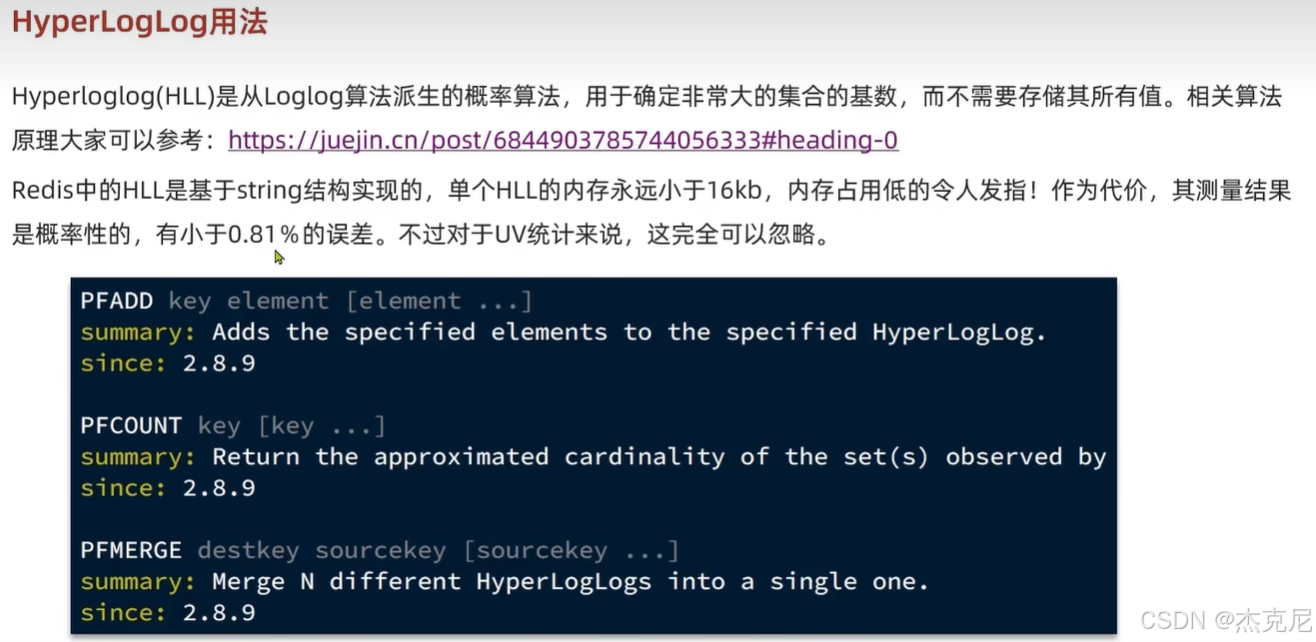
[实战篇 - 18.UV 统计 - HyperLogLog 的用法](#实战篇 - 18.UV 统计 - HyperLogLog 的用法)
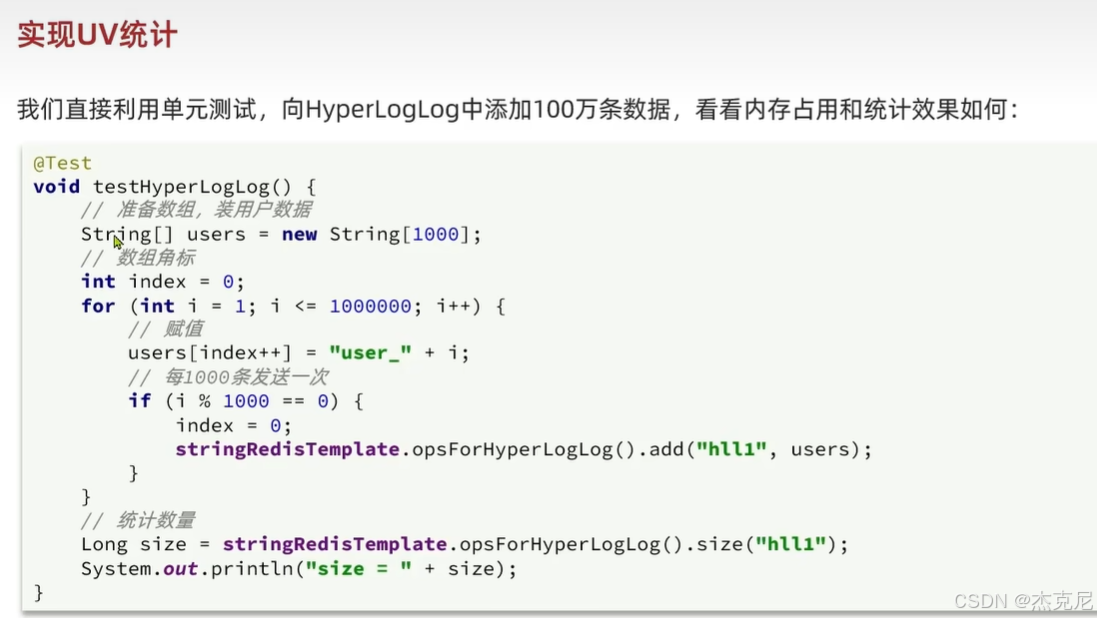
[实战篇 - 19.UV 统计 - 测试百万数据的统计](#实战篇 - 19.UV 统计 - 测试百万数据的统计)
一复习
问题1:解释下面代码?
java// 1.获取消息队列中的订单信息 XREADGROUP GROUP g1 c1 COUNT 1 BLOCK 2000 STREAMS s1 > List<MapRecord<String, Object, Object>> list = stringRedisTemplate.opsForStream().read( Consumer.from("g1", "c1"), StreamReadOptions.empty().count(1).block(Duration.ofSeconds(2)), treamOffset.create("stream.orders", ReadOffset.lastConsumed()) );这段代码的作用: 从 Redis Stream 消息队列
stream.orders里,用消费者组g1、消费者c1,读取1 条新消息 **,最多阻塞等 2 秒。**
一、逐行拆解(超级清晰)
java
运行
stringRedisTemplate.opsForStream()作用:获取 Redis 操作 Stream(消息队列) 的工具。
java
运行
.read(...)作用:读取消息对应 Redis 原生命令:
plaintext
XREADGROUP
java
运行
Consumer.from("g1", "c1")
g1:消费者组名
c1:消费者名称作用:告诉 Redis
我是组 g1 里的消费者 c1,我来读消息啦!
java
运行
StreamReadOptions.empty()
    .count(1)      // 一次只读1条
    .block(Duration.ofSeconds(2))  // 没消息就阻塞等2秒
对应 Redis 参数:
plaintext
COUNT 1 BLOCK 2000意思:
一次只拿 1 条消息
队列没消息就 阻塞等待 2 秒
2 秒后还没消息,返回 null
java
运行
StreamOffset.create("stream.orders", ReadOffset.lastConsumed())
stream.orders:队列名称
ReadOffset.lastConsumed()→ >`>` = 只读取新消息(从未消费过的)
问题2:解释下面代码?
java// 1.执行lua脚本 Long result = stringRedisTemplate.execute( SECKILL_SCRIPT, Collections.emptyList(), voucherId.toString(), userId.toString(), String.valueOf(orderId) );
stringRedisTemplate.execute(...)作用 :执行 Redis 命令,专门用来执行 Lua 脚本。特点:
整个脚本 原子执行
不会被其他线程打断
秒杀绝对不会超卖、不会重复下单
SECKILL_SCRIPT这是你提前写好的秒杀 Lua 脚本,内容大概包含:
判断库存
判断用户是否下单过
扣库存
发送消息到队列
stream.orders
Collections.emptyList()传给 Lua 的 KEYS 参数(这里是空的)
Lua 里有
KEYS[1]、KEYS[2]这里传空 → 说明脚本没用到 Redis 的 key 参数
- 后面三个参数(重点!)
java
运行
voucherId.toString(),  // 优惠券ID
userId.toString(),     // 用户ID
String.valueOf(orderId) // 订单ID
这 3 个会传给 Lua 里的 ARGV:
ARGV[1]= voucherId
ARGV[2]= userId
ARGV[3]= orderIdLua 脚本里就是用这 3 个值做判断。
三、返回值
result是什么?Lua 脚本 return 一个数字,Java 收到:
0= 秒杀成功
1= 库存不足
2= 重复下单
二
实战篇 - 01. 达人探店 - 发布探店笔记
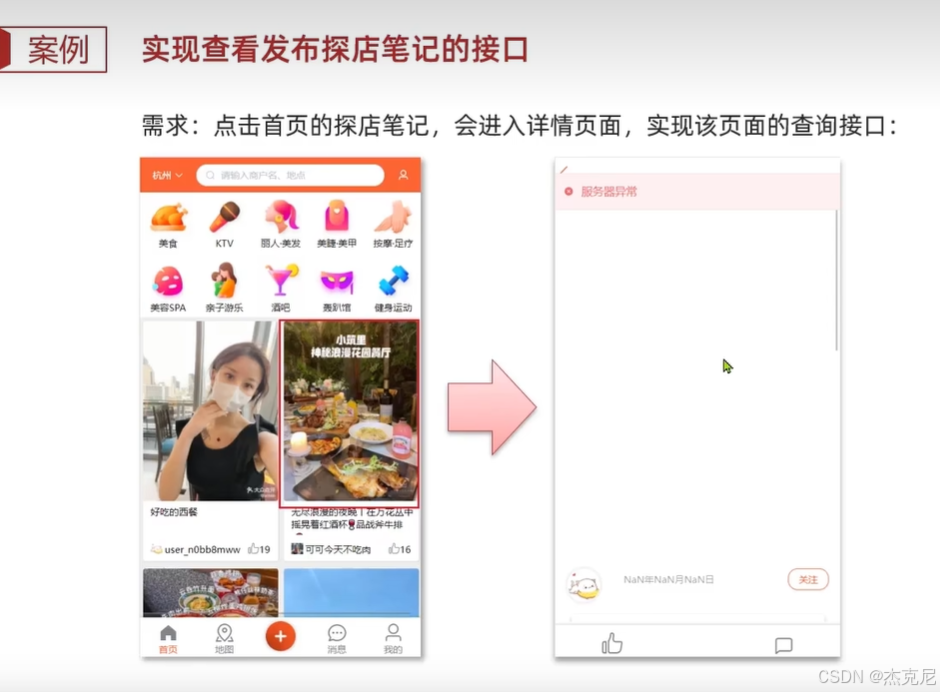
实战篇 - 02. 达人探店 - 查看探店笔记
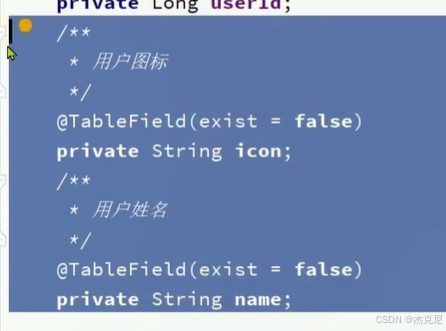
问题:下面注解作用?
表示在数据库中不存在该字段
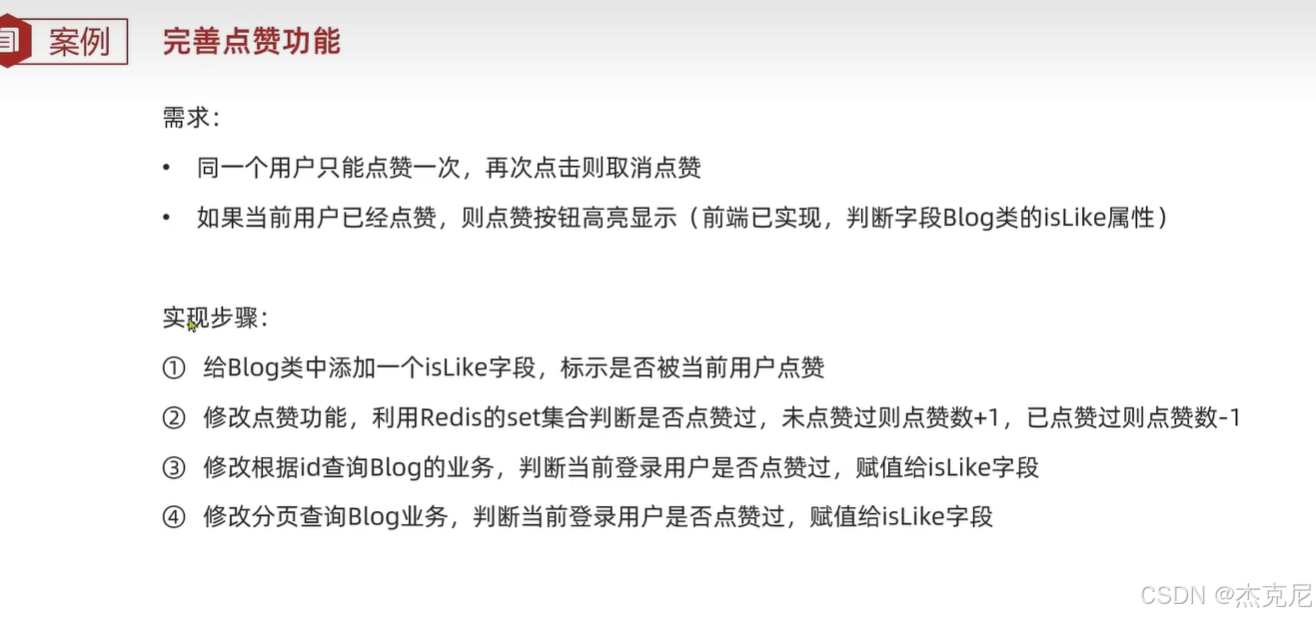
实战篇 - 03. 达人探店 - 点赞功能
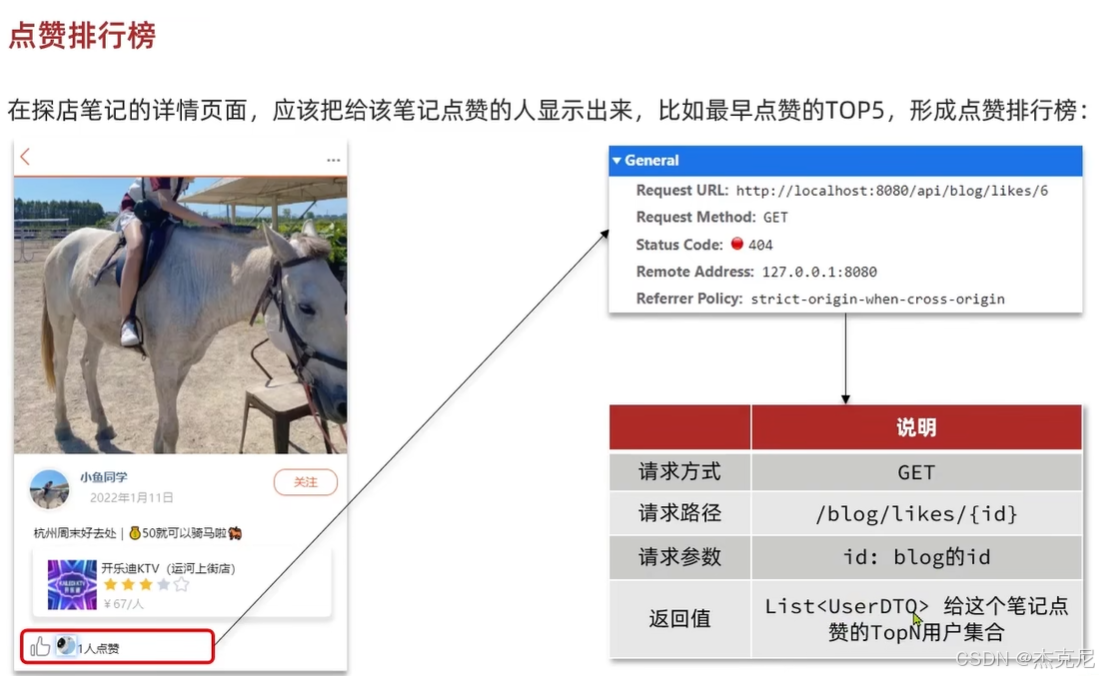
实战篇 - 04. 达人探店 - 点赞排行榜
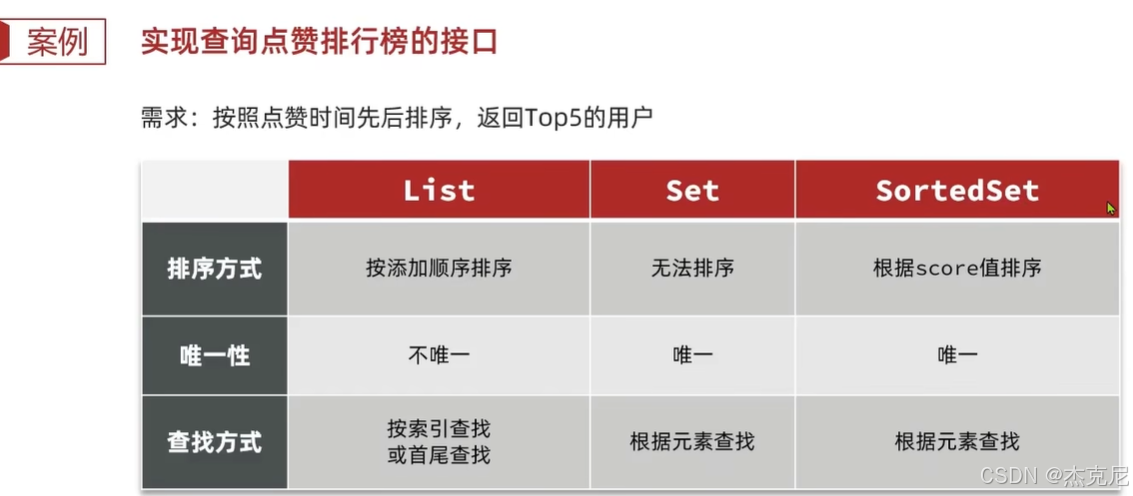
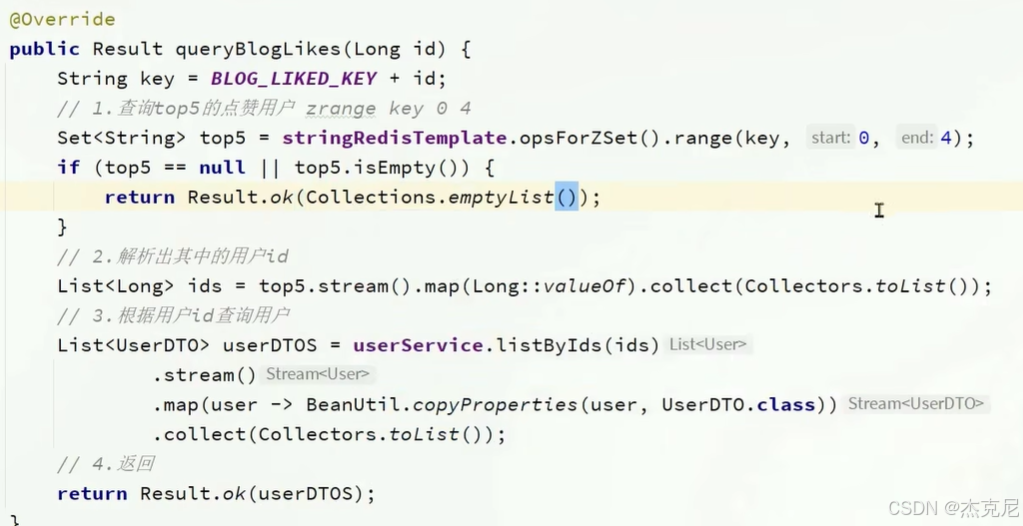
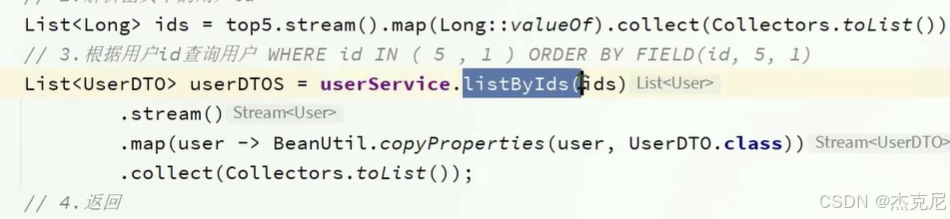
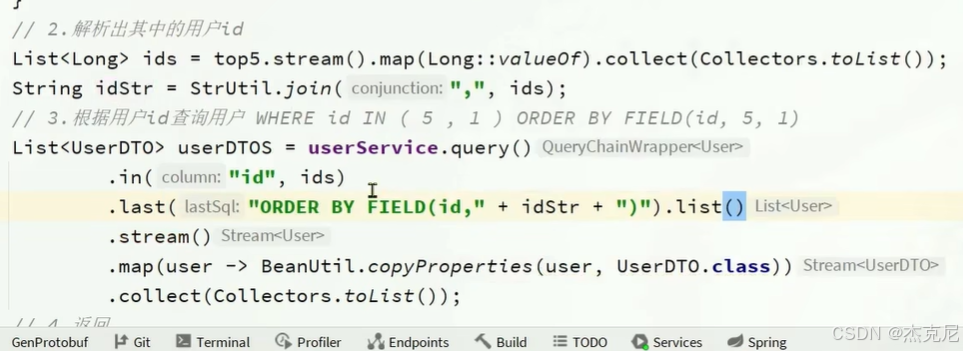
问题:下图代码为什么不能正确排序?
因为底层SQL使用的是in()//范围查询
解决办法,使用Order by
实战篇 - 05. 好友关注 - 关注和取关
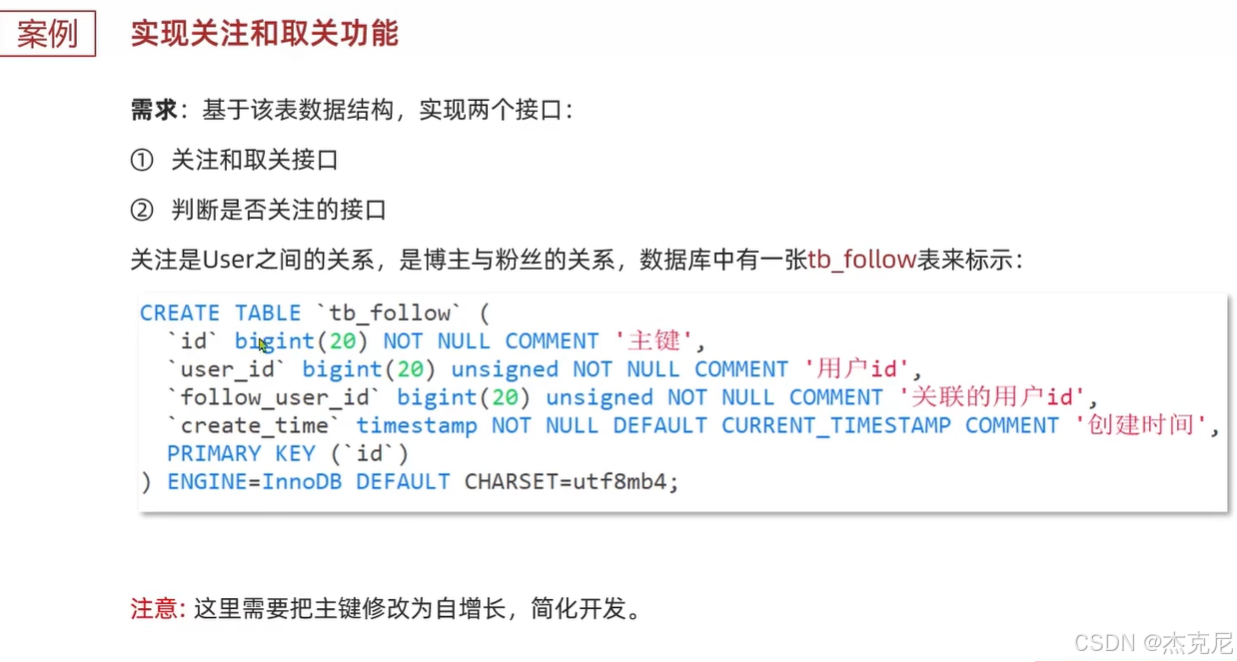
java
    @Override
    public Result follow(Long followUserId, Boolean isFollow) {
        // 1.获取登录用户
        Long userId = UserHolder.getUser().getId();
        String key = "follows:" + userId;
        // 1.判断到底是关注还是取关
        if (isFollow) {
            // 2.关注,新增数据
            Follow follow = new Follow();
            follow.setUserId(userId);
            follow.setFollowUserId(followUserId);
            boolean isSuccess = save(follow);
            if (isSuccess) {
                // 把关注用户的id,放入redis的set集合 sadd userId followerUserId
                stringRedisTemplate.opsForSet().add(key, followUserId.toString());
            }
        } else {
            // 3.取关,删除 delete from tb_follow where user_id = ? and follow_user_id = ?
            boolean isSuccess = remove(new QueryWrapper<Follow>()
                    .eq("user_id", userId).eq("follow_user_id", followUserId));
            if (isSuccess) {
                // 把关注用户的id从Redis集合中移除
                stringRedisTemplate.opsForSet().remove(key, followUserId.toString());
            }
        }
        return Result.ok();
    }
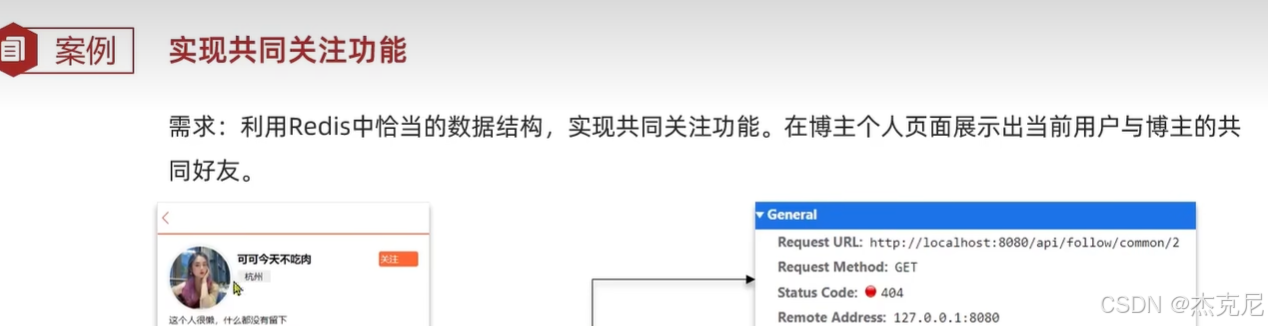
实战篇 - 06. 好友关注 - 共同关注
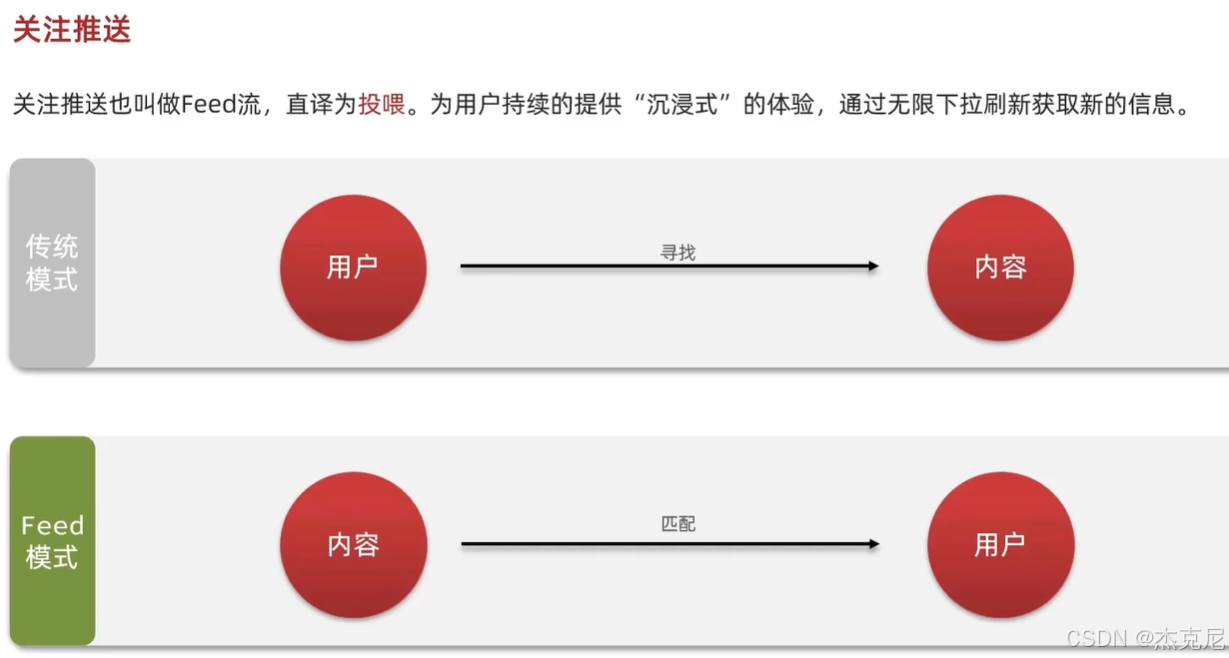
实战篇 - 07. 好友关注 - Feed 流实现方案分析
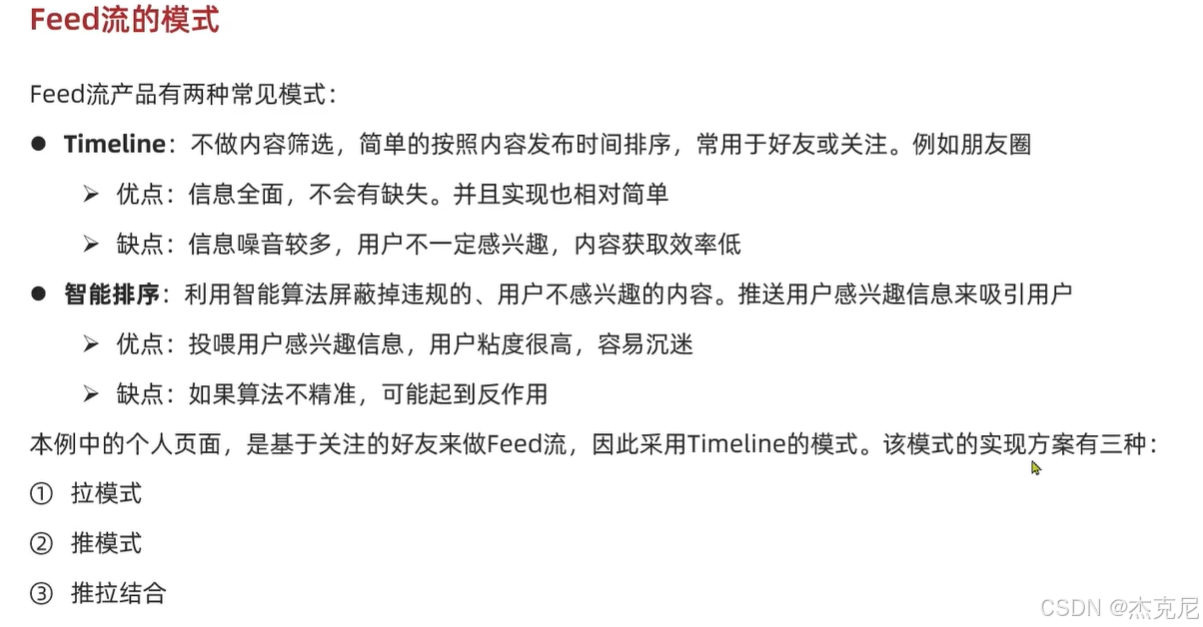
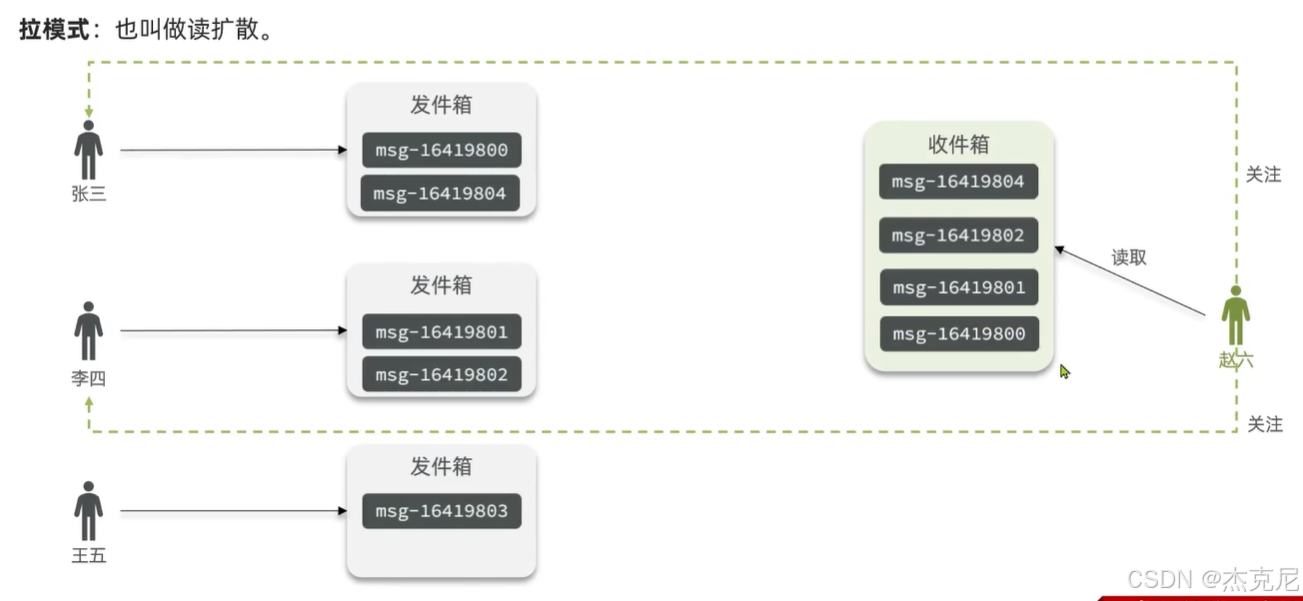
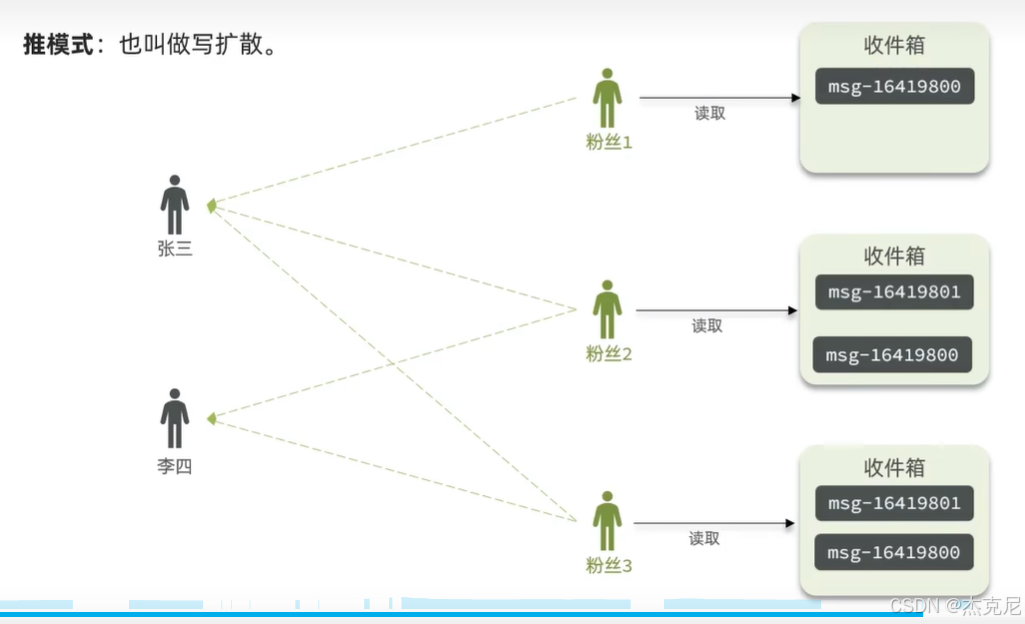
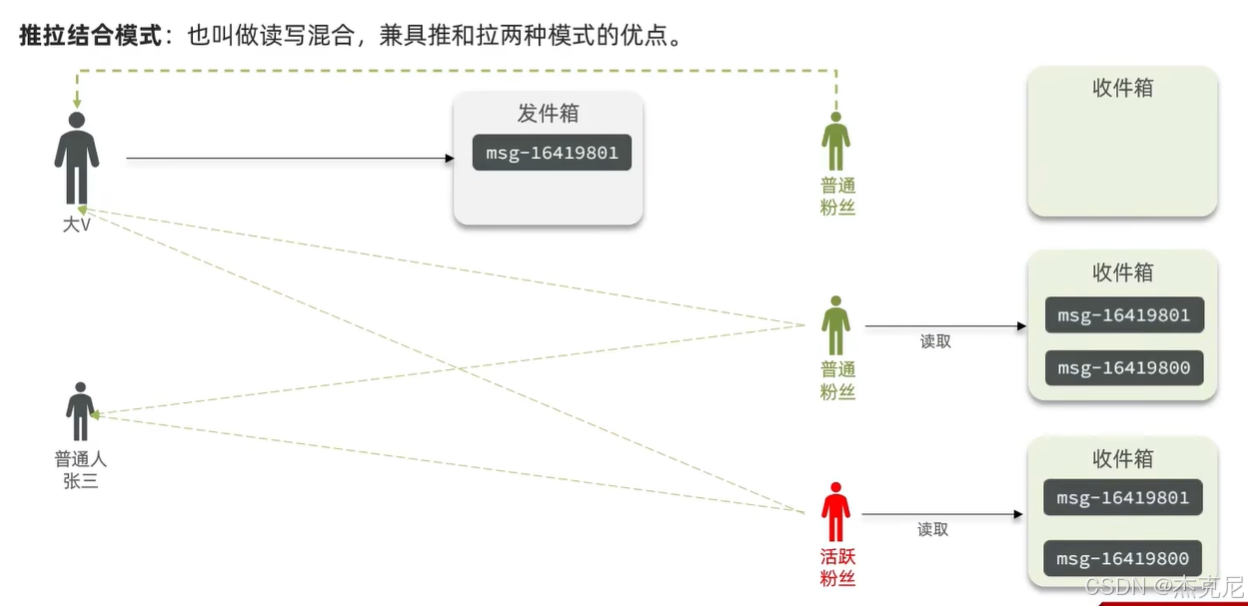
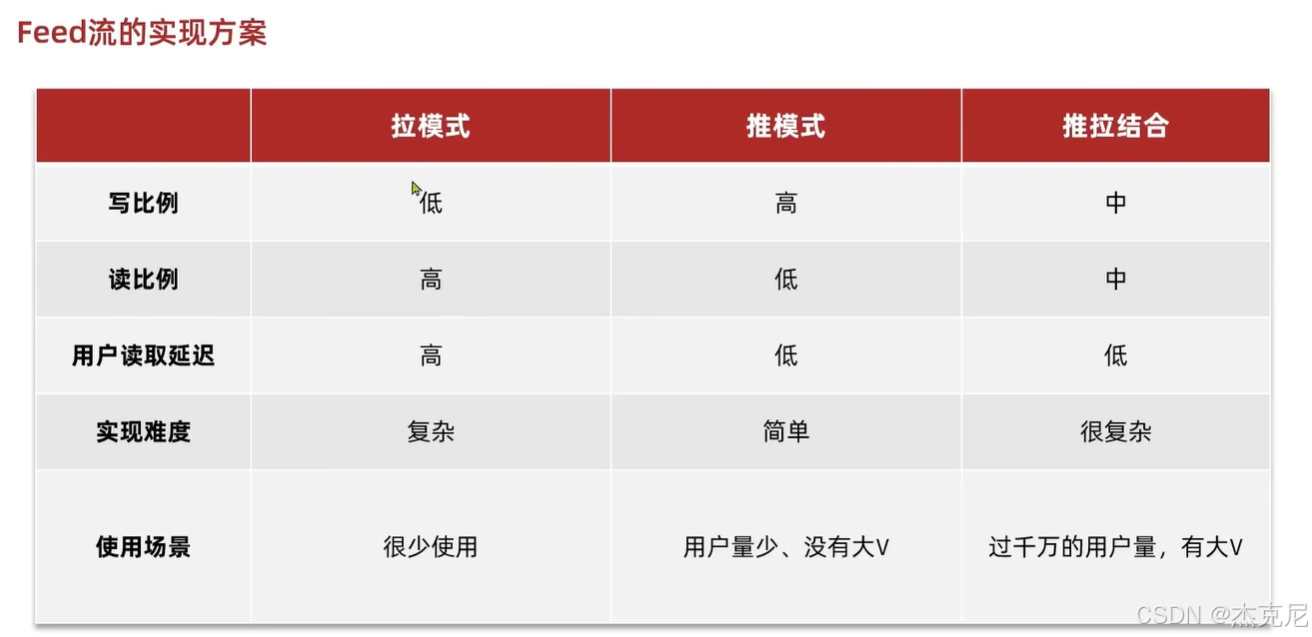
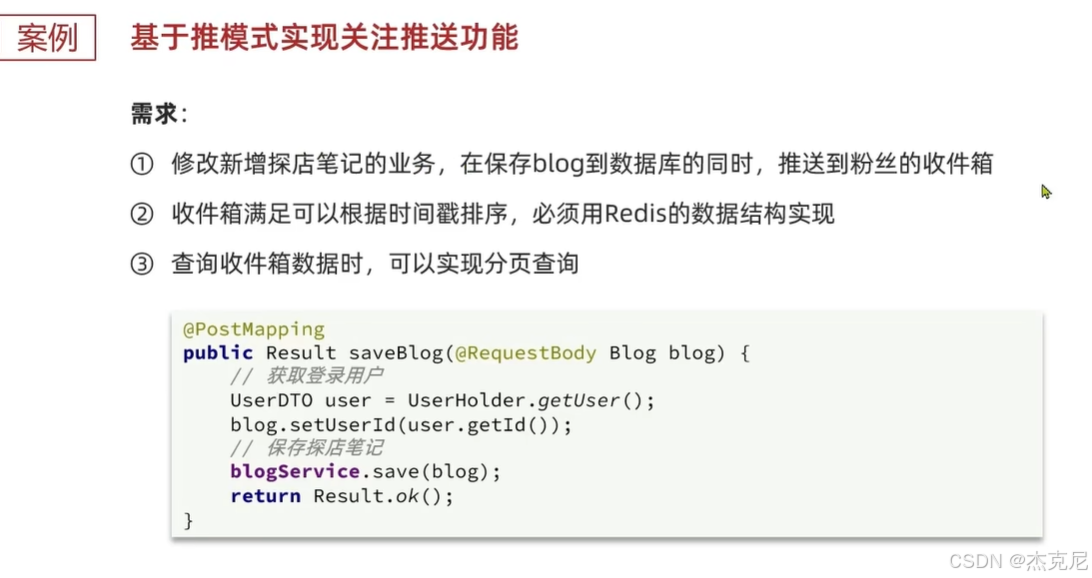
实战篇 - 08. 好友关注 - 推送到粉丝收件箱
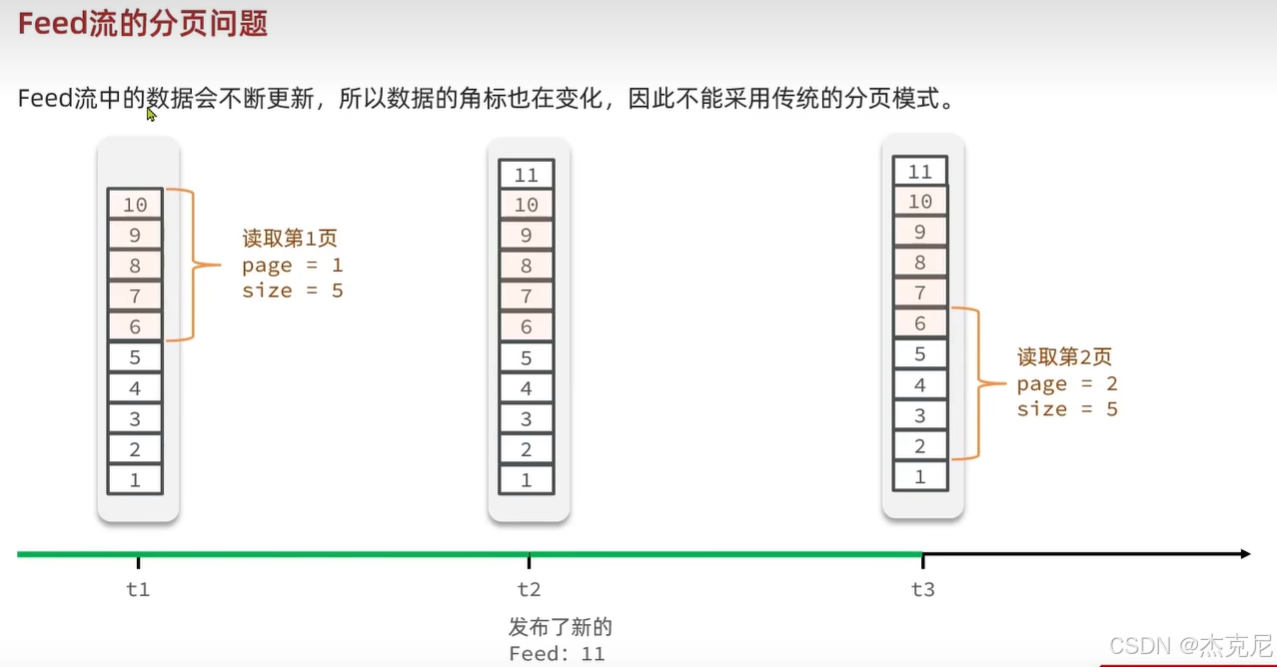
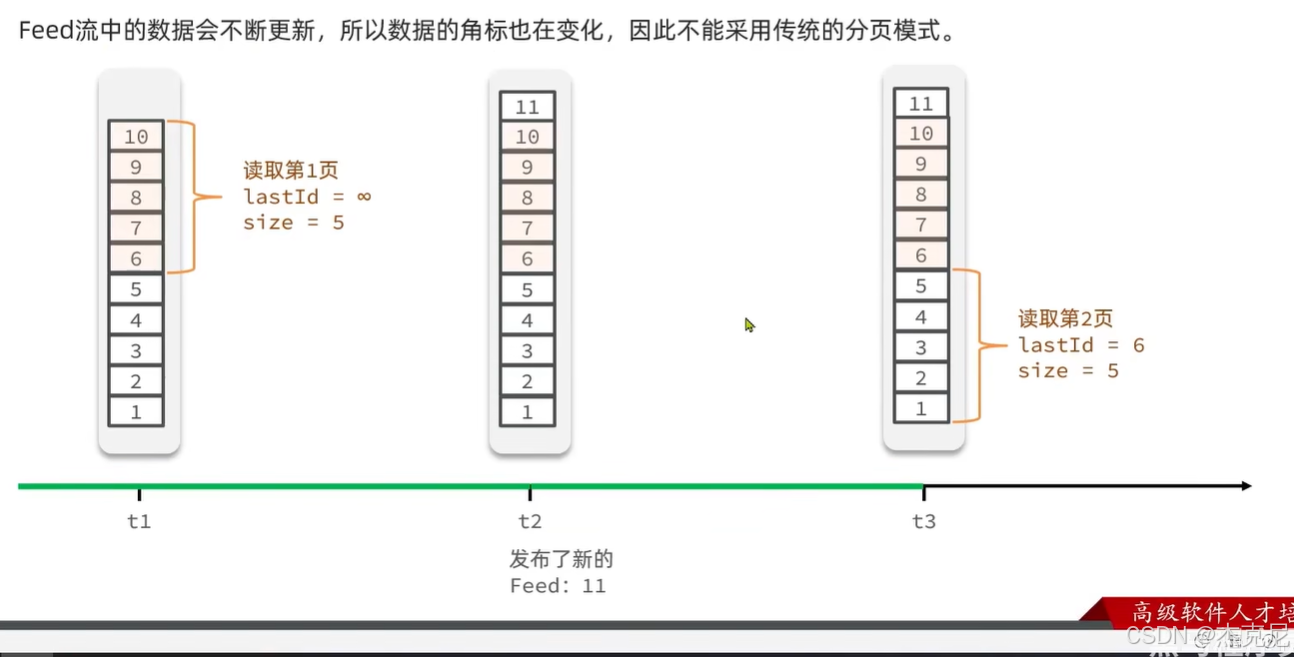
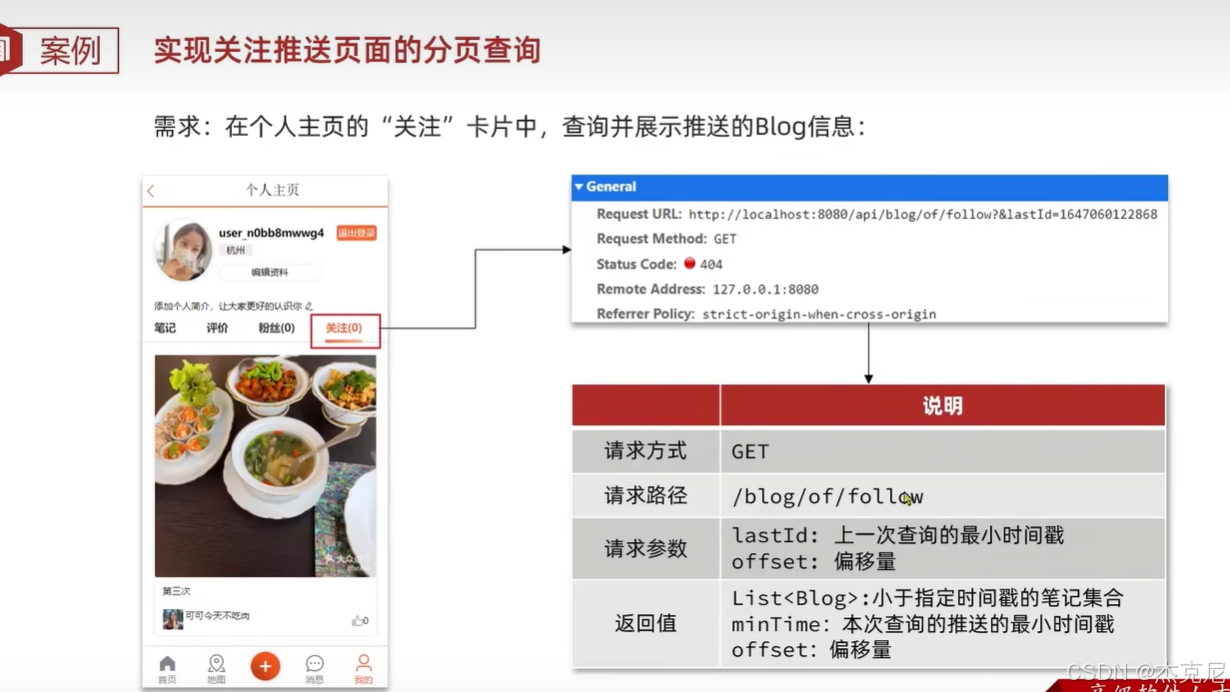
实战篇 - 09. 好友关注 - 滚动分页查询收件箱的思路
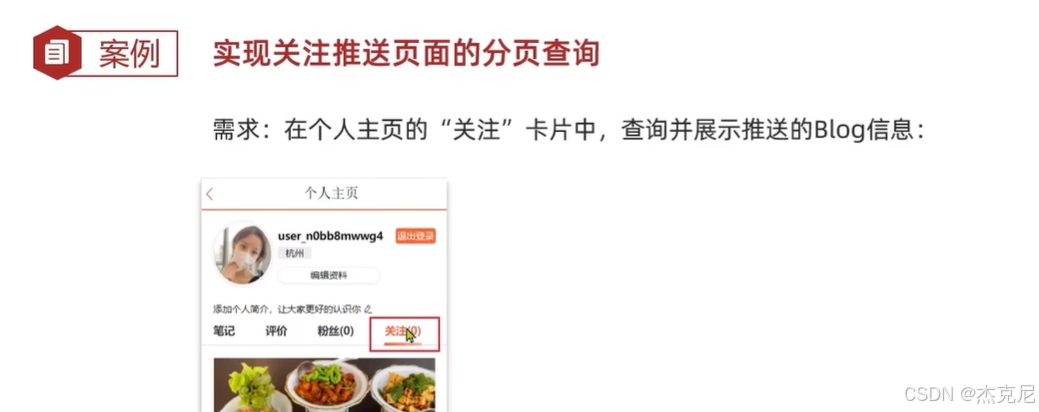
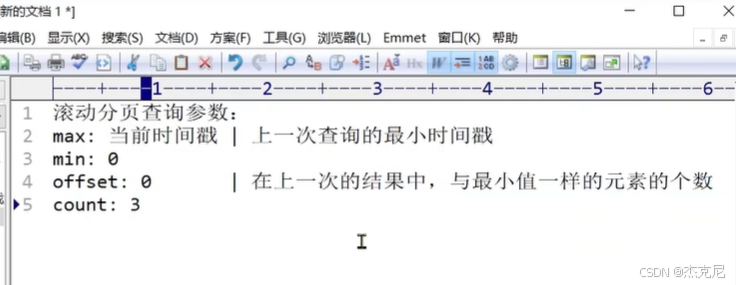
问题:滚动分页中offset参数有什么用?
参数 第一次查询 后续分页查询 作用 max当前时间戳 上一次查询的最小时间戳 查询的分数上限,控制分页的起点 min0 0 查询的分数下限,固定为 0(查所有历史数据) offset0 上一次结果中与最小值相同的元素个数 跳过重复分数的元素,避免重复 / 漏读 count每页条数(如 3) 每页条数(如 3) 每页返回的元素数量
实战篇 - 10. 好友关注 - 实现滚动分页查询
问题:.longValue()和Long.valueOf有什么区别?
javaids.add(Long.valueOf(tuple.getValue())); // 4.2.获取分数(时间戳) long time = tuple.getScore().longValue();
Long.valueOf()和.longValue()完全不是一回事!一个是把字符串 / 基本类型 → 包装类型 Long
一个是把包装类型 Long → 基本类型 long
问题:滚动分页查询代码?
java@Override public Result queryBlogOfFollow(Long max, Integer offset) { // 1.获取当前用户 Long userId = UserHolder.getUser().getId(); // 2.查询收件箱 ZREVRANGEBYSCORE key Max Min LIMIT offset count String key = FEED_KEY + userId; Set<ZSetOperations.TypedTuple<String>> typedTuples = stringRedisTemplate.opsForZSet() .reverseRangeByScoreWithScores(key, 0, max, offset, 2); // 3.非空判断 if (typedTuples == null || typedTuples.isEmpty()) { return Result.ok(); } // 4.解析数据:blogId、minTime(时间戳)、offset List<Long> ids = new ArrayList<>(typedTuples.size()); long minTime = 0; // 2 int os = 1; // 2 for (ZSetOperations.TypedTuple<String> tuple : typedTuples) { // 5 4 4 2 2 // 4.1.获取id ids.add(Long.valueOf(tuple.getValue())); // 4.2.获取分数(时间戳) long time = tuple.getScore().longValue(); if(time == minTime){ os++; }else{ minTime = time; os = 1; } } // 5.根据id查询blog String idStr = StrUtil.join(",", ids); List<Blog> blogs = query().in("id", ids).last("ORDER BY FIELD(id," + idStr + ")").list(); for (Blog blog : blogs) { // 5.1.查询blog有关的作者 queryBlogUser(blog); // 5.2.查询blog是否被点赞 isBlogLiked(blog); } // 6.封装并返回 ScrollResult r = new ScrollResult(); r.setList(blogs); r.setOffset(os); r.setMinTime(minTime); return Result.ok(r); }
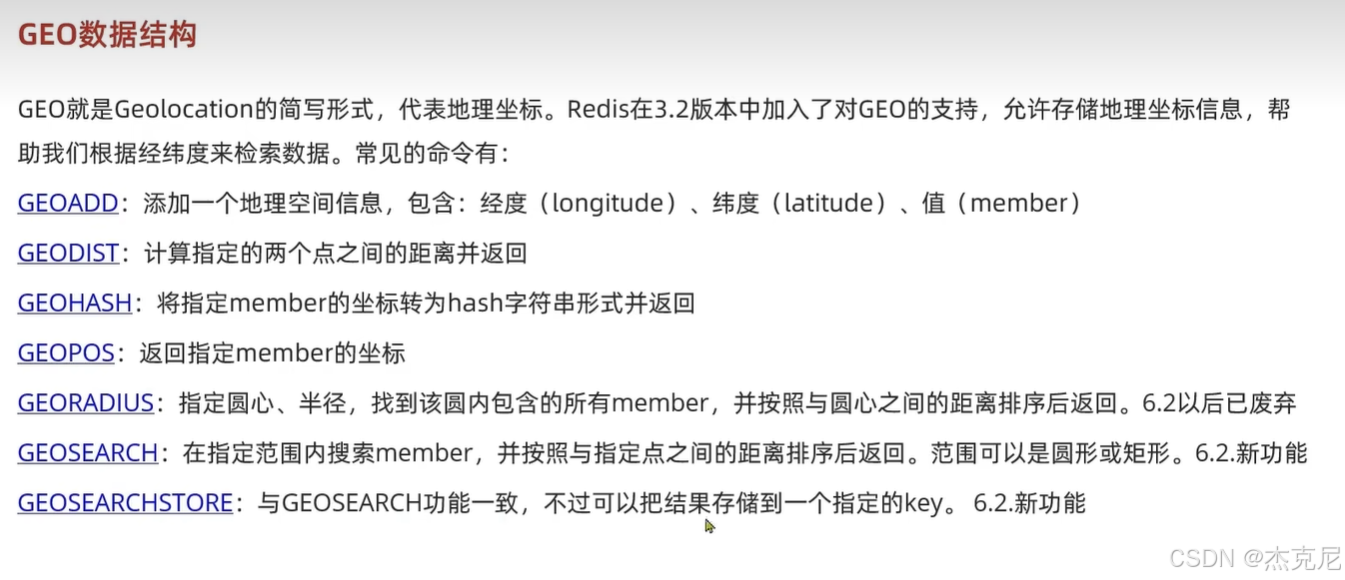
实战篇 - 11. 附近商铺 - GEO 数据结构的基本用法
实战篇 - 12. 附近商铺 - 导入店铺数据到 GEO
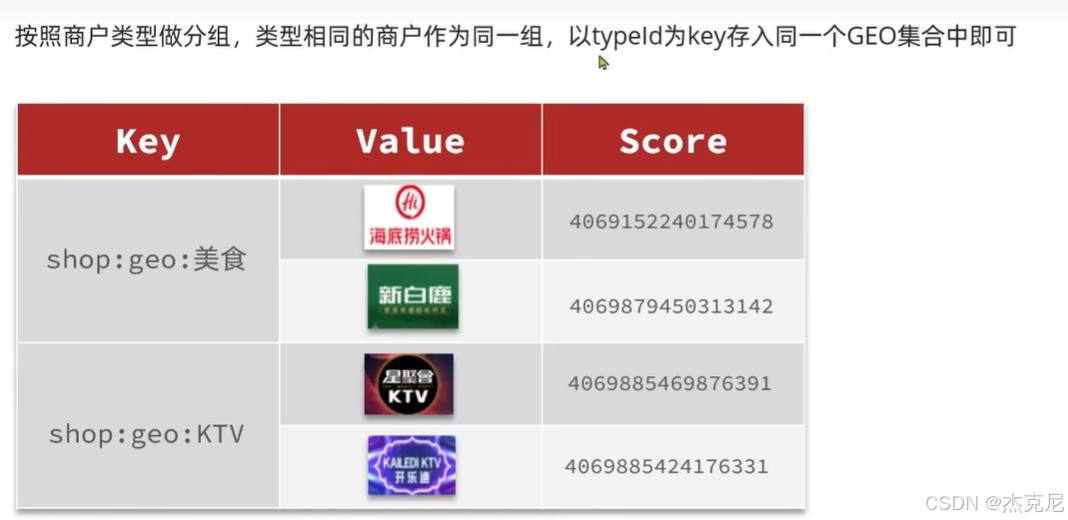
java
    @Test//缓存附近商铺
    void loadShopData() {
        // 1.查询店铺信息
        List<Shop> list = shopService.list();
        // 2.把店铺分组,按照typeId分组,typeId一致的放到一个集合
        Map<Long, List<Shop>> map = list.stream().collect(Collectors.groupingBy(Shop::getTypeId));
        // 3.分批完成写入Redis
        for (Map.Entry<Long, List<Shop>> entry : map.entrySet()) {
            // 3.1.获取类型id
            Long typeId = entry.getKey();
            String key = SHOP_GEO_KEY + typeId;
            // 3.2.获取同类型的店铺的集合
            List<Shop> value = entry.getValue();
            List<RedisGeoCommands.GeoLocation<String>> locations = new ArrayList<>(value.size());
            // 3.3.写入redis GEOADD key 经度 纬度 member
            for (Shop shop : value) {
                // stringRedisTemplate.opsForGeo().add(key, new Point(shop.getX(), shop.getY()), shop.getId().toString());
                locations.add(new RedisGeoCommands.GeoLocation<>(
                        shop.getId().toString(),
                        new Point(shop.getX(), shop.getY())
                ));
            }
            stringRedisTemplate.opsForGeo().add(key, locations);
        }
    }
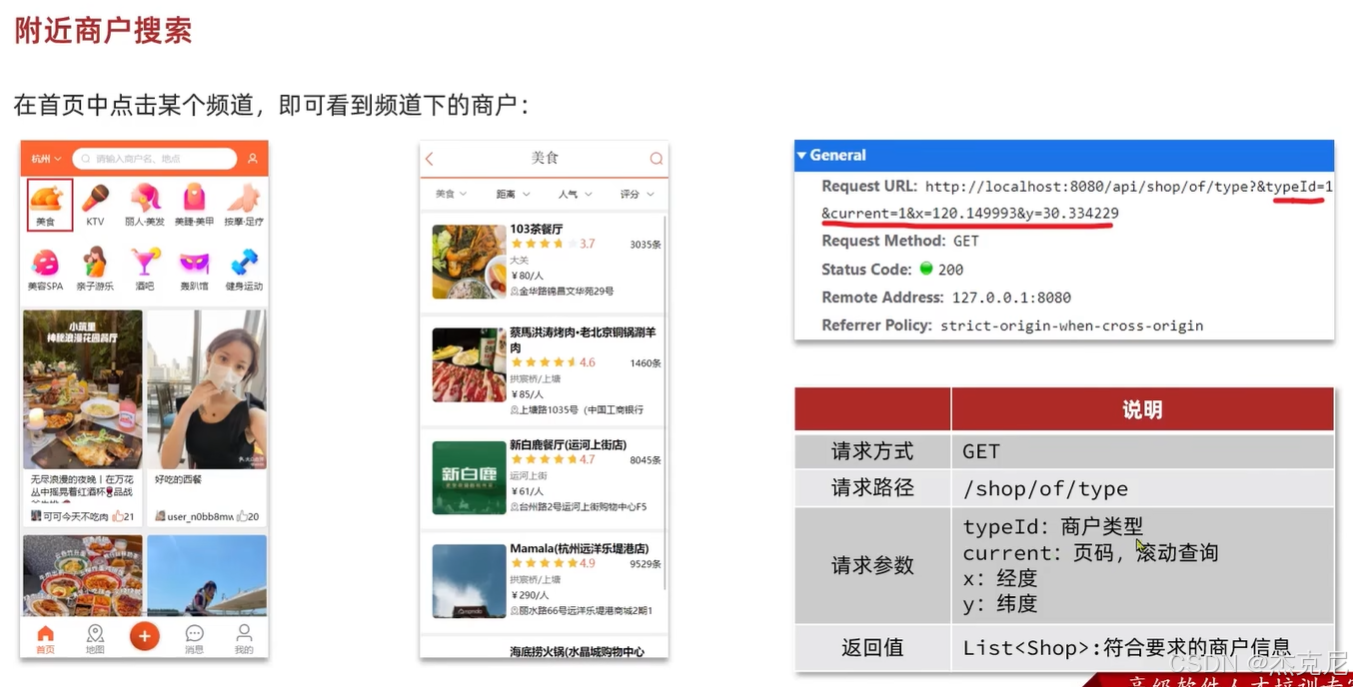
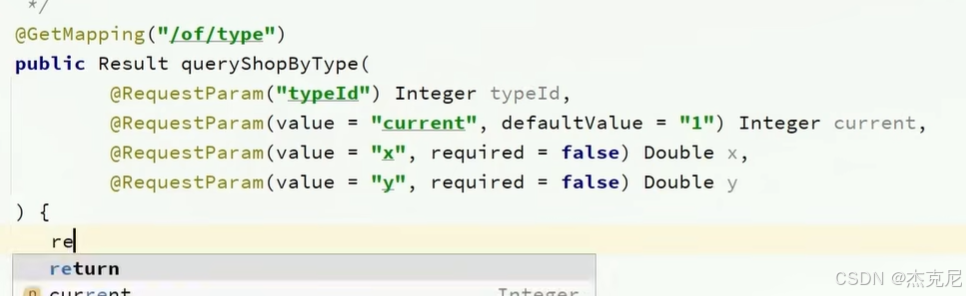
实战篇 - 13. 附近商铺 - 实现附近商户功能
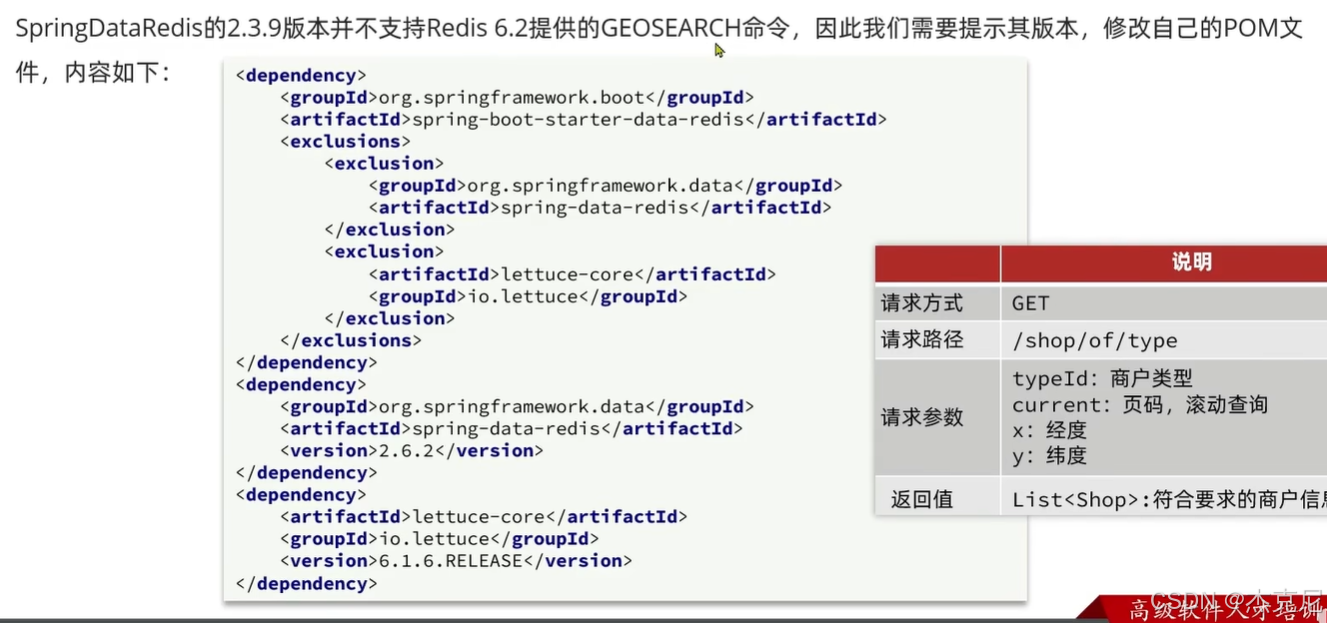
问题:形参列表注解里面的required=false什么意思?
表示可以传也可以 不传
java
 //查看附近商铺
    @Override
    public Result queryShopByType(Integer typeId, Integer current, Double x, Double y) {
        // 1.判断是否需要根据坐标查询
        if (x == null || y == null) {
            // 不需要坐标查询,按数据库查询
            Page<Shop> page = query()
                    .eq("type_id", typeId)
                    .page(new Page<>(current, SystemConstants.DEFAULT_PAGE_SIZE));
            // 返回数据
            return Result.ok(page.getRecords());
        }

        // 2.计算分页参数
        int from = (current - 1) * SystemConstants.DEFAULT_PAGE_SIZE;
        int end = current * SystemConstants.DEFAULT_PAGE_SIZE;

        // 3.查询redis、按照距离排序、分页。结果:shopId、distance
        String key = SHOP_GEO_KEY + typeId;
        GeoResults<RedisGeoCommands.GeoLocation<String>> results = stringRedisTemplate.opsForGeo() // GEOSEARCH key BYLONLAT x y BYRADIUS 10 WITHDISTANCE
                .search(
                        key,
                        GeoReference.fromCoordinate(x, y),
                        new Distance(5000),
                        RedisGeoCommands.GeoSearchCommandArgs.newGeoSearchArgs().includeDistance().limit(end)
                );
        // 4.解析出id
        if (results == null) {
            return Result.ok(Collections.emptyList());
        }
        List<GeoResult<RedisGeoCommands.GeoLocation<String>>> list = results.getContent();
        if (list.size() <= from) {
            // 没有下一页了,结束
            return Result.ok(Collections.emptyList());
        }
        // 4.1.截取 from ~ end的部分
        List<Long> ids = new ArrayList<>(list.size());
        Map<String, Distance> distanceMap = new HashMap<>(list.size());
        list.stream().skip(from).forEach(result -> {
            // 4.2.获取店铺id
            String shopIdStr = result.getContent().getName();
            ids.add(Long.valueOf(shopIdStr));
            // 4.3.获取距离
            Distance distance = result.getDistance();
            distanceMap.put(shopIdStr, distance);
        });
        // 5.根据id查询Shop
        String idStr = StrUtil.join(",", ids);
        List<Shop> shops = query().in("id", ids).last("ORDER BY FIELD(id," + idStr + ")").list();
        for (Shop shop : shops) {
            shop.setDistance(distanceMap.get(shop.getId().toString()).getValue());
        }
        // 6.返回
        return Result.ok(shops);
    }
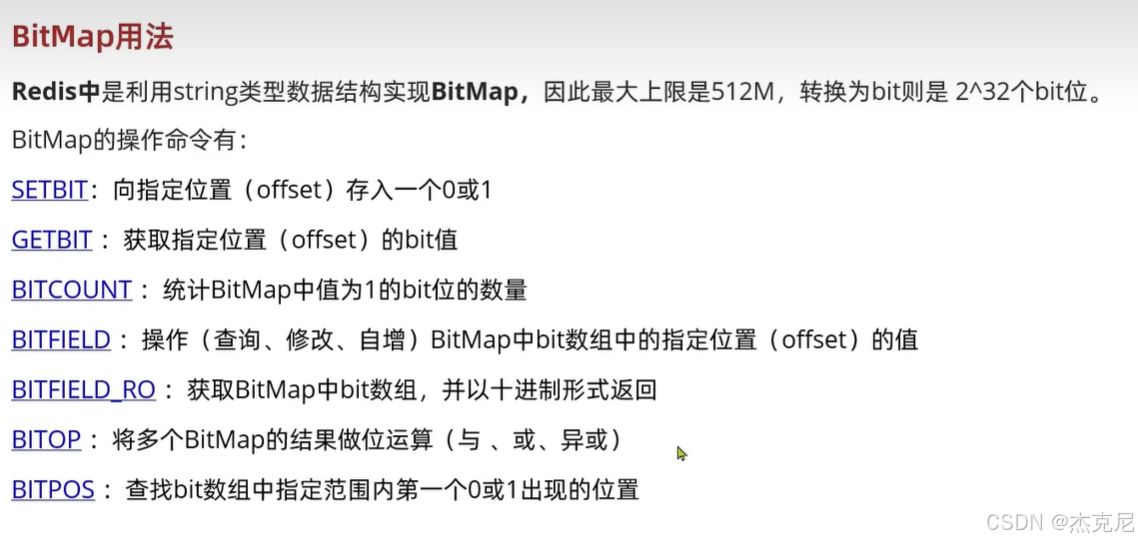
实战篇 - 15. 用户签到 - BitMap 功能演示
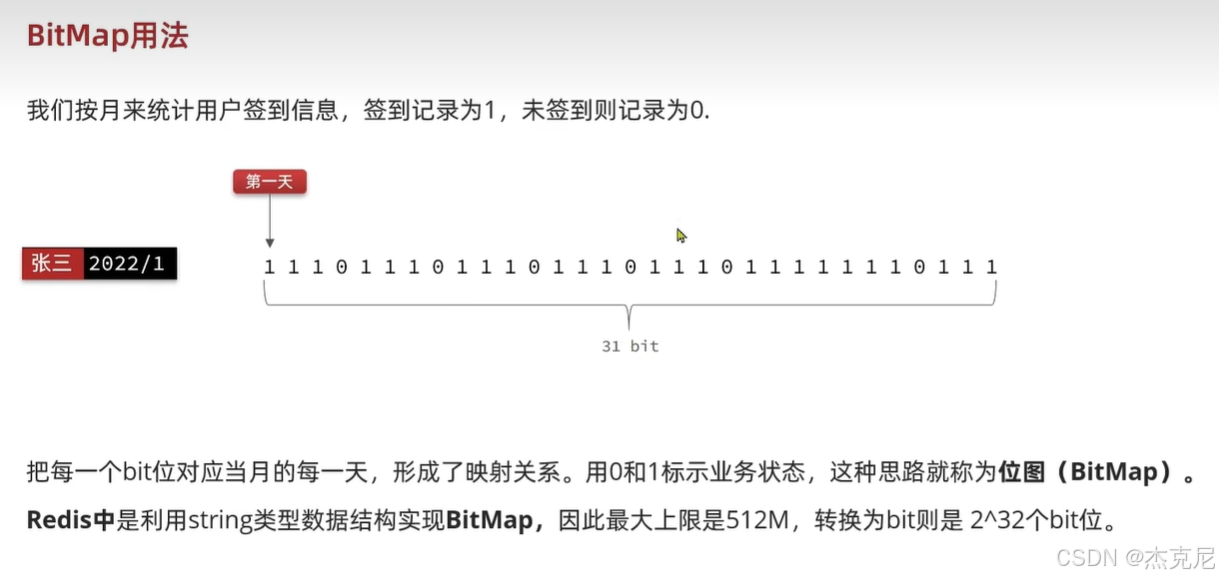
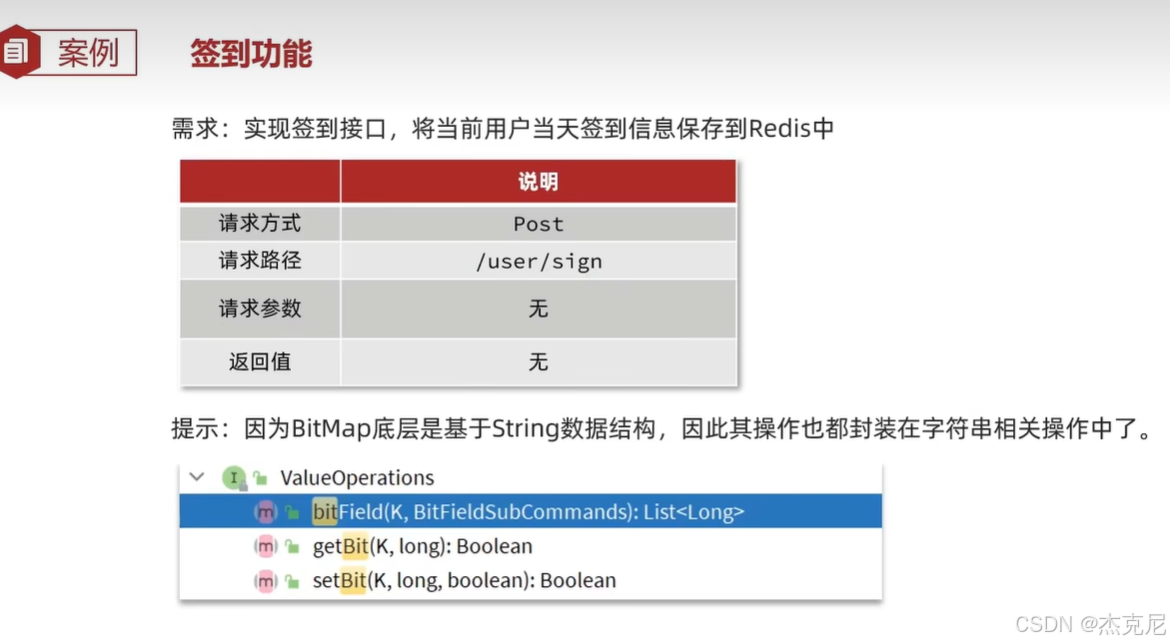
实战篇 - 16. 用户签到 - 实现签到功能
问题:解释下面代码?
now.format(DateTimeFormatter.ofPattern(":yyyyMM"))
now
- 是 LocalDateTime / LocalDate 类型的当前时间对象
.format(...)
- 把时间按照指定格式转成字符串
DateTimeFormatter.ofPattern(":yyyyMM")
Pattern = 格式模板
:→ 直接输出一个冒号
yyyy→ 4 位年份 (2025)
MM→ 2 位月份 (01~12)
java
    //记录用户签到信息
    @Override
    public Result sign() {
        // 1.获取当前登录用户
        Long userId = UserHolder.getUser().getId();
        // 2.获取日期
        LocalDateTime now = LocalDateTime.now();
        // 3.拼接key
        String keySuffix = now.format(DateTimeFormatter.ofPattern(":yyyyMM"));
        String key = USER_SIGN_KEY + userId + keySuffix;
        // 4.获取今天是本月的第几天
        int dayOfMonth = now.getDayOfMonth();
        // 5.写入Redis SETBIT key offset 1
        stringRedisTemplate.opsForValue().setBit(key, dayOfMonth - 1, true);
        return Result.ok();
    }
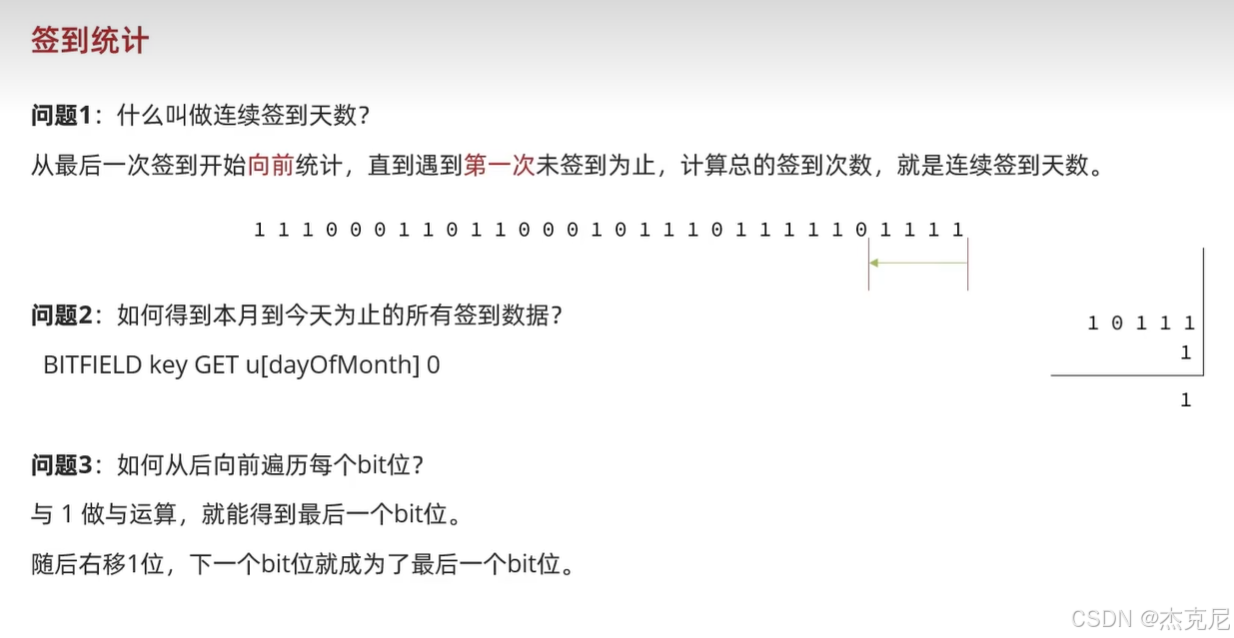
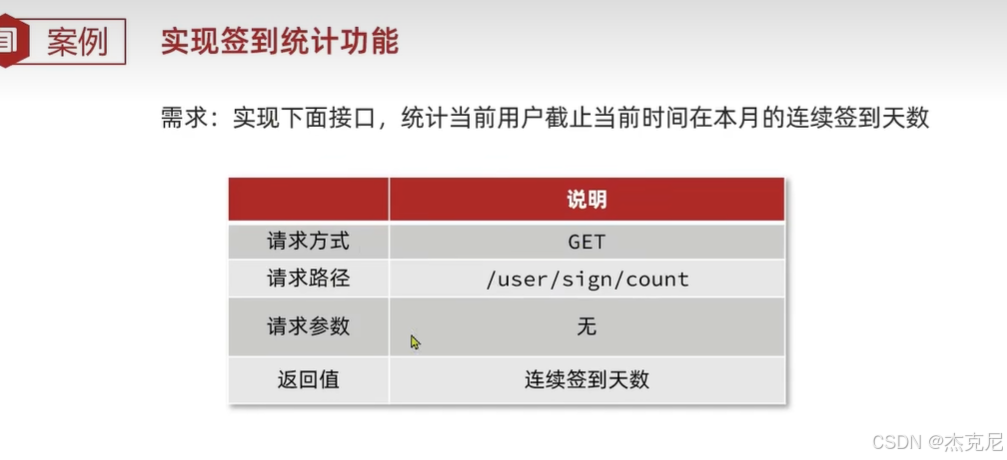
实战篇 - 17. 用户签到 - 统计连续签到
java
    //获取连续签到数据
    @Override
    public Result signCount() {
        // 1.获取当前登录用户
        Long userId = UserHolder.getUser().getId();
        // 2.获取日期
        LocalDateTime now = LocalDateTime.now();
        // 3.拼接key
        String keySuffix = now.format(DateTimeFormatter.ofPattern(":yyyyMM"));
        String key = USER_SIGN_KEY + userId + keySuffix;
        // 4.获取今天是本月的第几天
        int dayOfMonth = now.getDayOfMonth();
        // 5.获取本月截止今天为止的所有的签到记录,返回的是一个十进制的数字 BITFIELD sign:5:202203 GET u14 0
        List<Long> result = stringRedisTemplate.opsForValue().bitField(
                key,
                BitFieldSubCommands.create()
                        .get(BitFieldSubCommands.BitFieldType.unsigned(dayOfMonth)).valueAt(0)
        );
        if (result == null || result.isEmpty()) {
            // 没有任何签到结果
            return Result.ok(0);
        }
        Long num = result.get(0);
        if (num == null || num == 0) {
            return Result.ok(0);
        }
        // 6.循环遍历
        int count = 0;
        while (true) {
            // 6.1.让这个数字与1做与运算,得到数字的最后一个bit位  // 判断这个bit位是否为0
            if ((num & 1) == 0) {
                // 如果为0,说明未签到,结束
                break;
            }else {
                // 如果不为0,说明已签到,计数器+1
                count++;
            }
            // 把数字右移一位,抛弃最后一个bit位,继续下一个bit位
            num >>>= 1;
        }
        return Result.ok(count);
    }
实战篇 - 18.UV 统计 - HyperLogLog 的用法

实战篇 - 19.UV 统计 - 测试百万数据的统计
末尾页
本文摘要: 文章详细讲解了Redis在电商系统中的多种应用场景和技术实现。主要内容包括:1) 使用Redis Stream实现消息队列消费,包括消费者组配置和阻塞读取;2) 通过Lua脚本实现原子性秒杀操作;3) 好友关注功能实现,包括共同关注和Feed流推送;4) GEO数据结构实现附近商铺查询;5) 使用BitMap实现用户签到和连续签到统计;6) HyperLogLog进行UV统计。文中对每个功能模块都提供了详细的代码解析和实现原理说明,包括关键参数的作用、数据结构的选用理由以及常见问题的解决方案。