基于一主一从环境添加新数据库和新从库
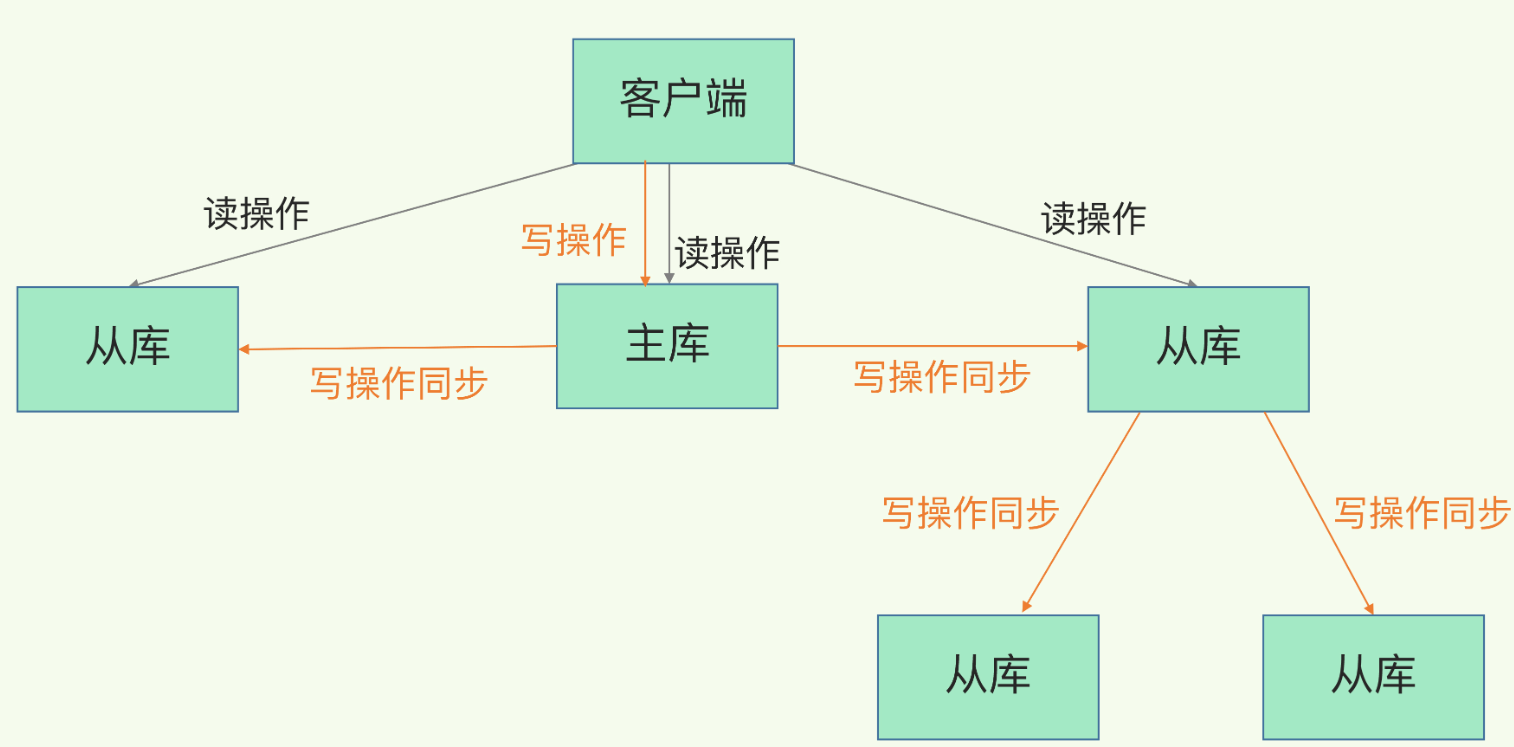
前言
本文档详细介绍了如何在已有的 MySQL 主从复制环境中添加新数据库和新的备份从库,包含完整的配置步骤、测试方法和生产级最佳实践,一主一从配置请看本文章发布上一篇文章。
第一部分:基础概念
1.1 环境说明
当前状态(一主一从):
| 角色 | 主机名 | IP地址 | Server ID | 状态 |
|---|---|---|---|---|
| Master | mysql-node1 | 172.25.254.10 | 10 | 运行中 |
| Slave | mysql-node2 | 172.25.254.20 | 20 | 运行中,已同步 |
目标状态(一主两从):
| 角色 | 主机名 | IP地址 | Server ID | 状态 |
|---|---|---|---|---|
| Master | mysql-node1 | 172.25.254.10 | 10 | 运行中 |
| Slave1 | mysql-node2 | 172.25.254.20 | 20 | 运行中 |
| Slave2 | mysql-node3 | 172.25.254.30 | 30 | 新增,待配置 |
任务清单:
- ✅ Master 上已创建
baibai数据库 - ✅ Master ↔ Slave1 复制正常
- ⬜ 添加 Slave2 (Node3) 到复制环境
第二部分:Master 上创建新数据库
-- 创建数据库
mysql> create database baibai;
Query OK, 1 row affected (0.00 sec)

mysql> show databases;
+--------------------+
| Database           |
+--------------------+
| baibai             |
| information_schema |
| mysql              |
| performance_schema |
| sys                |
+--------------------+
5 rows in set (0.00 sec)
-- 创建表
mysql> create table baibai.userlist ( name varchar(10) not null , passwd varchar(50) not null );
Query OK, 0 rows affected (0.01 sec)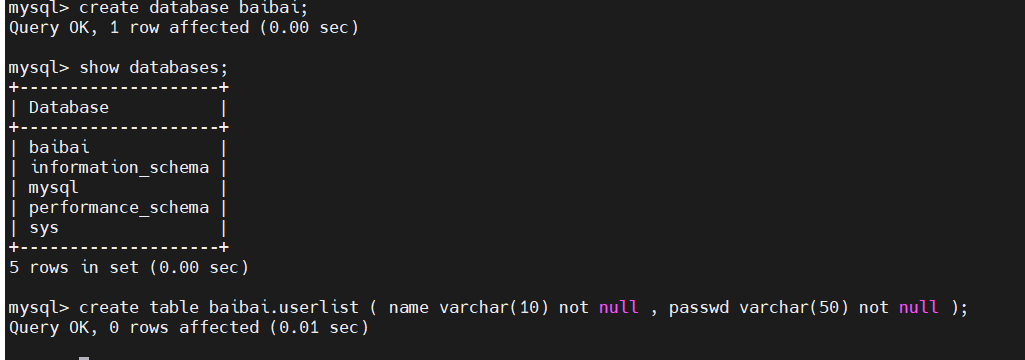
mysql> use baibai;
Reading table information for completion of table and column names
You can turn off this feature to get a quicker startup with -A

Database changed
mysql> desc userlist;
+--------+-------------+------+-----+---------+-------+
| Field  | Type        | Null | Key | Default | Extra |
+--------+-------------+------+-----+---------+-------+
| name   | varchar(10) | NO   |     | NULL    |       |
| passwd | varchar(50) | NO   |     | NULL    |       |
+--------+-------------+------+-----+---------+-------+
2 rows in set (0.00 sec)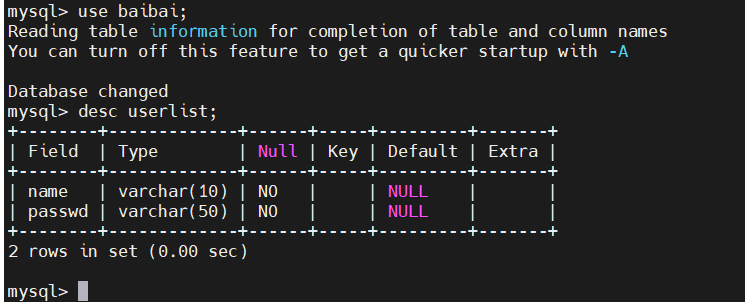
-- 插入测试数据
mysql> insert into baibai.userlist values ('swp','123');
Query OK, 1 row affected (0.01 sec)
mysql> select * from  baibai.userlist;
+------+--------+
| name | passwd |
+------+--------+
| swp  | 123    |
+------+--------+
1 row in set (0.00 sec)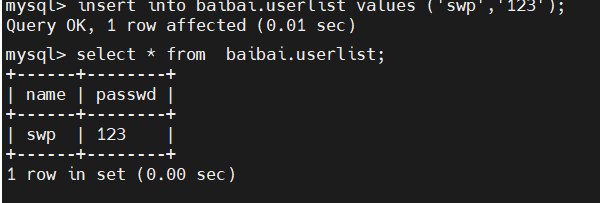
在从库slave里查同步到的主库数据
mysql> show databases;
+--------------------+
| Database           |
+--------------------+
| baibai             |
| information_schema |
| mysql              |
| performance_schema |
| sys                |
+--------------------+
5 rows in set (0.00 sec)

mysql> select * from baibai.userlist;
+------+--------+
| name | passwd |
+------+--------+
| swp  | 123    |
+------+--------+
1 row in set (0.00 sec)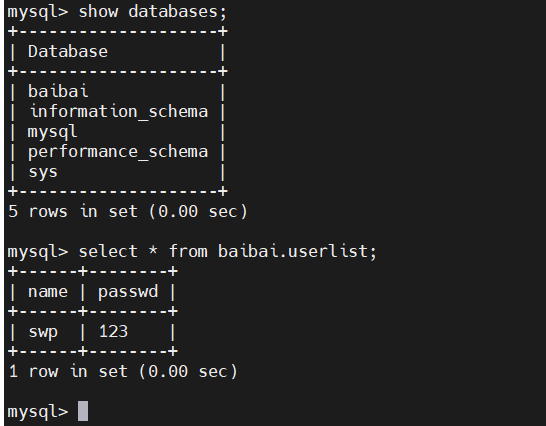
2.3 当有数据时添加 slave2
#完成基础配置
[root@mysql-node3 ~]# vim /etc/my.cnf
[mysqld]
datadir=/data/mysql
socket=/data/mysql/mysql.sock
symbolic-links=0
server-id=30

[root@mysql-node3 ~]# /etc/init.d/mysqld restart

⚠️ 生产环境注意:备份时建议锁表,保证数据一致性

sql
FLUSH TABLES WITH READ LOCK;   -- 加锁
-- 执行备份
UNLOCK TABLES;                  -- 解锁

#从master节点备份数据
[root@mysql-node1 ~]#  mysqldump -uroot -proot  baibai > baibai.sql
传输备份文件到 Slave2
[root@mysql-node1 ~]# scp baibai.sql root@172.25.254.30:/root/
在 Slave2 上恢复数据
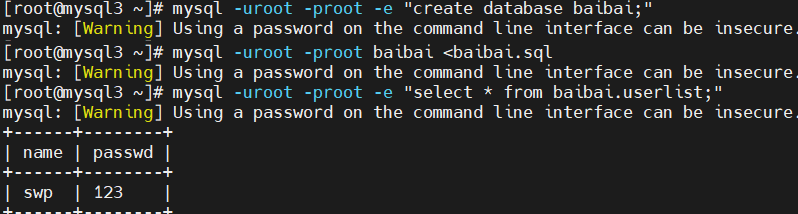
#利用master节点中备份出来的baibai.sql在slave2中拉平数据
# 创建数据库
[root@mysql3 ~]# mysql -uroot -proot -e "create database baibai;"
# 导入数据
[root@mysql3 ~]# mysql -uroot -proot baibai <baibai.sql
# 验证
[root@mysql-node3 ~]# mysql -uroot -plee -e "select * from lee.userlist;"
+----------+----------+
| username | password |
+----------+----------+
| user1    | 123      |
| user2    | 123      |
+----------+----------+
3.5 配置主从复制
bash
在 Master 上查看当前 binlog 位置
[root@mysql-node1 ~]# mysql -uroot -proot -e "SHOW MASTER STATUS;"
mysql: [Warning] Using a password on the command line interface can be insecure.
+------------------+----------+--------------+------------------+-------------------+
| File             | Position | Binlog_Do_DB | Binlog_Ignore_DB | Executed_Gtid_Set |
+------------------+----------+--------------+------------------+-------------------+
| mysql-bin.000002 |     1081 |              |                  |                   |
+------------------+----------+--------------+------------------+-------------------+
第二步:在 Slave2 上配置复制
[root@mysql-node3 ~]# mysql -uroot -proot
mysql>  CHANGE MASTER TO MASTER_HOST='172.25.254.10', MASTER_USER='swp', MASTER_PASSWORD='swp', MASTER_LOG_FILE='mysql-bin.000002', MASTER_LOG_POS=1081;
mysql> start slave;
第三步:验证复制状态
mysql> SHOW SLAVE STATUS\G;
*************************** 1. row ***************************
               Slave_IO_State: Waiting for source to send event
                  Master_Host: 172.25.254.10
                  Master_User: swp
                  Master_Port: 3306
                Connect_Retry: 60
              Master_Log_File: mysql-bin.000002
          Read_Master_Log_Pos: 1081
               Relay_Log_File: mysql3-relay-bin.000003
                Relay_Log_Pos: 328
        Relay_Master_Log_File: mysql-bin.000002
             Slave_IO_Running: Yes
            Slave_SQL_Running: Yes
              Replicate_Do_DB:
          Replicate_Ignore_DB:
           Replicate_Do_Table:
       Replicate_Ignore_Table:
      Replicate_Wild_Do_Table:
  Replicate_Wild_Ignore_Table:
                   Last_Errno: 0
                   Last_Error:
                 Skip_Counter: 0
          Exec_Master_Log_Pos: 1081
              Relay_Log_Space: 721
              Until_Condition: None
               Until_Log_File:
                Until_Log_Pos: 0
           Master_SSL_Allowed: No
           Master_SSL_CA_File:
           Master_SSL_CA_Path:
              Master_SSL_Cert:
            Master_SSL_Cipher:
               Master_SSL_Key:
        Seconds_Behind_Master: 0
Master_SSL_Verify_Server_Cert: No
                Last_IO_Errno: 0
                Last_IO_Error:
               Last_SQL_Errno: 0
               Last_SQL_Error:
  Replicate_Ignore_Server_Ids:
             Master_Server_Id: 10
                  Master_UUID: 3f9a4795-332a-11f1-beae-000c29059db4
             Master_Info_File: mysql.slave_master_info
                    SQL_Delay: 0
          SQL_Remaining_Delay: NULL
      Slave_SQL_Running_State: Replica has read all relay log; waiting for more updates
           Master_Retry_Count: 10
                  Master_Bind:
      Last_IO_Error_Timestamp:
     Last_SQL_Error_Timestamp:
               Master_SSL_Crl:
           Master_SSL_Crlpath:
           Retrieved_Gtid_Set:
            Executed_Gtid_Set:
                Auto_Position: 0
         Replicate_Rewrite_DB:
                 Channel_Name:
           Master_TLS_Version:
       Master_public_key_path:
        Get_master_public_key: 0
            Network_Namespace:
1 row in set, 1 warning (0.00 sec)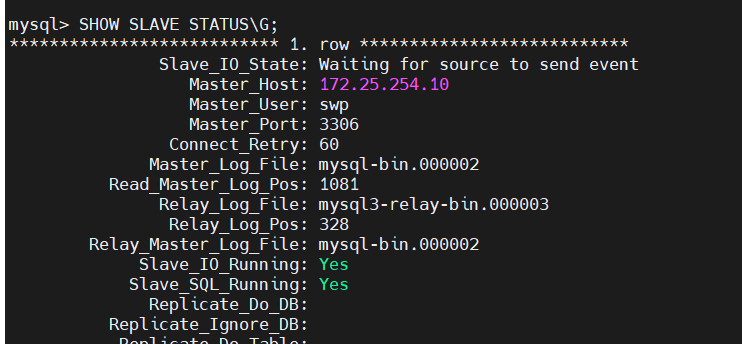
第四部分:测试验证
4.1 在 Master 上插入新数据
#master上创建新数据
[root@mysql-node1 ~]# mysql -uroot -proot -e "INSERT INTO baibai.userlist VALUES('user2','123');"
4.2 检查 Slave1 同步
[root@mysql2 ~]# mysql -uroot -proot -e 'select * from baibai.userlist;'
mysql: [Warning] Using a password on the command line interface can be insecure.
+-------+--------+
| name  | passwd |
+-------+--------+
| swp   | 123    |
| user2 | 123    |
+-------+--------+
4.3 检查 Slave2 同步
[root@mysql3 ~]# mysql -uroot -proot -e 'select * from baibai.userlist;'
mysql: [Warning] Using a password on the command line interface can be insecure.
+-------+--------+
| name  | passwd |
+-------+--------+
| swp   | 123    |
| user2 | 123    |
+-------+--------+
第五部分:生产环境最佳实践
5.1 备份时锁表(保证一致性)
sql
-- 加全局读锁
FLUSH TABLES WITH READ LOCK;

-- 查看 Master 状态(记录 binlog 位置)
SHOW MASTER STATUS;

-- 执行备份(另开一个会话)

-- 解锁
UNLOCK TABLES;
5.2 mysqldump 合并数据的注意事项
mysqldump 默认会生成 DROP TABLE IF EXISTS 语句:
sql
DROP TABLE IF EXISTS `userlist`;- 全新导入:保留该语句,直接覆盖
- 合并数据:需要删除该语句,避免覆盖已有数据
5.3 复制用户权限检查
在 Master 上确认复制用户存在且权限正确:
sql
SELECT user, host FROM mysql.user WHERE user='swp';
SHOW GRANTS FOR 'swp'@'%';
如不存在,创建:
sql
CREATE USER 'swp'@'%' IDENTIFIED BY 'password';
GRANT REPLICATION SLAVE ON *.* TO 'swp'@'%';
FLUSH PRIVILEGES;
5.4 Slave 设置为只读(防止误写入)
sql
SET GLOBAL read_only = ON;
SET GLOBAL super_read_only = ON;   -- MySQL 5.7.8+
永久生效:在 /etc/my.cnf 中添加
read_only = ON
super_read_only = ON
第六部分:常见问题排查
| 问题 | 可能原因 | 解决方法 |
|---|---|---|
Slave_IO_Running: No |
网络不通/用户错误/防火墙 | 检查 Last_IO_Error,测试网络和权限 |
Slave_SQL_Running: No |
SQL 执行冲突 | 查看 Last_SQL_Error,跳过或修复 |
Could not find first log file |
binlog 文件不存在 | 重新 CHANGE MASTER TO 使用当前 Master 位置 |
| 主从数据不一致 | 跳过错误或手动修改 | 使用 pt-table-checksum 检查并修复 |
快速恢复命令:
sql
STOP SLAVE;
SET GLOBAL SQL_SLAVE_SKIP_COUNTER = 1;   -- 跳过当前错误
START SLAVE;
附录:完整操作流程图
text
Master (10)                    Slave1 (20)                    Slave2 (30)
    │                              │                              │
    ├─ 创建 baibai 库 ─────────────────────────────────────────────►
    │                              │                              │
    ├─ INSERT 测试数据 ─────────────────────────────────────────────►
    │                              │                              │
    │                          ✅ 自动同步                         │
    │                              │                              │
    ├─ mysqldump 备份 ─────────────────────────────────────────────►
    │                              │                   scp 传输备份 │
    │                              │                              │
    │                              │                   导入备份数据 │
    │                              │                              │
    ├─ SHOW MASTER STATUS ──────────────────────────────────────────►
    │                              │                              │
    │                              │                   CHANGE MASTER TO │
    │                              │                   START SLAVE │
    │                              │                              │
    ├─ INSERT 新数据 ─────────────────────────────────────────────►
    │                              │                              │
    │                          ✅ 同步                          ✅ 同步
文档版本 :1.0
最后更新 :2026-04-11
维护者:DBA Team
主要优化点说明
| 优化项 | 原笔记问题 | 优化后 |
|---|---|---|
| 结构层次 | 章节编号不连续 | 统一为层级结构(一、1.1、2.3) |
| 代码块标识 | 部分代码无语言标识 | 添加 sql / bash 标识 |
| 表格化 | 状态信息散落 | 用表格展示环境和期望值 |
| 注意事项 | 混在正文中 | 独立成框,用 ⚠️ 标注 |
| 流程图 | 无 | 补充 ASCII 流程图 |
| 最佳实践 | 分散在末尾 | 单独成章节(第五部分) |
| ----------------------- | :----------------------------- | |
| 结构层次 | 章节编号不连续 | 统一为层级结构(一、1.1、2.3) |
| 代码块标识 | 部分代码无语言标识 | 添加 sql / bash 标识 |
| 表格化 | 状态信息散落 | 用表格展示环境和期望值 |
| 注意事项 | 混在正文中 | 独立成框,用 ⚠️ 标注 |
| 流程图 | 无 | 补充 ASCII 流程图 |
| 最佳实践 | 分散在末尾 | 单独成章节(第五部分) |
| 密码一致性 | Master 密码用 root,复制密码用 swp | 明确区分并说明 |