关注CodingTechWork
引言
在企业级应用开发中,跨服务文件传输是一个高频场景。典型的业务场景包括:财务报表上传、对账单下载、批量数据处理等。这些场景往往涉及大文件传输,如果处理不当,很容易导致内存溢出。
本文介绍一种生产级架构设计:A 服务通过 Feign 客户端调用 B 服务,由 B 服务负责与 SFTP 服务器进行文件交互 ,执行文件的上传、下载和删除操作。核心目标是实现大文件的安全、高效传输,同时保证内存占用可控。
- SFTP 原理:基于 SSH 的安全文件传输协议,支持密码和公钥两种认证方式
- 架构设计:A 服务通过 Feign 调用 B 服务,B 服务负责与 SFTP 服务器交互
- 内存优化:使用流式传输,避免将整个文件加载到内存
- Feign 配置 :返回类型使用
feign.Response,配置足够长的读取超时 - 资源管理:使用 try-with-resources 确保连接和临时文件正确释放
SFTP 原理与认证
什么是 SFTP
SFTP(SSH File Transfer Protocol,SSH 文件传输协议)是一种基于 SSH 协议的安全文件传输协议。与传统的 FTP 不同,SFTP 在 SSH 加密通道上运行,对命令和数据都进行加密传输。
SFTP 的核心特性:
| 特性 | 说明 |
|---|---|
| 安全性 | 所有数据(包括用户名、密码、文件内容)都经过加密 |
| 单端口 | 只需开放 22 端口,防火墙配置简单 |
| 功能丰富 | 支持文件上传/下载、目录操作、文件权限管理等 |
| 平台兼容 | 支持断点续传、文件列表获取等高级功能 |
SFTP 协议架构
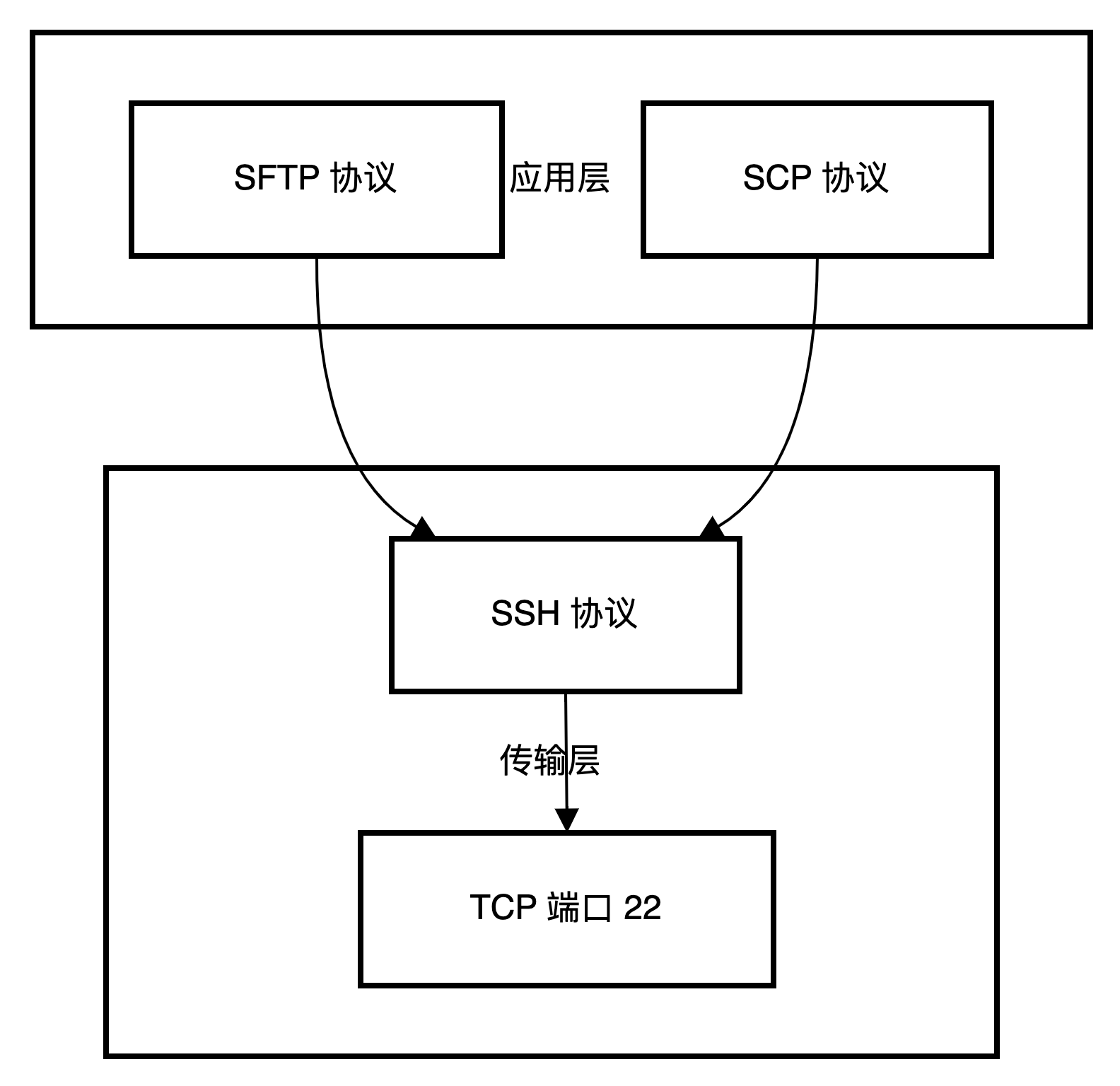
SFTP 认证方式
SFTP 支持多种认证方式,以下是常用的两种:
密码认证
最基础的认证方式,使用用户名和密码进行身份验证。
客户端 ──► SSH 服务器
         │
         ├── 1. 建立 TCP 连接
         ├── 2. SSH 协议版本协商
         ├── 3. 服务器发送公钥
         ├── 4. 客户端加密密码并发送
         └── 5. 服务器验证并返回结果
优点 :配置简单,易于集成
缺点:密码在网络中传输(虽然加密),存在被破解风险
公钥认证
使用 RSA 或 DSA 密钥对进行认证,安全性更高。
客户端 ──► SSH 服务器
         │
         ├── 1. 客户端发送公钥指纹
         ├── 2. 服务器检查 authorized_keys
         ├── 3. 服务器生成随机挑战码
         ├── 4. 客户端用私钥签名
         └── 5. 服务器用公钥验证签名
优点 :安全性高,无需传输密码
缺点:需要预先配置密钥
认证方式对比
| 认证方式 | 安全性 | 配置复杂度 | 适用场景 |
|---|---|---|---|
| 密码认证 | 中 | 低 | 内部网络、测试环境 |
| 公钥认证 | 高 | 中 | 生产环境、自动化脚本 |
| 键盘交互 | 中 | 中 | 需要双因素认证的场景 |
需求场景
业务场景
假设我们有一个金融系统,需要处理以下文件操作需求:
- 对账单上传:A 服务生成每日对账单,需要上传到 SFTP 服务器供合作方下载
- 数据同步:A 服务需要从 SFTP 服务器下载合作方上传的批量数据文件
- 文件清理:处理完成后删除 SFTP 服务器上的历史文件
架构设计
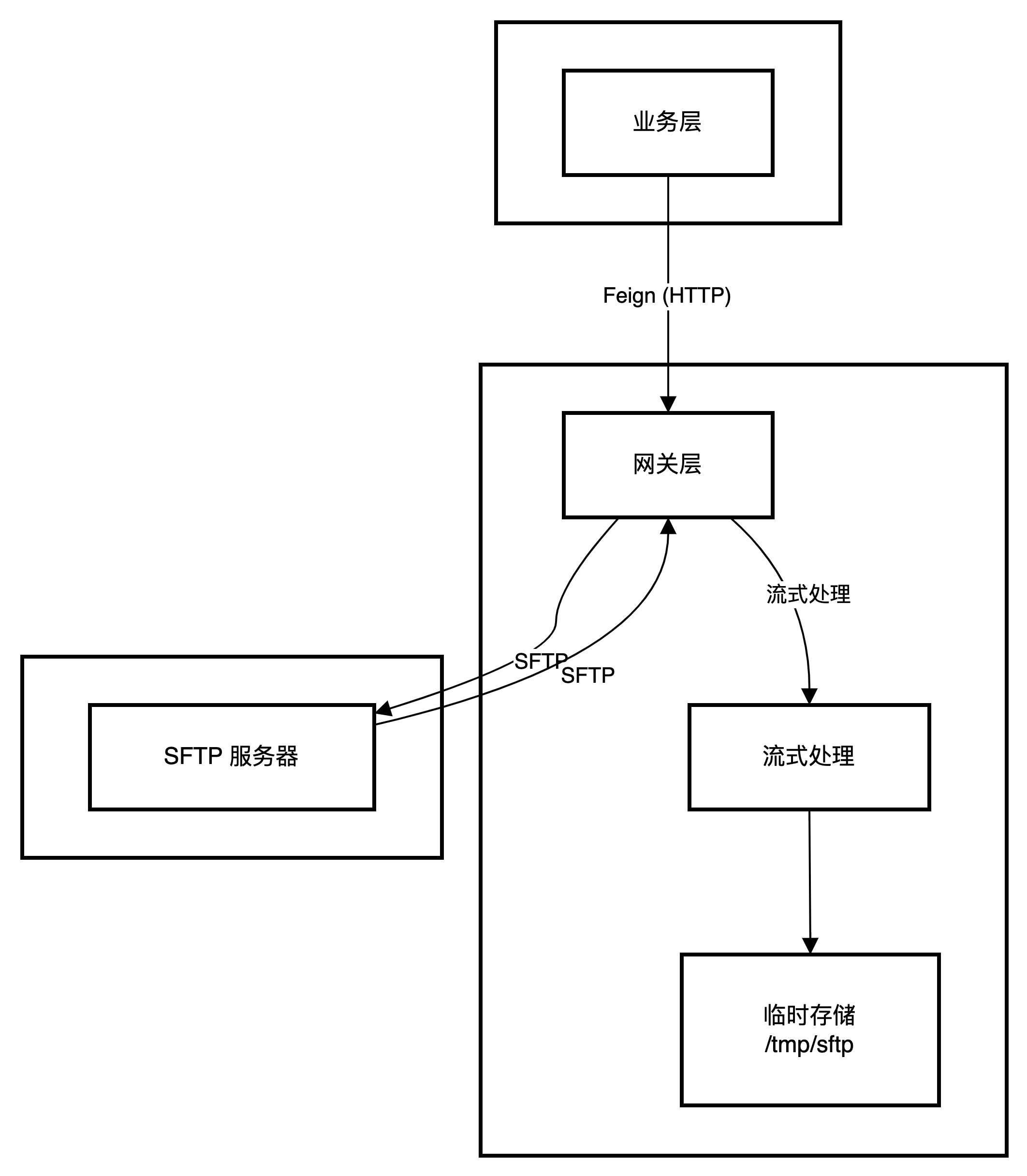
核心挑战
| 挑战 | 描述 | 解决方案 |
|---|---|---|
| 内存溢出 | 大文件加载到内存导致 OOM | 流式传输,分块处理 |
| 超时控制 | 大文件传输时间长 | 合理设置 Feign 超时 |
| 资源泄漏 | 连接和临时文件未释放 | 使用 try-with-resources |
| 并发控制 | 多请求同时传输 | 连接池管理 |
Java 实现
技术选型
| 组件 | 技术 | 版本 | 说明 |
|---|---|---|---|
| SFTP 客户端 | JSch | 0.1.55 | 成熟稳定的 SSH2 实现 |
| 微服务框架 | Spring Boot + Cloud | 2.7.x | 服务治理与 Feign 支持 |
| HTTP 客户端 | Feign | - | 声明式 HTTP 调用 |
| 连接池 | Apache Commons Pool2 | 2.11.x | SFTP 连接复用 |
时序图
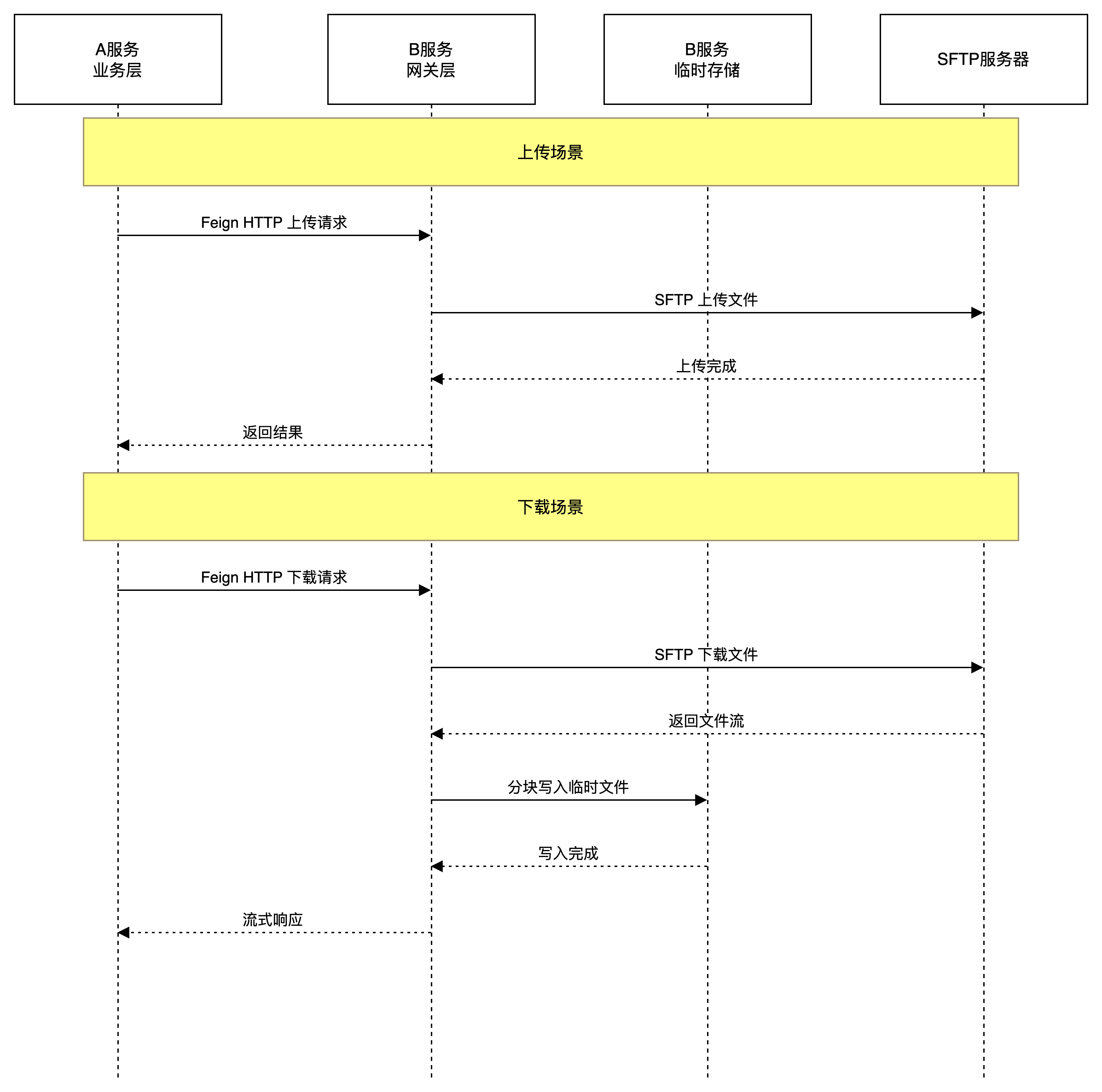
Maven 依赖
xml
<?xml version="1.0" encoding="UTF-8"?>
<project xmlns="http://maven.apache.org/POM/4.0.0">
    <parent>
        <groupId>org.springframework.boot</groupId>
        <artifactId>spring-boot-starter-parent</artifactId>
        <version>2.7.14</version>
    </parent>

    <dependencies>
        <!-- Spring Boot Web -->
        <dependency>
            <groupId>org.springframework.boot</groupId>
            <artifactId>spring-boot-starter-web</artifactId>
        </dependency>

        <!-- Spring Cloud OpenFeign -->
        <dependency>
            <groupId>org.springframework.cloud</groupId>
            <artifactId>spring-cloud-starter-openfeign</artifactId>
            <version>3.1.5</version>
        </dependency>

        <!-- SFTP 客户端 -->
        <dependency>
            <groupId>com.jcraft</groupId>
            <artifactId>jsch</artifactId>
            <version>0.1.55</version>
        </dependency>

        <!-- 连接池 -->
        <dependency>
            <groupId>org.apache.commons</groupId>
            <artifactId>commons-pool2</artifactId>
            <version>2.11.1</version>
        </dependency>

        <!-- 工具类 -->
        <dependency>
            <groupId>org.apache.commons</groupId>
            <artifactId>commons-lang3</artifactId>
        </dependency>

        <dependency>
            <groupId>org.projectlombok</groupId>
            <artifactId>lombok</artifactId>
            <optional>true</optional>
        </dependency>
    </dependencies>
</project>
B 服务实现
SFTP 配置类
java
package com.example.sftp.config;

import lombok.Data;
import org.springframework.boot.context.properties.ConfigurationProperties;
import org.springframework.stereotype.Component;

@Data
@Component
@ConfigurationProperties(prefix = "sftp")
public class SftpProperties {

    /** SFTP 服务器地址 */
    private String host;

    /** SFTP 端口,默认 22 */
    private int port = 22;

    /** 用户名 */
    private String username;

    /** 密码认证方式使用 */
    private String password;

    /** 私钥路径(公钥认证方式使用) */
    private String privateKeyPath;

    /** 私钥密码 */
    private String privateKeyPassphrase;

    /** 连接超时(毫秒) */
    private int connectionTimeout = 30000;

    /** 缓冲区大小(字节),默认 4MB */
    private int bufferSize = 4 * 1024 * 1024;

    /** 临时文件目录 */
    private String tempDirectory = "/tmp/sftp";

    /** 是否跳过主机密钥检查(生产环境应设为 false) */
    private boolean strictHostKeyChecking = false;
}
yaml
# application.yml
sftp:
  host: sftp.example.com
  port: 22
  username: sftp_user
  password: ${SFTP_PASSWORD:}
  private-key-path: /keys/id_rsa
  buffer-size: 4194304
  temp-directory: /data/sftp-temp
  strict-host-key-checking: false

server:
  port: 8081

feign:
  client:
    config:
      default:
        connectTimeout: 30000
        readTimeout: 600000
SFTP 连接管理器
java
package com.example.sftp.connection;

import com.example.sftp.config.SftpProperties;
import com.jcraft.jsch.*;
import lombok.extern.slf4j.Slf4j;
import org.springframework.stereotype.Component;

import java.util.Properties;

@Slf4j
@Component
public class SftpConnectionManager {

    private final SftpProperties properties;
    private Session session;
    private ChannelSftp channelSftp;

    public SftpConnectionManager(SftpProperties properties) {
        this.properties = properties;
    }

    /**
     * 获取 SFTP 通道
     * 采用懒加载方式,首次调用时建立连接
     */
    public synchronized ChannelSftp getChannel() throws JSchException {
        if (isConnected()) {
            return channelSftp;
        }

        close();
        establishConnection();
        return channelSftp;
    }

    /**
     * 建立连接
     */
    private void establishConnection() throws JSchException {
        JSch jsch = new JSch();

        // 配置私钥认证(优先使用)
        configurePrivateKey(jsch);

        // 创建会话
        session = jsch.getSession(
            properties.getUsername(),
            properties.getHost(),
            properties.getPort()
        );

        // 配置密码认证
        configurePassword();

        // 配置会话属性
        configureSession();

        // 连接会话
        session.connect(properties.getConnectionTimeout());

        // 打开 SFTP 通道
        channelSftp = (ChannelSftp) session.openChannel("sftp");
        channelSftp.connect();

        log.info("SFTP 连接成功: {}:{}", properties.getHost(), properties.getPort());
    }

    /**
     * 配置私钥认证
     */
    private void configurePrivateKey(JSch jsch) throws JSchException {
        if (properties.getPrivateKeyPath() != null && !properties.getPrivateKeyPath().isEmpty()) {
            if (properties.getPrivateKeyPassphrase() != null) {
                jsch.addIdentity(
                    properties.getPrivateKeyPath(),
                    properties.getPrivateKeyPassphrase()
                );
            } else {
                jsch.addIdentity(properties.getPrivateKeyPath());
            }
            log.info("使用私钥认证: {}", properties.getPrivateKeyPath());
        }
    }

    /**
     * 配置密码认证
     */
    private void configurePassword() {
        if (properties.getPassword() != null && !properties.getPassword().isEmpty()) {
            session.setPassword(properties.getPassword());
            log.info("使用密码认证");
        }
    }

    /**
     * 配置会话属性
     */
    private void configureSession() {
        Properties config = new Properties();

        // 主机密钥检查(生产环境应开启)
        if (!properties.isStrictHostKeyChecking()) {
            config.put("StrictHostKeyChecking", "no");
        }

        session.setConfig(config);
        session.setTimeout(properties.getConnectionTimeout());
    }

    /**
     * 检查连接是否有效
     */
    private boolean isConnected() {
        return channelSftp != null
            && channelSftp.isConnected()
            && session != null
            && session.isConnected();
    }

    /**
     * 关闭连接
     */
    public synchronized void close() {
        if (channelSftp != null && channelSftp.isConnected()) {
            channelSftp.disconnect();
            log.debug("SFTP 通道已关闭");
        }
        if (session != null && session.isConnected()) {
            session.disconnect();
            log.debug("SSH 会话已关闭");
        }
    }
}
SFTP 文件操作服务
java
package com.example.sftp.service;

import com.example.sftp.config.SftpProperties;
import com.example.sftp.connection.SftpConnectionManager;
import com.jcraft.ChannelSftp;
import com.jcraft.SftpException;
import lombok.extern.slf4j.Slf4j;
import org.springframework.stereotype.Service;

import java.io.*;
import java.nio.file.Files;
import java.nio.file.Path;

@Slf4j
@Service
public class SftpFileService {

    private final SftpProperties properties;
    private final SftpConnectionManager connectionManager;

    public SftpFileService(SftpProperties properties, SftpConnectionManager connectionManager) {
        this.properties = properties;
        this.connectionManager = connectionManager;
    }

    /**
     * 上传文件到 SFTP
     *
     * @param remotePath 远程文件路径(如 /data/file.txt)
     * @param inputStream 文件输入流
     */
    public void uploadFile(String remotePath, InputStream inputStream) {
        ChannelSftp channelSftp = null;

        try {
            channelSftp = connectionManager.getChannel();

            // 创建远程目录(如果不存在)
            createRemoteDirectory(channelSftp, getParentPath(remotePath));

            // 流式上传
            try (BufferedInputStream bis = new BufferedInputStream(inputStream)) {
                channelSftp.put(bis, remotePath, ChannelSftp.OVERWRITE);
            }

            log.info("文件上传成功: {}", remotePath);

        } catch (Exception e) {
            log.error("文件上传失败: {}", remotePath, e);
            throw new RuntimeException("文件上传失败: " + e.getMessage(), e);
        }
    }

    /**
     * 从 SFTP 下载文件到临时文件
     *
     * @param remotePath 远程文件路径
     * @return 临时文件
     */
    public File downloadFileToTemp(String remotePath) {
        ChannelSftp channelSftp = null;
        File tempFile = null;

        try {
            channelSftp = connectionManager.getChannel();

            // 检查文件是否存在
            checkFileExists(channelSftp, remotePath);

            // 创建临时文件
            tempFile = createTempFile();

            // 分块下载
            downloadWithBuffer(channelSftp, remotePath, tempFile);

            log.info("文件下载完成: {} -> {} ({} bytes)",
                     remotePath, tempFile.getAbsolutePath(), tempFile.length());
            return tempFile;

        } catch (Exception e) {
            cleanupTempFile(tempFile);
            log.error("文件下载失败: {}", remotePath, e);
            throw new RuntimeException("文件下载失败: " + e.getMessage(), e);
        }
    }

    /**
     * 分块下载文件
     */
    private void downloadWithBuffer(ChannelSftp channelSftp, String remotePath, File tempFile)
            throws SftpException, IOException {

        int bufferSize = properties.getBufferSize();
        byte[] buffer = new byte[bufferSize];

        try (InputStream inputStream = channelSftp.get(remotePath);
             FileOutputStream fos = new FileOutputStream(tempFile);
             BufferedOutputStream bos = new BufferedOutputStream(fos, bufferSize)) {

            int bytesRead;
            long totalBytes = 0;

            while ((bytesRead = inputStream.read(buffer)) != -1) {
                bos.write(buffer, 0, bytesRead);
                totalBytes += bytesRead;

                // 每传输 10MB 记录一次进度
                if (totalBytes % (10 * 1024 * 1024) == 0) {
                    log.debug("下载进度: {} bytes - {}", totalBytes, remotePath);
                }
            }

            bos.flush();
        }
    }

    /**
     * 删除 SFTP 文件
     *
     * @param remotePath 远程文件路径
     * @return 是否删除成功
     */
    public boolean deleteFile(String remotePath) {
        ChannelSftp channelSftp = null;

        try {
            channelSftp = connectionManager.getChannel();

            // 检查文件是否存在
            if (!fileExists(channelSftp, remotePath)) {
                log.warn("文件不存在,无需删除: {}", remotePath);
                return false;
            }

            channelSftp.rm(remotePath);
            log.info("文件删除成功: {}", remotePath);
            return true;

        } catch (Exception e) {
            log.error("文件删除失败: {}", remotePath, e);
            throw new RuntimeException("文件删除失败: " + e.getMessage(), e);
        }
    }

    /**
     * 创建临时文件
     */
    private File createTempFile() throws IOException {
        Path tempDir = Path.of(properties.getTempDirectory());
        if (!Files.exists(tempDir)) {
            Files.createDirectories(tempDir);
        }
        return File.createTempFile("sftp_", ".tmp", tempDir.toFile());
    }

    /**
     * 检查文件是否存在
     */
    private boolean fileExists(ChannelSftp channelSftp, String remotePath) {
        try {
            channelSftp.stat(remotePath);
            return true;
        } catch (SftpException e) {
            if (e.id == ChannelSftp.SSH_FX_NO_SUCH_FILE) {
                return false;
            }
            throw new RuntimeException("检查文件存在性失败", e);
        }
    }

    /**
     * 检查文件存在,不存在则抛出异常
     */
    private void checkFileExists(ChannelSftp channelSftp, String remotePath) throws SftpException {
        try {
            channelSftp.stat(remotePath);
        } catch (SftpException e) {
            if (e.id == ChannelSftp.SSH_FX_NO_SUCH_FILE) {
                throw new RuntimeException("远程文件不存在: " + remotePath);
            }
            throw e;
        }
    }

    /**
     * 创建远程目录
     */
    private void createRemoteDirectory(ChannelSftp channelSftp, String remoteDir) throws SftpException {
        if (remoteDir == null || remoteDir.isEmpty()) {
            return;
        }

        try {
            channelSftp.cd(remoteDir);
            return;
        } catch (SftpException e) {
            // 目录不存在,继续创建
        }

        String[] dirs = remoteDir.split("/");
        StringBuilder path = new StringBuilder();

        for (String dir : dirs) {
            if (dir.isEmpty()) {
                continue;
            }

            path.append("/").append(dir);

            try {
                channelSftp.cd(path.toString());
            } catch (SftpException e) {
                channelSftp.mkdir(path.toString());
                channelSftp.cd(path.toString());
            }
        }
    }

    /**
     * 获取父目录路径
     */
    private String getParentPath(String path) {
        int lastSlash = path.lastIndexOf('/');
        if (lastSlash <= 0) {
            return "";
        }
        return path.substring(0, lastSlash);
    }

    /**
     * 清理临时文件
     */
    private void cleanupTempFile(File tempFile) {
        if (tempFile != null && tempFile.exists()) {
            tempFile.delete();
            log.debug("临时文件已清理: {}", tempFile.getAbsolutePath());
        }
    }
}
Controller 实现
java
package com.example.sftp.controller;

import com.example.sftp.service.SftpFileService;
import lombok.extern.slf4j.Slf4j;
import org.springframework.http.HttpHeaders;
import org.springframework.http.MediaType;
import org.springframework.http.ResponseEntity;
import org.springframework.web.bind.annotation.*;
import org.springframework.web.multipart.MultipartFile;
import org.springframework.web.servlet.mvc.method.annotation.StreamingResponseBody;

import java.io.File;
import java.io.FileInputStream;
import java.io.InputStream;

@Slf4j
@RestController
@RequestMapping("/api/sftp")
public class SftpController {

    private final SftpFileService sftpFileService;

    public SftpController(SftpFileService sftpFileService) {
        this.sftpFileService = sftpFileService;
    }

    /**
     * 上传文件
     */
    @PostMapping(value = "/upload", consumes = MediaType.MULTIPART_FORM_DATA_VALUE)
    public ResponseEntity<Result<Void>> upload(
            @RequestPart("request") UploadRequest request,
            @RequestPart("file") MultipartFile file) {

        try (InputStream inputStream = file.getInputStream()) {
            sftpFileService.uploadFile(request.getRemotePath(), inputStream);
            return ResponseEntity.ok(Result.success());
        } catch (Exception e) {
            log.error("上传失败", e);
            return ResponseEntity.status(500).body(Result.failure(e.getMessage()));
        }
    }

    /**
     * 下载文件(流式返回)
     */
    @GetMapping(value = "/download", produces = MediaType.APPLICATION_OCTET_STREAM_VALUE)
    public ResponseEntity<StreamingResponseBody> download(@RequestParam String remotePath) {

        try {
            File tempFile = sftpFileService.downloadFileToTemp(remotePath);

            StreamingResponseBody responseBody = outputStream -> {
                try (FileInputStream fis = new FileInputStream(tempFile)) {
                    byte[] buffer = new byte[8192];
                    int bytesRead;
                    while ((bytesRead = fis.read(buffer)) != -1) {
                        outputStream.write(buffer, 0, bytesRead);
                    }
                    outputStream.flush();
                } finally {
                    if (tempFile.exists()) {
                        tempFile.delete();
                        log.debug("临时文件已删除: {}", tempFile.getAbsolutePath());
                    }
                }
            };

            String fileName = extractFileName(remotePath);

            return ResponseEntity.ok()
                    .header(HttpHeaders.CONTENT_DISPOSITION,
                            "attachment; filename=\"" + fileName + "\"")
                    .contentType(MediaType.APPLICATION_OCTET_STREAM)
                    .body(responseBody);

        } catch (Exception e) {
            log.error("下载失败: {}", remotePath, e);
            return ResponseEntity.status(500).build();
        }
    }

    /**
     * 删除文件
     */
    @DeleteMapping("/file")
    public ResponseEntity<Result<Void>> delete(@RequestParam String remotePath) {
        try {
            boolean deleted = sftpFileService.deleteFile(remotePath);
            return ResponseEntity.ok(Result.success(deleted));
        } catch (Exception e) {
            log.error("删除失败: {}", remotePath, e);
            return ResponseEntity.status(500).body(Result.failure(e.getMessage()));
        }
    }

    private String extractFileName(String path) {
        int lastSlash = path.lastIndexOf('/');
        return lastSlash >= 0 ? path.substring(lastSlash + 1) : path;
    }
}
A 服务实现
Feign 客户端接口
java
package com.example.client;

import feign.Response;
import org.springframework.cloud.openfeign.FeignClient;
import org.springframework.http.MediaType;
import org.springframework.web.bind.annotation.*;
import org.springframework.web.multipart.MultipartFile;

@FeignClient(name = "sftp-service",
             url = "${sftp.service.url}",
             configuration = SftpFeignConfig.class)
public interface SftpFeignClient {

    /**
     * 上传文件到 SFTP
     */
    @PostMapping(value = "/api/sftp/upload",
                 consumes = MediaType.MULTIPART_FORM_DATA_VALUE)
    Result<Void> upload(@RequestPart("request") UploadRequest request,
                        @RequestPart("file") MultipartFile file);

    /**
     * 从 SFTP 下载文件
     * 注意:返回类型必须是 feign.Response,不能是 ResponseEntity<Resource>
     */
    @GetMapping(value = "/api/sftp/download",
                produces = MediaType.APPLICATION_OCTET_STREAM_VALUE)
    Response download(@RequestParam("remotePath") String remotePath);

    /**
     * 删除 SFTP 文件
     */
    @DeleteMapping("/api/sftp/file")
    Result<Void> delete(@RequestParam("remotePath") String remotePath);
}
Feign 配置类
java
package com.example.client;

import feign.Response;
import feign.codec.Decoder;
import feign.codec.Encoder;
import feign.codec.ErrorDecoder;
import org.springframework.context.annotation.Bean;
import org.springframework.context.annotation.Configuration;
import org.springframework.http.converter.HttpMessageConverter;
import org.springframework.web.client.RestTemplate;

import java.io.IOException;
import java.lang.reflect.Type;

@Configuration
public class SftpFeignConfig {

    /**
     * 配置请求选项
     * 连接超时30秒,读取超时30分钟(大文件传输需要足够时间)
     */
    @Bean
    public feign.Request.Options options() {
        return new feign.Request.Options(30_000, 1_800_000);
    }

    /**
     * 自定义解码器
     * 对于返回类型为 Response 的接口,不进行解码,直接返回原始响应
     */
    @Bean
    public Decoder feignDecoder() {
        return new StreamDecoder();
    }

    /**
     * 编码器
     */
    @Bean
    public Encoder feignEncoder() {
        return new feign.codec.Encoder.Default();
    }

    /**
     * 错误解码器
     */
    @Bean
    public ErrorDecoder errorDecoder() {
        return new SftpErrorDecoder();
    }

    /**
     * 流式解码器:不对响应体进行预加载
     */
    private static class StreamDecoder implements Decoder {
        @Override
        public Object decode(Response response, Type type) throws IOException {
            // 如果返回类型是 Response,直接返回原始响应
            if (type.equals(Response.class)) {
                return response;
            }
            // 其他类型使用默认解码器
            return new feign.codec.Decoder.Default()
                    .decode(response, type);
        }
    }

    /**
     * 错误解码器
     */
    private static class SftpErrorDecoder implements ErrorDecoder {
        @Override
        public Exception decode(String methodKey, Response response) {
            return new RuntimeException(
                String.format("SFTP 服务调用失败: HTTP %d - %s",
                              response.status(), response.reason())
            );
        }
    }
}
A 服务业务实现
java
package com.example.service;

import com.example.client.SftpFeignClient;
import com.example.client.UploadRequest;
import feign.Response;
import lombok.extern.slf4j.Slf4j;
import org.springframework.stereotype.Service;
import org.springframework.web.multipart.MultipartFile;
import org.springframework.web.multipart.support.StandardMultipartHttpServletRequest;

import java.io.*;
import java.nio.file.Files;
import java.nio.file.Path;
import java.nio.file.Paths;

@Slf4j
@Service
public class FileTransferService {

    private final SftpFeignClient sftpFeignClient;

    public FileTransferService(SftpFeignClient sftpFeignClient) {
        this.sftpFeignClient = sftpFeignClient;
    }

    /**
     * 上传本地文件到 SFTP
     */
    public void uploadToSftp(String localFilePath, String remotePath) throws IOException {
        File file = new File(localFilePath);

        if (!file.exists()) {
            throw new RuntimeException("本地文件不存在: " + localFilePath);
        }

        // 构建 MultipartFile
        MultipartFile multipartFile = new CustomMultipartFile(file);

        UploadRequest request = new UploadRequest();
        request.setRemotePath(remotePath);

        Result<Void> result = sftpFeignClient.upload(request, multipartFile);

        if (result.getCode() != 200) {
            throw new RuntimeException("上传失败: " + result.getMessage());
        }

        log.info("文件上传成功: {} -> {}", localFilePath, remotePath);
    }

    /**
     * 从 SFTP 下载文件到本地
     */
    public void downloadFromSftp(String remotePath, String localFilePath) throws IOException {
        Response response = sftpFeignClient.download(remotePath);

        if (response.status() != 200) {
            throw new RuntimeException("下载失败: HTTP " + response.status());
        }

        // 确保目录存在
        Path localPath = Paths.get(localFilePath);
        Files.createDirectories(localPath.getParent());

        // 流式写入本地文件
        try (Response.Body body = response.body();
             InputStream inputStream = body.asInputStream();
             FileOutputStream fos = new FileOutputStream(localFilePath);
             BufferedOutputStream bos = new BufferedOutputStream(fos)) {

            byte[] buffer = new byte[8192];
            int bytesRead;
            long totalBytes = 0;

            while ((bytesRead = inputStream.read(buffer)) != -1) {
                bos.write(buffer, 0, bytesRead);
                totalBytes += bytesRead;

                if (totalBytes % (10 * 1024 * 1024) == 0) {
                    log.info("下载进度: {} bytes - {}", totalBytes, remotePath);
                }
            }

            bos.flush();
            log.info("文件下载完成: {} -> {} ({} bytes)",
                     remotePath, localFilePath, totalBytes);
        }
    }

    /**
     * 从 SFTP 下载文件并直接处理流
     * 适用于需要流式处理的场景
     */
    public void downloadAndProcess(String remotePath, InputStreamProcessor processor) throws IOException {
        Response response = sftpFeignClient.download(remotePath);

        if (response.status() != 200) {
            throw new RuntimeException("下载失败: HTTP " + response.status());
        }

        try (Response.Body body = response.body();
             InputStream inputStream = body.asInputStream()) {
            processor.process(inputStream);
        }
    }

    /**
     * 删除 SFTP 文件
     */
    public void deleteFromSftp(String remotePath) {
        Result<Void> result = sftpFeignClient.delete(remotePath);

        if (result.getCode() != 200) {
            throw new RuntimeException("删除失败: " + result.getMessage());
        }

        log.info("文件删除成功: {}", remotePath);
    }

    /**
     * 输入流处理器接口
     */
    @FunctionalInterface
    public interface InputStreamProcessor {
        void process(InputStream inputStream) throws IOException;
    }
}
关键技术要点
内存优化核心
问题:传统方式会将整个文件加载到内存,导致 OOM
java
// 错误示例
byte[] content = file.getBytes();
// 整个文件加载到内存
channelSftp.put(new ByteArrayInputStream(content), remotePath);解决方案:分块流式传输
java
// 正确示例
try (InputStream inputStream = file.getInputStream()) {
    // put 方法内部使用缓冲区,不会一次性读取全部内容
    channelSftp.put(inputStream, remotePath);
}
为什么使用 feign.Response
| 返回类型 | 内存行为 | 适用场景 |
|---|---|---|
ResponseEntity<Resource> |
Feign 会将整个响应体加载到内存 | 小文件(< 10MB) |
feign.Response |
流式访问,不预加载 | 大文件(任意大小) |
##资源管理最佳实践
java
// 使用 try-with-resources 确保资源释放
try (Response response = sftpFeignClient.download(remotePath);
     InputStream inputStream = response.body().asInputStream();
     FileOutputStream fos = new FileOutputStream(localPath)) {

    // 处理流
    byte[] buffer = new byte[8192];
    int bytesRead;
    while ((bytesRead = inputStream.read(buffer)) != -1) {
        fos.write(buffer, 0, bytesRead);
    }
}