场景
SpringBoot中使用SpringAIAlibaba框架集成阿里云百炼实现AI快速对话入门示例:
https://blog.csdn.net/BADAO_LIUMANG_QIZHI/article/details/160024361
基于上面的基础,使用OpenAI兼容的方式实现AI对话以及流式对话功能。
Spring AI 提供了 spring-ai-openai-spring-boot-starter,自动配置 OpenAiChatModel。
核心配置:
spring.ai.openai.api-key=...
spring.ai.openai.base-url=... # 可选,默认 https://api.openai.com
spring.ai.openai.chat.options.model=gpt-4o
通过 ChatClient 或直接注入 OpenAiChatModel 进行调用。
支持流式响应、函数调用、嵌入等。
注:
博客:
https://blog.csdn.net/badao_liumang_qizhi
实现
- 配置 pom.xml 文件
在项目的 pom.xml 中,添加 spring-ai-openai-spring-boot-starter 依赖,并配置 Spring 里程碑仓库以确保依赖能正确下载。
    <parent>
        <groupId>org.springframework.boot</groupId>
        <artifactId>spring-boot-starter-parent</artifactId>
        <version>3.2.5</version>
    </parent>

    <groupId>com.example</groupId>
    <artifactId>spring-openai-bailian</artifactId>
    <version>1.0</version>

    <properties>
        <java.version>17</java.version>
    </properties>

    <!-- Spring AI BOM 统一管理依赖版本 -->
    <dependencyManagement>
        <dependencies>
            <dependency>
                <groupId>org.springframework.ai</groupId>
                <artifactId>spring-ai-bom</artifactId>
                <version>1.0.0-M6</version>
                <type>pom</type>
                <scope>import</scope>
            </dependency>
        </dependencies>
    </dependencyManagement>

    <dependencies>
        <dependency>
            <groupId>org.springframework.boot</groupId>
            <artifactId>spring-boot-starter-web</artifactId>
        </dependency>
        <dependency>
            <groupId>org.springframework.ai</groupId>
            <artifactId>spring-ai-openai-spring-boot-starter</artifactId>
        </dependency>
    </dependencies>

    <repositories>
        <repository>
            <id>spring-milestones</id>
            <name>Spring Milestones</name>
            <url>https://repo.spring.io/milestone</url>
        </repository>
</repositories>- 配置 application.yml
修改配置文件,将 spring.ai.openai 的 base-url 指向百炼平台的兼容模式地址,并填入你的 API Key 和想要使用的模型
spring:
ai:
openai:
# 替换为你的阿里云百炼 API Key,建议使用环境变量
api-key: your-api-key
# 百炼平台的兼容模式地址,注意不要额外添加 /v1
base-url: https://dashscope.aliyuncs.com/compatible-mode
chat:
options:
# 替换为你想使用的模型名称,例如 qwen-max, qwen-plus 或 deepseek-r1
model: qwen-max
- 编写调用代码
你可以创建一个 ChatClient 的 Bean,或者直接在 Controller 中注入 OpenAiChatModel 来调用模型。
import org.springframework.ai.chat.client.ChatClient;
import org.springframework.http.MediaType;
import org.springframework.http.codec.ServerSentEvent;
import org.springframework.web.bind.annotation.GetMapping;
import org.springframework.web.bind.annotation.RequestParam;
import org.springframework.web.bind.annotation.RestController;
import reactor.core.publisher.Flux;

@RestController
public class ChatController {

    private final ChatClient chatClient;

    // 通过构造函数注入 ChatClient
    public ChatController(ChatClient.Builder chatClientBuilder) {
        this.chatClient = chatClientBuilder.build();
    }

    // 1. 同步调用
    @GetMapping("/ai/generate")
    public String generate(@RequestParam(value = "message", defaultValue = "你好") String message) {
        return chatClient.prompt()
                .user(message)
                .call()
                .content();
    }

    // 2. 流式调用 (SSE)
    @GetMapping(value = "/ai/stream", produces = MediaType.TEXT_EVENT_STREAM_VALUE)
    public Flux<ServerSentEvent<String>> stream(@RequestParam(value = "message", defaultValue = "讲个笑话") String message) {
        return chatClient.prompt()
                .user(message)
                .stream()
                .content()
                .map(content -> ServerSentEvent.builder(content).build());
    }
}
关键注意点
base-url 配置:
确保 base-url 配置为 https://dashscope.aliyuncs.com/compatible-mode,而不是 .../compatible-mode/v1。
因为 Spring AI 会自动在路径后添加 /v1,配置错误会导致 404 错误。
API Key 安全:
建议使用环境变量(如 ${DASHSCOPE_API_KEY})来配置 API Key,避免硬编码在配置文件中。
你可以使用 echo "export DASHSCOPE_API_KEY='你的API密钥'" >> ~/.bashrc 等命令进行设置。
模型选择:
在 model 字段填写你需要的模型名称,例如 qwen-max、qwen-plus 或 deepseek-r1 等,
具体可选的模型列表可以在百炼控制台的"模型广场"查看。
JDK 版本:
Spring AI 3.x 版本基于 Spring Boot 3.x,要求 JDK 17 或更高版本
4、启动测试
打开浏览器,直接访问以下 URL:
同步接口:
http://localhost:8080/ai/generate?message=你好,请介绍一下自己
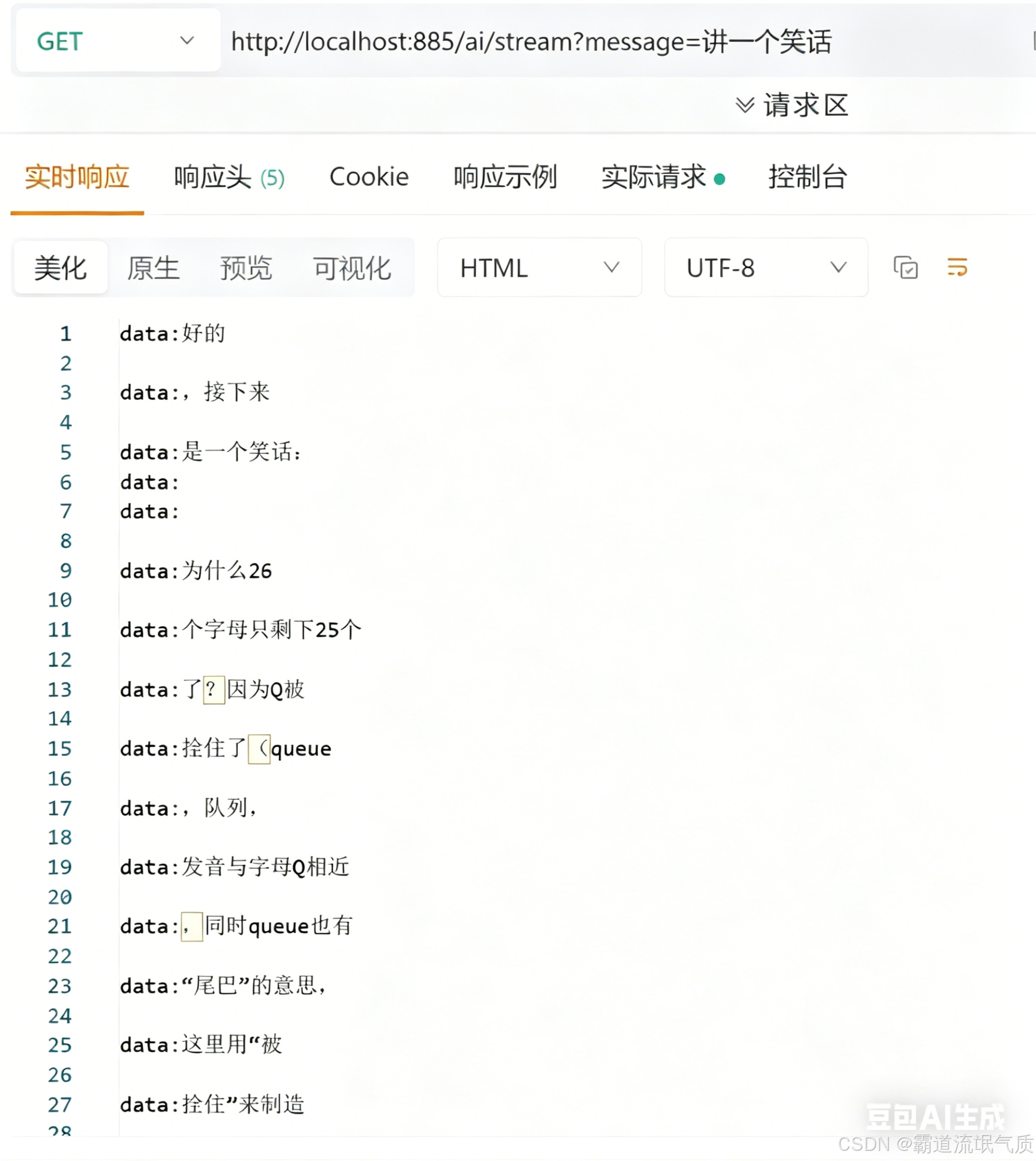
流式接口:
http://localhost:8080/ai/stream?message=讲一个简短的笑话
流式接口会以 Server-Sent Events (SSE) 形式逐字输出,浏览器可能无法直接展示,建议使用Postman 测试