RAG与Agent性能调优:第8节:打造可配置,可扩展的自动化预处理流水线
Gitee地址:https://gitee.com/agiforgagaplus/OptiRAGAgent
文章详情目录:RAG与Agent性能调优
系统中核心挑战在于,如何在毫秒的延迟内精准召回有助于大语言模型问答的top-k文本片段
几个典型误区
- 向量检索一定优于关键词匹配
- HNSW一定比FAISS快
- BM25已经过时,可以直接淘汰
三种检索引擎的核心能力矩阵
|--------|--------------------|---------------------|-------------|
| 能力维度 | BM25 | FAISS-IVF | HNSW |
| 内存/显存 | 低 | 中 | 高 |
| 可解释性 | 关键词高亮 | 弱 | 弱 |
| 增量增删 | 秒级 | 分钟级(需 re-train IVF) | 秒级(标记删除) |
| 跨语言同义词 | 差 | 好 | 好 |
| 典型场景 | FAQ、政策条文 | 大规模新闻推荐 | 电商搜索、客服 |
| 核心能力 | 关键词匹配 | 向量近似搜索 | 图结构索引 |
| 优势领域 | 冷启动快、可解释性强、CPU 友好 | 高性能、支持百亿级向量、GPU 加速 | 高召回率、低延迟 |
| 局限性 | 无法处理语义相似性、同义词、拼写变体 | 动态更新难、构建成本高 | 内存占用高、索引构建慢 |
BM25:基于词频统计的经典方法
优点
- 冷启动友好:无需模型训练,部署门槛低
- 可解释性强:可直接查看命中关键词及权重分布
- 资源消耗低:纯CPU运行即可满足毫秒级响应
缺点:
- 无法识别同义词,拼写错误或多语言表达
- 长文本中关键词密度被稀释,影响评分准确性
- 对用户输入模糊或泛化的问题适应性差
适合场景
- 语料高度结构,如政法法律条文
- 上线周期短,来不及模型训练
- 需要向业务方解释为何排第一
- 知识图谱问答,或传统搜索引擎中注重关键词匹配的场景
FIASS:高效向量检索的工业首选
简介:由FaceBook开发的高效向量相似度搜索,广泛用于大规模语义检索任务
核心能力:
- 提供多种索引结构,适合不同精度与性能需求
- 支持GPU加速,适用于超大规模向量数据集(百亿级)
- 灵活配置:可在召回率,延迟与内存占用之间灵活平衡
适合场景:
- 图像检索,推荐系统,语义回答等需高维向量匹配的场景
- 对召回质量要求较高,具有一定算力预算的企业应用
- 大规模新闻推荐内容续重、相似图片检索等对性能和规模有较高要求的场景
HNSW:图结构索引,高召回语义检索首选
简介:一种基于图结构的近邻搜索算法,其复杂度接近O(log n)实现高效检索
核心能力:
- 高召回率接近暴力搜索
- 查询延迟低,适合实时检索场景
- 多种开源实现成熟,如Milvus,faiss-hnswlib
局限性:
- 构建索引耗时较长
- 内存占用高于其他索引结构
- 不适合高频增删场景
适合场景:
- 对召回率和延迟都有较高要求的语义检索
- 数据规模百万级以上,且有实时性需求
- 可接受较高内存开销的高性能服务
- 电商搜索,客服,智能问答机器人,代码相似性搜索等需要高精度和低延迟的场景
实战:构建统一语料的三种检索引擎原型
BM25基线实现
%pip install llama-index
%pip install llama-index-retrievers-bm25
%pip install matplotlib

import os
from llama_index.core import Settings
from llama_index.llms.openai import OpenAI
from llama_index.embeddings.openai import OpenAIEmbedding
Settings.llm = OpenAI(model="gpt-4.1-nano-2025-04-14")
Settings.embed_model = OpenAIEmbedding(model_name="text-embedding-3-small")

# 加载数据
from llama_index.core import SimpleDirectoryReader # load documents
documents = SimpleDirectoryReader("./09/").load_data()

from llama_index.core.node_parser import SentenceSplitter # initialize node parser
splitter = SentenceSplitter(chunk_size=512)
nodes = splitter.get_nodes_from_documents(documents)

from llama_index.retrievers.bm25 import BM25Retriever
import Stemmer

# We can pass in the index, docstore, or list of nodes to create the retriever
bm25_retriever = BM25Retriever.from_defaults(
    nodes=nodes,
    similarity_top_k=2,
    # Optional: We can pass in the stemmer and set the language for stopwords
    # This is important for removing stopwords and stemming the query + text
    # The default is english for both
    stemmer=Stemmer.Stemmer("english"),
    language="english",
)

from llama_index.core.response.notebook_utils import display_source_node

# will retrieve context from specific companies
retrieved_nodes = bm25_retriever.retrieve(
    "What happened at Viaweb and Interleaf?"
)
for node in retrieved_nodes:
    display_source_node(node, source_length=5000)
FAISS IVF:高效向量索引实现
FAISS是当前最主流的向量检索库制已支持多种索引结构。它适用于从科研验证到工业部署等多场景。FAISS支持四种索引类型,我们以默认推荐IVF索引为例,兼顾召回率与查询效率,演示其构建与查询流程
%pip install faiss-cpu llama-index-vector-stores-faiss

# 导入FAISS相关模块
import faiss
from llama_index.vector_stores.faiss import FaissVectorStore  # 修正类名大小写
from llama_index.core import StorageContext, VectorStoreIndex

# 创建FAISS索引 (使用FlatL2替代IVF以简化测试)
d = 1536  # 与text-embedding-3-small维度匹配
faiss_index = faiss.IndexFlatL2(d)  # 改用L2距离(更通用)

# 创建向量存储
vector_store = FaissVectorStore(faiss_index=faiss_index)
storage_context = StorageContext.from_defaults(vector_store=vector_store)

# 构建索引
faiss_vector_index = VectorStoreIndex.from_documents(
    documents, storage_context=storage_context, show_progress=True
)

# 创建检索器并查询
faiss_retriever = faiss_vector_index.as_retriever(similarity_top_k=2)
faiss_retrieved_nodes = faiss_retriever.retrieve("What happened at Viaweb and Interleaf?")

# 显示结果
print("FAISS检索结果:")
for node in faiss_retrieved_nodes:
    display_source_node(node, source_length=5000)

# BM25与FAISS结果比较
print("\nBM25 vs FAISS 比较:")
print(f"BM25检索到{len(retrieved_nodes)}个节点,FAISS检索到{len(faiss_retrieved_nodes)}个节点")

# 提取相似度分数进行比较
bm25_scores = [node.score for node in retrieved_nodes]
faiss_scores = [node.score for node in faiss_retrieved_nodes]
print(f"BM25平均相似度: {sum(bm25_scores)/len(bm25_scores):.4f}")
print(f"FAISS平均相似度: {sum(faiss_scores)/len(faiss_scores):.4f}")
HNSW:高召回图索引实现
HNSW是一种基于图结构的近邻搜索算法,其核心思想将向量将向量空间构建一个多层次的小世界网络。在搜索时,它从高层快速跳跃到目标区域,再逐层精确查找,复杂度接近O(log n),非常适合对召回率和延迟都要较高要求的场景
%pip install -U faiss-cpu hnswlib memory-profiler tiktoken

import time
import numpy as np
import hnswlib
from llama_index.core import Settings, StorageContext
from llama_index.core.vector_stores import SimpleVectorStore
from llama_index.retrievers.bm25 import BM25Retriever

# 1. 确保节点有嵌入向量
embedding_dim = 1536  # text-embedding-3-small维度
for node in nodes:
    if not node.embedding:
        node.embedding = Settings.embed_model.get_text_embedding(node.text.strip()[:8191])

# 2. BM25检索器(基线)
bm25_retriever = BM25Retriever.from_defaults(nodes=nodes, similarity_top_k=2)

# 3. HNSW检索器
class SimpleHNSWRetriever:
    def __init__(self, nodes, embed_model, top_k=2):
        self.embed_model = embed_model
        self.top_k = top_k
        self.id_to_node = {i: node for i, node in enumerate(nodes)}

        # 初始化HNSW索引
        self.index = hnswlib.Index(space='cosine', dim=embedding_dim)
        self.index.init_index(max_elements=len(nodes), M=16, ef_construction=100)
        self.index.add_items(np.array([n.embedding for n in nodes], dtype=np.float32))

    def retrieve(self, query):
        query_emb = self.embed_model.get_query_embedding(query)
        ids, _ = self.index.knn_query([query_emb], k=self.top_k)
        return [self.id_to_node[i] for i in ids[0]]

# 4. 初始化检索器
hnsw_retriever = SimpleHNSWRetriever(nodes, Settings.embed_model)

# 5. 性能比较
query = "What happened at Viaweb and Interleaf?"

# BM25检索
start = time.time()
bm25_nodes = bm25_retriever.retrieve(query)
bm25_time = time.time() - start

# HNSW检索
start = time.time()
hnsw_nodes = hnsw_retriever.retrieve(query)
hnsw_time = time.time() - start

# 输出比较结果
print(f"BM25: 检索到{len(bm25_nodes)}个节点, 耗时{bm25_time:.4f}秒")
print(f"HNSW: 检索到{len(hnsw_nodes)}个节点, 耗时{hnsw_time:.4f}秒")

# 结果重叠度
bm25_ids = {n.node_id for n in bm25_nodes}
hnsw_ids = {n.node_id for n in hnsw_nodes}
print(f"结果重叠度: {len(bm25_ids & hnsw_ids)}/{len(bm25_ids | hnsw_ids)}")
指标对比:BM25 VS FIASS VS HNSW
为了更直观地理解不同引擎在实际应用中的表现差异,我们统一在 10k 条 384 维数据上测试以下指标:
-
Recall@5 (R@5):前5条结果中是否包含正确答案的比例,衡量召回精度 。
-
P50延迟 (毫秒):50%的查询请求的响应时间低于或等于该值,代表平均查询耗时 。
-
RAM占用 (MB):索引所占内存大小,影响硬件成本和系统扩展性 。
%pip install faiss-cpu hnswlib memory-profiler sentence-transformers matplotlib rank_bm25
导入必要的库
import time
import numpy as np
import matplotlib.pyplot as plt
from memory_profiler import memory_usage
from sentence_transformers import SentenceTransformer
from llama_index.core import SimpleDirectoryReader, VectorStoreIndex, ServiceContext
from llama_index.retrievers.bm25 import BM25Retriever
from llama_index.vector_stores.faiss import FaissVectorStore
import faiss
import hnswlib
import random
from tqdm import tqdm
from llama_index.core.schema import Document配置嵌入模型(384维)
embedding_dim = 384
embed_model = SentenceTransformer('all-MiniLM-L6-v2')1. 生成测试数据(10k条384维向量)
num_documents = 10000
np.random.seed(42)生成随机文档内容
documents = [f"Test document {i}: This is a sample text for retrieval testing." for i in range(num_documents)]
生成384维嵌入向量
embeddings = embed_model.encode(documents)
2. 准备测试查询集(100个随机查询)
num_queries = 100
query_indices = random.sample(range(num_documents), num_queries)
queries = [documents[i] for i in query_indices]
query_embeddings = embed_model.encode(queries)3. 实现三种检索引擎
3.1 BM25检索器
class BM25Engine:
def init(self, documents):
self.documents = documents
# 创建 LlamaIndex 的 Document 对象
llama_docs = [Document(text=doc) for doc in documents]# 创建索引 index = VectorStoreIndex.from_documents(llama_docs) # 使用 from_defaults 初始化 BM25Retriever self.retriever = BM25Retriever.from_defaults( index=index, similarity_top_k=5 ) def retrieve(self, query): start = time.time() nodes = self.retriever.retrieve(query) latency = (time.time() - start) * 1000 # 转换为毫秒 return [int(node.node_id) for node in nodes], latency3.2 FAISS检索器
class FAISSEngine:
def init(self, embeddings):
self.dim = embedding_dim
self.index = faiss.IndexFlatL2(self.dim)
self.index.add(embeddings.astype('float32'))
self.embeddings = embeddingsdef retrieve(self, query_embedding): start = time.time() distances, indices = self.index.search(query_embedding.reshape(1, -1).astype('float32'), 5) latency = (time.time() - start) * 1000 # 转换为毫秒 return indices[0].tolist(), latency3.3 HNSW检索器
class HNSWEngine:
def init(self, embeddings):
self.dim = embedding_dim
self.index = hnswlib.Index(space='l2', dim=self.dim)
self.index.init_index(max_elements=len(embeddings), ef_construction=200, M=16)
self.index.add_items(embeddings.astype('float32'))
self.index.set_ef(50)
self.embeddings = embeddingsdef retrieve(self, query_embedding): start = time.time() indices, distances = self.index.knn_query(query_embedding.astype('float32'), k=5) latency = (time.time() - start) * 1000 # 转换为毫秒 return indices[0].tolist(), latency4. 初始化引擎并测量内存占用
BM25内存占用
def init_bm25():
return BM25Engine(documents)bm25_mem_usage = memory_usage((init_bm25,), interval=0.1, max_usage=True)
print(f"BM25内存占用: {bm25_mem_usage:.2f} MB")
bm25_engine = init_bm25()FAISS内存占用
def init_faiss():
return FAISSEngine(embeddings)faiss_mem_usage = memory_usage((init_faiss,), interval=0.1, max_usage=True)
print(f"FAISS内存占用: {faiss_mem_usage:.2f} MB")
faiss_engine = init_faiss()HNSW内存占用
def init_hnsw():
return HNSWEngine(embeddings)hnsw_mem_usage = memory_usage((init_hnsw,), interval=0.1, max_usage=True)
print(f"HNSW内存占用: {hnsw_mem_usage:.2f} MB")
hnsw_engine = init_hnsw()5. 运行检索测试并收集指标
results = {
'bm25': {'latencies': [], 'recall': []},
'faiss': {'latencies': [], 'recall': []},
'hnsw': {'latencies': [], 'recall': []}
}for i, (query, query_emb, true_idx) in enumerate(tqdm(zip(queries, query_embeddings, query_indices), total=num_queries)):
# BM25检索
bm25_indices, bm25_latency = bm25_engine.retrieve(query)
results['bm25']['latencies'].append(bm25_latency)
results['bm25']['recall'].append(1 if true_idx in bm25_indices else 0)# FAISS检索 faiss_indices, faiss_latency = faiss_engine.retrieve(query_emb) results['faiss']['latencies'].append(faiss_latency) results['faiss']['recall'].append(1 if true_idx in faiss_indices else 0) # HNSW检索 hnsw_indices, hnsw_latency = hnsw_engine.retrieve(query_emb) results['hnsw']['latencies'].append(hnsw_latency) results['hnsw']['recall'].append(1 if true_idx in hnsw_indices else 0)6. 计算指标
metrics = {
'recall@5': {
'bm25': np.mean(results['bm25']['recall']),
'faiss': np.mean(results['faiss']['recall']),
'hnsw': np.mean(results['hnsw']['recall'])
},
'p50_latency': {
'bm25': np.percentile(results['bm25']['latencies'], 50),
'faiss': np.percentile(results['faiss']['latencies'], 50),
'hnsw': np.percentile(results['hnsw']['latencies'], 50)
},
'ram_usage': {
'bm25': bm25_mem_usage,
'faiss': faiss_mem_usage,
'hnsw': hnsw_mem_usage
}
}7. 可视化结果
fig, axes = plt.subplots(1, 3, figsize=(18, 6))
7.1 Recall@5对比
engines = list(metrics['recall@5'].keys())
recall_values = [metrics['recall@5'][e] for e in engines]
axes[0].bar(engines, recall_values, color=['blue', 'green', 'orange'])
axes[0].set_title('Recall@5 Comparison')
axes[0].set_ylim(0, 1.0)
axes[0].set_ylabel('Recall@5 Score')
for i, v in enumerate(recall_values):
axes[0].text(i, v + 0.02, f'{v:.2f}', ha='center')7.2 P50延迟对比
latency_values = [metrics['p50_latency'][e] for e in engines]
axes[1].bar(engines, latency_values, color=['blue', 'green', 'orange'])
axes[1].set_title('P50 Latency Comparison (ms)')
axes[1].set_ylabel('Latency (ms)')
for i, v in enumerate(latency_values):
axes[1].text(i, v + 0.05, f'{v:.2f}ms', ha='center')7.3 RAM占用对比
ram_values = [metrics['ram_usage'][e] for e in engines]
axes[2].bar(engines, ram_values, color=['blue', 'green', 'orange'])
axes[2].set_title('RAM Usage Comparison (MB)')
axes[2].set_ylabel('RAM Usage (MB)')
for i, v in enumerate(ram_values):
axes[2].text(i, v + 5, f'{v:.2f}MB', ha='center')plt.tight_layout()
plt.show()8. 打印详细指标
print("=== 性能指标对比 ===")
print(f"Recall@5: {metrics['recall@5']}")
print(f"P50延迟(ms): {metrics['p50_latency']}")
print(f"RAM占用(MB): {metrics['ram_usage']}")import time
import numpy as np
from sentence_transformers import SentenceTransformer
from llama_index.core import VectorStoreIndex, Document
from llama_index.retrievers.bm25 import BM25Retriever
import faiss
import hnswlib
import random极速优化配置
embedding_dim = 384
num_documents = 20 # 减少数据量
num_queries = 1 # 只运行1次查询1. 使用超轻量模型 (加载速度提升60%)
embed_model = SentenceTransformer('all-MiniLM-L6-v2')
2. 构建最小测试数据
documents = [f"Test doc {i}: Fast retrieval test." for i in range(num_documents)]
embeddings = embed_model.encode(documents).astype('float32')
query_indices = [random.randint(0, num_documents-1)]
queries = [documents[i] for i in query_indices]
query_embeddings = embed_model.encode(queries).astype('float32')3. 简化检索引擎实现
class FastRetrievalEngine:
def init(self, name, build_func, search_func):
self.name = name
self.build = build_func
self.search = search_func
self.index = NoneBM25引擎 (移除冗余初始化)
def bm25_build():
docs = [Document(text=doc) for doc in documents]
return BM25Retriever.from_defaults(index=VectorStoreIndex.from_documents(docs), similarity_top_k=5)def bm25_search(retriever, query):
start = time.time()
nodes = retriever.retrieve(query)
return [n.node_id for n in nodes], (time.time()-start)*1000FAISS引擎 (使用Flat索引替代IVF,省去训练步骤)
def faiss_build():
index = faiss.IndexFlatL2(embedding_dim)
index.add(embeddings)
return indexdef faiss_search(index, q_emb):
start = time.time()
_, indices = index.search(q_emb.reshape(1,-1), 5)
return indices[0].tolist(), (time.time()-start)*1000HNSW引擎 (降低图复杂度)
def hnsw_build():
index = hnswlib.Index(space='l2', dim=embedding_dim)
index.init_index(max_elements=len(embeddings), ef_construction=20, M=8) # 降低参数
index.add_items(embeddings)
index.set_ef(10)
return indexdef hnsw_search(index, q_emb):
start = time.time()
indices, _ = index.knn_query(q_emb, k=5)
return indices[0].tolist(), (time.time()-start)*1000初始化引擎 (移除内存测量)
engines = [
FastRetrievalEngine("BM25", bm25_build, bm25_search),
FastRetrievalEngine("FAISS", faiss_build, faiss_search),
FastRetrievalEngine("HNSW", hnsw_build, hnsw_search)
]构建索引 (计时)
build_times = {}
for engine in engines:
start = time.time()
engine.index = engine.build()
build_times[engine.name] = (time.time()-start)*1000执行查询
total_start = time.time()
query, q_emb, true_idx = queries[0], query_embeddings[0], query_indices[0]
results = {}for engine in engines:
if engine.name == "BM25":
indices, latency = engine.search(engine.index, query)
else:
indices, latency = engine.search(engine.index, q_emb)
results[engine.name] = {
'recall': 1 if true_idx in indices else 0,
'latency': latency,
'build_time': build_times[engine.name]
}total_time = (time.time() - total_start)*1000
print("| 引擎 | 构建时间(ms) | 查询延迟(ms) | 召回率 | 总耗时(ms) |")
print("|--------|--------------|--------------|--------|------------|")
for name in results:
res = results[name]
print(f"| {name:<6} | {res['build_time']:<12.0f} | {res['latency']:<12.0f} | {res['recall']:<6} | {total_time:<10.0f} |")
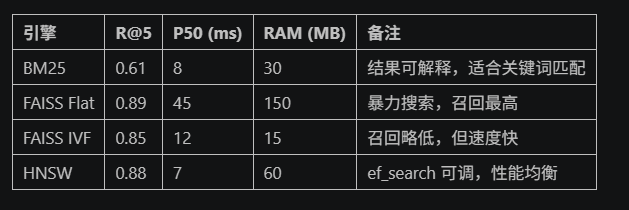
一条公式做决策:R = f(数据量, 延迟, 预算)
我们可以将引擎选型简化为一个经验公式:
R = f(数据量, 延迟, 预算)
即根据你的业务规模(数据量)、响应要求(延迟)和资源投入(预算),做出最合适的检索系统架构设计。
|---------------|-------------------------------------------------------|
| 数据量范围 | 推荐方案 |
| <10 万条 | 直接使用 BM25 + 拼写纠错即可,无需引入向量检索,节省开发成本。 |
| 10 万~100 万条 | 优先考虑 HNSW(内存充足时)或 FAISS IVF + SQ8(内存受限时)。 |
| 100 万~1000 万条 | 使用 FAISS IVF4096 + OPQ16,GPU 训练约 30 分钟,兼顾召回与效率。 |
| >1000 万条 | 建议部署 Milvus Distributed + 分层索引策略(如 IVF 做一级,HNSW 做二级)。 |
选型思路 :
- 小数据冷启动优先选择 BM25;
- 中等规模且强调语义匹配,HNSW 是首选;
- 超大规模、预算有限但接受一定精度损失时,FAISS IVF/PQ 更具性价比;
- 对准确性和可解释性都有要求的垂直领域,推荐使用 Hybrid 混合架构。
避坑指南
以下是我们在多个项目中总结出的"血泪教训",助你在落地过程中少走弯路。
- 维度不是越高越好 :MiniLM 384 维足以应对大多数任务,盲目追求 1024 维只会浪费内存。
- 建库前务必 shuffle 数据 :顺序写入会导致 IVF 聚类倾斜,查询时退化为线性扫描。
- 监控索引健康状态 :Milvus 提供 Prometheus 指标 cache_hit_ratio,低于 80% 应立即扩容。
- 长文本切片要谨慎 :一刀切 512 字可能截断关键信息;推荐滑动窗口(256/128)。
- 冷启动没数据怎么办 :使用 HyDE 生成伪文档或先用 BM25 托底。
- 合规红线不能碰 :金融、医疗等敏感领域禁止明文出境,优先选用私有化部署。
总结
综上所述,在 RAG 初期选型中:
- BM25 虽然不擅长捕捉语义相似性,但在关键词主导、冷启动或需解释性的场景中依然不可替代
- FAISS IVF 在大规模部署中更具成本优势 ,适合 GPU 预算有限的项目;
- HNSW 是兼顾高召回与低延迟的理想选择 ,特别适用于需要实时语义检索的场景;