借助ai模型@vladmandic/face-api实现截取视频中的正脸照片
npm i @vladmandic/face-api
加载模型//可以加载CDN资源
const MODEL_URL = 'https://cdn.jsdelivr.net/npm/@vladmandic/face-api/model/'
//也可以将face-api的模型直接拷贝下来放在public下
const MODEL_URL = '/models';
//在public下新建文件夹models,将模型文件放到该文件夹下,如下图所示
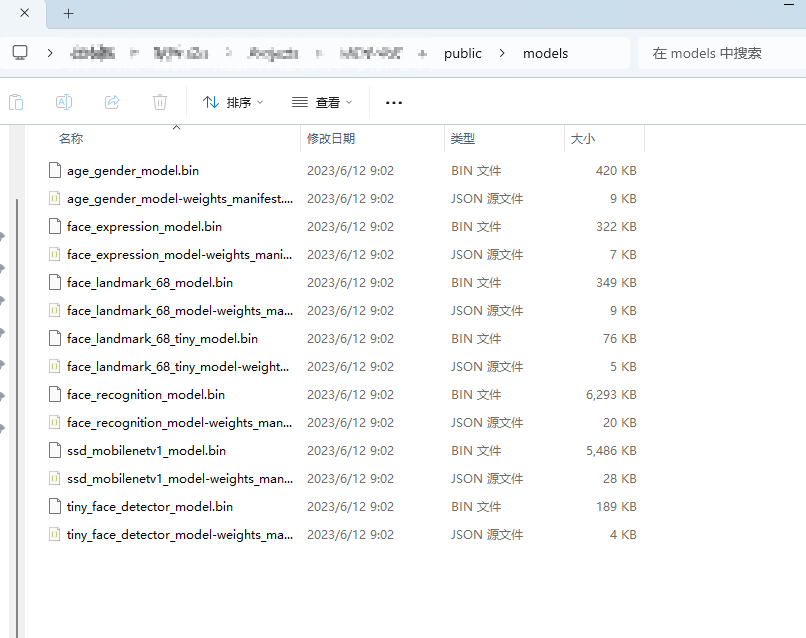
c
<template>
  <div class="face-extractor-container">
    <div class="card">
      <h2>Vue 2 视频正脸自动提取</h2>

      <!-- 状态显示 -->
      <p :class="['status', { error: isError }]">{{ statusText }}</p>

      <!-- 进度条 -->
      <div v-if="processing" class="progress-container">
        <div class="progress-bar" :style="{ width: progress + '%' }"></div>
        <span>{{ progress }}%</span>
      </div>

      <!-- 操作按钮 -->
      <div class="controls">
        <input
            type="file"
            ref="fileInput"
            accept="video/*"
            @change="handleFileUpload"
            style="display: none"
        >
        <button
            class="btn"
            @click="$refs.fileInput.click()"
            :disabled="!modelsLoaded || processing"
        >
          {{ processing ? '正在处理...' : '上传视频并提取' }}
        </button>
      </div>

      <!-- 结果展示 -->
      <div v-if="bestFace.bestDataUrl" class="result-area">
        <p>检测到的最佳正脸截图:</p>
        <img :src="bestFace.bestDataUrl" class="result-img" />
        <br />
        <button class="btn download-btn" @click="downloadImage">下载截图</button>
      </div>

      <!-- 隐藏的辅助元素 -->
      <video ref="hiddenVideo" muted style="display: none"></video>
      <canvas ref="hiddenCanvas" style="display: none"></canvas>
    </div>
  </div>
</template>

<script>
// 注意:如果通过 npm 安装,使用 import * as faceapi from 'face-api.js'
// 这里假设通过 CDN 在 index.html 引入了 face-api.min.js
import * as faceapi from '@vladmandic/face-api'
export default {
  data() {
    return {
      modelsLoaded: false,
      processing: false,
      isError: false,
      statusText: '正在初始化 AI 模型...',
      progress: 0,
      bestFace: {
        score: 100, // 分数越小越好(越对称)
        bestDataUrl: null
      },
      sampleStep: 0.5, // 采样间隔(秒),越小越精细但越慢
    };
  },
  mounted() {
    this.initModels();
  },
  methods: {
    // 1. 加载模型
    async initModels() {
      const MODEL_URL = '/models';
      const MODEL_URL = 'https://cdn.jsdelivr.net/npm/@vladmandic/face-api/model/';
      try {
        // 加载人脸检测和特征点识别模型
        await faceapi.nets.tinyFaceDetector.loadFromUri(MODEL_URL);
        await faceapi.nets.faceLandmark68Net.loadFromUri(MODEL_URL);
        this.modelsLoaded = true;
        this.statusText = '模型加载成功,请上传视频';
      } catch (err) {
        this.isError = true;
        this.statusText = '模型加载失败,请检查网络或 CORS 限制';
        console.error(err);
      }
    },

    // 2. 处理文件上传
    async handleFileUpload(event) {
      const file = event.target.files[0];
      if (!file) return;

      this.processing = true;
      this.progress = 0;
      this.bestFace.score = 100;
      this.bestFace.bestDataUrl = null;
      this.statusText = '读取视频中...';

      const video = this.$refs.hiddenVideo;
      video.src = URL.createObjectURL(file);

      video.onloadedmetadata = async () => {
        await this.startExtraction();
      };
    },

    // 3. 核心提取逻辑
    async startExtraction() {
      const video = this.$refs.hiddenVideo;
      const duration = video.duration;

      for (let currentTime = 0; currentTime < duration; currentTime += this.sampleStep) {
        // 跳转到指定时间点(不播放)
        video.currentTime = currentTime;

        // 等待视频跳转完成
        await new Promise(resolve => (video.onseeked = resolve));

        // 进行人脸检测
        const detection = await faceapi
            .detectSingleFace(video, new faceapi.TinyFaceDetectorOptions())
            .withFaceLandmarks();

        if (detection) {
          const score = this.calculateFaceScore(detection.landmarks);
          // 如果得分比之前的好,则更新截图
          if (score < this.bestFace.score) {
            this.bestFace.score = score;
            this.captureFrame();
          }
        }

        // 更新进度
        this.progress = Math.round((currentTime / duration) * 100);
      }

      this.finish();
    },

    // 4. 计算正脸分值(基于面部对称性)
    calculateFaceScore(landmarks) {
      const nose = landmarks.getNose()[0];
      const jaw = landmarks.getJawOutline();
      const leftEdge = jaw[0];
      const rightEdge = jaw[16];

      // 鼻子到左边缘和右边缘的距离
      const distL = Math.abs(nose.x - leftEdge.x);
      const distR = Math.abs(nose.x - rightEdge.x);

      // 理想正脸比例为 1:1,计算其偏离程度
      return Math.abs(distL / distR - 1);
    },

    // 5. 截取当前视频帧
    captureFrame() {
      const video = this.$refs.hiddenVideo;
      const canvas = this.$refs.hiddenCanvas;
      canvas.width = video.videoWidth;
      canvas.height = video.videoHeight;
      const ctx = canvas.getContext('2d');
      ctx.drawImage(video, 0, 0, canvas.width, canvas.height);
      this.bestFace.bestDataUrl = canvas.toDataURL('image/jpeg', 0.9);
    },

    finish() {
      this.processing = false;
      this.progress = 100;
      this.statusText = this.bestFace.bestDataUrl ? '提取完成' : '未检测到人脸';
    },

    downloadImage() {
      const link = document.createElement('a');
      link.href = this.bestFace.bestDataUrl;
      link.download = 'best_face.jpg';
      link.click();
    }
  }
};
</script>

<style scoped>
.face-extractor-container {
  display: flex;
  justify-content: center;
  padding: 40px;
  font-family: Arial, sans-serif;
}
.card {
  background: white;
  padding: 2rem;
  border-radius: 12px;
  box-shadow: 0 4px 6px rgba(0,0,0,0.1);
  width: 100%;
  max-width: 500px;
}
.status { color: #666; font-size: 0.9rem; }
.status.error { color: #ff4d4f; }
.progress-container {
  width: 100%;
  background: #eee;
  height: 20px;
  border-radius: 10px;
  margin: 20px 0;
  position: relative;
  overflow: hidden;
}
.progress-bar {
  background: #1890ff;
  height: 100%;
  transition: width 0.2s;
}
.progress-container span {
  position: absolute;
  top: 0; left: 50%;
  transform: translateX(-50%);
  font-size: 12px;
  line-height: 20px;
  color: #333;
}
.btn {
  background: #1890ff;
  color: white;
  border: none;
  padding: 10px 20px;
  border-radius: 4px;
  cursor: pointer;
}
.btn:disabled { background: #d9d9d9; cursor: not-allowed; }
.result-area { margin-top: 30px; }
.result-img {
  width: 100%;
  border: 3px solid #52c41a;
  border-radius: 8px;
}
.download-btn { background: #52c41a; margin-top: 10px; }
</style>
但在上传视频没有人脸的视频也能截取到照片,包括闭眼照片,可能功能主要是五官截取
本文章是为了记录分享,欢迎大家评论区留言~