微服务项目-短信平台
父级pom
java
<?xml version="1.0" encoding="UTF-8"?>
<project xmlns="http://maven.apache.org/POM/4.0.0" xmlns:xsi="http://www.w3.org/2001/XMLSchema-instance"
         xsi:schemaLocation="http://maven.apache.org/POM/4.0.0 https://maven.apache.org/xsd/maven-4.0.0.xsd">
    <modelVersion>4.0.0</modelVersion>
    <packaging>pom</packaging>

    <!--声明当前项目是springboot-->
    <parent>
        <groupId>org.springframework.boot</groupId>
        <artifactId>spring-boot-starter-parent</artifactId>
        <version>2.1.9.RELEASE</version>
    </parent>
    <groupId>com.test</groupId>
    <artifactId>smsplatform</artifactId>
    <version>0.0.1-SNAPSHOT</version>
    <name>smsplatform</name>
    <description>smsplatform</description>

    <dependencyManagement>
        <dependencies>
            <dependency>
                <groupId>org.springframework.cloud</groupId>
                <artifactId>spring-cloud-dependencies</artifactId>
                <version>Greenwich.SR5</version>
                <scope>import</scope>
                <type>pom</type>
            </dependency>
        </dependencies>
    </dependencyManagement>
</project>
一、注册中心
pom
java
<?xml version="1.0" encoding="UTF-8"?>
<project xmlns="http://maven.apache.org/POM/4.0.0"
         xmlns:xsi="http://www.w3.org/2001/XMLSchema-instance"
         xsi:schemaLocation="http://maven.apache.org/POM/4.0.0 http://maven.apache.org/xsd/maven-4.0.0.xsd">
    <parent>
        <artifactId>smsplatform</artifactId>
        <groupId>com.test</groupId>
        <version>0.0.1-SNAPSHOT</version>
    </parent>
    <modelVersion>4.0.0</modelVersion>

    <artifactId>sms-register</artifactId>


    <dependencies>
        <dependency>
            <groupId>org.springframework.cloud</groupId>
            <artifactId>spring-cloud-starter-netflix-eureka-server</artifactId>
        </dependency>
    </dependencies>

    <profiles>
        <profile>
            <!--id与配置文件后缀一致-->
            <id>local</id>
            <activation>
                <activeByDefault>true</activeByDefault>
            </activation>
            <properties>
                <!--profileActive与配置文件的属性一致-->
                <profileActive>local</profileActive>
            </properties>
        </profile>

        <profile>
            <!--id与配置文件后缀一致-->
            <id>prod</id>
            <activation>
                <activeByDefault>false</activeByDefault>
            </activation>
            <properties>
                <!--profileActive与配置文件的属性一致-->
                <profileActive>prod</profileActive>
            </properties>
        </profile>
    </profiles>
</project>
配置文件
application.yml
java
server:
  port: 8000
spring:
  application:
    name: sms-register
  profiles:
    active: @profileActive@
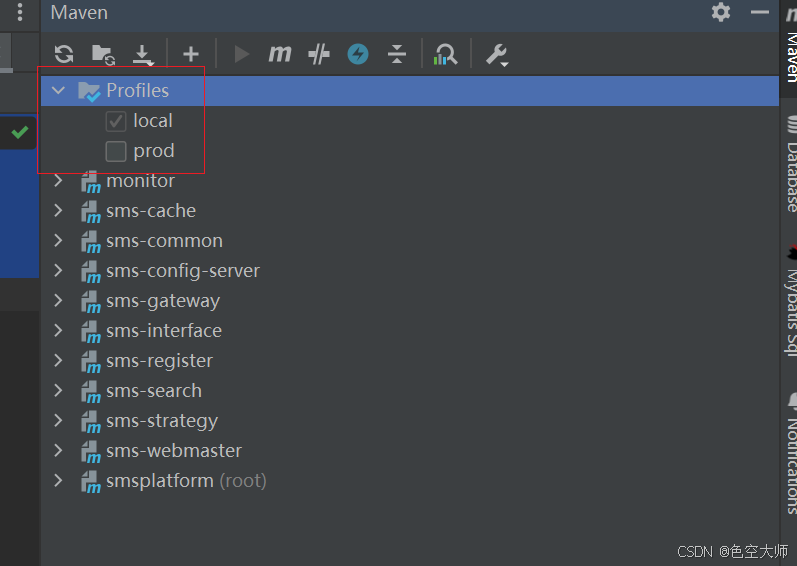
@profileActive@属性在pom文件中,pom中配置后,可在maven页面看到,打包时勾选哪个环境就是哪个环境配置打包
本地配置
java
eureka:
  client:
    service-url:
      defaultZone: http://localhost:8000/eureka
      fetch-register: true
      register-with-eureka: false
启动类
java
package com.test.register;

import org.springframework.boot.SpringApplication;
import org.springframework.boot.autoconfigure.SpringBootApplication;
import org.springframework.cloud.netflix.eureka.server.EnableEurekaServer;

@SpringBootApplication
@EnableEurekaServer
public class RegisterServer {
    public static void main(String[] args) {
        SpringApplication.run(RegisterServer.class,args);
        System.out.println("############ sms-register start success  ###########");
    }
}
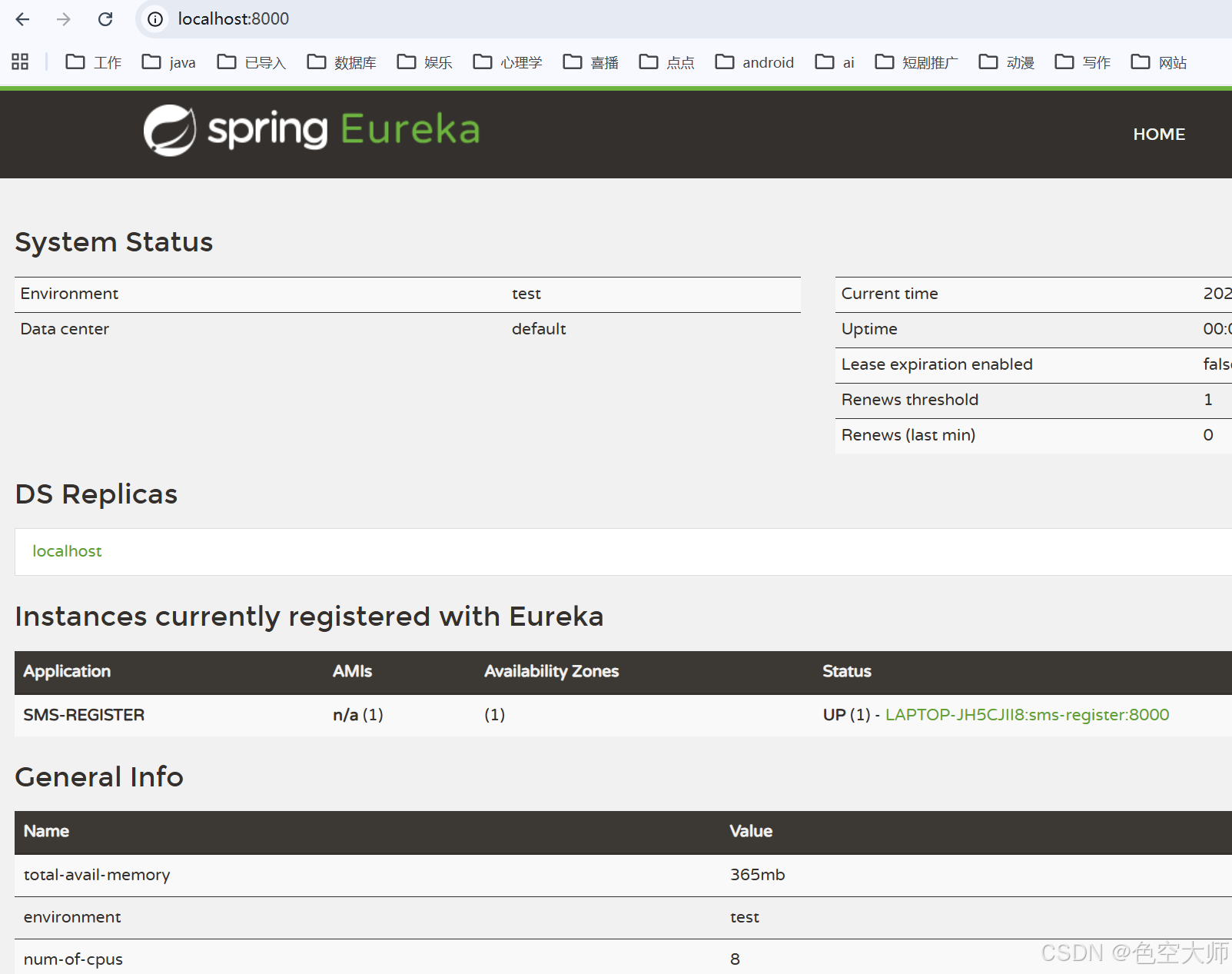
验证
启动后在浏览器输入http://localhost:8000/
配置中心
pom
java
<?xml version="1.0" encoding="UTF-8"?>
<project xmlns="http://maven.apache.org/POM/4.0.0"
         xmlns:xsi="http://www.w3.org/2001/XMLSchema-instance"
         xsi:schemaLocation="http://maven.apache.org/POM/4.0.0 http://maven.apache.org/xsd/maven-4.0.0.xsd">
    <parent>
        <artifactId>smsplatform</artifactId>
        <groupId>com.test</groupId>
        <version>0.0.1-SNAPSHOT</version>
    </parent>
    <modelVersion>4.0.0</modelVersion>

    <artifactId>sms-config-server</artifactId>


    <dependencies>
        <dependency>
            <groupId>org.springframework.cloud</groupId>
            <artifactId>spring-cloud-config-server</artifactId>
        </dependency>

        <dependency>
            <groupId>org.springframework.cloud</groupId>
            <artifactId>spring-cloud-starter-netflix-eureka-client</artifactId>
        </dependency>
    </dependencies>

    <profiles>
        <profile>
            <!--id与配置文件后缀一致-->
            <id>local</id>
            <activation>
                <activeByDefault>true</activeByDefault>
            </activation>
            <properties>
                <!--profileActive与配置文件的属性一致-->
                <profileActive>local</profileActive>
            </properties>
        </profile>

        <profile>
            <!--id与配置文件后缀一致-->
            <id>prod</id>
            <activation>
                <activeByDefault>false</activeByDefault>
            </activation>
            <properties>
                <!--profileActive与配置文件的属性一致-->
                <profileActive>prod</profileActive>
            </properties>
        </profile>
    </profiles>
</project>
配置文件
java
eureka:
  client:
    service-url:
      defaultZone: http://localhost:8000/eureka
spring:
  cloud:
    config:
      server:
        git:
          uri: https://gitee.com/qfp17393120407/sms # 私有仓库需要配置用户名和密码
启动类
java
package com.test.config;

import org.springframework.boot.SpringApplication;
import org.springframework.boot.autoconfigure.SpringBootApplication;
import org.springframework.cloud.client.discovery.EnableDiscoveryClient;
import org.springframework.cloud.config.server.EnableConfigServer;

@SpringBootApplication
@EnableConfigServer
@EnableDiscoveryClient
public class ConfigServer {
    public static void main(String[] args) {
        SpringApplication.run(ConfigServer.class,args);
        System.out.println("############# ConfigServer start success ###########");
    }
}
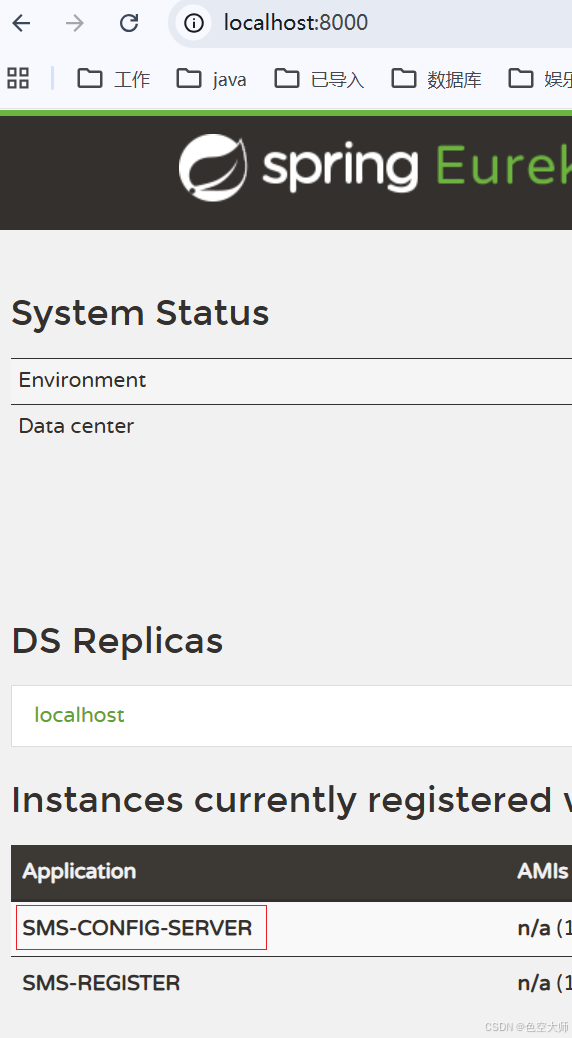
启动验证
启动成功且注册到eureka
缓存模块搭建
pom
java
<?xml version="1.0" encoding="UTF-8"?>
<project xmlns="http://maven.apache.org/POM/4.0.0"
         xmlns:xsi="http://www.w3.org/2001/XMLSchema-instance"
         xsi:schemaLocation="http://maven.apache.org/POM/4.0.0 http://maven.apache.org/xsd/maven-4.0.0.xsd">
    <parent>
        <artifactId>smsplatform</artifactId>
        <groupId>com.test</groupId>
        <version>0.0.1-SNAPSHOT</version>
    </parent>
    <modelVersion>4.0.0</modelVersion>

    <artifactId>sms-cache</artifactId>

    <dependencies>
        <dependency>
            <groupId>org.springframework.boot</groupId>
            <artifactId>spring-boot-starter-web</artifactId>
        </dependency>

        <dependency>
            <groupId>org.springframework.boot</groupId>
            <artifactId>spring-boot-starter-data-redis</artifactId>
        </dependency>

        <dependency>
            <groupId>org.springframework.cloud</groupId>
            <artifactId>spring-cloud-starter-netflix-eureka-client</artifactId>
        </dependency>

        <dependency>
            <groupId>io.springfox</groupId>
            <artifactId>springfox-swagger2</artifactId>
            <version>2.9.2</version>
        </dependency>
        <dependency>
            <groupId>io.springfox</groupId>
            <artifactId>springfox-swagger-ui</artifactId>
            <version>2.9.2</version>
        </dependency>

        <dependency>
            <groupId>org.springframework.cloud</groupId>
            <artifactId>spring-cloud-starter-config</artifactId>
        </dependency>

    </dependencies>

    <!--指定资源文件目录,防止无法读到属性-->
    <build>
        <resources>
            <resource>
                <directory>src/main/resources</directory>
                <filtering>true</filtering>
            </resource>
        </resources>
    </build>

    <profiles>
        <profile>
            <!--id与配置文件后缀一致-->
            <id>local</id>
            <activation>
                <activeByDefault>true</activeByDefault>
            </activation>
            <properties>
                <!--profileActive与配置文件的属性一致-->
                <profileActive>local</profileActive>
            </properties>
        </profile>

        <profile>
            <!--id与配置文件后缀一致-->
            <id>prod</id>
            <activation>
                <activeByDefault>false</activeByDefault>
            </activation>
            <properties>
                <!--profileActive与配置文件的属性一致-->
                <profileActive>prod</profileActive>
            </properties>
        </profile>
    </profiles>
</project>
redis配置类
package com.test.cache.config;
import com.fasterxml.jackson.annotation.JsonAutoDetect;
import com.fasterxml.jackson.annotation.PropertyAccessor;
import com.fasterxml.jackson.databind.ObjectMapper;
import org.springframework.cache.CacheManager;
import org.springframework.cache.annotation.CachingConfigurerSupport;
import org.springframework.cache.interceptor.KeyGenerator;
import org.springframework.context.annotation.Bean;
import org.springframework.data.redis.cache.RedisCacheConfiguration;
import org.springframework.data.redis.cache.RedisCacheManager;
import org.springframework.data.redis.cache.RedisCacheWriter;
import org.springframework.data.redis.connection.lettuce.LettuceConnectionFactory;
import org.springframework.data.redis.core.RedisTemplate;
import org.springframework.data.redis.serializer.Jackson2JsonRedisSerializer;
import org.springframework.data.redis.serializer.StringRedisSerializer;
import java.lang.reflect.Method;
public class RedisConfig extends CachingConfigurerSupport {
@Override
@Bean
public KeyGenerator keyGenerator() {
return new KeyGenerator() {
@Override
public Object generate(Object target, Method method, Object... params) {
StringBuilder stringBuilder = new StringBuilder();
stringBuilder.append(target.getClass().getName());
stringBuilder.append(method.getName());
for (Object param : params) {
stringBuilder.append(params.toString());
}
return stringBuilder.toString();
}
};
}
@Bean
public CacheManager cacheManager(LettuceConnectionFactory connectionFactory) {
    //以锁写入的方式创建我们的写入对象
    RedisCacheWriter writer = RedisCacheWriter.lockingRedisCacheWriter(connectionFactory);
    //创建默认的缓存配置对象
    RedisCacheConfiguration cacheConfiguration = RedisCacheConfiguration.defaultCacheConfig();
    //根据我们的默认配置和写入方式创建缓存的管理器
    RedisCacheManager manager = new RedisCacheManager(writer, cacheConfiguration);

    return manager;
}


@Bean
public RedisTemplate<String, Object> redisTemplate(LettuceConnectionFactory factory) {
    RedisTemplate<String,Object> template = new RedisTemplate();
    template.setConnectionFactory(factory);

    StringRedisSerializer stringRedisSerializer = new StringRedisSerializer();
    template.setKeySerializer(stringRedisSerializer);
    template.setHashKeySerializer(stringRedisSerializer);


    Jackson2JsonRedisSerializer jackson2JsonRedisSerializer = new Jackson2JsonRedisSerializer(Object.class);
    ObjectMapper objectMapper = new ObjectMapper();
    objectMapper.setVisibility(PropertyAccessor.ALL, JsonAutoDetect.Visibility.ANY);
    objectMapper.enableDefaultTyping(ObjectMapper.DefaultTyping.NON_FINAL);
    jackson2JsonRedisSerializer.setObjectMapper(objectMapper);

    template.setValueSerializer(jackson2JsonRedisSerializer);
    template.setHashValueSerializer(jackson2JsonRedisSerializer);
    template.afterPropertiesSet();
    return template;

}
}
缓存api
java
package com.test.cache.controller;

import com.test.cache.service.CacheService;
import io.swagger.annotations.ApiOperation;
import io.swagger.annotations.ApiParam;
import org.slf4j.Logger;
import org.slf4j.LoggerFactory;
import org.springframework.beans.factory.annotation.Autowired;
import org.springframework.web.bind.annotation.*;

import java.util.Map;

@RestController
@RequestMapping("/cache")
public class CacheController {

    private static final Logger LOGGER = LoggerFactory.getLogger(CacheController.class);
    @Autowired
    private CacheService cacheService;

    /**
     *
     * @param key  set 的 key
     * @param value
     * @param expireSecond 有效期 是一个秒
     */
    @GetMapping(value = "/save2cache")
    @ApiOperation("存储字符串类型的数据")
    public boolean save2Cache(@ApiParam(name = "key",required = true,value = "保存的 key") String key,
                              @ApiParam(name = "value",required = true,value = "保存的 value") String value,
                              @ApiParam(name = "expireSecond",required = true,value = "有效期")Integer expireSecond) {
        LOGGER.error("save2cache执行了:传递的 key 是{},value 是{},有效期是{}",key,value,expireSecond);
        cacheService.save2Cache(key,value,expireSecond);
        return true;
    }

    @GetMapping("/get/{key}")
    @ApiOperation("从 redis 中获取字符串类型的数据")
    public String get(@PathVariable String key) {
        return cacheService.get(key);
    }

//
//    /**
//     * 这个方法应该要接收具体类型的参数,而不是直接接收一个 Object
//     * @param key
//     * @param value
//     */
//    @GetMapping(value = "/save2cache")
//    public void save2Cache(String key, Object value, Integer expireSecond) {
//        cacheService.save2Cache(key,value,expireSecond);
//    }
//
//    /**
//     * 这个方法应该要接收具体类型的参数,而不是直接接收一个 Object
//     * @param key
//     * @param value
//     */
//    @GetMapping(value = "/save2cache")
//    public void save2Cache(String key, Object value) {
//        cacheService.save2Cache(key,value);
//    }

    @PostMapping(value = "/save2cache/{key}/{value}")
    @ApiOperation("永久保存数据到redis")
    public boolean save2Cache(@PathVariable String key,@PathVariable String value) {
        LOGGER.error("save2cache执行了 key:{} value:{}",key,value);
        cacheService.save2Cache(key,value);
        return true;
    }
    //因为我们还没有考虑好存放的具体是对象是什么,所以暂时还无法编写获取对象的方法,实际上就是调用了 get 方法

    @RequestMapping("/getbject/{key}")
    public Object getObject(@PathVariable String key) {
        return cacheService.getObject(key);
    }
    @ApiOperation("从 redis 中删除指定 key")
    @PostMapping("/delete")
    public Long del(String... keys) {
        LOGGER.error("delete执行了 keys{}",keys);
        return cacheService.del(keys);
    }

    @PostMapping("/expire/{key}/{seconds}")
    @ApiOperation("给指定的 key 设置有效期")
    public boolean expire(@PathVariable String key, @PathVariable long seconds) {
        LOGGER.error("expire执行了 keys{} seconds{}",key,seconds);
        return cacheService.expire(key, seconds);
    }

    @GetMapping("/incr")
    @ApiOperation("递增")
    public long incr(String key, @RequestParam(defaultValue = "1") long delta) {
        LOGGER.error("incr执行了 keys{} delta{}",key,delta);
        return cacheService.incr(key,delta);
    }

    @GetMapping("/decr")
    @ApiOperation("递减")
    public long decr(String key,@RequestParam(defaultValue = "-1") long delta) {
        LOGGER.error("decr执行了 keys{} delta{}",key,delta);
        return cacheService.decr(key,delta);
    }
    @GetMapping("/hmget/{key}")
    @ApiOperation("从 redis 中获取 hash 类型的数据")
    public Map<Object, Object> hGetAll(@PathVariable String key) {

        LOGGER.error("hmget执行了 key{}",key);
        return cacheService.hGetAll(key);
    }

    /**
     * hash赋值
     * @param key
     * @param map
     * @return
     */
    @PostMapping("/hmset/{key}")
    @ApiOperation("保存 json 到 redis 的 hash 中")
    public boolean hMset(@PathVariable String key, @RequestBody Map<String, Object> map) {
        LOGGER.error("hMset执行了 key{} map{}",key,map);
        cacheService.hMset(key, map);
        return true;
    }

}
实现类
java
package com.test.cache.service.impl;

import com.test.cache.service.CacheService;
import org.springframework.beans.factory.annotation.Autowired;
import org.springframework.data.redis.core.RedisTemplate;
import org.springframework.stereotype.Service;
import org.springframework.util.CollectionUtils;

import java.util.Map;
import java.util.concurrent.TimeUnit;

@Service
public class CacheServiceImpl implements CacheService {

    @Autowired
    private RedisTemplate<String, Object> redisTemplate;

    @Override
    public void save2Cache(String key, String value, Integer expireSecond) {
        redisTemplate.opsForValue().set(key, value, expireSecond, TimeUnit.SECONDS);
    }

    @Override
    public void save2Cache(String key, Object value, Integer expireSecond) {
        redisTemplate.opsForValue().set(key, value, expireSecond, TimeUnit.SECONDS);
    }

    @Override
    public void save2Cache(String key, Object value) {
        redisTemplate.opsForValue().set(key, value);
    }

    @Override
    public void save2Cache(String key, String value) {
        redisTemplate.opsForValue().set(key, value);
    }

    @Override
    public String get(String key) {

//        redisTemplate.setKeySerializer(new StringRedisSerializer());
//        redisTemplate.setValueSerializer(new StringRedisSerializer());
        Object result = redisTemplate.opsForValue().get(key);
        return (String) result;
    }

    @Override
    public Object getObject(String key) {
        return  redisTemplate.opsForValue().get(key);
    }

    @Override
    public Long del(String... keys) {
        return redisTemplate.delete(CollectionUtils.arrayToList(keys));

    }

    @Override
    public boolean expire(String key, long seconds) {
        return redisTemplate.expire(key,seconds,TimeUnit.SECONDS);
    }

    @Override
    public long incr(String key, long delta) {
        return redisTemplate.opsForValue().increment(key,delta);
    }

    @Override
    public long decr(String key, long delta) {
        return redisTemplate.opsForValue().decrement(key,delta);
    }

    @Override
    public Map<Object, Object> hGetAll(String key) {
        return redisTemplate.opsForHash().entries(key);
    }

    @Override
    public void hMset(String key, Map<String, Object> map) {
        redisTemplate.opsForHash().putAll(key, map);
    }
}
配置文件
application.yml
yaml
server:
  port: 8002
spring:
  application:
    name: sms-cache
  profiles:
    active: @profileActive@
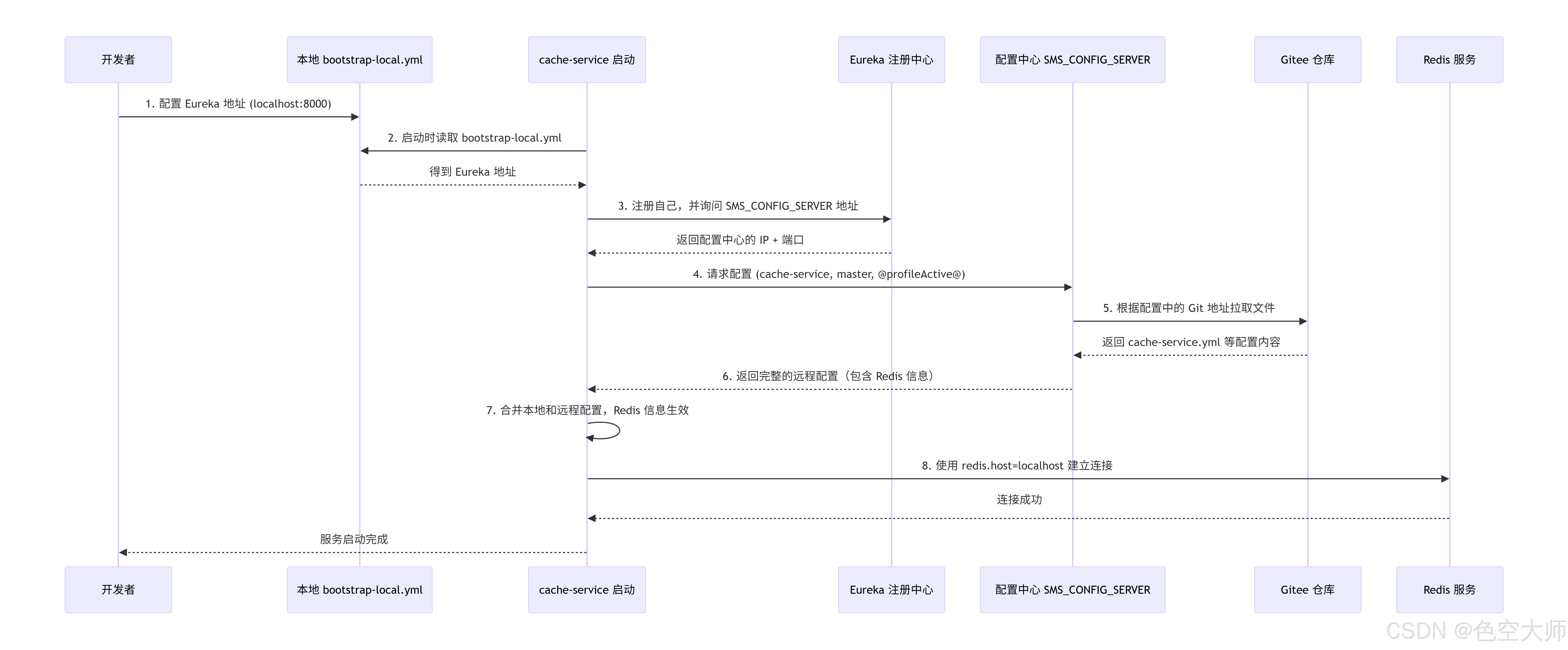
使用配置中心需要bootstrap配置
bootstrap-local.yml
yaml
eureka:
  client:
    service-url:
      defaultZone: http://localhost:8000/eureka
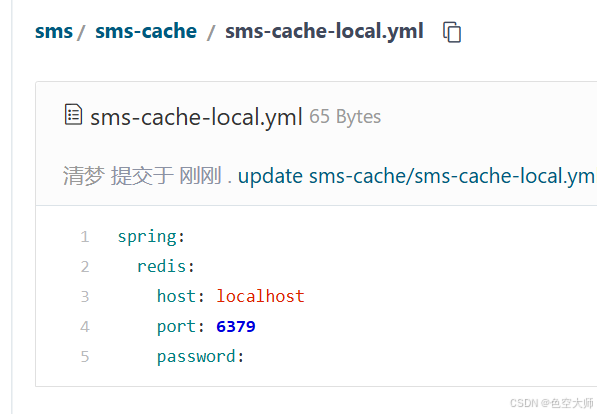
redis配置在配置中心指定目录下配置
在配置中心目录下创建配置文件
读取顺序
启动流程如下图
webmaster
代码太多见源码