1)先看系统的
[root@huawei-sh1-3-gywzsbcslmzdsxsj-game-1 ~]# ulimit -n
65535
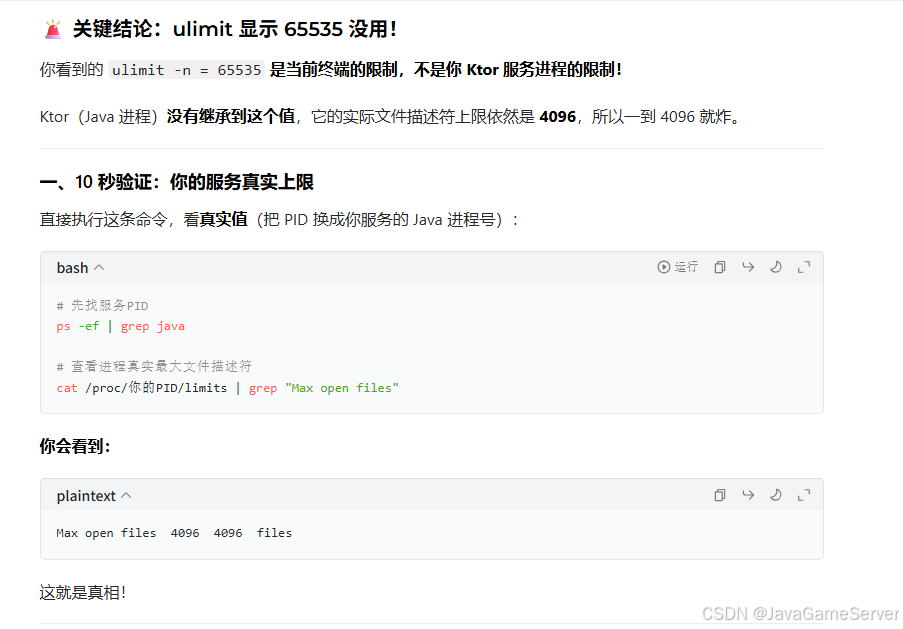
疑问: 看着这个值是65535啊,但是依然连不上了
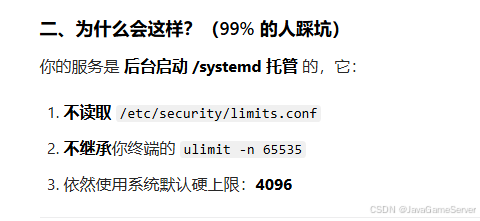
2)问了下豆包
3)那就查询下
[root@huawei-sh1-3-gywzsbcslmzdsxsj-game-1 ~]# jps
12145 Jps
15603 nacos-server.jar
8979 server.jar
8627 server.jar
9421 server.jar
[root@huawei-sh1-3-gywzsbcslmzdsxsj-game-1 ~]# cat /proc/8979/limits | grep "Max open files"
Max open files            4096                 4096                 files
[root@huawei-sh1-3-gywzsbcslmzdsxsj-game-1 ~]# cat /proc/8627/limits | grep "Max open files"
Max open files            4096                 4096                 files
[root@huawei-sh1-3-gywzsbcslmzdsxsj-game-1 ~]# cat /proc/9421/limits | grep "Max open files"
Max open files            4096                 4096                 files
果然是: 4096
4)调整配置
vim /etc/systemd/system.conf
DefaultLimitNOFILE=1048576
#DefaultLimitAS=
DefaultLimitNPROC=1048576
vim /etc/sysctl.conf
# ========== 文件描述符核心配置(必须加,匹配systemd的1048576) ==========
# 系统全局最大可打开的文件描述符总数(给1000万,冗余拉满,支撑高并发)
fs.file-max = 10000000
# 单个进程最大可打开的文件描述符硬上限(必须 >= systemd的DefaultLimitNOFILE=1048576)
fs.nr_open = 2000000

# ========== TCP 高并发优化(游戏服务器必加,解决连接瓶颈) ==========
# 调整TCP连接队列上限,解决高并发下连接拒绝
net.core.somaxconn = 65535
# 半连接队列上限,应对SYN Flood攻击,提升并发
net.ipv4.tcp_max_syn_backlog = 65535
# TIME_WAIT状态连接的最大数量,避免短时间大量连接占满端口
net.ipv4.tcp_max_tw_buckets = 2000000
# 允许TIME_WAIT状态的端口被快速复用,解决端口耗尽问题
net.ipv4.tcp_tw_reuse = 1
# 开启TCP时间戳,tw_reuse依赖此参数
net.ipv4.tcp_timestamps = 1
# 调整TCP keepalive参数,快速回收死连接,释放FD
net.ipv4.tcp_keepalive_time = 300
net.ipv4.tcp_keepalive_intvl = 30
net.ipv4.tcp_keepalive_probes = 3

# ========== 内存优化(你已经有了,这里补充完整) ==========
# 关闭swap,避免内存交换导致服务卡顿(你已经配置了vm.swappiness=0,保留即可)
vm.swappiness=0
vim /etc/security/limits.conf
root soft nofile 1048576
root hard nofile 1048576
* soft nofile 1048576
* hard nofile 1048576
5)生效
sysctl -p

systemctl daemon-reexec6)退出回话重新登录验证
cat /proc/self/limits

ulimit -n

systemctl show --property DefaultLimitNOFILE

systemctl show --property DefaultLimitNPROC
7)验证java进程最大句柄数
for pid in $(pidof java); do echo "PID: $pid"; cat /proc/$pid/limits | grep "Max open files"; done可见,除了nacos没重启,其它的java进程都改为100W了
PID: 15603
Max open files 4096 4096 files
PID: 8357
Max open files 1048576 1048576 files
PID: 7897
Max open files 1048576 1048576 files
PID: 7531
Max open files 1048576 1048576 files
8)查看当每个java进程句柄占用数
for pid in $(jps -q); do
echo -n "PID $pid: "
ls /proc/$pid/fd 2>/dev/null | wc -l
done