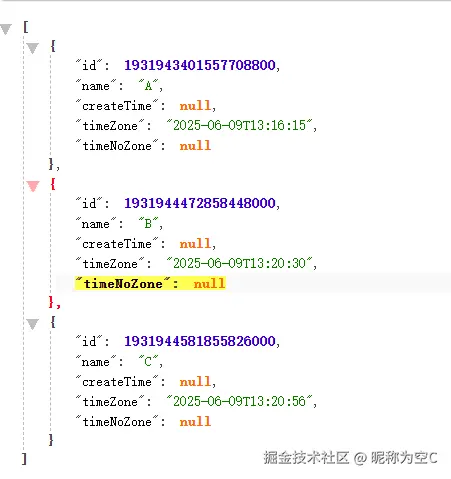
摘要:本文主要介绍如何基于SpringBoot+hutool实现项目的多数据源。在我们已有的一些复杂项目如果想直接基于默认的DataSource实现多数据源代价比较大,而我们可以通过hutool的db工具类来实现小型业务的数据库连接,并不会影响主流程业务。
案例实现
pom.xml
xml
<project xmlns="http://maven.apache.org/POM/4.0.0" xmlns:xsi="http://www.w3.org/2001/XMLSchema-instance"
         xsi:schemaLocation="http://maven.apache.org/POM/4.0.0 http://maven.apache.org/xsd/maven-4.0.0.xsd">
    <modelVersion>4.0.0</modelVersion>
    <parent>
        <groupId>com.example</groupId>
        <artifactId>huzhihui-sp3-home</artifactId>
        <version>0.0.1-SNAPSHOT</version>
    </parent>

    <artifactId>sp3-hutool</artifactId>
    <packaging>jar</packaging>

    <name>sp3-hutool</name>
    <url>http://maven.apache.org</url>

    <properties>
        <project.build.sourceEncoding>UTF-8</project.build.sourceEncoding>
    </properties>

    <dependencies>
        <dependency>
            <groupId>org.springframework.boot</groupId>
            <artifactId>spring-boot-starter-web</artifactId>
        </dependency>
        <dependency>
            <groupId>cn.hutool</groupId>
            <artifactId>hutool-all</artifactId>
            <version>5.8.39</version>
        </dependency>
        <dependency>
            <groupId>mysql</groupId>
            <artifactId>mysql-connector-java</artifactId>
        </dependency>
        <dependency>
            <groupId>com.zaxxer</groupId>
            <artifactId>HikariCP</artifactId>
        </dependency>
        <dependency>
            <groupId>org.springframework.boot</groupId>
            <artifactId>spring-boot-starter-test</artifactId>
            <scope>test</scope>
        </dependency>
    </dependencies>

    <build>
        <plugins>
            <plugin>
                <groupId>org.apache.maven.plugins</groupId>
                <artifactId>maven-dependency-plugin</artifactId>
                <executions>
                    <execution>
                        <id>copy-external-dependencies</id>
                        <phase>package</phase>
                        <goals>
                            <goal>copy-dependencies</goal>
                        </goals>
                        <configuration>
                            <outputDirectory>${project.build.directory}/lib/external</outputDirectory>
                            <includeScope>compile</includeScope>
                            <excludeGroupIds>cn.hutool</excludeGroupIds>
                        </configuration>
                    </execution>

                    <execution>
                        <id>copy-internal-dependencies</id>
                        <phase>package</phase>
                        <goals>
                            <goal>copy-dependencies</goal>
                        </goals>
                        <configuration>
                            <outputDirectory>${project.build.directory}/lib/internal</outputDirectory>
                            <includeScope>compile</includeScope>
                            <includeGroupIds>cn.hutool</includeGroupIds>
                        </configuration>
                    </execution>
                </executions>
            </plugin>
            <plugin>
                <groupId>org.apache.maven.plugins</groupId>
                <artifactId>maven-compiler-plugin</artifactId>
                <configuration>
                    <source>21</source>
                    <target>21</target>
                    <encoding>UTF-8</encoding>
                    <!-- 如果使用预览特性 -->
                    <compilerArgs>
                        <arg>--enable-preview</arg>
                    </compilerArgs>
                    <release>21</release>
                </configuration>
            </plugin>
        </plugins>
    </build>
</project>
DataSourceConfig
数据源配置,我这里使用的写死的配置,实际过程中可以切换为从配置文件中读取,或者从数据库中读取
java
@Configuration
public class DataSourceConfig {

    @Bean
    public Db masterDb() {
        // 打印日志
        SqlLog.INSTANCE.init(true, true, true, Level.INFO);
        HikariConfig hikariConfig = new HikariConfig();
        hikariConfig.setDriverClassName("com.mysql.cj.jdbc.Driver");
        hikariConfig.setJdbcUrl("jdbc:mysql://192.168.8.134:30635/test_1?useSSL=false&serverTimezone=UTC");
        hikariConfig.setUsername("super_admin");
        hikariConfig.setPassword("super_admin");
        return Db.use(new HikariDataSource(hikariConfig));
    }

}DbController测试类
kotlin
@RestController
@RequestMapping(value = "/db")
public class DbController {

    @Autowired
    private Db db;

    @GetMapping(value = "/all")
    public Object all() throws Exception {
        List<Entity> query = db.query("select * from databasechangelog");
        for (Entity entity : query) {
            entity.forEach((key, value) -> System.out.println(key + ":" + value));
        }
        return query;
    }

    @GetMapping(value = "/school")
    public Object school() throws Exception {
        List<School> query = db.query("select * from school", School.class);
        return query;
    }

    @Data
    public static class School {
        private Long id;

        private String name;

        private LocalDateTime createTime;

        private LocalDateTime timeZone;

        private LocalDateTime timeNoZone;
    }
}