日志级别,默认是waring
DEBUG 详细信息
INFO 正常运行产生的一些信息
WARNING 警告用户,虽然正常但可能会发生错误
ERROR 严重错误
CRITICAL 严重错误
简单应用
基础配置
python
#filename,日志输出的文件,filemode='w',每次运行后会清除上次的日志内容,level=logging.DEBUG,表示只要在这个等级(包括)上的都会被输出
logging.basicConfig(filename='demo.log',filemode='w',level=logging.DEBUG)
logging.debug("debug message")
logging.info("info message")
logging.warning("warning message")
logging.error("error message")
logging.critical("critical message")
输出变量
python
logging.basicConfig(level=logging.DEBUG)
logging.debug("姓名 %s,年龄 %d","张三",19)
logging.debug("姓名 %s,年龄 %d"%("张三",19))
设置输出格式
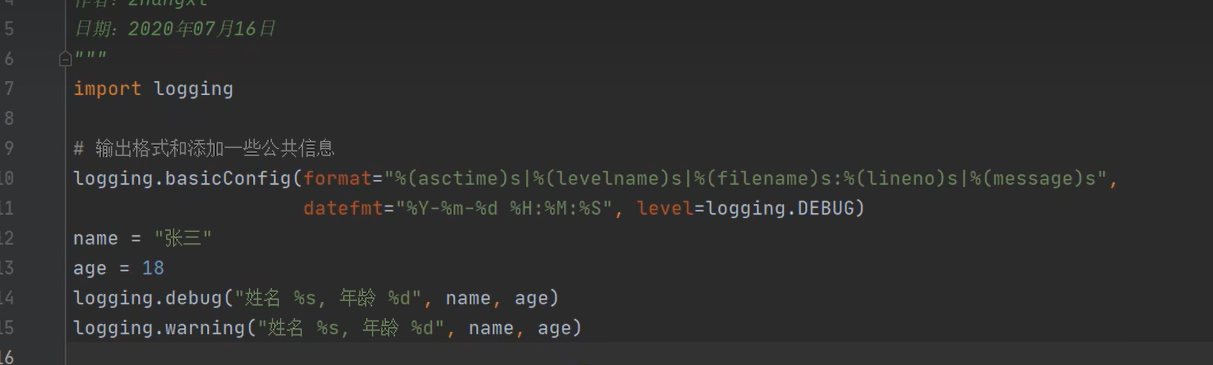
高级应用
loggers:记录器,提供应用程序代码直接使用的接口
Handlers:处理器,将日志输出到指定的位置
Filters:过滤器,更好选择输出的日志
Formatters:格式化器
python
#记录器
logger = logging.getLogger("app_log")
logger.setLevel(logging.DEBUG)

#处理器
#输出控制台
consoleHandle = logging.StreamHandler()
consoleHandle.setLevel(logging.DEBUG)

#输出文件
fileHandle = logging.FileHandler(filename="addDemo.log")
fileHandle.setLevel(logging.INFO)

#formatter格式
formatter = logging.Formatter("%(asctime)s - %(name)s - %(levelname)s - %(message)s")

#设置处理的的输出格式
consoleHandle.setFormatter(formatter)
fileHandle.setFormatter(formatter)

#记录器要设置处理器
logger.addHandler(consoleHandle)
logger.addHandler(fileHandle)

#过滤器
flt = logging.Filter("cc")

#不会输出日志,被过滤掉
# logger.addFilter(flt)
#指定过滤对应的处理器
fileHandle.addFilter(flt)

logger.debug("debug message")
logger.info("info message")
logger.warning("warning message")
logger.error("error message")
logger.critical("critical message")
使用配置文件
配置文件
python
[loggers]
keys=root,app_log

[handlers]
keys=fileHandler,consoleHandle

[formatters]
keys=simpleFormatter

[logger_root]
level=DEBUG
handlers=consoleHandle

[logger_app_log]
level=DEBUG
handlers=fileHandler,consoleHandle
qualname=app_log
propagate=0

[handler_consoleHandle]
class=StreamHandler
args=(sys.stdout,)
level=DEBUG

[handler_fileHandler]
class=handlers.TimedRotatingFileHandler
args=('app_log.log','midnight',1,0)
level=DEBUG
formatter=simpleFormatter

[formatter_simpleFormatter]
format=%(asctime)s|%(levelname)8s|%(filename)s[:%(lineno)d]|%(message)s
datefmt=%Y-%m-%d %H:%M:%S
python
#配置文件方式处理日志
logging.config.fileConfig('logging.conf')
#记录器
rootLogger = logging.getLogger()
logger = logging.getLogger("app_log.log")

a="sss"
try:
    int(a)
except Exception as e:
    logger.exception(e)


logger.debug("debug message")
logger.info("info message")
logger.warning("warning message")
logger.error("error message")
logger.critical("critical message")