提示:文章写完后,目录可以自动生成,如何生成可参考右边的帮助文档
文章目录
- 子查询
- 通用表达式
-
-
- 一、整体总结
-
- [1. 子查询(Subquery)](#1. 子查询(Subquery))
- [2. CTE(Common Table Expressions 通用表达式)](#2. CTE(Common Table Expressions 通用表达式))
- [3. 递归 CTE(RECURSIVE CTE)](#3. 递归 CTE(RECURSIVE CTE))
- 二、各类子查询核心用法总结
-
- [1. SELECT 中嵌套子查询](#1. SELECT 中嵌套子查询)
- [2. WHERE / HAVING 中嵌套子查询](#2. WHERE / HAVING 中嵌套子查询)
- [3. FROM 中嵌套子查询(派生表)](#3. FROM 中嵌套子查询(派生表))
- [4. UPDATE / DELETE 中嵌套子查询](#4. UPDATE / DELETE 中嵌套子查询)
- 三、高频易错点汇总(重点)
-
子查询
select中嵌套子查询
子查询:嵌套在另一个SQL语句中的查询。
select语句可以嵌套在另一个select、update、delete、insert、create等语句中。
select中嵌套子查询
python
-- 在t_employee表中查询每个人薪资和公司平均薪资的差值
-- 并显示员工薪资和公司平均薪资相差5000元以上的记录
select
    ename as "姓名",
    salary as "薪资",
    round((select avg(salary) from t_employee),2) as "全公司平均薪资",
    round(salary-(select avg(salary) from t_employee),2) as "差值"
from t_employee
where abs(round(salary-(select avg(salary) from t_employee),2))>5000;
-- 在t_employee表中查询每个部门平均薪资和公司平均薪资的差值
select
    did,
    avg(salary),
    avg(salary)-(select avg(salary) from t_employee)
from t_employee
group by did;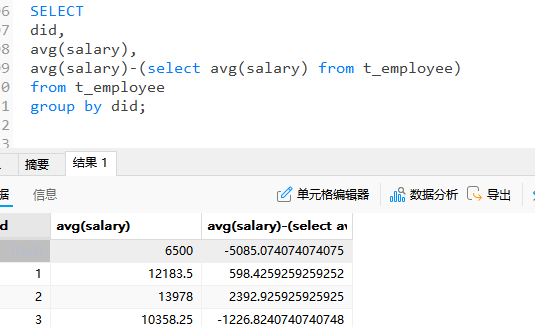
where或having中嵌套子查询
当子查询结果作为外层另一个SQL的过滤条件,通常把子查询嵌入到where或having中。根据子查询结果的情况,分为如下三种情况:
当子查询的结果是单列单个值,那么可以直接使用比较运算符,如"<"、"<="、">"、">="、"="、"!="等与子查询结果进行比较
当子查询的结果是单列多个值,那么可以使用比较运算符in或not in进行比较
当子查询的结果是单列多个值,还可以使用比较运算符, 如"<"、"<="、">"、">="、"="、"!="等搭配any、all等关键字与查询结果进行比较
子查询结果一列一行
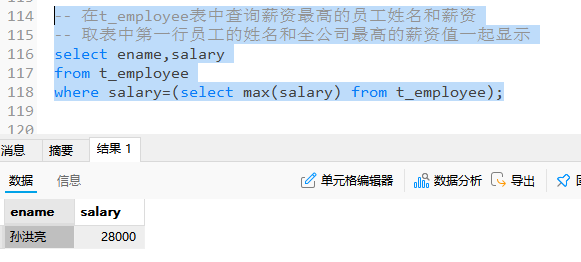
python
-- 在t_employee表中查询比全公司平均薪资高的男员工姓名和薪资
select ename,salary
from t_employee
where salary>(select avg(salary) from t_employee) and gender='男';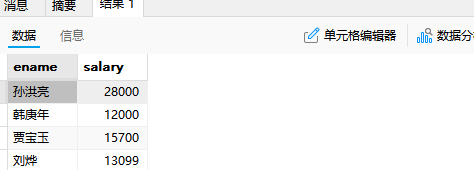
子查询,一列多行
python
-- 在t_employee表中查询和 白露,谢吉娜 同一部门的员工姓名和电话
select ename,tel,did
from t_employee
where did in (select did from t_employee where ename='白露' or ename='谢吉娜');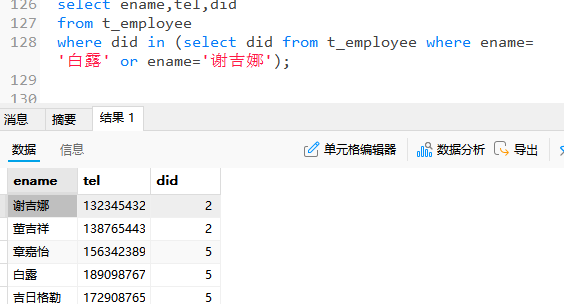
python
-- 在t_employee表中查询薪资比 白露,李诗雨,黄冰茹 三个人的薪资都要高的员工姓名和薪资
select ename,salary
from t_employee
where salary>all(select salary from t_employee where ename in('白露','李诗雨','黄冰茹'))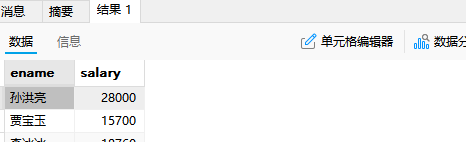
python
-- 查询t_employee和t_department表,按部门统计平均工资
-- 显示部门平均工资比全公司的总平均工资高的部门编号、部门名称、部门平均薪资
-- 并按照部门平均薪资升序排列
select t_department.did,dname,avg(salary)
from t_employee
right join t_department
on t_employee.did=t_department.did
group by t_department.did
having avg(salary)>(select avg(salary) from t_employee)
order by avg(salary);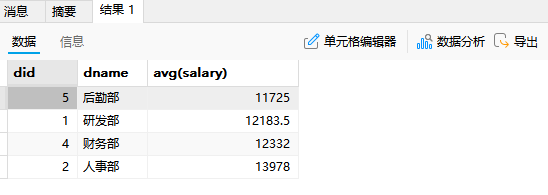
exists型子查询
比如下面第一个案例,也就是相当于对t_department的每一行进行判断,其的did是否为null,并且exists中的select是什么事无所谓的,比如看结果
python
-- 查询t_employee表中是否存在部门编号为null的员工
-- 如果存在,查询t_department表的部门编号、部门名称
select * from t_department
where exists(select * from t_employee where did is null);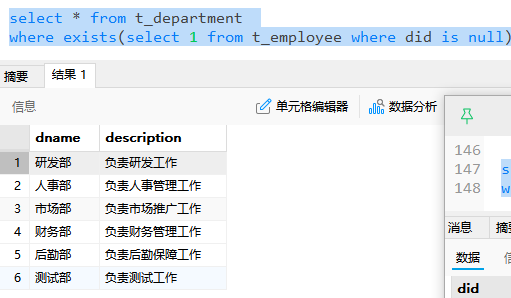
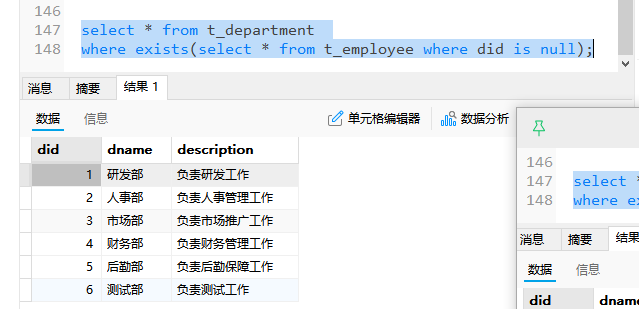
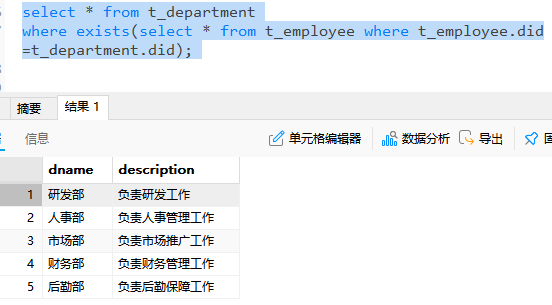
同样的道理,也是看t_department的每一行是否满足这个t_employee.did=t_department.did条件,满足的返回
python
-- 查询t_department表是否存在与t_employee表相同部门编号的记录
-- 如果存在,查询这些部门的编号和名称
select * from t_department
where exists(select * from t_employee where t_employee.did=t_department.did);
结果如下,筛选去掉了一个测试部,因为测试部门的id在员工表中不存在
等价于
python
-- 查询结果等价于下面的SQL
select distinct t_department.*
from t_department
inner join t_employee
on t_department.did=t_employee.did;
from中嵌套子查询
当子查询结果是多列的结果时,通常将子查询放到from后面,然后采用给子查询结果取别名的方式,把子查询结果当成一张"动态生成的临时表"使用。
若是使用
这种方式
python
select
ename,
did,
salary,
dense_rank() over (partition by did order by salary desc) as paiming
from t_employee
where dense_rank() over (partition by did order by salary desc)<=2;
窗口函数是最后一步进行计算的,所以报错
sql中的执行顺序
FROM
→ WHERE
→ GROUP BY
→ HAVING
→ SELECT ✅(窗口函数在这里算)
python
# 在t_employee表中查询每个部门中薪资排名前2的员工姓名、部门编号和薪资
select *
from (
    select
        ename,
        did,
        salary,
        dense_rank() over (partition by did order by salary desc) as paiming
    from t_employee
) temp
where temp.paiming<=2;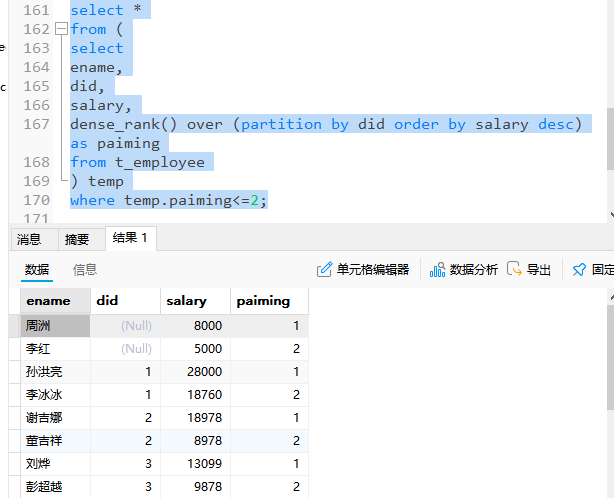
update中嵌套子查询
python
-- 修改t_employee表中部门编号和测试部部门编号相同的员工薪资为原来薪资的1.5倍
update t_employee
set salary = salary * 1.5
where did=(select did from t_department where dname='测试部');
python
-- 修改t_employee表中did为null的员工信息
-- 将他们的did值修改为测试部的部门编号
-- 这种子查询必须是单个值,否则无法赋值
update t_employee
set did = (select did from t_department where dname='测试部')
where did is null;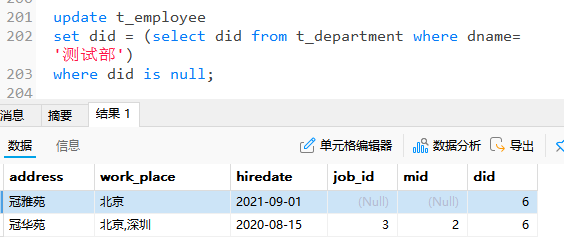
-- 当update的表和子查询的表是同一个表时,需要将子查询的结果用临时表的方式表示
-- 即再套一层子查询,使得update和最外层的子查询不是同一张表
python
update t_employee
set did = (select did from t_department where dname='测试部')
where did is null;
所以使用下面的办法,嵌套作为一个临时表
python
-- 修改t_employee表中李冰冰的薪资值等于孙红梅的薪资值
update t_employee
set salary = (select salary from(select salary from t_employee where ename='孙红梅')temp)
where ename='李冰冰';
-- 修改t_employee表李冰冰的薪资与她所在部门的平均薪资一样(注意一定要给临时表起别名,否则报错)
python
update t_employee t
set salary=(
select ping
from(SELECT avg(salary) ping
from t_employee t2
where t.did = t2.did)tmp

)
where ename='李冰冰';
delete中嵌套子查询
python
-- 从t_employee表中删除测试部的员工记录
delete from t_employee
where did = (select did from t_department where dname='测试部');
python
-- 从t_employee表中删除和李冰冰同一个部门的员工记录
delete from t_employee
where did=(select did from t_employee where ename='李冰冰');
-- 报错,因为删除和子查询是同一张表
和上面同样的处理方式,设置一个临时表
delete from t_employee
where did =(select did from(SELECT did from t_employee where ename='李冰冰')temp)
使用子查询复制表结构和数据
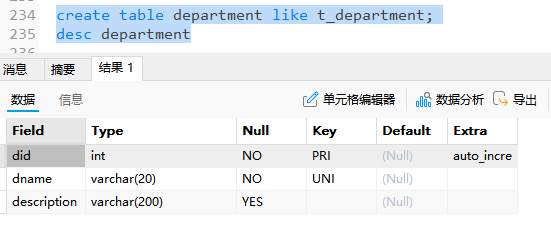
1)复制表结构
-- 仅复制表结构,可以用create语句
create table department like t_department;
2)复制一条或多条记录
-- 使用insert语句+子查询,复制数据,此时insert不用写values
insert into department (select * from t_department where did<=3);
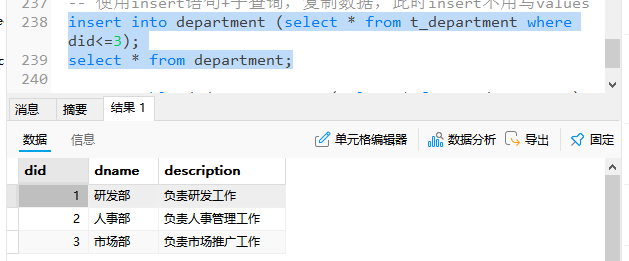
3)同时复制表结构和记录
-- 同时复制表结构+数据
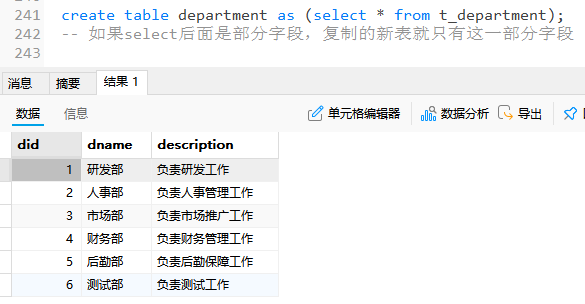
create table d_department as (select * from t_department);
-- 如果select后面是部分字段,复制的新表就只有这一部分字段
通用表达式
通用表达式简称为CTE(Common Table Expressions)。CTE是命名的临时结果集,作用范围是当前语句。CTE可以理解为一个可以复用的子查询,但是和子查询又有区别,一个CTE可以引用其他CTE,CTE还可以是自引用(递归CTE),也可以在同一查询中多次引用,但子查询不可以。
python
with [recursive]
cte_name [(字段名1,字段名2)] as (子查询),
cte_name [(字段名1,字段名2)] as (子查询)
-- 在t_employee表中查询每个人薪资和公司平均薪资的的差值
python
SELECT *
FROM (
    SELECT
        ename AS "员工姓名",
        salary AS "薪资",
        AVG(salary) OVER() AS pingjun,
        ROUND(salary - AVG(salary) OVER(), 2) AS "差值"
    FROM t_employee
) t
WHERE ROUND(t.`薪资` - t.pingjun, 2) > 5000;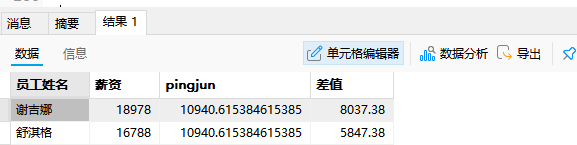
可以这样写
-- 查询薪资低于9000的员工编号,员工姓名,员工薪资,领导编号,领导姓名,领导薪资
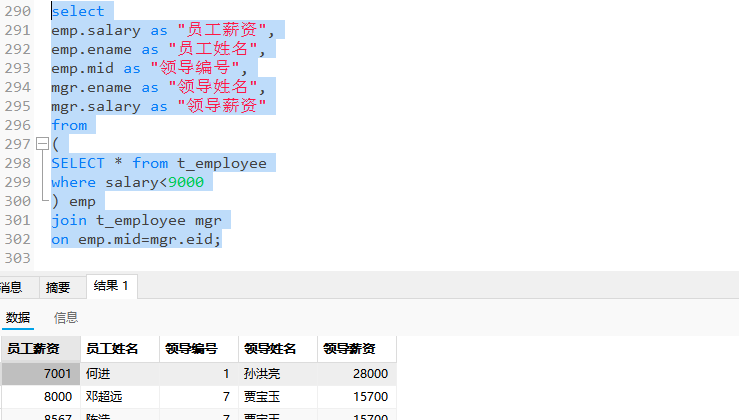
但是也可以使用CTE来替代子查询
python
WITH
emp as (SELECT * from t_employee
where salary<9000)

select
emp.salary as "员工薪资",
emp.ename as "员工姓名",
emp.mid as "领导编号",
mgr.ename as "领导姓名",
mgr.salary as "领导薪资"
from emp
join t_employee mgr
on emp.mid=mgr.eid;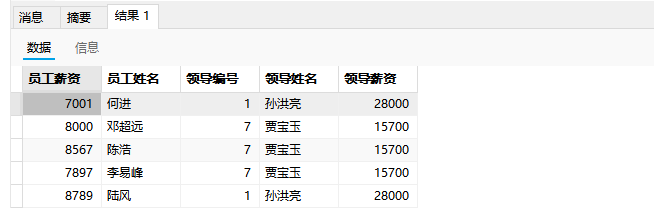
python
-- 查询eid为21的员工,和他所有领导,直到最高领导
-- 建表,设置多层领导
create table emp as (select eid,ename,salary,tel,`mid` from t_employee where salary<10000);
update emp set mid=19 where eid=21;
update emp set mid=17 where eid=19;
update emp set mid=16 where eid=17;
update emp set mid=15 where eid=16;
update emp set mid=4 where eid=15;
update emp set mid=null where eid=4;
select * from emp;

with recursive
cte as(
    select eid,ename,`mid`
    from emp
    where eid=21
    union all
    select emp.eid,emp.ename,emp.mid
    from emp join cte
    on emp.eid=cte.mid
    where emp.eid is not null
)
select * from cte;
这里CET循环解释一下
循环有三个条件,起始,递归,终止
首先是起始
select eid,ename,mid
from emp
where eid = 21
循环部分,相当于不断地在结果上进行递加
union all
select emp.id emp.ename,emp.mid
from emp join cte
on cte.mid=emp.eid
终止条件
where emp eid is not null
总结
一、整体总结
1. 子查询(Subquery)
子查询是指嵌套在其他 SQL 语句中的查询 ,可以出现在 SELECT、FROM、WHERE、HAVING、UPDATE、DELETE 等位置。
核心特点:
- 子查询先执行,其结果作为外层 SQL 的条件或数据源。
- 根据返回结果不同,可分为:单行单列 、单列多行 、多列多行。
- 执行顺序:子查询总是优先于主查询执行。
2. CTE(Common Table Expressions 通用表达式)
CTE 是 MySQL 8.0+ 引入的特性,可以理解为可以命名的临时结果集,只在当前语句有效。
与子查询的区别:
| 对比项 | 子查询 | CTE(通用表达式) |
|---|---|---|
| 是否需要命名 | 不需要(from中必须) | 必须命名 |
| 可重复使用 | 不可以 | 可以多次引用 |
| 是否可相互引用 | 不可以 | 可以(CTE 可以引用其他 CTE) |
| 是否支持递归 | 不支持 | 支持(加 RECURSIVE) |
| 可读性 | 差(嵌套多层很乱) | 优秀(结构清晰) |
语法结构:
sql
WITH [RECURSIVE]
    cte_name1 AS (子查询1),
    cte_name2 AS (子查询2)
SELECT ... FROM cte_name1 ...
3. 递归 CTE(RECURSIVE CTE)
递归 CTE 是 CTE 的进阶用法,用于处理层级关系、树形结构(如查找所有上级、所有下属、组织架构等)。
核心组成:
- 种子查询:提供起始点(第一层数据)
- 递归查询 :通过
UNION ALL+JOIN自己调用自己 - 终止条件:当递归查询不再返回结果时自动停止
执行本质:像"滚雪球"一样,一行一行不断累积结果,而不是"在表格后面添加列"。
二、各类子查询核心用法总结
1. SELECT 中嵌套子查询
- 常用于返回单值(如公司平均薪资)
- 每次外层查询一行,子查询就会执行一次(性能较差)
2. WHERE / HAVING 中嵌套子查询
- 单行单列 :直接用
=、>、<等比较 - 单列多行 :用
IN、ANY、ALL HAVING中可使用聚合函数,WHERE中不能
3. FROM 中嵌套子查询(派生表)
- 子查询结果当作临时表使用,必须给别名
- 常用于窗口函数后筛选(因为窗口函数在
SELECT中最后计算)
4. UPDATE / DELETE 中嵌套子查询
- 更新同一张表时,容易出现
You can't specify target table错误 - 解决办法:把子查询再包一层,成为临时表
三、高频易错点汇总(重点)
以下是这篇笔记中最容易出错的地方,按严重程度排序:
| 序号 | 易错点 | 具体表现 | 正确做法 |
|---|---|---|---|
| 1 | 窗口函数写在 WHERE 中 | WHERE dense_rank() OVER(...) <= 2 |
必须包一层子查询,在外层用 WHERE 筛选 |
| 2 | UPDATE/DELETE 与子查询操作同一张表 | 报 You can't specify target table |
子查询外面再包一层临时表 |
| 3 | HAVING 中使用 SELECT 的别名 | HAVING 差值 > 5000 |
外层用子查询,或者重复写表达式 |
| 4 | 递归 CTE 方向写反 | ON emp.eid = cte.mid(想找上级却写成向下) |
向上找领导用 ON e.eid = cte.mid,向下找下属用 ON e.mid = cte.eid |
| 5 | 递归 CTE 没有终止条件 | 导致 Recursive query aborted after 1001 iterations |
加上 level 字段 + WHERE cte.level < 20 限制 |
| 6 | 子查询返回多行却用 = |
WHERE did = (SELECT did ...) 返回多行时报错 |
改用 IN |
| 7 | FROM 子查询不写别名 | FROM (SELECT ...) 没给别名 |
必须写别名,如 FROM (...) t |
| 8 | EXISTS 子查询写法混淆 | 把 EXISTS 当成返回具体值使用 |
EXISTS 只关心"有没有结果",不关心内容 |
| 9 | CTE 中忘记写 RECURSIVE | 递归查询无法生效 | 递归必须写 WITH RECURSIVE |
| 10 | 多表查询不加表别名导致 ambiguous | Column 'eid' is ambiguous |
所有字段都加上表别名(如 emp.eid、mgr.eid) |