LLMChat


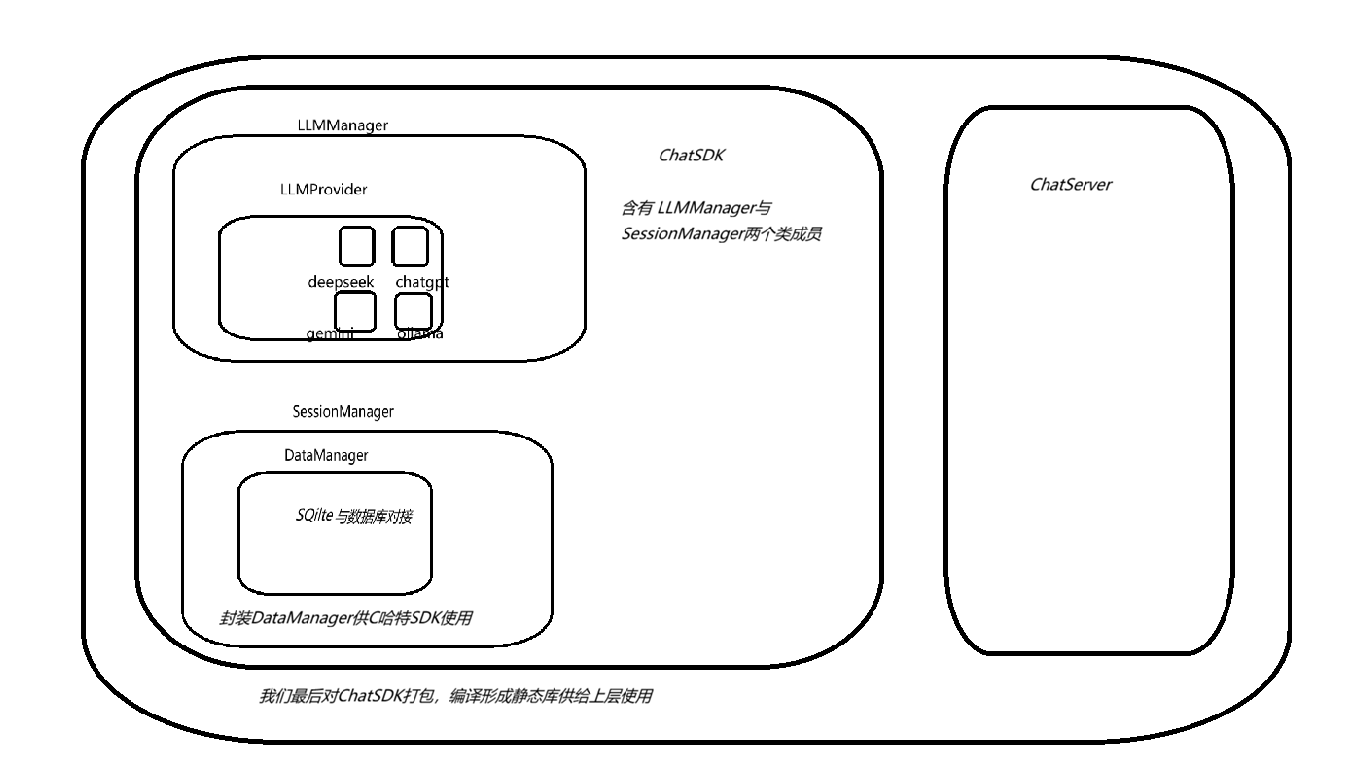
项目框架
ChatSDK
ChatSDK是⼀款基于C++语⾔实现的大语言入库模型。
ChatSDK实现了接入 deepseek-chat、gpt-4o-mini、gemini-2.0-flash类的云端大语言模型,以及⽀持Ollama本地接⼊deepseek-r1:1.5b模型。
ChatSDK通过封装LLMManager,以及SessionManager,实现了会话管理,多轮会话实现。包括和大语言模型的全量和流式返回。
我们最后将ChatSDK编译成为静态库,来让上层调用。
- 静态库安装在: /usr/local/lib
- 头⽂件安装位置: /usr/local/include/ai_chat_sdk
LLMManager
我们通过提供LLMManager来对上层提供调用LLMProvider的接口。
具体方法如下:
        // 注册LLM提供者

        bool registerProvider(const std::string& modelName, std::unique_ptr<LLMProvider> provider);

        // 初始化指定模型

        bool initModel(const std::string& modelName, const std::map<std::string, std::string>& modelParam);

        // 获取可用模型

        std::vector<ModelInfo> getAvailableModels()const;

        // 检查模型是否可用

        bool isModelAvailable(const std::string& modelName)const;

        // 发送消息给指定模型

        std::string sendMessage(const std::string& modelName, const std::vector<Message>& messages, const std::map<std::string, std::string>& requestParam);

        // 发送消息流给指定模型

        std::string sendMessageStream(const std::string& modelName, const std::vector<Message>& messages, const std::map<std::string, std::string>& requestParam, std::function<void(const std::string&, bool)>& callback);
LLMProvider
LLMProvider作为基类,提供了如下方法:初始化 , 检测模型是否有效 , 发送消息给模型 , 获取模型名称 ,获取模型描述 ,保存模型的有效状态、API_Key、模型描述。
具体提供的模型有deepseek-chat、gpt-4o-mini、gemini-2.0-flash,以及ollama本地接⼊的deepseek-r1:1.5b模型。
各类大模型在接口实现都类似,只有少量的字段由于官方提供的名称不同,而有所变化。
我们将来通过多态的方式,来对各个模型进行调用
deepseek
官方提供的api测试文档: 首次调用 API | DeepSeek API Docs
curl https://api.deepseek.com/chat/completions \
-H "Content-Type: application/json" \
-H "Authorization: Bearer ${DEEPSEEK_API_KEY}" \
-d '{
"model": "deepseek-chat",
"messages": [
{"role": "system", "content": "You are a helpful assistant."},
{"role": "user", "content": "Hello!"}
],
"stream": false
}'
提供了上述最基础的必填字段后,便可以和大模型进行交互了。
-
messages的类型是Json数组,为了给我们提供大模型的记忆功能,我们需要将历史的message数据填充到该数组中
除此之外,在我们的实现当中,还另外提供了两个字段。 -
temperature string 采样温度
-
max_tokens integer 最⼤tokens数
如若想要添加更多字段,可以自行添加。在这里我们只进行简单调用即可。
如下是官方提供的完整字段:curl -L -X POST 'https://api.deepseek.com/chat/completions'
-H 'Content-Type: application/json'
-H 'Accept: application/json'
-H 'Authorization: Bearer sk-cd09687ab84740dcb1300b8857f5e0aa'
--data-raw '{
"messages": [
{
"content": "You are a helpful assistant",
"role": "system"
},
{
"content": "Hi",
"role": "user"
}
],
"model": "deepseek-chat",
"thinking": {
"type": "disabled"
},
"frequency_penalty": 0,
"max_tokens": 4096,
"presence_penalty": 0,
"response_format": {
"type": "text"
},
"stop": null,
"stream": false,
"stream_options": null,
"temperature": 1,
"top_p": 1,
"tools": null,
"tool_choice": "none",
"logprobs": false,
"top_logprobs": null
}'
从大模型处获取数据之后,我们还要将有效的字段提取出来,作为返回值。
以下是我在测试时,大模型给我的返回值测试,我们需要的是其中的content字段
{
  "id": "6b49443c-024b-4b99-a657-7a334a4e5ec2",
  "object": "chat.completion",
  "created": 1776229013,
  "model": "deepseek-chat",
  "choices": [
    {
      "index": 0,
      "message": {
        "role": "assistant",
        "content": "Hello! How can I assist you today? 😊"
      },
      "logprobs": null,
      "finish_reason": "stop"
    }
  ],
  "usage": {
    "prompt_tokens": 10,
    "completion_tokens": 11,
    "total_tokens": 21,
    "prompt_tokens_details": {
      "cached_tokens": 0
    },
    "prompt_cache_hit_tokens": 0,
    "prompt_cache_miss_tokens": 10
  },
  "system_fingerprint": "fp_eaab8d114b_prod0820_fp8_kvcache_new_kvcache_20260410"
}
我们在处理返回值时,先要对大模型给我们的字符串进行反序列化。在这里我们借助Jsoncpp实现。
然后从choices -> message -> content 中拿到字符串,返回。
关于流式返回:
我们需要对Httplib resp中的对应流式返回函数进行设置,具体如下:
 response_handler 为响应处理回调函数,
实际类型为 std::function<void(const Response&)> ,
如果发起请求时设置该函数,当客⼾端收到完整的HTTP响应头和⼀些体(如果存在) 后,会调⽤该函数,并传⼊构造好的Response对象。

content_recevier 内容接收回调函数,是处理流式处理响应的关键,
类型为: function<bool(const char* data, size_t len, uint64_t offset, uint64_t total)>
设置该回调函数后,客⼾端不会等待整个响应体传输完再存到response.body中,⽽是每收到⼀⼩块 数据就⽴刻调⽤该回调函数,处理实时数据,
chatgpt
chatgpt在具体的方法实现上,与deepseek同理。在这里就不过多赘述了。
具体字段如下:
request :
curl https://api.openai.com/v1/responses \
  -H "Content-Type: application/json" \
  -H "Authorization: Bearer $OPENAI_API_KEY" \
  -d '{
    "model": "gpt-5.4",
    "input": "Tell me a three sentence bedtime story about a unicorn."
  }'
response :
{
  "id": "resp_67ccd2bed1ec8190b14f964abc0542670bb6a6b452d3795b",
  "object": "response",
  "created_at": 1741476542,
  "status": "completed",
  "completed_at": 1741476543,
  "error": null,
  "incomplete_details": null,
  "instructions": null,
  "max_output_tokens": null,
  "model": "gpt-5.4",
  "output": [
    {
      "type": "message",
      "id": "msg_67ccd2bf17f0819081ff3bb2cf6508e60bb6a6b452d3795b",
      "status": "completed",
      "role": "assistant",
      "content": [
        {
          "type": "output_text",
          "text": "In a peaceful grove beneath a silver moon, a unicorn named Lumina discovered a hidden pool that reflected the stars. As she dipped her horn into the water, the pool began to shimmer, revealing a pathway to a magical realm of endless night skies. Filled with wonder, Lumina whispered a wish for all who dream to find their own hidden magic, and as she glanced back, her hoofprints sparkled like stardust.",
          "annotations": []
        }
      ]
    }
  ],
  "parallel_tool_calls": true,
  "previous_response_id": null,
  "reasoning": {
    "effort": null,
    "summary": null
  },
  "store": true,
  "temperature": 1.0,
  "text": {
    "format": {
      "type": "text"
    }
  },
  "tool_choice": "auto",
  "tools": [],
  "top_p": 1.0,
  "truncation": "disabled",
  "usage": {
    "input_tokens": 36,
    "input_tokens_details": {
      "cached_tokens": 0
    },
    "output_tokens": 87,
    "output_tokens_details": {
      "reasoning_tokens": 0
    },
    "total_tokens": 123
  },
  "user": null,
  "metadata": {}
}
gemini
request:
curl -X POST "https://generativelanguage.googleapis.com/v1beta/interactions" \
-H "Content-Type: application/json" \
-H "x-goog-api-key: $GEMINI_API_KEY" \
-d '{
    "model": "gemini-3-flash-preview",
    "input": "Tell me a short joke about programming."
}'
response:
{ "choices":
 [
	 {
	 "finish_reason":
	 "stop", "index": 0, "message":
			  { "content": "我是⼀个⼤型语⾔模型,由 Google 训练。\n", "role": "assistant" }
	  }
 ],
 "created": 1754897666,
 "id": "Ap2ZaPGBEMS1nvgPu6DPwAg",
 "model": "gemini-2.0-flash",
 "object": "chat.completion",
 "usage": {
	 "completion_tokens": 12,
	 "prompt_tokens": 3,
	 "total_tokens": 15 }
}
ollama
request
curl -s -X POST "http://127.0.0.1:11434/api/chat" -H "Content-Type: application/json" -d '{"model":"deepseek-r1:1.5b","stream":false,"messages":[{"role":"user","content":"你是谁?"}],"options":{"temperature":0.7,"num_ctx":2048}}'response
{
	"model":"deepseek-r1:1.5b",
	"created_at":"2025-09-02T09:24:03.117965426Z",
	"message":{
		"role":"assistant",
		"content":"\n\n\n\n你好!很高兴见到你,有什么我可以帮忙的吗?"
	},
	"done_reason":"stop",
	"done":true,
	"total_duration":24879553617,
	"load_duration":97011891,
	"prompt_eval_count":2,
	"prompt_eval_duration":133646497,
	"eval_count":181,
	"eval_duration":24647987800
}
SessionManager
DataManager
为了能够将用户的数据永久的存储下来,我们就不得不引入数据库这一概念。
在这里我们使用两张表来存储数据。
其中一张,用来存储我们的会话信息。
另一张表,我们来存储消息信息。其中,每一个消息,我们都通过外键与会话ID来关联起来。在这里,我们需要另外设置 ON DELETE CASCADE 字段。方便于到时候,删除掉会话,会话ID所对应的消息一并删除。
SQLite
我们这里使用SQLite数据库技术。
我在这里将其归类于五个步骤,来使用SQLite。
- 准备SQL语句
首先,我们要以字符串的形式,先将我们的SQL语句以字符串的形式准备下来。暂时未定好的参数,我们这里可以使用?先行占位。 - 编译SQL语句
将你的数据库表名称,SQL语句传入,另外参数中有一个句柄,在后续调用函数时需要使用。如果返回值为SQLITE_OK,则代表调用成功。 ----- sqlite3_prepare_v2 - 绑定SQL参数
在准备SQL语句时,我们有时会使用?进行占位。我们需要在这一步,将使用?的地方进行数据替换。----- sqlite3_bind_text 最后一个参数给SQLITE_TRANSIENT时,会创建一个副本,不对原内容操作 - 执行SQL语句
SQLITE_ROW是 C/C++ 语言操作 SQLite 时 ,sqlite3_step()函数的返回值常量 ,表示:查询结果有一行数据可以读取
SQLITE_DONE:数据遍历完毕(没有更多行了) SQL语句执行完成之后,如果成功,就会返回SQLITE_DONE - 销毁句柄
stmt是 SQLite 在堆上申请的语句对象(占用内存),我们最后要对其进行销毁
ChatServer
ChatServer作为一个服务器,内部大多数,基本全部函数参数都需要通过cpp-httplib库的response 和 request成员,来实现。
我们在这里使用 RESTful API风格来进行http交互,具体如下:
- 获取会话列表
请求URL:GET /api/sessions
返回响应:200 OK
{
"success" : "bool",
"message" : "string",
"data": "array"[
	{
	"id" : "string",
	"model" : "string",
	"created_at" : "int64_t",
	"updated_at" : "int64_t",
	"message_count" : "int",
	"first_user_message" : "string"
	}]
}- 获取可⽤模型
请求URL:GET /api/models
返回响应:200 OK
{
"success" : "bool",
"message" : "string",
"data": "array"[
	{
		"name" : "string",
		"desc" : "string"
	}]
}-
创建新会话
请求URL:POST /api/session{
"model" : "string"
}
返回响应:200 OK
{
"success" : "bool",
"message" : "string",
"data":
	{
	"session_id" : "string",
	 "model" : "string"
	}
}- 获取历史消息
请求URL:GET /api/session/${session_id}/history
返回响应:200 OK
{
"success" : "bool",
"message" : "string",
"data": "array"[
	{
	"id" : "string",
	"role" : "string",
	"content" : "string",
	 "timestamp" : 0,
	}]
}- 发送消息 全量返回
请求URL:POST /api/message
{
"session_id" : "string",
"message" : "string"
}
返回响应:200 OK
{
"success" : "bool",
"message" : "string",
"data":
	{
		"session_id" : "string",
		"response" : "string"
	}
}
发送消息 流式响应
请求URL:POST /api/message/async
{
"session_id" : "string",
"message" : "string"
}
返回响应:200 OK
data: 正⽂
data: 正⽂
data: [DONE]
删除会话
请求URL:DELETE /api/session/${session_id}
返回响应:200 OK
{
"success" : "bool",
"message" : "string"
}
依照上方提供参数,先对请求体进行反序列化提取所需参数,再去调用ChatSDK相关接口,最后序列化将内容传出去。