文章目录
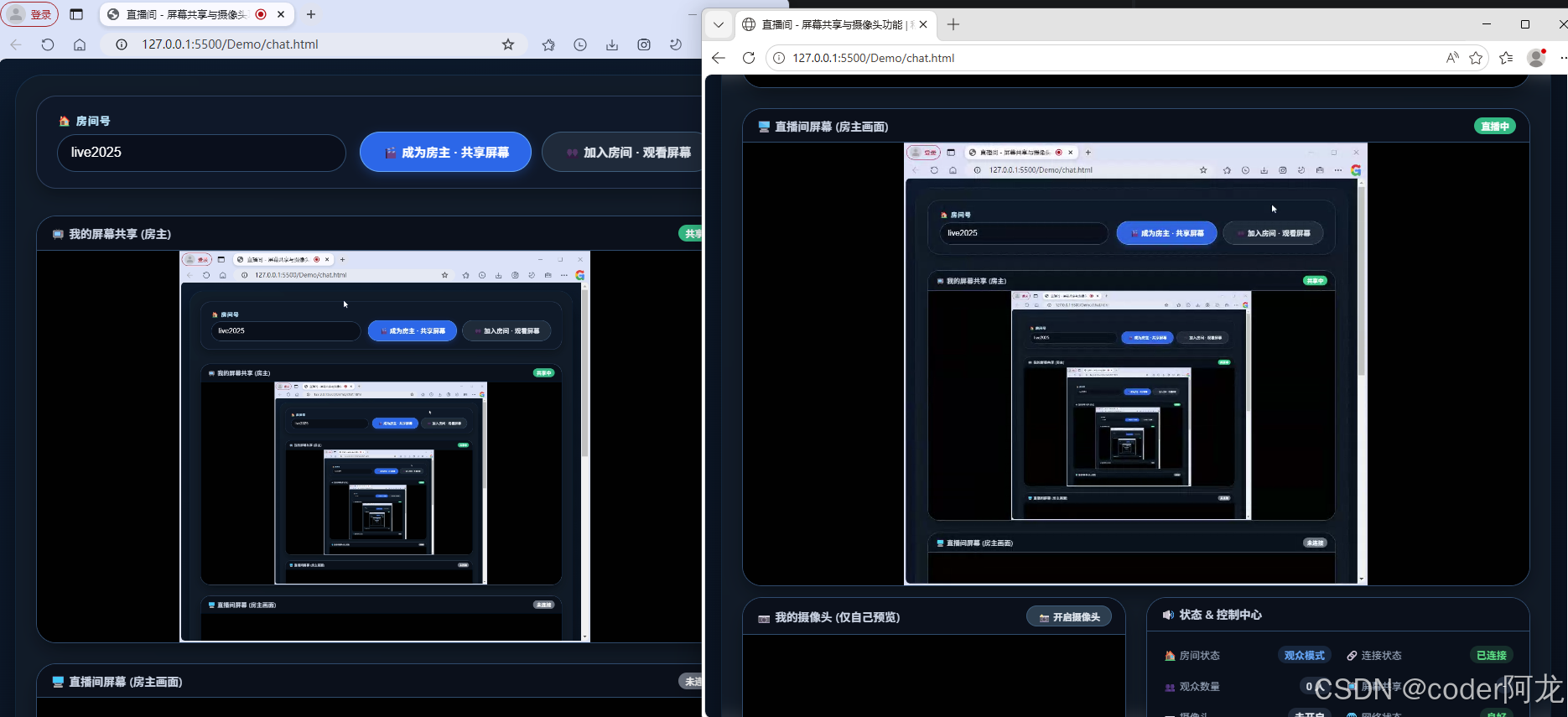
0.效果预览
左边是房主,右边是观众
1.安装并启动PeerJS
shell
# 安装
npm install peer -g

# 启动
peerjs --port 4000 --path /myapp
2.网页代码
html
<!DOCTYPE html>
<html lang="zh-CN">
<head>
<meta charset="UTF-8">
<meta name="viewport" content="width=device-width, initial-scale=1.0, user-scalable=no">
<title>直播间 - 屏幕共享与摄像头功能 | 私有Peer服务器</title>
<!-- PeerJS 库 -->
<script src="https://unpkg.com/peerjs@1.5.4/dist/peerjs.min.js"></script>
<style>
* {
margin: 0;
padding: 0;
box-sizing: border-box;
user-select: none;
}
body {
font-family: 'Segoe UI', Tahoma, Geneva, Verdana, sans-serif;
background: linear-gradient(145deg, #0b1a2e 0%, #0a111f 100%);
min-height: 100vh;
display: flex;
justify-content: center;
align-items: center;
padding: 20px;
}
.container {
max-width: 1400px;
width: 100%;
background: rgba(18, 28, 40, 0.75);
backdrop-filter: blur(10px);
border-radius: 2rem;
box-shadow: 0 25px 45px rgba(0, 0, 0, 0.5), 0 0 0 1px rgba(66, 153, 225, 0.2);
overflow: hidden;
padding: 1.5rem;
transition: all 0.3s ease;
}
.room-control {
background: #0f172ad9;
border-radius: 1.5rem;
padding: 1.2rem 1.5rem;
margin-bottom: 2rem;
display: flex;
flex-wrap: wrap;
align-items: flex-end;
gap: 1rem;
border: 1px solid #2d3e5f;
box-shadow: 0 8px 20px rgba(0, 0, 0, 0.3);
}
.input-group {
flex: 2;
min-width: 180px;
}
.input-group label {
display: block;
color: #b9e6ff;
font-weight: 600;
font-size: 0.8rem;
margin-bottom: 0.4rem;
letter-spacing: 1px;
}
.input-group input {
width: 100%;
background: #0a0f1c;
border: 1px solid #2c4b6e;
padding: 0.8rem 1rem;
border-radius: 2rem;
color: white;
font-size: 1rem;
outline: none;
transition: all 0.2s;
}
.input-group input:focus {
border-color: #3b82f6;
box-shadow: 0 0 0 2px rgba(59,130,246,0.3);
}
.btn-group {
display: flex;
gap: 12px;
flex-wrap: wrap;
}
button {
background: #1e2a3a;
border: none;
padding: 0.8rem 1.6rem;
border-radius: 2.5rem;
font-weight: bold;
font-size: 0.9rem;
cursor: pointer;
transition: all 0.2s ease;
color: #e2e8f0;
display: inline-flex;
align-items: center;
gap: 8px;
backdrop-filter: blur(4px);
border: 1px solid #3b5c7c;
}
button i {
font-style: normal;
font-weight: bold;
font-size: 1.1rem;
}
button.primary {
background: #2563eb;
border-color: #60a5fa;
color: white;
box-shadow: 0 4px 12px rgba(37,99,235,0.3);
}
button.primary:hover {
background: #3b82f6;
transform: translateY(-2px);
}
button.danger {
background: #b91c1c;
border-color: #f87171;
}
button.danger:hover {
background: #dc2626;
}
button.warning {
background: #d97706;
border-color: #fbbf24;
}
button:hover {
filter: brightness(1.05);
transform: translateY(-1px);
}
button:active {
transform: translateY(1px);
}
.video-grid {
display: grid;
grid-template-columns: repeat(auto-fit, minmax(480px, 1fr));
gap: 1.5rem;
margin-top: 1rem;
}
.video-card {
background: #00000066;
border-radius: 1.5rem;
overflow: hidden;
backdrop-filter: blur(4px);
border: 1px solid #2e4a6e;
transition: all 0.2s;
box-shadow: 0 10px 25px -5px rgba(0, 0, 0, 0.5);
}
.video-label {
background: #0a101cee;
padding: 0.6rem 1rem;
font-size: 0.85rem;
font-weight: 600;
color: #cbd5e6;
border-bottom: 1px solid #2c4b6e;
display: flex;
justify-content: space-between;
align-items: center;
}
.video-label span:first-child {
display: flex;
align-items: center;
gap: 8px;
}
.badge {
background: #3b82f6;
padding: 2px 8px;
border-radius: 20px;
font-size: 0.7rem;
color: white;
}
video {
width: 100%;
background: #010101;
aspect-ratio: 16 / 9;
object-fit: contain;
display: block;
-webkit-touch-callout: none;
-webkit-user-select: none;
-moz-user-select: none;
user-select: none;
pointer-events: none;
}
video::-webkit-media-controls {
display: none !important;
}
video::-webkit-media-controls-enclosure {
display: none !important;
}
video::-webkit-media-controls-panel {
display: none !important;
}
.info-panel {
margin-top: 1rem;
background: #0a0f1ccc;
border-radius: 1rem;
padding: 0.8rem 1.2rem;
font-size: 0.8rem;
color: #94a3b8;
text-align: center;
display: flex;
justify-content: space-between;
flex-wrap: wrap;
gap: 10px;
}
.status {
color: #4ade80;
font-weight: 500;
}
.error-msg {
color: #f87171;
}
@media (max-width: 760px) {
.video-grid {
grid-template-columns: 1fr;
}
.container {
padding: 1rem;
}
button {
padding: 0.6rem 1.2rem;
}
}
.placeholder-text {
color: #5c6e8c;
text-align: center;
padding: 3rem;
font-size: 0.9rem;
}
.flex-between {
display: flex;
justify-content: space-between;
align-items: center;
}
.status-grid {
display: grid;
grid-template-columns: 1fr 1fr;
gap: 8px 16px;
width: 100%;
margin-bottom: 0.8rem;
padding-bottom: 0.8rem;
border-bottom: 1px solid #2c4b6e;
}
.status-item {
display: flex;
justify-content: space-between;
align-items: center;
padding: 4px 0;
}
.status-label {
color: #94a3b8;
font-size: 0.75rem;
}
.status-value {
font-weight: 600;
font-size: 0.75rem;
color: #e2e8f0;
padding: 2px 8px;
border-radius: 10px;
background: #1e293b;
}
.status-value.connected {
color: #4ade80;
background: rgba(74, 222, 128, 0.15);
}
.status-value.disconnected {
color: #f87171;
background: rgba(248, 113, 113, 0.15);
}
.status-value.warning {
color: #fbbf24;
background: rgba(251, 191, 36, 0.15);
}
.status-value.info {
color: #60a5fa;
background: rgba(96, 165, 250, 0.15);
}
.status-message {
width: 100%;
padding: 6px 10px;
background: #0a0f1c;
border-radius: 8px;
font-size: 0.8rem;
margin-bottom: 0.8rem;
text-align: left;
}
.control-buttons {
display: flex;
gap: 8px;
flex-wrap: wrap;
}
.stream-info {
background: #0a0f1c;
border-radius: 8px;
padding: 6px 10px;
margin-top: 0.5rem;
}
</style>
</head>
<body>
<div class="container">
<div class="room-control">
<div class="input-group">
<label>🏠 房间号</label>
<input type="text" id="roomIdInput" placeholder="例如: meeting123" value="live2025">
</div>
<div class="btn-group">
<button id="becomeHostBtn" class="primary">🎬 成为房主 · 共享屏幕</button>
<button id="joinRoomBtn">👥 加入房间 · 观看屏幕</button>
</div>
</div>
<div class="video-grid" id="videoGrid">
<div class="video-card" id="localScreenCard">
<div class="video-label">
<span>📺 我的屏幕共享 (房主)</span>
<span class="badge" id="localScreenBadge">未共享</span>
</div>
<video id="localScreenVideo" autoplay muted playsinline></video>
</div>
<div class="video-card" id="remoteScreenCard">
<div class="video-label">
<span>🖥️ 直播间屏幕 (房主画面)</span>
<span class="badge" id="remoteBadge">未连接</span>
</div>
<video id="remoteVideo" autoplay playsinline></video>
</div>
</div>
<div class="video-grid" style="grid-template-columns: 1fr 1fr; margin-top: 0.8rem;">
<div class="video-card">
<div class="video-label">
<span>📷 我的摄像头 (仅自己预览)</span>
<button id="toggleCameraBtn" style="background: #2c3e50; padding: 0.2rem 0.8rem; font-size: 0.7rem;">📸 开启摄像头</button>
</div>
<video id="localCameraVideo" autoplay muted playsinline></video>
</div>
<div class="video-card">
<div class="video-label">
<span>🔊 状态 & 控制中心</span>
</div>
<div class="info-panel" id="controlPanel" style="margin:0; border-radius:0 0 1rem 1rem; flex-direction: column; align-items: flex-start;">
<div class="status-grid">
<div class="status-item">
<span class="status-label">🏠 房间状态</span>
<span class="status-value" id="roomStatus">未加入</span>
</div>
<div class="status-item">
<span class="status-label">🔗 连接状态</span>
<span class="status-value" id="connectionStatus">未连接</span>
</div>
<div class="status-item">
<span class="status-label">👥 观众数量</span>
<span class="status-value" id="viewerCount">0 人</span>
</div>
<div class="status-item">
<span class="status-label">📺 屏幕共享</span>
<span class="status-value" id="screenShareStatus">未共享</span>
</div>
<div class="status-item">
<span class="status-label">📷 摄像头</span>
<span class="status-value" id="cameraStatus">未开启</span>
</div>
<div class="status-item">
<span class="status-label">🌐 网络状态</span>
<span class="status-value" id="networkStatus">良好</span>
</div>
</div>
<div class="status-message" id="statusMessage">⚡ 准备就绪,输入房间号开始</div>
<div class="control-buttons" style="width:100%; gap:8px; flex-wrap:wrap;">
<button id="stopShareBtn" class="danger" style="padding: 0.4rem 1rem;">🛑 停止共享</button>
<button id="leaveRoomBtn" class="warning" style="padding: 0.4rem 1rem;">🚪 退出房间</button>
<button id="reconnectBtn" style="padding: 0.4rem 1rem; background: #1e40af;">🔄 重连</button>
</div>
<div class="stream-info" id="streamInfo" style="width:100%; margin-top:0.5rem; display:none;">
<small style="color:#6c86a3;" id="streamDetails"></small>
</div>
<small style="color:#6c86a3; margin-top:0.3rem;">💡 提示: 房主共享屏幕后,其他人输入相同房间号并「加入房间」即可实时观看。</small>
<small style="color:#6c86a3;">🔧 Peer服务器: http://127.0.0.1:4000/myapp</small>
</div>
</div>
</div>
</div>
<script>
// ---------- DOM 元素 ----------
const roomIdInput = document.getElementById('roomIdInput');
const becomeHostBtn = document.getElementById('becomeHostBtn');
const joinRoomBtn = document.getElementById('joinRoomBtn');
const stopShareBtn = document.getElementById('stopShareBtn');
const leaveRoomBtn = document.getElementById('leaveRoomBtn');
const toggleCameraBtn = document.getElementById('toggleCameraBtn');
const reconnectBtn = document.getElementById('reconnectBtn');
const localScreenVideo = document.getElementById('localScreenVideo');
const remoteVideo = document.getElementById('remoteVideo');
const localCameraVideo = document.getElementById('localCameraVideo');
const localScreenBadge = document.getElementById('localScreenBadge');
const remoteBadge = document.getElementById('remoteBadge');
const statusMessageDiv = document.getElementById('statusMessage');
const roomStatusEl = document.getElementById('roomStatus');
const connectionStatusEl = document.getElementById('connectionStatus');
const viewerCountEl = document.getElementById('viewerCount');
const screenShareStatusEl = document.getElementById('screenShareStatus');
const cameraStatusEl = document.getElementById('cameraStatus');
const networkStatusEl = document.getElementById('networkStatus');
const streamInfoEl = document.getElementById('streamInfo');
const streamDetailsEl = document.getElementById('streamDetails');
// ---------- 全局状态 ----------
let currentPeer = null;
let screenStream = null;
let cameraStream = null;
let isHost = false;
let currentRoomId = null;
let activeCall = null;
let hostCallsMap = new Map();
// ================= 自定义 PeerJS 服务器配置 =================
const PEER_CONFIG = {
host: '127.0.0.1',
port: 4000,
path: '/myapp'
};
// =========================================================
function updateRoomStatus(status, type = 'default') {
roomStatusEl.textContent = status;
roomStatusEl.className = 'status-value ' + type;
}
function updateConnectionStatus(status, type = 'default') {
connectionStatusEl.textContent = status;
connectionStatusEl.className = 'status-value ' + type;
}
function updateViewerCount(count) {
viewerCountEl.textContent = count + ' 人';
viewerCountEl.className = count > 0 ? 'status-value connected' : 'status-value';
}
function updateScreenShareStatus(status, type = 'default') {
screenShareStatusEl.textContent = status;
screenShareStatusEl.className = 'status-value ' + type;
}
function updateCameraStatus(status, type = 'default') {
cameraStatusEl.textContent = status;
cameraStatusEl.className = 'status-value ' + type;
}
function updateNetworkStatus(status, type = 'default') {
networkStatusEl.textContent = status;
networkStatusEl.className = 'status-value ' + type;
}
function showStreamInfo(text) {
streamDetailsEl.textContent = text;
streamInfoEl.style.display = 'block';
}
function hideStreamInfo() {
streamInfoEl.style.display = 'none';
}
function updateAllStatus() {
if (isHost) {
updateRoomStatus('房主模式', 'info');
updateConnectionStatus(screenStream ? '已共享' : '等待共享', screenStream ? 'connected' : 'warning');
updateViewerCount(hostCallsMap.size);
updateScreenShareStatus(screenStream ? '共享中' : '未共享', screenStream ? 'connected' : '');
} else if (currentPeer) {
updateRoomStatus('观众模式', 'info');
updateConnectionStatus(activeCall ? '已连接' : '连接中', activeCall ? 'connected' : 'warning');
updateViewerCount(0);
updateScreenShareStatus('-', '');
} else {
updateRoomStatus('未加入', '');
updateConnectionStatus('未连接', '');
updateViewerCount(0);
updateScreenShareStatus('未共享', '');
updateCameraStatus(cameraStream ? '已开启' : '未开启', cameraStream ? 'connected' : '');
updateNetworkStatus('良好', 'connected');
}
}
function setStatus(text, isError = false) {
statusMessageDiv.innerHTML = isError ? `❌ ${text}` : `✅ ${text}`;
statusMessageDiv.style.color = isError ? '#f87171' : '#4ade80';
updateAllStatus();
}
async function closeCameraStream() {
if (cameraStream) {
cameraStream.getTracks().forEach(track => track.stop());
cameraStream = null;
}
localCameraVideo.srcObject = null;
toggleCameraBtn.innerHTML = '📸 开启摄像头';
toggleCameraBtn.style.background = '#2c3e50';
updateCameraStatus('未开启', '');
}
async function openCameraPreview() {
if (cameraStream) {
closeCameraStream();
return;
}
try {
const stream = await navigator.mediaDevices.getUserMedia({ video: true, audio: false });
cameraStream = stream;
localCameraVideo.srcObject = stream;
toggleCameraBtn.innerHTML = '🔴 关闭摄像头';
toggleCameraBtn.style.background = '#b91c1c';
updateCameraStatus('已开启(预览)', 'connected');
setStatus("摄像头已开启 (仅本地预览,不共享给观众)", false);
} catch (err) {
console.error("摄像头获取失败", err);
setStatus("无法开启摄像头,请检查权限", true);
updateCameraStatus('开启失败', 'disconnected');
}
}
async function stopScreenSharing() {
if (!isHost) {
setStatus("只有房主可以停止屏幕共享", true);
return;
}
if (screenStream) {
screenStream.getTracks().forEach(track => track.stop());
screenStream = null;
}
localScreenVideo.srcObject = null;
localScreenBadge.innerText = "未共享";
localScreenBadge.style.background = "#6b7280";
updateScreenShareStatus('已停止', 'warning');
for (let [peerId, call] of hostCallsMap.entries()) {
if (call && call.close) call.close();
}
hostCallsMap.clear();
updateViewerCount(0);
hideStreamInfo();
setStatus("已停止屏幕共享,观众将断开连接", false);
}
function exitRoom() {
if (screenStream) {
screenStream.getTracks().forEach(track => track.stop());
screenStream = null;
}
if (activeCall) {
activeCall.close();
activeCall = null;
}
for (let [_, call] of hostCallsMap.entries()) {
if (call) call.close();
}
hostCallsMap.clear();
if (currentPeer) {
currentPeer.destroy();
currentPeer = null;
}
localScreenVideo.srcObject = null;
remoteVideo.srcObject = null;
localScreenBadge.innerText = "未共享";
remoteBadge.innerText = "未连接";
remoteBadge.style.background = "#6b7280";
isHost = false;
currentRoomId = null;
activeCall = null;
hideStreamInfo();
updateAllStatus();
setStatus("已退出房间,所有连接已断开", false);
}
// 房主:使用自定义Peer服务器
async function becomeHost() {
let roomId = roomIdInput.value.trim();
if (!roomId) {
setStatus("请输入房间号", true);
return;
}
exitRoom();
let stream;
try {
stream = await navigator.mediaDevices.getDisplayMedia({ video: true, audio: false });
setStatus("屏幕共享授权成功,正在创建直播间...", false);
} catch (err) {
console.error("屏幕共享失败", err);
setStatus("获取屏幕共享失败,请确认已授权", true);
return;
}
screenStream = stream;
localScreenVideo.srcObject = stream;
localScreenBadge.innerText = "共享中";
localScreenBadge.style.background = "#10b981";
updateScreenShareStatus('准备共享...', 'warning');
showStreamInfo('正在初始化Peer连接,等待观众加入...');
const videoTrack = stream.getVideoTracks()[0];
const settings = videoTrack.getSettings();
showStreamInfo(`分辨率: ${settings.width || '?'}x${settings.height || '?'} | 帧率: ${settings.frameRate || '?'}`);
stream.getVideoTracks()[0].onended = () => {
if (isHost && screenStream) {
setStatus("屏幕共享已被系统停止", true);
stopScreenSharing();
localScreenBadge.innerText = "已停止";
updateScreenShareStatus('已停止', 'warning');
}
};
const peer = new Peer(roomId, PEER_CONFIG);
currentPeer = peer;
isHost = true;
currentRoomId = roomId;
peer.on('open', (id) => {
console.log("房主Peer已连接,ID:", id);
console.log("房主Peer状态 - open:", peer.open, "disconnected:", peer.disconnected);
updateConnectionStatus('已就绪', 'connected');
updateScreenShareStatus('共享中', 'connected');
showStreamInfo(`房间号: ${id} | 等待观众加入...`);
setStatus(`房主模式已启动,房间号: ${id} ,等待观众加入...`, false);
console.log("房主 Peer ID:", id);
});
peer.on('connection', (conn) => {
console.log("收到来自", conn.peer, "的连接请求");
conn.on('open', () => {
console.log("数据连接已打开,等待请求...");
});
conn.on('data', (data) => {
console.log("收到数据:", data);
if (data.type === 'viewer_ready') {
console.log("观众已就绪,房主发起呼叫...");
if (screenStream) {
const call = peer.call(data.from, screenStream);
console.log("房主呼叫call对象:", call);
if (call) {
const callerPeerId = data.from;
hostCallsMap.set(callerPeerId, call);
updateViewerCount(hostCallsMap.size);
call.on('close', () => {
hostCallsMap.delete(callerPeerId);
updateViewerCount(hostCallsMap.size);
});
}
conn.send({ type: 'host_call', from: conn.peer });
} else {
conn.send({ type: 'host_error', message: '未共享屏幕' });
}
}
});
});
peer.on('call', (call) => {
console.log("房主收到呼叫 from:", call.peer);
console.log("房主call事件 - screenStream存在:", !!screenStream, "isHost:", isHost);
if (!isHost || !screenStream) {
console.log("房主拒绝呼叫:未共享屏幕或不是房主");
call.close();
return;
}
call.answer(screenStream);
const callerPeerId = call.peer;
hostCallsMap.set(callerPeerId, call);
updateViewerCount(hostCallsMap.size);
showStreamInfo(`观众 ${callerPeerId} 已加入 | 当前观众: ${hostCallsMap.size}`);
call.on('close', () => {
hostCallsMap.delete(callerPeerId);
updateViewerCount(hostCallsMap.size);
showStreamInfo(`观众离开了 | 当前观众: ${hostCallsMap.size}`);
setStatus(`一位观众离开了房间,当前观众数: ${hostCallsMap.size}`, false);
});
call.on('error', (err) => {
console.error("观众连接错误:", err);
hostCallsMap.delete(callerPeerId);
updateViewerCount(hostCallsMap.size);
});
setStatus(`新观众加入,当前观众数: ${hostCallsMap.size}`, false);
});
peer.on('error', (err) => {
console.error("房主Peer错误:", err);
updateNetworkStatus('连接错误', 'disconnected');
if (err.type === 'unavailable-id' || err.message?.includes('ID is taken')) {
setStatus(`房间号 "${roomId}" 已被占用,无法成为房主`, true);
exitRoom();
} else if (err.type === 'browser-incompatible' || err.type === 'unsupported') {
setStatus(`浏览器不支持此功能: ${err.type}`, true);
exitRoom();
} else if (err.type === 'network' || err.type === 'server-error' || err.type === 'socket-error' || err.type === 'socket-closed') {
setStatus("网络连接不稳定,信令服务器断开...", false);
updateNetworkStatus('网络断开', 'warning');
peer.reconnect();
} else {
setStatus(`连接错误: ${err.message || err}`, false);
}
});
peer.on('disconnected', () => {
console.log("房主Peer断开连接,尝试重连...");
updateNetworkStatus('正在重连...', 'warning');
const didConnect = peer.reconnect();
if (!didConnect) {
setStatus("无法重新连接信令服务器", true);
updateNetworkStatus('重连失败', 'disconnected');
}
});
peer.on('close', () => {
if (isHost) {
updateNetworkStatus('连接已关闭', 'disconnected');
setStatus("房主连接已关闭", true);
exitRoom();
}
});
}
// 观众:使用相同的自定义Peer服务器
async function joinRoomAsViewer() {
let roomId = roomIdInput.value.trim();
if (!roomId) {
setStatus("请输入房间号", true);
return;
}
if (currentPeer) {
exitRoom();
}
const randomId = 'viewer_' + Date.now() + '_' + Math.floor(Math.random() * 10000);
console.log("创建观众Peer,ID:", randomId);
const peer = new Peer(randomId, PEER_CONFIG);
currentPeer = peer;
isHost = false;
currentRoomId = roomId;
peer.on('open', (id) => {
console.log("观众Peer已连接,ID:", id);
updateConnectionStatus('连接中...', 'warning');
setStatus(`正在加入房间: ${roomId}...`, false);
showStreamInfo(`观众ID: ${id} | 等待房主连接...`);
peer.on('call', (call) => {
console.log("观众收到房主呼叫:", call);
console.log("观众call事件 - screenStream存在:", !!screenStream, "isHost:", isHost);
if (isHost) {
call.close();
return;
}
if (screenStream) {
call.answer(screenStream);
} else {
call.answer(null);
}
const callerPeerId = call.peer;
activeCall = call;
setupCallHandlers(call);
setStatus("已与房主建立连接", false);
});
setTimeout(() => {
if (!peer || peer.destroyed) {
console.log("Peer已销毁");
return;
}
console.log("使用DataConnection建立连接...");
const conn = peer.connect(roomId, { reliable: true });
console.log("DataConnection对象:", conn);
conn.on('open', () => {
console.log("DataConnection已打开,发送viewer就绪消息");
conn.send({ type: 'viewer_ready', from: id });
});
conn.on('data', (data) => {
console.log("收到房主消息:", data);
});
conn.on('error', (err) => {
console.error("DataConnection错误:", err);
});
setTimeout(() => {
if (!activeCall) {
setStatus(`等待房主连接超时...`, true);
}
}, 10000);
}, 3000);
});
peer.on('error', (err) => {
console.error("观众Peer错误:", err.type, err.message);
updateNetworkStatus('连接错误', 'disconnected');
if (err.type === 'peer-unavailable') {
setStatus(`房间 "${roomId}" 不存在或房主已离线`, true);
updateConnectionStatus('房间不可用', 'disconnected');
} else if (err.type === 'browser-incompatible' || err.type === 'unsupported') {
setStatus(`浏览器不支持此功能: ${err.type}`, true);
updateConnectionStatus('不支持', 'disconnected');
} else if (err.type === 'disconnected') {
updateNetworkStatus('已断开', 'warning');
} else {
setStatus(`连接错误: ${err.message || err}`, false);
}
});
peer.on('disconnected', () => {
console.log("观众Peer断开连接");
updateNetworkStatus('已断开', 'warning');
});
}
function setupCallHandlers(call) {
call.on('stream', (remoteStream) => {
console.log("收到房主stream");
if (remoteStream) {
remoteVideo.srcObject = remoteStream;
remoteBadge.innerText = "直播中";
remoteBadge.style.background = "#10b981";
updateConnectionStatus('已连接', 'connected');
updateScreenShareStatus('观看中', 'connected');
const videoTrack = remoteStream.getVideoTracks()[0];
if (videoTrack) {
const settings = videoTrack.getSettings();
showStreamInfo(`房主屏幕: ${settings.width || '?'}x${settings.height || '?'} | 帧率: ${settings.frameRate || '?'}`);
} else {
showStreamInfo('已成功接收房主屏幕画面');
}
setStatus("成功接收房主屏幕画面", false);
}
});
call.on('error', (err) => {
console.error("呼叫错误:", err);
setStatus("连接房主失败: " + (err.message || err.type || '未知错误'), true);
remoteBadge.innerText = "连接失败";
remoteBadge.style.background = "#b91c1c";
updateConnectionStatus('连接错误', 'disconnected');
updateScreenShareStatus('连接失败', 'disconnected');
});
call.on('close', () => {
console.log("与房主的连接已关闭");
setStatus("与房主的连接已断开", true);
remoteVideo.srcObject = null;
remoteBadge.innerText = "已断开";
remoteBadge.style.background = "#6b7280";
updateConnectionStatus('已断开', 'disconnected');
updateScreenShareStatus('已断开', 'warning');
activeCall = null;
});
}
stopShareBtn.addEventListener('click', async () => {
if (!isHost) {
setStatus("只有房主可以停止屏幕共享", true);
return;
}
await stopScreenSharing();
setStatus("已停止共享,观众将会断开", false);
});
leaveRoomBtn.addEventListener('click', () => {
if (!currentPeer) {
setStatus("当前未加入任何房间", true);
return;
}
exitRoom();
setStatus("已退出房间", false);
});
reconnectBtn.addEventListener('click', () => {
if (!currentPeer) {
setStatus("当前未加入任何房间,无法重连", true);
return;
}
setStatus("正在尝试重连...", false);
updateNetworkStatus('正在重连...', 'warning');
if (isHost) {
currentPeer.reconnect();
} else {
if (activeCall) {
activeCall.close();
activeCall = null;
}
joinRoomAsViewer();
}
});
toggleCameraBtn.addEventListener('click', openCameraPreview);
becomeHostBtn.addEventListener('click', () => {
becomeHost().catch(err => {
console.error(err);
setStatus("创建房间失败", true);
});
});
joinRoomBtn.addEventListener('click', () => {
joinRoomAsViewer().catch(err => {
console.error(err);
setStatus("加入房间失败,请检查网络或房间号", true);
});
});
window.addEventListener('beforeunload', () => {
if (screenStream) {
screenStream.getTracks().forEach(track => track.stop());
}
if (cameraStream) {
cameraStream.getTracks().forEach(track => track.stop());
}
if (currentPeer) {
currentPeer.destroy();
}
});
setStatus("👋 输入房间号 → 房主点「共享屏幕」 / 观众点「加入房间」观看", false);
</script>
</body>
</html>