文章目录
前言
张正友标定标定法是相机标定的经典之作,他是由张正友(微软研究院),于1998年提出的。如果想通过相机计算机坐标,以及通过相机测距,必须要对相机进行标定。
背景信息
张正友标定法,使用平面棋盘格标定,不需要精密 3D 标定物,成本极低、精度高、鲁棒好;通过张正友标定法可以求解 相机内参 K、外参 (R, t)、镜头畸变系数。
相机成像模型
张正友标定法涉及的几个坐标系如下:
世界坐标系 → 相机坐标系 → 图像坐标系 → 像素坐标系
通过相机标定后,利用标定后求出的参数我们最终求解出机器人从世界坐标系到像素坐标系的转换关系;
-
摄像头在没有畸变的情况时(理想情况)
世界坐标系和像素坐标系之间的关系,如下:
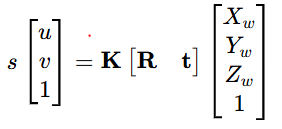
以上公式中各个符号代表的意思如下:
-
u和v 表示的是像素坐标系;右侧的Xw、Yw、Zw是世界坐标系;
-
K是内参矩阵
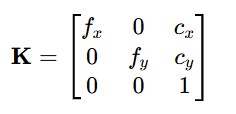
其中fx和fy是焦距;cx和cy是中心点(光轴与图像的焦点);在相机镜头无倾斜的情况下fx约等于fy
-
R t 是外参矩阵
其中R是3×3旋转矩阵;t 是3×1平移向量;
在张正友标定法中默认标定版平面为Zw=0,所以以上公式就变形为如下:
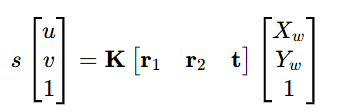
令单应性矩阵H=K r1 r2 t
所以以上公式变形为:
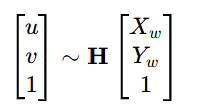
其中H为齐次矩阵。
1、标定流程
准备与拍摄
- 标定板:棋盘格(黑白方块),已知方格物理尺寸(如 20mm×20mm)
- 拍摄:
- 不同角度、不同距离、不同倾斜(俯仰 / 偏航 / 滚动)
- 覆盖全画面,边缘也要有角点
- 数量:≥15 张(工程常用 15~25 张)
- 要求:棋盘清晰、无模糊、角点明显
角点检测
- 提取每张图的 棋盘角点(亚像素级)
- 建立:世界坐标 (Xw, Yw, 0) ↔ 像素坐标 (u, v) 对应关系
线性求解内参和外参
- 单应性矩阵 H 求解
对每幅图,用 DLT(直接线性变换) 解 H:
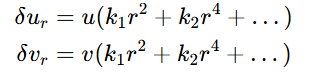
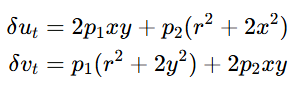
2、畸变模型
实际镜头有畸变,主要分:1. 径向畸变(主导)和切向畸变
1. 径向畸变(主导)
2. 切向畸变(镜头安装误差)
3、非线性优化
目标:最小化重投影误差
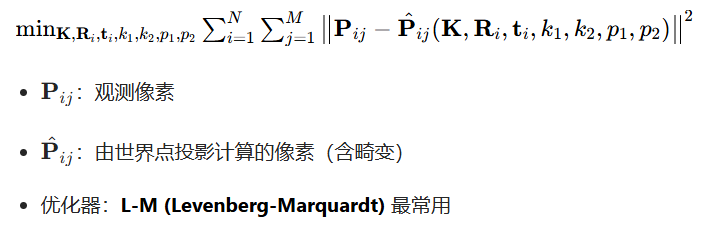
4、工程要点
1、重投影误差
- <0.5px:高精度可用
- 0.5~1.0px:常规可用
- 2px:重拍 / 剔除坏图
2、拍摄要点
- 倾斜、远近、左右、上下都要有
- 棋盘占画面 1/2~2/3
- 不要模糊、不要过曝
- 边缘必须拍到
3、畸变系数选择
- 普通镜头:k1,k2,p1,p2 足够
- 广角:加 k3
4、内参意义
- fx, fy 一般接近相等
- cx, cy 靠近图像中心
程序的实现
接下来通过程序实现以下以上流程:
棋盘格生成程序
python
import cv2
import numpy as np

def generate_chessboard(pattern_size=(9,6), square_size=25, margin=20):
    w = pattern_size[0]
    h = pattern_size[1]
    img_w = w * square_size + 2 * margin
    img_h = h * square_size + 2 * margin
    img = np.ones((img_h, img_w), dtype=np.uint8) * 255

    for i in range(h):
        for j in range(w):
            if (i + j) % 2 == 0:
                x1 = margin + j * square_size
                y1 = margin + i * square_size
                x2 = x1 + square_size
                y2 = y1 + square_size
                cv2.rectangle(img, (x1, y1), (x2, y2), 0, -1)
    return img

if __name__ == "__main__":
    chess = generate_chessboard((9,6), 100)
    cv2.imwrite("chessboard.png", chess)
    cv2.imshow("chess", chess)
    cv2.waitKey(0)
以上程序生成的是6行9列的棋盘格,棋盘格生成后就可以对摄像头进行标定了;
标定程序
python
import cv2
import numpy as np
import glob
import os

# ====================== 配置 ======================
PATTERN_SIZE = (9, 6)          # 内角点行列
SQUARE_SIZE_MM = 25.0          # 棋盘格物理尺寸 mm
IMG_DIR = "calib_imgs/*"       # 标定图路径
SHOW_CORNERS = True
SAVE_RESULT = True
# ====================================================

# 1. 准备世界坐标
objp = np.zeros((PATTERN_SIZE[0]*PATTERN_SIZE[1], 3), np.float32)
objp[:,:2] = np.mgrid[0:PATTERN_SIZE[0], 0:PATTERN_SIZE[1]].T.reshape(-1,2)
objp *= SQUARE_SIZE_MM

obj_points = []   # 3D点
img_points = []   # 2D点
img_shape = None

# 2. 读取图片并检测角点
img_paths = sorted(glob.glob(IMG_DIR))
print(f"找到 {len(img_paths)} 张标定图")

for path in img_paths:
    img = cv2.imread(path)
    if img is None: continue
    gray = cv2.cvtColor(img, cv2.COLOR_BGR2GRAY)
    if img_shape is None:
        img_shape = gray.shape[::-1]

    # 查找角点
    ret, corners = cv2.findChessboardCorners(gray, PATTERN_SIZE, None)
    if ret:
        # 亚像素优化
        criteria = (cv2.TERM_CRITERIA_EPS+cv2.TERM_CRITERIA_MAX_ITER, 30, 0.001)
        corners_sub = cv2.cornerSubPix(gray, corners, (11,11), (-1,-1), criteria)

        obj_points.append(objp)
        img_points.append(corners_sub)

        if SHOW_CORNERS:
            cv2.drawChessboardCorners(img, PATTERN_SIZE, corners_sub, ret)
            cv2.imshow("corners", img)
            cv2.waitKey(100)

cv2.destroyAllWindows()
if len(obj_points) < 3:
    print("有效图片太少,至少3张")
    exit()

# 3. 张正友标定
print("开始标定...")
ret, K, dist, rvecs, tvecs = cv2.calibrateCamera(
    obj_points, img_points, img_shape, None, None
)

# 4. 计算平均重投影误差(核心评价指标)
total_err = 0
errors = []
for i in range(len(obj_points)):
    img_proj, _ = cv2.projectPoints(obj_points[i], rvecs[i], tvecs[i], K, dist)
    err = cv2.norm(img_points[i], img_proj, cv2.NORM_L2) / len(img_proj)
    errors.append(err)
    total_err += err
mean_err = total_err / len(obj_points)

# ====================== 输出结果 ======================
print("\n===== 相机内参 K =====")
print(K)
print("\n===== 畸变系数 dist =====")
print("k1, k2, p1, p2, k3 =")
print(dist.ravel())
print(f"\n平均重投影误差: {mean_err:.4f} 像素")
print("(<0.5 优秀,<1.0 良好,>2.0 需重拍)")

# 5. 保存结果
if SAVE_RESULT:
    np.savez("calib_result.npz", K=K, dist=dist, rvecs=rvecs, tvecs=tvecs)
    print("已保存到 calib_result.npz")

# 6. 去畸变示例
if img_paths:
    img = cv2.imread(img_paths[0])
    h, w = img.shape[:2]
    new_K, roi = cv2.getOptimalNewCameraMatrix(K, dist, (w,h), 1, (w,h))
    dst = cv2.undistort(img, K, dist, None, new_K)

    cv2.imshow("original", img)
    cv2.imshow("undistorted", dst)
    cv2.waitKey(0)
    cv2.destroyAllWindows()
以上内容若有错误欢迎指正!