A2A 让智能体学会协作,本文用实战案例带你串起完整闭环。跟着代码走就行。
一、什么是 Agent2Agent?
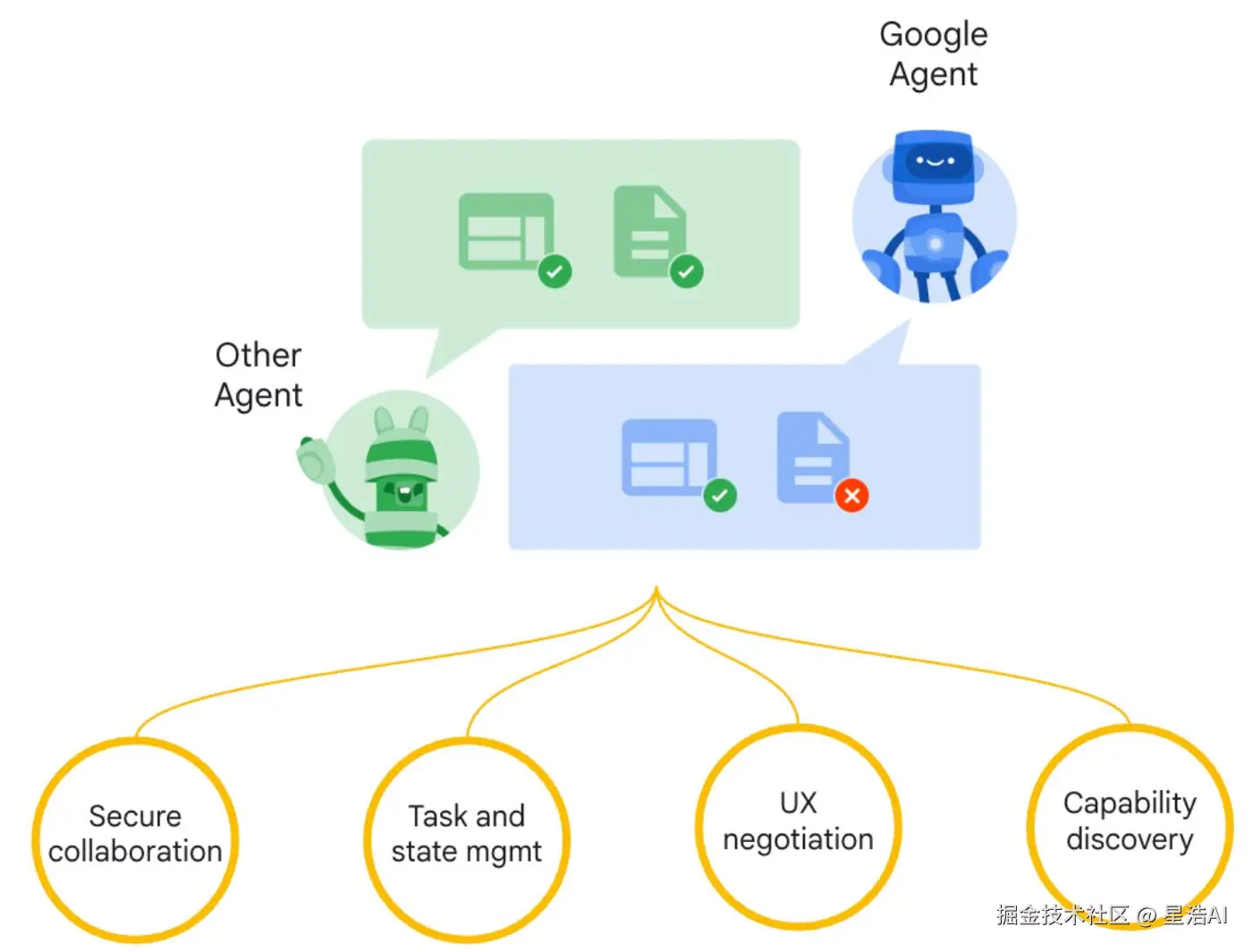
Google 将 A2A 作为开放协议推出,目标很明确:让不同团队、不同框架、不同部署形态的智能体,能用同一套「协作语言」连起来,面向大规模、多智能体场景。
二、A2A 的五条设计原则
| 原则 | 一句话说明 |
|---|---|
| 拥抱智能体能力 | 支持自然、非结构化的协作方式。 |
| 利用现有标准 | 使用 HTTP、SSE、JSON-RPC,确保与现有系统的兼容性。 |
| 默认安全 | 强调企业级认证与授权思路,并与 OpenAPI 等生态对齐。 |
| 支持长期任务 | 支持长期任务,支持流式更新、通知、状态推进。 |
| 多模态 | 支持文本、音频、视频流等多模态通信。 |
三、核心组件一览
- Agent Card
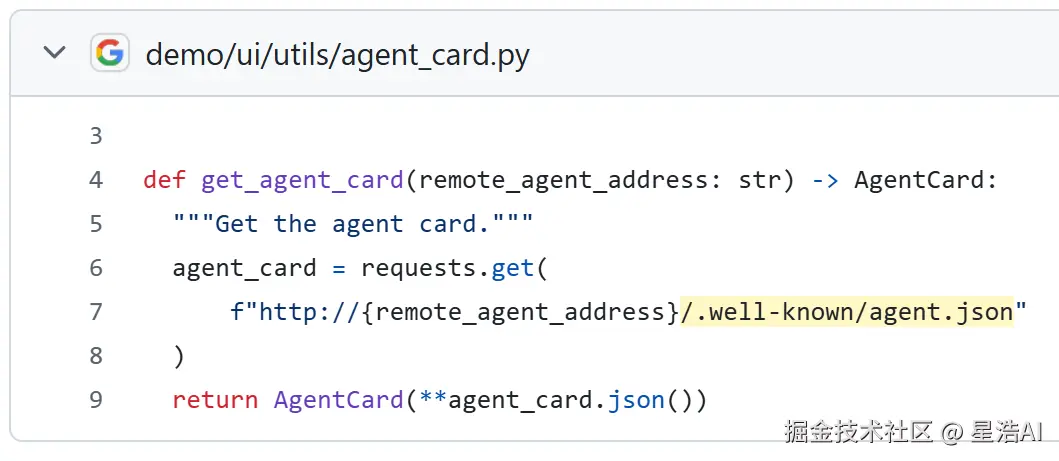
公共元数据文件,通常位于/.well-known/agent.json,描述智能体能力、技能、端点 URL 和认证要求,用于能力发现。
-
A2A 服务器
暴露 HTTP 端点,实现 A2A 协议方法,管理任务执行。
-
A2A 客户端
应用程序或智能体,消费 A2A 服务,通过
tasks/send或tasks/sendSubscribe与服务器交互。
A2A 关键组件与技术细节如下:
| 组件 | 描述 |
|---|---|
| Agent Card | 位于 /.well-known/agent.json,描述能力、技能、端点 URL、认证要求,用于发现。 |
| A2A 服务器 | 实现协议约定的方法,管理任务执行(具体以官方规格为准)。 |
| A2A 客户端 | 消费 A2A 服务,例如发送 tasks/send 或 tasks/sendSubscribe。 |
| 任务(Task) | 核心工作单元,有唯一 ID,状态如 submitted、working 等。 |
| 消息(Message) | 通信单元,角色如 user / agent,内含 Parts。 |
| 部分(Part) | 内容单元,如 TextPart、FilePart、DataPart。 |
| 工件(Artifact) | 任务输出,由 Parts 构成。 |
| 流式传输 | 常用 SSE 推送长任务状态。 |
| 推送通知 | 可通过 Webhook 异步告知进展。 |
四、A2A 工作流程:从「发现」到「完成」
- 发现 :客户端读取
/.well-known/agent.json(Agent Card),了解智能体能力。 - 启动 :客户端发送任务请求。
- 使用
tasks/send处理即时任务,返回最终 Task 对象。 - 使用
tasks/sendSubscribe处理长期任务,服务器通过 SSE 事件持续推送更新。
- 使用
- 处理:服务端执行任务,可能流式返回,也可能一次性返回。
- 交互(可选) :若任务状态为
input-required,客户端可基于相同 Task ID 继续补充输入。 - 完成 :任务进入终端状态(如
completed、failed或canceled)。
该流程既支持简单任务,也支持需要多轮交互的复杂任务,尤其适合多模态通信环境。
五、A2A 和 MCP 是什么关系?
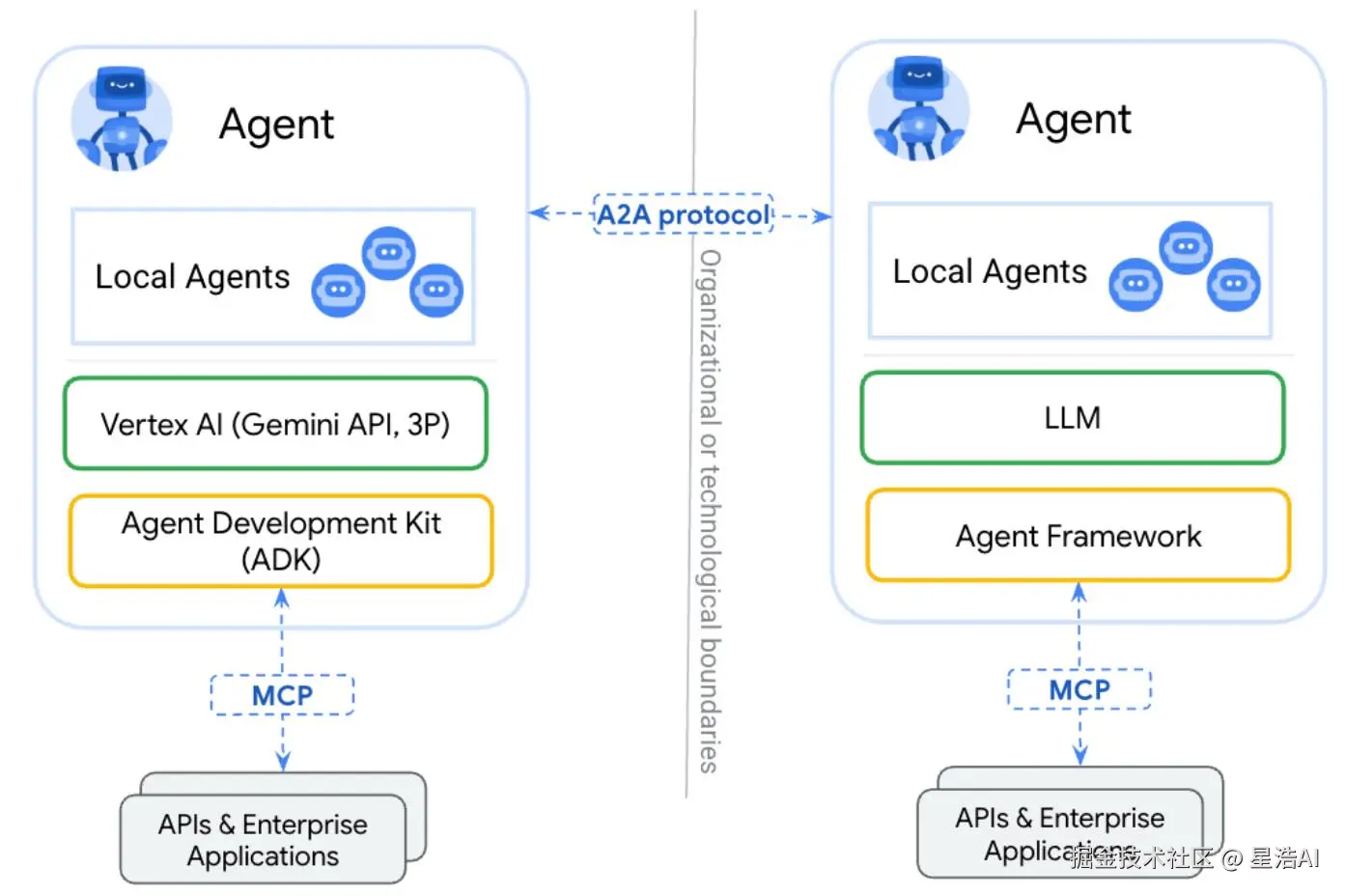
二者 互补,不是替代:
| 对比项 | MCP | A2A |
|---|---|---|
| 主要解决 | 模型如何标准化接入工具、API、资源 | 多个 Agent 之间如何协作通信 |
| 类比(好记版) | 工具说明书 / 应用商店里的能力包 | 同事群里的协作语言、协作总线 |
| 典型场景 | 连数据库、Drive、Slack、GitHub 等 | Agent A 查数、Agent B 分析、Agent C 汇总 |
-
MCP:用于工具和资源接入
通过结构化输入/输出将 Agent 连接到工具、API 和资源。Google ADK 支持 MCP 工具,可与 Agent 组合使用广泛的 MCP 服务器。
-
A2A:用于 Agent 间协作
在不同 Agent 间实现动态、多模态通信,而无需共享内存、资源和工具。这是社区驱动的开放标准。
-
协议交集
Google 建议将 A2A 智能体通过 Agent Card 描述并注册为 MCP 资源。这样框架既能通过 MCP 调用工具,又能通过 A2A 与用户、远程智能体通信,实现无缝协作。
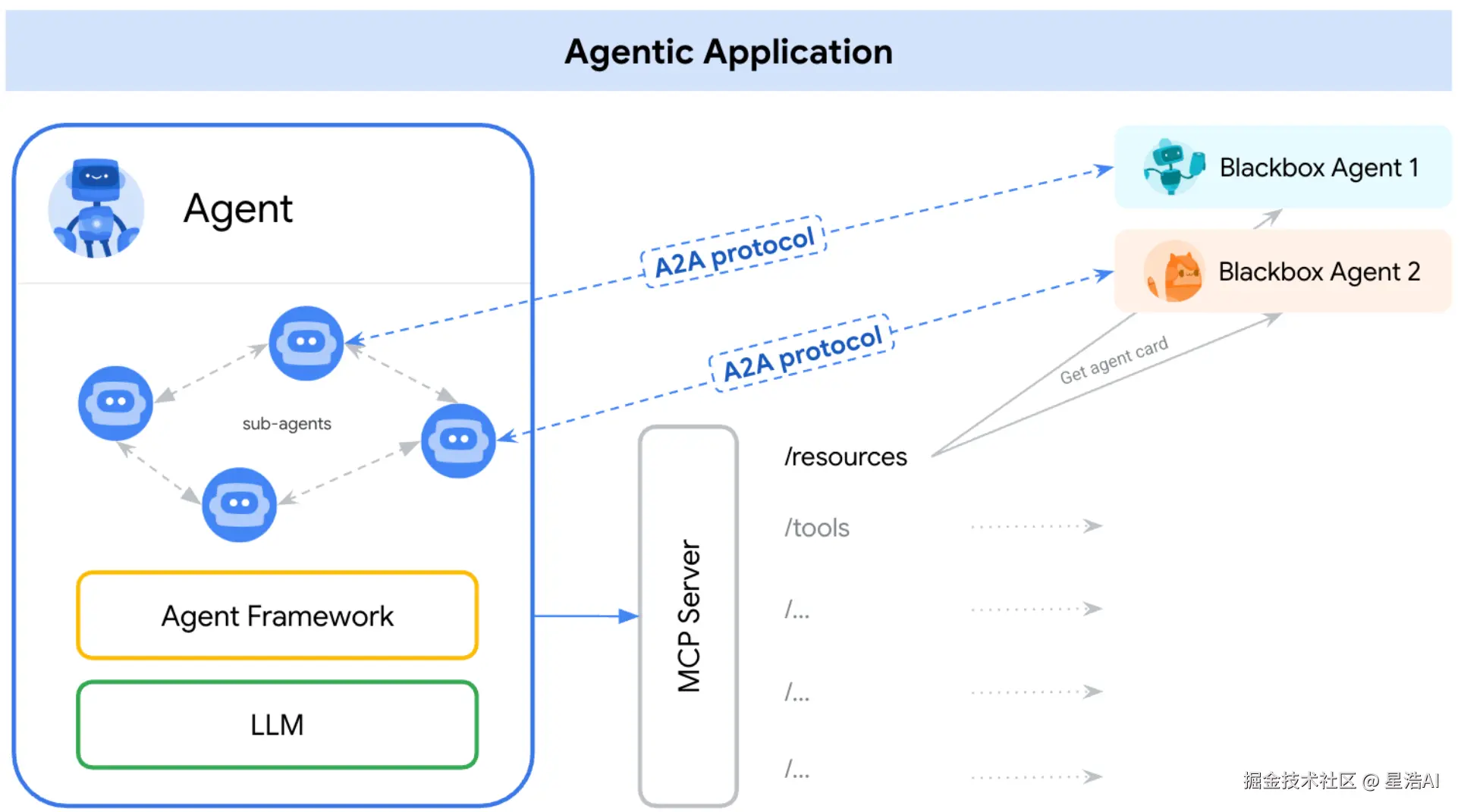
例如,一个智能体可以先通过 MCP 从数据库检索数据,再通过 A2A 与另一个智能体协作分析数据。
六、A2A 为什么这样设计?
-
解耦能力与通信
MCP 专注标准化能力调用(类似微服务),A2A 专注动态协作(类似聊天)。避免智能体既要处理功能逻辑,又要处理通信协议。
-
无缝扩展性
新智能体只需注册 Agent Card 到 MCP,即可被其他智能体发现和调用;A2A 允许智能体动态组队(如临时组建"数据分析小组")。
-
兼容现有架构
MCP 可集成传统工具(数据库、API);A2A 可对接人类用户或其他异构智能体。
可以这样记:
- MCP 像"应用商店":提供标准化服务(如地图、支付)。
- A2A 像"微信群聊":智能体在群里用通用语言(协议)讨论如何分工。
- Agent Card 像"个人资料":写明"我会修图""我会翻译",方便协作时快速发现能力。
七、案例:安排篮球活动(多智能体协作)
实现了一个自动根据天气情况决定是否安排篮球活动的场景。
7.1 业务故事
- WeatherAgent:提供指定日期天气数据(内存模拟)的智能体。
- BasketBallAgent :收到用户日期后,先拉 Agent Card 再问天气,据此决定篮球活动是否成行。
7.2 整体流程
BasketBallAgent接收到用户提供的活动日期BasketBallAgent通过A2A协议向WeatherAgent请求该日期的天气信息WeatherAgent返回天气数据(温度和天气状况)BasketBallAgent根据天气状况做出决策: -如果天气不含"雨"或"雪",确认安排篮球活动 -否则,取消活动并提供取消原因
7.3 实现说明
- 职责分离 :天气服务独立进程(FastAPI),决策方用
requests调用,边界清晰。 - 发现端点 :
GET /.well-known/agent.json符合"发现"叙事,后续可替换为更贴近官方 schema 的 JSON。 - 与完整 A2A 的差异 :当前为简化 REST + 自定义 JSON,未展开官方 JSON-RPC 方法名与 Message/Part 全模型;鉴权上客户端发送了
Bearer,但服务端示例未校验 token,仅适合教学,生产环境需补齐。
7.4 依赖(requirements.txt)
txt
fastapi==0.115.12
pydantic==2.11.4
Requests==2.32.3
uvicorn==0.34.2
7.5 WeatherAgent(服务端)
WeatherAgent是一个基于FastAPI实现的服务,默认监听 0.0.0.0:8000:
python
from fastapi import FastAPI, HTTPException
from datetime import date
from pydantic import BaseModel
import uvicorn

app = FastAPI()

# Agent Card 声明(通过 /.well-known/agent.json 暴露)
WEATHER_AGENT_CARD = {
    "name": "WeatherAgent",
    "version": "1.0",
    "description": "提供指定日期的天气数据查询",
    "endpoints": {
        "task_submit": "/api/tasks/weather",
        "sse_subscribe": "/api/tasks/updates"
    },
    "input_schema": {
        "type": "object",
        "properties": {
            "date": {"type": "string", "format": "date"},
            "location": {"type": "string", "enum": ["北京"]}
        },
        "required": ["date"]
    },
    "authentication": {"methods": ["API_Key"]}
}

# 任务请求模型
class WeatherTaskRequest(BaseModel):
    task_id: str
    params: dict

# 模拟天气数据存储
weather_db = {
    "2026-03-18": {"temperature": "16℃", "condition": "雷阵雨"},
    "2026-03-19": {"temperature": "18℃", "condition": "小雨转晴"},
    "2026-03-20": {"temperature": "15℃", "condition": "多云转晴"}
}

@app.get("/.well-known/agent.json")
async def get_agent_card():
    return WEATHER_AGENT_CARD

@app.post("/api/tasks/weather")
async def handle_weather_task(request: WeatherTaskRequest):
    """处理天气查询任务"""
    target_date = request.params.get("date")
    # 参数验证
    if not target_date or target_date not in weather_db:
        raise HTTPException(status_code=400, detail="无效日期参数")
    return {
        "task_id": request.task_id,
        "status": "completed",
        "artifact": {
            "date": target_date,
            "weather": weather_db[target_date]
        }
    }

if __name__ == "__main__":
    uvicorn.run(app, host="0.0.0.0", port=8000)
7.6 BasketBallAgent(客户端)
BasketBallAgent是调用方,负责消费WeatherAgent的服务:
python
import requests
import uuid

class BasketBallAgent:
    def __init__(self):
        self.weather_agent_url = "http://localhost:8000"
        self.api_key = "SECRET_KEY"  # 实际应通过安全方式存储

    def _create_task(self, target_date: str) -> dict:
        """创建 A2A 标准任务对象"""
        return {
            "task_id": str(uuid.uuid4()),
            "params": {
                "date": target_date,
                "location": "北京"
            }
        }

    def check_weather(self, target_date: str) -> dict:
        """通过 A2A 协议查询天气"""
        # 获取天气智能体能力描述
        agent_card = requests.get(
            f"{self.weather_agent_url}/.well-known/agent.json"
        ).json()
        # 构造任务请求
        task = self._create_task(target_date)
        # 发送任务请求
        response = requests.post(
            f"{self.weather_agent_url}{agent_card['endpoints']['task_submit']}",
            json=task,
            headers={"Authorization": f"Bearer {self.api_key}"}
        )
        if response.status_code == 200:
            return response.json()["artifact"]
        else:
            raise Exception(f"天气查询失败: {response.text}")

    def schedule_meeting(self, date: str):
        """综合决策逻辑"""
        try:
            result = self.check_weather(date)
            if "雨" not in result["weather"]["condition"] and "雪" not in result["weather"]["condition"]:
                return {"status": "confirmed", "weather": result["weather"]}
            else:
                return {"status": "cancelled", "reason": "恶劣天气"}
        except Exception as e:
            return {"status": "error", "detail": str(e)}

# 使用示例
if __name__ == "__main__":
    meeting_agent = BasketBallAgent()
    result = meeting_agent.schedule_meeting("2026-03-18")
    print("篮球安排结果:", result)
7.7 如何运行
- 安装依赖:
pip install -r requirements.txt(版本见 7.4)。 - 终端一:运行
WeatherAgent.py,确保本机8000端口可访问。 - 终端二:运行
BasketBallAgent.py。 - 预期结果:
2026-03-18为雷阵雨,活动取消;将schedule_meeting参数改为2026-03-20可验证"多云转晴"时活动确认。
八、落地清单
- 先画协作图:明确有哪些 Agent、谁先发现谁、任务是否长运行、是否需要 SSE。
- 再选协议层:工具调用走 MCP;跨 Agent 对话与任务编排走 A2A(或官方 SDK / 参考实现)。
- 安全优先:Agent Card 写清认证方式;生产环境必须落实网关、密钥与审计。
- 从最小闭环到规格对齐:先跑通「发现 → 任务 → 工件」,再对照官方 spec 补全消息模型与状态机。
九、结语
A2A 的意义,是让智能体协作 可发现、可编排、可演进:系统里多一个 Agent,应像多一个标准接口的同事,而不是多一团无法追踪的调用。