对数变换
一、基本概念
对数变换是一种灰度变换 ,用于对图像像素的灰度值做非线性映射,公式为:
s=c⋅log(1+r)\] \[ s = c \\cdot \\log(1 + r) \] \[s=c⋅log(1+r)
- (r):原图像灰度值(归一化后 (0\le r\le 1) 或直接 (0\sim255))
- (s):变换后灰度值
- (c):常数,用于缩放输出范围,保证结果落在正常灰度区间(0~255)
- 加 (1) 是为了避免 (\log(0)) 无意义
曲线特点
- 对大灰度值(高亮区域)压缩明显
- 对小灰度值(暗部区域)拉伸扩展
整体是一条上凸、增长越来越慢的曲线。
二、作用(核心)
- 压缩图像动态范围
把亮度跨度特别大的图像,压缩到人眼/显示器能看清的范围。 - 增强暗部细节
让原本很暗、看不清的区域变亮、细节更明显。 - 抑制高亮过曝
让特别亮的区域不"一片死白"。
三、典型应用场景
-
傅里叶频谱显示(教材最经典例子)
- FFT 幅度谱数值跨度极大(低频极大、高频极小)
- 直接显示只能看到中心亮点,周围全黑
- 用对数变换后,高低频都能清晰显示
-
高动态范围图像(HDR 类场景)
- 夜景(灯光极亮、环境极暗)
- 逆光、强光源场景
- 天文图像、医学影像等亮度差异巨大的图像
-
拓展:彩色图像
本质仍是灰度变换,分别对 R/G/B 三通道做对数变换即可。
四、一句话记忆
对数变换 = 压亮、拉暗,专门解决图像亮度范围太大、看不清细节的问题。
kompute实现
C++核心代码
C++
int main(int argc, char* argv[]) {
    const int channels = 1;

    std::string inputPath;
    if (argc > 1) {
        inputPath = argv[1];
    } else {
        inputPath = "D:/xxx/repo/kompute/examples/image_lib/asserts/input_gray.jpg";
    }

    std::cout << "======================================================" << std::endl;
    std::cout << "          Image Log Transform Processing              " << std::endl;
    std::cout << "              s = c * log(1 + r)                      " << std::endl;
    std::cout << "======================================================" << std::endl;
    std::cout << std::endl;

    std::cout << "Input image path: " << inputPath << std::endl;

    int imgWidth, imgHeight, imgChannels;
    unsigned char* imgData = stbi_load(inputPath.c_str(), &imgWidth, &imgHeight, &imgChannels, 0);

    if (!imgData) {
        std::cout << "Failed to load input image: " << stbi_failure_reason() << std::endl;
        std::cout << "Creating test grayscale pattern..." << std::endl;
        imgWidth = 512;
        imgHeight = 512;
        imgChannels = 1;
        imgData = (unsigned char*)malloc(imgWidth * imgHeight);

        for (int y = 0; y < imgHeight; y++) {
            for (int x = 0; x < imgWidth; x++) {
                int idx = y * imgWidth + x;
                imgData[idx] = (unsigned char)((x * 255) / imgWidth);
            }
        }
    }

    std::cout << "Image size: " << imgWidth << " x " << imgHeight << std::endl;
    std::cout << "Original image channels: " << imgChannels << std::endl;

    if (imgChannels != 1) {
        std::cout << "\n[ERROR] 对数变换仅支持灰度图!" << std::endl;
        std::cout << "当前图像有 " << imgChannels << " 个通道, 不是灰度图。" << std::endl;
        std::cout << "请提供单通道灰度图像。" << std::endl;
        stbi_image_free(imgData);
        return 1;
    }

    std::cout << "[OK] 检测到灰度图, 开始处理..." << std::endl;
    std::cout << "Input pixel [0] = " << (int)imgData[0] << std::endl;

    float inputGray = imgData[0] / 255.0f;

    std::vector<float> inputData(imgWidth * imgHeight);
    for (int i = 0; i < imgWidth * imgHeight; i++) {
        inputData[i] = imgData[i] / 255.0f;
    }

    stbi_image_free(imgData);
    std::cout << "Total pixels: " << (imgWidth * imgHeight) << ", Data size: " << inputData.size() << " floats" << std::endl;

    try {
        kp::Manager mgr;

        kp::Memory::MemoryTypes optimalType = detectOptimalMemoryType(mgr);
        std::cout << std::endl;

        auto imageInput = mgr.image(
            inputData,
            imgWidth,
            imgHeight,
            channels,
            optimalType
        );

        auto imageOutput = mgr.image(
            std::vector<float>(imgWidth * imgHeight * channels, 0.0f),
            imgWidth,
            imgHeight,
            channels,
            optimalType
        );

        std::vector<std::shared_ptr<kp::Memory>> params = { imageInput, imageOutput };

        std::vector<uint32_t> shaderData = std::vector<uint32_t>(
            shader::LOG_TRANSFORM_COMP_SPV.begin(), shader::LOG_TRANSFORM_COMP_SPV.end());

        kp::Workgroup workgroup = { (uint32_t)imgWidth, (uint32_t)imgHeight, 1 };

        std::vector<uint32_t> specConstants = { (uint32_t)imgWidth, (uint32_t)imgHeight };

        std::vector<float> pushConstants;

        auto algo = mgr.algorithm(params, shaderData, workgroup, specConstants, pushConstants);

        std::cout << "\n========== 执行GPU计算 ==========" << std::endl;

        auto start = std::chrono::high_resolution_clock::now();

        mgr.sequence()
            ->record<kp::OpSyncDevice>(params)
            ->record<kp::OpAlgoDispatch>(algo)
            ->record<kp::OpSyncLocal>(params)
            ->eval();

        auto end = std::chrono::high_resolution_clock::now();
        auto duration = std::chrono::duration_cast<std::chrono::milliseconds>(end - start).count();

        std::cout << "Total GPU processing time: " << duration << "ms" << std::endl;
        std::cout << "==============================" << std::endl;

        const auto& outputVec = imageOutput->vector();

        std::cout << "Output vector size: " << outputVec.size() << std::endl;

        float c = 1.0f / std::log(2.0f);
        float expectedGray = c * std::log(1.0f + inputGray);
        std::cout << "Expected log transform value: " << expectedGray << std::endl;
        std::cout << "Output pixel [0] = " << (int)(outputVec[0]*255) << std::endl;

        unsigned char* outputImg = (unsigned char*)malloc(imgWidth * imgHeight);
        for (int i = 0; i < imgWidth * imgHeight; i++) {
            outputImg[i] = (unsigned char)(outputVec[i] * 255.0f);
        }

        stbi_write_png("output.png", imgWidth, imgHeight, channels, outputImg, imgWidth * channels);
        std::cout << "Output saved to output.png (grayscale)" << std::endl;

        free(outputImg);

    } catch (const std::exception& e) {
        std::cerr << "Error: " << e.what() << std::endl;
        return 1;
    }

    return 0;
}
Shader核心代码:
shell
#version 450

layout (constant_id = 0) const uint WIDTH = 3840;
layout (constant_id = 1) const uint HEIGHT = 2160;

layout (local_size_x = 16, local_size_y = 16) in;

layout(set = 0, binding = 0, r8) uniform readonly image2D inputImage;
layout(set = 0, binding = 1, r8) uniform writeonly image2D outputImage;

void main() {
    uint x = gl_GlobalInvocationID.x;
    uint y = gl_GlobalInvocationID.y;

    if (x >= WIDTH || y >= HEIGHT) {
        return;
    }

    float gray = imageLoad(inputImage, ivec2(x, y)).r;

    float c = 1.0 / log(2.0);

    float logGray = c * log(1.0 + gray);

    imageStore(outputImage, ivec2(x, y), vec4(logGray, 0.0, 0.0, 1.0));
}
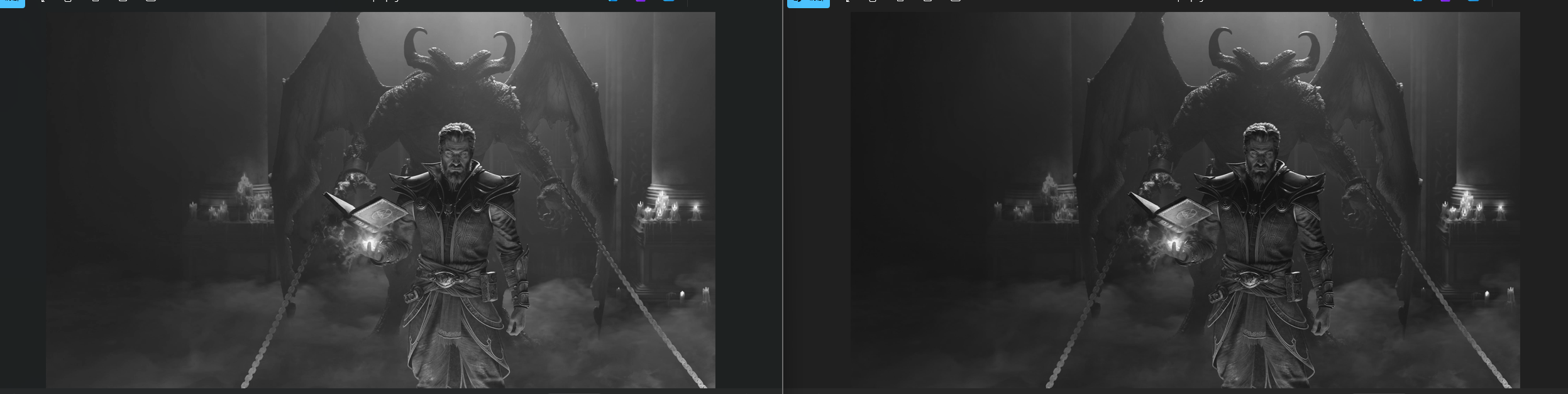
输出:

OpenCV实现
python
import cv2
import numpy as np

img = cv2.imread("img.jpg", 0)
img_float = img / 255.0

# 对数变换
c = 1 / np.log(1 + np.max(img_float))
log_img = c * np.log(1 + img_float)

# 转回0~255
log_img = np.uint8(log_img * 255)
更多内容,欢迎关注我的微信公众号: 半夏之夜的无情剑客