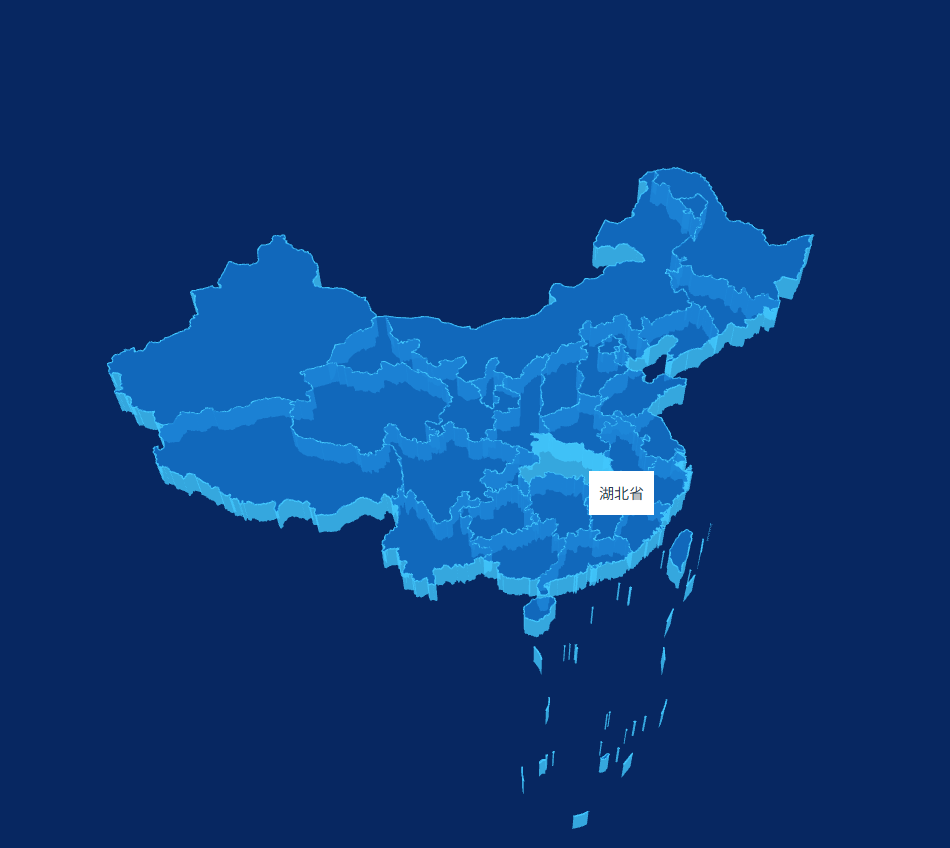
<template>
  <div>
    <div id="provinceInfo" ref="provinceInfo"></div>
  </div>
</template>

<script setup lang="ts">
import * as THREE from 'three'
import { OrbitControls } from 'three/addons/controls/OrbitControls.js'
import { onMounted, ref, onUnmounted } from 'vue'
import * as d3 from 'd3-geo'

// 浮层 DOM 引用
const provinceInfo = ref<HTMLDivElement | null>(null)

// 全局变量
let renderer: THREE.WebGLRenderer
let scene: THREE.Scene
let camera: THREE.PerspectiveCamera
let controller: OrbitControls
let raycaster: THREE.Raycaster
let mouse: THREE.Vector2
let map: THREE.Object3D
let activeIntersect: any[] = []
let eventOffset = { x: 0, y: 0 }

onMounted(() => {
  init()
})

onUnmounted(() => {
  window.removeEventListener('resize', onWindowResize)
})

function init() {
  // 渲染器
  renderer = new THREE.WebGLRenderer({ antialias: true })
  renderer.setSize(window.innerWidth, window.innerHeight)
  document.body.appendChild(renderer.domElement)

  // 场景
  scene = new THREE.Scene()
  // 背景颜色
  scene.background = new THREE.Color(0x072761)

  // 相机
  camera = new THREE.PerspectiveCamera(
    45,
    window.innerWidth / window.innerHeight,
    0.1,
    1000
  )
  camera.position.set(0, -70, 150)
  camera.lookAt(0, 0, 0)

  setController()
  setLight()
  setRaycaster()
  loadMapData()
  animate()
  window.addEventListener('resize', onWindowResize)
}

// 窗口缩放
function onWindowResize() {
  renderer.setSize(window.innerWidth, window.innerHeight)
  camera.aspect = window.innerWidth / window.innerHeight
  camera.updateProjectionMatrix()
}

// 加载地图数据
function loadMapData() {
  const loader = new THREE.FileLoader()
  loader.load('/china.json', (data: string) => {
    const jsonData = JSON.parse(data)
    initMap(jsonData)
  })
}

// 初始化地图
function initMap(chinaJson: any) {
  map = new THREE.Object3D()

  const projection = d3.geoMercator()
    .center([104.0, 37.5])
    .scale(80)
    .translate([0, 0])

  chinaJson.features.forEach((elem: any) => {
    const province = new THREE.Object3D()
    const coordinates = elem.geometry.coordinates

    coordinates.forEach((multiPolygon: any) => {
      multiPolygon.forEach((polygon: any) => {
        const shape = new THREE.Shape()
        const points: THREE.Vector3[] = []

        for (let i = 0; i < polygon.length; i++) {
          const [x, y] = projection(polygon[i])
          const px = x
          const py = -y

          if (i === 0) shape.moveTo(px, py)
          shape.lineTo(px, py)
          points.push(new THREE.Vector3(px, py, 4.01))
        }

        const extrudeSettings = { depth: 4, bevelEnabled: false }
        const geometry = new THREE.ExtrudeGeometry(shape, extrudeSettings)

        const material = new THREE.MeshBasicMaterial({
          color: '#1478d2',
          transparent: true,
          opacity: 0.8
        })
        const material1 = new THREE.MeshBasicMaterial({
          color: '#41c7fd',
          transparent: true,
          opacity: 0.8
        })

        const mesh = new THREE.Mesh(geometry, [material, material1])

        // 边框(修复新版 three.js 废弃 Geometry)
        const lineGeometry = new THREE.BufferGeometry().setFromPoints(points)
        const lineMaterial = new THREE.LineBasicMaterial({ color: '#41c7fd' })
        const line = new THREE.Line(lineGeometry, lineMaterial)

        province.add(mesh)
        province.add(line)
      })
    })

    // 省份信息
    province.userData = elem.properties
    if (elem.properties.contorid) {
      const [x, y] = projection(elem.properties.contorid)
      province.userData._centroid = [x, y]
    }

    map.add(province)
  })

  scene.add(map)
}

// 射线拾取(鼠标检测)
function setRaycaster() {
  raycaster = new THREE.Raycaster()
  mouse = new THREE.Vector2()

  window.addEventListener('mousemove', (event) => {
    mouse.x = (event.clientX / window.innerWidth) * 2 - 1
    mouse.y = -(event.clientY / window.innerHeight) * 2 + 1
    eventOffset.x = event.clientX
    eventOffset.y = event.clientY

    if (provinceInfo.value) {
      provinceInfo.value.style.left = eventOffset.x + 2 + 'px'
      provinceInfo.value.style.top = eventOffset.y + 2 + 'px'
    }
  })
}

// 灯光
function setLight() {
  const ambientLight = new THREE.AmbientLight(0xffffff, 0.5)
  scene.add(ambientLight)
}

// 控制器
function setController() {
  controller = new OrbitControls(camera, renderer.domElement)
}

// 动画循环
function animate() {
  requestAnimationFrame(animate)
  controller.update()

  raycaster.setFromCamera(mouse, camera)
  const intersects = raycaster.intersectObjects(scene.children, true)

  // 恢复上一次颜色
  if (activeIntersect.length > 0) {
    activeIntersect.forEach(item => {
      item.object.material[0].color.set('#1478d2')
      item.object.material[1].color.set('#41c7fd')
    })
  }

  activeIntersect = []

  // 选中变色
  for (let i = 0; i < intersects.length; i++) {
    const obj = intersects[i].object
    if (obj.material && obj.material.length === 2) {
      activeIntersect.push(intersects[i])
      obj.material[0].color.set(0x41c7fd)
      obj.material[1].color.set(0x41c7fd)
      break
    }
  }

  createProvinceInfo()
  renderer.render(scene, camera)
}

// 显示省份浮层
function createProvinceInfo() {
  if (!provinceInfo.value) return

  if (activeIntersect.length !== 0 && activeIntersect[0].object.parent.userData?.name) {
    const info = activeIntersect[0].object.parent.userData
    provinceInfo.value.textContent = info.name
    provinceInfo.value.style.visibility = 'visible'
  } else {
    provinceInfo.value.style.visibility = 'hidden'
  }
}
</script>

<style>
/* 必须全局样式,不能 scoped */
html,
body {
  height: 100%;
  width: 100%;
  margin: 0;
  padding: 0;
  overflow: hidden;
}

#provinceInfo {
  position: absolute;
  z-index: 2;
  background: white;
  padding: 10px;
  visibility: hidden;
  pointer-events: none;
}
</style>