说明:文中 Lycium 为 OpenHarmony 三方库常用的交叉编译框架(仓库内
lycium/目录);与口语中的「lycim」为同一套工具,以下统一写作 Lycium。
Lycium编译框架地址 :
tpc_c_cplusplus框架介绍地址:https://gitcode.com/openharmony-sig/tpc_c_cplusplus
lycium_plusplus框架地址:https://gitcode.com/OpenHarmonyPCDeveloper/lycium_plusplus
OpenHarmony PC Developer 社区:https://gitcode.com/OpenHarmonyPCDeveloper
一、pngquant 是什么
pngquant 是对 PNG 做有损压缩 的命令行工具(GPL-3.0-or-later),在尽量保持观感的前提下减小体积。其经典 2.x 分支以 C 语言为主,依赖:
| 依赖 | 作用 |
|---|---|
| libpng | 读写 PNG |
| zlib | 压缩数据流 |
| lcms2 | 色彩管理(ICC 等),对应 configure 的 --with-lcms2 |
源码默认从 GitHub 拉取指定 tag(本适配为 2.18.0 ),且需 git clone --recursive ,以便带上 lib/ 下的 libimagequant 子模块(pngquant 会静态链接该库)。
二、与常见 Autoconf 工程的区别(移植前必读)
tpc_c_cplusplus 里许多库使用 GNU Autoconf (./configure 由 autotools 生成)。pngquant 2.x 根目录的 configure 是自写的 Bash 脚本,特点包括:
- 支持
./configure --help查看参数,例如--prefix、--extra-cflags、--extra-ldflags、--with-libpng=<dir>、--with-lcms2/--without-lcms2、--disable-sse等。 - 会通过
pkg-config查找 libpng / zlib / lcms2 ,也会在/usr、/usr/local等路径搜索;交叉编译到 OHOS 时,必须显式指向 Lycium 安装前缀 ,否则会链接到宿主机库或干脆报 libpng not found。 buildtools="configure"在 Lycium 中表示走configuredependpath分支,向build传入--prefix=$LYCIUM_ROOT/usr/pngquant/<ARCH>/(即脚本里的"$@"),不要 误设为cmake。
三、环境准备
-
已安装 OpenHarmony NDK/SDK ,并设置
OHOS_SDK(与 Lyciumbuild.sh要求一致)。 -
已按 Lycium README 准备编译依赖(如
gcc、make、pkg-config、git等)。 -
先编好本库在
depends中声明的三方库,使下列目录存在(<ARCH>为armeabi-v7a或arm64-v8a):text$LYCIUM_ROOT/usr/zlib/<ARCH>/ $LYCIUM_ROOT/usr/libpng/<ARCH>/ $LYCIUM_ROOT/usr/lcms2/<ARCH>/若你仓库里 libpng / lcms2 的
pkgname带版本后缀 (例如安装到usr/libpng_xxx/),需同步修改HPKBUILD中的pngroot/lcmsroot路径,与真实usr/<pkgname>/<ARCH>一致。
四、目录与脚本说明(thirdparty/pngquant)
| 文件 | 作用 |
|---|---|
| HPKBUILD | 克隆源码、prepare 里设置交叉环境、build 里调用 pngquant 自带 configure 与 make、package 里 make install |
| SHA512SUM | 若改为 tarball 下载模式时使用;当前为 git clone ,downloadpackage=false |
| HPKCHECK(若有) | 设备或 CI 上的检查结果(可按项目补全) |
五、HPKBUILD 编写要点(按执行顺序)
5.1 元数据与依赖
bash
pkgname=pngquant
pkgver=2.18.0
depends=("libpng" "zlib" "lcms2")
makedepends=()depends:告知 Lycium 先编 这些库,并在configuredependpath里拼接各依赖的lib/pkgconfig到pkgconfigpath。makedepends:只能写宿主机上可通过which找到的命令名 (见lycium/script/build_hpk.sh的checkmakedepends),不要 把zlib等库名写进去。
5.2 获取源码
cloneFlag=true,在prepare()中执行:
git clone -b $pkgver --recursive $source $builddir
保证 libimagequant 子模块就绪。buildtools="configure":走 Lycium 的 configure 分支。source envset.sh:使用setarm32ENV/setarm64ENV注入CC、CFLAGS等 OHOS 交叉变量。
5.3 build() 核心:让 pngquant 的 configure「看见」交叉依赖
-
导出
PKG_CONFIG_LIBDIRLycium 已根据
depends把各库的.../lib/pkgconfig拼进变量pkgconfigpath。必须在./configure之前执行:bashexport PKG_CONFIG_LIBDIR="${pkgconfigpath}"仅赋值不
export时 ,子进程里的pkg-config读不到该变量,仍可能去宿主机的路径找 libpng ,导致 configure 失败。 -
显式拼接
--extra-cflags/--extra-ldflagspngquant 的探测逻辑会在
/usr等默认路径找头文件与库。交叉场景下应把 Lycium 前缀下的include/lib/lib64(若存在)拼进去,例如:- 头文件:
${pngroot}/include、${pngroot}/include/libpng16(部分 libpng 布局)、${zroot}/include、${lcmsroot}/include - 库目录:
${pngroot}/lib、${zroot}/lib、${lcmsroot}/lib、${lcmsroot}/lib64
对每个目录用
[ -d ... ]判断后再追加-I或-L,避免不存在的路径污染编译参数。 - 头文件:
-
调用 pngquant 自带 configure
推荐形式:
bash./configure "$@" \ --with-libpng="$pngroot" \ --with-lcms2 \ --disable-sse \ --extra-cflags="$extra_cflags" \ --extra-ldflags="$extra_ldflags" \ CC="$CC" AR="$AR" CFLAGS="$CFLAGS" LDFLAGS="$LDFLAGS" >> $buildlog 2>&1说明:
"$@":承接 Lycium 传入的--prefix=...,与configuredependpath一致。--with-libpng=:在指定前缀下递归查找png.h与对应libpng静态/动态库。--disable-sse:ARM 交叉编译关闭 x86 SSE 探测。CC/AR/CFLAGS/LDFLAGS:与 OHOS 工具链及告警抑制(如-Wno-unused-command-line-argument)对齐。
-
make与make installbuild():在源码根目录make -j$(nproc)(由顶层Makefile驱动,并会进入lib/构建 libimagequant)。package():make install,将pngquant安装到$LYCIUM_ROOT/usr/pngquant/<ARCH>/bin/(具体以config.mk中PREFIX为准)。package()末尾unsetarm*ENV,避免影响下一架构编译。
5.4 日志与排错
- 构建日志:
thirdparty/pngquant/pngquant-<ver>-<ARCH>-lycium_build.log - 脚本中已对 configure 与 make 失败分别提示 exit code,便于区分阶段。
5.5 附完整HPKBUILD脚本
bash
# Copyright (c) 2024 Huawei Device Co., Ltd.
# Licensed under the Apache License, Version 2.0 (the "License");
# you may not use this file except in compliance with the License.
# You may obtain a copy of the License at
#
#     http://www.apache.org/licenses/LICENSE-2.0
#
# Unless required by applicable law or agreed to in writing, software
# distributed under the License is distributed on an "AS IS" BASIS,
# WITHOUT WARRANTIES OR CONDITIONS OF ANY KIND, either express or implied.
# See the License for the specific language governing permissions and
# limitations under the License.

# Contributor: csdn猫哥 <534117529@qq.com>
# Maintainer: csdn猫哥 <534117529@qq.com>

pkgname=pngquant
pkgver=2.18.0
pkgrel=0
pkgdesc="Lossy PNG compressor - Pure C legacy version"
url="github.com/kornelski/pngquant.git"
archs=("armeabi-v7a" "arm64-v8a")
license=("GPL-3.0-or-later")

# v2.x dependencies
depends=("libpng" "zlib" "lcms2")
makedepends=()

source="https://github.com/kornelski/$pkgname.git"

downloadpackage=false
autounpack=false
builddir=$pkgname-$pkgver
packagename=$builddir.tar.gz

patchflag=false
cloneFlag=true

buildtools="configure"

source envset.sh

prepare() {
    if $cloneFlag
    then
        # Clone the pure C version tag
        git clone -b $pkgver --recursive $source $builddir > $publicbuildlog 2>&1
        if [ $? -ne 0 ]; then
            echo "$pkgname git clone error."
            return -1
        fi
        cloneFlag=false
    fi

    if [ $ARCH == "armeabi-v7a" ]
    then
        setarm32ENV
    elif [ $ARCH == "arm64-v8a" ]
    then
        setarm64ENV
    else
        echo "${ARCH} not support"
        return -1
    fi

    cd $builddir
    if [ ! -f "configure" ]; then
        autoreconf -vif >> $publicbuildlog 2>&1
    fi
    cd $OLDPWD
    mkdir -p $builddir/$ARCH-build
}

build() {
    cd $builddir || return 1

    zroot=$LYCIUM_ROOT/usr/zlib/$ARCH
    pngroot=$LYCIUM_ROOT/usr/libpng/$ARCH
    lcmsroot=$LYCIUM_ROOT/usr/lcms2/$ARCH

    export PKG_CONFIG_LIBDIR="${pkgconfigpath}"


    extra_cflags="-Wno-unused-command-line-argument"
    if [ -d "${pngroot}/include" ]; then
        extra_cflags="$extra_cflags -I${pngroot}/include"
    fi
    if [ -d "${pngroot}/include/libpng16" ]; then
        extra_cflags="$extra_cflags -I${pngroot}/include/libpng16"
    fi

    # zlib
    if [ -d "${zroot}/include" ]; then
        extra_cflags="$extra_cflags -I${zroot}/include"
    fi

    # lcms2
    if [ -d "${lcmsroot}/include" ]; then
        extra_cflags="$extra_cflags -I${lcmsroot}/include"
    fi

    extra_ldflags=""
    if [ -d "${pngroot}/lib" ]; then
        extra_ldflags="$extra_ldflags -L${pngroot}/lib"
    fi
    if [ -d "${zroot}/lib" ]; then
        extra_ldflags="$extra_ldflags -L${zroot}/lib"
    fi
    if [ -d "${lcmsroot}/lib" ]; then
        extra_ldflags="$extra_ldflags -L${lcmsroot}/lib"
    fi
    if [ -d "${lcmsroot}/lib64" ]; then
        extra_ldflags="$extra_ldflags -L${lcmsroot}/lib64"
    fi

    ./configure "$@" \
        --with-libpng="$pngroot" \
        --with-lcms2 \
        --disable-sse \
        --extra-cflags="$extra_cflags" \
        --extra-ldflags="$extra_ldflags" \
        CC="$CC" \
        AR="$AR" \
        CFLAGS="$CFLAGS" \
        LDFLAGS="$LDFLAGS" >> $buildlog 2>&1

    cfg_ret=$?
    if [ $cfg_ret -ne 0 ]; then
        echo "$pkgname configure failed (exit $cfg_ret), see $buildlog"
        cd $OLDPWD
        return $cfg_ret
    fi

    ${MAKE} -j$(nproc) >> $buildlog 2>&1
    mk_ret=$?
    if [ $mk_ret -ne 0 ]; then
        echo "$pkgname make failed (exit $mk_ret), see $buildlog"
    fi
    cd $OLDPWD
    return $mk_ret
}

package() {
    cd $builddir || return 1
    ${MAKE} install >> $buildlog 2>&1
    ret=$?
    cd $OLDPWD
    if [ $ARCH == "armeabi-v7a" ]
    then
        unsetarm32ENV
    elif [ $ARCH == "arm64-v8a" ]
    then
        unsetarm64ENV
    else
        echo "${ARCH} not support"
        return -1
    fi
    return $ret
}

check() {
    echo "The test must be on an OpenHarmony device!"
    # Verification: pngquant --version
}

cleanbuild() {
    rm -rf ${PWD}/$builddir
}
六、推荐编译命令
在仓库 lycium 目录执行(按依赖顺序):
shell
cd lycium
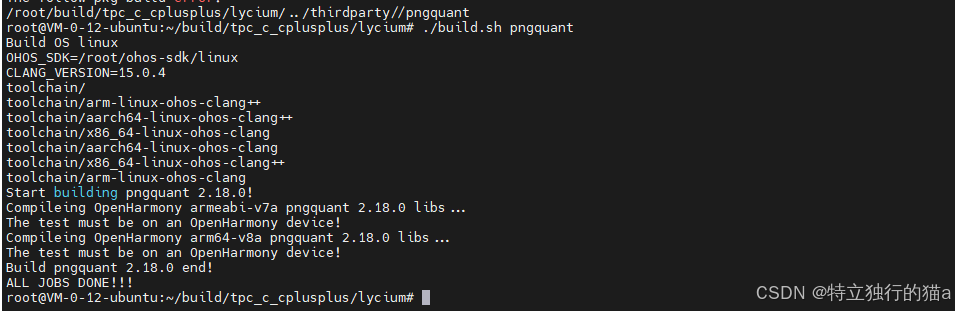
./build.sh zlib libpng lcms2 pngquant
若依赖已在 lycium/usr/... 中就绪,可只编:
shell
./build.sh pngquant成功后可在:
text
lycium/usr/pngquant/<ARCH>/bin/pngquant找到可执行文件(以实际 PREFIX 为准)。
移植成功的gitcode仓:https://gitcode.com/oh-tpc/pngquant
七、常见问题归纳
| 现象 | 可能原因 | 处理 |
|---|---|---|
| libpng not found / configure 失败 | PKG_CONFIG_LIBDIR 未 export ;或未传 --extra-* / --with-libpng |
按上文 export 并补全 -I/-L ;确认 zlib/libpng/lcms2 已先编好 |
| 仍找不到 libpng | 依赖安装路径与 HPKBUILD 里 pngroot 不一致 |
将 pngroot= 改为实际 usr/<pkgname>/<ARCH> |
| git clone 失败 | 网络或 tag 名错误 | 确认 pkgver 与远端 tag(如 2.18.0 )一致;需 --recursive |
| SSE / OpenMP 相关报错 | 交叉环境不支持 | 保持 --disable-sse ;勿随意开启 --with-openmp 除非工具链支持 |
| makedepends 误填库名 | Lycium 用 which 检查「命令」 |
makedepends=() ,库只写在 depends |
八、设备侧与集成说明
- pngquant 为命令行工具 ,集成到 OHOS 多为:随系统镜像、通过
hdc推送到可执行目录、或在自有工具链中调用。 - 若需在 HAP 内使用,通常将对应 ABI 的
pngquant与依赖.so放入包内合适路径,并注意权限与沙箱策略;具体可参考项目内其它「可执行三方件」的集成方式。
九、参考
- pngquant 上游:https://github.com/kornelski/pngquant
- Lycium 脚本:
lycium/script/build_hpk.sh(configuredependpath、checkmakedepends)
最后,欢迎加入开源鸿蒙开发者社区交流:https://harmonypc.csdn.net/