[root@mgr1 ~]# ssh-keygen
Generating public/private ed25519 key pair.
Enter file in which to save the key (/root/.ssh/id_ed25519):
Enter passphrase for "/root/.ssh/id_ed25519" (empty for no passphrase):
Enter same passphrase again:
Your identification has been saved in /root/.ssh/id_ed25519
Your public key has been saved in /root/.ssh/id_ed25519.pub
The key fingerprint is:
SHA256:YVdckNPBtETeiqmBPHFECV30KN+FNh66Y0BU+GpfmZA root@mgr2
The key's randomart image is:
+--[ED25519 256]--+
|        .++B*O*. |
|         o+.+=o+ |
|        + =..oO o|
|       o B oEB = |
|        S o.=.+o |
|         .o+ .+  |
|         ...+.   |
|           ...   |
|                 |
+----[SHA256]-----+
[root@mgr1 ~]# ssh-copy-id mgr2
/usr/bin/ssh-copy-id: INFO: Source of key(s) to be installed: "/root/.ssh/id_ed25519.pub"
The authenticity of host 'mgr2 (192.168.194.12)' can't be established.
ED25519 key fingerprint is SHA256:cOcQwno9t4p5xBrZ5NwA0FVKmSFGPea8xF6/Xlgl8CQ.
This host key is known by the following other names/addresses:
    ~/.ssh/known_hosts:1: mgr1
Are you sure you want to continue connecting (yes/no/[fingerprint])? yes
/usr/bin/ssh-copy-id: INFO: attempting to log in with the new key(s), to filter out any that are already installed
/usr/bin/ssh-copy-id: INFO: 1 key(s) remain to be installed -- if you are prompted now it is to install the new keys
root@mgr2's password:

Number of key(s) added: 1

Now try logging into the machine, with: "ssh 'mgr2'"
and check to make sure that only the key(s) you wanted were added.

[root@mgr1 ~]# ssh-copy-id mgr3
/usr/bin/ssh-copy-id: INFO: Source of key(s) to be installed: "/root/.ssh/id_ed25519.pub"
The authenticity of host 'mgr3 (192.168.194.13)' can't be established.
ED25519 key fingerprint is SHA256:cOcQwno9t4p5xBrZ5NwA0FVKmSFGPea8xF6/Xlgl8CQ.
This host key is known by the following other names/addresses:
    ~/.ssh/known_hosts:1: mgr1
    ~/.ssh/known_hosts:4: mgr2
Are you sure you want to continue connecting (yes/no/[fingerprint])? yes
/usr/bin/ssh-copy-id: INFO: attempting to log in with the new key(s), to filter out any that are already installed
/usr/bin/ssh-copy-id: INFO: 1 key(s) remain to be installed -- if you are prompted now it is to install the new keys
root@mgr3's password:

Number of key(s) added: 1

Now try logging into the machine, with: "ssh 'mgr3'"
and check to make sure that only the key(s) you wanted were added.


# 或者在shell脚本中使用命令
ssh-keygen -t rsa -N '' -f /root/.ssh/id_rsa -q
# 然后拷贝即可
ssh-copy-id mgr2
# 启动MySQL
[root@mgr1 ~]# systemctl start mysqld

# 使用grep命令查看日志中的临时密码
[root@mgr1 ~]# grep -i password /var/log/mysqld.log
2026-04-18T09:38:59.968877Z 6 [Note] [MY-010454] [Server] A temporary password is generated for root@localhost: :mOw3AlgS#Kf
接着使用awk命令和一个变量来接受MySQL密码,这样就需要直接手动输入密码了
powershell复制代码
[root@mgr1 ~]# tmp_passwd=`awk '/temporary password/ {print $NF}' /var/log/mysqld.log` && echo ${tmp_passwd}
:mOw3AlgS#Kf
[root@mgr1 ~]# mysql -uroot -p${tmp_passwd}
mysql: [Warning] Using a password on the command line interface can be insecure.
Welcome to the MySQL monitor.  Commands end with ; or \g.
Your MySQL connection id is 8
Server version: 8.4.8

Copyright (c) 2000, 2026, Oracle and/or its affiliates.

Oracle is a registered trademark of Oracle Corporation and/or its
affiliates. Other names may be trademarks of their respective
owners.

Type 'help;' or '\h' for help. Type '\c' to clear the current input statement.

mysql>
# 更改密码
mysql>alter user 'root'@'localhost' identified by 'MySQL@123';
接着按照以上操作对mgr2和mgr3节点进行操作
配置MySQL配置文件
powershell复制代码
# 先备份
[root@mgr1 ~]# cp /etc/my.cnf{,.bak}

# 接着查询uuid
[root@mgr2 ~]# mysql -uroot -p'MySQL@123' -e "select uuid()"
mysql: [Warning] Using a password on the command line interface can be insecure.
+--------------------------------------+
| uuid()                               |
+--------------------------------------+
| 53880f11-3be3-11f1-881e-000c29d52c59 |
+--------------------------------------+
[root@mgr2 ~]#

[root@mgr1 ~]# vim /etc/my.cnf

[root@mgr1 ~]# cat /etc/my.cnf
[mysqld]
#
# Remove leading # and set to the amount of RAM for the most important data
# cache in MySQL. Start at 70% of total RAM for dedicated server, else 10%.
# innodb_buffer_pool_size = 128M
#
# Remove the leading "# " to disable binary logging
# Binary logging captures changes between backups and is enabled by
# default. It's default setting is log_bin=binlog
# disable_log_bin
#
# Remove leading # to set options mainly useful for reporting servers.
# The server defaults are faster for transactions and fast SELECTs.
# Adjust sizes as needed, experiment to find the optimal values.
# join_buffer_size = 128M
# sort_buffer_size = 2M
# read_rnd_buffer_size = 2M

datadir=/var/lib/mysql
socket=/var/lib/mysql/mysql.sock

log-error=/var/log/mysqld.log
pid-file=/var/run/mysqld/mysqld.pid

disabled_storage_engines="MyISAM,BLACKHOLE,FEDERATED,ARCHIVE,MEMORY"
server_id=11
gtid_mode=ON
enforce_gtid_consistency=ON

binlog_checksum=NONE
log_slave_updates=ON
binlog_format=ROW
default_storage_engine=InnoDB

plugin_load_add='group_replication.so'
group_replication_group_name="53880f11-3be3-11f1-881e-000c29d52c59"
group_replication_start_on_boot=off
group_replication_local_address="mgr1:33061"
group_replication_group_seeds="mgr1:33061,mgr2:33061,mgr3:33061"
group_replication_bootstrap_group=off
group_replication_recovery_get_public_key=ON


[root@mgr1 ~]# scp /etc/my.cnf /etc/my.cnf.
/etc/my.cnf.bak   /etc/my.cnf.d/
[root@mgr1 ~]# scp /etc/my.cnf /etc/my.cnf.bak mgr2:/etc/
root@mgr2's password:
my.cnf                                                                                                                                               100% 1413     2.1MB/s   00:00
my.cnf.bak                                                                                                                                           100%  921     1.0MB/s   00:00
[root@mgr1 ~]# scp /etc/my.cnf /etc/my.cnf.bak mgr3:/etc/
The authenticity of host 'mgr3 (192.168.194.13)' can't be established.
ED25519 key fingerprint is SHA256:cOcQwno9t4p5xBrZ5NwA0FVKmSFGPea8xF6/Xlgl8CQ.
This host key is known by the following other names/addresses:
    ~/.ssh/known_hosts:1: mgr2
Are you sure you want to continue connecting (yes/no/[fingerprint])? yes
Warning: Permanently added 'mgr3' (ED25519) to the list of known hosts.
root@mgr3's password:
my.cnf                                                                                                                                               100% 1413     2.5MB/s   00:00
my.cnf.bak                                                                                                                                           100%  921     3.1MB/s   00:00
[root@mgr1 ~]#
server_id=12
group_replication_local_address="mgr2:33061"

# 完整文件如下
[root@mgr2 ~]#  cat /etc/my.cnf
[mysqld]
#
# Remove leading # and set to the amount of RAM for the most important data
# cache in MySQL. Start at 70% of total RAM for dedicated server, else 10%.
# innodb_buffer_pool_size = 128M
#
# Remove the leading "# " to disable binary logging
# Binary logging captures changes between backups and is enabled by
# default. It's default setting is log_bin=binlog
# disable_log_bin
#
# Remove leading # to set options mainly useful for reporting servers.
# The server defaults are faster for transactions and fast SELECTs.
# Adjust sizes as needed, experiment to find the optimal values.
# join_buffer_size = 128M
# sort_buffer_size = 2M
# read_rnd_buffer_size = 2M

datadir=/var/lib/mysql
socket=/var/lib/mysql/mysql.sock

log-error=/var/log/mysqld.log
pid-file=/var/run/mysqld/mysqld.pid

disabled_storage_engines="MyISAM,BLACKHOLE,FEDERATED,ARCHIVE,MEMORY"
server_id=12
gtid_mode=ON
enforce_gtid_consistency=ON

binlog_checksum=NONE
log_slave_updates=ON
binlog_format=ROW
default_storage_engine=InnoDB

plugin_load_add='group_replication.so'
group_replication_group_name="53880f11-3be3-11f1-881e-000c29d52c59"
group_replication_start_on_boot=off
group_replication_local_address="mgr2:33061"
group_replication_group_seeds="mgr1:33061,mgr2:33061,mgr3:33061"
group_replication_bootstrap_group=off
group_replication_recovery_get_public_key=ON
mgr3
powershell复制代码
server_id=13
group_replication_local_address="mgr3:33061"

# 完整文件如下
[root@mgr3 ~]# cat /etc/my.cnf
[mysqld]
#
# Remove leading # and set to the amount of RAM for the most important data
# cache in MySQL. Start at 70% of total RAM for dedicated server, else 10%.
# innodb_buffer_pool_size = 128M
#
# Remove the leading "# " to disable binary logging
# Binary logging captures changes between backups and is enabled by
# default. It's default setting is log_bin=binlog
# disable_log_bin
#
# Remove leading # to set options mainly useful for reporting servers.
# The server defaults are faster for transactions and fast SELECTs.
# Adjust sizes as needed, experiment to find the optimal values.
# join_buffer_size = 128M
# sort_buffer_size = 2M
# read_rnd_buffer_size = 2M

datadir=/var/lib/mysql
socket=/var/lib/mysql/mysql.sock

log-error=/var/log/mysqld.log
pid-file=/var/run/mysqld/mysqld.pid

disabled_storage_engines="MyISAM,BLACKHOLE,FEDERATED,ARCHIVE,MEMORY"
server_id=13
gtid_mode=ON
enforce_gtid_consistency=ON

binlog_checksum=NONE
log_slave_updates=ON
binlog_format=ROW
default_storage_engine=InnoDB

plugin_load_add='group_replication.so'
group_replication_group_name="53880f11-3be3-11f1-881e-000c29d52c59"
group_replication_start_on_boot=off
group_replication_local_address="mgr3:33061"
group_replication_group_seeds="mgr1:33061,mgr2:33061,mgr3:33061"
group_replication_bootstrap_group=off
group_replication_recovery_get_public_key=ON
重启MySQL,每个节点都需要操作
powershell复制代码
systemctl restart mysqld
5、配置用户
三个节点都要执行
powershell复制代码
mysql> SET SQL_LOG_BIN=0;
mysql> CREATE USER 'repl'@'%' IDENTIFIED BY 'Back@123';
mysql> GRANT REPLICATION SLAVE ON *.* TO 'repl'@'%';
mysql> GRANT CONNECTION_ADMIN ON *.* TO 'repl'@'%';
mysql> GRANT BACKUP_ADMIN ON *.* TO 'repl'@'%';
mysql> GRANT GROUP_REPLICATION_STREAM ON *.* TO 'repl'@'%';
mysql> FLUSH PRIVILEGES;
mysql> SET SQL_LOG_BIN=1;

# 2. 配置 MGR 服务通道,通道名字 group_replication_recovery 是固定的,不能修改
mysql> CHANGE REPLICATION SOURCE TO SOURCE_USER='repl',SOURCE_PASSWORD='Back@123' FOR CHANNEL 'group_replication_recovery';
6、安装插件
powershell复制代码
mysql> show plugins;
+----------------------------------+----------+--------------------+----------------------+---------+
| Name                             | Status   | Type               | Library              | License |
+----------------------------------+----------+--------------------+----------------------+---------+
| binlog                           | ACTIVE   | STORAGE ENGINE     | NULL                 | GPL     |
| sha256_password                  | ACTIVE   | AUTHENTICATION     | NULL                 | GPL     |
| caching_sha2_password            | ACTIVE   | AUTHENTICATION     | NULL                 | GPL     |
| sha2_cache_cleaner               | ACTIVE   | AUDIT              | NULL                 | GPL     |
| daemon_keyring_proxy_plugin      | ACTIVE   | DAEMON             | NULL                 | GPL     |
| CSV                              | ACTIVE   | STORAGE ENGINE     | NULL                 | GPL     |
| MEMORY                           | ACTIVE   | STORAGE ENGINE     | NULL                 | GPL     |
| InnoDB                           | ACTIVE   | STORAGE ENGINE     | NULL                 | GPL     |
| INNODB_TRX                       | ACTIVE   | INFORMATION SCHEMA | NULL                 | GPL     |
| INNODB_CMP                       | ACTIVE   | INFORMATION SCHEMA | NULL                 | GPL     |
| INNODB_CMP_RESET                 | ACTIVE   | INFORMATION SCHEMA | NULL                 | GPL     |
| INNODB_CMPMEM                    | ACTIVE   | INFORMATION SCHEMA | NULL                 | GPL     |
| INNODB_CMPMEM_RESET              | ACTIVE   | INFORMATION SCHEMA | NULL                 | GPL     |
| INNODB_CMP_PER_INDEX             | ACTIVE   | INFORMATION SCHEMA | NULL                 | GPL     |
| INNODB_CMP_PER_INDEX_RESET       | ACTIVE   | INFORMATION SCHEMA | NULL                 | GPL     |
| INNODB_BUFFER_PAGE               | ACTIVE   | INFORMATION SCHEMA | NULL                 | GPL     |
| INNODB_BUFFER_PAGE_LRU           | ACTIVE   | INFORMATION SCHEMA | NULL                 | GPL     |
| INNODB_BUFFER_POOL_STATS         | ACTIVE   | INFORMATION SCHEMA | NULL                 | GPL     |
| INNODB_TEMP_TABLE_INFO           | ACTIVE   | INFORMATION SCHEMA | NULL                 | GPL     |
| INNODB_METRICS                   | ACTIVE   | INFORMATION SCHEMA | NULL                 | GPL     |
| INNODB_FT_DEFAULT_STOPWORD       | ACTIVE   | INFORMATION SCHEMA | NULL                 | GPL     |
| INNODB_FT_DELETED                | ACTIVE   | INFORMATION SCHEMA | NULL                 | GPL     |
| INNODB_FT_BEING_DELETED          | ACTIVE   | INFORMATION SCHEMA | NULL                 | GPL     |
| INNODB_FT_CONFIG                 | ACTIVE   | INFORMATION SCHEMA | NULL                 | GPL     |
| INNODB_FT_INDEX_CACHE            | ACTIVE   | INFORMATION SCHEMA | NULL                 | GPL     |
| INNODB_FT_INDEX_TABLE            | ACTIVE   | INFORMATION SCHEMA | NULL                 | GPL     |
| INNODB_TABLES                    | ACTIVE   | INFORMATION SCHEMA | NULL                 | GPL     |
| INNODB_TABLESTATS                | ACTIVE   | INFORMATION SCHEMA | NULL                 | GPL     |
| INNODB_INDEXES                   | ACTIVE   | INFORMATION SCHEMA | NULL                 | GPL     |
| INNODB_TABLESPACES               | ACTIVE   | INFORMATION SCHEMA | NULL                 | GPL     |
| INNODB_COLUMNS                   | ACTIVE   | INFORMATION SCHEMA | NULL                 | GPL     |
| INNODB_VIRTUAL                   | ACTIVE   | INFORMATION SCHEMA | NULL                 | GPL     |
| INNODB_CACHED_INDEXES            | ACTIVE   | INFORMATION SCHEMA | NULL                 | GPL     |
| INNODB_SESSION_TEMP_TABLESPACES  | ACTIVE   | INFORMATION SCHEMA | NULL                 | GPL     |
| MyISAM                           | ACTIVE   | STORAGE ENGINE     | NULL                 | GPL     |
| MRG_MYISAM                       | ACTIVE   | STORAGE ENGINE     | NULL                 | GPL     |
| PERFORMANCE_SCHEMA               | ACTIVE   | STORAGE ENGINE     | NULL                 | GPL     |
| TempTable                        | ACTIVE   | STORAGE ENGINE     | NULL                 | GPL     |
| ARCHIVE                          | ACTIVE   | STORAGE ENGINE     | NULL                 | GPL     |
| BLACKHOLE                        | ACTIVE   | STORAGE ENGINE     | NULL                 | GPL     |
| FEDERATED                        | DISABLED | STORAGE ENGINE     | NULL                 | GPL     |
| ndbcluster                       | DISABLED | STORAGE ENGINE     | NULL                 | GPL     |
| ndbinfo                          | DISABLED | STORAGE ENGINE     | NULL                 | GPL     |
| ndb_transid_mysql_connection_map | DISABLED | INFORMATION SCHEMA | NULL                 | GPL     |
| ngram                            | ACTIVE   | FTPARSER           | NULL                 | GPL     |
| mysqlx_cache_cleaner             | ACTIVE   | AUDIT              | NULL                 | GPL     |
| mysqlx                           | ACTIVE   | DAEMON             | NULL                 | GPL     |
| mysql_native_password            | DISABLED | AUTHENTICATION     | NULL                 | GPL     |
| group_replication                | ACTIVE   | GROUP REPLICATION  | group_replication.so | GPL     |
+----------------------------------+----------+--------------------+----------------------+---------+
49 rows in set (0.00 sec)

# 查看最后一行的group_replication.so插件有没有,如果没有就安装,这里已经有了不需要安装了

# 如果没有,则安装
mysql> INSTALL PLUGIN group_replication SONAME 'group_replication.so';
7、启动节点
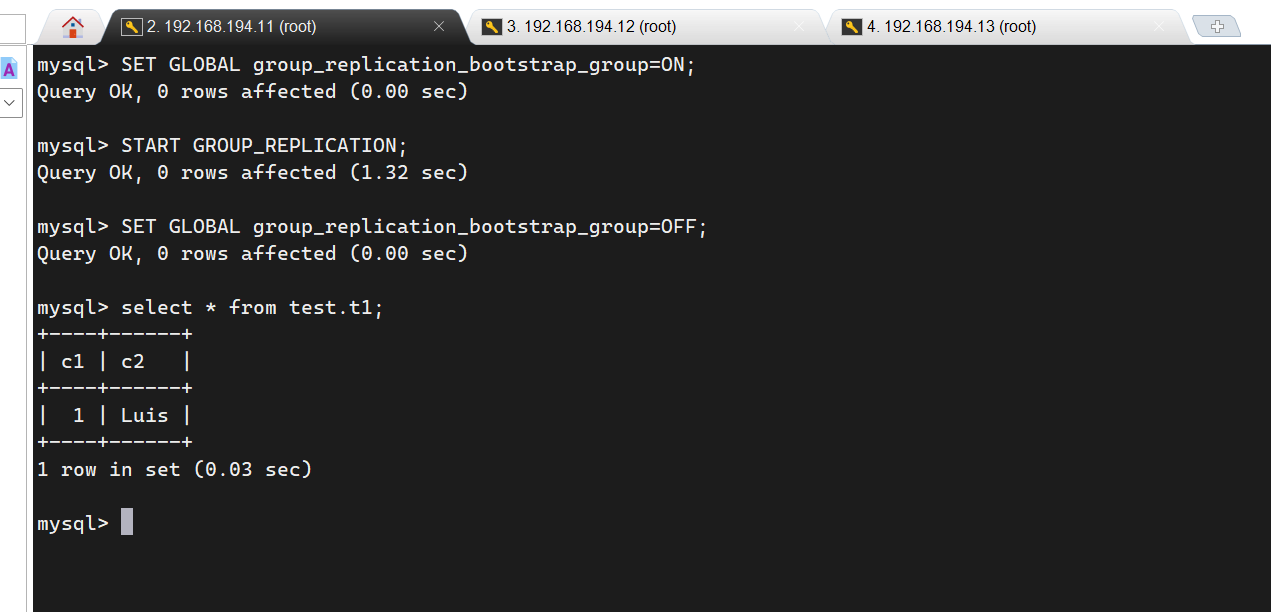
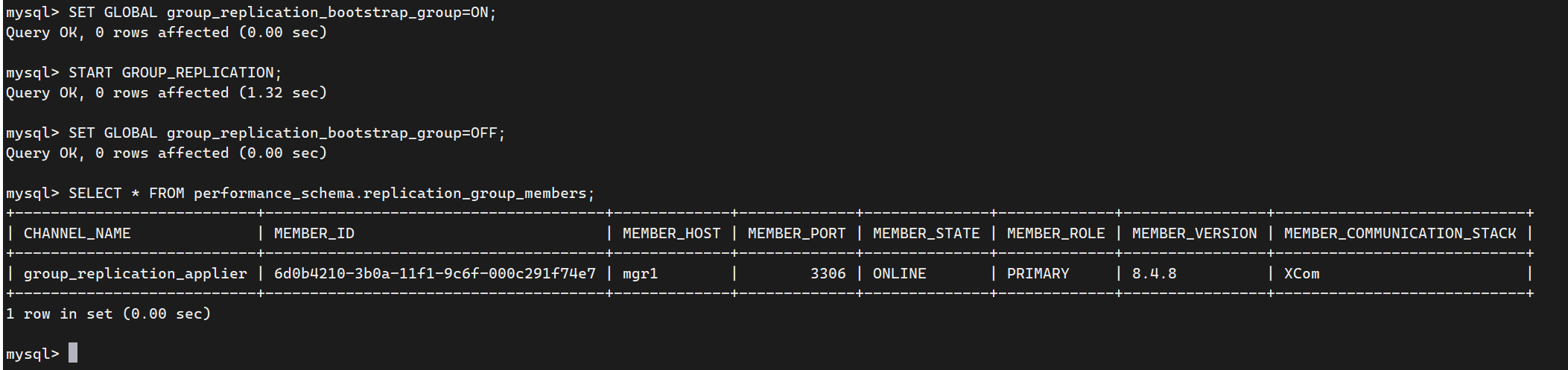
首次启动组的过程称为引导(bootstrapping)。可以使用 group_replication_bootstrap_group 系统变量来引导一个组。引导操作只能由启动该组的单个服务器执行,且只能执行一次。这就是为什么group_replication_bootstrap_group 选项的值没有存储在实例的选项文件中的原因。如果将其保存在选项文件中,则服务器在重启时会自动引导第二个同名组。这将导致出现两个同名但不同的组。同样的逻辑也适用于在将此选项设置为 ON 的情况停止和重新启动插件。因此,为了安全地引导组,请连接到 mgr1 节点并执行以下语句: