OpenClaw Daemon 模块超深度架构分析
分析版本:2026-04-20 | 代码目录:
src/daemon/
一、模块定位
1.1 业务职责
daemon 模块是 OpenClaw 的服务守护进程管理层,负责将 Gateway(和 Node Host)进程注册为操作系统原生的后台服务,实现开机自启、崩溃自动重启、统一启停控制。核心职责包括:
- 跨平台服务管理:封装 macOS LaunchAgent、Linux systemd user service、Windows Scheduled Task 三套系统守护机制为统一 API
- 服务全生命周期控制:安装(install)、卸载(uninstall)、启动(start)、停止(stop)、重启(restart)、状态查询(readRuntime)
- 服务配置生成:为每种平台生成对应的服务描述文件(plist / .service / .cmd)
- 服务审计与诊断:检测配置漂移、Token 不匹配、PATH 非最小化、运行时版本管理器依赖等风险
- 遗留服务迁移:自动发现并清理旧版 clawdbot 等遗留服务单元
- 环境构建:为守护进程构建最小化 PATH、TLS CA 证书、代理环境等
1.2 在系统中的位置
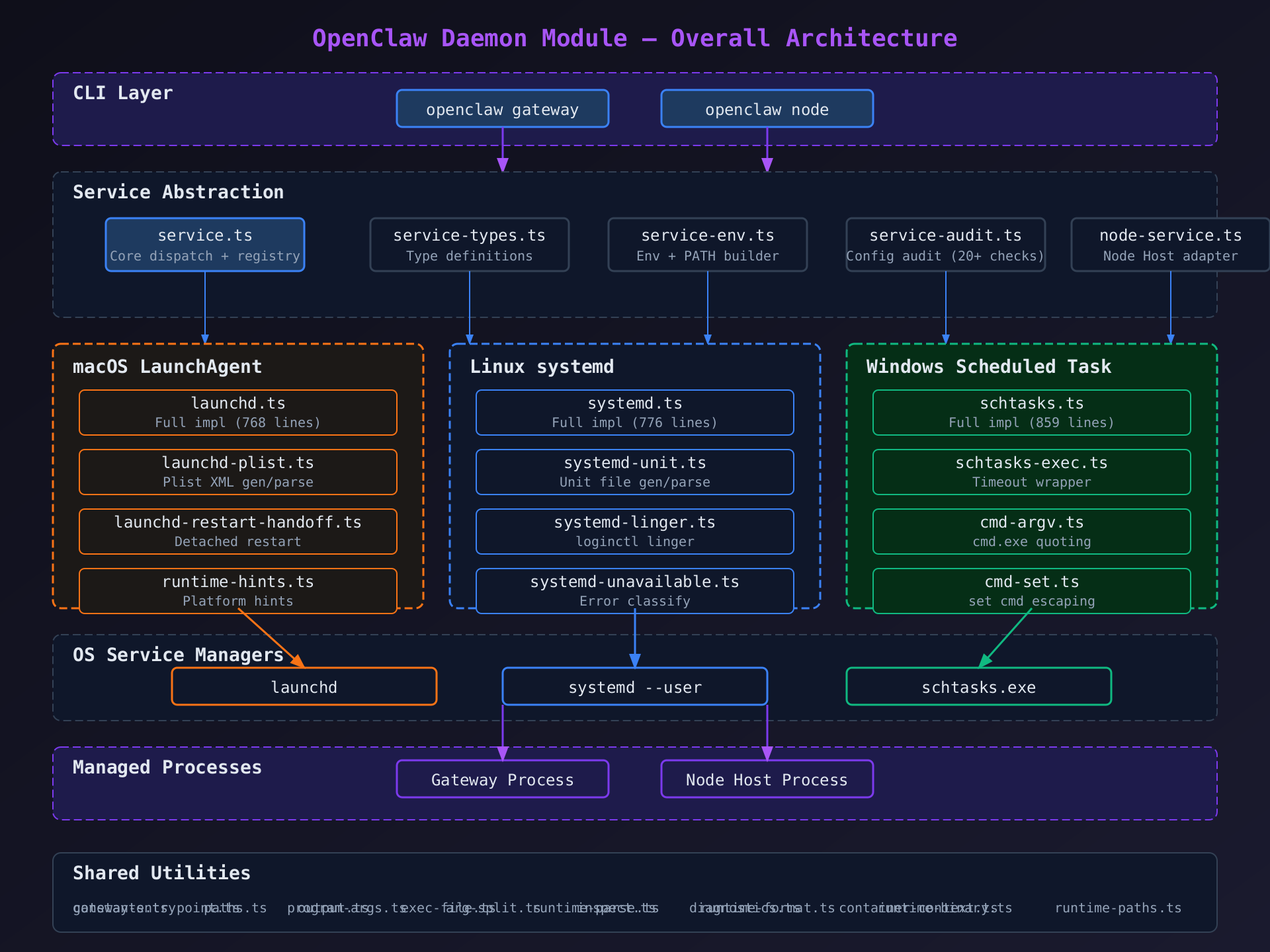
CLI 入口 (src/cli/)
   ↓ 调用
daemon 模块 (src/daemon/)
   ↓ 调用
操作系统原生服务管理器 (launchd / systemd / schtasks)
   ↓ 管理
Gateway/Node Host 进程
daemon 模块位于 CLI 层与操作系统层之间 ,是用户态命令(openclaw gateway install/start/stop/restart)到系统服务管理器的桥梁。它不直接运行 Gateway 进程,而是通过 OS 服务管理器间接管理。
1.3 核心业务价值
| 价值维度 | 具体体现 |
|---|---|
| 零宕机 | KeepAlive (macOS) / Restart=always (Linux) / ONLOGON (Windows) 保证服务持续运行 |
| 开箱即用 | 一条命令完成跨平台服务注册,用户无需手动编写 plist/service/cmd |
| 安全隔离 | 最小化 PATH、umask 077、Token 审计防止配置漂移 |
| 版本迁移 | 自动检测版本管理器 Node/Bun 路径,引导用户迁移到系统 Node |
| 向后兼容 | 自动发现和清理 clawdbot 时代的遗留服务单元 |
二、模块整体结构
2.1 文件分类与依赖关系
整个 daemon 模块按功能分为 6 个子系统:
① 核心服务抽象层(Service Abstraction)
| 文件 | 行数 | 职责 |
|---|---|---|
service.ts |
225 | 核心入口 --- GatewayService 接口定义 + 平台注册表 + 状态读取/启动逻辑 |
service-types.ts |
60 | 类型定义 --- Install/Control/Manage/Stage/RestartResult 等所有参数与返回类型 |
service-runtime.ts |
13 | 运行时状态类型 --- GatewayServiceRuntime |
service-env.ts |
368 | 环境构建 --- 最小化 PATH 构建 + 服务环境变量组装 |
service-audit.ts |
427 | 配置审计 --- 20+ 检查项:Token 漂移、PATH 非最小化、运行时版本管理器、systemd/launchd 配置完整性 |
node-service.ts |
69 | Node Host 服务适配 --- 复用 GatewayService 但注入 Node 专用环境变量 |
② macOS LaunchAgent 实现
| 文件 | 行数 | 职责 |
|---|---|---|
launchd.ts |
768 | LaunchAgent 完整实现 --- plist 写入、bootstrap/bootout、kickstart、状态读取、遗留清理 |
launchd-plist.ts |
117 | plist XML 生成与解析 --- 构建/读取 plist 文件 |
launchd-restart-handoff.ts |
155 | 重启交接 --- 从 launchd 管理的进程内部安全重启(detached shell 脚本) |
③ Linux systemd 实现
| 文件 | 行数 | 职责 |
|---|---|---|
systemd.ts |
776 | systemd 完整实现 --- unit 写入、enable/restart/stop、状态读取、遗留清理、sudo 降级 |
systemd-unit.ts |
139 | systemd unit 文件生成与解析 --- ExecStart/Environment/EnvironmentFile 渲染 |
systemd-linger.ts |
78 | loginctl enable-linger 管理 --- 保证无头服务器上用户 systemd 会话持久化 |
systemd-unavailable.ts |
54 | systemd 不可用分类 --- missing_systemctl / user_bus_unavailable / generic_unavailable |
systemd-hints.ts |
41 | 不可用时的用户提示 --- WSL/容器/无头服务器场景指导 |
④ Windows Scheduled Task 实现
| 文件 | 行数 | 职责 |
|---|---|---|
schtasks.ts |
859 | Scheduled Task 完整实现 --- 任务脚本生成、schtasks 注册、启动文件夹降级、端口释放 |
schtasks-exec.ts |
24 | schtasks 命令执行封装 --- 超时 15s + 无输出超时 5s |
cmd-argv.ts |
26 | cmd.exe 命令行参数引用/解析 |
cmd-set.ts |
64 | set 命令赋值引用/解析 --- 处理 ^, %, !, " 转义 |
arg-split.ts |
48 | 通用参数分割 --- 支持引号保持 + 三种转义模式 |
⑤ 运行时与路径工具
| 文件 | 行数 | 职责 |
|---|---|---|
runtime-binary.ts |
26 | 运行时检测 --- isNodeRuntime / isBunRuntime |
runtime-paths.ts |
186 | Node 路径解析 --- 版本管理器路径检测、系统 Node 查找、版本验证 |
runtime-parse.ts |
22 | 键值对输出解析 --- 统一解析 launchctl print / systemctl show / schtasks 输出 |
runtime-format.ts |
44 | 运行时状态格式化 --- 统一输出格式 |
runtime-hints.ts |
52 | 平台运行时提示 --- 日志路径、启动命令 |
gateway-entrypoint.ts |
67 | Gateway 入口点解析 --- 定位 dist/ 下的可执行入口 |
program-args.ts |
298 | 程序参数组装 --- 根据 runtime(dev/node/bun/auto) + dev 模式构建完整命令行 |
paths.ts |
43 | 路径工具 --- HOME 解析、~ 展开、状态目录解析 |
⑥ 辅助工具
| 文件 | 行数 | 职责 |
|---|---|---|
output.ts |
21 | 终端格式化输出 --- label: value 样式 |
exec-file.ts |
32 | execFileUtf8 封装 --- 统一错误处理 |
inspect.ts |
442 | 外部服务检测 --- 扫描 LaunchAgents/systemd/ScheduledTasks 中 OpenClaw 相关服务 |
diagnostics.ts |
44 | 日志诊断 --- 读取最后一条错误日志行 |
container-context.ts |
11 | 容器环境检测 |
constants.ts |
112 | 常量定义 --- 服务标签、Profile 后缀、描述格式化 |
2.2 核心接口 GatewayService
typescript
type GatewayService = {
  label: string;                    // 服务类型名 "LaunchAgent" | "systemd" | "Scheduled Task"
  loadedText: string;               // 已加载文本 "loaded" | "enabled" | "registered"
  notLoadedText: string;            // 未加载文本 "not loaded" | "disabled" | "missing"
  stage: (args) => Promise<void>;   // 仅写入配置文件(不激活)
  install: (args) => Promise<void>; // 写入 + 激活服务
  uninstall: (args) => Promise<void>; // 卸载服务
  stop: (args) => Promise<void>;    // 停止服务
  restart: (args) => Promise<GatewayServiceRestartResult>; // 重启服务
  isLoaded: (args) => Promise<boolean>; // 服务是否已加载
  readCommand: (env) => Promise<GatewayServiceCommandConfig | null>; // 读取服务命令配置
  readRuntime: (env) => Promise<GatewayServiceRuntime>; // 读取运行时状态
};
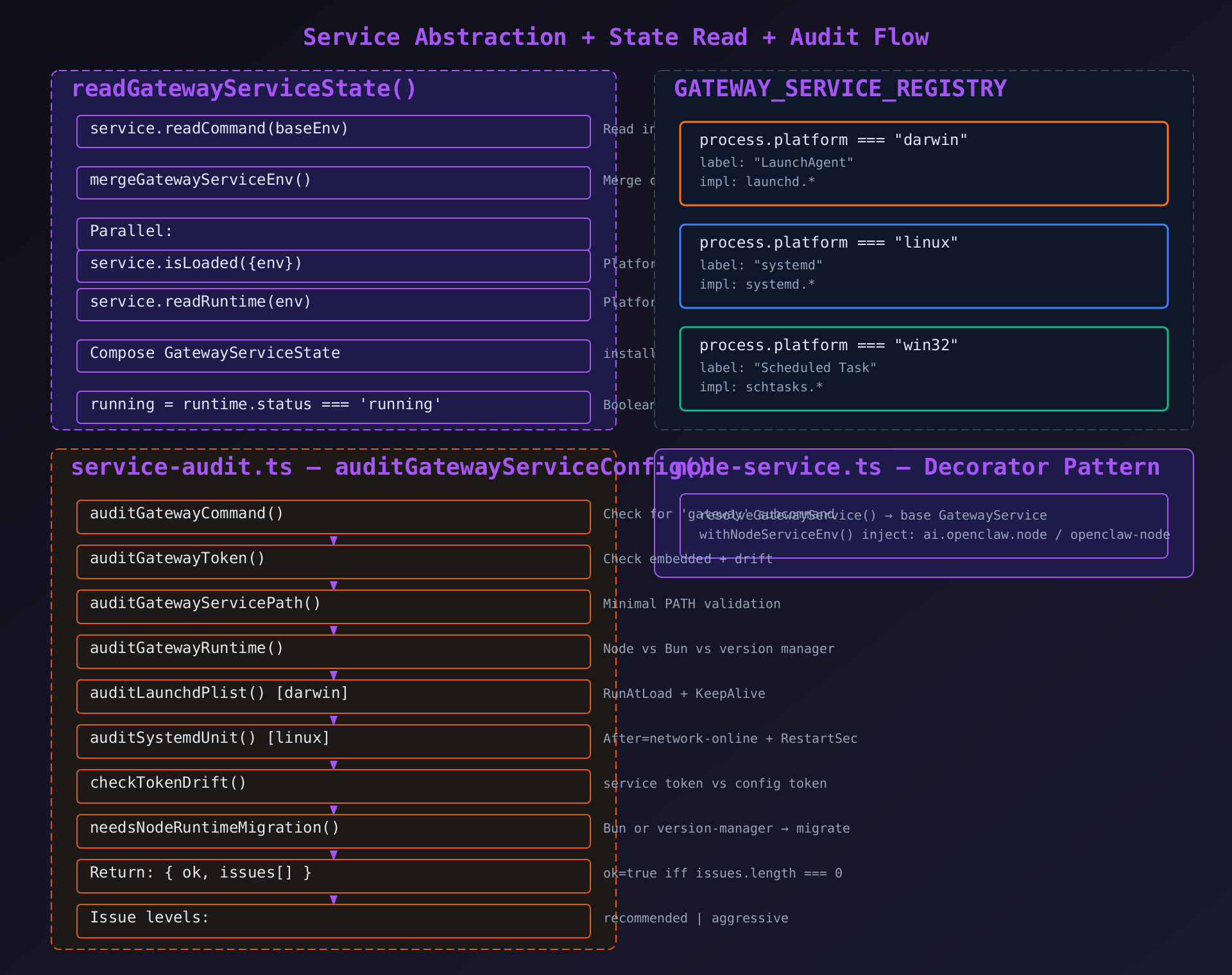
平台注册表 将 process.platform 映射到具体实现:
typescript
const GATEWAY_SERVICE_REGISTRY = {
  darwin: { label: "LaunchAgent", ... launchd.* 实现 ... },
  linux:  { label: "systemd",    ... systemd.* 实现 ... },
  win32:  { label: "Scheduled Task", ... schtasks.* 实现 ... },
};
2.3 数据流入流出方式
CLI 命令 → service.ts::resolveGatewayService()
         → 按平台选择实现 (launchd / systemd / schtasks)
         → 调用 install/stop/restart/readRuntime 等
         → 写入服务配置文件 (plist / .service / .cmd)
         → 执行系统命令 (launchctl / systemctl / schtasks)
         → 返回 GatewayServiceRuntime / GatewayServiceState
三、核心业务逻辑深度解析
3.1 macOS LaunchAgent 子系统 (launchd.ts --- 768行逐行解析)
3.1.1 导入与常量 (L1-35)
typescript
import fs from "node:fs/promises";  // 异步文件系统操作
import path from "node:path"; // 路径拼接工具parseStrictInteger/parseStrictPositiveInteger--- 从infra/parse-finite-number导入,严格整数解析,用于端口和 PID 解析cleanStaleGatewayProcessesSync--- 同步清理占用端口的旧 gateway 进程,在重启时使用(同步是因为需要在 spawn 新进程前确保端口释放)normalizeLowercaseStringOrEmpty--- 安全字符串归一化,用于 launchctl 输出匹配sanitizeForLog--- 清理日志中的敏感信息- 从
constants.js导入GATEWAY_LAUNCH_AGENT_LABEL("ai.openclaw.gateway")、resolveGatewayLaunchAgentLabel、resolveLegacyGatewayLaunchAgentLabels execFileUtf8--- 统一子进程执行封装buildLaunchAgentPlistImpl--- plist 生成委托给launchd-plist.tsisCurrentProcessLaunchdServiceLabel/scheduleDetachedLaunchdRestartHandoff--- 重启交接机制
常量:
typescript
const LAUNCH_AGENT_DIR_MODE = 0o755;  // LaunchAgents 目录权限
const LAUNCH_AGENT_PLIST_MODE = 0o644; // plist 文件权限
3.1.2 标签验证与解析 (L36-50)
typescript
function assertValidLaunchAgentLabel(label: string): string {
  const trimmed = label.trim();  // 去首尾空白
  if (!/^[A-Za-z0-9._-]+$/.test(trimmed)) {  // 仅允许字母数字点横线下划线
    throw new Error(`Invalid launchd label: ${sanitizeForLog(trimmed)}`);  // 拒绝注入
  }
  return trimmed;
}设计目的: launchd 标签直接用于文件名和 launchctl 命令参数,必须防止路径遍历和命令注入。
typescript
function resolveLaunchAgentLabel(args?: { env? }): string {
  const envLabel = args?.env?.OPENCLAW_LAUNCHD_LABEL?.trim();  // 优先用环境变量覆盖
  if (envLabel) return assertValidLaunchAgentLabel(envLabel);
  return assertValidLaunchAgentLabel(  // 否则根据 profile 生成默认标签
    resolveGatewayLaunchAgentLabel(args?.env?.OPENCLAW_PROFILE)
  );
}
分支逻辑 : 环境变量 OPENCLAW_LAUNCHD_LABEL 允许自定义标签(多实例场景),否则用 profile 生成 ai.openclaw.gateway 或 ai.openclaw.gateway.{profile}。
3.1.3 路径解析 (L51-80)
typescript
function resolveLaunchAgentPlistPathForLabel(env, label): string {
  const home = toPosixPath(resolveHomeDir(env));  // 解析 HOME,转为 POSIX 路径
  return path.posix.join(home, "Library", "LaunchAgents", `${label}.plist`);
  // 结果如: /Users/user/Library/LaunchAgents/ai.openclaw.gateway.plist
}
typescript
export function resolveGatewayLogPaths(env) {
  const stateDir = resolveGatewayStateDir(env);  // ~/.openclaw 或自定义
  const logDir = path.join(stateDir, "logs");
  const prefix = env.OPENCLAW_LOG_PREFIX?.trim() || "gateway";  // 可自定义日志前缀
  return { logDir, stdoutPath: `${logDir}/${prefix}.log`, stderrPath: `${logDir}/${prefix}.err.log` };
}设计目的: stdout/stderr 分离,stderr 专门用于错误日志诊断。
3.1.4 launchctl 执行封装 (L120-128)
typescript
async function execLaunchctl(args: string[]) {
  const isWindows = process.platform === "win32";
  const file = isWindows ? (process.env.ComSpec ?? "cmd.exe") : "launchctl";
  const fileArgs = isWindows ? ["/d", "/s", "/c", "launchctl", ...args] : args;
  return await execFileUtf8(file, fileArgs, isWindows ? { windowsHide: true } : {});
}
关键设计 : 支持 Windows 上通过 ComSpec 调用 launchctl(用于 WSL 场景下开发测试),/d /s /c 禁用命令扩展和延迟扩展以避免参数被 cmd.exe 解析。
3.1.5 端口解析 (L129-170)
typescript
function parseGatewayPortFromProgramArguments(programArguments): number | null {
  // 遍历参数数组,支持两种形式:
  //   --port 4152  (两个参数)
  //   --port=4152  (一个参数)
  for (let index = 0; index < programArguments.length; index += 1) {
    const current = programArguments[index]?.trim();
    if (current === "--port") {
      const next = parseStrictPositiveInteger(programArguments[index + 1] ?? "");
      if (next !== undefined) return next;  // --port 后跟的数字
    }
    if (current.startsWith("--port=")) {
      const value = parseStrictPositiveInteger(current.slice("--port=".length));
      if (value !== undefined) return value;  // --port=数字
    }
  }
  return null;
}用途: 重启时需要知道端口号来清理旧进程。
3.1.6 安全目录创建 (L225-238)
typescript
async function ensureSecureDirectory(targetPath: string): Promise<void> {
  await fs.mkdir(targetPath, { recursive: true, mode: LAUNCH_AGENT_DIR_MODE }); // 755
  try {
    const stat = await fs.stat(targetPath);
    const mode = stat.mode & 0o777;  // 取低 9 位权限
    const tightenedMode = mode & ~0o022;  // 清除 group/other write 位
    if (tightenedMode !== mode) {
      await fs.chmod(targetPath, tightenedMode);  // 确保无 group/other 写权限
    }
  } catch { /* Best effort */ }
}
安全设计 : mkdir 的 mode 受 umask 影响,所以创建后再次检查并收紧权限。& ~0o022 确保其他用户无法写入目录。
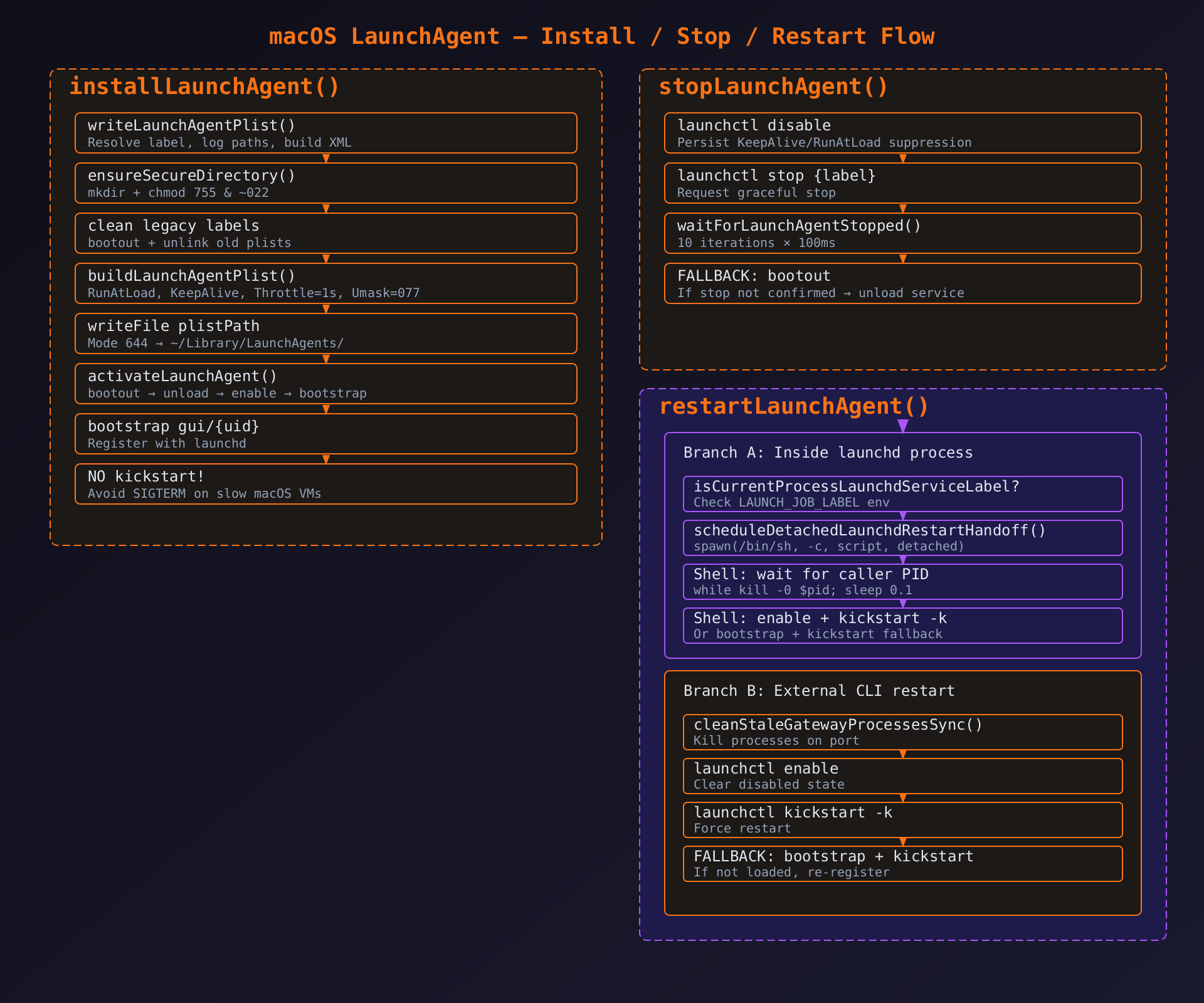
3.1.7 安装流程 (L600-640)
typescript
async function writeLaunchAgentPlist({...args}): Promise<{ plistPath; stdoutPath }> {
  // 1. 解析日志路径 + 创建安全目录
  const { logDir, stdoutPath, stderrPath } = resolveGatewayLogPaths(env);
  await ensureSecureDirectory(logDir);

  // 2. 清理遗留 LaunchAgent
  const domain = resolveGuiDomain();
  for (const legacyLabel of resolveLegacyGatewayLaunchAgentLabels(env.OPENCLAW_PROFILE)) {
    await execLaunchctl(["bootout", domain, legacyPlistPath]);  // 卸载旧服务
    await execLaunchctl(["unload", legacyPlistPath]);
    await fs.unlink(legacyPlistPath).catch(() => {});  // 删除旧 plist
  }

  // 3. 创建目录链: HOME → Library → LaunchAgents
  await ensureSecureDirectory(home);
  await ensureSecureDirectory(libraryDir);
  await ensureSecureDirectory(path.dirname(plistPath));

  // 4. 生成 plist + 写入文件 (644)
  const plist = buildLaunchAgentPlist({ label, programArguments, ... });
  await fs.writeFile(plistPath, plist, { encoding: "utf8", mode: LAUNCH_AGENT_PLIST_MODE });
}
typescript
async function activateLaunchAgent({ env, plistPath }) {
  await execLaunchctl(["bootout", domain, plistPath]);  // 先卸载(如果已加载)
  await execLaunchctl(["unload", plistPath]);            // 再 unload(双保险)
  await bootstrapLaunchAgentOrThrow({ domain, serviceTarget, plistPath, ... });
  // bootstrap 内部: enable(清除 disabled)+ bootstrap gui/{uid} {path}
}
typescript
export async function installLaunchAgent(args) {
  const { plistPath, stdoutPath } = await writeLaunchAgentPlist(args);
  await activateLaunchAgent({ env: args.env, plistPath });
  // 注意: 这里不调用 kickstart -k!
  // 原因: 慢速 macOS 虚拟机上,kickstart 会在 setup 健康检查超时前 SIGTERM 新启动的 gateway
}
关键决策 : bootstrap 已足以触发 RunAtLoad,无需额外的 kickstart -k。避免在慢速 VM 上因 SIGTERM 导致安装失败。
3.1.8 停止流程 (L551-590)
typescript
export async function stopLaunchAgent({ stdout, env }) {
  // Step 1: disable --- 持久化抑制 KeepAlive/RunAtLoad
  const disable = await execLaunchctl(["disable", serviceTarget]);
  if (disable.code !== 0) {
    // 降级: bootout 会完全卸载服务(比 disable+stop 更激进)
    await bootoutLaunchAgentOrThrow({ serviceTarget, stdout, warning: "..." });
    return;  // bootout 后无需再 stop
  }

  // Step 2: stop --- 通知 launchd 停止当前进程
  const stop = await execLaunchctl(["stop", label]);
  if (stop.code !== 0 && !isLaunchctlNotLoaded(stop)) {
    await bootoutLaunchAgentOrThrow({ ... });  // 降级
    return;
  }

  // Step 3: 等待确认停止
  const stopState = await waitForLaunchAgentStopped(serviceTarget);
  if (stopState.state !== "stopped" && stopState.state !== "not-loaded") {
    await bootoutLaunchAgentOrThrow({ ... });  // 无法确认 → 降级 bootout
    return;
  }
}
双重保证 : disable 防止 launchd 因 KeepAlive 重启;stop 终止当前进程;确认循环保证停止生效。
typescript
async function waitForLaunchAgentStopped(serviceTarget): Promise<LaunchAgentProbeResult> {
  let lastUnknown = null;
  for (let attempt = 0; attempt < 10; attempt += 1) {  // 最多 10 次
    const probe = await probeLaunchAgentState(serviceTarget);
    if (probe.state === "stopped" || probe.state === "not-loaded") return probe;
    if (probe.state === "unknown") lastUnknown = probe;
    await new Promise(resolve => setTimeout(resolve, 100));  // 100ms 间隔
  }
  return lastUnknown ?? { state: "running" };  // 超时 → 返回 running(触发 bootout 降级)
}
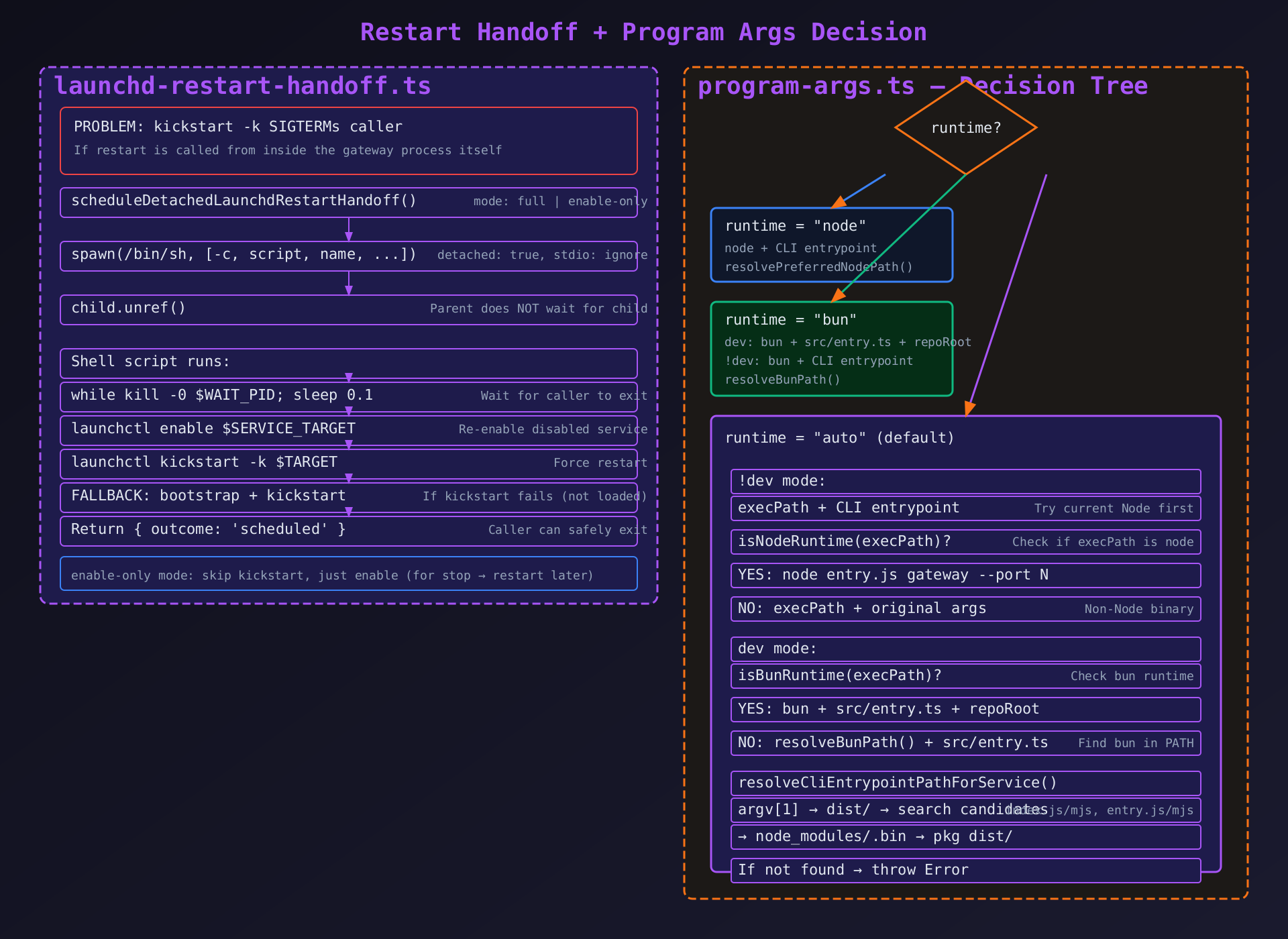
3.1.9 重启流程 (L660-768)
typescript
export async function restartLaunchAgent({ stdout, env }) {
  // 分支 A: 从 launchd 管理的进程内部重启
  if (isCurrentProcessLaunchdServiceLabel(label)) {
    // 启动 detached shell 子进程,等调用者退出后执行 kickstart
    const handoff = scheduleDetachedLaunchdRestartHandoff({
      env, mode: "kickstart", waitForPid: process.pid,
    });
    if (!handoff.ok) throw new Error(`launchd restart handoff failed: ${handoff.detail}`);
    return { outcome: "scheduled" };  // 调用者可以安全退出
  }

  // 分支 B: 外部 CLI 重启
  const cleanupPort = await resolveLaunchAgentGatewayPort(serviceEnv);
  if (cleanupPort !== null) cleanStaleGatewayProcessesSync(cleanupPort);  // 清理旧进程

  await execLaunchctl(["enable", serviceTarget]);  // 清除 disabled 状态
  const start = await execLaunchctl(["kickstart", "-k", serviceTarget]);
  if (start.code === 0) return { outcome: "completed" };

  // kickstart 失败: 如果是 "not loaded" → bootstrap 后重试
  if (!isLaunchctlNotLoaded(start)) {
    await ensureLaunchAgentLoadedAfterFailure({ domain, serviceTarget, plistPath });
    throw new Error(`launchctl kickstart failed: ${start.stderr || start.stdout}`);
  }

  // bootstrap + 重试 kickstart
  await bootstrapLaunchAgentOrThrow({ domain, serviceTarget, plistPath, ... });
  const retry = await execLaunchctl(["kickstart", "-k", serviceTarget]);
  if (retry.code !== 0) throw new Error(`launchctl kickstart failed after bootstrap`);
  return { outcome: "completed" };
}
3.2 Linux systemd 子系统 (systemd.ts --- 776行)
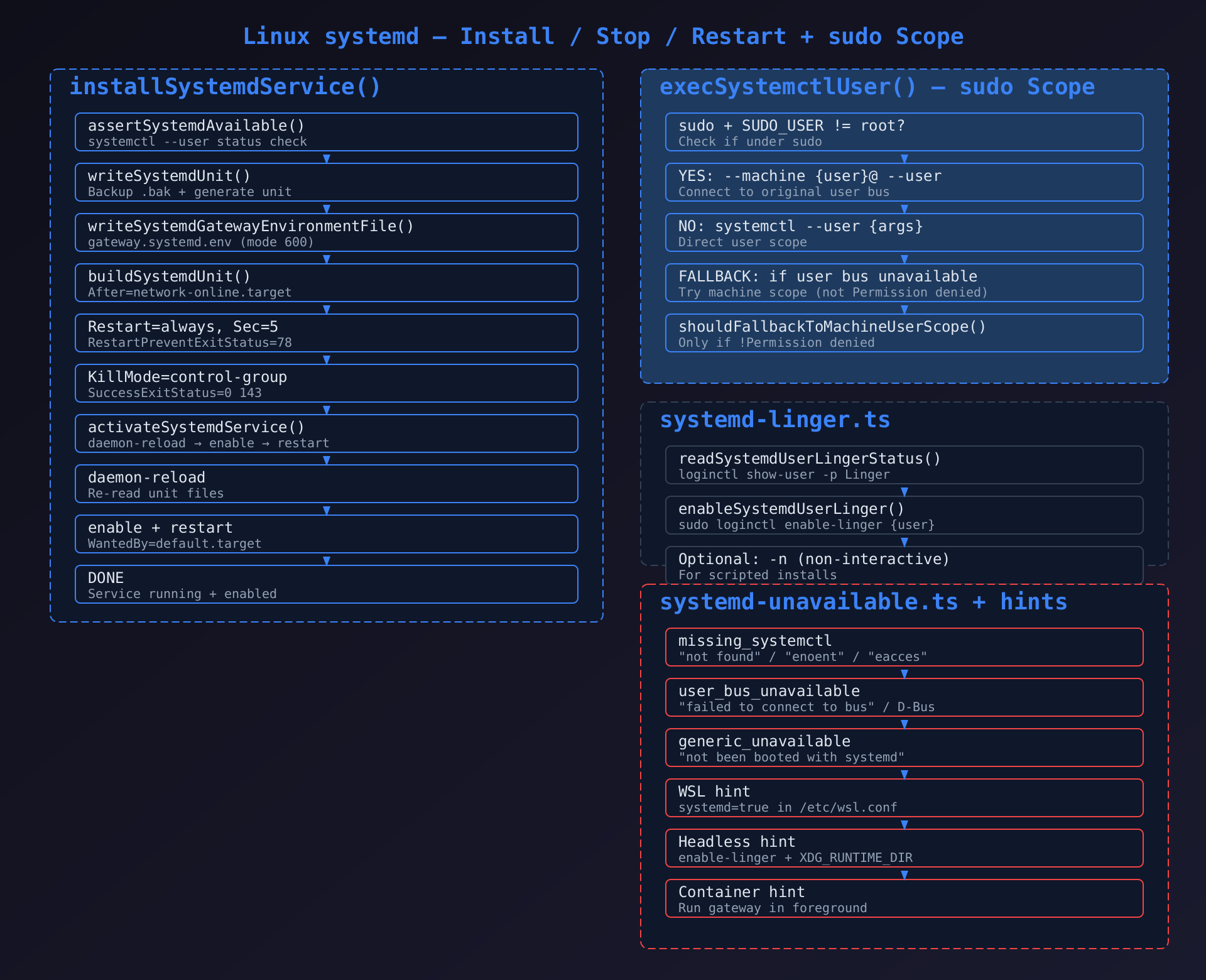
3.2.1 核心安装流程
typescript
export async function installSystemdService(args: GatewayServiceInstallArgs) {
  // 1. 检查 systemd 可用性
  assertSystemdAvailable();

  // 2. 写入 unit 文件
  await writeSystemdUnit({ env, programArguments, workingDirectory, environment, ... });

  // 3. 写入环境变量文件 (gateway.systemd.env, chmod 600)
  await writeSystemdGatewayEnvironmentFile({ env, environment });

  // 4. 激活: daemon-reload → enable → restart
  await activateSystemdService({ env, unitName });
}
unit 文件生成 (buildSystemdUnit)的关键字段:
[Unit]
After=network-online.target        # 等待网络就绪
Wants=network-online.target         # 请求网络目标
StartLimitBurst=5                   # 60秒内最多重启5次
StartLimitIntervalSec=60

[Service]
ExecStart={programArguments.join(' ')}  # 主命令
Restart=always                          # 总是重启
RestartSec=5                            # 重启间隔5秒
RestartPreventExitStatus=78             # 配置错误(78)不重启
TimeoutStopSec=30                       # 停止超时
TimeoutStartSec=30                      # 启动超时
SuccessExitStatus=0 143                 # 0=正常 143=SIGTERM
KillMode=control-group                  # 终止所有子进程
WorkingDirectory={workingDirectory}
EnvironmentFile=-{envFilePath}          # -前缀:文件不存在不报错
Environment=KEY=VALUE ...               # 内联环境变量(不在env file中的)

[Install]
WantedBy=default.target # 用户登录时自动启动RestartPreventExitStatus=78: 退出码 78 是 OpenClaw 的 "配置错误" 信号(源自 EX_CONFIG in sysexits.h),不应无限重试。
3.2.2 sudo 降级机制 (execSystemctlUser)
typescript
async function execSystemctlUser(args: string[]) {
  const sudoUser = process.env.SUDO_USER;
  const machineUser = resolveMachineUser();

  // 场景1: sudo 环境 → 使用 machine scope 连接原用户 bus
  if (sudoUser && sudoUser !== "root" && machineUser) {
    return execSystemctl(["--machine", `${machineUser}@`, "--user", ...args]);
  }

  // 场景2: 直接执行 → 尝试 --user scope
  const directResult = await execSystemctl(["--user", ...args]);
  if (directResult.code === 0) return directResult;

  // 场景3: user bus 不可用 → 尝试 machine scope
  if (shouldFallbackToMachineUserScope(detail)) {
    return execSystemctl(["--machine", `${machineUser}@`, "--user", ...args]);
  }

  return directResult;  // 其他错误直接返回
}
shouldFallbackToMachineUserScope 逻辑: 仅在非 "Permission denied" 错误时降级。Permission denied 意味着用户没有访问权限,machine scope 也不会解决。
3.3 Windows Scheduled Task 子系统 (schtasks.ts --- 859行)
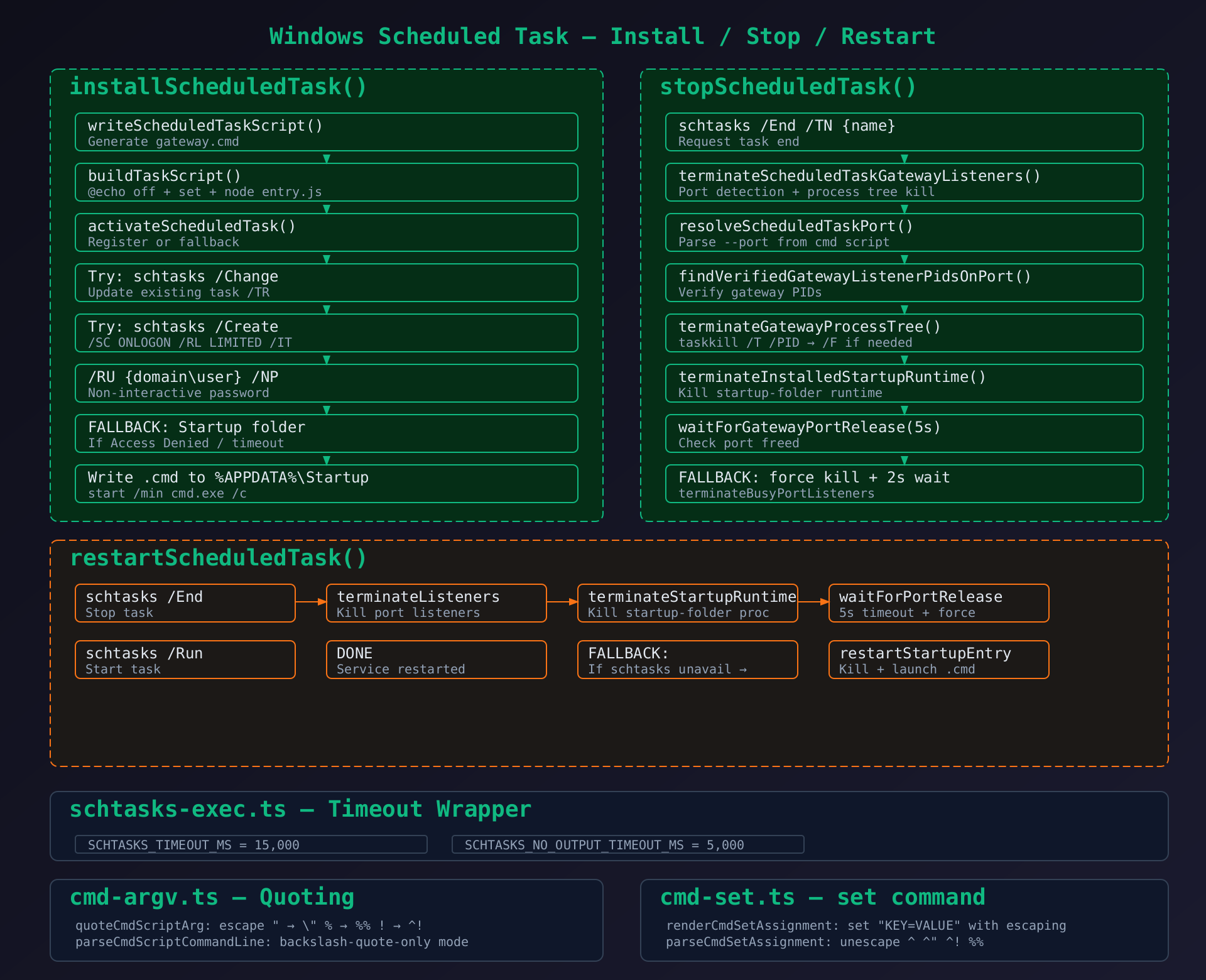
3.3.1 任务脚本生成
cmd
@echo off
rem OpenClaw Gateway
cd /d "C:\Users\user"
set "HOME=C:\Users\user"
set "OPENCLAW_GATEWAY_PORT=4152"
set "OPENCLAW_SERVICE_MARKER=openclaw"
...
"C:\Program Files\nodejs\node.exe" "C:\...\dist\index.js" gateway --port 4152设计注意: Windows cmd 脚本中不设置 PATH --- Scheduled Task 继承调用者的 PATH 环境。
3.3.2 停止流程的多重保证
typescript
export async function stopScheduledTask({ stdout, env }) {
  // Step 1: schtasks /End 请求终止
  await execSchtasks(["/End", "/TN", taskName]);

  // Step 2: 通过端口检测找到并终止所有关联的 gateway 进程
  // (schtasks /End 不保证终止子进程)
  await terminateScheduledTaskGatewayListeners({ env, stdout });

  // Step 3: 终止启动文件夹方式的运行时进程
  await terminateInstalledStartupRuntime({ env, stdout });

  // Step 4: 等待端口释放 (5s 超时)
  const released = await waitForGatewayPortRelease(port, 5000);
  if (!released) {
    // Step 5: 强制终止 + 再等 2s
    await terminateBusyPortListeners(port);
    await sleep(2000);
  }
}为什么需要端口检测: Windows schtasks /End 只终止任务进程本身,不会终止 Node.js worker 子进程。子进程继续占用端口会导致重启失败。
3.3.3 启动文件夹降级
typescript
// 如果 schtasks /Create 因权限被拒绝:
async function installStartupFolderEntry({ scriptPath, stdout }) {
  const startupDir = path.join(appData, "Microsoft", "Windows", "Start Menu", "Programs", "Startup");
  const launcherPath = path.join(startupDir, "OpenClaw Gateway.cmd");
  const launcherContent = `start "" /min cmd.exe /d /c "${scriptPath}"`;
  await fs.writeFile(launcherPath, launcherContent);
}
start "" /min cmd.exe /d /c --- 最小化窗口启动,/d 禁用自动运行命令。
3.4 环境构建子系统 (service-env.ts)
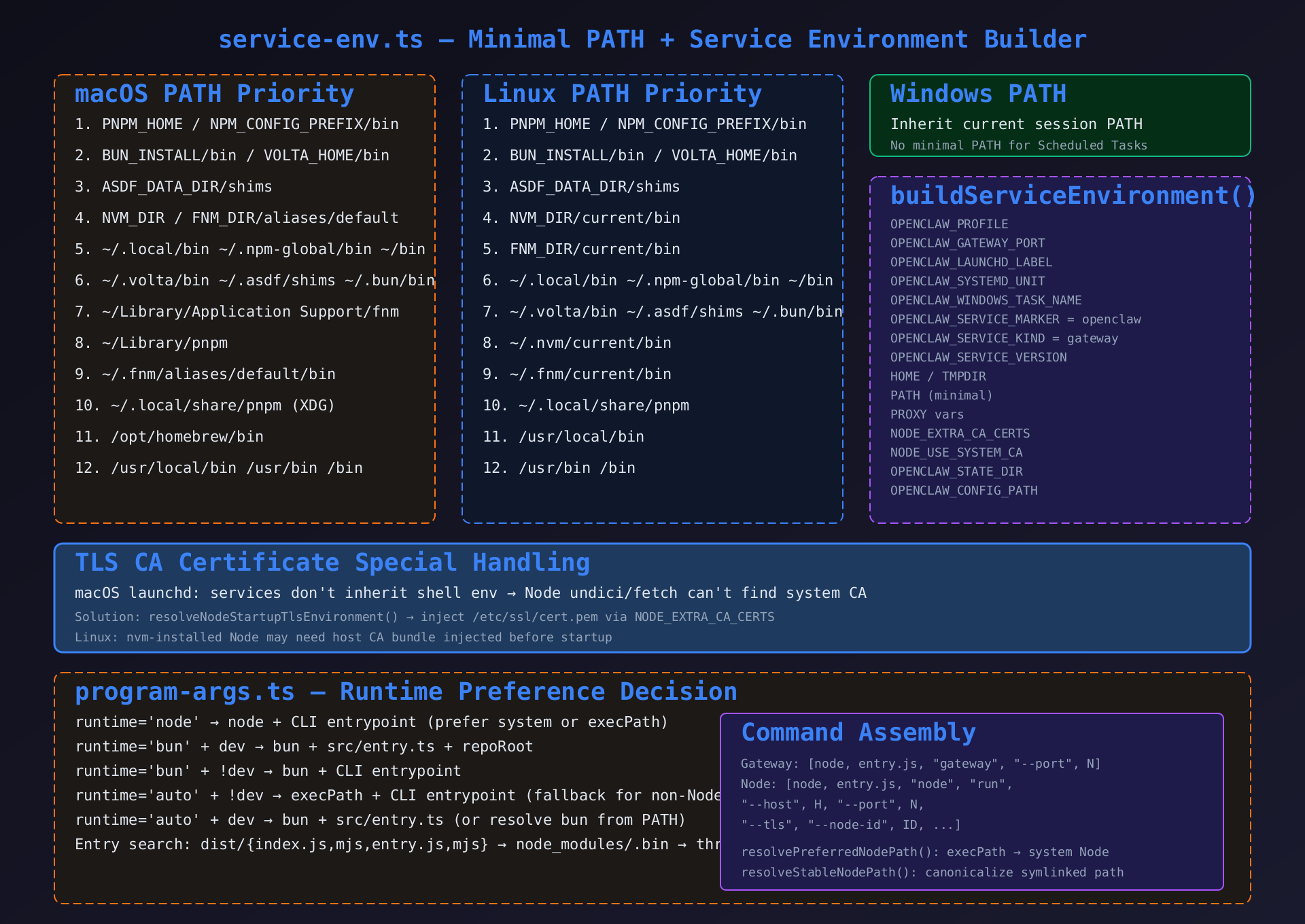
3.4.1 最小化 PATH 构建逻辑
核心原则: 守护进程不继承用户 shell 环境,必须构建自包含的最小 PATH。
macOS PATH 优先级(从高到低):
- 环境变量覆盖(PNPM_HOME、NPM_CONFIG_PREFIX/bin、BUN_INSTALL/bin、VOLTA_HOME/bin、ASDF_DATA_DIR/shims)
- NVM_DIR、FNM_DIR(aliases/default/bin)
- 通用用户目录(/.local/bin、/.npm-global/bin、/bin、/.volta/bin、/.asdf/shims、/.bun/bin)
- macOS 特定路径(~/Library/Application Support/fnm、~/Library/pnpm)
- 系统路径(/opt/homebrew/bin、/usr/local/bin、/usr/bin、/bin)
版本管理器路径处理 : NVM/FNM 的 aliases/default/bin 是符号链接到当前 Node 版本,比直接引用版本目录更稳定。
3.4.2 TLS CA 证书特殊处理
typescript
export function resolveNodeStartupTlsEnvironment(env): Record<string, string | undefined> {
  // macOS launchd 服务不继承 shell 环境
  // Node undici/fetch 无法定位系统 CA bundle
  // 默认注入 /etc/ssl/cert.pem
  if (!env.NODE_EXTRA_CA_CERTS && !env.NODE_USE_SYSTEM_CA) {
    const certPath = findSystemCertPath();  // /etc/ssl/cert.pem (macOS) 等
    if (certPath) return { NODE_EXTRA_CA_CERTS: certPath };
  }
  return {};
}
3.5 配置审计子系统 (service-audit.ts)
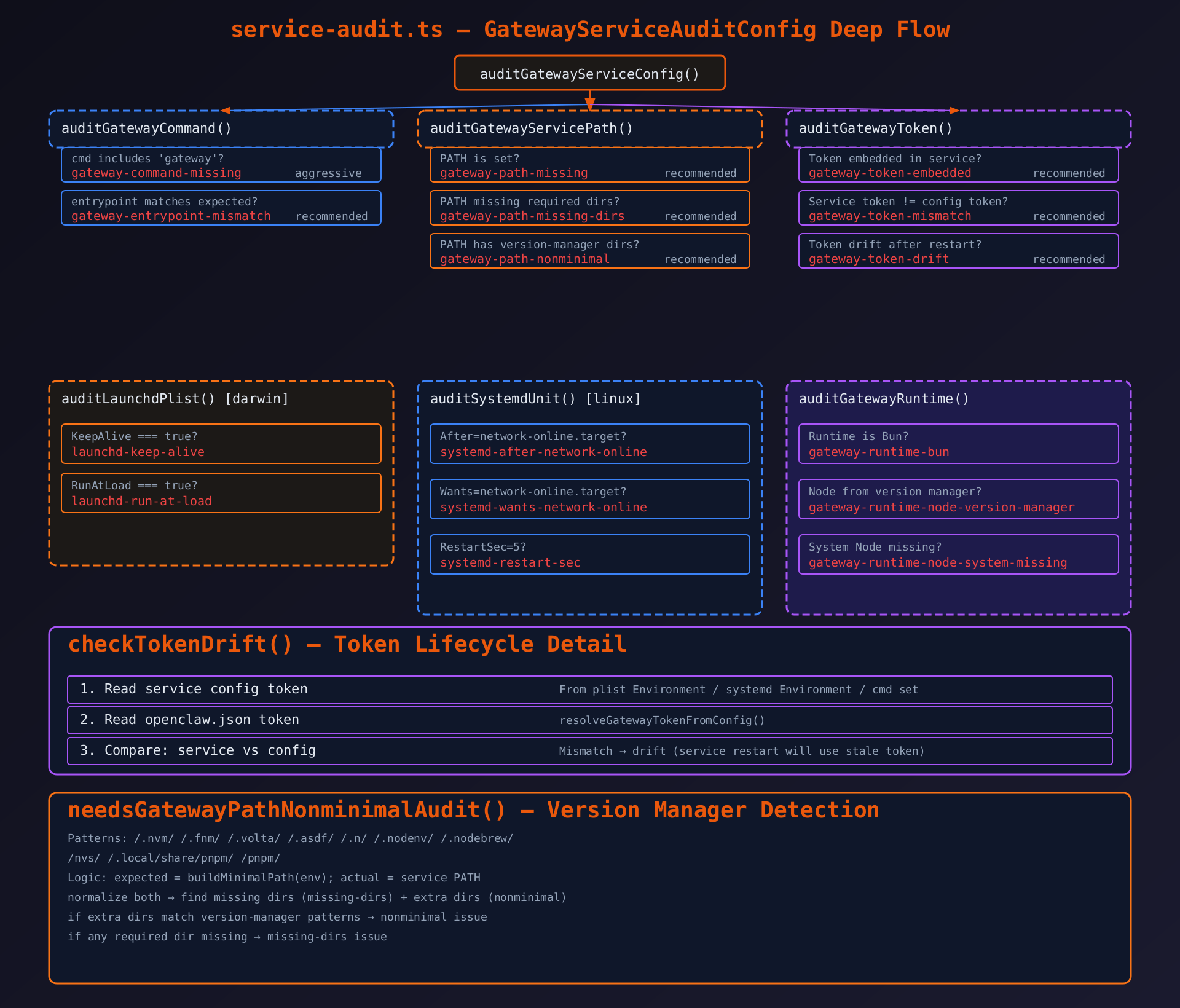
3.5.1 审计入口
typescript
export function auditGatewayServiceConfig(params): GatewayServiceAuditResult {
  const issues: GatewayServiceAuditIssue[] = [];
  const command = params.command;  // 服务命令配置

  // 1. 审计命令
  issues.push(...auditGatewayCommand(params));
  // 2. 审计 Token
  issues.push(...auditGatewayToken(params));
  // 3. 审计 PATH
  issues.push(...auditGatewayServicePath(params));
  // 4. 审计运行时
  issues.push(...auditGatewayRuntime(params));
  // 5. 平台特定审计
  if (params.platform === "darwin") issues.push(...auditLaunchdPlist(params));
  if (params.platform === "linux") issues.push(...auditSystemdUnit(params));

  return { ok: issues.length === 0, issues };
}
3.5.2 Token 漂移检测详解
typescript
function checkTokenDrift({ serviceToken, configToken }) {
  if (!serviceToken) return null;  // 无 Token 服务单元是规范的(推荐用 EnvironmentFile)
  if (configToken && serviceToken !== configToken) {
    // 服务 Token 与配置文件 Token 不匹配
    // 服务重启后将使用服务配置中的旧 Token
    // 用户修改了 openclaw.json 中的 token 但服务配置未更新
    return { code: "gateway-token-drift", level: "recommended", message: "..." };
  }
  return null;
}关键规则: Token 漂移意味着服务重启后使用的是服务配置中的旧 Token,而非配置文件的新 Token。这会导致客户端使用新 Token 认证失败。
3.6 外部服务检测 (inspect.ts)
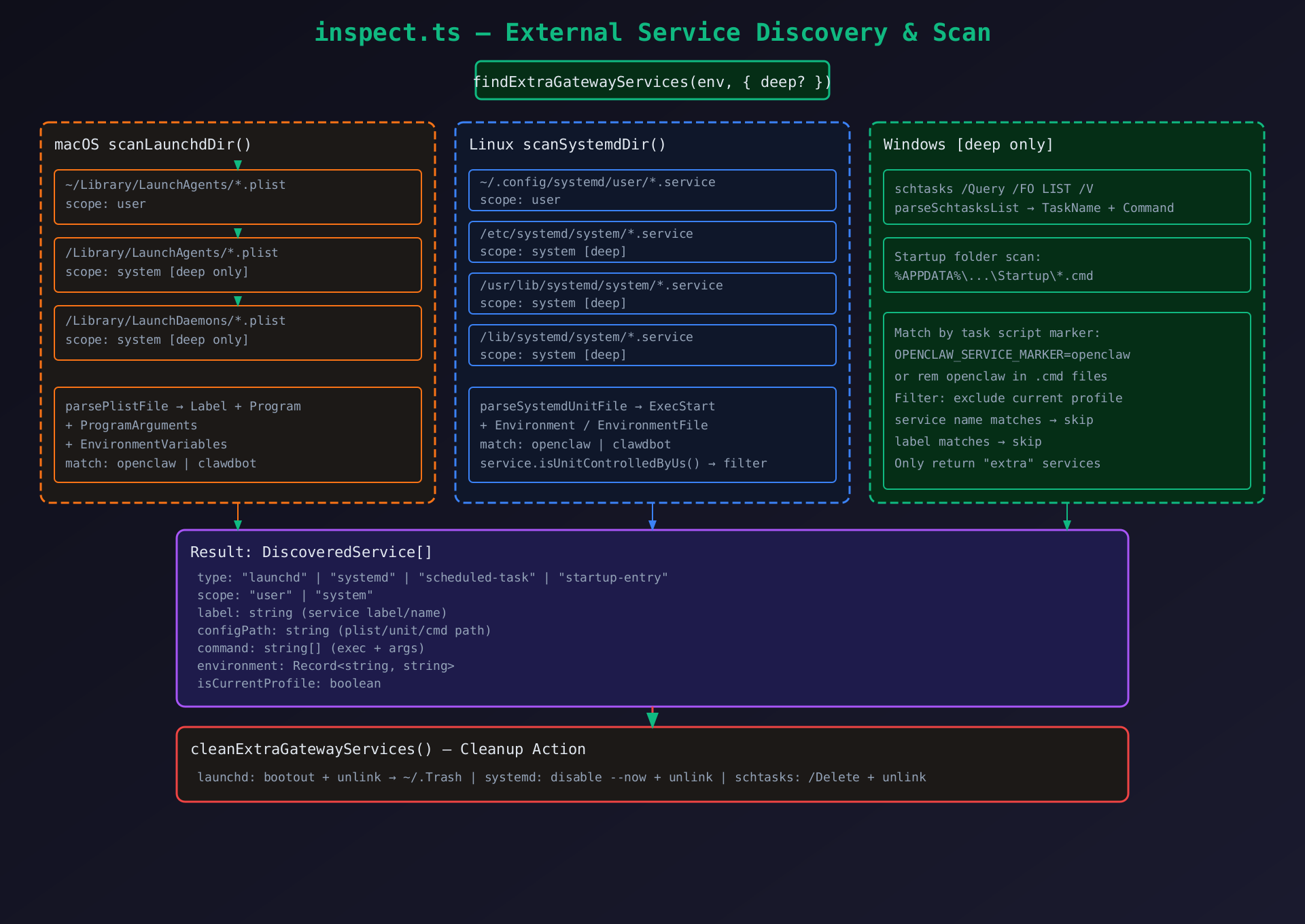
3.6.1 三平台扫描策略
macOS : 读取 ~/Library/LaunchAgents/*.plist,解析 XML 提取 Label + Program + ProgramArguments + EnvironmentVariables。深度模式还扫描 /Library/LaunchAgents/ 和 /Library/LaunchDaemons/。
Linux : 读取 ~/.config/systemd/user/*.service,解析 ini 提取 ExecStart + Environment + EnvironmentFile。深度模式扫描系统级目录。
Windows : 执行 schtasks /Query /FO LIST /V,解析列表输出。还扫描 %APPDATA%\...\Startup\*.cmd。
过滤规则: 排除当前 profile 对应的正式服务单元,只返回"额外"的服务实例(可能是遗留的或误装的)。
3.7 Node Host 服务适配 (node-service.ts --- 装饰器模式)
typescript
export function resolveNodeService(env): GatewayService {
  const base = resolveGatewayService(env);  // 复用 Gateway 实现
  return {
    ...base,
    // 仅替换 install/restart 中的环境变量注入
    install: (args) => base.install({ ...args, env: withNodeServiceEnv(args.env) }),
    restart: (args) => base.restart({ ...args, env: withNodeServiceEnv(args.env) }),
    // 其他方法直接委托
  };
}

function withNodeServiceEnv(env) {
  return {
    ...env,
    OPENCLAW_LAUNCHD_LABEL: "ai.openclaw.node",
    OPENCLAW_SYSTEMD_UNIT: "openclaw-node",
    OPENCLAW_WINDOWS_TASK_NAME: "OpenClaw Node",
    OPENCLAW_TASK_SCRIPT_NAME: "node.cmd",
    OPENCLAW_LOG_PREFIX: "node",
    OPENCLAW_SERVICE_KIND: "node",
  };
}
3.8 程序参数组装 (program-args.ts)
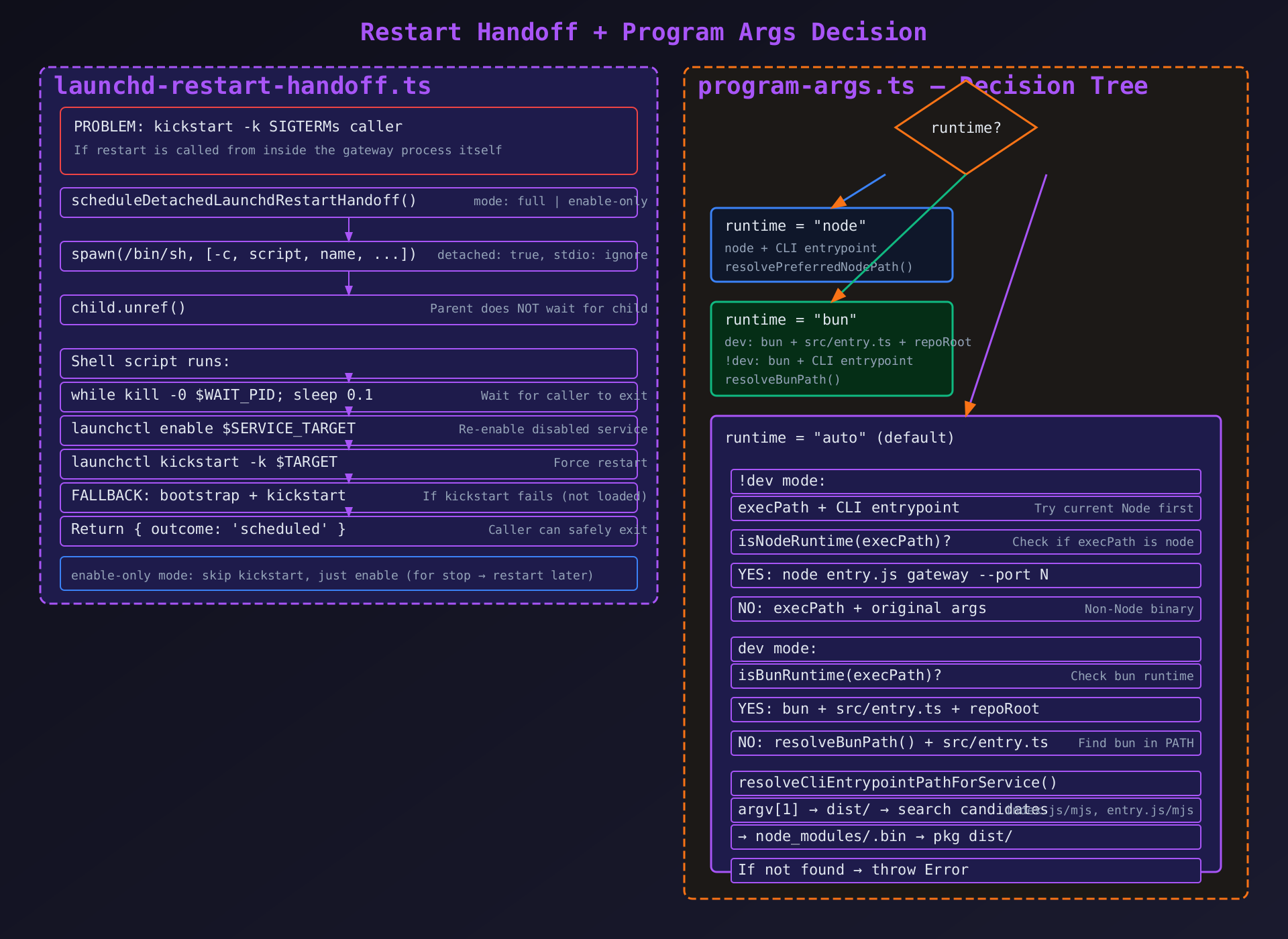
决策树逻辑
resolveCliProgramArguments({ runtime, dev })
  ↓
runtime === "node"?
  → node + CLI entrypoint (resolvePreferredNodePath → 系统 Node 或 execPath)
  ↓
runtime === "bun"?
  → dev: bun + src/entry.ts + repoRoot
  → !dev: bun + CLI entrypoint
  ↓
runtime === "auto" + !dev?
  → execPath + CLI entrypoint
  → 如果 !isNodeRuntime(execPath) → execPath + args (非 Node 二进制)
  ↓
runtime === "auto" + dev?
  → isBunRuntime(execPath)? → bun + src/entry.ts
  → 否则 → resolveBunPath() + src/entry.ts
入口点搜索 : resolveCliEntrypointPathForService 搜索 dist/{index.js,mjs,entry.js,mjs},如果 process.argv[1] 的 realpath 与 normalized 不同(符号链接),优先使用 normalized 路径(更稳定)。
四、跨平台设计对比
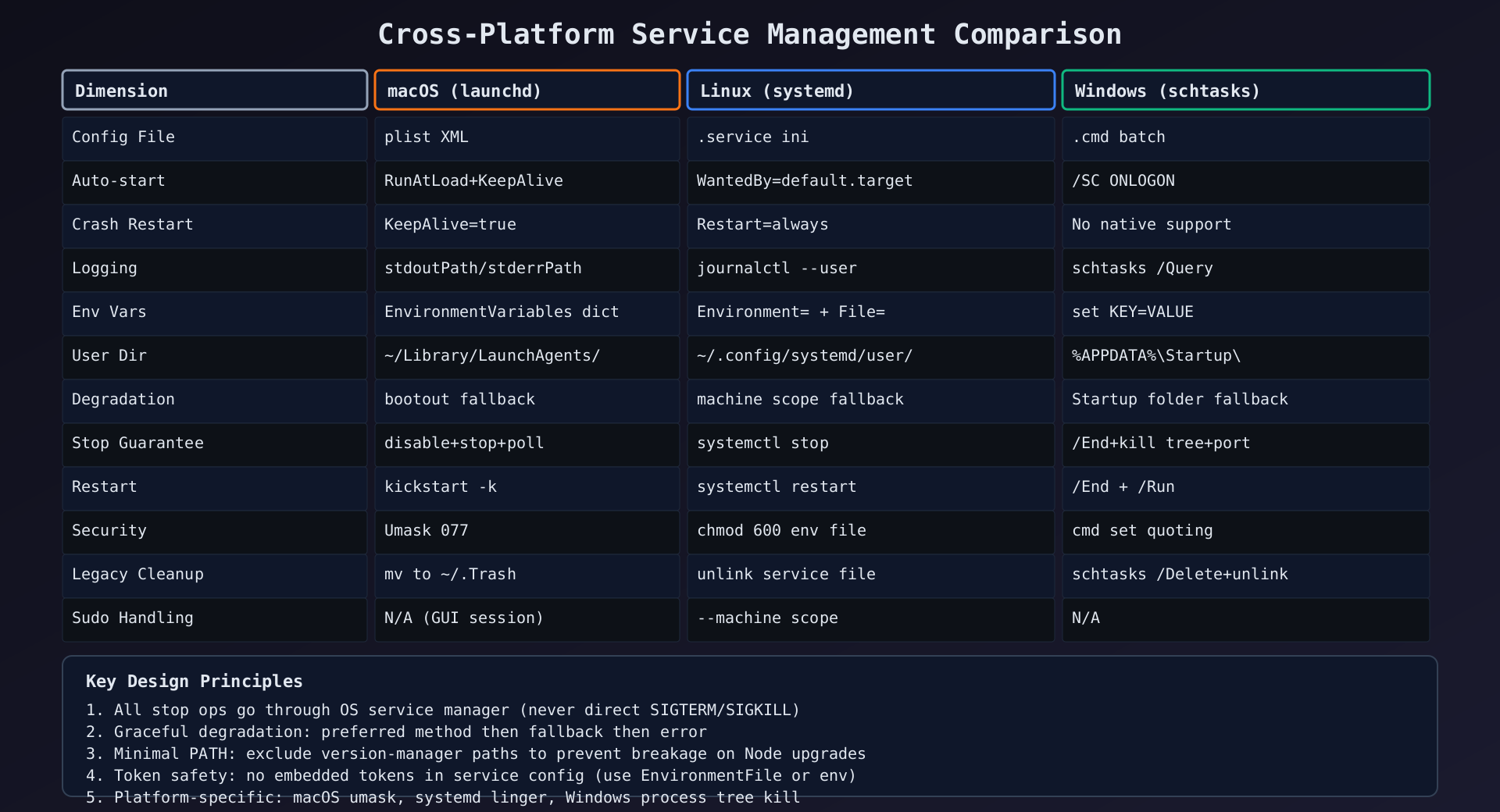
| 维度 | macOS (launchd) | Linux (systemd) | Windows (schtasks) |
|---|---|---|---|
| 配置文件 | plist XML | .service ini | .cmd batch |
| 自启机制 | RunAtLoad + KeepAlive | WantedBy=default.target | /SC ONLOGON |
| 崩溃重启 | KeepAlive=true | Restart=always | 无原生支持 |
| 日志路径 | 自定义 stdoutPath/stderrPath | journalctl --user | schtasks /Query |
| 环境变量 | EnvironmentVariables dict | Environment= + EnvironmentFile= | set "KEY=VALUE" |
| 用户级目录 | ~/Library/LaunchAgents/ | ~/.config/systemd/user/ | %APPDATA%\Startup\ |
| 降级策略 | bootout 降级 | machine scope 降级 | Startup 文件夹降级 |
| 停止保证 | disable + stop + 确认循环 | systemctl stop | /End + 进程树终止 + 端口释放 |
| 重启方式 | kickstart -k / detached handoff | systemctl restart | /End + /Run |
| 安全模型 | umask 077 | chmod 600 env file | cmd set 引用 |
| 遗留清理 | 移到 ~/.Trash | unlink | schtasks /Delete + unlink |
| sudo 处理 | 无(需要 GUI 会话) | --machine scope | 无 |
五、关键设计决策
5.1 为什么不直接 kill 进程?
所有停止操作都通过系统服务管理器(launchctl stop / systemctl stop / schtasks /End),而非直接 SIGTERM/SIGKILL。原因:
- 服务管理器需要知道进程已停止(否则会因 KeepAlive/Restart=always 自动重启)
- 进程树清理由服务管理器负责(systemd KillMode=control-group)
- 状态追踪由服务管理器维护
5.2 为什么 macOS 重启用 detached shell?
因为 kickstart -k 会先终止当前进程树。如果从 gateway 内部发起 restart,命令本身会被终止。detached shell 独立于进程树,可以安全地等待调用者退出后执行 kickstart。
5.3 为什么 Windows 需要端口检测?
schtasks /End 只结束任务进程,不保证子进程终止。Gateway 进程可能 fork 了 worker 子进程,这些子进程会继续占用端口。通过端口检测 + 进程树终止确保端口释放。
5.4 为什么服务环境要最小化 PATH?
守护进程在系统级运行,不继承用户 shell 环境。如果 PATH 包含版本管理器路径(如 ~/.nvm/),在 Node 版本升级后路径会断裂。最小化 PATH 只包含系统 Node 和已知的稳定路径。
5.5 为什么 Token 不能内嵌在服务配置中?
旧版 OpenClaw 将 OPENCLAW_GATEWAY_TOKEN 直接写入 plist/Environment。如果用户修改了 openclaw.json 中的 token,服务配置中的旧 token 不会更新,导致认证失败。新版使用 EnvironmentFile(Linux)或不在配置中存储 token(macOS/Windows),避免漂移。
5.6 为什么安装时不调用 kickstart?
在慢速 macOS 虚拟机上,kickstart -k 会 SIGTERM 刚启动的 gateway 进程,导致 setup 的健康检查超时前进程就被杀死。bootstrap 已经足以触发 RunAtLoad。
六、错误处理与降级策略
6.1 降级链
首选方案 → 降级方案 1 → 降级方案 2 → 错误

macOS 停止: disable+stop → bootout(服务完全卸载)
macOS 重启: kickstart -k → bootstrap + kickstart
macOS 安装: bootstrap → 抛出 GUI 会话错误
Linux scope: --user → --machine {user}@ --user
Linux 可用性: systemctl --user status → 分类错误 → 用户提示
Windows 安装: schtasks /Create → Startup 文件夹
Windows 停止: schtasks /End → 进程树终止 → 强制终止
6.2 环境检测降级
systemd 可用性:
  systemctl --user status
    ├─ 成功 → 可用
    ├─ "not found" → missing_systemctl → "安装 systemd"
    ├─ "failed to connect to bus" → user_bus_unavailable → "enable-linger / XDG_RUNTIME_DIR"
    └─ WSL 场景 → "systemd=true in /etc/wsl.conf"
七、遗留服务迁移
模块内置了从 clawdbot → openclaw 的迁移支持:
| 平台 | 旧标签 | 处理方式 |
|---|---|---|
| Linux | clawdbot-gateway.service |
LEGACY_GATEWAY_SYSTEMD_SERVICE_NAMES → disable --now + unlink |
| macOS | 无遗留标签 | LEGACY_GATEWAY_LAUNCH_AGENT_LABELS = [] |
| Windows | 无遗留标签 | LEGACY_GATEWAY_WINDOWS_TASK_NAMES = [] |
inspect.ts 的 findExtraGatewayServices 还能深度扫描发现系统级目录中残留的 openclaw/clawdbot 服务,并通过 cleanExtraGatewayServices 清理。
八、辅助模块解析
8.1 constants.ts --- 常量定义
typescript
export const GATEWAY_LAUNCH_AGENT_LABEL = "ai.openclaw.gateway";     // macOS 默认标签
export const GATEWAY_SYSTEMD_SERVICE_NAME = "openclaw-gateway";      // Linux 默认服务名
export const GATEWAY_WINDOWS_TASK_NAME = "OpenClaw Gateway";          // Windows 默认任务名
export const NODE_LAUNCH_AGENT_LABEL = "ai.openclaw.node";            // Node Host 标签
export const NODE_SYSTEMD_SERVICE_NAME = "openclaw-node";
export const NODE_WINDOWS_TASK_NAME = "OpenClaw Node";
export const LAUNCH_AGENT_THROTTLE_INTERVAL_SECONDS = 1;             // 最小重启间隔
export const LAUNCH_AGENT_UMASK_DECIMAL = 0o077;                     // 文件权限掩码
export const LEGACY_GATEWAY_SYSTEMD_SERVICE_NAMES = ["clawdbot-gateway"]; // 遗留服务名
export const LEGACY_GATEWAY_LAUNCH_AGENT_LABELS: string[] = [];       // macOS 无遗留
export const LEGACY_GATEWAY_WINDOWS_TASK_NAMES: string[] = [];        // Windows 无遗留
Profile 后缀 : resolveGatewayProfileSuffix(profile) 返回 "" (默认) 或 ".{profile}" (非空 profile)。resolveGatewayLaunchAgentLabel(profile) 组合为 ai.openclaw.gateway[.profile]。
8.2 arg-split.ts --- 参数分割
typescript
export function splitArgsPreservingQuotes(input: string, mode?: "posix" | "cmd" | "none") {
  // posix: 反斜杠转义 + 单引号 + 双引号
  // cmd: ^转义 + 双引号
  // none: 仅按空白分割
}
8.3 cmd-set.ts --- Windows set 命令转义
typescript
export function renderCmdSetAssignment(key: string, value: string): string {
  // 处理 Windows cmd.exe 中的特殊字符:
  // % → %% (延迟扩展展开)
  // ! → ^! (延迟扩展)
  // " → 保持配对
  // 结果: set "KEY=VALUE"
}
8.4 diagnostics.ts --- 错误日志诊断
typescript
export async function readLastGatewayErrorLine(logPaths) {
  // 读取 stderr + stdout 日志文件
  // 从末尾向前搜索匹配以下模式的行:
  //   "refusing to bind gateway"
  //   "gateway auth mode"
  //   "gateway start blocked"
  //   "failed to bind gateway socket"
  //   "tailscale .* requires"
  // 如果无匹配 → 返回最后一条日志行
}