目录
[1. 基本概念与基本操作](#1. 基本概念与基本操作)
[cwd ----current work dir 当前程序所在的路径](#cwd ----current work dir 当前程序所在的路径)
1.理解系统调用
操作系统要向上提供对应的服务
操作系统,不能相信任何用户或者人
---系统调用
银行就是典型的这种,为我们提供服务,但是不相信
不允许我们进入银行内部进行访问
提供了一个个窗口。
所以同理,操作系统要把自己封装起来,但是也要给一个叫系统调用的东西
所以之后获取操作系统数据等都是通过系统调用进行的
银行除了内部的工作人员+银行行长+系统还有外面的大堂经理
同理,操作系统除了要把自己内部的工作做好,还要给用户提供服务。
比如给开发者提供各种库,给操作者使用者提供外壳、命令行指令
Linux/windows/macos->C语言->c函数---输出参数和返回值
用户和操作系统之间,进行某种数据交互
• 在开发角度,操作系统对外会表现为⼀个整体,但是会暴露自己的部分接口,供上层开发使用,
这部分由操作系统提供的接口,叫做系统调用。
• 系统调用在使用上,功能比较基础,对用户的要求相对也比较高,所以,有心的开发者可以对部
分系统调用进行适度封装,从而形成库,有了库,就很有利于更上层用户或者开发者进行二次开发
库函数和系统调用属于上下层的关系
不清楚库函数到底有没有进行系统调用
调用库函数时有没有调用硬件,只要访问了硬件,那么必定访问系统调用
操作系统是怎么管理进行进程管理的呢?很简单,先把进程描述起来,再把进程组织起来!
2.进程
1. 基本概念与基本操作
•课本概念:程序的⼀个执⾏实例,正在执⾏的程序等
•内核观点:担当分配系统资源(CPU时间,内存)的实体。
•当前:进程=内核数据结构(task_struct)+⾃⼰的程序代码和数据
当我们自己编译好了一个可执行文件,根据冯诺依曼,程序加载运行到内存中
所以说,把一个可执行文件从磁盘加载到内存就是进程吗
同一时刻操作系统内加载了很多可执行程序

还有一款软件从一开始就加载进来了----操作系统
这些程序在内存什么位置加载?
这些代码和数据有没有已经被cpu执行完了?
系统中有这么多程序,要申请内存释放内存,操作系统必然要对多个记载内存中的程序进行管理
---先描述,再组织!
struct xxx PCB
{
代码地址
数据地址
id
优先级 进程控制块
状态
........
struct xxx *next
}
到时候所有属性都可以在节点中找到
我们在操作系统内就找到一个操作系统列表---进程列表
进程=内核数据结构对象+自己的代码数据!
PCB是在操作系统中的统一叫法,描述进程的
内存中的结构体---PCB---进程控制块
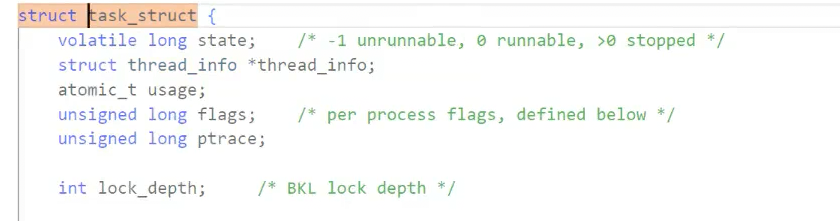
在linux下这个PCB具体是个结构体struct task_struct
进程的所有属性,都可以直接或间接通过tsak_struct找到
进程=PCB(task_struct)+自己的代码和数据!
任何一个进程加载进来的时候,除了把代码和数据加载到内存里,操作系统还要在自己的内部为该代码和数据创建对应的task_struct结构体,然后这个结构体可以找到代码和数据。
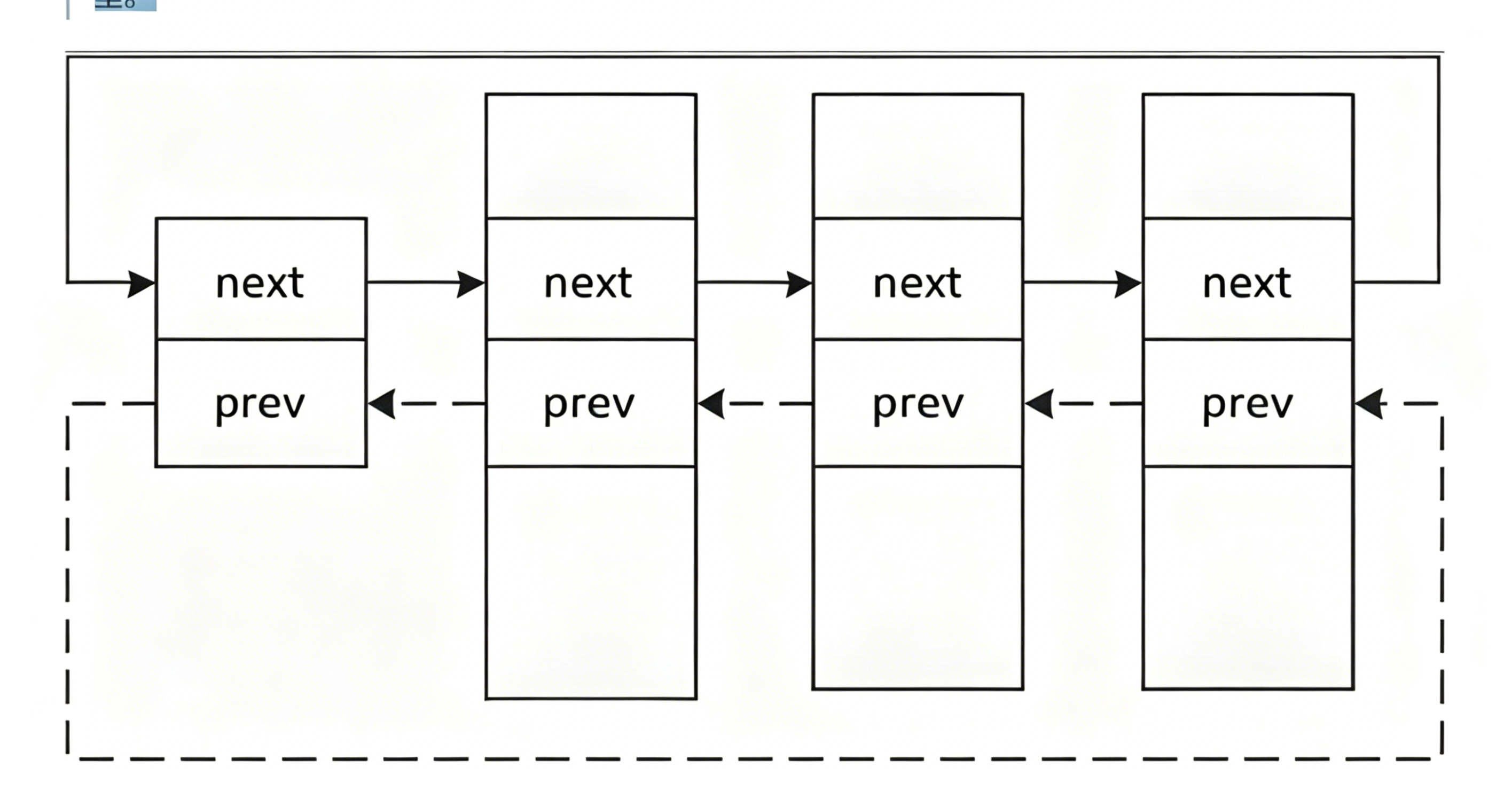
所有的task_struct在操作系统内可以通过链表一样的PCB管理起来
所以对进程的管理,就变成了对链表的增删查改!
PCB相当于简历,CPU相当于面试官
一旦一个可执行程序加载到内存中,这个可执行程序是最不重要的,重要的是操作系统创建对应的PCB来描述它。
那么具体的task_struct怎么样的?
2.task_struct
内容分类
• 标示符 :描述本进程的唯⼀标示符,⽤来区别其他进程。
• 状态 :任务状态,退出代码,退出信号等。
• 优先级 :相对于其他进程的优先级。
• 程序计数器 :程序中即将被执⾏的下⼀条指令的地址。
• 内存指针 :包括程序代码和进程相关数据的指针,还有和其他进程共享的内存块的指针
•上下⽂数据 :进程执⾏时处理器的寄存器中的数据休学例⼦,要加图CPU,寄存器。
• I∕O状态信息 :包括显⽰的I/O请求,分配给进程的I∕O设备和被进程使⽤的⽂件列表。
• 记账信息 :可能包括处理器时间总和,使⽤的时钟数总和,时间限制,记账号等。
• 其他信息
task_struct部分源代码
组织进程
可以在内核源代码里找到它。所有运行在系统里的进程都以 task_struct 双链表的形式存在内核里。
[user1@iZ5waahoxw3q2bZ 26-4-20]$ ll
total 20
-rw-rw-r-- 1 user1 user1   73 Apr 20 22:21 Makefile
-rwxrwxr-x 1 user1 user1 8496 Apr 20 22:23 myprocess
-rw-rw-r-- 1 user1 user1  137 Apr 20 22:23 myprocess.c
[user1@iZ5waahoxw3q2bZ 26-4-20]$ cat Makefile
myprocess:myprocess.c
	gcc -o $@ $^
.PHONY:clean
clean:
	rm -f myprocess
[user1@iZ5waahoxw3q2bZ 26-4-20]$ cat myprocess.c
#include<stdio.h>
#include<unistd.h>

int main()
{
    while(1)
    {
        sleep(1);
        printf("我是一个进程!\n");
    }
}
我们历史上执行的所有指令、工具、自己的程序,运行起来,全部都是进程
getpid 获取进程ID 系统调用
NAME
       getpid, getppid - get process identification

SYNOPSIS
       #include <sys/types.h>
       #include <unistd.h>

       pid_t getpid(void);
       pid_t getppid(void);

[user1@iZ5waahoxw3q2bZ 26-4-20]$ cat myprocess.c
#include<stdio.h>
#include<unistd.h>
#include<sys/types.h>

int main()
{
    while(1)
    {
        sleep(1);
        printf("我是一个进程!,我的pid:%d\n",getpid());
    }
}
[user1@iZ5waahoxw3q2bZ 26-4-20]$ ./myprocess
我是一个进程!,我的pid:17507
我是一个进程!,我的pid:17507
我是一个进程!,我的pid:17507
我是一个进程!,我的pid:17507
我是一个进程!,我的pid:17507
ps axj查看进程
[user1@iZ5waahoxw3q2bZ ~]$ ps axj | head -1 ; ps axj |grep myprocess
 PPID   PID  PGID   SID TTY      TPGID STAT   UID   TIME COMMAND
17419 17507 17507 17419 pts/0    17507 S+    1001   0:00 ./myprocess
17513 17537 17536 17513 pts/1    17536 S+    1001   0:00 grep --color=auto myprocess
ps axj | head -1 ; ps axj |grep myprocess | grep -v grep
除去grep进程的进程信息
[user1@iZ5waahoxw3q2bZ ~]$  ps axj | head -1 ; ps axj |grep myprocess | grep -v grep
 PPID   PID  PGID   SID TTY      TPGID STAT   UID   TIME COMMAND
17419 17507 17507 17419 pts/0    17507 S+    1001   0:00 ./myprocess
ctrl+c是杀掉进程的
kill -9+pid也能杀掉进程
[user1@iZ5waahoxw3q2bZ ~]$ kill -9 17507

我是一个进程!,我的pid:17507
Killed
补充两个小知识:
ls /proc查看进程
[user1@iZ5waahoxw3q2bZ ~]$ ls /proc
1      16     17551  262  379  527  840        diskstats    kcore       mounts        swaps
10     17280  18     264  38   530  9          dma          keys        mtrr          sys
11     17407  1856   27   39   539  96         driver       key-users   net           sysrq-trigger
1149   17416  19     28   425  545  acpi       execdomains  kmsg        pagetypeinfo  sysvipc
1180   17418  2      288  47   546  buddyinfo  fb           kpagecount  partitions    timer_list
12     17419  20     289  49   550  bus        filesystems  kpageflags  sched_debug   timer_stats
1265   17454  21     29   5    6    cgroups    fs           loadavg     schedstat     tty
13     17456  22     290  50   65   cmdline    interrupts   locks       scsi          uptime
1357   17510  23     3    503  7    consoles   iomem        mdstat      self          version
1379   17512  24     358  51   774  cpuinfo    ioports      meminfo     slabinfo      vmallocinfo
13871  17513  25     36   52   8    crypto     irq          misc        softirqs      vmstat
14     17550  26     37   522  835  devices    kallsyms     modules     stat          zoneinfo
当该进程退出,proc会自动给其移除
[user1@iZ5waahoxw3q2bZ ~]$ ls /proc/17550 -dl
dr-xr-xr-x 9 user1 user1 0 Apr 20 22:35 /proc/17550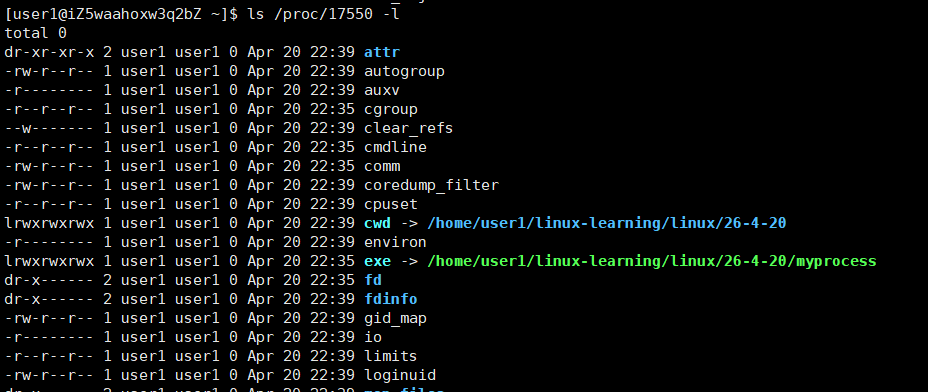
目前我们只需要了解其中两个
cwd ----current work dir 当前程序所在的路径
fopen会记录在自己当前的进程,如果不存在就新建
[user1@iZ5waahoxw3q2bZ 26-4-20]$ make
gcc -o myprocess myprocess.c
[user1@iZ5waahoxw3q2bZ 26-4-20]$ ./myprocess
我是一个进程!,我的pid:17570
我是一个进程!,我的pid:17570
我是一个进程!,我的pid:17570
^C
[user1@iZ5waahoxw3q2bZ 26-4-20]$ ll
total 20
-rw-rw-r-- 1 user1 user1    0 Apr 20 22:46 hello txt
-rw-rw-r-- 1 user1 user1   73 Apr 20 22:21 Makefile
-rwxrwxr-x 1 user1 user1 8600 Apr 20 22:46 myprocess
-rw-rw-r-- 1 user1 user1  211 Apr 20 22:45 myprocess.c
[user1@iZ5waahoxw3q2bZ 26-4-20]$ cat myprocess.c
#include<stdio.h>
#include<unistd.h>
#include<sys/types.h>

int main()
{
    fopen("hello txt","a");
    while(1)
    {
        sleep(1);
        printf("我是一个进程!,我的pid:%d\n",getpid());
    }
}
chdir更改进程路径
[user1@iZ5waahoxw3q2bZ 26-4-20]$ ll
total 20
-rw-rw-r-- 1 user1 user1   73 Apr 20 22:21 Makefile
-rwxrwxr-x 1 user1 user1 8656 Apr 20 22:48 myprocess
-rw-rw-r-- 1 user1 user1  258 Apr 20 22:48 myprocess.c
[user1@iZ5waahoxw3q2bZ 26-4-20]$ cat myprocess.c
#include<stdio.h>
#include<unistd.h>
#include<sys/types.h>

int main()
{
    chdir("/home/user1/linux-learning/linux");
    fopen("hello txt","a");
    while(1)
    {
        sleep(1);
        printf("我是一个进程!,我的pid:%d\n",getpid());
    }
}
[user1@iZ5waahoxw3q2bZ 26-4-20]$ cd ..
[user1@iZ5waahoxw3q2bZ linux]$ ll
total 16
drwxrwxr-x 2 user1 user1 4096 Apr 15 16:52 26-4-15
drwxrwxr-x 3 user1 user1 4096 Apr 15 22:15 26-4-15.2
drwxrwxr-x 2 user1 user1 4096 Apr 16 18:37 26-4-16
drwxrwxr-x 2 user1 user1 4096 Apr 20 22:48 26-4-20
-rw-rw-r-- 1 user1 user1    0 Apr 20 22:48 hello txt
exe进程对应的可执行文件
感觉你的观看,期待我们的下次再见!